

Table of Contents
We will review SurePoint’s next-generation, cloud-based law practice software, Practice Pro Review.
For legal professionals, ensuring that their practice runs smoothly and effectively is paramount. This involves optimizing case management, billing, document handling, and leveraging AI for legal tasks. Practice Pro offers a comprehensive solution that meets these needs.
We will explore Practice Pro’s features, how they benefit law firms, and share insights from users on the platform’s impact on their practice.
This reflection will help you determine if Practice Pro’s comprehensive, cloud-based solution aligns with your firm’s operational needs and goals, potentially streamlining your processes and enhancing your practice’s efficiency and security.
Introduction Law Practice Management Software
The evolution of law practice management software marks a pivotal shift in the legal industry, offering unprecedented efficiencies in case management, client communication, billing procedures, and document storage.
This innovation, primarily through cloud-based platforms, not only facilitates operational fluidity but also enhances data security, a critical concern in legal practice. Furthermore, it empowers attorneys and legal staff with the ability to work remotely, ensuring that geographical constraints do not impede productivity.
By integrating such technology, law firms can not only reduce overhead costs but also significantly improve client service delivery, making legal services more accessible. Additionally, these systems support scalability, enabling firms to adjust resources as they grow.
The adoption of law practice management software thus represents a strategic move towards a more dynamic, client-focused, and efficient legal service model.
Introduction to Practice Pro
Practice Pro stands at the forefront of legal technology, redefining the operational dynamics of law firms through its innovative cloud-based management software.
At its core, Practice Pro addresses the critical elements of legal practice management, from the initial client engagement to the comprehensive handling of cases.
It simplifies complex processes, such as document management and billing, through automation and artificial intelligence, enhancing the efficiency and productivity of legal professionals.
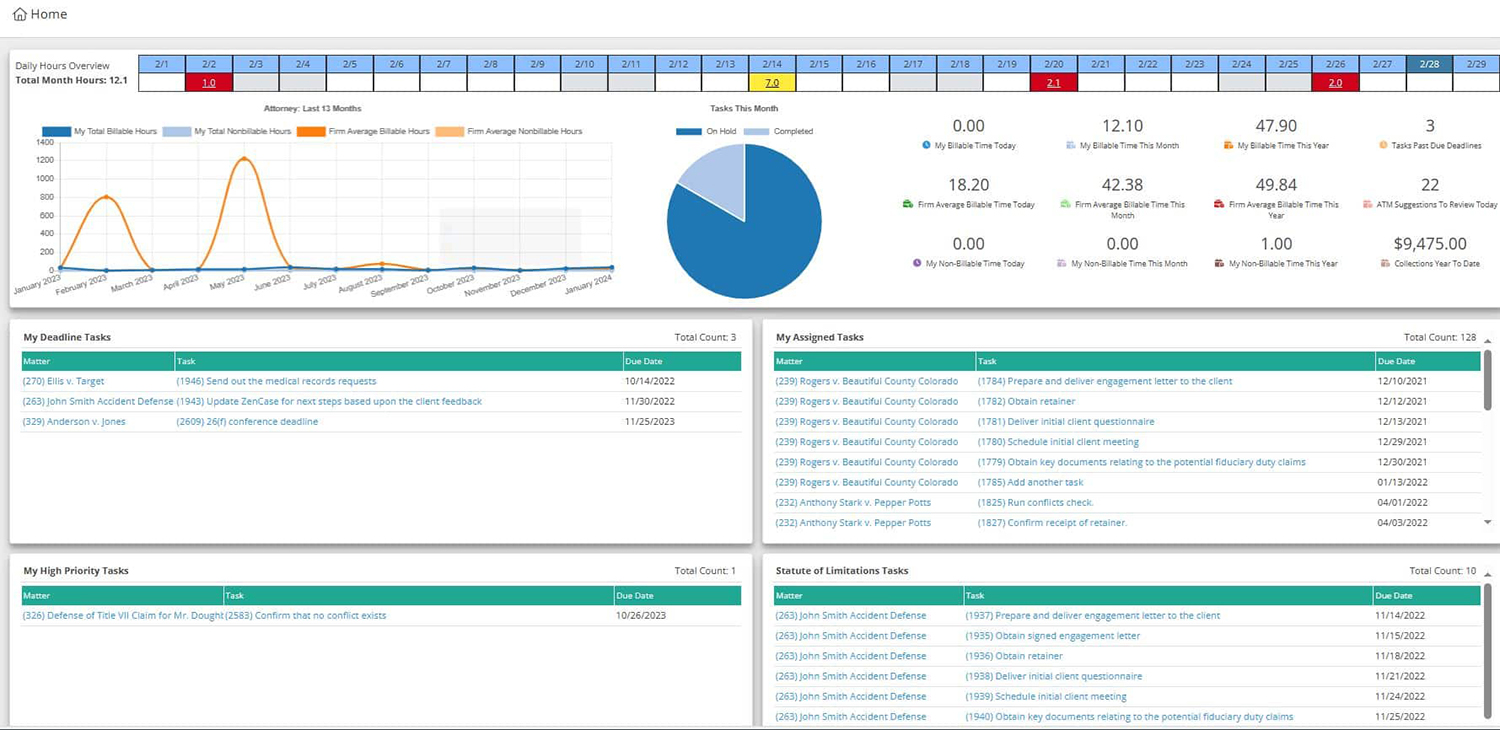
By integrating Practice Pro, firms can ensure a smoother, more efficient workflow, optimizing both time and resources while maintaining the highest standards of data security.
This platform is not just about managing legal tasks; it’s about transforming the way law firms operate, ensuring they are well-equipped to meet the demands of the modern legal landscape.
See Practice Pro in Use
Practice Pro, when put into action, illustrates a seamless integration of case management, billing, and document handling within a law firm’s daily operations.
Imagine a scenario where legal professionals access their case files, communicate with clients, track billable hours, and manage documents, all from a single, intuitive interface.
Practice Pro’s cloud-based platform offers this level of integration, streamlining tasks that traditionally require multiple systems.
Its use in a real-world setting showcases efficiency improvements, with lawyers spending less time on administrative tasks and more on client representation.
This practical application underscores Practice Pro’s value proposition: enhancing law firm productivity and data security through innovative technology.
Highlighting Practice Pro’s Stand-Out Features
This section aims to detail the standout features that differentiate Practice Pro from its competitors, focusing on how these features cater to its target audience’s needs and preferences.
Intuitive User Interface (UI)
Practice Pro’s intuitive user interface caters to both tech-savvy individuals and those with minimal technical expertise.
The design is clean, modern, and easy to navigate, ensuring that users can find what they need without unnecessary complexity.
This intuitive design extends to the mobile platform, offering a seamless experience across devices.
The thoughtful layout, combined with responsive design elements, makes Practice Pro accessible and enjoyable for a wide range of users.
Customization
Practice Pro offers an unparalleled level of customization, allowing users to tailor their experience to match their personal or professional needs precisely.
Unlike many of its competitors, which offer a one-size-fits-all solution, Practice Pro understands that its users have diverse needs.
Through a user-friendly interface, customers can customize everything from the layout to the functionality and features they need most.
This personalized approach ensures that each Practice Pro user has a tool that feels uniquely theirs, enhancing both usability and satisfaction.
Intelligent Automation and Workflows
To further enhance productivity, Practice Pro provides users with intelligent automation and workflow capabilities.
Through simple yet powerful automation rules, users can automate repetitive tasks, such as email notifications, task assignments, and data entry.
This not only saves time but also reduces the risk of human error.
Additionally, customizable workflows allow users to streamline their processes, ensuring that projects move forward smoothly and efficiently.
Advanced Security Measures
Practice Pro has addressed security concerns with technologies that protect against both external threats and internal vulnerabilities.
Features such as end-to-end encryption, two-factor authentication, and real-time security monitoring give users peace of mind, knowing their data is safe and secure.
Furthermore, Practice Pro’s commitment to privacy is evident in its transparent data policies, which clearly outline how user data is used and protected.
Integration Capabilities
Understanding the importance of workflow efficiency, Practice Pro offers integration capabilities with a wide range of third-party applications and services.
This feature is particularly beneficial for professionals and businesses that rely on various tools and platforms to operate.
Practice Pro’s integration capabilities ensure that users can easily connect their accounts, data, and workflows without the need for complex workarounds or the assistance of IT professionals.
As a result, productivity is significantly boosted, and users can enjoy a more streamlined and cohesive working experience.
Support and Community Engagement
Practice Pro distinguishes itself through its support and community engagement.
The company has invested heavily in creating a comprehensive support system that includes diligent customer service, extensive online resources, and more.
This support system ensures that users can quickly find solutions to their issues or learn new ways to maximize the utility of Practice Pro.
These standout features collectively make Practice Pro a compelling choice for individuals and businesses looking for a customizable, secure, and efficient tool to enhance their digital experience.
With its user-centric approach, Practice Pro not only meets the current needs of its users but is also well-positioned to adapt to their evolving demands in the future.
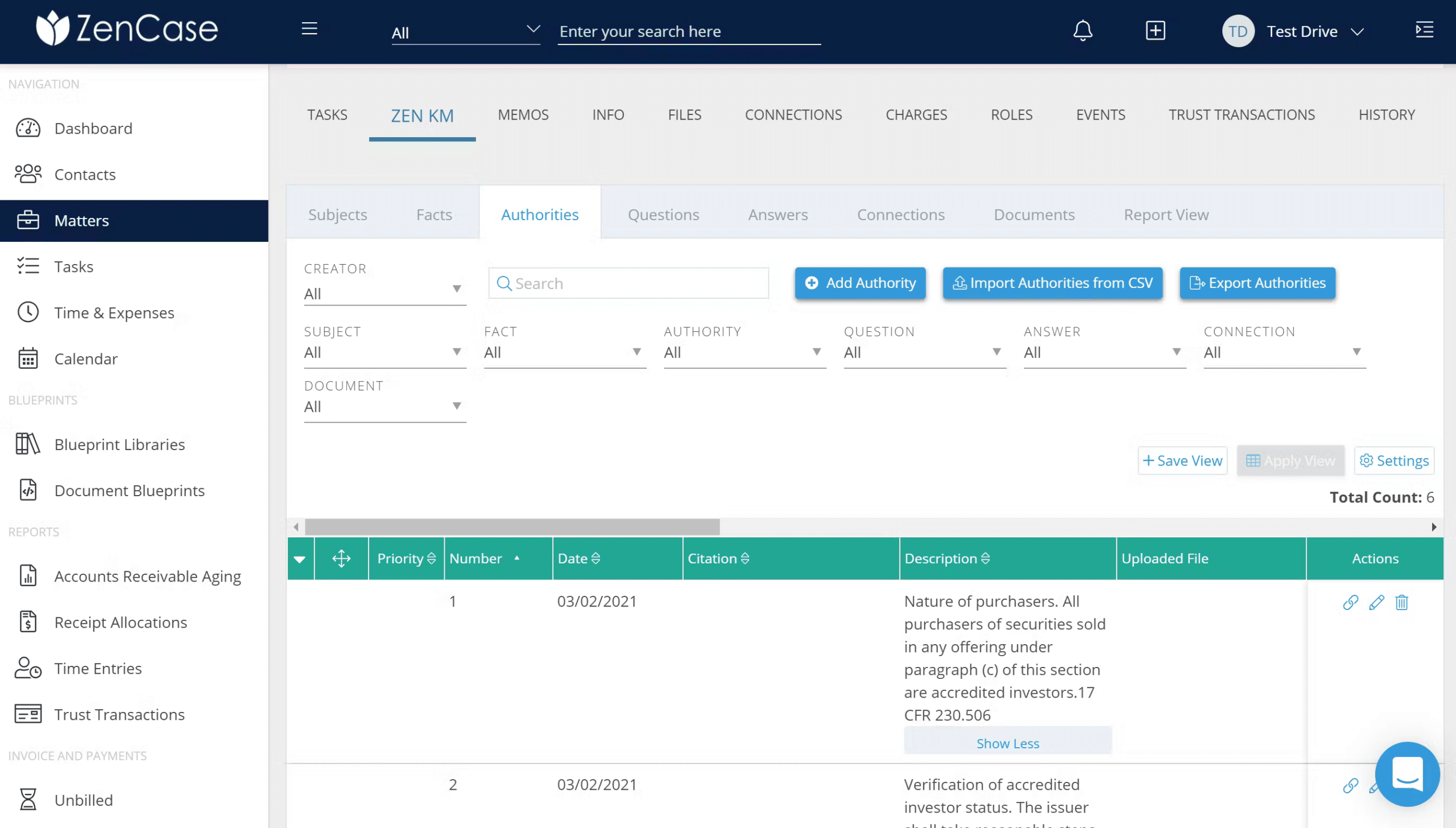
Other Noteworthy Features of Practice Pro
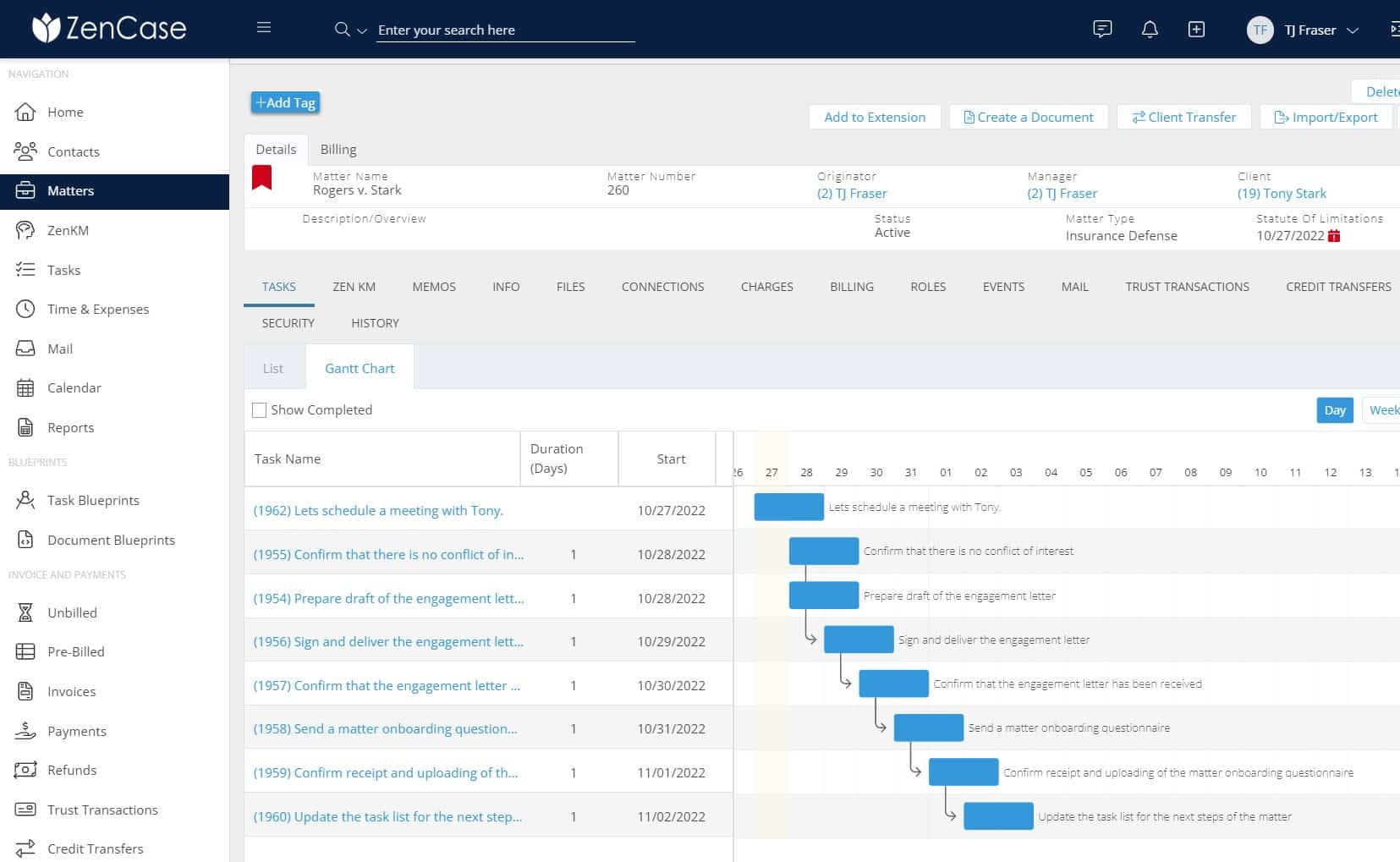
Comprehensive Task and Project Management
Practice Pro includes a comprehensive suite of task and project management tools that cater to a wide range of organizational needs.
Users can create, assign, and track tasks, set deadlines, and monitor progress through intuitive dashboards.
These tools are adaptable to various project management methodologies, including Agile and Waterfall, making Practice Pro a versatile choice for project managers and teams across different industries.
Time & Billing
Practice Pro simplifies the process of recording time spent on projects with automated time tracking, ensuring accurate billing.
It allows for customizable billing rates for different tasks or team members and automatically generates invoices based on tracked time and expenses, streamlining the billing process.
Contact Management
Practice Pro stores and manages contact information in a comprehensive database, tracks all interactions with contacts, and integrates with email and communication tools for seamless interaction.
Accounting
The platform provides comprehensive financial reports, insights into profitability, expenses, and revenue streams, and enables precise budget management.
Integration with leading accounting software facilitates a unified financial management experience.
Collaborative Tools
Understanding the importance of collaboration in both personal and professional spheres, Practice Pro includes a suite of collaborative tools designed to facilitate smooth and efficient teamwork.
Features such as shared workspaces, real-time editing, and more tools ensure teams work together seamlessly, regardless of their physical location.
These tools are built with flexibility in mind, supporting a variety of collaborative scenarios and workflows.
Comprehensive Analytics
For users and businesses that rely on data to make informed decisions, Practice Pro provides comprehensive analytics and reporting tools.
These tools offer insights into usage patterns, productivity metrics, and more, allowing users to analyze their activities and outcomes effectively.
The analytics are presented in a user-friendly format, making it easy for users to derive meaningful conclusions and identify areas for improvement.
Cross-Platform Accessibility
Practice Pro is designed with cross-platform accessibility in mind, ensuring users can access their data and work efficiently regardless of the device or operating system they are using.
Whether it’s through a web browser, a desktop application for Windows or macOS, or mobile apps for iOS and Android, Practice Pro offers a consistent and seamless user experience. This accessibility is particularly important for teams and individuals who work on multiple devices throughout the day.
These general features, combined with the standout features highlighted earlier, demonstrate Practice Pro’s commitment to providing a comprehensive and user-centric solution.
Whether for individual productivity, team collaboration, or organizational management, Practice Pro offers a versatile platform that meets a broad spectrum of needs.
Feedback from Practice Pro Users
Gathering and analyzing user feedback is crucial for understanding the impact of Practice Pro on its user base and identifying areas for improvement.
Feedback from Practice Pro users encompasses a wide range of experiences, highlighting the platform’s strengths and areas where users see potential for enhancement.
This section compiles insights from various sources, including user reviews, surveys, and direct customer feedback, to paint a comprehensive picture of how Practice Pro is received by its community.
“Practice Pro is a comprehensive, easy-to-use tool that our firm relies on!”
Pros
Tracking and recording time, invoicing and managing receivables, managing information, documents, and firm knowledge, managing projects and associated tasks.
Cons
I would like to see more reports available, but I know we can create custom reports. I would also like to see a basic document automation process for letters.
“Best legal software I’ve used in over 20 years in the industry!”
Pros
All of the capabilities it has to keep my files organized and keeps me organized and on top of deadlines. It’s extremely user-friendly. Works well with Netdocs. When the merging functions as it should, it is extremely handy for drafting documents.
Cons
Too many issues with merging documents. Once that is fixed, this will be golden!
“Love the Efficiency!”
Pros
As Billing Manager, their ease of billing is so refreshing. I am able to create prebills based on specific filters such as Matter Manager, billing type, matter type, etc. I no longer have to print out prebills, I can create them and the Managing Attorney can go through them within Practice Pro and make any necessary changes and mark them as approved. When the invoices are ready to be finalized, with a click of a button all the expense back-up is attached at once. That is Awesome! Practice Pro has saved me Hours of time searching for and attaching expense documents to my bills so invoices get out the door quicker, and money comes back in quicker. A great improvement for Cash Flow.
Cons
I have no Cons about this software. It has made monthly billing easier, faster, and more efficient. If issues happen to arise, The Customer service team can be reached via Chat, and respond almost immediately.
Overall, feedback from Practice Pro users is overwhelmingly positive, with particular emphasis on its ease of use, productivity enhancement capabilities, and the level of customization it offers.
However, like any platform, there is always room for improvement.
Practice Pro’s commitment to incorporating user feedback into its development process is a promising sign for future enhancements, ensuring that the platform continues to evolve in line with the needs and expectations of its user community.
A Practice Pro Success Story
1. Background
Shows, Cali & Walsh, L.L.P. (SCW) is a general practice, full-service law firm headquartered in Baton Rouge, LA. With nine attorneys and a supporting staff of more than twenty, working from two locations, in 2023, SCW is celebrating its fortieth anniversary.
The firm focuses on collections, civil litigation, bankruptcy, and real estate. SCW represents individuals, businesses, and government agencies.
For over twenty years, SCW used PCLaw to manage its matters, time entry, and billing. When initially deployed, PCLaw met the firm’s needs, but as the firm grew and its volume increased, it found the product failed to keep up with modern technology and case demands.
Partners and staff complained the system was slow and often bogged down. In addition, the lack of product and customer support caused the firm to consider changing.
Michon Miller, Accounting Manager at SCW, has been with the firm for twenty years. When the partners decided it was time to research alternatives to PCLaw, they tasked Michon with the primary responsibility.
She was highly aware of how difficult change could be for a busy practice.
2. The Process & Implementation
SCW engaged Circle Management Group (CMG), a legal tech consulting firm, to help them analyze their needs and select product options. After thoroughly evaluating the firm’s processes and workflows, CMG suggested Leap, Perfect Practice, and Practice Pro.
Ultimately, the firm was convinced that Practice Pro’s product and pricing were the best choice.
Ms. Miller said: “We were all very nervous about it. We had been with PCLaw for a long time and had so much information stored in it. The partners were very nervous about losing information and losing data. But the process was extremely smooth. CMG helped us with the data migration and transition. It took a couple of months but was within the timeframe the partners were told and agreed to. We felt it went fast and extremely smoothly. We had no issues with any data being lost or corrupted.”
3. Getting Comfortable with Practice Pro
Once SCW’s data was migrated and the setup completed, Practice Pro offered multiple training sessions. While getting everybody in one room simultaneously is difficult, Practice Pro’s flexibility enabled us to train the entire staff within a week.
Surprisingly after the training, the staff and the partners didn’t have many questions. They understood everything. Practice Pro is very user-friendly, and I’ve been shocked at how well everyone responded to the change and now likes working in Practice Pro.
“Since I manage the firm’s accounting, I received additional training and was well prepared to run the firm’s accounting through Practice Pro and QuickBooks. We haven’t had any complaints about anything. If the attorneys or staff have questions, the Practice Pro team has been very responsive. They’ve been receptive to our suggestions, and the entire experience has been a complete ‘180’ from the quality of support we received before.“
4. How Practice Pro Changed SCW
Before Practice Pro, several attorneys were still tracking their time on paper and turning them over to a staff member to input. When Practice Pro was implemented, the firm committed to entering time electronically. Now, they are realizing the efficiencies of timely, electronic time entry.
The attorneys like the ease of the process and have come to enjoy it. They appreciate how easy it is and how it is more time efficient for everyone.
For Michon, she found Practice Pro to be less time-consuming. She said: “I do all of the billing for our clients, and the process is so much quicker. I’m able to get the bills out to our clients promptly, and we’re getting paid much faster.”
This case exemplifies how Practice Pro can be a catalyst for transformation, empowering businesses to achieve their objectives and drive success.
Practice Pro Pricing Details
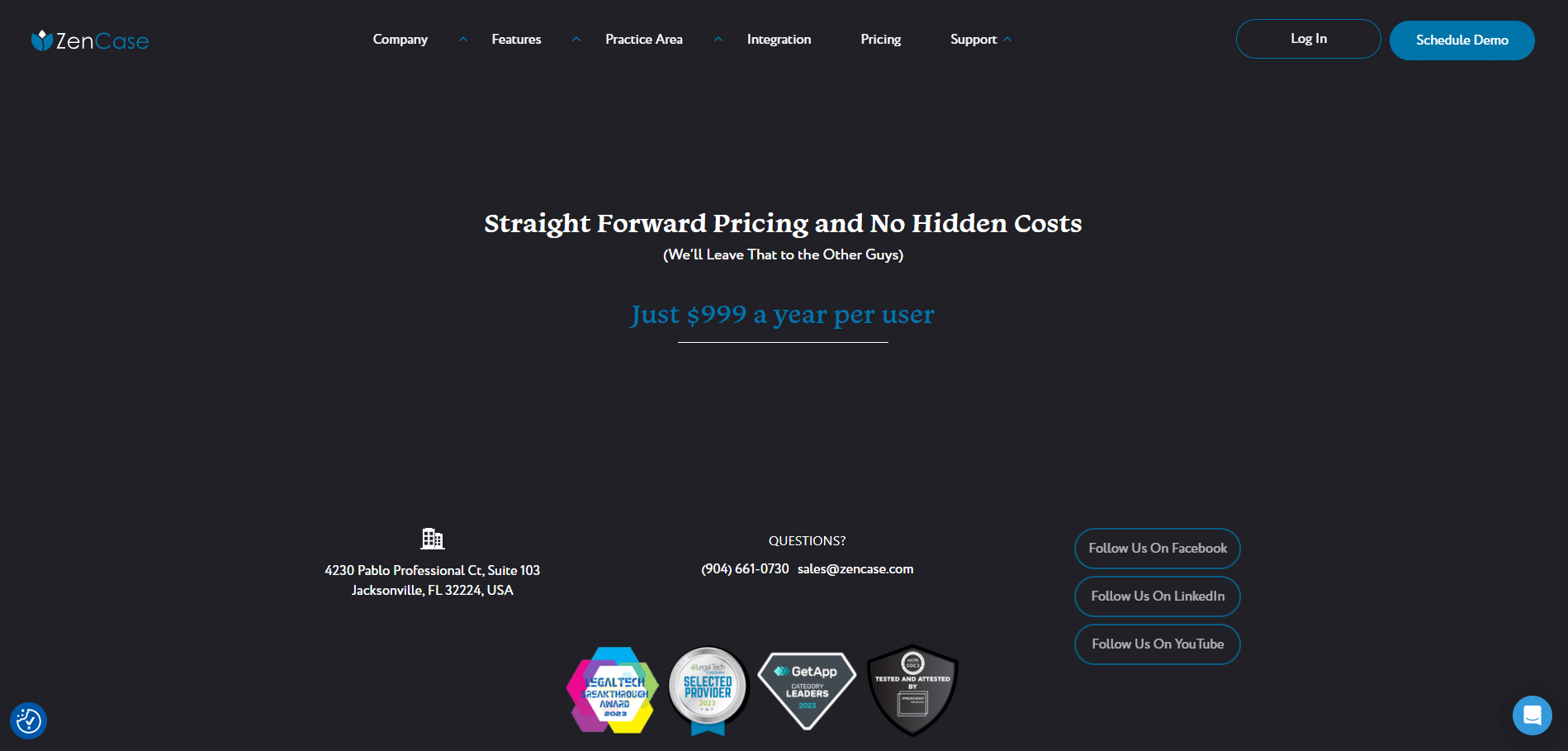
Oftentimes, you’ll find that legal software avoids pricing transparency.
Luckily, Practice Pro does not fall into this category.
They boast straightforward pricing of Just $999 a year per user.
Next Steps with Practice Pro
The next steps with Practice Pro involve leveraging its capabilities to transform your workflow, improve team collaboration, and achieve your operational objectives.
Here’s a guide on how to proceed:
Evaluate Your Needs
Take time to evaluate your team or organization’s specific needs. Consider:
- User Feedback: Gather feedback from your team on their experience with Practice Pro. What worked well? What could be improved?
- Feature Requirements: Identify which features are must-haves for your operations. This will help in deciding which subscription plan is most suitable.
- Budget Allocation: Review your budget to decide what aligns with your financial constraints and operational needs.
Sign Up for the Demo
Make sure to:
- Explore All Features: Dive into each feature offered by Practice Pro, from task management to real-time collaboration tools.
- Understand Integrations: Ensure that you’re able to integrate your current tools and systems with Practice Pro to ensure compatibility and workflow continuity.
- Ask Questions and Take Notes: Use this opportunity to get all of your questions answered. Be sure to take notes, so you have something to refer back to later.
Setup Your Account and Onboard
Once you’ve chosen Practice Pro, the next step is to onboard your team and set up the software. Practice Pro offers resources and personalized training sessions to facilitate this process.
Ensure that:
- You Integrate: Set Up Practice Pro to communicate with your existing tools and customize the platform to fit your workflow.
- You Customize: Utilize Practice Pro’s customization options to tailor the interface, features, and workflows to meet your specific needs.
- You Engage with the Practice Pro Community: Join the Practice Pro community to stay informed about new features, updates, and best practices.
- Everyone is Trained: All users should be comfortable with the platform’s features and functionalities.
- Best Practices are Established: Develop guidelines and best practices for using Practice Pro within your team or organization to ensure consistency and efficiency.
Taking these steps with Practice Pro can lead to significant improvements in how your team or organization manages projects, collaborates, and secures data.
By thoughtfully integrating Practice Pro into your workflow, you can unlock its full potential, driving efficiency and productivity to new heights. Remember, the journey with Practice Pro is one of continuous improvement, with the platform evolving to meet your changing needs.
Schedule your Practice Pro Demo today.

Uptime Legal’s Technology Solutions
Cloud, software, IT, and document management built for today’s law firms.