Table of Contents
When we onboard a new law firm client, one cybersecurity gap shows up time and time again: multi-factor authentication isn’t fully in place.
Sometimes MFA is missing entirely. More often, the firm believes it already has MFA because email requires a code or phone prompt. Then the actual environment gets reviewed, and the gaps appear: remote access, cloud apps, admin accounts, document systems, billing tools, and personal devices.
That’s the real issue. MFA only protects the systems where it’s required and enforced.
That distinction matters. A compromised account can expose client communications, confidential documents, settlement information, billing data, and internal systems. It can also create insurance and client-questionnaire problems if the firm claimed to have MFA without knowing whether that was fully true.
What MFA Is And Why Law Firms Need It
Multi-factor authentication requires more than a password — and for law firms, that distinction matters.
That second step matters because passwords fail constantly. People reuse them. They get phished. They end up in breach databases. They’re guessed, stolen, and sold.
That protection is hard to ignore because so much of the firm’s work now sits behind logins: email, Microsoft 365, document systems, billing software, practice management platforms, remote access tools, and cloud storage.
MFA doesn’t make a firm immune, but in the context of law firm cybersecurity, password-only access is no longer a reasonable baseline for systems that hold client data.
Where Law Firms Actually Need MFA
The most common MFA mistake is treating email as the whole environment.
Email is critical. It’s where phishing usually starts, and it often contains client communications, attachments, payment details, password resets, and matter context.
But email is only one door.
Anti-spam and anti-phishing tools stop the initial phishing email until they don’t. Once an attacker gets past that layer, they may trick a user into approving a login, capture a session, or find another way around email protection.
And even when email MFA works, it only protects email. The attacker’s next move is often to try the same credentials against VPN, remote desktop, cloud storage, billing software, or another system where MFA was never enforced.
That’s why email-only MFA creates a coverage gap.
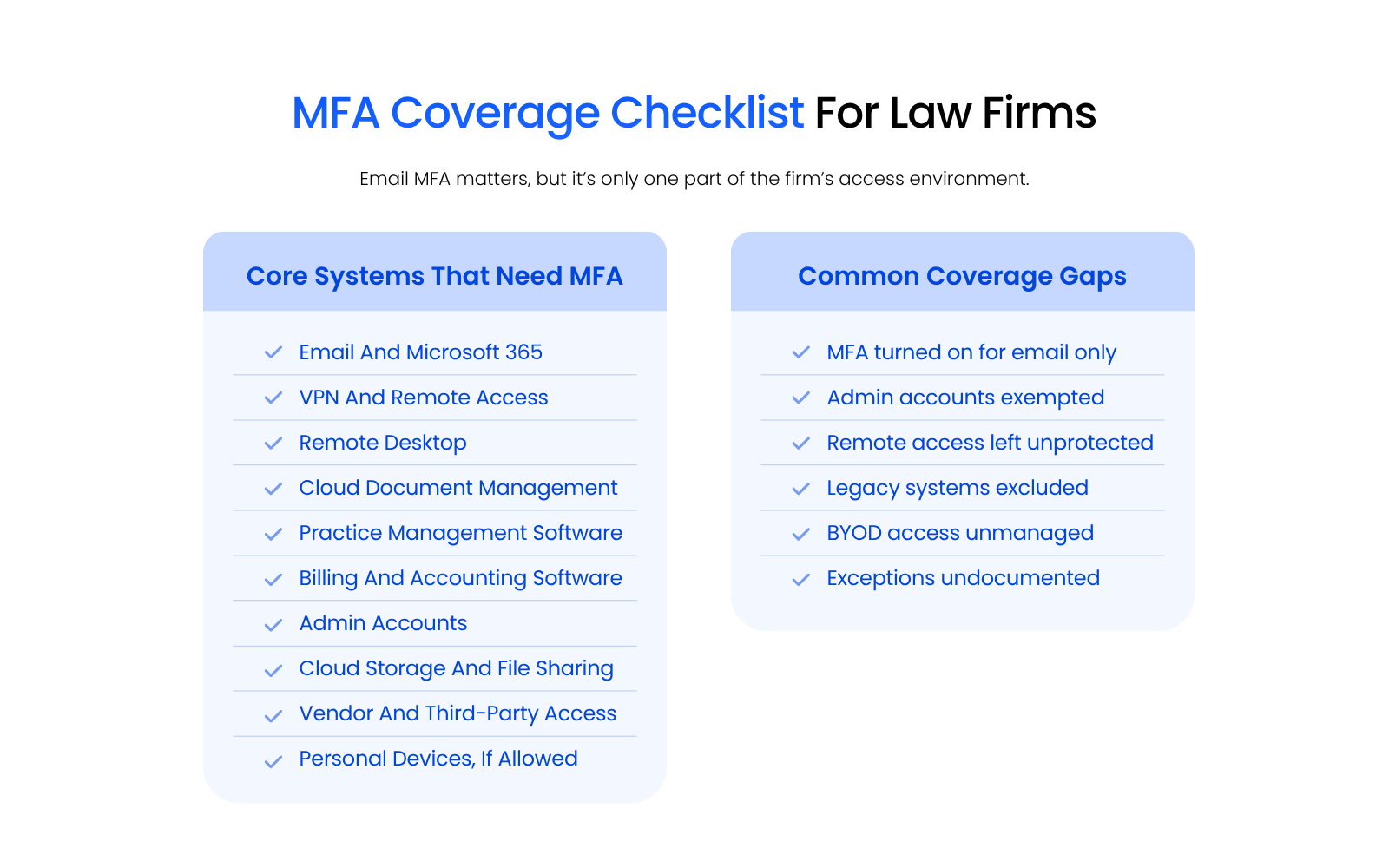
A strong MFA rollout should cover:
Law firms should treat MFA as a coverage model across the environment, not a checkbox attached to email.
If a partner’s email has MFA, but the firm’s VPN, admin accounts, or document system does not, a single unprotected path may still be enough for a breach.
Available Vs. Enforced MFA
There’s a major difference between MFA being available and MFA being enforced.
Available MFA means the system supports MFA, or some users have turned it on. That can sound reassuring in a meeting or questionnaire, but it may not mean much in practice.
A firm might have available MFA if:
Enforced MFA means MFA is required for covered users, systems, and access types. It also means exceptions are limited, documented, and reviewed.
That matters because attackers don’t need every account. They need one working path.
This distinction also matters for cyber insurance.
In Travelers v. ICS, the insurer sought rescission of a cyber policy after alleging the insured misrepresented its use of MFA. Travelers asked a district court to rescind the policy because MFA was allegedly misrepresented as a condition of coverage. Lockton later described the case as a warning that incorrect cyber insurance application answers can create serious coverage risk.
Although that case didn’t involve a law firm, the consequence is what matters: insurers have sought to rescind policies entirely when MFA was misrepresented. Law firms should answer MFA questions based on verified enforcement, not assumptions.
Addressing Attorney Pushback Without Weakening Security
Attorney pushback is real. MFA adds friction, especially during enrollment and the first few days of a rollout.
That concern shouldn’t be brushed aside. Lawyers are often trying to access email, documents, court filings, or client communications quickly. A prompt at the wrong moment can feel like one more interruption in a day already full of them.
The answer is to implement MFA in a way that supports the firm’s workflow without weakening the control.
For most law firms, that means:
The inconvenience of MFA is manageable. The disruption from a credential breach is not.
In practice, a compromised login could let an attacker access settlement correspondence, client tax records, billing details, payment instructions, or the document repository for an active matter. That is a much bigger interruption than a phone prompt.
MFA, Cyber Insurance, And ABA Ethics
Aaron Eittreim describes the moment when MFA becomes real for many law firms:
MFA often becomes urgent when a law firm has to answer a cyber insurance renewal, client security questionnaire, or outside security review.
At that point, “we have MFA” may not be enough. The firm may need to answer more specific questions about where MFA is enforced, which users are covered, whether admin accounts are protected, and whether any exceptions exist.
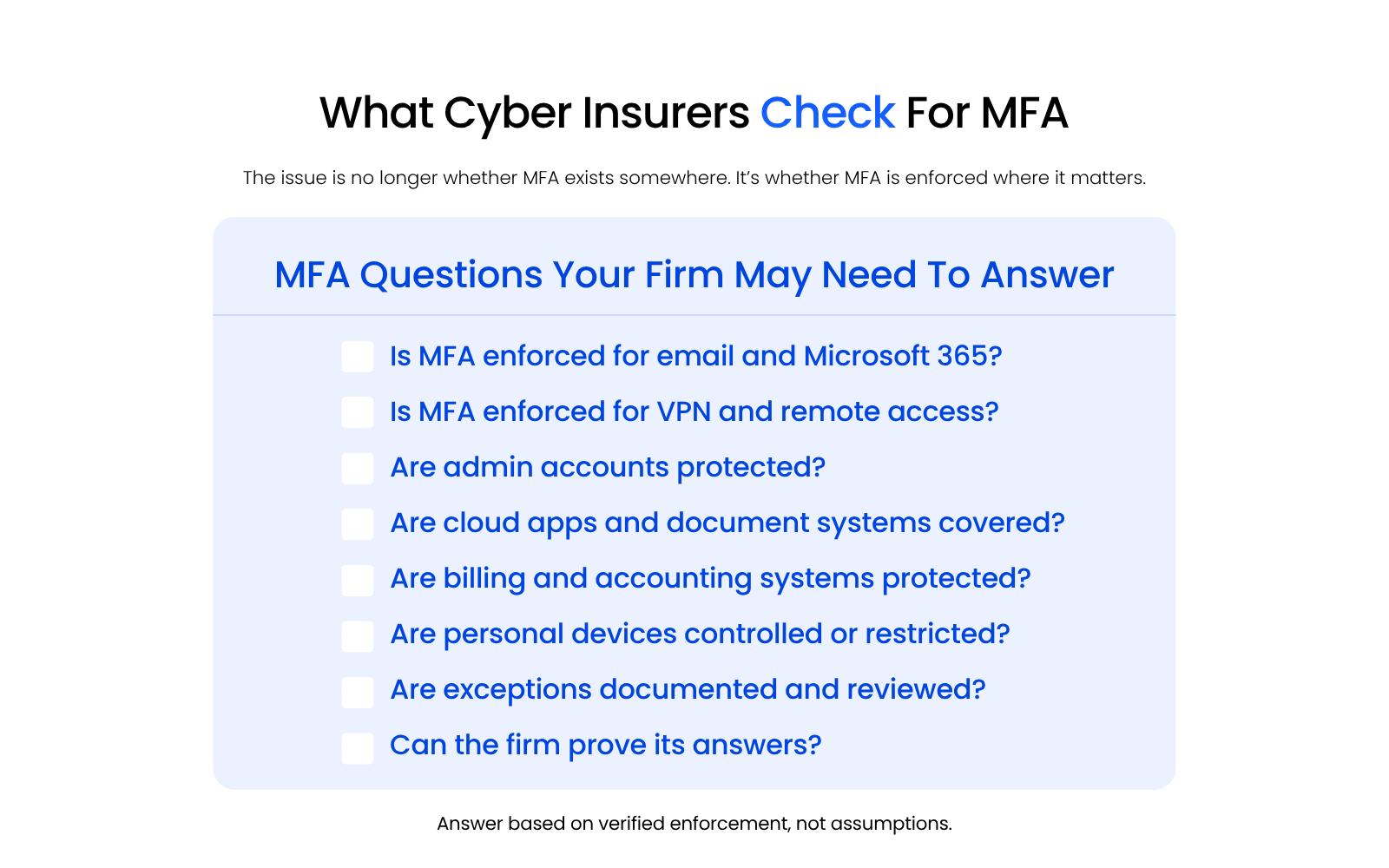
Coalition lists multi-factor authentication as one of the essential security requirements insurers commonly look for before providing cyber coverage. Uptime Legal’s own cyber insurance readiness guidance also notes that insurers often expect firms to show controls such as MFA, endpoint detection and response, tested backups, and incident response planning.
For law firms, there’s also the ethics dimension.
ABA Model Rule 1.6(c) says a lawyer must make reasonable efforts to prevent the inadvertent or unauthorized disclosure of, or unauthorized access to, information relating to the representation of a client. Comment 18 explains that reasonableness depends on factors such as the sensitivity of the information, the likelihood of disclosure without safeguards, the cost and difficulty of safeguards, and whether safeguards interfere with the lawyer’s ability to represent clients.
That does not turn MFA into a one-size-fits-all legal mandate. The rule uses a reasonableness standard, and specific obligations vary by jurisdiction, client requirements, facts, and systems.
Still, in this day and age, it’s difficult for a law firm to argue that password-only access is a strong safeguard for systems containing client data. MFA has become part of what reasonable security usually looks like.
Choosing The Right MFA Method For Your Firm
Not every MFA method is equal.
For most law firms, the practical choice comes down to three options: SMS codes, authenticator apps, and hardware security keys.
| MFA Method | Security Level | Staff Experience | Best Use Case | Insurance Fit |
|---|---|---|---|---|
| SMS/Text Code | Lowest | Familiar, but weaker and vulnerable to SIM swapping | Fallback option when stronger MFA is not immediately available | Better than no MFA, but not ideal for admin accounts or sensitive access |
| Authenticator App | Strong | Usually fast once users are enrolled | Best default for most attorneys and staff | Strong fit for most law firm users |
| Hardware Security Key | Strongest | Requires more setup and training | Admin accounts, high-risk users, and highly sensitive roles | Strongest fit for privileged access |
SMS MFA is better than nothing. It’s also the weakest common option because phone numbers can be targeted through SIM swapping and account takeover.
Authenticator apps are usually the best balance for law firms. They’re stronger than SMS, familiar enough for most users after setup, and practical for attorneys and staff who need to work without constant interruption.
Hardware security keys are stronger still. They make the most sense for admin accounts, firm leadership, finance users, IT users, and anyone with broad access to sensitive systems.
A practical standard is simple: authenticator apps for most users, hardware keys for privileged accounts, and SMS only when a better method isn’t feasible yet. That gives the firm stronger protection where the risk is highest without making everyday access unnecessarily complicated for the whole team.
Implementing MFA Across The Firm
Rolling out MFA across a law firm requires more than turning on a setting.
You need to know which systems are in scope, which users have access, which accounts are privileged, which devices are allowed, and which exceptions exist.
A practical rollout usually starts with the highest-risk areas:
Documentation also matters. A firm should be able to answer practical questions:
That’s where a legal-specific managed IT partner can help.
The challenge isn’t just turning MFA on. It’s enforcing it across every system, managing exceptions, staying on top of admin account changes, and documenting it when the insurer asks.
Uptime Manage helps law firms enforce MFA across Microsoft 365, remote access, user devices, and other core systems. We also support the rollout with help desk assistance, Entra ID/SSO support, security tools, legal software familiarity, and security questionnaire documentation.
WHAT’S NEXT
Frequently Asked Questions

Uptime Legal’s Technology Solutions
Cloud, software, IT, and document management built for today’s law firms.