Table of Contents
Most firms don’t have a complete picture of their own IT environment.
They know what works and what breaks. They don’t always know what’s outdated, what’s exposed, or what would happen if something failed at the wrong moment.
That’s what an IT assessment surfaces.
If you’ve been offered one, it’s reasonable to wonder what you’re actually agreeing to. Whether it will disrupt the firm, who needs access to what, and whether you’ll get something useful at the end — or just a sales pitch with a more official-sounding name.
A good assessment answers those questions and gives you something actionable whether you move forward with the provider or not.
What Is a Law Firm IT Assessment?
A law firm IT assessment should evaluate your systems, including hardware, network infrastructure, Microsoft 365, cybersecurity controls, backups, user access, legal software, and IT documentation.
The goal is to identify risks, gaps, outdated systems, recurring support problems, and practical improvements.
The assessment should go beyond a basic network scan.
A generic IT review might check devices, servers, firewalls, and antivirus. A law firm IT assessment should also consider how attorneys and staff actually work:
A useful assessment should also be understandable to firm leadership.
The managing partner or administrator shouldn’t need to translate a technical export into business decisions. The findings should explain what was found, why it matters, and what should happen next.
Why Law Firms Get An IT Assessment
Most firms don’t review their entire technology environment for fun. Usually, something prompts the conversation.
Sometimes it’s frustration. The firm keeps dealing with slow computers, unreliable remote access, recurring Outlook issues, scanner problems, or legal software errors that no one fully explains.
Sometimes it’s a transition. The firm may be switching IT providers, moving away from an on-premise server, planning a cloud migration, or trying to figure out what its current provider has actually been managing.
Other times, the trigger is risk. A cyber insurance renewal may require clearer documentation. A client may ask about the firm’s security posture. Leadership may realize that no one has a confident answer to basic operational questions.
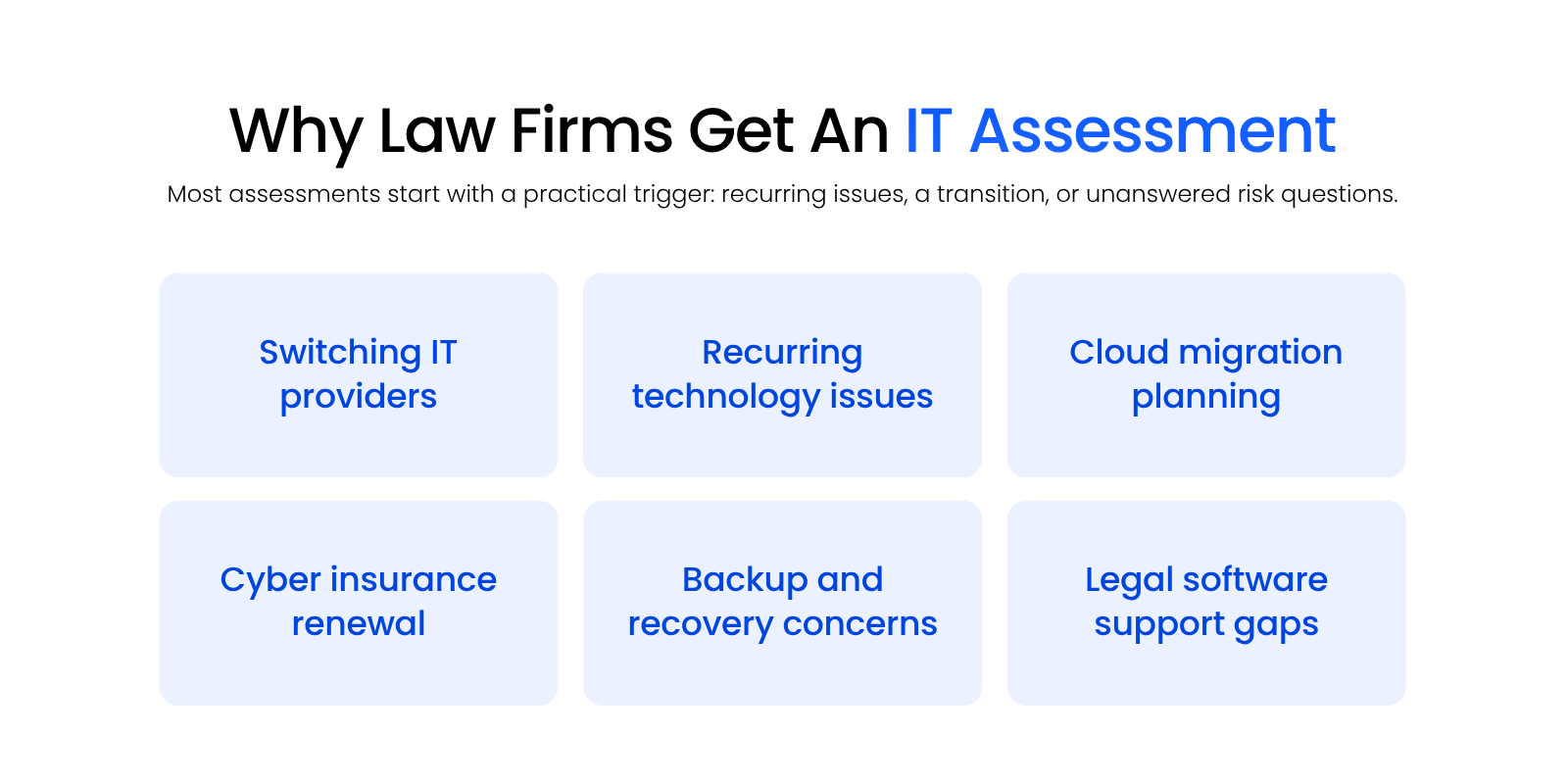
Common reasons law firms get an IT assessment include:
A five-attorney firm with Microsoft 365, a practice management platform, local scanners, and a few remote staff members still has a lot of moving parts. So does a 40-user firm with multiple offices, legacy billing software, document management, and a mix of in-office and remote users.
The assessment brings those pieces into view.
What Gets Reviewed During A Law Firm IT Assessment?
A thorough law firm IT assessment reviews the systems attorneys and staff rely on every day, along with the security, backup, and support structure behind them.
This is where a legal–specific assessment should separate itself from a generic IT review.
A basic assessment may look at devices, firewalls, and network settings. A law firm IT assessment should also review legal software, matter data, Microsoft 365 configuration, backup coverage, user access, documentation, and the systems that support confidential client work.
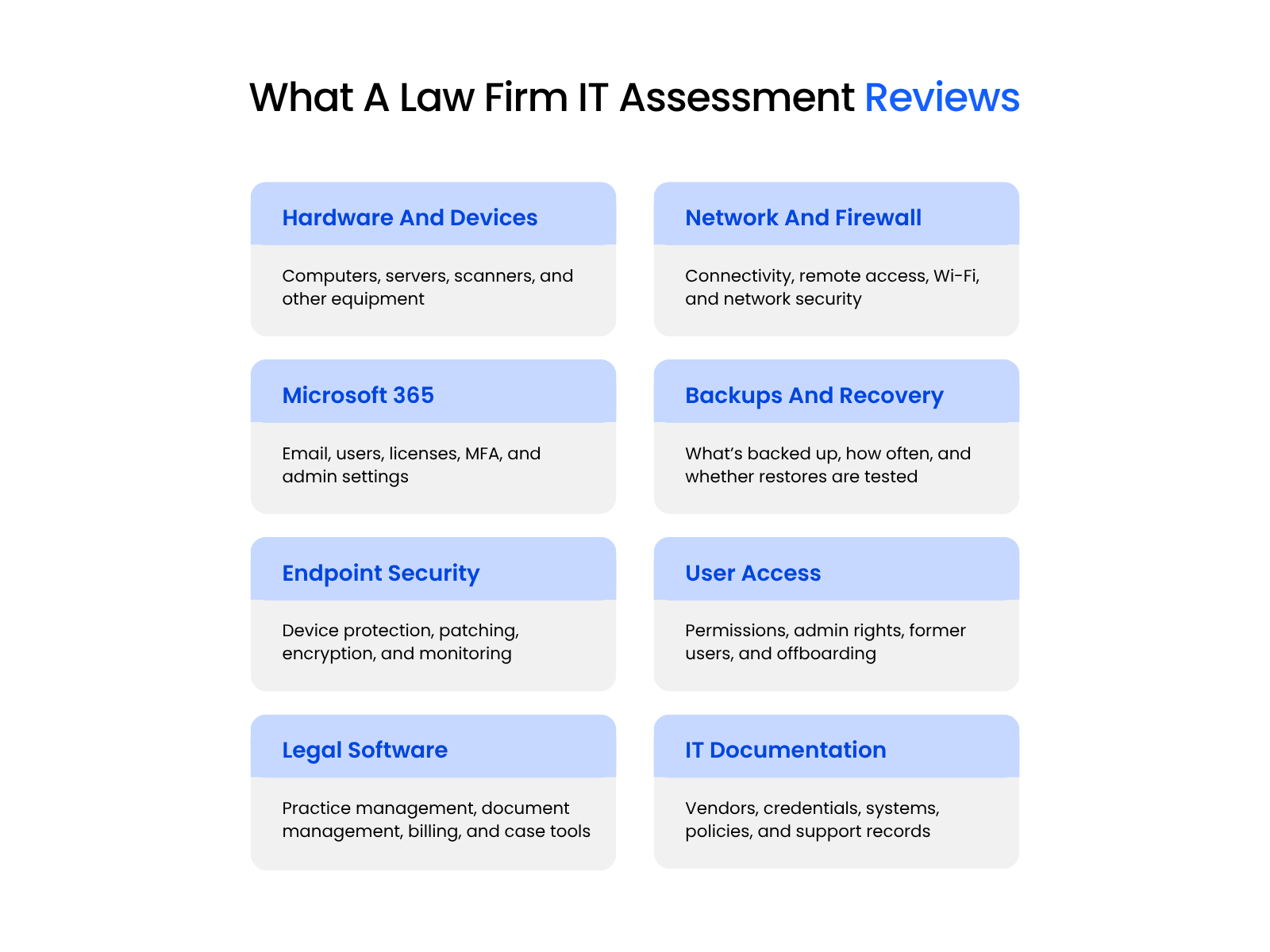
A strong assessment usually reviews eight core areas:
Hardware And Device Inventory
The assessment should start with the devices the firm uses: desktops, laptops, servers, printers, scanners, mobile devices, and aging equipment still connected to the environment.
The provider is checking what exists, what’s outdated, what’s unmanaged, and what may no longer be supported. That includes attorney laptops, staff workstations, shared scanning stations, home-office devices, and any machine that still has access to firm systems.
For law firms, this gets practical fast. A litigation team may rely on one old scanner for discovery productions. A remote attorney may use an unmanaged personal laptop to access client files. A bookkeeper may be running billing software on a workstation no one has patched in months.
Those aren’t abstract IT issues. They affect the firm’s ability to work securely and consistently.
Network Infrastructure And Firewall
The assessment should review the firm’s firewall, internet setup, Wi-Fi, switches, remote access, and overall network design.
The provider is checking whether the firewall is current, whether remote access is configured safely, whether the network has bottlenecks, and whether attorneys and staff can work securely from inside and outside the office.
This is especially important for firms that still rely on a fragile VPN, exposed remote desktop access, or a server closet that everyone hopes will keep behaving.
For a law firm, network reliability has a direct operational cost. If attorneys can’t reach files, email, billing systems, or legal software when they need them, the technology problem quickly becomes a client-service problem.
Microsoft 365 Configuration And Security
Microsoft 365 is often one of the most important systems in a law firm. It may touch email, calendars, Teams, SharePoint, OneDrive, identity management, device access, and user permissions.
A good assessment should review MFA enforcement, admin permissions, user licenses, shared mailboxes, email security settings, conditional access, and inactive accounts.
It should also look at whether Microsoft 365 supports the firm’s actual workflow. A messy setup can create confusion over where documents live, who can access shared files, whether former employees still have access, and whether email security is configured properly.
For many firms, Microsoft 365 is where productivity and risk meet. It’s the front door for email, identity, and collaboration, which means a weak configuration can create problems across the entire firm.
Backup Systems And Restore Verification
Backups answer a simple question: if something breaks, can the firm actually recover?
The assessment should review what’s backed up, how often backups run, where backup data is stored, how monitoring works, and whether restore tests have been performed. That includes servers, workstations, Microsoft 365, legal software data, and matter files.
The key word is restore.
A backup that has never been tested is more of an assumption than a recovery plan. For law firms, that assumption can become expensive if a server fails, ransomware hits, files are deleted, or a cloud system doesn’t retain the data the firm thought it did.
A good assessment should make the backup picture concrete: what’s protected, what isn’t, how fast the firm could recover, and what data might be harder to restore than leadership expects.
Endpoint Security And Patch Status
The assessment should review the security posture of the devices that attorneys and staff use every day.
That usually includes antivirus or endpoint detection tools, patching status, operating system updates, disk encryption, device management, and whether security alerts are being monitored.
This is especially important for firms with hybrid or remote users. A laptop that accesses client files from court, home, a hotel, or a client site should still be protected, patched, and accounted for.
The firm shouldn’t have to guess which devices are secure and which ones have quietly fallen behind.
User Access Controls And Offboarding
User access review answers a basic but important question: who can access what?
The provider should look for active accounts tied to former employees, excessive admin privileges, shared logins, weak password practices, inconsistent permissions, and unclear offboarding procedures.
For law firms, this is tied directly to confidentiality. A paralegal, attorney, billing user, outside consultant, and former employee should not all have the same level of access.
The assessment should help the firm see whether access matches each person’s role and whether the offboarding process actually removes access when someone leaves.
This is the kind of issue that often hides in plain sight. A former employee may be removed from payroll and email forwarding, but still have access to a file share, Microsoft 365 group, legal software account, or remote access tool.
Legal Software Health And Support Coverage
This is one of the biggest differences between a generic IT assessment and a law firm IT assessment.
The provider should review the systems where legal work actually happens, including practice management, document management, billing, accounting, case management, and legal-specific cloud platforms. Depending on the firm, that may include Clio, NetDocuments, iManage, Worldox, Tabs3, ProLaw, PCLaw, Time Matters, QuickBooks, or other legal applications.
The assessment should check whether those systems are on supported versions, whether performance issues exist, whether data is backed up properly, whether integrations are working, and whether the current IT provider can actually support them.
This is where law firm experience shows. A generalist provider may be comfortable with laptops, routers, and Microsoft 365. That doesn’t mean they understand why a Worldox indexing issue, a Tabs3 workstation problem, a ProLaw performance complaint, or a scanner-to-document-management workflow can derail a normal workday.
Documentation And IT Records
A law firm’s technology environment should not live entirely in one person’s head.
The assessment should review whether the firm has current documentation for systems, vendors, licensing, admin access, network setup, backup procedures, security policies, and onboarding/offboarding steps.
Poor documentation creates dependency. It makes provider transitions harder, slows down urgent support, complicates insurance questions, and leaves the firm exposed when something goes wrong.
This matters during everyday support, too. If no one knows who manages the domain, where firewall credentials are stored, which vendor supports the phone system, or what backup product protects the server, every issue takes longer than it should.
Good documentation doesn’t make the environment perfect. It gives the firm more control.

How Long Does A Law Firm IT Assessment Take?
Most law firm IT assessments are designed to be non-disruptive.
The firm usually needs to answer intake questions, provide basic access, identify key systems, and make someone available for follow-up questions. Attorneys and staff typically don’t need to stop working.
For many small-to-midsize firms, the active review can often be completed in a day or less, depending on the size and complexity of the environment. A more complex firm with multiple offices, servers, legal applications, remote users, and layered security tools may require more review time.
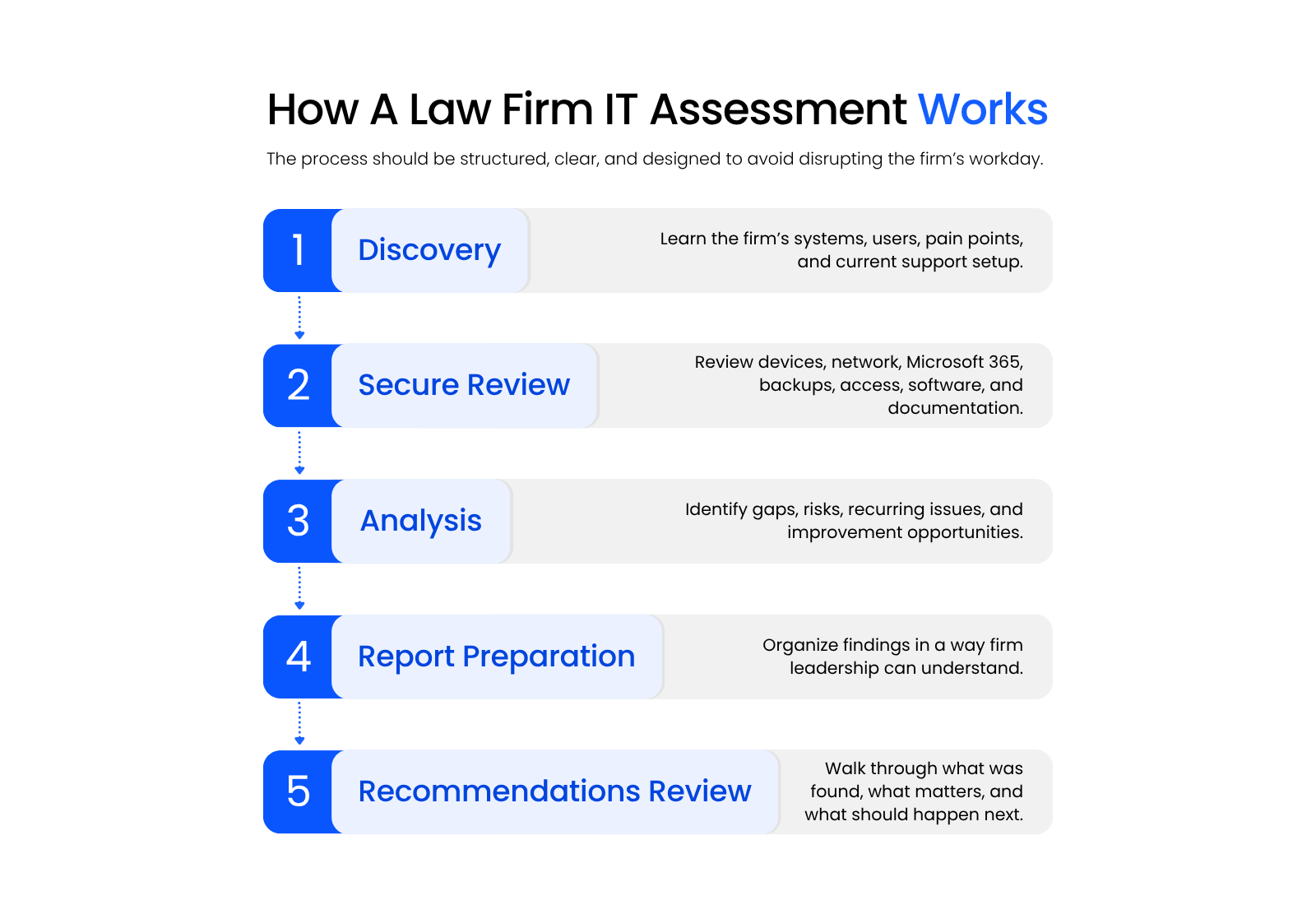
A typical assessment process looks like this:
The key point is that the assessment should fit around the firm’s workday, not interrupt it.
A good legal IT provider should be able to explain what access is needed, what will be reviewed, who needs to be involved, and what attorneys and staff can expect.
What You Get At The End: The Assessment Report
The report is where the assessment either proves its value or falls flat.
A useful report should be written for firm leadership, not only for technical staff. It should explain what was reviewed, what was found, why each finding matters, and what the firm should do next.
A good law firm IT assessment report should include:
It shouldn’t feel like a 50-page export from a scanning tool. It also shouldn’t be so vague that every recommendation sounds the same.
For example, a weak report might say:
“Security should be improved.”
A stronger report would say:
“MFA is not enforced for three users with access to email and firm files. This should be corrected immediately because compromised credentials can create unauthorized access to confidential firm information.”
That difference matters. One statement sounds serious but gives the firm no clear action. The other tells leadership what was found, why it matters, and what to do about it.
The report should help the firm make decisions — about what to fix, whether its current IT support for law firms is adequate, and what changes are worth prioritizing. It shouldn’t just make the provider sound necessary.

Is A Free IT Assessment Just A Sales Pitch?
Sometimes, yes.
Most IT providers offer a free assessment because they hope your firm will become a client. That’s the reality, and there’s nothing wrong with it as long as the assessment is real.
The question is whether the process gives your firm useful findings regardless of what you decide next.
A genuine assessment reviews the actual environment, identifies specific issues, explains the practical impact, and gives the firm something it can use. A surface-level assessment skips the deeper review and jumps quickly to a proposal.
| Signs Of A Genuine Assessment | Signs Of A Surface-Level Assessment |
|---|---|
| Reviews the firm’s actual systems, tools, and workflows | Relies mostly on a short discovery call |
| Includes Microsoft 365, backups, access controls, and legal software | Focuses only on basic devices or generic security language |
| Identifies specific findings and priority levels | Treats every issue as urgent without context |
| Explains why each issue matters to firm operations | Uses fear-based language without clear detail |
| Produces useful output even if the firm does not sign a contract | Produces a proposal without meaningful findings |
| Gives leadership a readable report | Sends a technical export or vague summary |
| Explains methodology clearly | Avoids explaining what was actually reviewed |
A free assessment can be a perfectly reasonable first step. Just hold it to a real standard.
If the provider can’t explain what they reviewed, what they found, and why it matters for a law firm, the assessment probably wasn’t thorough enough.
What To Do With The Findings
An IT assessment is only useful if the firm acts on it.
That doesn’t mean every finding needs to be fixed at once. A good report should help leadership sort the findings into a practical order.
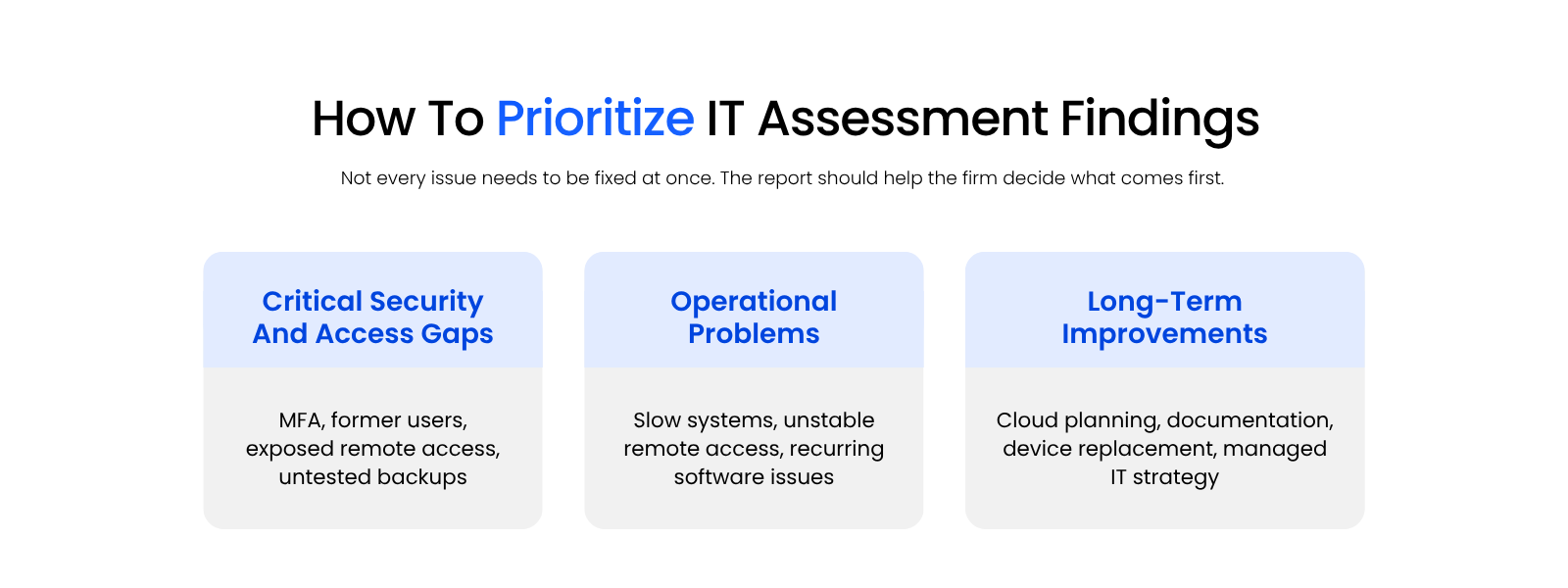
Start With Critical Security And Access Gaps
The first priority should be anything that creates immediate risk: missing MFA, former employee accounts, exposed remote access, unprotected devices, unsupported systems, or backups that can’t be restored confidently.
These issues affect security, continuity, and access to client information. They shouldn’t sit in a “future improvements” folder for six months.
Examples might include:
Then Fix The Operational Problems Slowing The Firm Down
Next, look at the issues that keep costing the firm time: unstable internet, recurring Microsoft 365 problems, slow workstations, unreliable VPN access, legal software performance issues, or support processes that leave attorneys and staff waiting too long.
This is where the assessment can help connect day-to-day frustration to root causes. Maybe the issue isn’t “everyone complains about the document system.” Maybe the server is underpowered, the VPN is unstable, the workstation setup is inconsistent, or the application is no longer properly supported.
Examples might include:
Plan Longer-Term Improvements With A Real Sequence
After the urgent and recurring issues are clear, the firm can plan larger improvements with more confidence.
That might include cloud migration, Microsoft 365 cleanup, documentation improvements, legal software modernization, device replacement, better onboarding/offboarding processes, or a stronger managed IT model.
The key is sequence. A good assessment helps the firm decide what needs immediate attention, what should be planned, and what can wait.
Examples might include:
Managed IT for Law Firms: What It Includes, Why It Matters, and How to Choose the Right Provider:
Learn what managed IT should cover for law firms, including help desk support, Microsoft 365, security, legal software support, and long-term planning.
What Uptime Legal’s IT Assessment Covers
Uptime Legal’s IT assessment is built for law firms, not generic office environments.
That matters because a law firm’s technology environment includes legal software, matter data, document workflows, billing systems, Microsoft 365, client confidentiality, remote access, and the support expectations of attorneys and staff who can’t afford long delays when something breaks.
The assessment looks at your environment through that legal-specific lens. We review whether your systems support the way your firm actually works, including:
The final report should give firm leadership a practical view of what’s working, what’s risky, what’s causing recurring friction, and which next steps should be prioritized.
For firms that need ongoing support, the assessment can also connect naturally to Uptime Manage, Uptime Legal’s managed IT service for law firms.
WHAT’S NEXT
Frequently Asked Questions

Uptime Legal’s Technology Solutions
Cloud, software, IT, and document management built for today’s law firms.