Table of Contents
Managed IT services for law firms exist because unreliable technology has a way of showing up everywhere it shouldn’t.
For your firm, that’s rarely one big failure: it’s slower logins, a printer nobody trusts, and a workaround for the workaround. It slows down billable work, complicates remote access, and eventually surfaces somewhere you can’t afford it to: client service, internal coordination, or the security questionnaire someone now has to answer by Friday.
The right managed IT provider prevents most of that before it starts. They support the software and workflows your firm already depends on, and give attorneys and staff a more stable day-to-day environment instead of a growing list of things everyone’s just learned to work around.
This is what managed IT actually includes, how it’s different from calling someone only after something breaks, and what to ask before you sign with a provider who’s supposed to understand how your firm runs.
What Managed IT for Law Firms Is
Managed IT is an ongoing service model that helps your firm maintain, support, secure, and improve its technology over time. It covers your daily environment, the people using it, and the planning needed to keep things running cleanly as your firm changes.
In practice, managed IT for your firm usually includes:
Break-fix is different: a provider is usually called once something has already gone wrong, while managed IT is supposed to keep you out of that cycle as much as possible.
At its best, managed IT means less disruption, fewer recurring issues, and more reliable support, so your people can spend less time dealing with tech problems and more time getting the work done.
Why Law Firms Use Managed IT Services
Firms rarely start looking into managed IT because everything’s running well. More often, the shift follows a moment that exposes how fragile the environment already was:
A lot of IT problems don’t hit all at once. They creep in: systems get harder to trust, support becomes more reactive, and workarounds become routine.
Why Firms Wait Too Long
Clients and cyber insurers are asking harder questions than firms are used to answering, which is what’s actually forcing the shift. In a lot of cases, it’s a questionnaire that exposes weak systems, vague processes, and a reactive support model your firm didn’t realize it had settled into — which is why law firm cybersecurity and managed IT tend to arrive on the agenda at the same time.
Why This Isn’t Just a Large-Firm Issue
A small firm’s privileged information carries the same stakes as a large firm’s, so “we’re small” doesn’t hold up once client data is exposed or a deadline slips. You shouldn’t have to spend your time chasing technology problems or building your day around recurring friction.
As expectations around security, responsiveness, and tech competency keep rising, you need support that helps you stay ahead of issues instead of constantly reacting to them.
What Managed IT Typically Includes
What counts as managed IT varies by provider, but for your firm it should mean stable systems, responsive support, cleaner operations, and fewer preventable problems getting in the way of the work.
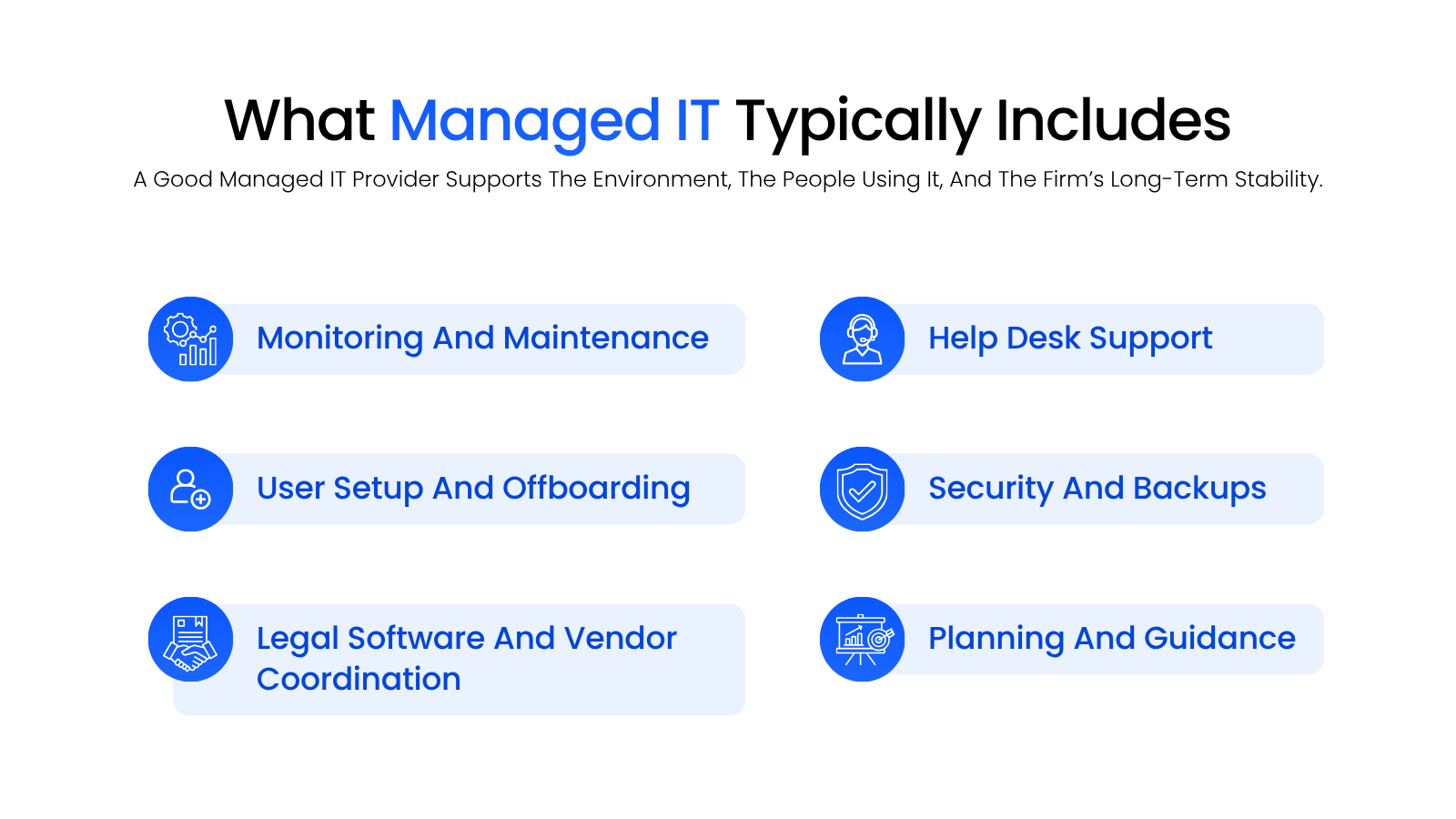
That typically includes:
For your firm, that means smoother onboarding, fewer recurring issues, better support for remote work, cleaner access management, and less time lost to low-grade technology friction. New employees get up to speed faster, remote users run into fewer access issues, and your staff stop losing time to the same problems over and over again.
It also covers the smaller vendors nobody assigns to anyone, including whichever online fax service the firm ended up on.
What Bad IT Looks Like Inside a Law Firm
Bad IT doesn’t usually show up as one dramatic failure. It shows up as friction your firm gradually starts treating as normal.
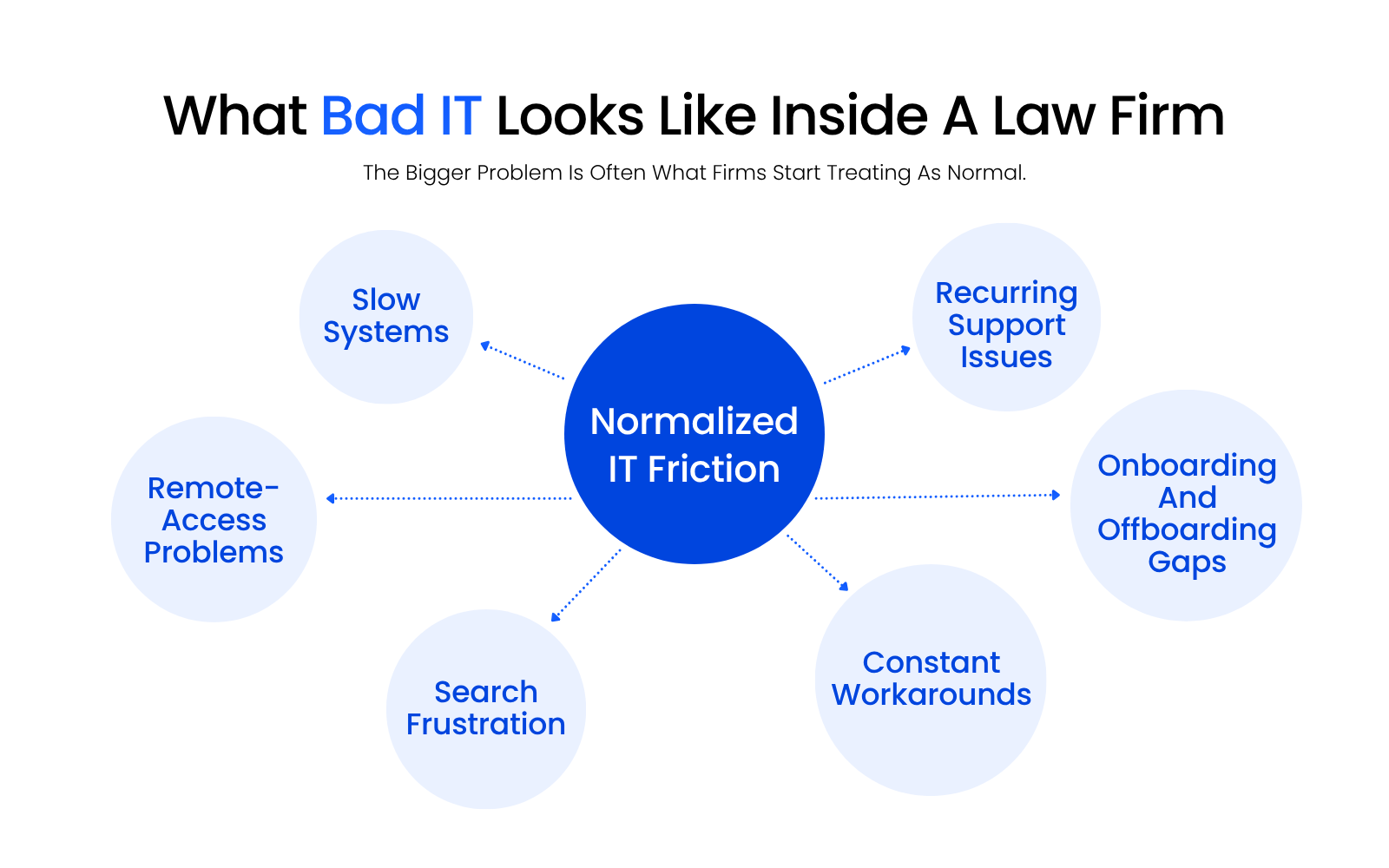
Systems run slower than they should. Remote access is less reliable than anyone wants to admit, and new employees take too long to get fully up and running. Over time, your people adjust to it: they learn which printer behaves, which workstation is temperamental, and which workaround is faster than asking for help.
The Problem Is Often What Firms Learn to Tolerate
Once you adjust to it, the issue stops being technical and becomes cultural:
At that point, your people stop expecting the environment to work cleanly and start building their day around its limitations.
That Kind of Friction Adds Up
Your firm can operate like that for a while, but it costs real time. A firm running on quiet workarounds for months typically ends up billing fewer hours than it should, because staff spend part of every day solving the same small problems instead of doing the work those hours were meant for.
That’s one reason firms wait too long to explore outsourced IT: the problem doesn’t feel urgent until you add up how much time it’s actually been costing you.

Managed IT vs Reactive IT Support
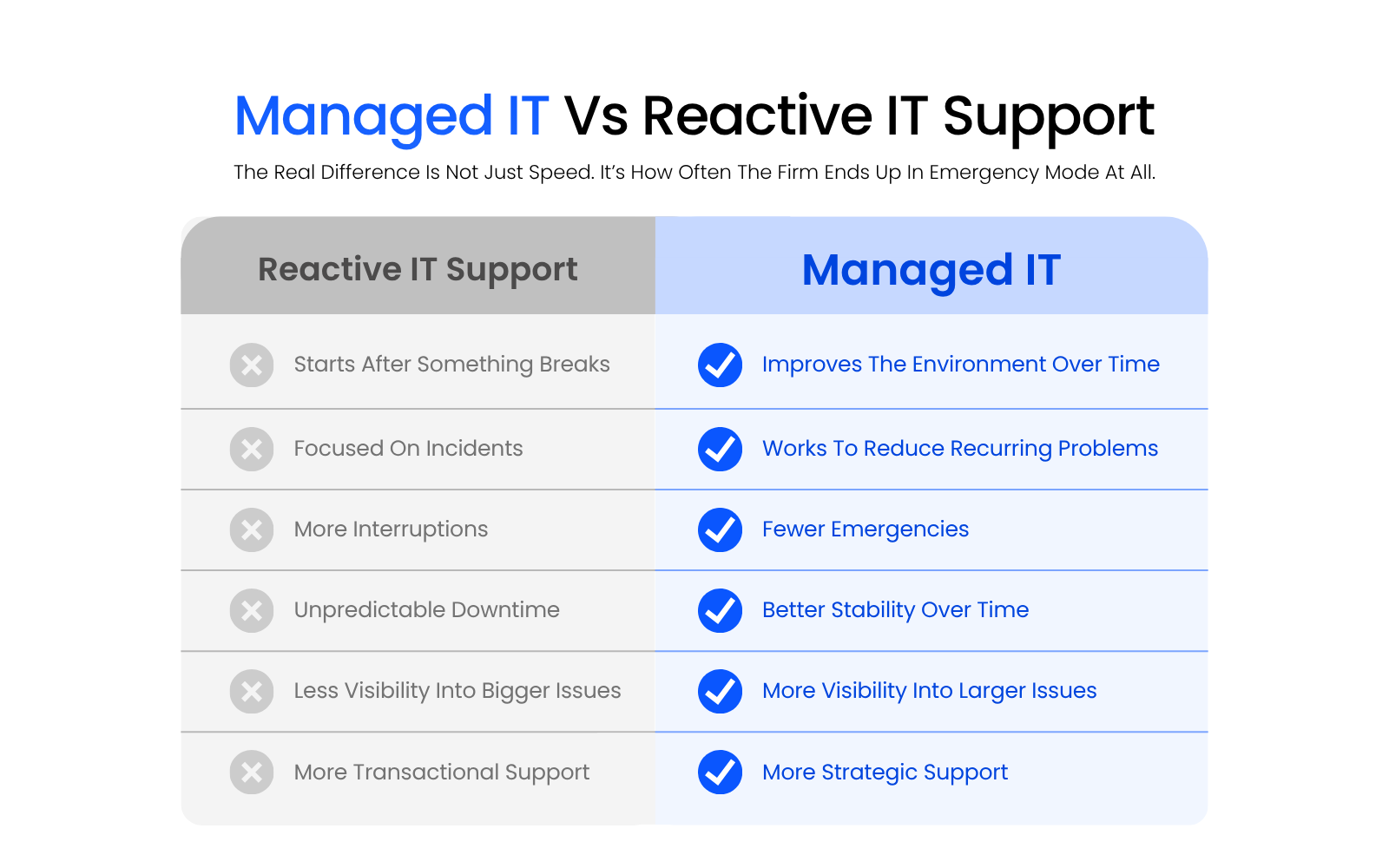
Managed IT and reactive IT support solve different problems: one is built to reduce how often emergencies happen, and the other only responds once they do. A firm can spend a long time thinking it has “IT support” when what it really has is someone responding after the damage is already done.
Reactive Support Solves the Immediate Problem
Reactive support, often called break-fix, usually starts after something’s already gone wrong: a server issue, a login problem, a software crash, or a remote-access failure triggers the call. The provider fixes the immediate issue, and you move on until the next one shows up.
That can work for isolated issues, but it does little to reduce how many issues you have in the first place. With reactive support, you often end up dealing with repeated interruptions, unpredictable downtime, rushed fixes, and support that feels transactional instead of strategic.
Managed IT Improves the Environment over Time
Managed IT should work differently. Instead of waiting for issues to pile up, your provider monitors systems, maintains the environment, supports your users, and works to reduce recurring problems before they disrupt the firm. That doesn’t mean nothing ever goes wrong; it means your environment should become more stable, more reliable, and easier to support over time.
Why the Difference Matters for Buyers
In a law firm, technology problems don’t stay isolated for long. They affect document access, staff productivity, remote work, and client responsiveness. The value of managed IT is fewer emergencies and a work environment that gets easier to operate instead of more exhausting.
Why Legal-Specific IT Support Matters
Technical capability alone doesn’t make an IT provider the right fit for your firm; understanding the legal environment does. Plenty of providers can support common business systems without being prepared for the demands of a law firm.
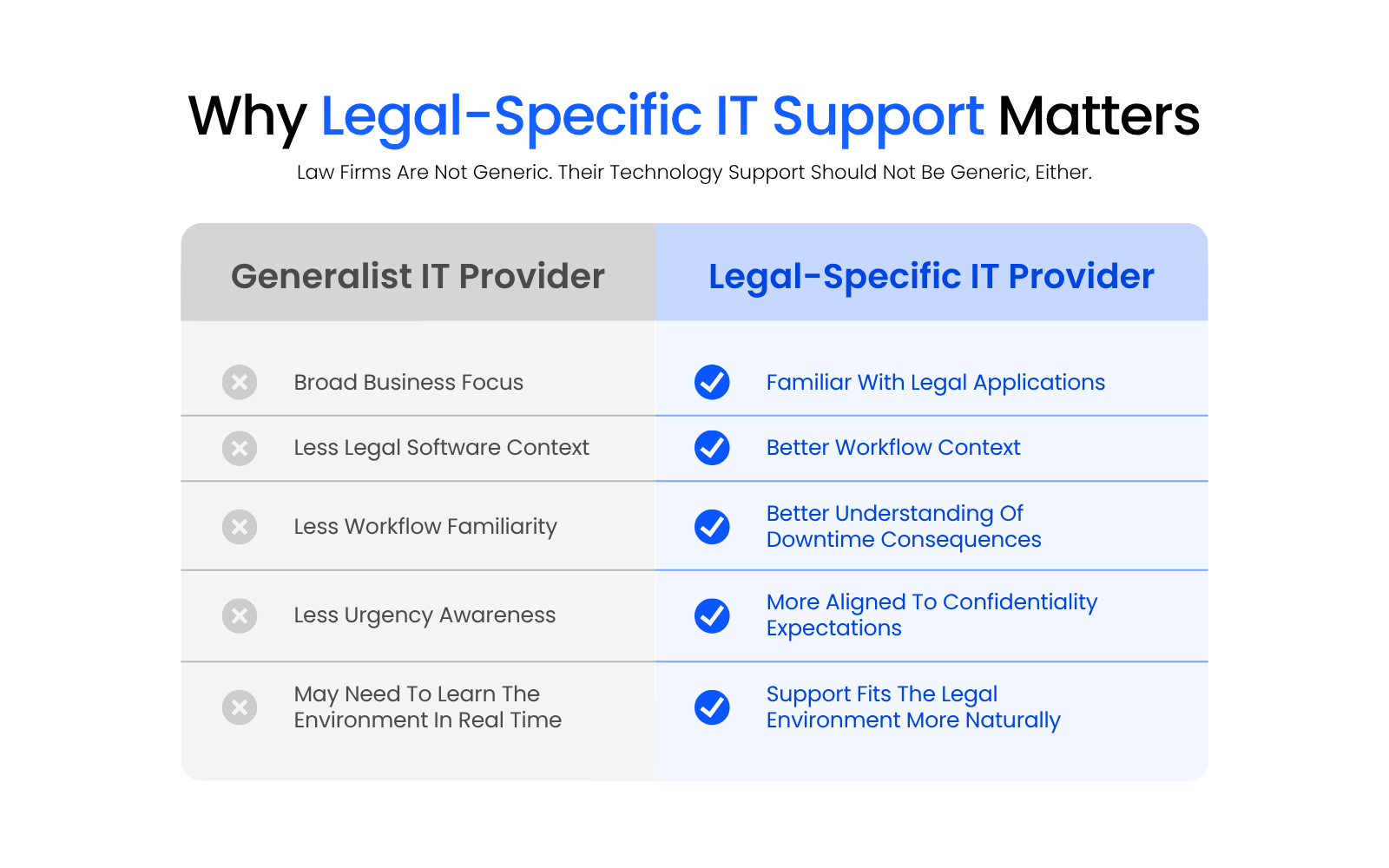
Your firm depends on specialized applications, handles sensitive information every day, and can’t really afford a support team learning your environment in real time. When access breaks or a workflow stalls, the impact usually reaches well beyond simple inconvenience: it can touch deadlines, billing, internal coordination, and client communication.
Law Firms Need More than General Business IT
A provider comfortable with general business systems isn’t automatically prepared for a law firm’s specialized applications and lower tolerance for downtime. Even a “small” issue rarely stays small once it starts touching calendars, document access, or time entry.
Legal Software Is Part of the Difference
A generalist provider unfamiliar with legal software slows troubleshooting down, because they’re learning the environment and fixing it at the same time. A provider with legal-specific experience can usually get to the real issue faster because they already understand the systems, workflows, and dependencies around the problem.
Why This Usually Leads to a Better Fit
That’s why legal-focused support is usually the better fit for your firm. A provider who already works inside legal environments is more likely to understand why a delay matters, why access issues can’t sit, and why a “good enough” fix is often not good enough in a legal environment.
That doesn’t mean every generalist or local MSP is a bad choice; it means broad business IT experience doesn’t automatically translate into law firm IT experience.

IT Support for Law Firms
What day-to-day IT support should actually look like inside a firm, and what to expect when something breaks
What Modern Law Firm IT Should Support
Modern law firm IT should make deadlines, billing, and client communication work reliably no matter where someone’s working from; making remote logins possible isn’t enough on its own. That flexibility is exactly what cloud solutions for law firms are built to deliver.
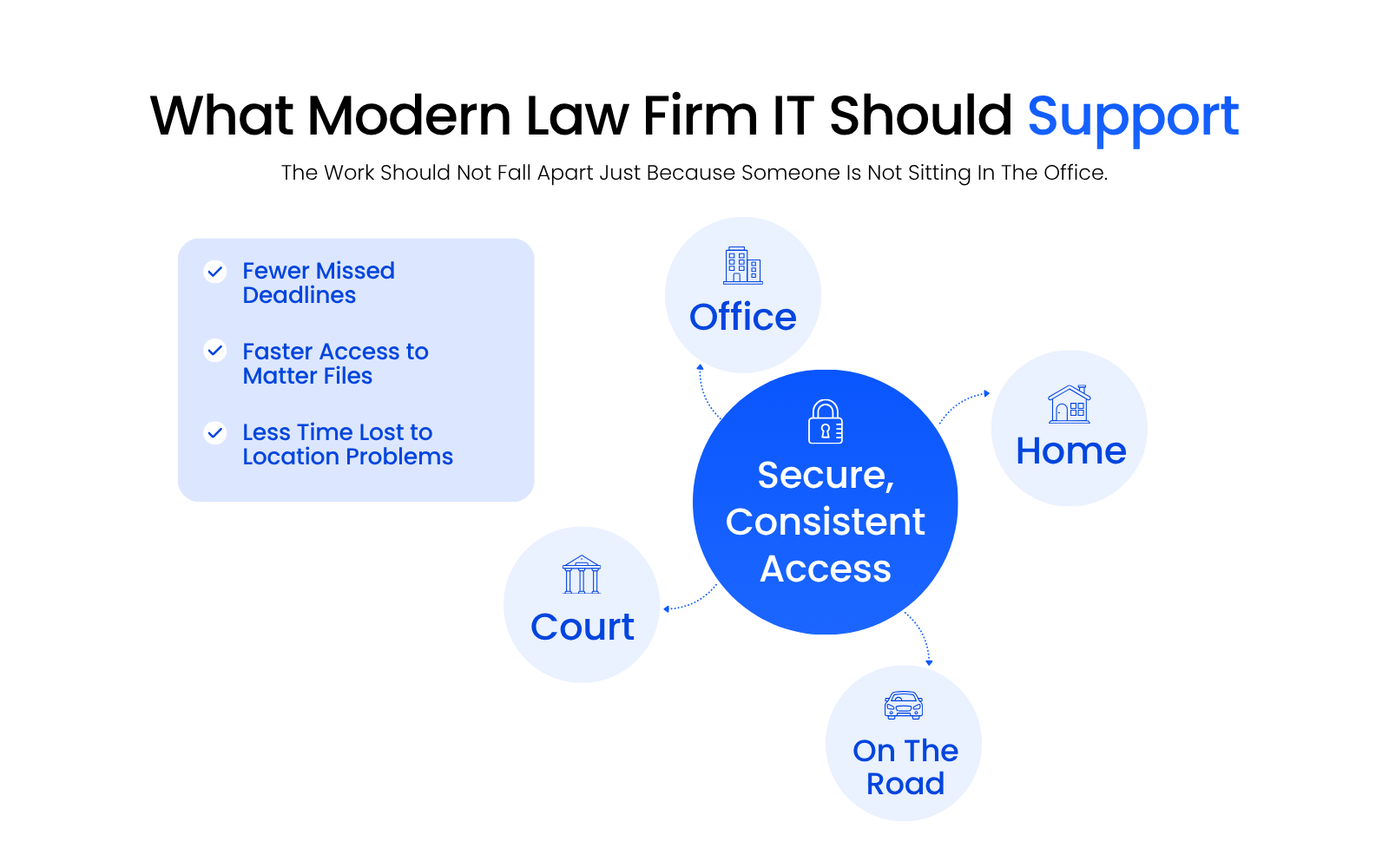
Good IT should make your firm more flexible, more secure, and easier to operate, especially when legal work is happening across office, home, court, and travel. That means attorneys and staff can pull up a document, confirm a filing deadline, or respond to a client from wherever they happen to be, without losing time re-explaining the environment or working around a system that only behaves in one location.
Modern IT Should Make the Firm Easier to Run
This is the bigger point: modern IT shouldn’t just help people log in from different places; it should make deadlines easier to hit, billing easier to track, and client communication easier to keep up with, regardless of where someone’s sitting. That means:
When your environment is set up well, your people spend less time on access issues and workarounds, and more time on billable, client-facing work.
What to Look for in a Managed IT Provider for Your Law Firm
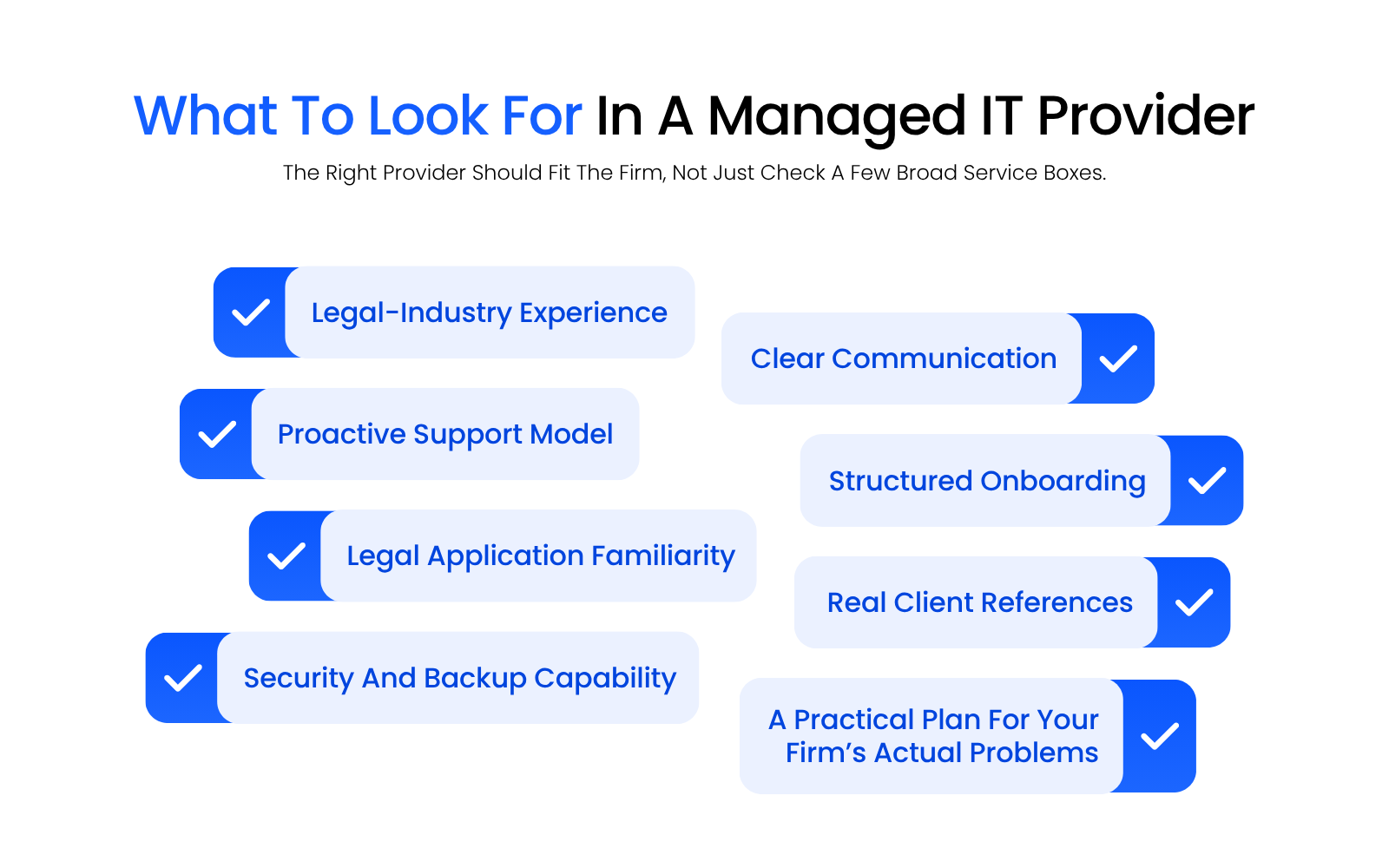
A lot of legal IT providers can say the right things on a website, but that doesn’t make them the right fit for your firm.
Watch · 8 min
How to read a managed IT proposal before you sign
The questions below, in practice: where a proposal's scope stops, who actually answers at nine at night, and three things that are almost never line items.

Ask What Legal Experience Actually Looks Like
“Legal-industry experience” should mean more than a few law firms on a client list, whether the provider works only with law firms or is a national legal MSP with its own legal practice. Ask what kinds of firms they support, which legal applications they work with regularly, and how often they deal with the workflows those systems create.
A specialized provider should be able to talk comfortably about document access, email workflows, onboarding and offboarding, permissions, remote work, shared matter access, and what downtime actually costs inside a law firm.
Ask What “Proactive” Means in Practice
A lot of providers describe themselves as proactive. Ask what that actually looks like:
A good provider explains how they reduce recurring friction, not just how they respond once it surfaces.
Ask What Proof They Can Provide
You shouldn’t have to take broad claims at face value. Ask for law-firm references, how they support legal applications in practice, and how they handle transition and onboarding, including what the first 30 to 90 days usually look like.
The right provider leaves you with a clear sense of how they work and why their approach fits how your firm actually operates. If the answer sounds like dressed-up break-fix support, that tells you something.
Ask How They Handle the Problems Firms Actually Feel
This is where choosing the right provider gets real. Ask how they handle:
The answers tell you whether they’ve run this playbook inside a law firm before, or whether you’d be their learning curve.

What Happens During Onboarding or an IT Assessment
A good IT assessment happens before anything changes, so the provider actually understands your environment before recommending what to do about it. This should feel like the beginning of a plan, not a vague sales exercise.
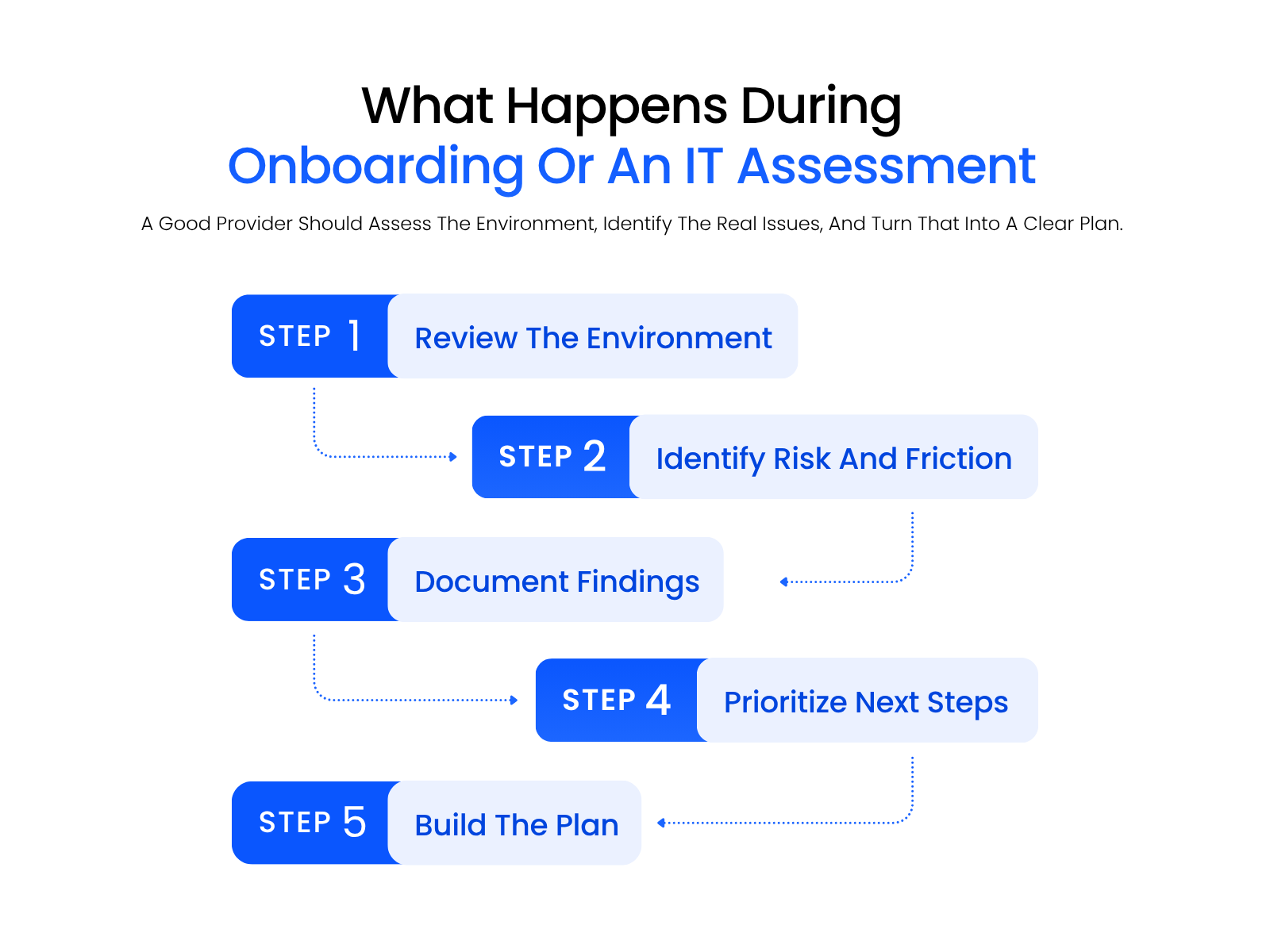
A solid assessment answers a few basic questions: what’s working well enough to leave alone, what’s creating unnecessary risk or friction, and what needs attention first.
What a Good Assessment Should Actually Produce
A good assessment produces findings, priorities, and a practical path forward, not just observations. That usually means a clearer picture of your current environment, the biggest risks and friction points, what’s causing repeated issues, and a set of prioritized next steps.
If the output is just “here are some things we noticed,” it isn’t enough.
Onboarding Should Turn Findings into Execution
Once the provider understands your environment, onboarding should move from diagnosis to execution. That usually means walking you through:
If you have internal IT, that should be part of the plan too: good managed IT doesn’t have to replace internal resources to be useful. In a lot of firms, the better answer is coordination.
The Output Should Be a Cleaner, More Stable Environment
The point of onboarding isn’t just getting through onboarding. It’s leaving you with a cleaner environment, a clearer support structure, and fewer avoidable problems waiting around the corner: a clearer roadmap, cleaner operations, better support visibility, and a plan for making the environment easier to run.
Managed IT Should Make the Firm Easier to Run
Managed IT isn’t just about having someone to call when something breaks; for your firm, it means fewer repeated issues, less disruption, and a more stable environment for the people actually doing the work.
That’s also why the right provider fits your firm, not just the service category. A generalist can be technically capable without understanding shared matter access, document workflows, or the pace legal work actually runs at.
The goal is simple: fewer workarounds, fewer surprises, and more confidence that your technology is helping, not getting in the way.
WHAT’S NEXT
Frequently Asked Questions

Uptime Legal’s Technology Solutions
Cloud, software, IT, and document management built for today’s law firms.