Table of Contents
Most law firms start looking at outsourced IT for the same reasons.
Support is reactive. Remote access is inconsistent. Security questions are harder to answer. Too much depends on one person who happens to know how everything works.
At a certain point, that setup becomes a liability — for productivity, for client data, and for the firm’s ability to grow without adding administrative weight.
This guide covers what outsourced IT actually looks like for law firms, what it typically includes, how to evaluate whether it’s the right fit, and what to look for in a provider.
What Is Outsourced IT for Law Firms?
Outsourced IT for law firms means hiring an outside provider to handle some or all of the firm’s technology support and oversight on an ongoing basis.
That matters because law firm IT goes beyond keeping devices running. It affects document access, email, billing, remote work, confidentiality, and the software the firm relies on to do legal work.
When those systems are unstable, the problem doesn’t stay in the IT lane for very long. It slows people down, interrupts client work, and creates avoidable risk.
A good outsourced IT relationship should do more than react to problems. It should help the firm run in a more reliable, supportable, and secure way over time.
That’s the difference between outside help that simply closes tickets and outside help that actually improves the environment.
What IT Services Do Law Firms Typically Outsource?
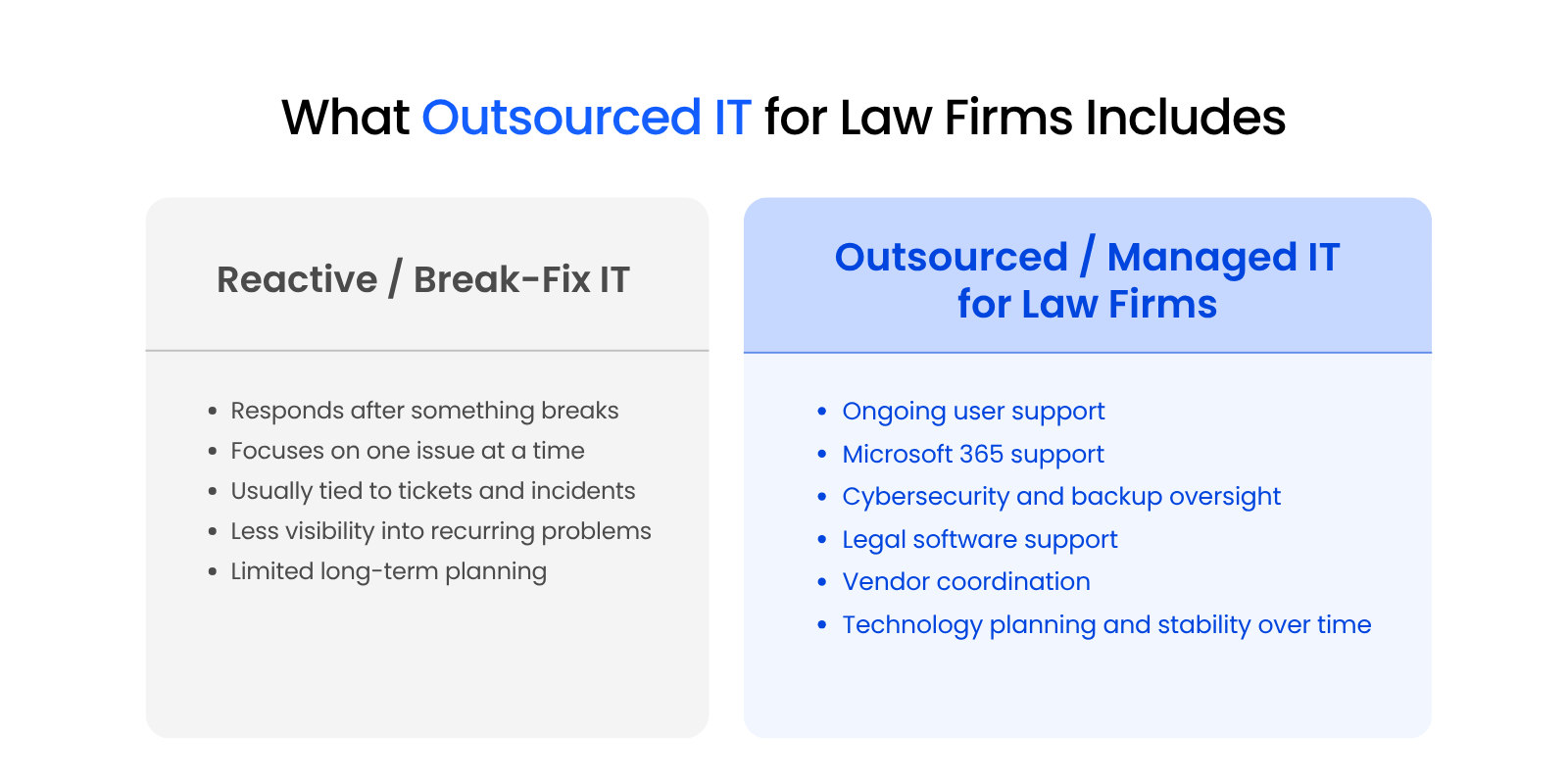
The exact scope varies by provider and by firm, but outsourced IT for law firms often includes:
Many firms think they are shopping for IT support when they are really trying to solve a larger operational problem.
Instead of just having someone to call when something breaks, they really benefit from a provider that can support the full working environment the firm depends on every day.
Outsourced IT vs. Managed IT Services: Is There a Difference?
Sometimes the terms are used interchangeably. In practice, outsourced IT usually describes the decision to rely on an outside provider rather than handling everything internally.
Managed IT for law firms usually describes the service model, meaning ongoing monitoring, maintenance, support, and planning instead of purely reactive break-fix work.
The distinction is useful, but the bigger question is simpler: what is the provider actually doing for the firm?
If the answer is mostly fixing issues as they come up, that’s one kind of relationship.
If the answer includes proactive maintenance, security oversight, user support, legal software help, and planning, that’s a more complete model and usually the one firms are actually looking for when they start researching outsourced IT.
Why Law Firms Outsource IT: The Core Benefits
Law firms outsource IT because weak technology support costs more than most firms want to admit. It costs billable time, slows down legal work, frustrates staff, and leaves the firm exposed to problems that should have been prevented earlier.
The benefit is creating an environment that is more stable, more supportive, and less disruptive to the actual work of the firm.
Billable Hour Protection: The Hidden Cost of IT Downtime
Downtime is expensive even when it doesn’t look dramatic.
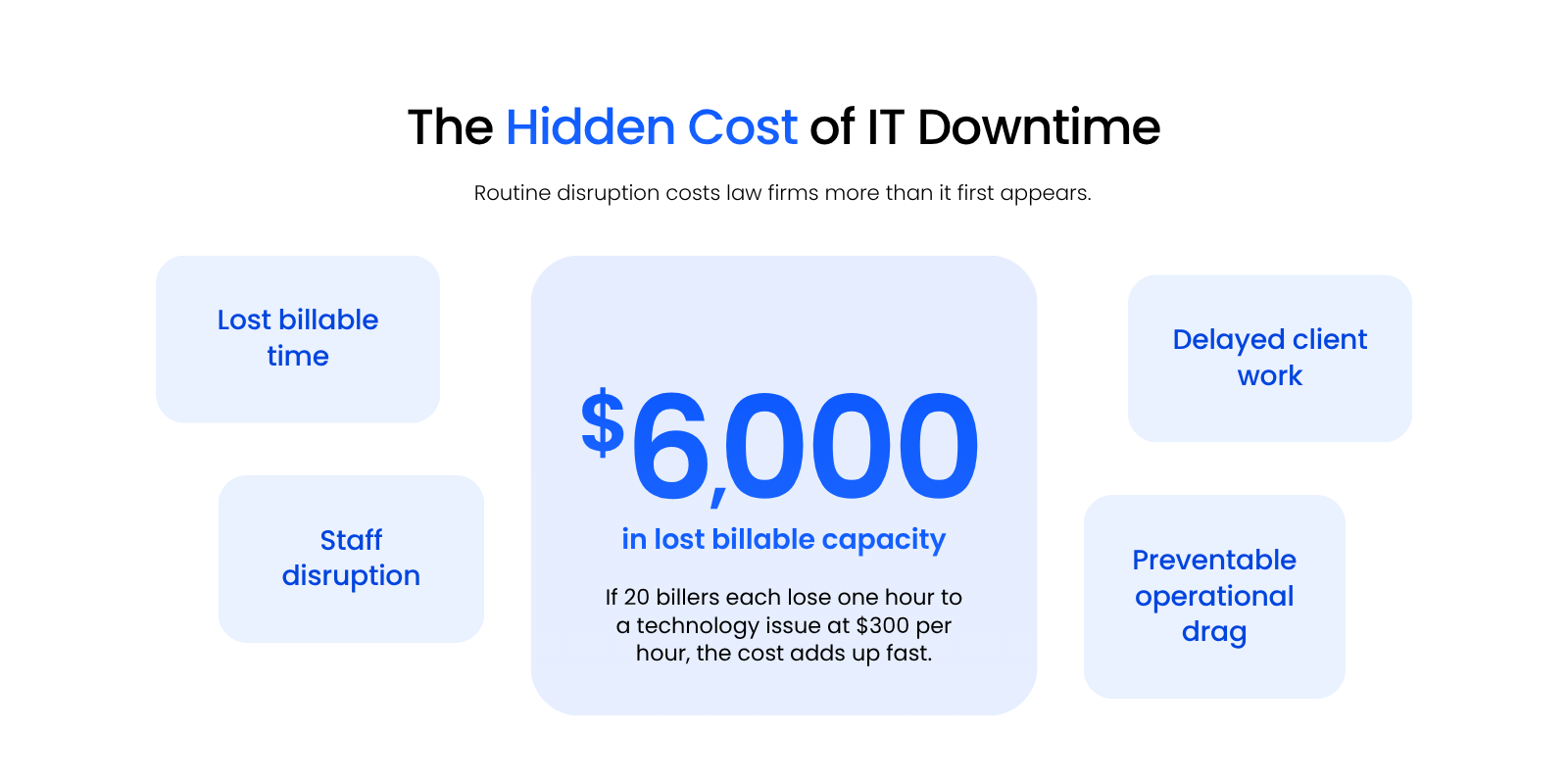
Sometimes the loss is obvious, like a firm-wide outage. More often, it shows up as the accumulated friction that costs the firm hours every week without a single identifiable incident.
A slow remote login. A Microsoft 365 issue that drags on. A legal application glitch that keeps getting worked around instead of actually fixed. None of those problems sound catastrophic on their own, but they stack up fast.
If 20 billers each lose one hour to a technology issue, and their average hourly rate is $300, that is $6,000 in lost billable capacity before you even account for staff disruption, delayed follow-up, and the time it takes to get everyone moving again.
That’s why this decision should be viewed as an operations issue, not just a support issue. Every hour the firm spends working around technology problems is an hour that can’t be spent on legal work.
Access to Legal Software Expertise
A firm can hire a competent general IT company and still end up with a serious support gap if that provider doesn’t understand legal software.
That gap shows up fast when the issue touches a practice management platform, document management system, billing workflow, or Microsoft 365 setup that is tied to how the firm operates.
Uptime Legal’s services reflect that distinction by pairing managed IT with legal application support and legal cloud hosting, rather than treating software support as someone else’s problem.
When a provider can’t support the systems that run the firm, the result is usually slower troubleshooting, more finger-pointing between vendors, and more time lost while your staff explains the environment to the people who are supposed to be supporting it.
Proactive IT Management vs. Break-Fix Support
Break-fix support starts after the firm already feels the problem.
A proactive IT model is supposed to do more than close tickets. It should monitor systems, maintain the environment, reduce avoidable risk, and catch issues earlier, before they turn into bigger disruptions.
That doesn’t mean nothing ever breaks. It means the provider’s job is not just to respond after the damage is already done. It’s to reduce how often the firm ends up in that position in the first place.
This difference matters because law firms don’t have much room for recurring friction. When access breaks, software drags, or support becomes unpredictable, the impact spreads quickly across attorneys, staff, deadlines, and client work.
Cost Structure: What Outsourced IT Actually Costs
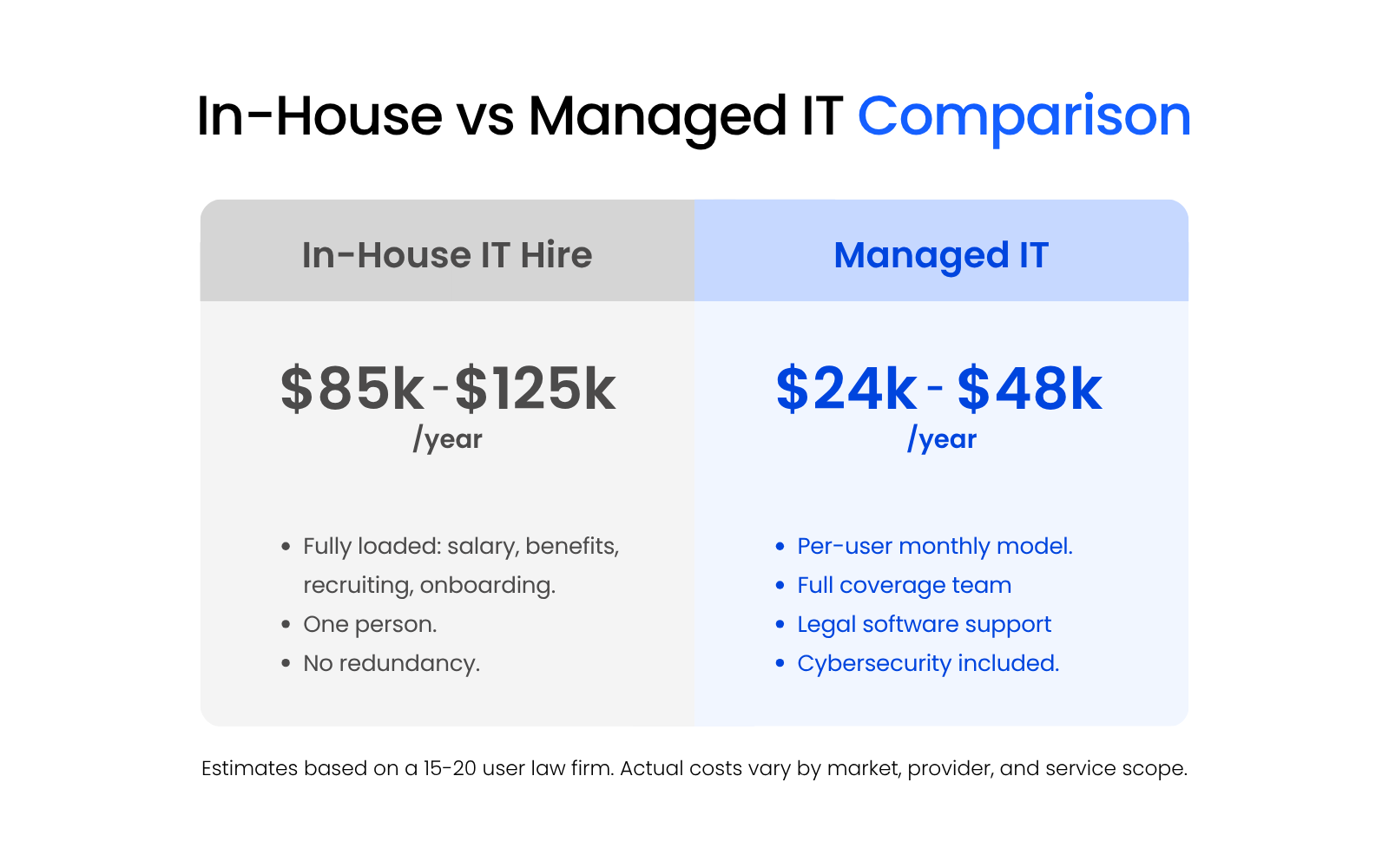
For a 15–20 user law firm, outsourced managed IT typically runs $24,000–$48,000 per year — roughly $100–$200 per user per month depending on scope, firm size, and provider. That includes a full coverage team, legal software support, and cybersecurity.
An in-house IT hire at the same firm costs $85,000–$125,000 per year in salary alone — before benefits, recruiting, onboarding, or the coverage gaps that come with a single person. One hire means one person’s availability, one person’s knowledge base, and no redundancy when that person is sick, on vacation, or leaves.
The math isn’t close. And it doesn’t account for the legal-specific expertise most in-house generalist hires won’t have on day one, if ever.
(Estimates based on a 15–20 user law firm. Actual costs vary by market, provider, and service scope.)
Why Smaller Firms Still Benefit
Compared to big firms, small firms still require:
In some cases, the impact of poorly managed IT is sharper because there are fewer people to absorb the disruption.
That’s why IT support for law firms can make sense well before a firm is large enough to justify a full internal IT department.
Compliance and Security Obligations for Law Firms
When a law firm outsources IT, the firm still carries responsibility for client confidentiality, vendor oversight, and technology risk.
That gives this decision more weight than a routine support purchase. The provider needs technical skill, and the relationship needs to hold up under the firm’s obligations around confidentiality, supervision, and operational risk.
ABA Model Rules and the Technology Competence Obligation
Lawyers are expected to understand the benefits and risks of relevant technology, protect client information, and supervise outside service providers appropriately.
For a law firm, that translates into practical decisions about who supports firm systems, how access is handled, what safeguards are in place, and whether the provider relationship is being managed with real care.
Once a firm brings in an outside IT provider, those questions become part of the operating model. The firm should have a clear handle on who can access systems, how support is delivered, and how the provider relationship is being monitored over time.
Protecting Attorney-Client Privilege Through Proper IT Controls
A security failure in a law firm can expose confidential client information, interrupt active matters, and create difficult conversations with clients and internal stakeholders.
The financial impact of a breach is already serious. In a law firm, the consequences can also include privilege concerns, reporting obligations, matter disruption, and reputational damage that lingers well after the technical event is over.
That’s why cybersecurity for law firms extends beyond purely technical controls and into operational and legal risk.
Access management, backups, patching, endpoint protection, and multi-factor authentication all help reduce the chance that an ordinary weakness grows into a much larger legal and client-service problem.
Vendor Supervision Still Matters After You Outsource
Outsourcing IT changes who performs the work. It doesn’t change the need for oversight.
In practice, the firm should understand what the provider is doing, what systems the provider can access, what safeguards are in place, how support is handled, and how issues are escalated. The firm should also know who owns key security tasks and what happens when the provider needs to work in systems tied directly to client matters.
The practical requirement is straightforward: choose providers carefully, set expectations clearly, and keep enough oversight in place to know whether the relationship is working the way it should.
Cyber Insurance Is Raising the Bar
For a lot of firms, cyber insurance is forcing this conversation into the open.
Applications and renewals often ask about multi-factor authentication, endpoint protection, backups, patching, access controls, and incident preparedness. Those questions reveal whether a firm has real structure behind its security practices or a loose collection of assumptions.
A strong outsourced IT provider should help the firm strengthen those controls, document them clearly, and answer those questions with more confidence.
AI Governance Is Now Part of IT Oversight
AI governance now belongs in the broader technology-risk conversation.
Once staff start using AI tools, the firm has to think about where data is going, what tools are approved, what information should never be entered, and who’s responsible for setting those boundaries. Those decisions now sit inside the same larger conversation about access, security, and technology oversight.
A useful provider will understand that AI use has become part of the current risk environment and that unmanaged usage can create problems quickly.

How Law Firms Can Meet Bar Association Tech Competency Standards:
Understand what bar compliance actually demands from your firm’s technology and how to meet it.
Common Challenges, and How to Avoid Them
Outsourcing IT can improve a law firm’s environment, but the relationship still has to be structured well. Most problems here are predictable.
They usually show up when the provider doesn’t understand legal software, when the transition is handled casually, or when service expectations stay vague.
The Generalist MSP Problem
A lot of firms run into trouble here. A provider may be perfectly competent on broad business IT and still struggle with the systems that shape the workday in a law firm.
When the issue touches a practice management platform, document management, time and billing, or a cloud-hosted legal app, a generalist provider can quickly become the middleman between the firm and the real problem.
That usually leads to slower troubleshooting, more finger-pointing between vendors, and more time lost while firm staff explain their own environment.
A stronger fit is a provider with real legal application support experience and a working understanding of how law firms operate day to day. That shortens the path to the real issue and reduces the chances that the firm gets stuck coordinating support across multiple vendors.
Managing Data Security During Transitions
Transition periods create risk because access, backups, documentation, and vendor handoffs are all in motion at once.
If those pieces are handled casually, the firm can end up with former staff still having access, current staff losing access they actually need, or backup jobs nobody realizes are failing until a restore is suddenly needed.
For example, if a firm changes providers without fully mapping user permissions, shared mailboxes, remote access dependencies, and backup coverage first, the firm can create a mess in a hurry. Someone loses access on day one, a former employee account stays active longer than it should, or a backup issue sits quietly in the background until something has to be recovered.
A good provider should review the current environment before major changes start, identify weak spots early, and move in a way that is planned, documented, and controlled.
Setting and Enforcing Service Level Expectations
A lot of disappointment in outsourced IT comes down to ambiguity:
Before signing, the firm should know who answers first, what counts as urgent, how issues are escalated, when after-hours support applies, and how recurring problems are tracked over time.
It also helps to ask how the provider handles issues that cross vendors or systems. If Microsoft 365, a legal platform, and the network are all part of the same problem, the firm should not be left coordinating the response on its own.
Clear expectations won’t eliminate every support issue. They do make it much easier to tell whether the relationship is working the way it should.
How to Choose an IT Outsourcing Partner for Your Law Firm
A lot of providers can say the right things on a website. That doesn’t make them the right fit for a law firm.
The better approach is to evaluate them against the actual problems your firm needs solved.
1. Define the Real Issues First
Start with a law firm IT assessment to map the firm’s actual friction points: downtime, poor support, security gaps, weak remote access, sloppy onboarding, legal software pain, or too much dependence on one internal “tech person.”
That step matters because a provider evaluation gets fuzzy fast when the firm is reacting to general frustration instead of naming the real breakdowns.
2. Require Legal Software Familiarity
This should be non-negotiable.
Ask which legal platforms they support regularly and how they handle problems when those systems intersect with Microsoft 365, cloud hosting, document management, or local devices.
If the answer sounds vague, overly cautious, or overly dependent on someone else, that usually tells you something.
3. Ask What Proactive Support Really Means
Don’t accept a vague promise.
Ask how they monitor systems, how they handle patching, how they surface recurring issues, and how they prevent the same problems from repeating.
A firm should leave that conversation with a clearer sense of what the provider is actually doing between support tickets.
4. Evaluate Security and Continuity Depth
Ask how they approach multi-factor authentication, endpoint protection, backups, disaster recovery, access controls, and documentation.
You’re not just looking for a security sales pitch. You’re looking for evidence that the provider understands how to support an environment that handles confidential legal work.
5. Review Their Microsoft 365 and Email Support
For most firms, Microsoft 365 is too central to treat lightly.
You want a provider that actually supports the environment the firm works in all day, not one that treats it like a side system somebody else can sort out later.
6. Understand the Onboarding Process
A good provider should be able to explain what they review, what they document, what happens first, and what your team should expect during the transition.
If onboarding sounds improvised, vague, or overly sales-led, that’s worth paying attention to.
7. Pay Attention to Communication Style
Are they clear? Are they listening? Are they asking smart questions? Or are they hiding behind jargon and broad assurances?
The evaluation process often tells you a lot about what the actual working relationship will feel like.
8. Ask for Law-Firm-Specific Proof
References, examples, supported software, and law-firm case context are all more useful than generic testimonials from unrelated industries.
You don’t need a theatrical pitch. You need evidence that the provider has supported firms with similar workflows, similar software, and similar pressure points.
9. Clarify Pricing and Exclusions
Know what is included, what’s not, how projects are scoped, and what support boundaries exist.
This is also where it helps to ask about after-hours support, escalation paths, vendor coordination, and where project work begins.
10. Choose the Provider That Fits the Way Your Firm Works
The goal is to find a provider that makes the firm easier to run.
That includes support depth, legal-software familiarity, communication style, security maturity, and the ability to solve the actual problems that pushed the firm to look in the first place.
A provider like Uptime Legal belongs in that conversation because the service model is built around law firms, legal applications, cloud hosting, and managed IT, rather than generic business support repackaged for legal later.
Is Outsourced IT Right for Your Law Firm?
Outsourced IT is often a strong fit when the firm is dealing with recurring downtime, weak remote access, security pressure, legal software issues, or too much dependence on one internal “tech person.” It also makes sense when growth is putting more strain on a setup that already feels harder to manage than it should.
That doesn’t mean every firm should outsource everything.
The real question to ask yourself is simpler: is your current setup giving the firm a stable, secure, legally aware environment, or is the firm quietly compensating for technology problems every day?
If the answer depends on workarounds, memory, or hoping the right person is available when something breaks, the model is probably wearing thin.
WHAT’S NEXT
Frequently Asked Questions

Uptime Legal’s Technology Solutions
Cloud, software, IT, and document management built for today’s law firms.