Table of Contents
Small and midsize law firms often make technology decisions when something forces the issue — a laptop fails, a cyber insurance questionnaire asks uncomfortable questions, attorneys start complaining about remote access.
That reactive pattern gets expensive. The cost shows up in downtime, rushed purchases, inconsistent security, and unpredictable IT spending.
Law firm IT strategy is the practical alternative. For a small or midsize firm, it’s a structured way to understand the technology environment, plan what needs attention, and make better decisions before problems become urgent.
This guide explains what IT strategy means for a law firm, what a practical technology roadmap should include, who drives it when there’s no internal IT director, and how to tell whether your firm is planning ahead or reacting under pressure.
What IT Strategy Actually Means for a Law Firm
IT strategy for a law firm is the practice of making intentional, forward-looking decisions about how the firm’s technology environment is managed, maintained, secured, and improved.
For a small or midsize law firm, that usually means knowing what technology the firm has today, understanding what’s aging or creating friction, planning upgrades before they become emergencies, and making technology decisions based on how the firm actually operates.
The goal is visibility.
A managing partner or firm administrator should be able to answer basic questions about the firm’s technology environment without starting from scratch every time:
That’s the real value of law firm IT strategy. It turns technology from a series of one-off decisions into a working plan for how the firm operates.
Why Reactive IT Management Costs More Than It Seems
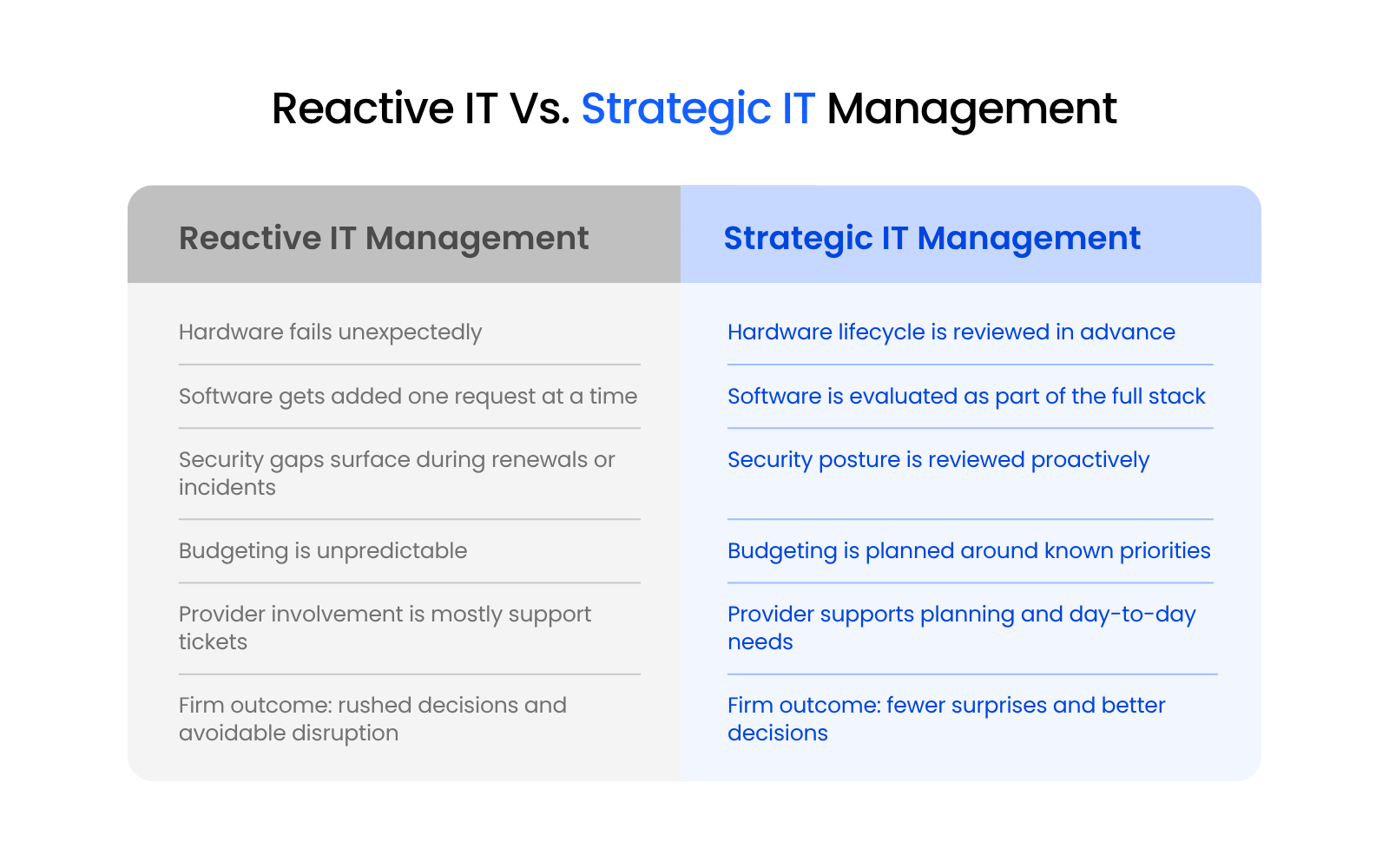
Reactive IT management can feel cheaper because the firm only spends money when something breaks or someone asks for a change.
That math rarely holds up.
The invoice for a replacement laptop, emergency migration, or urgent support call is only part of the cost. The larger cost often shows up in lost time, rushed decisions, avoidable risk, and productivity drag that becomes part of the firm’s daily routine.
For example:
None of these problems begin as full-blown emergencies. They usually start as small signs that the firm’s technology environment needs attention.
Reactive IT gives the firm fewer choices. By the time something breaks, leadership is usually making decisions under pressure. That can mean paying rush costs, accepting temporary fixes, choosing the fastest available option, or delaying other priorities because a technology problem suddenly moved to the front of the line.
That shift — from break-fix to proactive IT planning — gives the firm more visibility, more time, and better options before routine issues become disruptive.
What a Law Firm Technology Roadmap Actually Contains
A law firm technology roadmap is a working plan for the firm’s technology environment. It identifies what the firm has, what needs attention, which decisions are coming, and what should be budgeted over time.
For a small or midsize law firm, the roadmap should be practical enough to use. It should help the firm and its IT provider make better decisions throughout the year, not sit untouched after one planning meeting.
A useful law firm technology roadmap usually covers five areas:
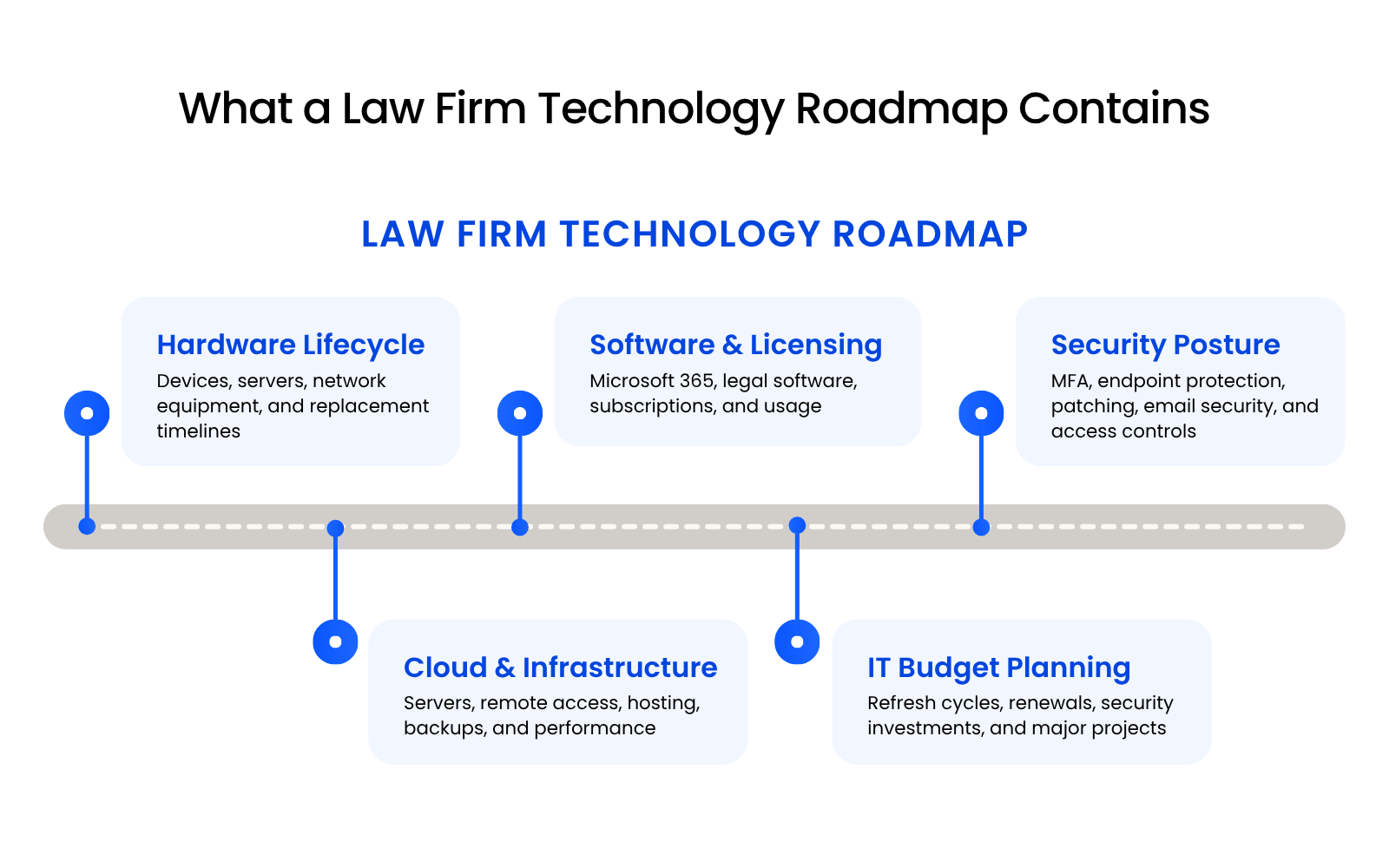
Hardware Lifecycle Inventory
A hardware lifecycle inventory tracks the devices and equipment the firm relies on, along with when they may need replacement.
That includes workstations, laptops, servers, network equipment, printers, scanners, mobile devices, and conference room technology. The firm should know which equipment is current, which is aging, and which replacements need to be planned into the budget.
A firm shouldn’t discover that multiple attorney laptops are past their useful life because they start freezing during client calls or slowing down during deadline-heavy work.
Planned replacement is usually calmer, cleaner, and less disruptive than emergency buying.
Software, Licensing, and Legal Tech Stack Review
A software and licensing review looks at the systems the firm pays for, how those tools are being used, and whether they still support the way the firm works. It matters because law firms often accumulate tools one request, renewal, or implementation at a time.
This review should include Microsoft 365 licensing, practice management software, document management, time and billing, accounting integrations, e-filing tools, security tools, and unused or duplicate subscriptions.
The practical question is simple: Is the firm’s software stack supporting the way people actually work?
If the answer is unclear, you may be carrying hidden costs. Attorneys might be entering information in multiple systems. Staff may be relying on spreadsheets because a tool was never configured properly.
Security Posture and Compliance Planning
Security posture is the firm’s current level of protection across users, devices, systems, email, backups, and access controls. It matters because law firms handle sensitive client information, and weak security practices often become visible only when something forces the issue.
A roadmap should include a practical review of multi-factor authentication, endpoint protection, patch management, email security, user access controls, backup protection, password policies, device security, and cyber insurance questionnaire readiness.
This doesn’t need to become a full cybersecurity overhaul every year. It does need to give the firm a clear picture of where things stand, what risks need attention, and which improvements should be prioritized.
For law firms, security planning also connects to professional responsibility. The ABA’s Comment 8 to Model Rule 1.1 states that lawyers should keep current with the “benefits and risks associated with relevant technology.”
That doesn’t mean every lawyer needs to become technical. It does mean the firm should have a reliable way to understand and manage the technology risks that affect client data, legal work, and daily operations.
Cloud and Infrastructure Direction
Cloud and infrastructure planning looks at where the firm’s systems live, how users access them, and whether the environment can support daily work reliably. It matters because infrastructure problems show up quickly in a law firm: slow applications, unreliable remote access, file access issues, backup concerns, and performance problems during time-sensitive work.
This part of the roadmap should clarify the firm’s direction around server replacement or retirement, cloud hosting, remote and hybrid work, application access, file storage, performance, backup and disaster recovery, and multi-office support if applicable.
A setup that technically works today may still create problems as the firm adds users, changes software, hires remote staff, or needs stronger security controls. Planning ahead helps the firm avoid treating every infrastructure decision like a separate emergency.
IT Budget Planning
A law firm IT budget should do more than track monthly support invoices.
A practical budget helps leadership understand which technology expenses are predictable, which investments are coming, and which decisions need attention before they become urgent.
That includes:
This gives the firm a healthier way to make technology decisions.
Instead of asking, “Why is this suddenly so expensive?” leadership can ask, “What should we prioritize this year, and what can wait?”
That shift matters. It helps the firm plan spending around actual business needs instead of reacting to the loudest problem in the moment.

Types of IT Services for Law Firms:
A practical breakdown of the IT services law firms may need, from day-to-day support to cloud hosting, cybersecurity, application support, and strategic planning.
Legal Software Belongs in the Strategy
A firm might choose a new practice management platform because one team wants better case tracking. That decision can quickly affect document storage, accounting workflows, Microsoft 365 configuration, permissions, reporting, integrations, training, and support.
That’s why legal software belongs in the technology roadmap.
A firm’s core systems shape daily operations:
Without planning, firms often end up with a stack of tools that technically function but feel clunky in practice. Attorneys use one system, staff use another, documents live somewhere else, and reporting becomes harder than it should be.
Better planning gives the firm a clearer reason for keeping, changing, consolidating, or improving the systems it already uses.
Who Drives IT Strategy When You Don’t Have an IT Director
Most small and midsize law firms don’t have an internal IT director. That doesn’t mean technology planning should fall entirely to the managing partner, office administrator, or the attorney who happens to be most comfortable with software.
This is where the vCIO function comes in.
A vCIO, or virtual/fractional Chief Information Officer, is a technology advisor role, typically provided by a managed IT partner, that gives small and midsize law firms access to strategic IT guidance without hiring a full-time IT director.
In practice, that may include:
For a small or midsize firm, this should feel practical, not corporate.
The firm needs a managed IT services provider who understands its environment, reviews it regularly, flags issues early, and helps leadership make better technology decisions.
That may include noticing when several laptops are aging out, when backup practices need testing, when a legal application is creating support issues, or when Microsoft 365 licensing no longer matches how the firm works.
The value is context. A good technology advisor helps the firm see how one decision affects the rest of the environment before that decision creates new problems.
How IT Strategy Supports Law Firm Growth
Technology problems often become more visible when a firm grows.
A process that worked for five people may start to crack at fifteen. Adding attorneys, opening another office, hiring remote staff, changing legal software, or expanding into new practice areas all create technology pressure.
New users need access. Permissions need to be consistent. Devices need to be configured properly. Applications need to scale. Security controls need to keep up. Leadership needs a clearer view of what everything costs.
Without a plan, growth turns into a series of one-off fixes.
A new attorney starts, and onboarding depends on someone remembering every system that needs to be configured. A second office opens, and remote access becomes a bigger headache. A new legal application gets added, and no one has mapped how it affects existing workflows. A client asks about security practices, and the firm has to scramble for answers.
Technology planning helps the firm prepare for those moments. It gives the firm a cleaner way to add users, standardize access, scale systems, support remote work, and budget for the technology changes growth will require.
The value is simple: Growth creates fewer surprises when the technology environment is already planned to support it.
Signs Your Firm Is Running on Reactive IT
Many law firms operate reactively because no one clearly owns the strategy function. Technology decisions get scattered across emergencies, user requests, renewals, and quick fixes.
A firm may be running on reactive IT if:
None of this means the firm has been careless. In many cases, the firm simply outgrew the informal approach that worked when there were fewer users, fewer systems, and fewer security expectations.
A strategic approach gives the firm a way to identify recurring friction, decide what needs attention, and fix the technology problems that quietly cost time, money, and focus across the firm.
What an Annual Technology Review Should Cover
A law firm IT assessment — sometimes called an annual technology review — is the minimum viable version of law firm IT strategy.
It doesn’t need to be complicated. It does need to be structured enough to produce a clear picture of where the firm stands, what needs attention, and what decisions are coming next.
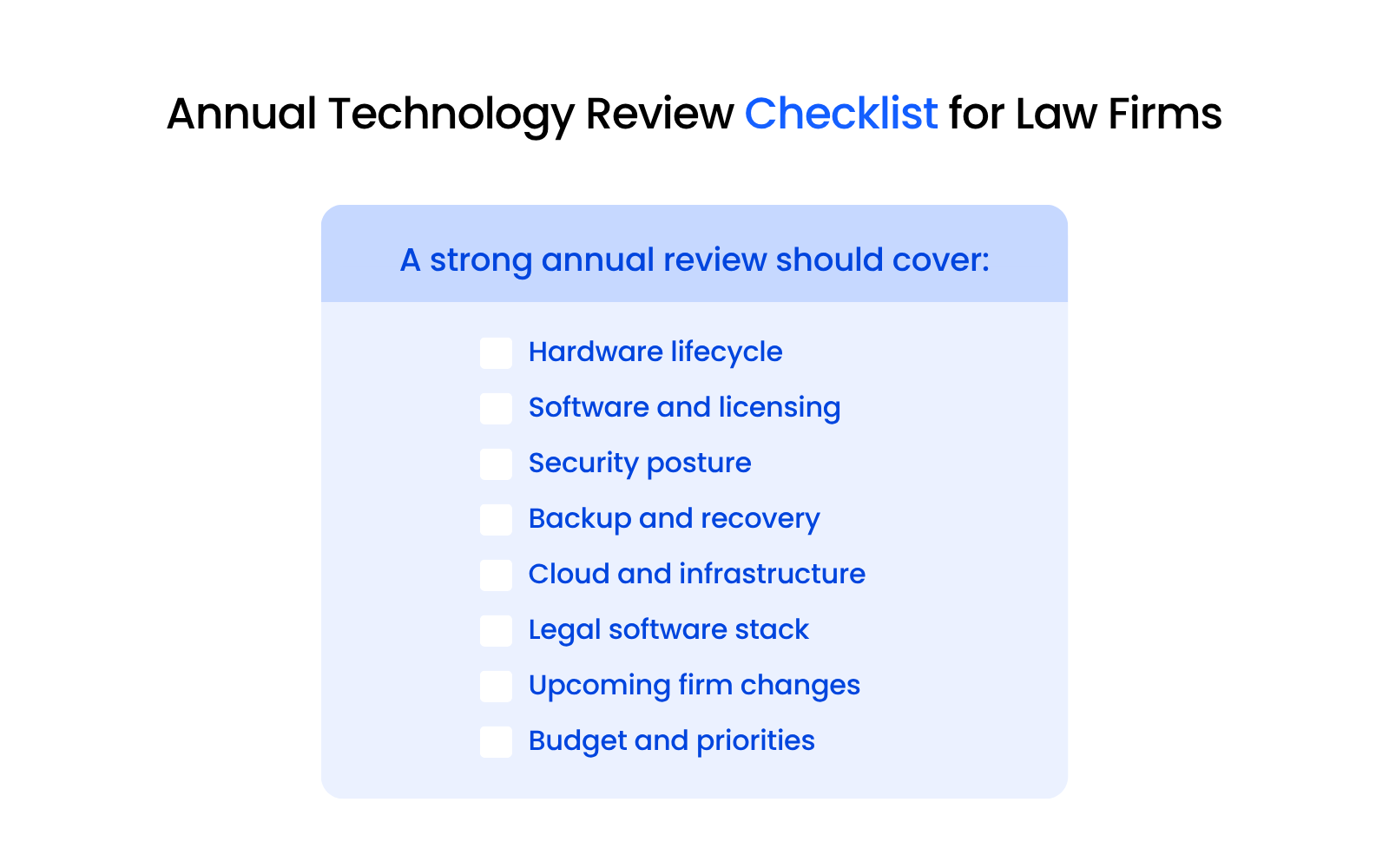
A strong annual technology review should cover:
The review should end with decisions.
How Uptime Legal Approaches IT Strategy for Law Firms
Uptime Legal works with law firms that need technology to be reliable, secure, and aligned with how legal work actually happens.
Through Uptime Manage, firms get more than day-to-day help desk support. The relationship includes ongoing technology guidance, regular environment reviews, security recommendations, legal software support, Microsoft 365 management, cloud planning, and vendor coordination.
That advisory layer matters for small and midsize firms because they often need strategic IT guidance long before they’re ready to hire internal IT leadership.
The goal is consistent: help the firm make technology decisions with more context, fewer surprises, and a clearer plan.
WHAT’S NEXT
Frequently Asked Questions

Uptime Legal’s Technology Solutions
Cloud, software, IT, and document management built for today’s law firms.