Table of Contents
Your firm runs on an aging server in a closet, or a tangle of consumer apps that nobody really controls.
Your team wants to work from anywhere, and somewhere in the back of your mind sits the real question: is moving client data to the cloud actually safe, and responsible?
Cloud is one of the biggest technology decisions a firm makes, and most advice out there either oversimplifies it or tries to sell you something.
This guide walks through the parts of a firm’s cloud setup, the decisions that matter most, and how to move without the risk you’re worried about.
What Cloud Solutions for Law Firms Actually Means
When most firms picture “the cloud,” they picture one of a few things:
Each of those is one piece. The cloud, for a firm, is how those pieces fit together into a single environment your team actually works in.
Cloud Is an Environment, Not a Single App
Your firm’s cloud is the connected setup behind its daily work, so choosing “a cloud tool” is a smaller decision than deciding how your whole firm runs in the cloud.
A practice management app might live in the cloud while your documents sit on a local server and your email runs somewhere else entirely.
That kind of split is where firms get into trouble. When your software, files, and email live in disconnected places, your team spends time bridging the gaps, and your security is only as strong as the weakest piece.
Choosing which practice management app to buy is its own decision, and this guide stays focused on the environment that app runs in.
What Cloud Means Specifically for a Law Firm
Cloud has to account for privileged client data, legal-specific software, and ethics duties that generic business advice skips. Your firm is responsible for maintaining confidentiality obligations, where client files physically sit, and software that often has no modern web version.
Those constraints shape every decision in this guide, which is why a setup built for legal work looks different from a generic small-business cloud.
The Core Components of a Law Firm’s Cloud Environment
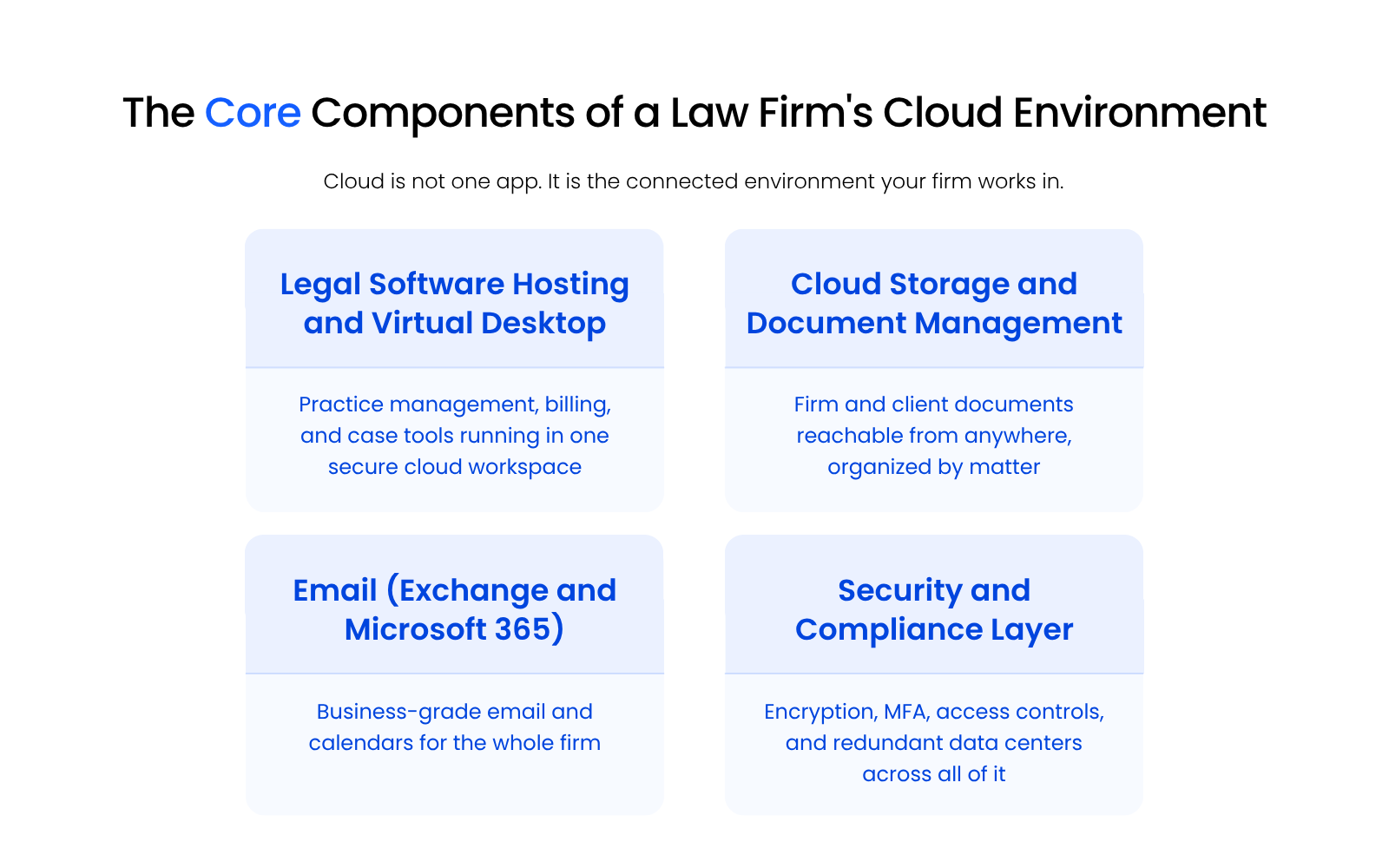
A law firm’s cloud environment is made up of four connected parts: where the firm’s legal software runs, where its documents live, how its email works, and how all of it is secured. Seeing the whole set at once makes it easier to spot what your firm already has and what’s missing.
Legal Software Hosting and the Virtual Desktop
Hosting puts your practice management, billing, and case tools in one secure cloud workspace your whole team signs into from anywhere. Instead of installing software on each machine and a server down the hall, your applications run in a virtual desktop that looks the same whether you’re at the office, at home, or at the courthouse.
This is also where legacy software matters. Many firms run tools like PCLaw, Tabs3, ProLaw, or Time Matters that were never built for the web and have to be hosted to reach the cloud at all.
That gap is why a legal-specialized cloud handles this part of the environment better than a general one.
Cloud Storage and Document Management
Cloud storage keeps firm and client documents reachable from any location, and a legal document management system organizes them by matter. Plain storage solves access.
A document management system adds the structure attorneys actually need: version history, matter-based filing, and search that spans documents and email.
Email (Exchange and Microsoft 365)
Business-grade email and calendars run as part of the same environment, instead of as a separate consumer account bolted on the side. Hosted Exchange or Microsoft 365 gives the firm shared calendars, reliable delivery, and the security controls that consumer inboxes lack.
The Security Layer That Ties It Together
Encryption, multi-factor authentication, access controls, and redundant data centers protect every other component, which is why security is a layer rather than a single feature.
It wraps your software, your documents, and your email at once, and it’s the part that turns “files in the cloud” into something a firm can responsibly trust with client data.
Public Cloud vs. Private Cloud for Law Firms
Public cloud means your firm shares pooled infrastructure run by a large provider, while private cloud means your firm runs on dedicated infrastructure, and for a firm holding privileged client data that distinction shapes control and accountability. It’s the central decision in any cloud move, so it’s worth understanding before you compare providers.
Public Cloud vs. Private Cloud for Law Firms
| Factor | Public Cloud | Private Cloud |
|---|---|---|
| Infrastructure | Shared, pooled across many customers | Dedicated to your firm |
| Security responsibility | Split between provider and your firm | Carried by the provider, configured for legal |
| Data location | Often spread across regions | Known, defined data centers |
| Legal software fit | Limited for legacy or server-based tools | Built to host legal and legacy applications |
| Accountability | Multiple vendors to coordinate | One accountable party |
What Public Cloud Really Means for a Firm
Public cloud (Azure, AWS, and most consumer apps) is shared, scalable, and convenient, and it leaves more of the security and configuration work on your firm. You’re renting space in a system built for everyone, which keeps costs flexible and puts the burden of locking it down on whoever set it up.
For a firm without dedicated IT, that burden is the catch. The platform can be secure, yet it won’t configure itself for confidentiality or legal software on its own.
What a Private, Owned-Infrastructure Cloud Changes
A private cloud running on infrastructure the provider owns gives your firm dedicated resources, tighter control, and a single party accountable for security and uptime.
When the provider owns the servers and network rather than reselling space on someone else’s public cloud, they can take full ownership of how your data is protected and how problems get solved.
Which One Fits Which Firm
The right fit depends on your firm’s software, data sensitivity, and appetite for managing its own security. A firm running only modern web apps with strong in-house IT can do well on public cloud. A firm running legacy legal software, holding sensitive client data, and wanting one accountable partner usually fits a private, legal-specific cloud better.
Why Managed Cloud Outperforms an In-House Server
Managed cloud services combine cloud infrastructure with a team that runs it for you, which is a different proposition than buying a server and maintaining it yourself.
Whichever cloud model your firm chooses, the case for managed cloud over ownership comes down to two things: reliability and cost.
Servers get less reliable every year you keep them:
- Year 1: 5% failure rate
- Year 4: 11% failure rate
- Year 7: 18% failure rate
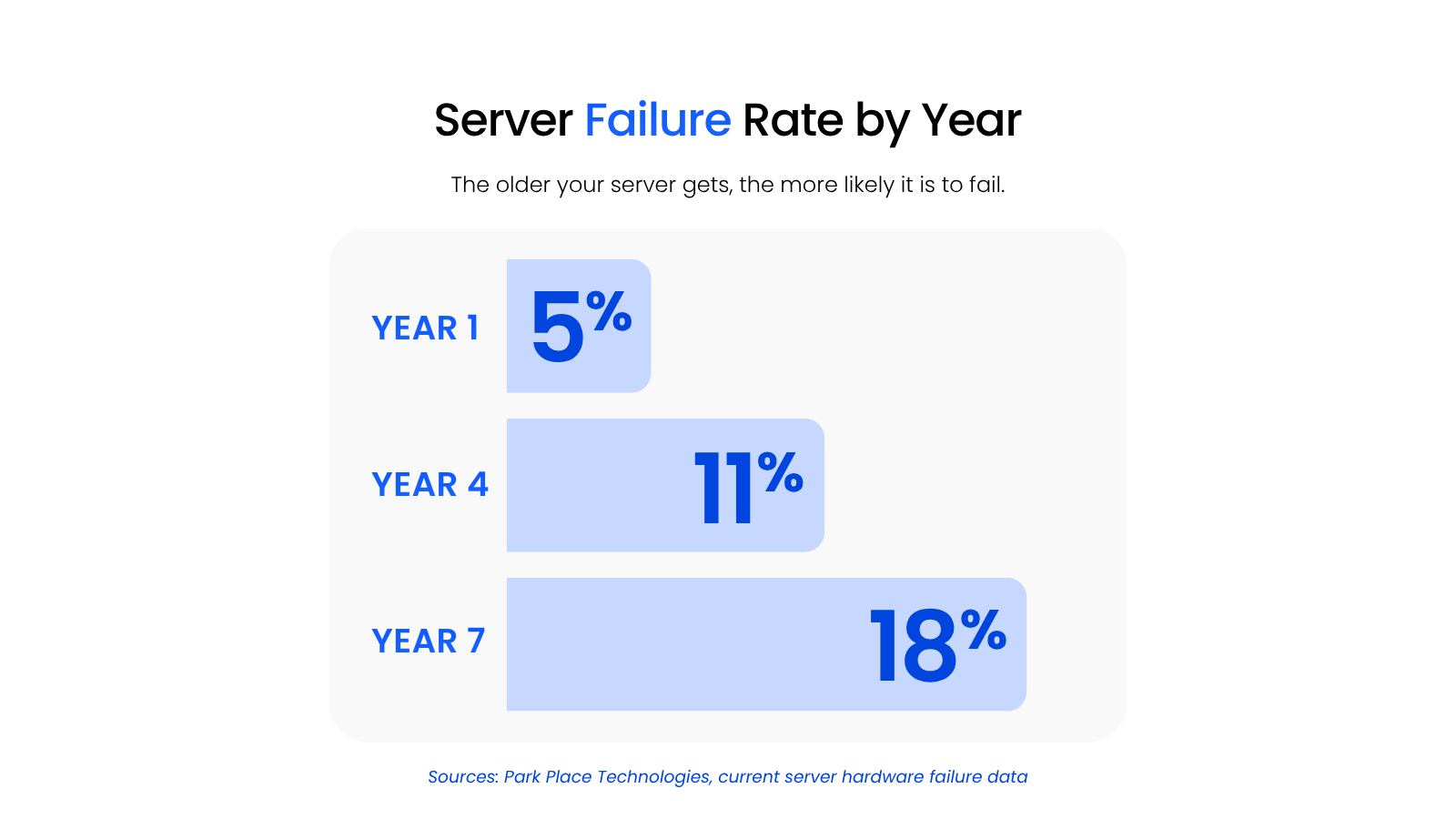
A managed cloud provider absorbs that risk on infrastructure built for it, not on the box in your closet.
The cost case is just as direct:
- On-premise, up front: around $5,250 for a small firm (roughly $3,750 for the server, $750 for a backup system, $750 for a UPS), before a single dollar of ongoing maintenance
- Managed private cloud: a predictable per-user monthly rate with no hardware to buy, from about $495/month for three users on single-app hosting, or $125 to $195 per user/month for a full private cloud
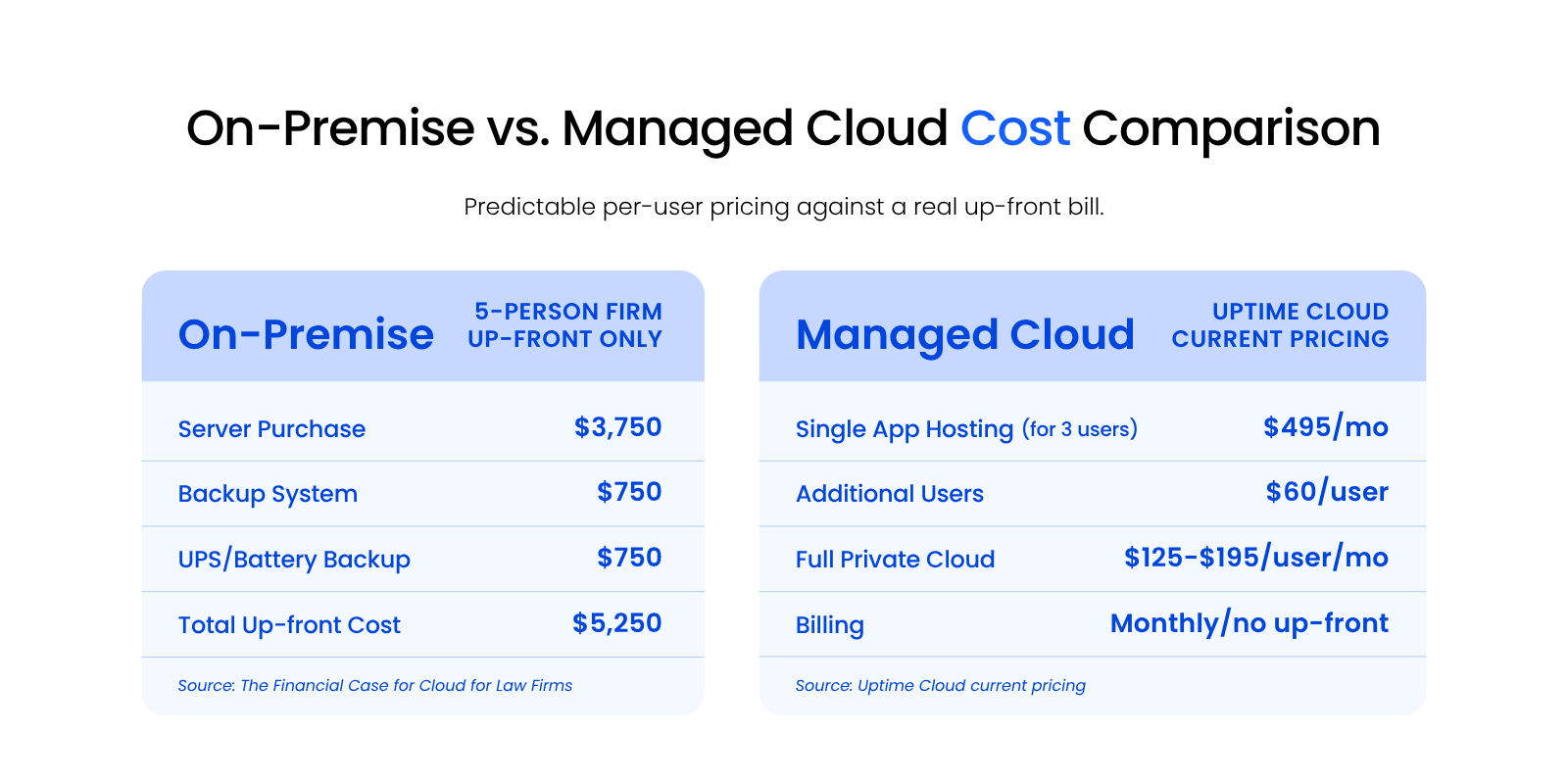
Put together, managed cloud isn’t just more convenient. It’s the more reliable, more predictable choice on the numbers alone.
Is the Cloud Safe and Compliant for Law Firms?
Yes, the cloud can be safe and compliant for law firms, and a well-configured legal cloud is usually more secure than an in-office server, as long as the right controls and confidentiality protections are in place. The instinct that local equals safer is the most common thing firms get wrong here.
Safety in the cloud comes from configuration. The same freedom that lets your team work from anywhere on any device also widens the attack surface, so controls like MFA and device and location checks are what keep that convenience from costing you security.
The Myth That the Cloud Is Less Secure
The belief that an office server is safer than the cloud is backward, because keeping a server in your own four walls also keeps the responsibility for defending it there. Modern cloud security runs around the clock, watches for unusual logins, and patches fast.
A local server maintained by a part-time IT person rarely keeps that pace.
What Actually Makes a Legal Cloud Secure
A secure legal cloud runs on a specific, checkable set of controls, not on good intentions. The following are the controls worth confirming with any provider:
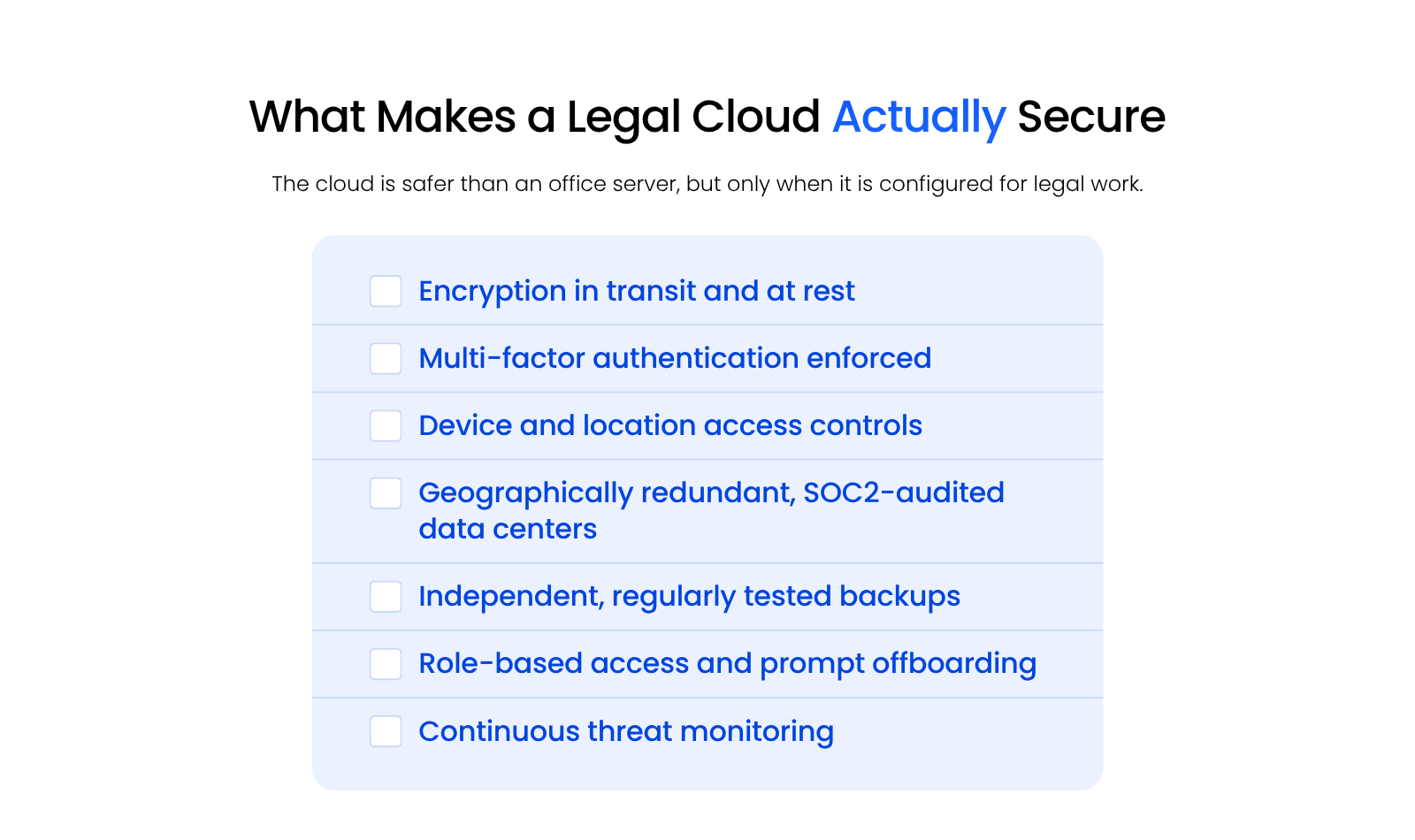
A firm that can check every box has a cloud setup most office servers can’t match.
Confidentiality, Ethics, and Where Your Data Lives
Attorney confidentiality duties turn “where does the data live and who can reach it” into an ethics question, not just an IT one.
ABA Model Rule 1.6 and a growing body of state bar opinions expect you to take reasonable steps to protect client information wherever it’s stored, including in the cloud.That makes a few questions worth asking any provider: where your data physically sits, who can access it, whether you keep ownership of it, and how they’d respond to a subpoena.
Reasonable answers to those questions are part of meeting your duties, though the obligation always stays with the firm.
Choosing and Moving to a Legal Cloud Solution
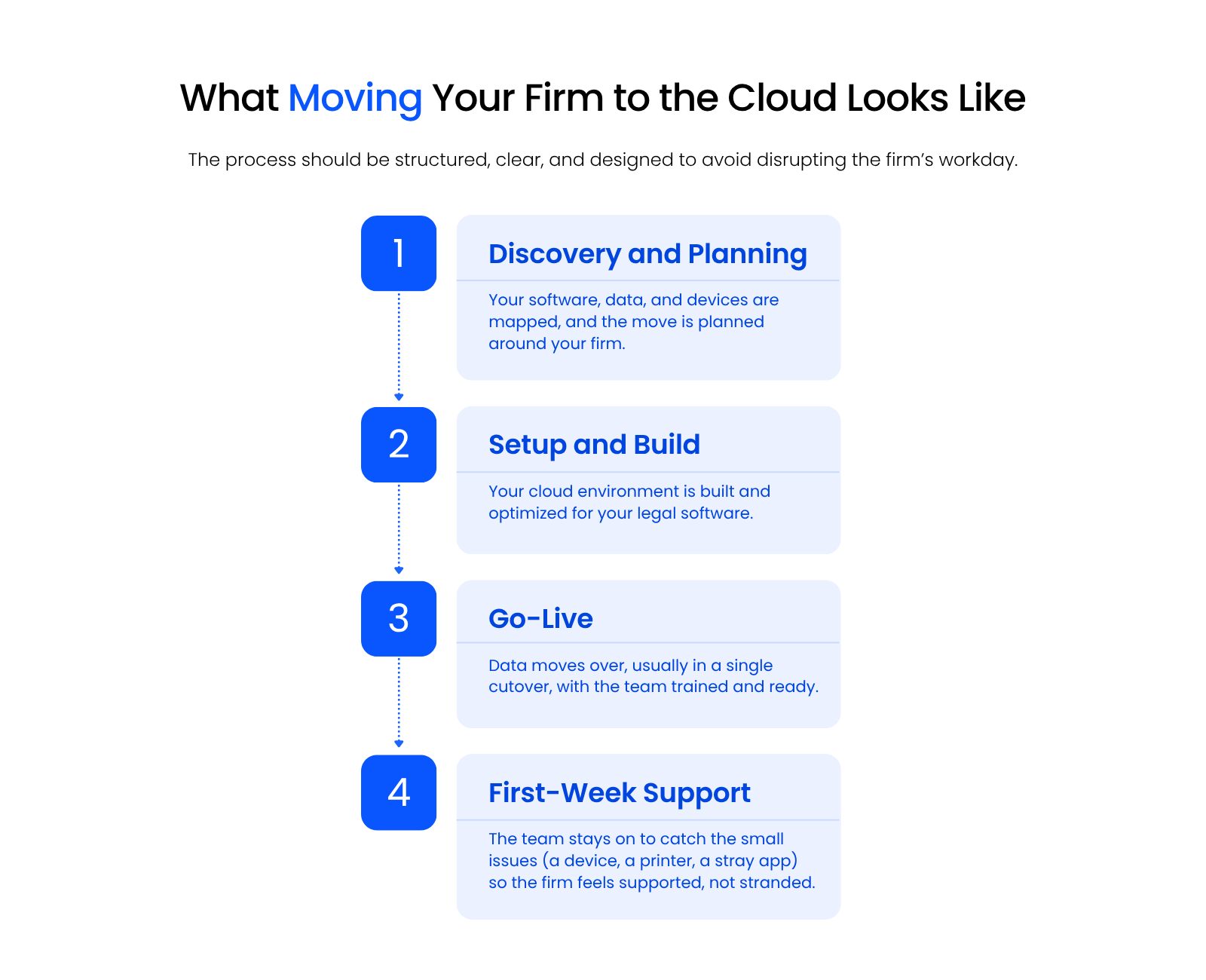
Moving a law firm to the cloud is a planned migration run in stages, discovery, build, go-live, and first-week support, not a risky overnight switch. Understanding what a good move looks like takes most of the fear out of leaving an aging server behind.
What to Look for in a Legal Cloud Provider
The provider should own its security and uptime, understand legal software and workflows, and explain what moving will actually involve in plain terms. A few things separate a legal-specific provider from a generalist:
If a provider can’t speak clearly to those, that tells you something before you sign.
What a Real Migration Looks Like
A well-run migration maps your software and data up front, builds your environment, moves you in a single cutover, and keeps the team supported through the first week.
The move itself is usually one clean cutover, and the team that ran it stays on through the first week to catch the small issues that always surface: a laptop that wasn’t on the network that day, a printer glitch, an application discovery missed.
The goal is for your firm to feel supported through the transition, rather than handed the keys and left to sort it out.
What a Legal Cloud Costs
Most legal cloud providers price the same way: a monthly fee per user, plus a one-time fee to handle the migration. That structure is consistent enough that you can plan around it before you ever request a quote.
What changes the number is your firm. The number of users, the legal software you run (especially anything legacy that needs dedicated hosting), and whether you choose single-app hosting or a full private cloud all move the total.
That’s why you won’t find a flat price list: the cost is scoped to what your firm actually needs rather than sold off a shelf.
Knowing what drives the number is what lets you read a proposal clearly, so the practical next step is asking a provider to scope one to your firm.
What Changes for Your Team Day to Day
After the move, your team can work from anywhere on any device, the kind of remote work a cloud setup is built to support, with files organized by matter and routine IT problems handled by the provider.
The server in the closet stops being something you worry about, and the daily experience gets more consistent across the office, home, and the road, which is really what the cloud vs. on-premise decision comes down to for most firms.
Building a Cloud Setup Your Firm Can Trust
Moving to the cloud isn’t one switch you flip. It’s a set of connected choices about where your software runs, where your client data lives, and who keeps it secure.
Get those right and the day-to-day gets simpler: your team works from anywhere, your files stay organized, and your security improves instead of slipping.
The firms that do well treat cloud as one complete environment built for the way legal work actually happens. Start with what you have, decide what matters most, and move at a pace your firm can absorb.
WHAT’S NEXT
Frequently Asked Questions

Uptime Legal’s Technology Solutions
Cloud, software, IT, and document management built for today’s law firms.