Table of Contents
ProLaw is server-based software, and your firm has a real choice in how you run those servers.
Run it on in-house servers, or move it to a Private Cloud and let someone else own the infrastructure. The second option is what this guide is about: what it actually costs, the real advantages over on-premise servers, and exactly how migration works.
This guide assumes your firm is already using, or has decided to use, ProLaw. If you’re still deciding on law practice management software in general, that decision comes first.
By the end, you’ll know whether moving ProLaw to the cloud makes sense for your firm, and how to actually do it.
Why Move Legal Software to the Cloud?
With the ongoing rise of remote work, more law firms are seeking to escape the burden of costly in-house servers and IT management. Web-based applications have closed much of the gap with established, premise-based software like ProLaw, but many firms are already deeply committed to ProLaw’s functionality and don’t want to start over with a different platform just to gain cloud benefits. There’s a way to get both: keep the software your firm already relies on, and add the mobility, security, and flexibility of cloud technology on top of it.
Who this guide is for:
A Quick Refresher on ProLaw
ProLaw is made by Elite, an independent legal technology company now backed by Francisco Partners. It’s a long-standing law practice management suite that continues to be a top-tier option for practice management, document management, and accounting.
ProLaw is server/desktop-based software, meaning it can run on-premise, on your firm’s in-house servers, or hosted in a Private Cloud, which is exactly what this guide covers.
At a high level, the suite provides client and matter management, calendaring, time and billing, task and workflow management, document management, and accounting, three pillars in one system rather than three separate ones.
Our ProLaw review covers the full evaluation: features, pricing, and honest user feedback.
ProLaw Workspace
ProLaw Workspace is a simplified, web-based interface to the same ProLaw database your firm’s desktop application already connects to. It’s a strong option for casual users who need basic functionality without the full desktop experience, and it works alongside the desktop application without splitting your firm’s data. Some staff can use Workspace while others keep the full desktop version.
Worth knowing: Workspace, like the desktop application, still requires a server or a Private Cloud behind it. Web-based doesn’t automatically mean cloud-based; Workspace just changes how your team accesses the software, not where it’s actually hosted.
Our ProLaw Workspace guide covers the full picture, including a practical, step-by-step walkthrough for getting started.
ProLaw Challenges
ProLaw offers a comprehensive suite of features for law practice management, but certain challenges come with running it, especially on-premise.
That belief doesn’t hold up against where breaches actually happen.
While ProLaw presents these real challenges, most of them can be mitigated or eliminated by opting for a cloud-hosted solution instead of running it on-premise.

Cybersecurity for Law Firms:
Cybersecurity, especially for law firms, is nothing to be trifled with. Utilize this article to understand the risks, the best practices, and more.
Advantages of ProLaw in the Cloud
1. The Best of Both Worlds: Keep the comprehensive legal software your firm is already committed to and relies on every day, while enjoying the mobility, accessibility, and security advantages that come with the cloud.
2. Managing Servers & IT is a Pain: Running ProLaw on-premise means your firm has to purchase server equipment every 3 to 5 years, purchase and implement Microsoft SQL Server, implement and manage backups and disaster recovery, implement and manage data security, perform routine preventative server and IT maintenance, and retain an IT consultant or firm to keep it all running. That’s a lot of ongoing responsibility for a firm whose real business is practicing law, not managing servers.
3. Work from Anywhere: Get secure, full access to your software, documents, and email from any device, anywhere, without clunky VPN connections or remote-login workarounds.
4. Data Security & Compliance: A secure Private Cloud platform keeps your software and data protected through data encryption in transit and at rest, end-to-end virus protection, ransomware protection, multi-factor authentication, redundant data centers with point-in-time backup recovery, enterprise-grade firewall protection, active threat monitoring, regular security patching, and a dedicated private network and virtual servers for your firm specifically.
5. Work With Windows and Macs: Most traditional law firm software, including ProLaw, is built for Windows, but a Virtual Desktop makes accessing it from a Mac straightforward for your team.
6. More Reliability, Less Downtime: Capable Private Cloud platforms are built with enterprise-grade infrastructure and managed around the clock by professionals, rather than depending on a single local server with no real redundancy.
7. Flexible & Scalable: Add or remove users, applications, and storage as your firm’s needs change, without the lead time or capital expense of new hardware.
8. More Economical: Private Cloud solutions consistently deliver a lower Total Cost of Ownership than managing on-premise, in-house servers and IT equipment, once every real cost is factored in.
9. Centralization: A Private Cloud serves as a single, central hub for firms with multiple office locations or a remote and hybrid staff, instead of managing separate infrastructure at each site.
ProLaw as a Cloud App
ProLaw is fundamentally premise-based software, but there are several ways to “cloudify” it.
One of the simplest is using a lightweight cloud platform, such as Uptime Cloud, to run ProLaw as a published, web-accessible application, bypassing the need for individual servers.
This approach works well if your firm only needs ProLaw itself in the cloud; for a more comprehensive environment covering your firm’s full software stack, a Private Cloud or Virtual Desktop is typically a better fit.
ProLaw in a Private Cloud
A Private Cloud is a hosted, managed IT platform that delivers everything an on-premise server does, plus added mobility, reliability, and security your firm wouldn’t get from a local server alone.
ProLaw still requires a server to run; in a Private Cloud, the cloud itself is the server, so your firm never has to own or maintain the physical hardware.
A Private Cloud built for law firms typically includes:
The “Private” in Private Cloud
Every law firm, or tenant, in a properly built Private Cloud has its own segregated, dedicated environment: a dedicated virtual server, a dedicated virtual network (VLAN), dedicated Active Directory, and a dedicated SQL server and database.
Your firm’s environment isn’t shared with anyone else’s.
ProLaw in a Virtual Desktop
A Virtual Desktop is a hosted desktop, accessible anytime and anywhere, loaded with the software your team needs every day: Word, Excel, Outlook, ProLaw, and your accounting and document management tools. It’s sometimes called Desktop-as-a-Service (DaaS).
How Virtual Desktops Work
In a traditional environment, most software runs locally on each machine. In a Virtual Desktop environment, few or no applications are installed locally at all, usually just a shortcut that logs the user into their hosted desktop.

Virtual Desktops for Law Firms:
How They Work, and Why Your Law Firm Should Probably Use Them.
Should My Law Firm Use Virtual Desktops?
A Virtual Desktop makes the most sense when your firm is committed to ProLaw, uses a mix of devices across your team (Windows, Macs, tablets), needs staff to work from anywhere, is tired of managing servers and fielding IT headaches, and needs to keep client data genuinely secure.
Migration: How to Move ProLaw to the Cloud
Moving ProLaw to the cloud is typically handled by your Cloud Service Provider, or a combination of IT consultants, software consultants, and your hosting provider working together, not something your firm has to manage entirely on its own.
Steps to Move ProLaw to the Cloud
1. Onboarding Project Manager: A single point of contact is assigned to your migration, responsible for setting expectations and defining a realistic timeline from the start.
2. Discovery: A thorough inventory of your software, documents and data, email accounts, third-party services, and network devices, plus a test of your firm’s actual internet speed to plan around it.
3. Build: Provisioning your virtual servers, setting up user profiles and Virtual Desktops, installing your software, setting file system permissions correctly, and testing everything before go-live.
4. Go-Live: The actual data cutover, covering your applications and databases, file system, email, and any utility functions. Done well, this should take no more than a day, with little to no downtime for your firm.
5. Training & Ongoing Support: A training plan tailored to your staff’s needs, followed by ongoing, responsive support and proactive account management, not a one-time handoff.
The Economics of ProLaw in the Cloud
Beyond the functional, reliability, security, and mobility benefits already covered, there’s a real financial case for moving ProLaw to the cloud. On-premise servers are deceptively expensive once every associated cost is accounted for, not just the sticker price of the hardware itself.

What On-Premise IT Actually Costs
Up-front costs, incurred roughly every 3 to 5 years with each new server cycle, include: server purchase, backup hardware and software, UPS and battery backup, Windows Server licensing, SQL Server licensing, desktop and network setup, and implementation costs from your IT consultant.
Ongoing costs include: your managed IT service, user support and IT help desk access, offsite or remote backup, a remote access solution, your practice management software itself, Office 365, and security maintenance and renewals, all of which recur year after year.
Unplanned costs are the ones firms consistently underestimate until they hit: unplanned server crashes, unplanned network repair, unplanned data recovery costs, and software updates that unexpectedly force a server upgrade ahead of schedule.
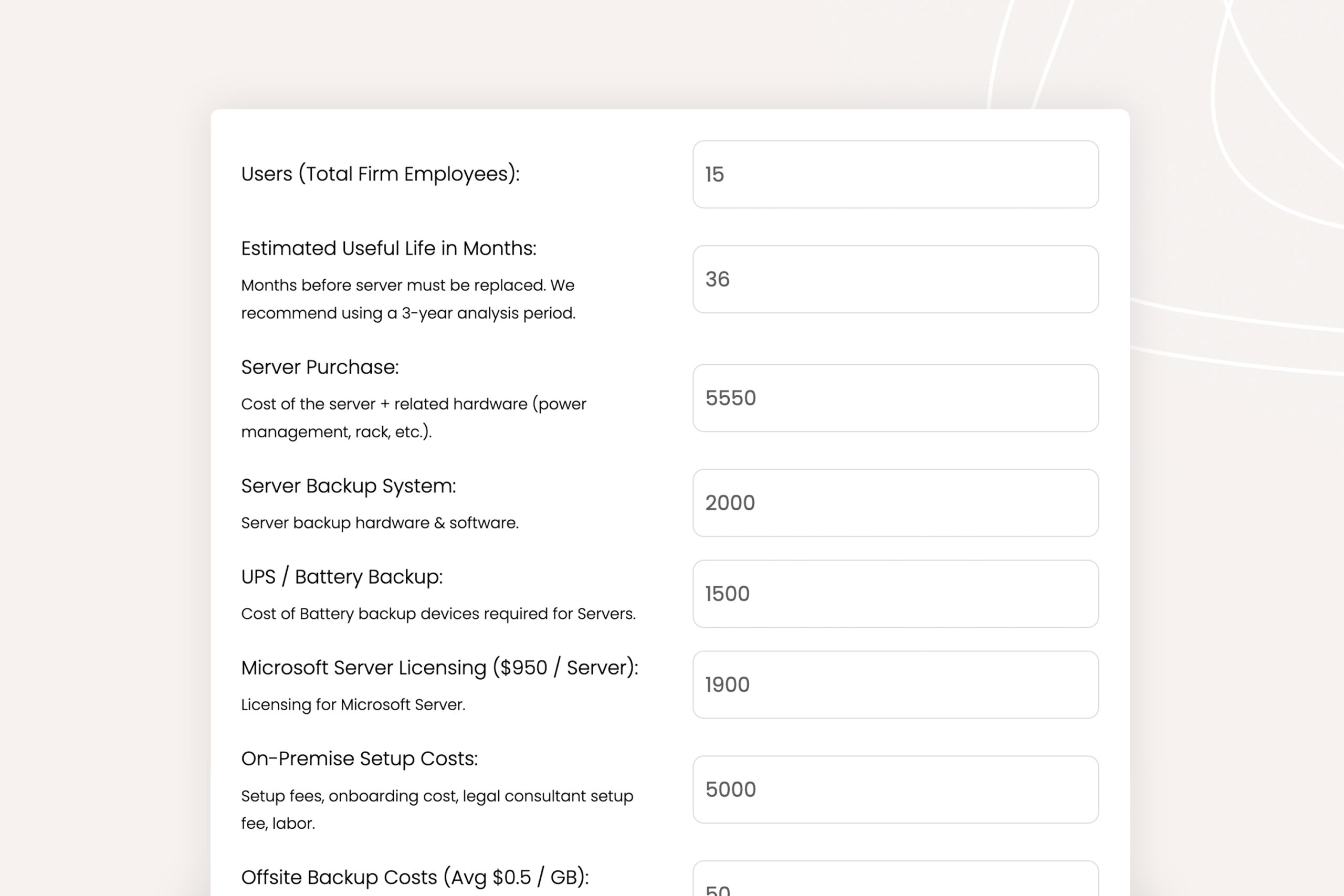
Cloud Cost Comparator:
Use our Cloud Cost Comparator to understand the costs of doing business on-prem and in the cloud.
Private Cloud pricing varies by provider, your firm’s size, and your specific needs; contact a provider directly for current figures rather than relying on a general estimate here, since these numbers shift and a stale figure could set the wrong expectation.
Doing Your Due Diligence & Mitigating Risk
In recent years, more companies have started advertising “ProLaw cloud hosting.” For law firms, that can be a real pitfall if you don’t look closely at who you’re actually working with. Critical areas to review when evaluating a potential Private Cloud provider:
Get references, review case studies and success stories, and read reviews before you commit to a provider. If your firm decides a managed provider is the right call, our managed ProLaw hosting and support service is one option worth evaluating against this exact checklist.
The Real Decision Is Who Manages Your Servers, Not Which Software You Run
The features, the interface, and the database stay exactly the same when ProLaw moves to the cloud. What changes is who owns the servers, who handles security, and what your firm pays for not thinking about any of it.
For most firms of 10 or more people, that trade is worth it. The math often favors a Private Cloud, and the old idea that on-premise is safer doesn’t hold up anymore.
If your firm makes the move, a good provider handles discovery, build, and go-live in weeks, with little to no downtime.
WHAT’S NEXT
Frequently Asked Questions

Uptime Legal’s Technology Solutions
Cloud, software, IT, and document management built for today’s law firms.