Table of Contents
When a law firm’s servers reach end of life, the replacement quote is rarely the real decision. The real question is what the next five years cost, and most comparisons answer it badly, adding up hardware and licences while ignoring the largest line item on any firm’s expense sheet.
We have watched this decision play out across hundreds of firms, and the pattern is consistent enough to state plainly: for most firms, their current on-premise servers will be their last. Aaron Eittreim, who leads our sales team and has spent fifteen years working with law firms, puts the tell simply: modern firms have gone completely serverless.
This guide walks the full five-year cost of all three models: on-premise servers, web applications, and private cloud. It is part of our broader guide to cloud for law firms.
On-Premise IT Cost Analysis
On-premise IT costs a law firm more than the server quote suggests, because the quote covers one of three cost categories.
Conventional IT practice puts a server on a three-to-five-year replacement cycle. Waiting for hardware to fail is not a strategy, so we will use five years as the analysis period throughout this guide. That gives us a like-for-like basis for comparing all three models.
Within that period, costs fall into three groups: what you pay once at the start of each cycle, what you pay every month, and what you pay when something breaks that nobody planned for.
On-Premise Costs: Up-Front
These are the costs of buying and implementing server infrastructure, incurred once per cycle. Figures below are Uptime Legal’s own Cloud Cost Comparator baseline for a five-user firm — treat them as a real starting point, not a quote for your specific environment.
Beyond the priced items above, a firm also needs to budget for costs that vary too much by vendor and license terms to quote a figure here:
The size of these numbers depends heavily on the software your firm runs. Three things follow directly from your practice management and document management systems:
That dependency is worth being concrete about. Applications such as iManage, ProLaw and Worldox demand substantial computational resources. PCLaw and Tabs3 are far less demanding. Two firms of identical headcount can face materially different server bills for this reason alone.
On-Premise Costs: Ongoing
Next, the monthly recurring costs, extrapolated across the full five years:
Include both the fixed monthly costs, such as a managed IT contract, and the sporadic ones, such as hourly support billed as needed. The second category is where on-premise budgets usually break.
Sidebar: Plug-And-Pray Doesn’t Count
This analysis assumes your firm’s IT management is proactive rather than reactive. That assumption matters, because a reactive comparison is not a fair one.
Ask yourself honestly:
If the answer to those is yes, your current on-premise costs look artificially low because you are deferring the bill.
On-Premise Costs: Total
The bottom line:
(Total up-front costs) + (total unplanned costs) + (monthly ongoing costs × 60) + (labor cost, see the next section)
Unplanned costs are the ones firms forget to model, and the ones a disaster recovery plan is built to bound:
The Cost Nobody Counts: Payroll
Payroll is the largest line item on a law firm’s expense sheet, so technology that forces you to add people is the most expensive technology you can buy.
This is the category almost every cost comparison omits, including previous versions of this one. It does not appear on a server quote or a software invoice, which is exactly why it survives so long unexamined. The same blind spot that hides the cost of a generalist IT provider.
The pattern shows up constantly in firms that unknowingly overspend on labor to make up for underspending on technology.
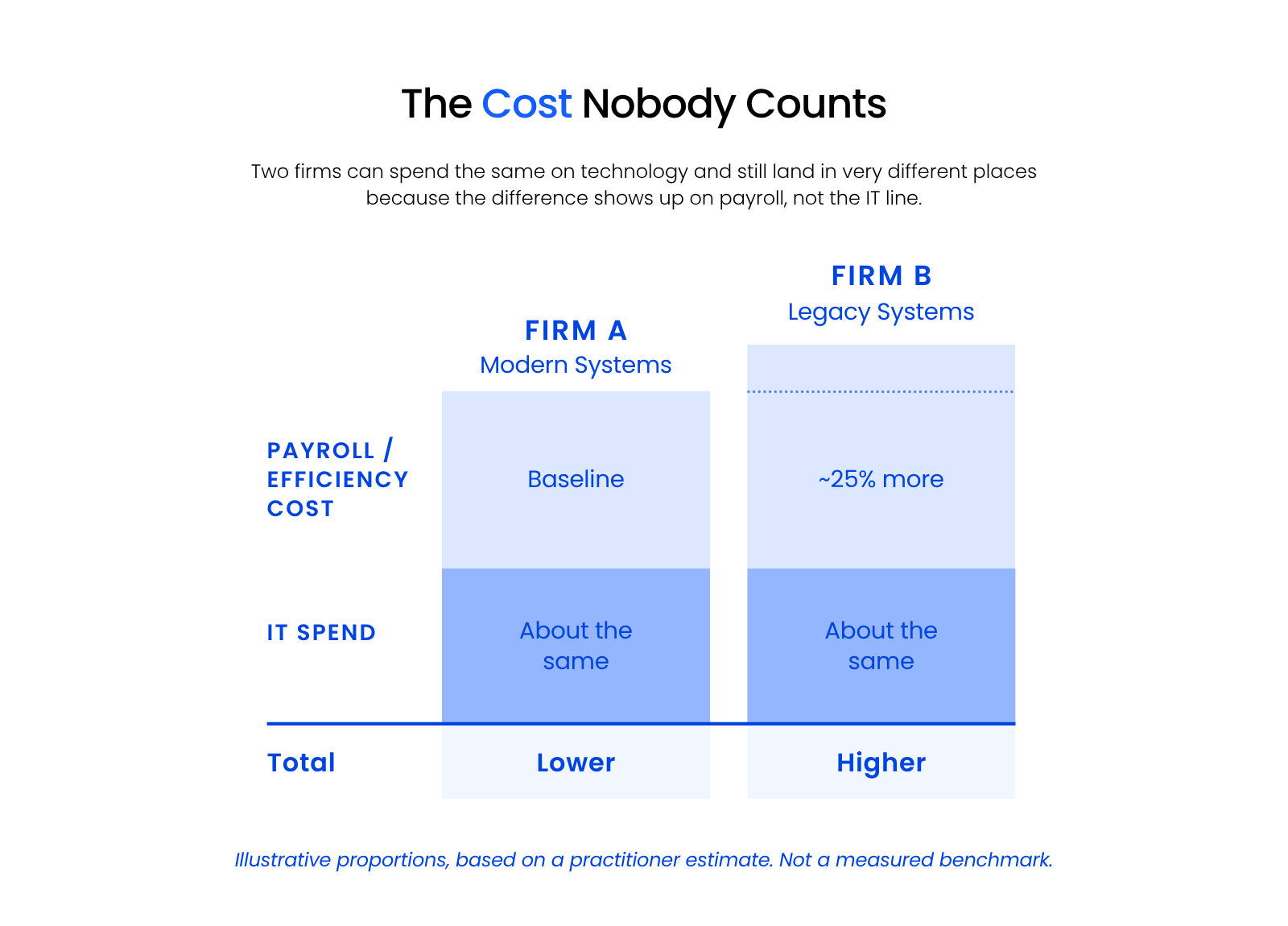
Aaron’s point is arithmetic. If poor systems mean an extra half-time administrator, or partners billing fewer hours because documents take longer to find, that cost lands on payroll, the biggest number on the sheet, while the technology line looks admirably lean.
In his experience, the gap between a well-run firm and a poorly-run one of the same size can reach around 25% on the same matter, because things move faster and less slips between the cracks. That is a practitioner’s estimate from fifteen years of these conversations, not a published study, and it should be read as an illustration of scale rather than a benchmark.
Add a labor line to your on-premise total. When you tally costs, account for the staff time your current systems require that better systems would not. If you cannot estimate it precisely, estimate it roughly. A rough number in the right category beats a precise number in the wrong one.
Web Application Cost Analysis
Web applications trade a large up-front cost for a per-user monthly bill that grows with every service the firm adds.
Web Application Costs: Up-Front
Up-front investment varies with the software, its complexity, and how much support your firm needs. A new firm with no historical data to import, implementing a lightweight web-based practice management application, may pay very little.
A firm implementing more sophisticated practice management or document management software faces real cost: data conversion, accounting setup, and training. Sometimes the vendor provides onboarding; often they refer you to an authorized consultant. Capture the whole amount, training included.
Web Application Costs: Ongoing
Most web applications charge a fixed fee per user per month. The common error is under-budgeting by forgetting how many separate services a firm actually needs. Current published rates, as of August 2026:
Your firm will need some combination of the above, each with its own fee. Five services, even at the low end of each range, add up faster than most budgets assume.
Web Applications: Total Cost
(Total up-front costs) + (monthly ongoing costs × 60)
Private Cloud Cost Analysis
A private cloud converts most IT costs into one predictable per-user monthly fee, including the infrastructure a firm would otherwise buy outright.
A reliable provider supplies the IT essentials your firm needs at a consistent per-user monthly rate. That covers most of what you would otherwise purchase and manage yourself in an on-premise setup.
The particular benefit is that a private cloud gives your firm a secure cloud workspace — usually delivered as virtual desktops — for software that was never built for the web. If your firm runs premise-based practice management software (PCLaw, Time Matters, ProLaw or Tabs3), a private cloud gives you that software with the advantages of the cloud, and without servers in a closet.
Private Cloud Costs: Up-Front
Up-front costs cover migrating your applications, documents, data, and email from their current home to the new platform. That usually includes:
The investment varies with the scope of the migration and the complexity of the applications involved. A reliable provider should give you a definitive migration quote covering users and applications. How comfortably they handle the more demanding legal applications is a good indicator of how much law firm work they actually do.

Private Cloud Costs: Ongoing
Ongoing private cloud costs should be transparent and fixed. When evaluating a private cloud provider, look for one whose monthly fee already includes:
Uptime Legal’s own private cloud pricing runs $125 to $195 per user per month, based on firm size: $195 for 3–5 users, $155 for 6–14 users, $135 for 15–50 users, and $125 for 51+ users. With infrastructure provided at a fixed per-user rate, costs are usually lower over the cycle and considerably more predictable.
(Total up-front costs) + (monthly ongoing costs × 60)
On-Premise vs. Web Apps vs. Private Cloud: Side by Side
Across a five-year cycle the three models differ less in total than in predictability and in who absorbs the labor.
The shape of that spend is easier to see than to describe:
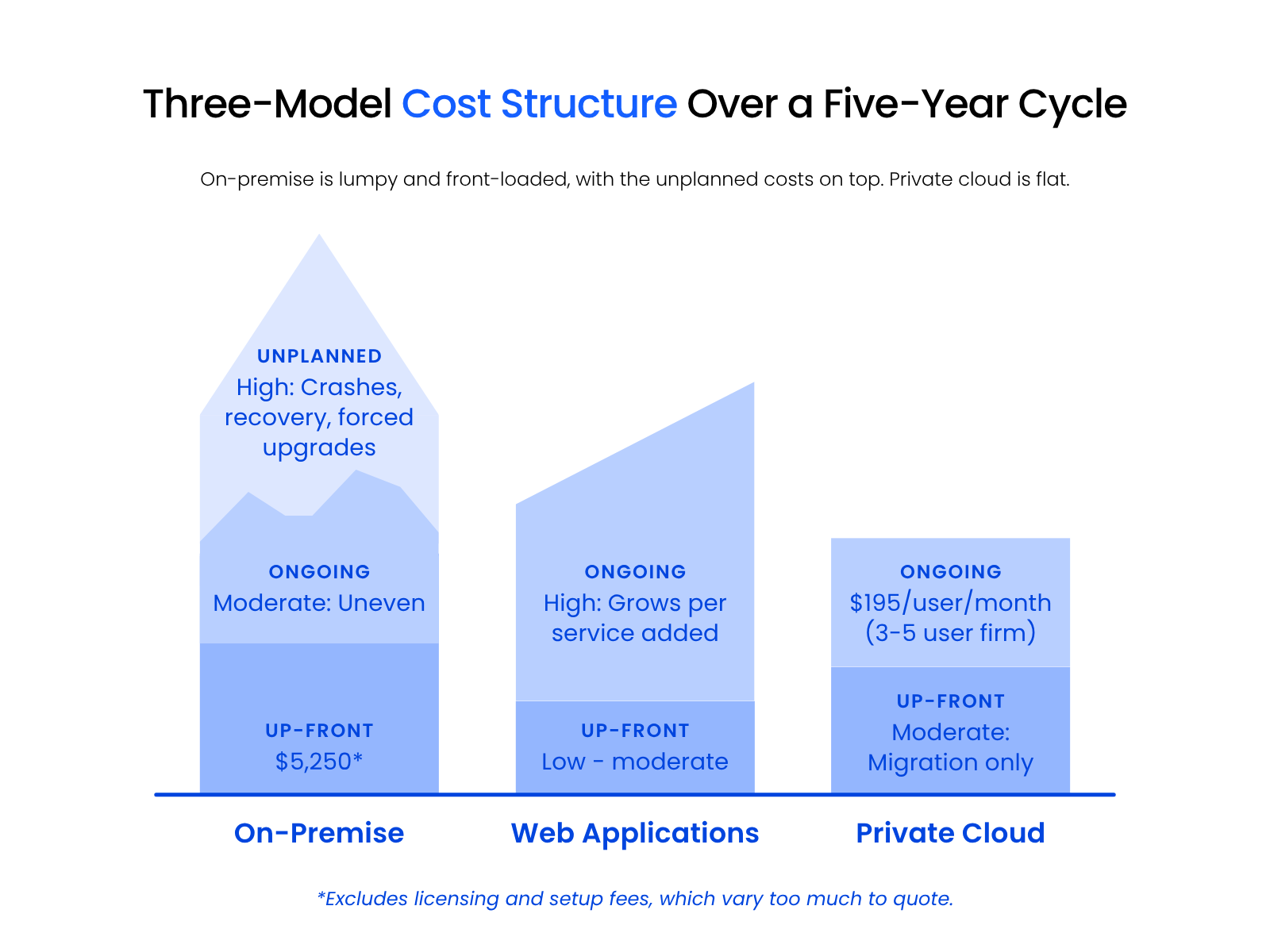
On-premise is lumpy and front-loaded with an unplanned segment sitting on top of it. Private cloud is flat. For a firm that has to forecast, flat is worth paying for.
Capabilities and Limitations: The Intangibles
The costs that decide this purchase are the ones that do not appear on either quote.
The most common objection has nothing to do with money. It’s the belief that data sitting on hardware in the office represents real ownership and control, the same feeling that keeps cash safer under a mattress than in a bank, at least until something goes wrong.
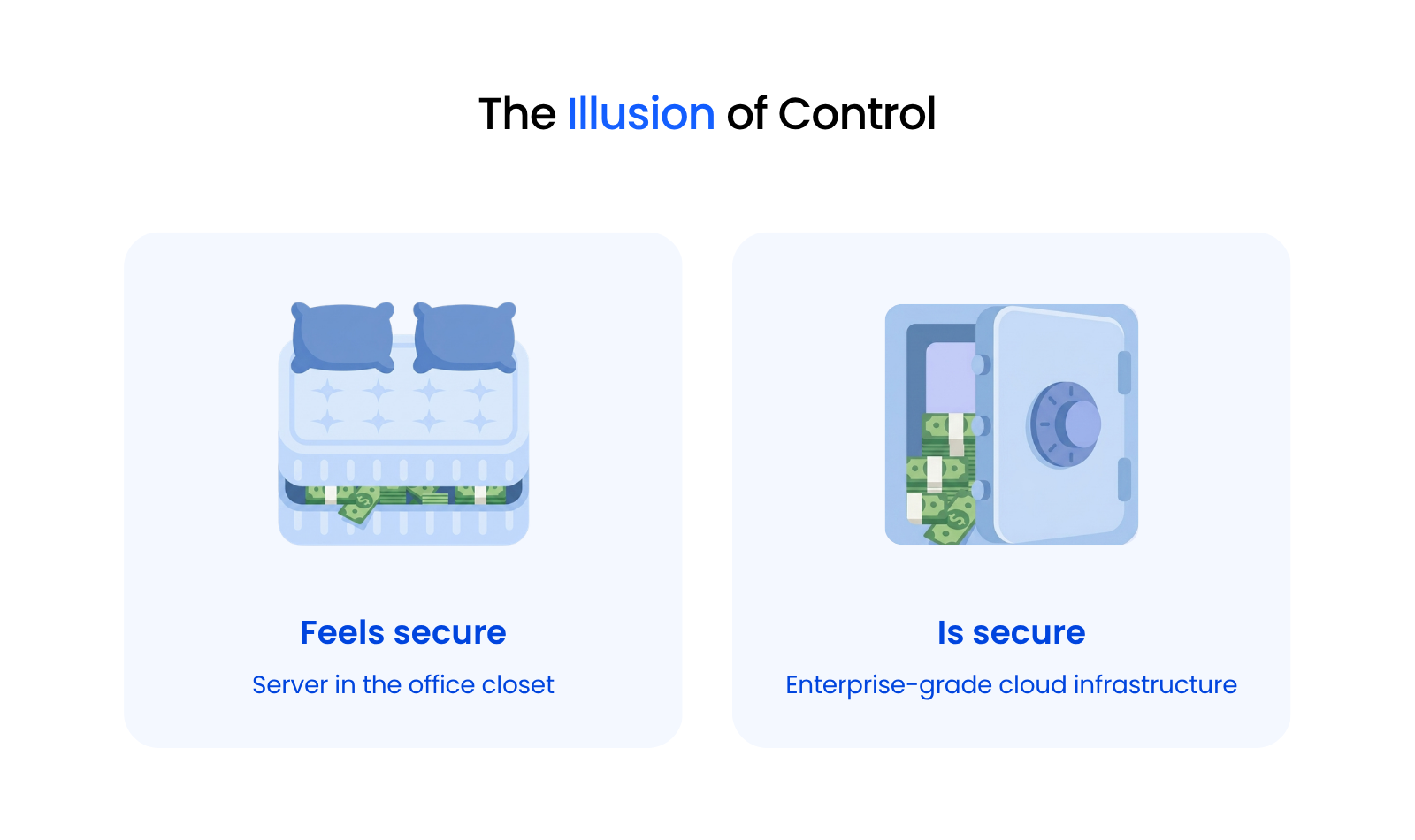
Eittreim calls it the illusion of control: firms that believe data sitting on “a tin can in the corner of their office” represents ultimate ownership and safety. The mattress feels more controlled. It is not more secure.
In Aaron’s experience, on-premise servers are breached and suffer data loss far more often than most firms expect, while enterprise-grade cloud infrastructure is engineered to a standard few firms can match in-house. A server in your office is also on the internet. It is reachable, it has open ports, and it is vulnerable in ways that feel less real because the box is visible.
This is not a fringe position. The American Bar Association’s 2024 guide, “A Guide for Migrating On-Premise Legal Tech to Cloud-Based Solutions,” treats the move as an expected, well-documented transition rather than an unusual risk, which is worth knowing if you are the person who has to defend the decision.
The genuine trade-offs, by model:
The honest summary: cloud models trade a small amount of theoretical control for a large amount of practical reliability. For most firms that is a good trade. For a firm with genuine in-house IT capability and a specific technical reason to own hardware, it may not be.
What the Numbers Usually Show
For most firms of five or more users the five-year totals land closer together than expected, and predictability decides it.
On-premise usually looks cheapest on a spreadsheet and rarely is, because the unplanned column is real and the labor column is missing.
Web applications suit newer firms with no legacy software and get expensive as service count climbs. Private cloud costs more per month and less per cycle, and it is the only model of the three that puts a fixed number in your forecast.
The pattern worth naming: firms rarely regret the cloud decision on cost. They regret it on migration timing, when an end-of-life server forces the move on a schedule nobody chose. Running the numbers before the server fails is the whole advantage.
If your firm runs premise-based legal software and has no in-house IT, the private cloud is usually the model that wins on both predictability and total cost. If you are a two-person firm starting fresh, web applications will almost certainly be cheaper.
Run Your Own Numbers
The Cloud Cost Comparator runs this same five-year comparison on your firm’s actual numbers.
Enter your headcount, your current server situation, your practice management software, and what you pay for IT support today. It returns a side-by-side five-year total for all three models, using the same categories as this guide — including the unplanned and labor columns that most comparisons leave out.
It takes a few minutes and it produces something you can put in front of a partner.
The Number Worth Arguing About
The three models cost less differently than most firms expect. What separates them is how much of the total is predictable and how much of the work lands on people you employ.
That is the number worth arguing about internally, and it is the one the server quote never shows. Run your own figures before the replacement decision is made for you.
WHAT’S NEXT
Frequently Asked Questions

Uptime Legal’s Technology Solutions
Cloud, software, IT, and document management built for today’s law firms.