Table of Contents
Your firm has a disaster recovery plan. Every managed IT provider makes sure of that.
What most plans never address is whether your firm can prove, to a court, a client, or an insurer, that client data stayed protected the entire time.
A law firm disaster recovery plan is a professional-responsibility question as much as an IT one. Bar rules on competence and confidentiality don’t pause during an outage, and neither does your duty to protect the people you represent.
This builds on the broader case for cloud infrastructure built for how your firm actually works, covering the ethical obligations behind recovery planning, the recovery targets your firm needs to set, and the specific actions that matter most in the first 72 hours after something goes wrong.
Ethical and Regulatory Obligations Behind Disaster Recovery
Rule 1.1 of the ABA Model Rules of Professional Conduct requires competence, and a 2012 comment extended that duty to cover staying current with the risks and benefits of relevant technology. Rule 1.6(c) requires you to make reasonable efforts to prevent unauthorized access to or disclosure of client information. Neither obligation pauses because your server is down.
State bar rules vary, and some states word competence and confidentiality differently, so confirm your own jurisdiction’s guidance rather than treating this as the complete picture. What doesn’t vary is the underlying expectation: a court, a client, or your malpractice carrier will eventually ask what your firm did to protect data during a disruption, and “we had backups” isn’t a complete answer.
The recovery process itself has to protect confidentiality too. Restoring files through an unsecured intermediate step, or handing recovery over to a vendor with no confidentiality agreement in place, creates a new exposure while it’s solving the old one. In 2025, hackers compromised personal data belonging to thousands of current and former clients of Kelley Drye & Warren, triggering a class-action lawsuit over the firm’s data protection practices.
The rest of this guide covers what a plan actually needs to hold up under that kind of scrutiny: real recovery targets for every critical system, and a specific sequence of actions for the first 72 hours after something goes wrong.
The Role of Managed IT Services in Enhancing Law Firm Disaster Recovery
A managed IT provider’s role in disaster recovery comes down to three concrete pieces: testing backups, building in failover, and responding fast when something actually goes wrong. It happens because the provider treats it as an ongoing discipline, not a one-time setup, not just because your firm pays for managed IT.
That documentation does more than support the recovery itself. It’s how your firm demonstrates it met the confidentiality obligation covered above, not just that it got back online eventually. A provider who can hand you a clear record of what was affected, what was contained, and when service was restored gives you something concrete to show a client, an insurer, or a bar investigator if it ever comes to that.
Developing a Law Firm Disaster Recovery Plan with IT Support
A disaster recovery plan is only as good as the steps behind it. The generic version, assess risk, back up data, hope for the best, skips the specifics that actually matter for your firm: trust accounting, client confidentiality, and court deadlines that don’t move just because your systems did.
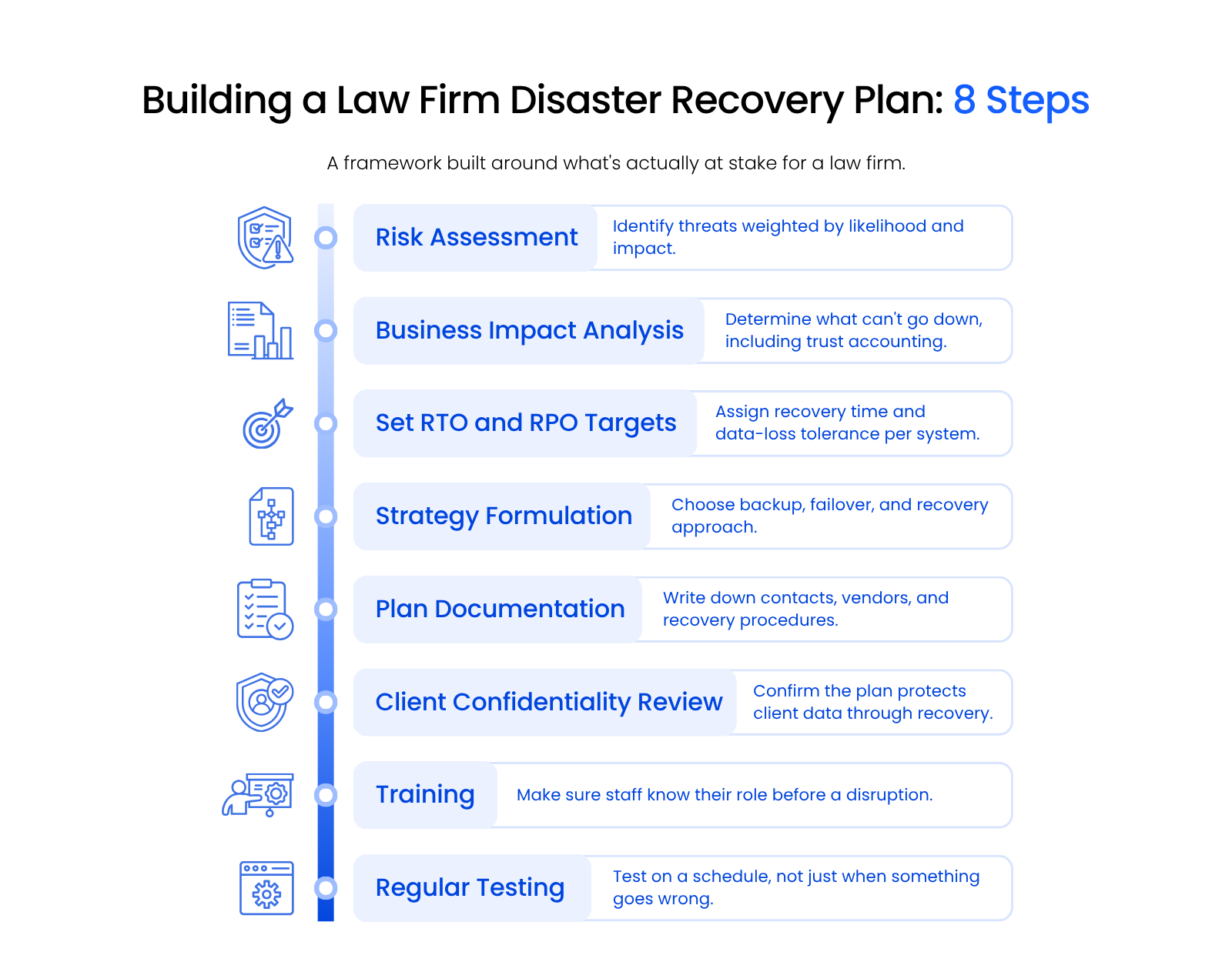
Here’s the framework, with the law-firm-specific stakes built into each step.
- 1
Risk assessment. Identify the threats most likely to hit your firm, cyberattack, natural disaster, power outage, and weigh them by how likely each one is and how much damage it would actually do to your practice.
- 2
Business impact analysis. Determine which systems can’t go down without real consequences. For most firms, that includes trust accounting, client-facing communication, and whatever holds active matter documents, not just the main file server.
- 3
Set RTO and RPO targets. Assign a recovery time and a data-loss tolerance to each critical system individually (more on what those numbers mean in the next section).
- 4
Strategy formulation. Choose the specific backup, failover, and recovery approach for each target: off-site backups, cloud redundancy, or some combination of both.
- 5
Plan documentation. Write down contacts, vendors, and the exact recovery steps, in enough detail that someone other than your regular IT provider could follow them in a pinch.
- 6
Client confidentiality review. Confirm the plan protects client data at every stage of recovery, not just once systems are back online. A recovery process that routes data through an unsecured intermediate step creates a new confidentiality problem while it solves the outage.
- 7
Training. Make sure staff know their specific role in a disruption before it happens. Nobody should be learning what to do for the first time during an actual outage.
- 8
Regular testing. Test the plan on a schedule, not just when curiosity or an insurance renewal prompts it. A plan that’s never been tested is a draft, not a plan.
Follow these eight steps in order, and your firm moves from a vague sense of preparedness to a plan you can actually execute under pressure.

Recovery Time and Recovery Point Objectives (RTO and RPO)
RTO (recovery time objective) sets how long your firm can afford to be down, and RPO (recovery point objective) sets how much data your firm can afford to lose. Neither number should be a guess.
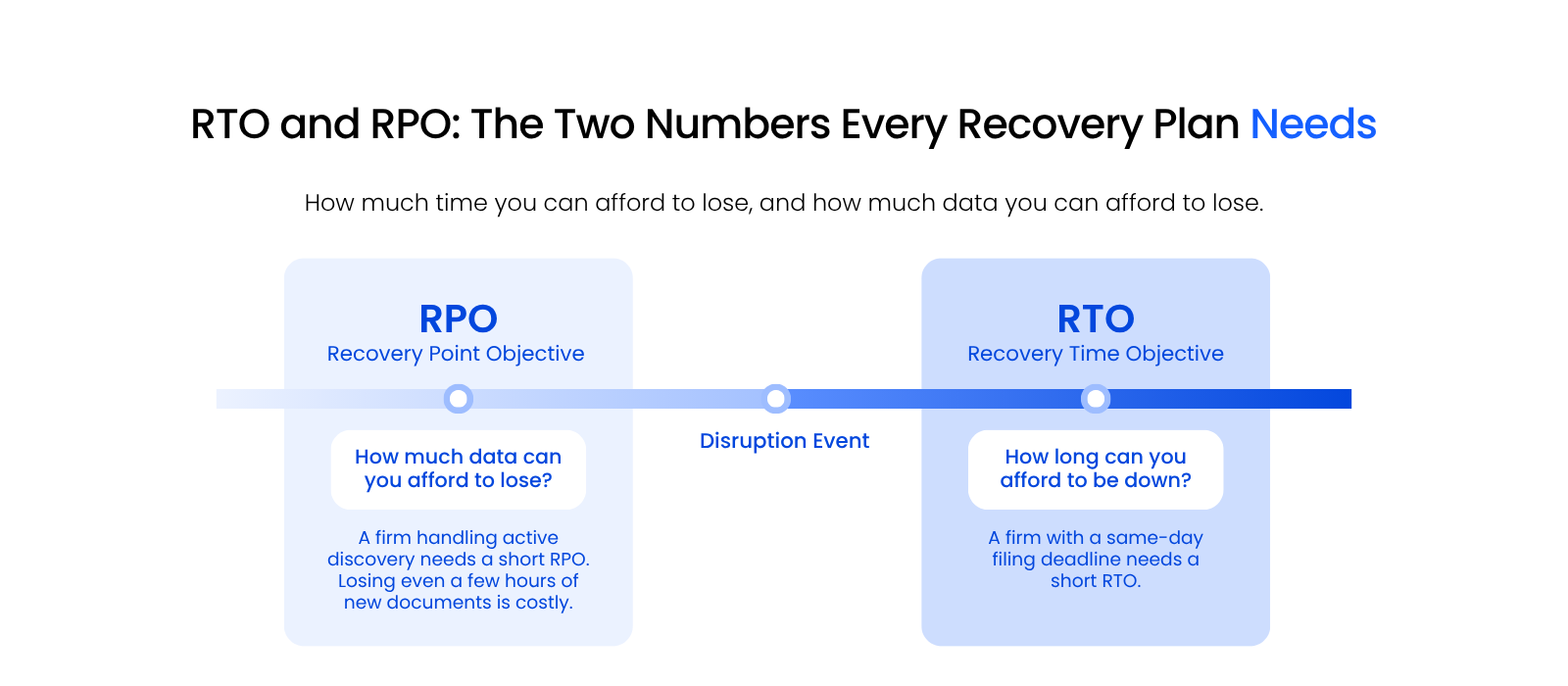
A firm with a same-day filing deadline needs a short RTO, hours, not days, because a court doesn’t care why the motion is late. A firm running active discovery needs a short RPO, because losing even a few hours of newly ingested documents can mean redoing work a paralegal already finished.
Set both numbers per system, not once for the whole firm. Your practice management software probably needs a shorter RTO than files from a matter that closed two years ago.
One blanket target for everything usually means overpaying to protect data that doesn’t need it, or underprotecting data that does. Start by ranking your systems from most to least disruptive if they went down for a day, and let that ranking set your RTO and RPO priorities.
Private Cloud for Law Firms
A closer look at how private cloud infrastructure supports the redundancy behind a real RTO and RPO.
Business Continuity: The First 72 Hours
Knowing your RTO and RPO tells you what to build toward. Knowing what to actually do in the first 72 hours after a disruption is what keeps your firm functioning while you get there.
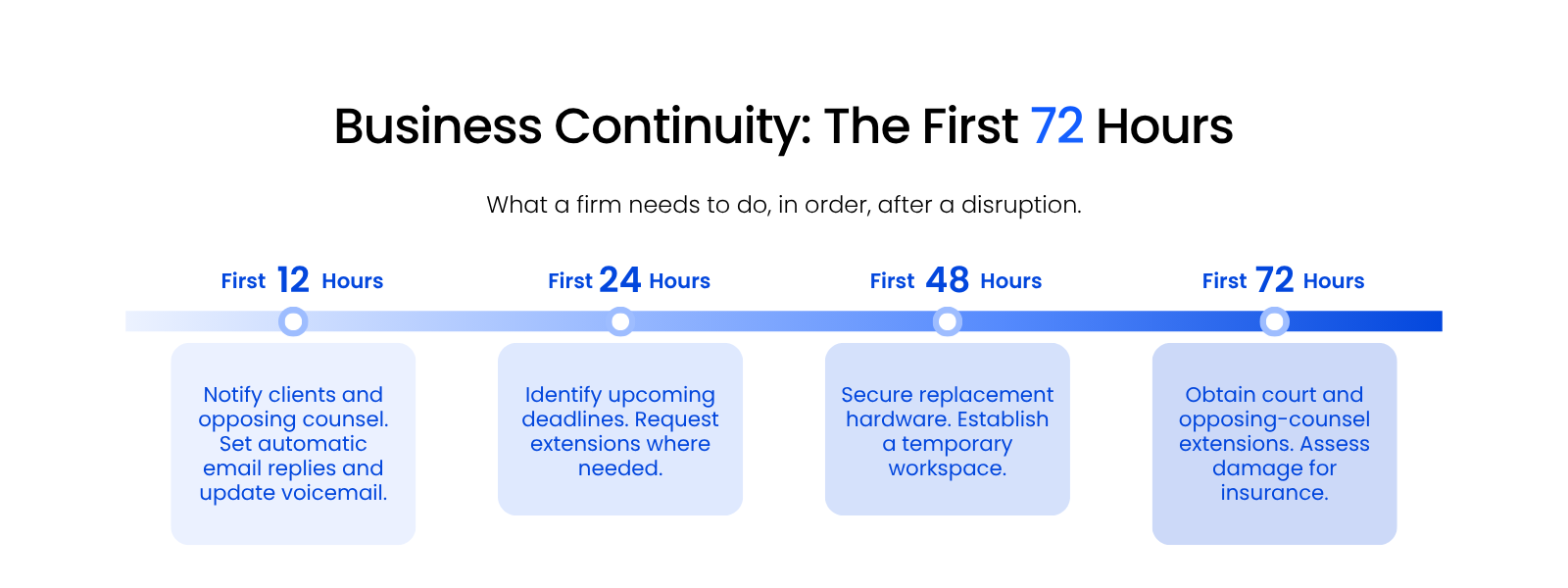
The sequence below isn’t exhaustive, but it covers the actions that matter most in each window.
First 12 Hours
Before you notify anyone, establish scope: what’s down, what’s still reachable, and whether client data might be involved. Notification comes after that, not before.
If there’s any chance this is a security incident rather than a hardware failure, don’t rebuild or wipe anything yet. This is the same documentation instinct covered in the Managed IT section: preserving the state of your systems is what lets a carrier or a bar investigator reconstruct what happened later.
Once scope is clear, notify clients and opposing counsel that you’re experiencing a disruption. Set an automatic reply on your email and update your voicemail greeting so anyone trying to reach your firm knows what’s happening and how to get an urgent message through.
First 24 Hours
Notify your cyber insurance carrier within this window too. Notice windows are measured in hours, not weeks, and late notice is one of the most common reasons claims get reduced or denied. Check your actual policy for the exact requirement rather than assuming you have more time.
Within 24 hours, also identify every deadline coming up in the next several weeks and request extensions where you need them. Courts and opposing counsel are generally more accommodating when you reach out early than when a deadline has already passed without warning.
First 48 Hours
By 48 hours, replacement hardware should be in motion, and a temporary workspace should already be established, whether that’s virtual desktops for law firms that let staff log in from any machine, a co-working space, or whatever else fits your firm.
If credentials may have been exposed, reset them and re-enroll multi-factor authentication before restoring broad access. This is also when you address payroll and any time-sensitive billing so operations don’t stall on top of the disruption itself.
First 72 Hours
By 72 hours, your firm should have the extensions it requested from courts and opposing counsel, and a clear picture of the damage for insurance purposes.
Telling clients your firm is experiencing a disruption is not the same as telling them their data was exposed. The first is an operational update you can send immediately. The second is a legal determination driven by what your investigation actually finds.
State breach-notification law and bar guidance on client communication both affect the timing and wording of that second notice, and requirements vary by jurisdiction, so confirm your own state’s rules before sending one. Firms conflate these two notices constantly, and it’s a distinction most competing guides don’t draw.
Designating a Custodian
This window is also where custodian designation comes in. If the person managing your practice becomes unavailable, someone else needs clear, documented authority to act: contact clients, request extensions, and access trust accounts. Banks and courts won’t grant that access after the fact without it already being in writing.
The same logic applies to your firm’s financial continuity. Banking details, a backup funding source, and a second authorized signer should already be documented, not figured out during the disruption itself.
Trust accounting reconciliation under ABA Model Rule 1.15 doesn’t pause either, so build a plan for keeping that current even while your primary systems are down.
Finding the Right Support for Your Law Firm Disaster Recovery
After you’ve built the plan, the harder part is finding an IT partner who can actually execute and maintain it. Here’s what to evaluate before you sign anything.
Assess Your Firm’s Specific Needs
Take stock of your firm’s size, the complexity of your systems, the sensitivity of the data you handle, and your compliance obligations before you start evaluating providers. That inventory tells you what you actually need, not just what a provider is selling.
Look for Industry-Specific Experience
Legal work comes with its own regulations and expectations, so look for a provider with real experience supporting law firms, not one that’s simply comfortable with generic small-business IT. Ask how many law firm clients they actually service, and how many are close to your firm’s size.
Evaluate Their Track Record in Disaster Recovery
Ask for case studies or references that show a provider has actually planned, implemented, and managed disaster recovery for firms like yours, not just that they offer it as a line item on a services list.
Consider the Scope of Services Offered
The right provider covers reactive recovery and proactive prevention: regular system audits, staff cybersecurity training, and ongoing consultation as threats change, not just data recovery after something breaks.
Assess Their Commitment to Partnership
Look for a provider who treats disaster recovery planning as an ongoing relationship, with regular communication, updates, and plan testing, not a project that ends the day it goes live.
Check for Scalability and Flexibility
Your disaster recovery needs will change as your firm grows. Confirm the provider can scale with you and adjust as your requirements shift, rather than locking you into today’s setup for the next several years.
Confirm They Can Document Compliance
Ask how a prospective partner handles bar-rule and cyber-insurance compliance documentation, not just their technical capability. A provider who can hand you a clear compliance record when a client, an insurer, or a bar investigator asks for one is solving a different problem than one who can only tell you your backups are running.
Initiate a Direct Conversation
Finally, talk to any provider you’re considering about more than technical capability. The right one asks about your firm’s broader goals, not just answers your questions about theirs.
A Tested Recovery Plan Is Your Firm’s Real Protection
A disaster recovery plan only protects your firm if it’s built around real numbers and tested on a schedule. Knowing your RTO and RPO for each critical system turns a vague sense of preparedness into targets you can actually hit. Knowing what happens in the first 72 hours turns a chaotic scramble into a sequence your team already knows. That same discipline satisfies the ethical obligations behind recovery planning. The firms still standing after something goes wrong are the ones that treated recovery planning as a compliance commitment from the start.
WHAT’S NEXT
Frequently Asked Questions

Uptime Legal’s Technology Solutions
Cloud, software, IT, and document management built for today’s law firms.