Table of Contents
When your firm’s IT provider stops working out, the first instinct is to call someone nearby. A local company feels safer: a technician who can drive over, who knows your office, who answers the phone by name.
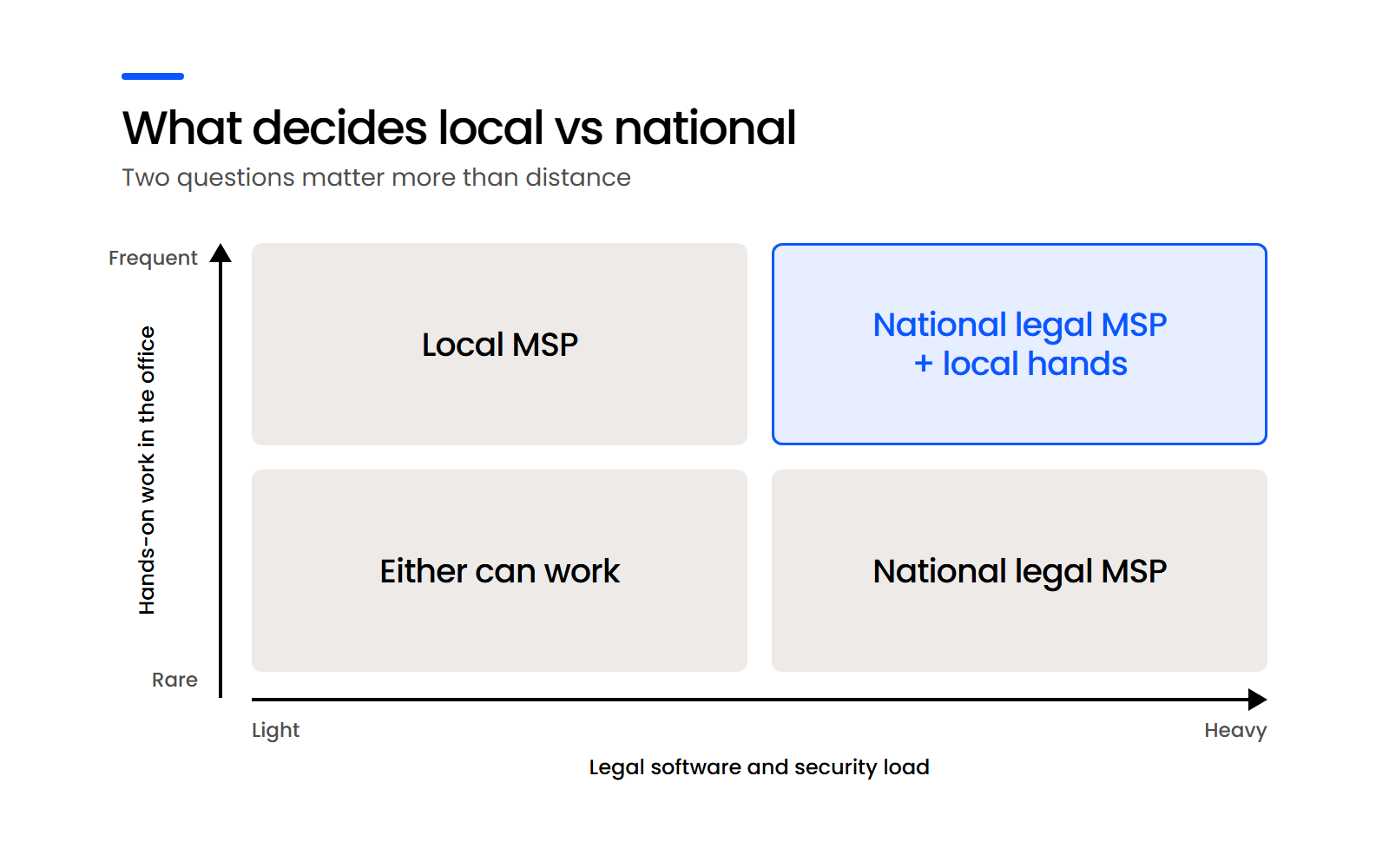
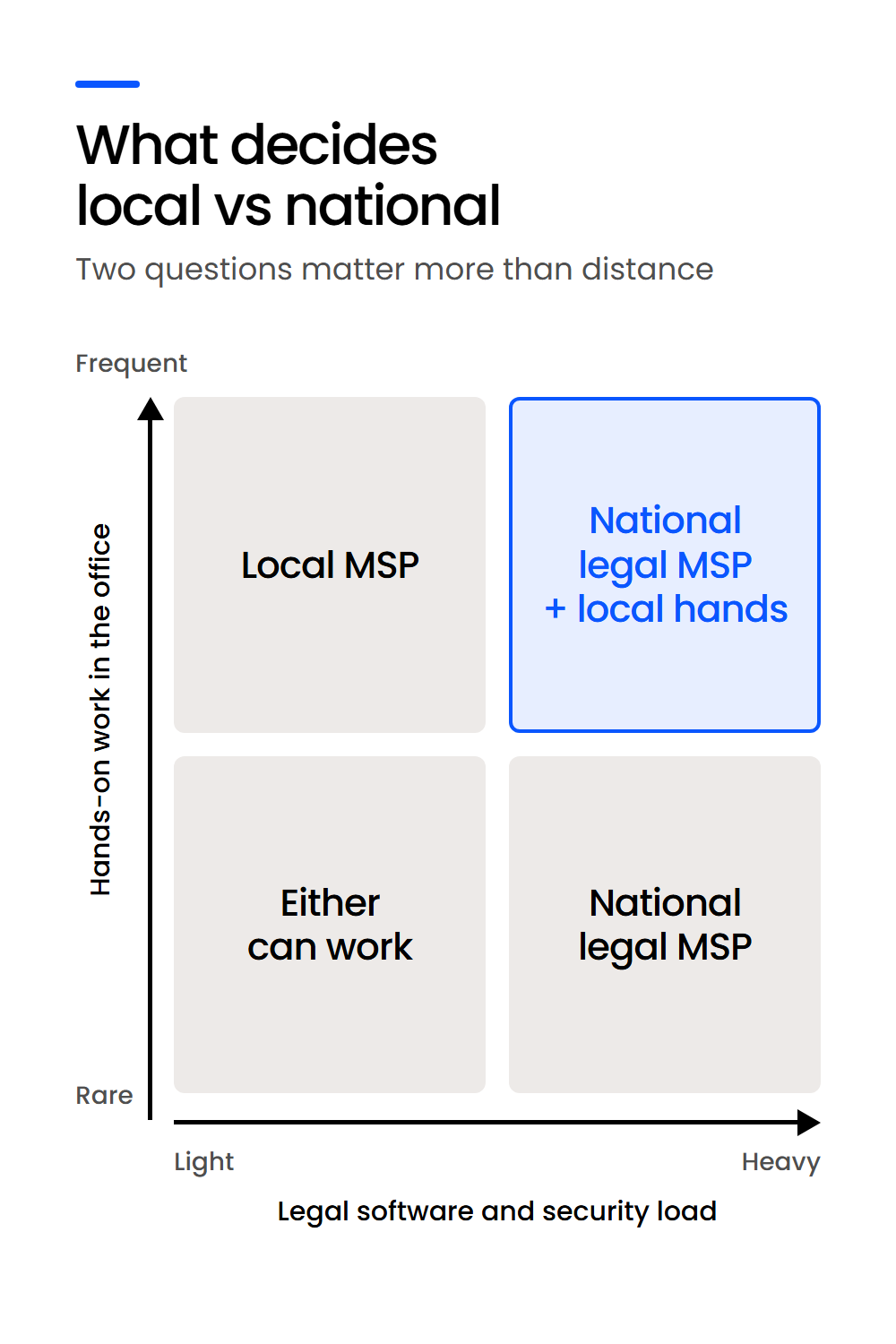
That instinct is right in some situations and wrong in others. The local vs. national MSP (managed service provider) question comes down to two things: how much hands-on work your office generates, and who owns your legal software when it breaks.
At most small firms, there’s no internal IT staff to turn to first, so the provider you choose decides what managed IT for law firms looks like in your office: who answers the help desk, who keeps Clio or PCLaw running, and who fills in the security questionnaire a client sends.
We run IT for law firms across the US and Canada. Below, we show where each option fits, including the cases where a local provider is the better choice.
What Decides Whether Your Firm Needs a Local or National MSP?
Two things decide whether a local or national MSP fits your firm: how much of your IT work needs a person in the office, and which provider takes responsibility when your legal software fails.
How far away the provider sits matters only as far as it affects those two.
One law-firm comptroller, reviewing the provider the firm hired on Clutch, described the search plainly. The firm weighed “local & non-local companies” and picked the option where “we felt we were getting more than what we needed for less than the cost of hiring a full-time IT person.”
It’s the same comparison you’re making now.
The choice matters because most small firms have no internal IT staff to turn to first.
According to the ABA’s 2024 Technology and Training TechReport, 56% of respondents at firms of 10–49 attorneys turn first to internal technical support staff when they have a problem with their firm’s technology, compared with 25% at firms of 2–9 attorneys and 4% of solo attorneys.
What ends a provider relationship is usually a failure: a security breach, significant downtime, or repeated outages. None of them is about distance.
A local MSP wins when your office needs regular hands-on work, a national legal MSP wins when your risk sits in legal software, security and more than one location, and many single-office firms do best with both.
The two definitions below set up the rest of the comparison.
What Counts as a Local MSP?
A local MSP is an IT company based near your office that usually serves businesses of every kind in one city or region. Its technicians can be on site quickly, and its depth with legal software varies from one provider to the next.
What Counts as a National Legal MSP?
A national legal MSP supports law firms in many cities, mostly remotely, and builds its service around legal software, security and the way firms work.
It sends people on site when a job needs hands, through its own staff or local partners.
When Does a Local MSP Win?
A local MSP is the better choice when your office creates regular hands-on work, keeps its own servers, or wants a technician who knows the building and can be there in person.
The advantage is physical presence, and it shows up in three places.
Hands-On Work and Office Moves Go Faster with a Local MSP
Some IT work can only be done by a person standing in your office:
A provider down the street gets to those jobs faster than one that has to send someone.
In our own records, when a firm has left us or weighed leaving for a local provider, the reason was a physical job like an office move rather than distance alone.
Why Servers in Your Office Favor a Local Provider
If your firm works from one office and still runs its own server, that server needs hands now and then. A local provider who can walk into the server closet has an advantage there.
If your firm works from a single office, keeps its own servers, generates regular hands-on work and wants a technician on site every week, a local MSP is often the better choice. The other good option is a national legal MSP plus a local hourly technician.
Why Many Firms Choose a Technician They Know by Name
Many firms choose local because they know the technician by name and can reach them in person.
One attorney, reviewing the firm’s provider on Clutch, explained that the provider was “in the same building,” so the firm “didn’t search far when we needed this service.” That familiarity is worth something, as long as it isn’t the only thing you’re buying.
Where the Local Model Breaks Down
A local provider is often a small team, and some are one person. When that person is on vacation, out sick or retires, your support goes with them.
The other risk is the provider not staying local. A local MSP can close or move the office your contract’s on-site support depended on.
Familiarity can also keep your firm with the wrong provider for too long.
One firm we brought on had put up with near-daily login problems for years because the provider was the local guy everyone knew, until ransomware locked its data and shut the firm down for two weeks while it rebuilt from backups.

Where Does a National Legal MSP Win?
A national legal MSP is the stronger choice when most of your firm’s IT risk sits in legal software, security and offices or staff spread across more than one place. The case rests on your legal software and on having more than one person who knows your setup.
Who Owns Your Legal Software When It Breaks?
When Clio, PCLaw, NetDocuments or your trust accounting breaks, a legal MSP owns the fix, while a generalist often sends you to the software vendor.
Practice management, document management, trust accounting and e-filing tools are built for law firms, and a provider that also supports dental offices and manufacturers rarely sees how they fail.
The MSP’s job is keeping the platform running, connected and secure, while choosing it stays with you and your legal software advisor.
More than One Technician Keeps Your Support Running
A national provider has more than one person who knows your setup, so a vacation or a sick day doesn’t leave the gap in your coverage it would with a single local technician.
A bigger team can also staff calls after hours, which a one-person shop can’t.
What Security Questionnaires Ask Your Provider to Run
Client and cyber-insurer security questionnaires ask about:
A provider runs those tools across many firms, and a single local technician rarely has the time or the tooling to run them all for yours.
Your Duty to Supervise the Vendor Applies Wherever It’s Based
Your duty to supervise an IT provider applies wherever the provider is based, and where the work is done is one of the circumstances that shapes it.
According to the ABA’s Model Rules, Rule 5.3, Comment [3], “When using such services outside the firm, a lawyer must make reasonable efforts to ensure that the services are provided in a manner that is compatible with the lawyer’s professional obligations.”
ABA Formal Opinion 498 makes the same point about technology vendors: “The lawyer must ensure that all of these individuals or services comply with the lawyer’s obligation of confidentiality and other ethical duties.”
States adopt the Model Rules with their own variations, so check your jurisdiction’s version.
Why No Provider Is Local to a Multi-Office or Remote Firm
Once your attorneys work from more than one office or from home, no provider is local to all of them. Remote support becomes the default whichever provider you choose, and the question becomes who can support every location the same way.
If Something Physical Breaks, Who Comes to the Office?
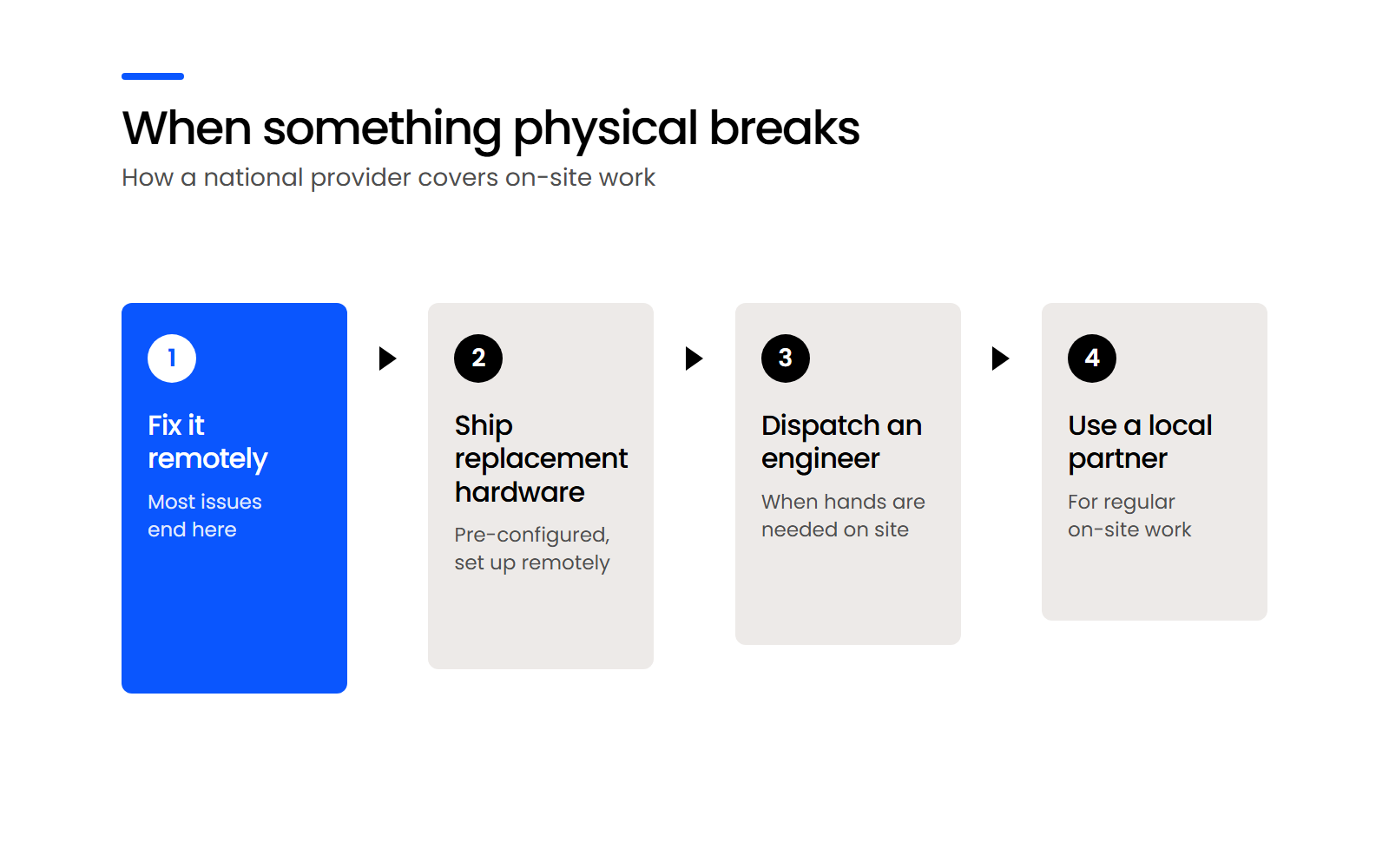
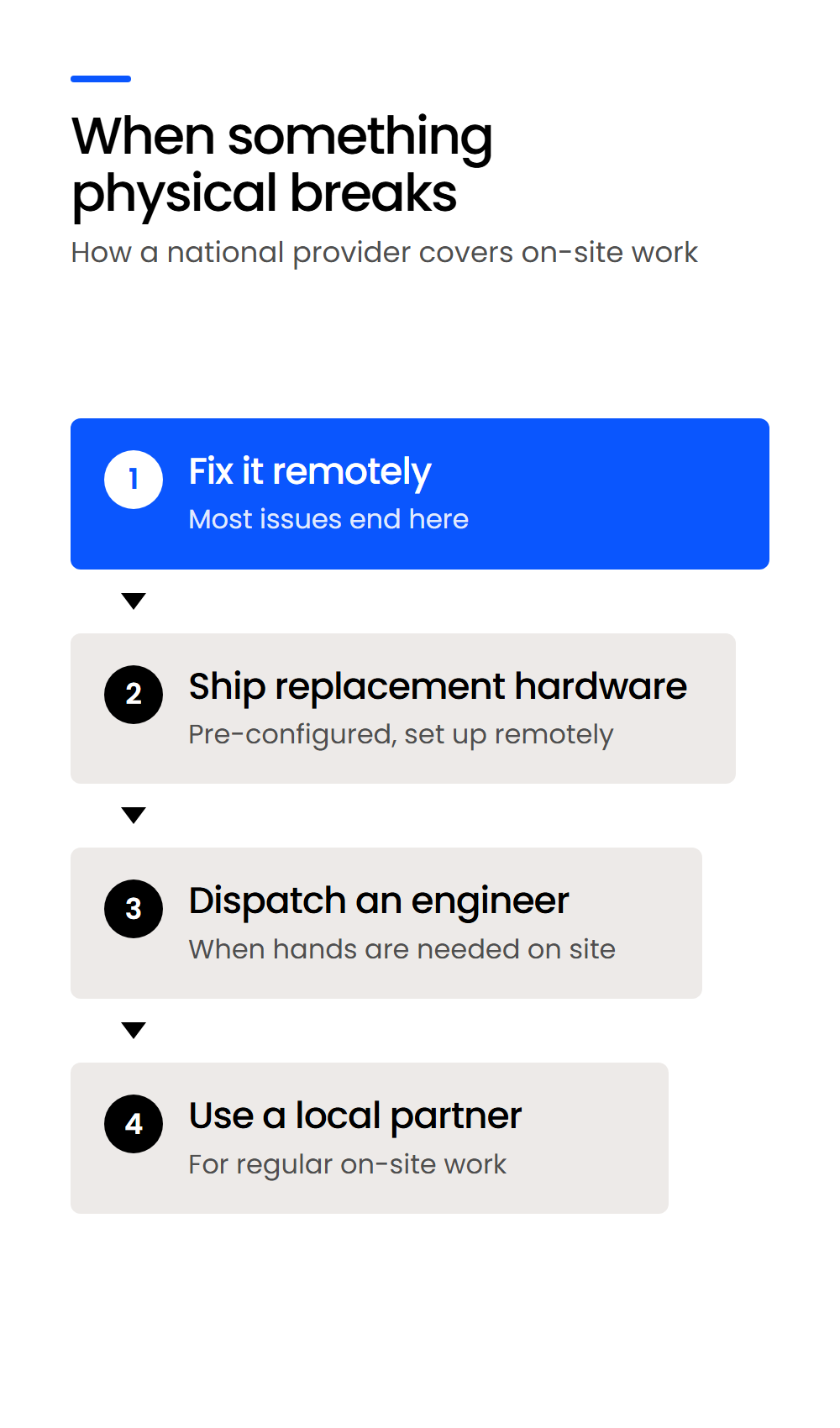
A national MSP handles physical problems remotely first, ships pre-configured replacement hardware when a device fails, and sends a technician on site when the work needs hands. The order matters, because each step takes longer than the one before it.
Remote First, Then Shipped Hardware
The provider’s help desk resolves most problems remotely, from a frozen application to a misbehaving printer queue.
When a device fails, a national provider ships a replacement that’s already configured, so your user signs in and keeps working.
How Uptime Legal Gets a Technician on Site
For work that needs hands, Uptime Legal sends partner technicians rather than its own staff, and your firm’s assigned IT Manager directs their work.
In most cases we can put someone on site: we deploy IT engineers to most locations in most cities, and on-site work isn’t billed separately.
That’s the hybrid model in practice: a national provider for your legal software, with local hands when the job needs them.
Where Distance Still Matters
Distance does limit how often a provider can be in your office.
If your firm needs a technician in the office every week, that limit is real, and a local provider or the hybrid model fits better.
Which Option Fits Your Firm? A Decision Table
The right provider matches your office: a single office running its own servers leans local, a cloud-based or multi-office firm leans national, and many firms do best with a national legal MSP plus local hands. Find the row that describes your firm, then read across.
Firm size is a secondary signal, and this is our judgment rather than a rule.
A firm that works mostly in the cloud needs the same things from a provider whatever its size, while a single office with servers and printers creates hands-on work whatever its headcount.

What Should You Ask Any IT Provider Before You Sign?
Five questions expose a weak provider of either kind, because each one tests a failure this comparison has already named. Put them to a local shop and a national MSP alike:
A provider that answers all five specifically, in writing, is one you can supervise. Switching IT providers goes more smoothly when you’ve collected those answers first.
Where Does Uptime Legal Fit, and Where Doesn’t It?
Uptime Legal fits firms whose IT risk sits mostly in legal software, security and more than one location, and it’s a weaker fit for a firm that needs a technician in the office every week. Here’s what we commit to:
If your firm needs a technician in the office every week, a local provider or the hybrid model will serve you better, and that’s what we’d tell you; in New York, start with the Tabush alternatives that have Manhattan offices.
Choose the Provider Built for the Work Your Office Creates
The right IT provider matches the work your firm generates. If your week brings hardware swaps, office moves and a server in the closet, a local MSP is the better fit. If your risk sits in Clio, PCLaw, NetDocuments and the security questionnaires your clients send, a national legal MSP is.
If you have both kinds of work, use both, and give each one a clear job. Find your row in the decision table, then put the five questions to every provider before you sign.
WHAT’S NEXT
FAQ

Uptime Legal’s Technology Solutions
Cloud, software, IT, and document management built for today’s law firms.