Table of Contents
On November 12, 2026, a Microsoft 365 outage hit Exchange Online, Teams, SharePoint, Microsoft 365 Copilot and Defender XDR under advisory MO1550821. Microsoft had the service fully restored by the morning of November 14.
Running your firm on a cloud platform like Microsoft 365 means only Microsoft can restore the service. Your filing deadlines don’t move while you wait, and neither does the client who needs an answer today.
What your firm controls is how quickly it knows the problem is Microsoft’s, and whether it has a way to keep working and filing that doesn’t depend on Outlook or Teams. Both depend on what you set up before the next outage starts.
At Uptime Legal, we manage Microsoft 365 for law firms, and these are the steps we’d want a managing partner or administrator to have ready when email stops.
Is the Microsoft 365 Outage Yours or Microsoft’s?
Check Service health in the Microsoft 365 admin center first, because that’s where Microsoft lists the known issues it’s already working on, and use Microsoft’s public service status page if nobody at your firm can sign in. If neither shows an incident, the problem is your firm’s to raise with its IT provider.
Run the checks in this order:
- 1
Open Service health in the Microsoft 365 admin center. It sits under Health in the admin center’s menu and lists the open incidents and advisories for your firm’s Microsoft 365 services.
- 2
Check the public service status page if nobody can sign in. Microsoft publishes it at status.cloud.microsoft for the case where the outage blocks access to the admin center itself.
- 3
Call your IT provider if neither one shows an incident. With nothing listed in either place, treat the problem as your firm’s own.
Microsoft tells admins to check service health “to determine whether this is a known issue with a resolution in progress before you call support or spend time troubleshooting.” An open incident tells you Microsoft has found the problem and which services it affects, and the entry is where Microsoft posts its updates until the issue closes.
Service health, the public status page and the @MSFT365Status account on X are free and come straight from Microsoft, so a firm admin with Service health notifications turned on can diagnose a Microsoft outage without an outside IT provider. Your IT provider’s job starts after the diagnosis.

How Do You Keep Client Work Moving While Microsoft 365 Is Down?
What your firm switches to depends on which Microsoft 365 services are down, so read the list of affected services in Microsoft’s advisory before moving anyone off Outlook or Teams. An Exchange Online outage stops email, a Teams outage stops chat and meetings, and each one calls for a different fallback.
These are the switches to have ready, with the condition each one depends on:
Which switch you make follows the advisory’s list of affected services, and filing in federal court doesn’t depend on any of them.
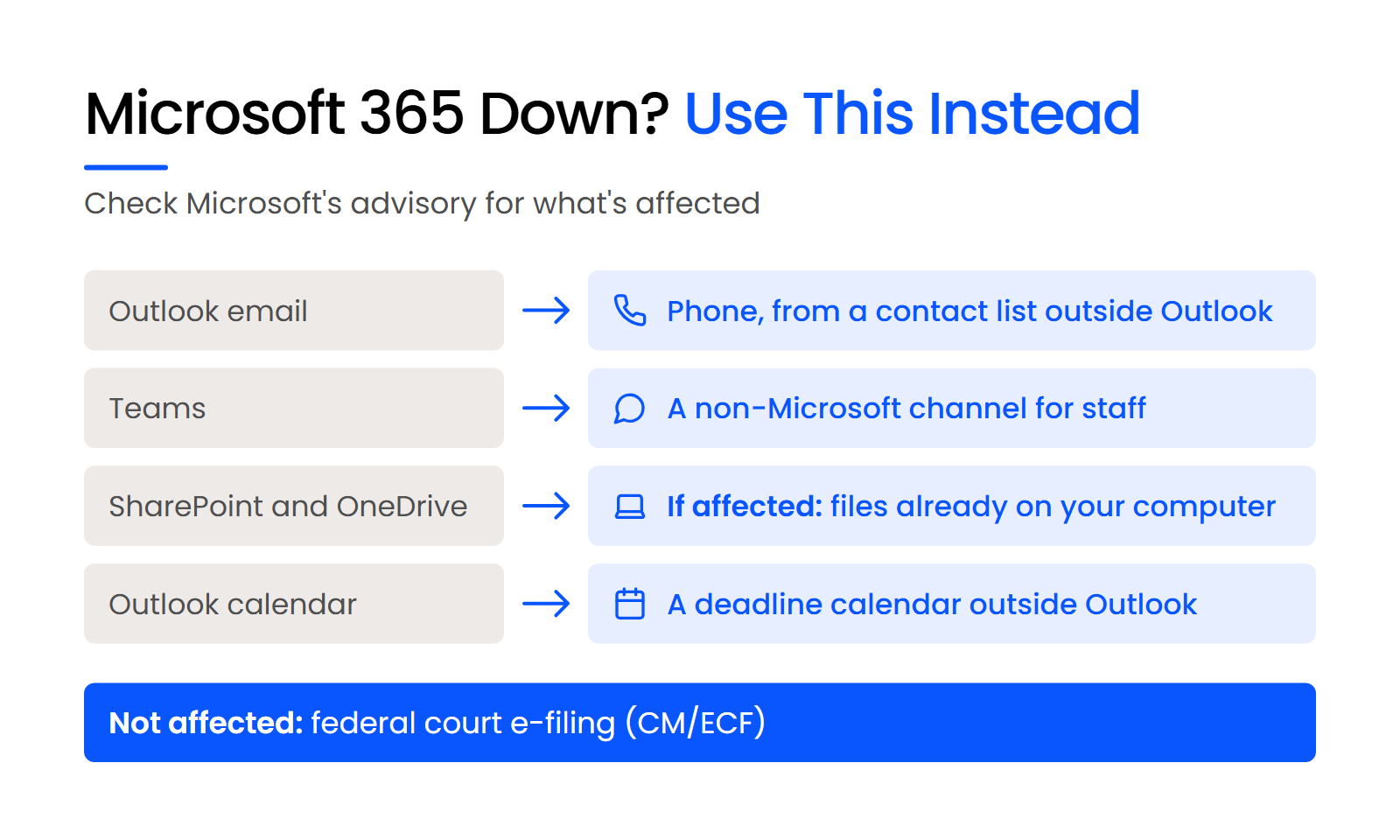
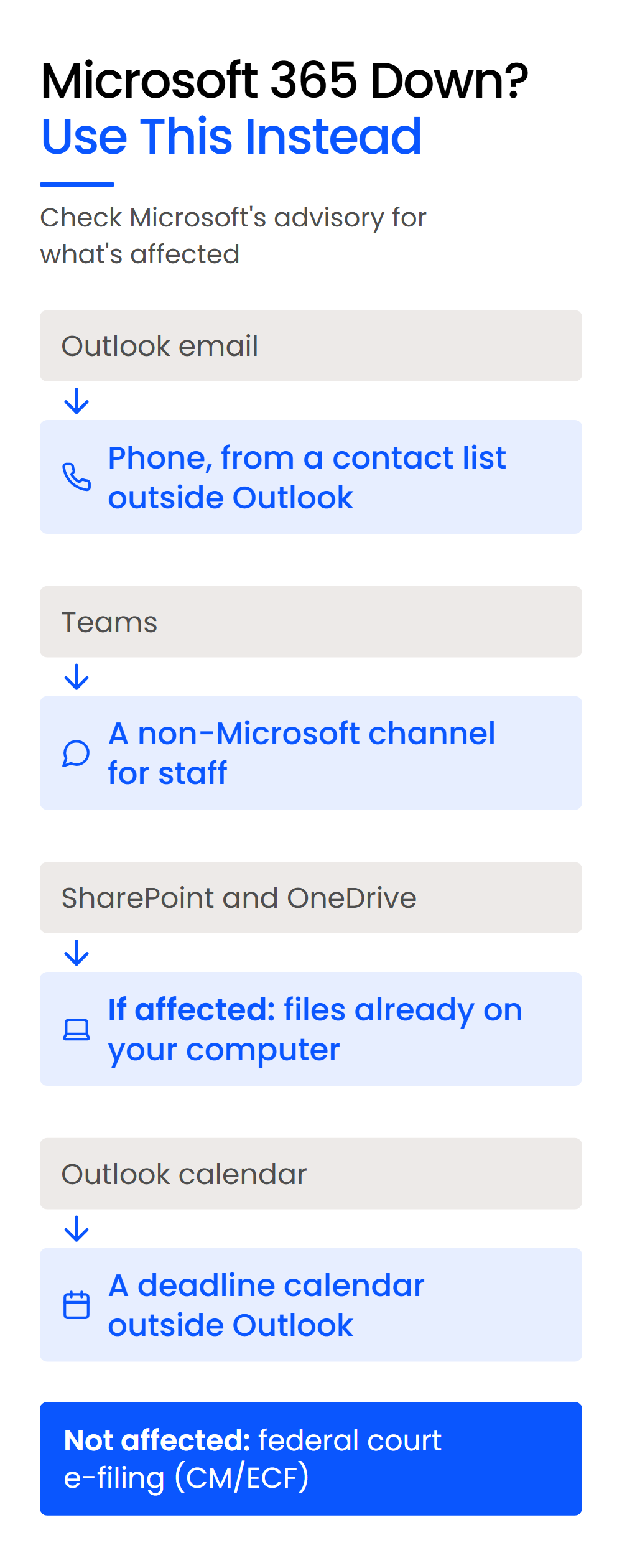
Federal court e-filing through CM/ECF runs on the federal judiciary’s own system, not on Microsoft 365, so a Microsoft 365 outage doesn’t stop your firm from filing there. The risk sits on your firm’s side: a filing saved only in SharePoint, or a single person who holds the e-filing login, can stall a filing while the court’s system is up.
What Should You Tell Clients and Courts When a Deadline Is at Stake?
Contact the clerk or opposing counsel before the deadline passes, and send clients a short update on what’s affected and how to reach your firm, kept separate from any breach notice. File by a route that doesn’t depend on Outlook, and don’t wait for Microsoft to restore the service before you raise the problem.
Does a Microsoft 365 Outage Excuse a Late Filing?
A Microsoft 365 outage doesn’t necessarily excuse a late filing: the U.S. Bankruptcy Court for the District of Nebraska’s technical failures procedures say problems on the filer’s end, including software problems, aren’t a technical failure and don’t excuse an untimely filing.
The Nebraska procedure covers one court, so read your own court’s e-filing procedures before you need them.
Take these three steps when a filing is due and email is down:
Whether to grant relief is the court’s decision. Raising the problem before the deadline puts that decision in front of the court while there’s still time to act on it.
What Should the Client Notice Say?
Send clients an operational update: which services are down, how to reach your firm in the meantime, and whether their matter or deadlines are affected. Keep it short, and keep it separate from a breach notice, which answers a different question.
Each update covers three things:
Don’t tell clients that no data was exposed unless Microsoft’s own incident report says so. If there’s any sign that client data was exposed, that’s a separate decision from this update.
What Should Your IT Provider Be Doing During and After a Microsoft 365 Outage?
Microsoft owns restoring the service, and your IT provider owns your firm’s response: confirming the scope, keeping staff informed, setting up workarounds and reporting back afterwards. Your firm still owns its deadlines and what it tells clients and courts.
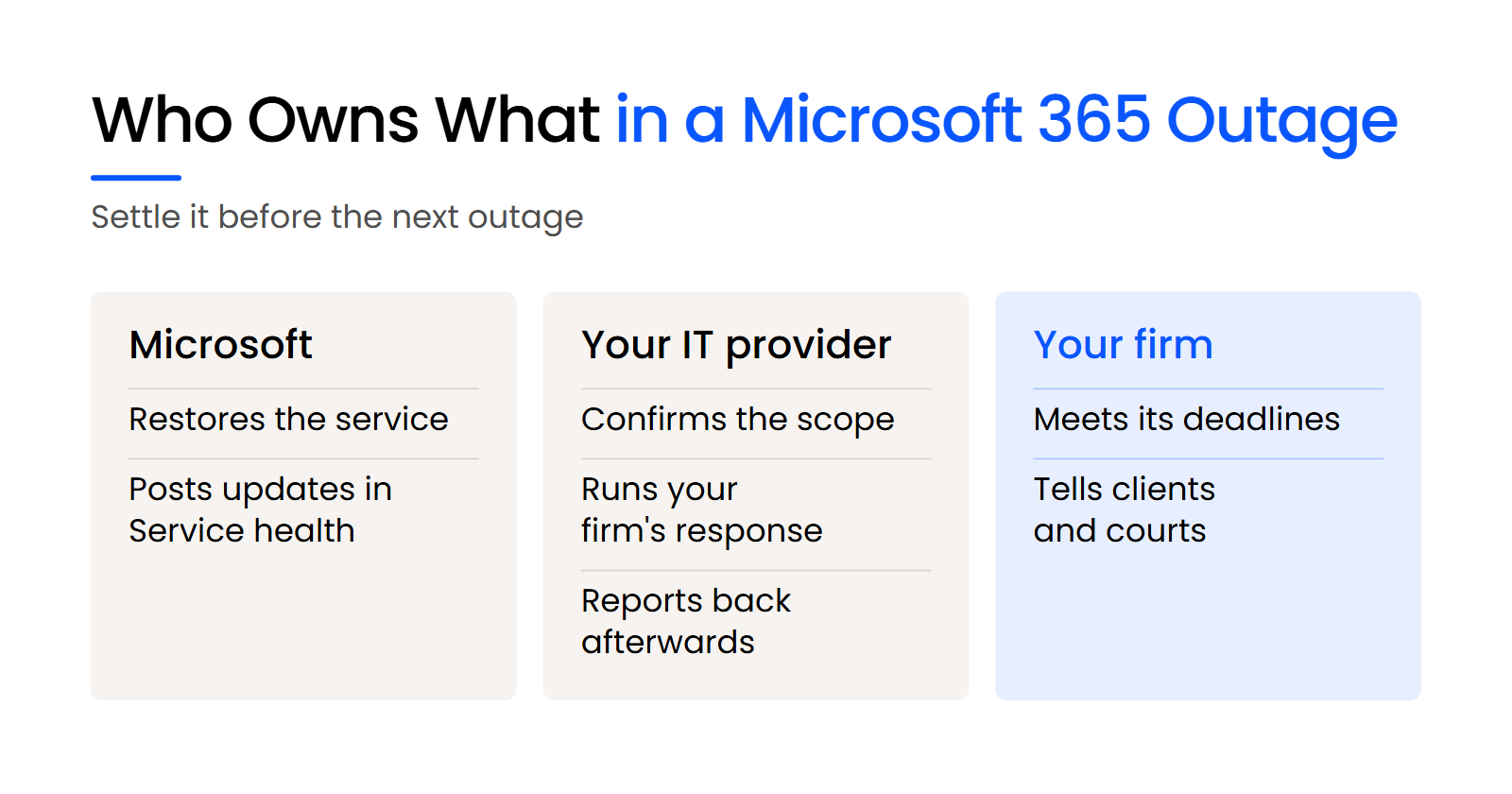
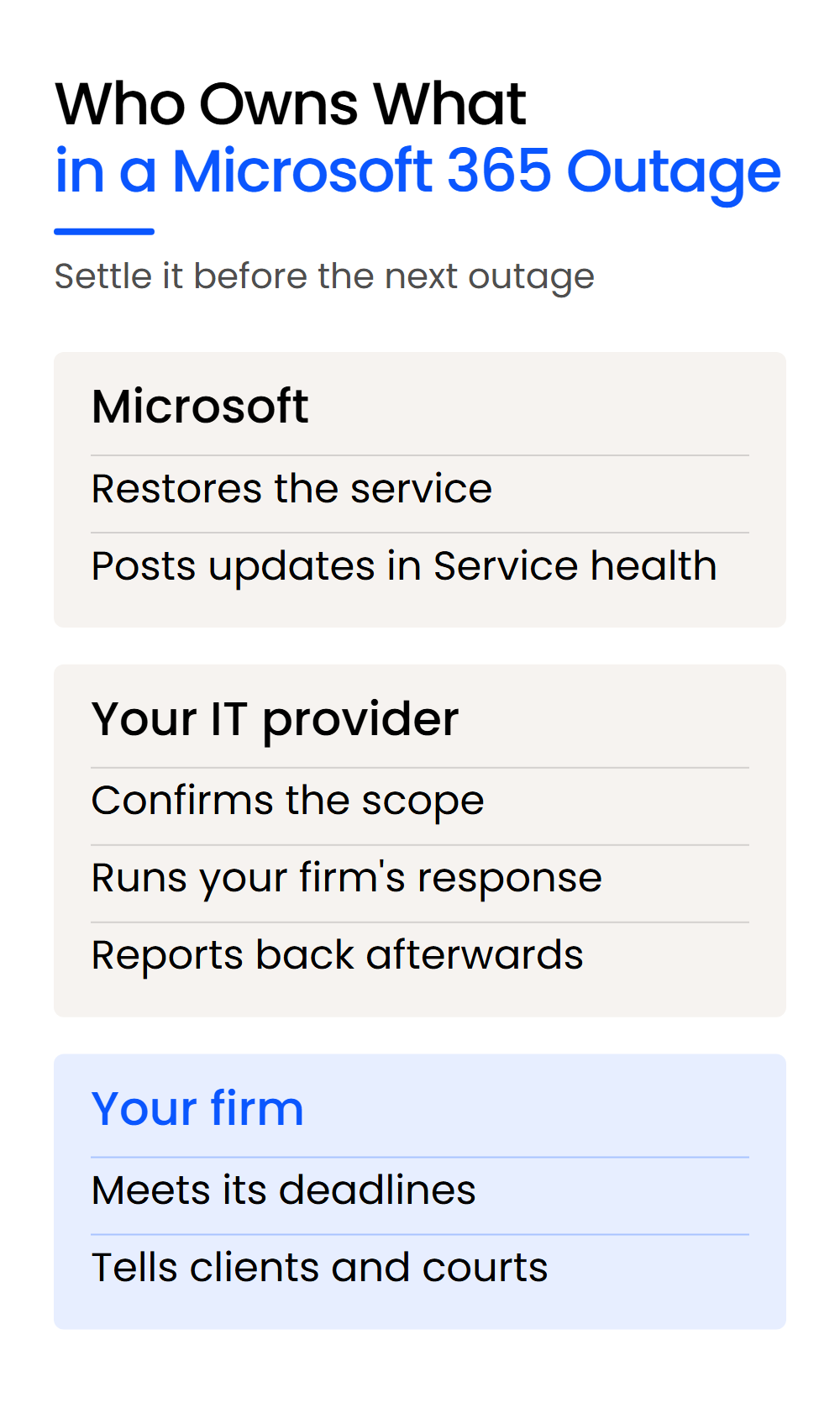
A good provider treats a problem it didn’t create as its own to solve, even when the cause sits entirely with Microsoft. Hold your provider to this standard:
The simplest test of a current or prospective managed IT provider is to ask what it did for your firm, or its other clients, during the last Microsoft outage, and what it sent them afterwards. A provider that meets this standard can answer with specifics.
Put that split in writing before the next outage, in your agreement with the provider or in your outage plan. Then nobody has to work out who does what while email is down.
Is Your Firm Owed Anything? How Microsoft’s Service Credits Work
Your firm may be owed a service credit under Microsoft’s Service Level Agreement, but someone has to ask for it, and it’s worked out on the subscription fees for the affected service, so it doesn’t cover the work you lost. The billable time an outage costs your firm stays with your firm.
The terms sit in Microsoft’s Service Level Agreement for Microsoft Online Services, which sets out Microsoft’s uptime commitments and the service credits that go with them. Who files depends on where your firm buys its Microsoft 365 licenses: through a Microsoft partner, the claim goes to Microsoft through that partner after your firm asks for the credit, and directly from Microsoft, your firm raises it itself.
The cost that matters is the billable time your firm loses, and you can price it with your own numbers:
Hourly rate × hours lost × people affected
Fill it in with your firm’s rates and headcount, then set the result beside a credit worked out on your license fees. That comparison shows how much of an outage’s cost the credit leaves with your firm.
No provider can stop an outage on Microsoft’s side, so the part of that formula you control is the hours: preparation decides how fast your firm confirms the problem and gets back to work.
What Should Your Firm Set Up Before the Next Microsoft 365 Outage?
Preparation decides how much a Microsoft 365 outage costs your firm, because nothing done during the outage brings the service back any sooner. Two things are worth settling now: whether your data is protected, and what each person does while Microsoft 365 is down.
Why Backup Doesn’t Keep Microsoft 365 Running
An outage makes your data unavailable until Microsoft restores the service, and a Microsoft 365 backup protects against data loss without keeping Outlook or Teams running.
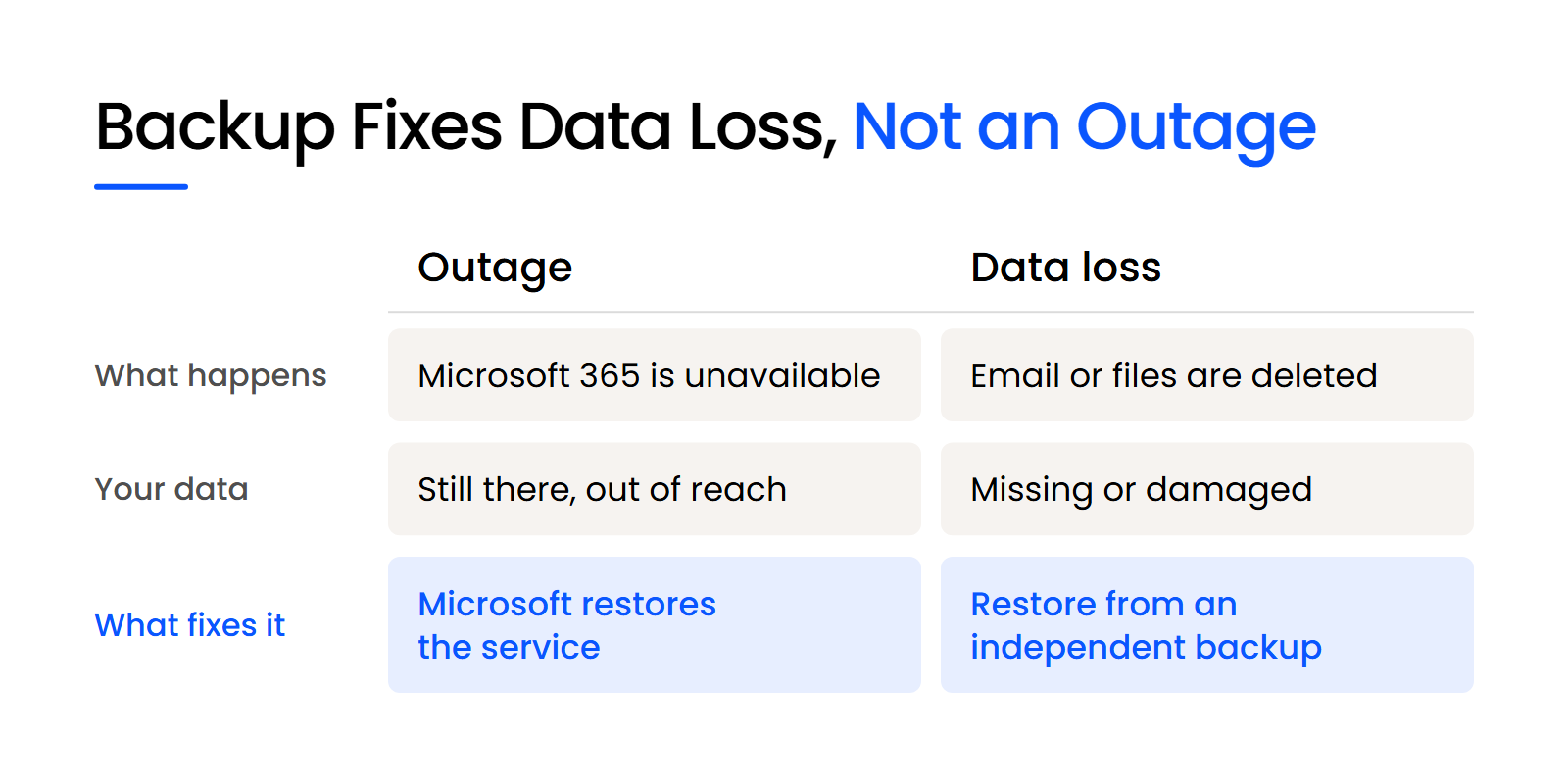
The mistake is assuming your firm’s Microsoft 365 data is safe because it sits with Microsoft. In the ABA’s 2024 Cloud Computing TechReport, Microsoft 365 (OneDrive) leads the cloud tools lawyers use at almost 72%, followed by Teams at about 63%, and 20% report making regular local data backups.
An external drive in a drawer isn’t a Microsoft 365 backup either. The fix is continuous backup of Exchange Online, SharePoint and Teams to a separate, third-party location, so a deletion, a ransomware attack or a sync error inside Microsoft 365 doesn’t take your only copy. Microsoft 365 Backup keeps its copies inside Microsoft 365.
What Belongs on Your Firm’s Outage Checklist?
Six items belong on the checklist, and each one is something your firm sets up now so nobody has to work it out during the outage. Together they cover the diagnosis, the fallback, the backup and the record of who does what:
With those in place, the next outage starts with a check and a switch your staff already know.
Turn On Service Health Alerts Before the Next Outage
Pick a time this week, while everything is working, and settle two things. Ask whoever runs your firm’s Microsoft 365 admin center to turn on Service health notifications for at least two people. Then write down who files with the court if Outlook is down, and check that person has their own e-filing access.
If nobody at your firm can say who gets the alerts or who files, that’s where your outage plan starts.
WHAT’S NEXT
Frequently Asked Questions

Uptime Legal’s Technology Solutions
Cloud, software, IT, and document management built for today’s law firms.