Table of Contents
You’ve got several managed IT quotes in front of you, and they don’t line up. One prices per user, one per device, one adds a startup fee, and none of them tells you what you’d pay at the end of the month.
That’s the question behind how much managed IT services cost for a law firm: what your firm, at your headcount, pays every month once licenses, legal software support and plan minimums are counted.
As of October 2026, Uptime Legal publishes its plans at $99 to $175 per user per month. That rate is where the math starts.
When we quote managed IT for a firm, the first useful step is always the same: turn every quote into an all-in monthly total at your headcount. This guide does that math with real, published prices.
What Drives the Cost of Managed IT for a Law Firm?
Four things set what your firm pays for managed IT: the per-user rate, the plan minimum, what the price bundles in, and the level of security you need. A quote’s per-user rate tells you only the first.
Many firms have no budget baseline to hold a quote against. The ABA’s 2024 Practice Management TechReport found that only 41% of solo respondents and 55% of firms with 2–9 attorneys budget for technology at all.
Here are the four drivers, in the order they reach your monthly total:
How the Per-User Rate and Plan Minimum Set Your Bill
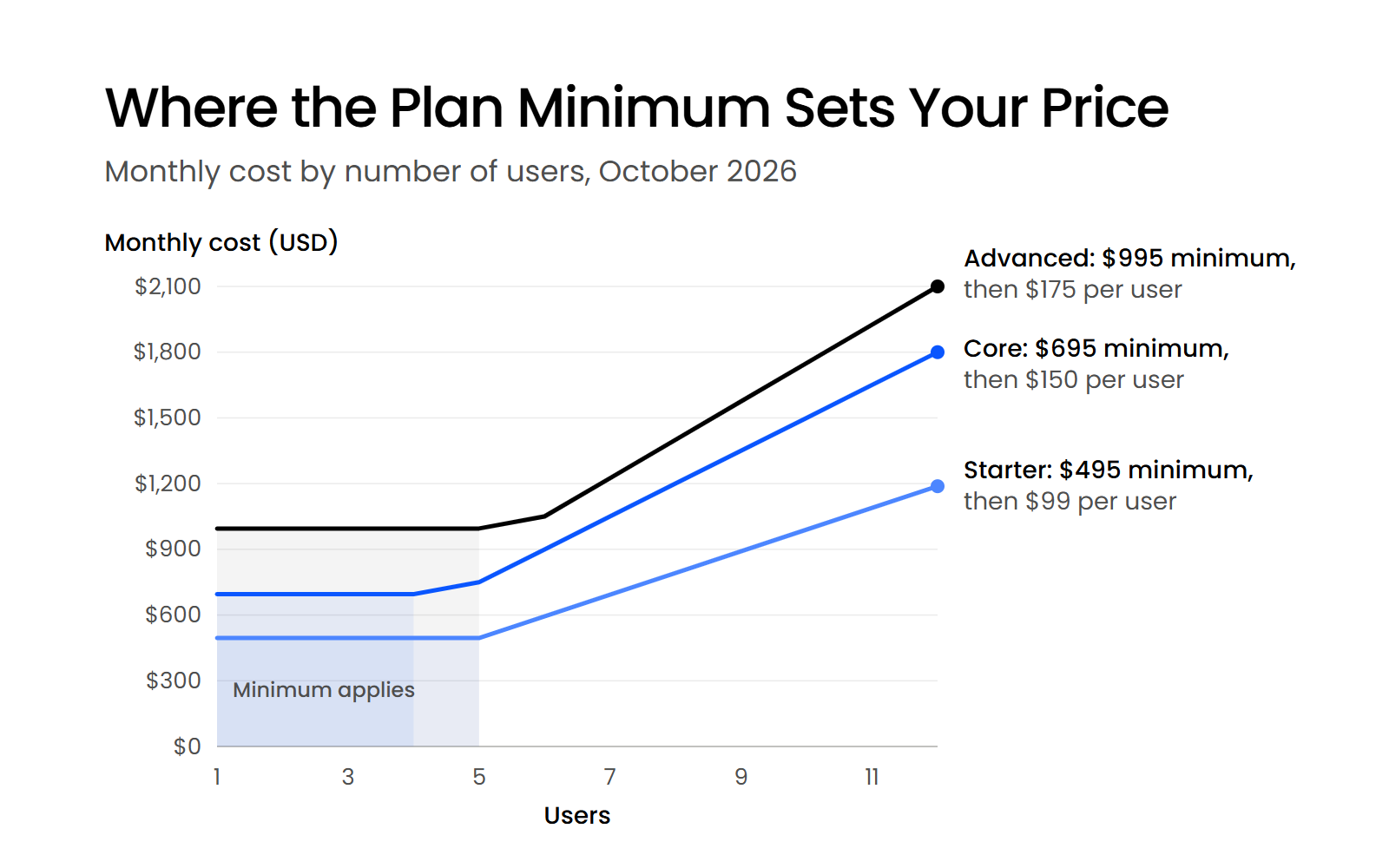
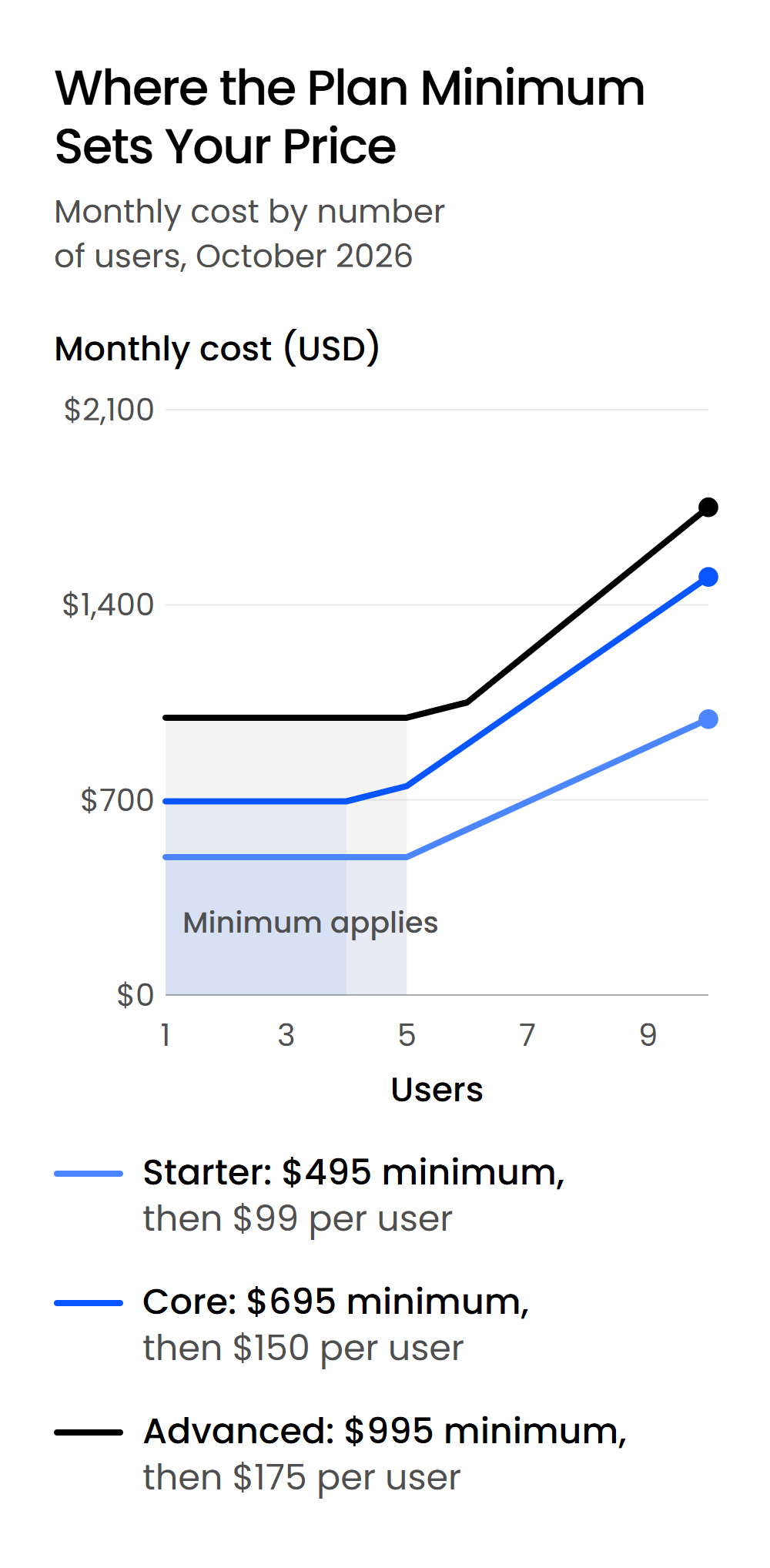
Managed IT is priced per user per month, so your bill grows with your headcount. Uptime Manage runs $99 per user on Starter, $150 on Core and $175 on Advanced.
Each plan also has a monthly minimum: $495 on Starter, $695 on Core and $995 on Advanced. A three-person firm on Core pays the $695 minimum, because three users at $150 comes to only $450.
The minimum stops mattering once your headcount passes it. That happens at six users on Starter, five on Core and six on Advanced.
What’s Bundled into the Price
Two quotes with the same per-user rate can produce different monthly totals. If one includes Microsoft 365 licenses and support for your legal software and the other bills them on top, the lower rate can turn out to be the higher total.
How Security Level Changes the Rate
The rate rises with the level of security your firm needs. Starter, at $99 per user, is built for small firms with simple IT needs that don’t require complex systems or compliance.
Core, at $150, adds an assigned IT Manager and business-grade security, including Microsoft Intune device management, Microsoft Defender for Business and Entra ID conditional access. Advanced, at $175, is built for firms with high-stakes clients, sensitive data and an elevated need for data security and compliance.
How Much Does Managed IT Cost by Firm Size?
At Uptime Legal’s published prices, managed IT costs a firm of five or fewer $495 to $995 a month, and a ten-person firm $990 to $1,750 a month, depending on the plan. The table works the Uptime Manage prices through to monthly and annual totals at five firm sizes, with each plan’s minimum applied.
Take a ten-person firm on Core: 10 users at $150 is $1,500 a month, or $18,000 a year. A three-person firm on the same plan pays the $695 minimum, or $8,340 a year.
Every figure is in US dollars, at our Uptime Manage prices as of October 2026.

What Should an All-In Managed IT Price Include?
An all-in managed IT price includes help desk support, Microsoft 365 licenses and support for your legal software, so you can compare it with any other quote line by line. Anything outside that list should appear on the quote by name, with its own price.
What’s Inside the Uptime Manage Price
Here’s what sits inside the Uptime Manage per-user price, set against what a bare per-user rate can leave out.
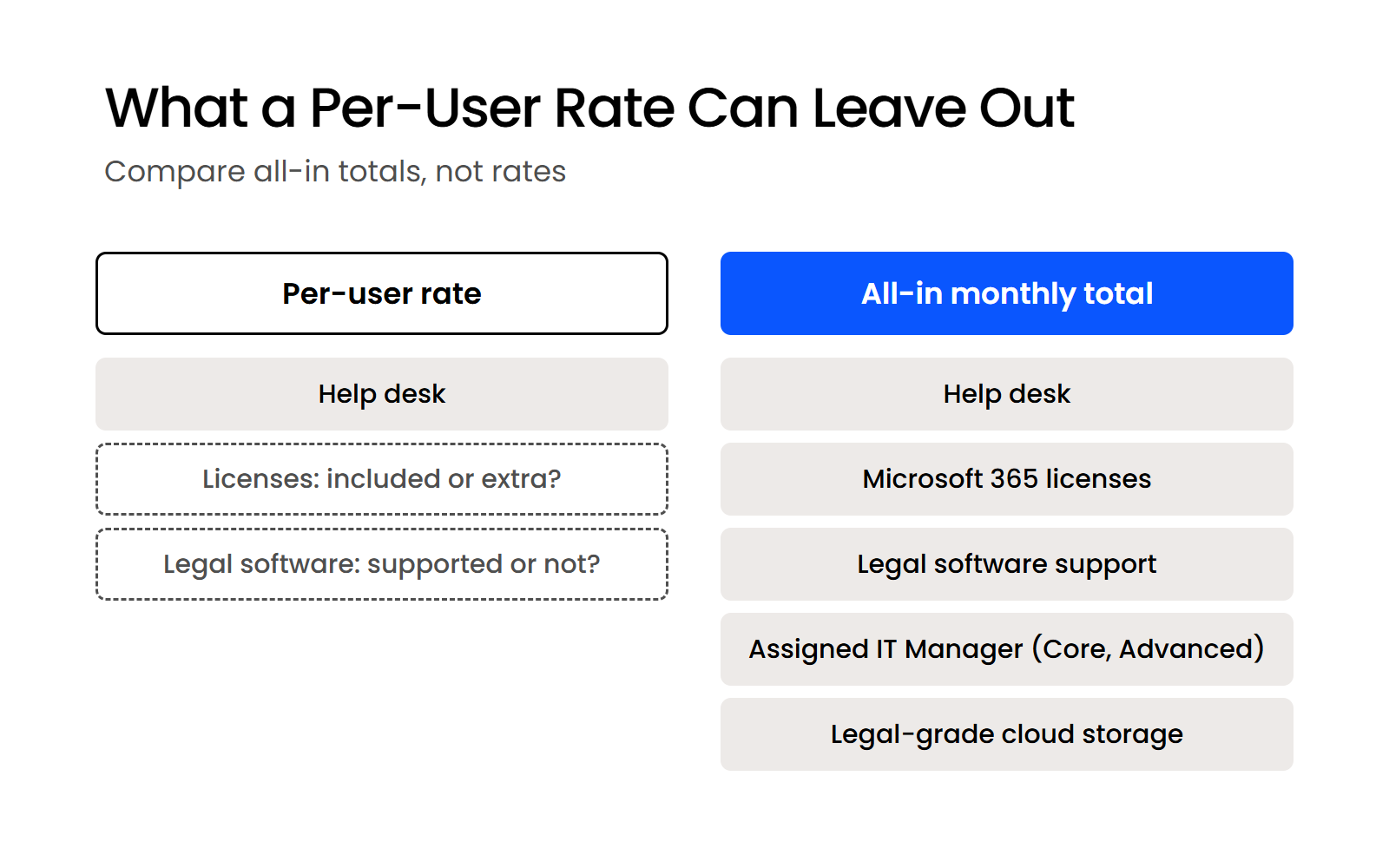
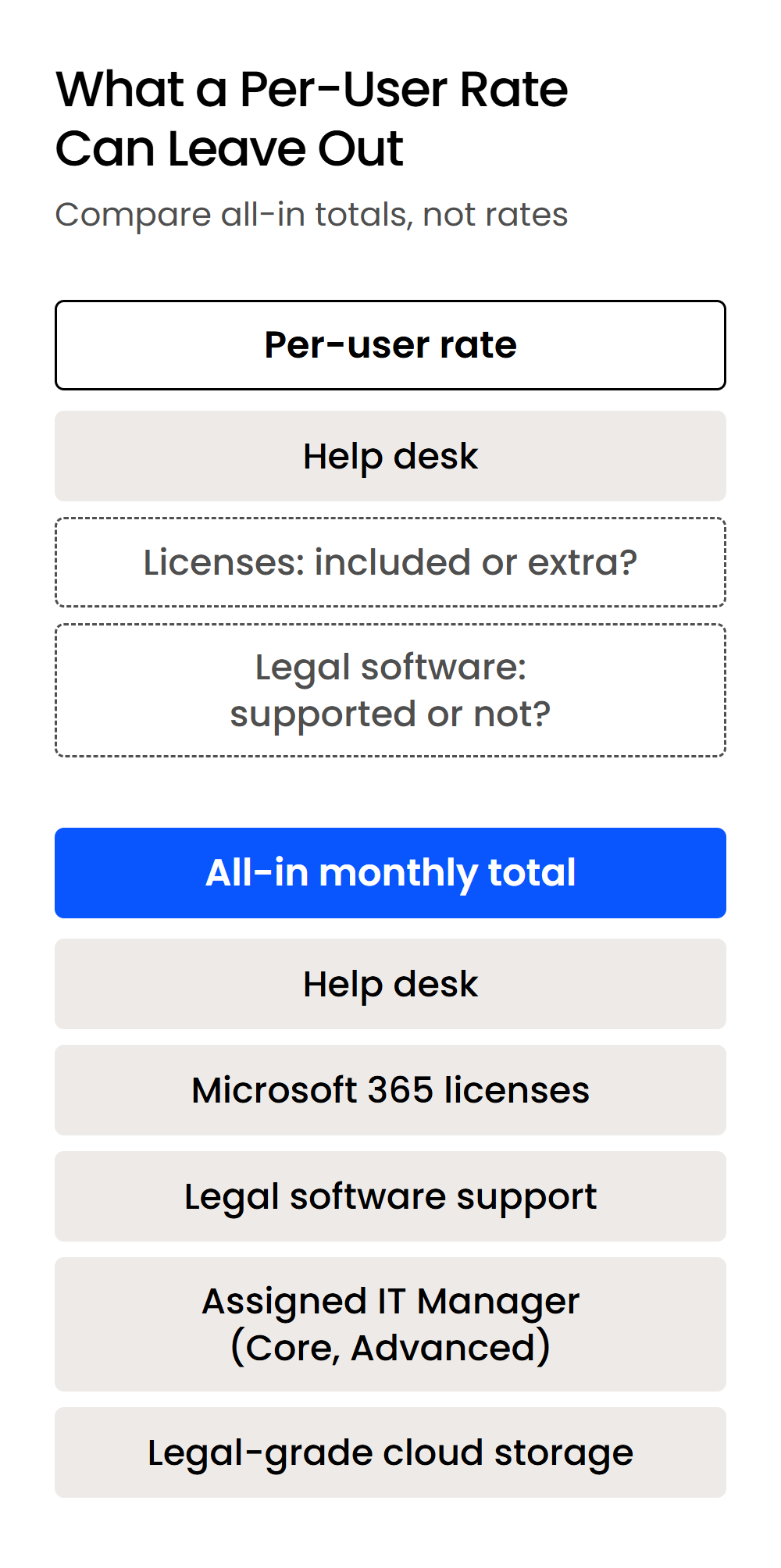
Licenses are the line to check first. Uptime Manage includes a Microsoft 365 subscription for each user (Business Standard on Starter, Business Premium on Core and Advanced), so a quote with a lower rate and licenses billed on top can still cost your firm more each month.
Legal software support is the second. A provider that stops at switches, firewalls, printers and Microsoft accounts leaves your practice management software, and the logins attached to it, to you and the software vendor. Owning that layer is what stops a departed employee from staying active in a system nobody on the IT side was watching.
What to Ask About What’s Excluded
Ask every provider, including us, what its monthly fee leaves out. These are the four lines to ask about by name:
A quote that answers all four in writing is one you can compare.
Why Does Legal-Specific IT Cost More Than a Generic MSP Quote?
Legal-specific IT costs more per user because the provider supports your practice management and billing software as well as your computers and Microsoft accounts. That means the systems your billing and deadlines run on:
Our help desk is trained on how a law firm works, and Core and Advanced add an assigned IT Manager who knows your systems. When your practice management system stops syncing the day before a filing, a legal-specific provider fixes it instead of sending you to the software vendor’s help line.
The fee gap is easy to measure against your own downtime. Multiply the number of billers who can’t work by their hourly rate and by the hours lost, then set that against the monthly difference between two quotes.
Hiring in-house is the other comparison firms run. A full-time IT hire costs more than a managed plan for most small firms: the Bureau of Labor Statistics puts the median computer user support specialist’s salary at $61,860 a year, before benefits. That trade-off is the core of outsourced IT for law firms.
Which Managed IT Plan Fits Your Firm?
Most firms fit the Core plan, while Starter suits small firms with simple IT needs and Advanced suits firms with high-stakes clients and an elevated need for security and compliance. Start with your software and your clients, then decide whether you need an assigned IT Manager.
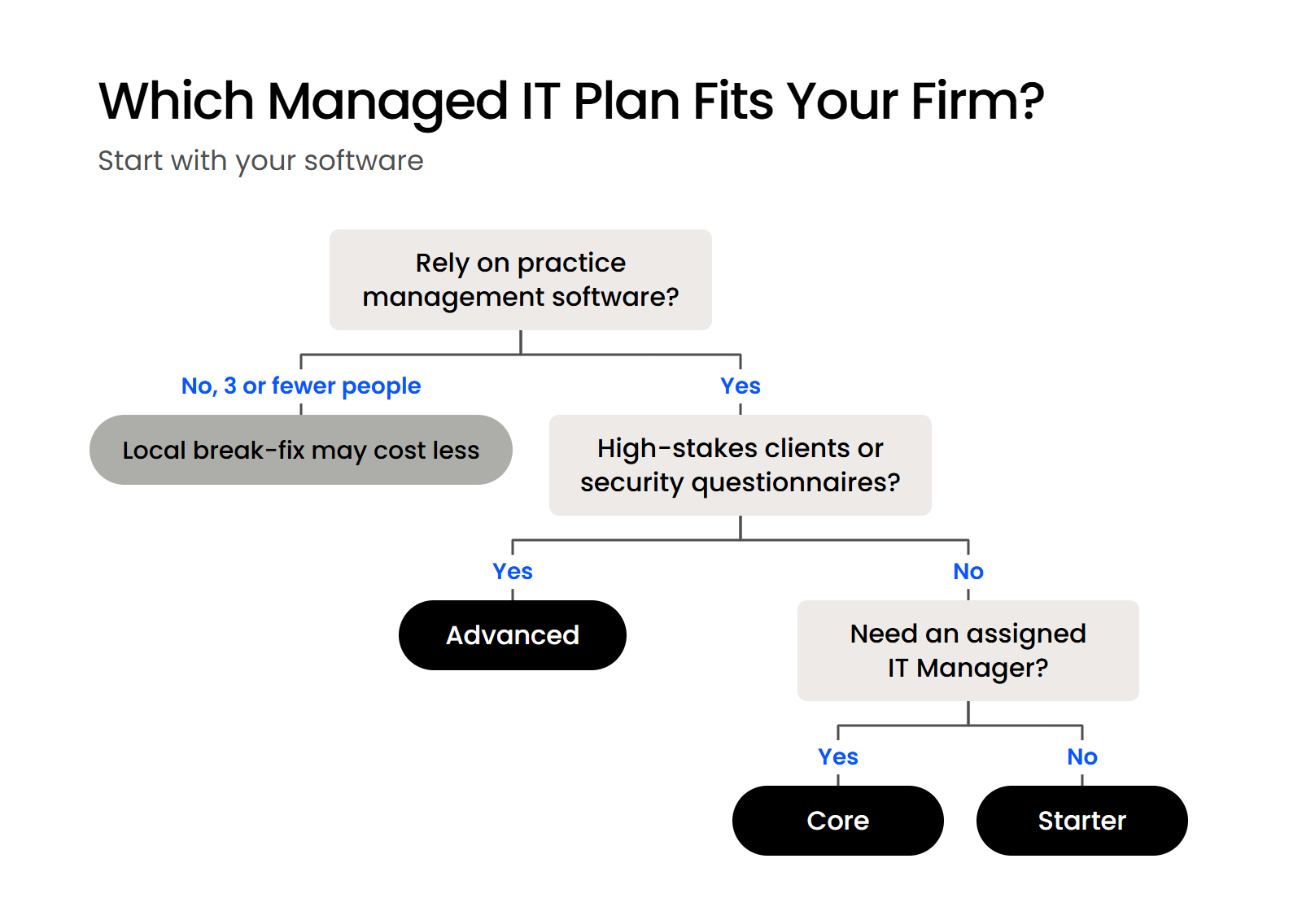
What Kind of Firm Each Uptime Manage Plan Fits
We built each plan for a different firm profile:
Starter gives you a shared pool of account managers, and Core and Advanced give you an assigned IT Manager who knows your systems.
When a Full Managed Plan Isn’t the Cheapest Fit
A firm of two or three people with simple needs and no practice management software can pay less for a local break-fix technician or a low-cost generic managed service provider (MSP). If that’s your firm, the $495 Starter minimum buys more support than you’ll use in a typical month.
Break-Fix vs Managed IT
How break-fix and managed IT compare for a small firm on cost, response and security.
The trade-off is that nobody watches your security between calls, and nobody supports legal software when you add it. If you need someone at the office regularly, weigh a local or national MSP before you choose.
How Do You Compare Managed IT Quotes Side by Side?
Compare managed IT quotes by converting each one into an all-in monthly total at your headcount, then asking every provider the same six questions. Firms often pick the lowest price tag on the assumption that all managed IT is roughly the same.
Compare what’s inside each price, the way you’d compare a $500 TV with a $2,000 one before buying. These six questions cover the price side of choosing an IT provider:
Startup fees come up when firms we talk to compare quotes. A fair answer names the work the fee pays for: a review of your current systems, an approved implementation plan, migration and go-live support.

Compare Every Managed IT Quote at Your Own Headcount
Budget against the all-in monthly total at your headcount, with the plan minimum applied and the licenses and legal software support counted. At our published prices, that’s $495 to $995 a month for a firm of five or fewer and $990 to $1,750 a month for a ten-person firm. Convert every quote you have to that same all-in total, and ask each provider what its monthly fee leaves out.
WHAT’S NEXT
FAQ

Uptime Legal’s Technology Solutions
Cloud, software, IT, and document management built for today’s law firms.