Table of Contents
Most law firms rely on a generalist MSP that handles the basics — laptops, Wi-Fi, Microsoft 365. That works fine until something legal-specific breaks.
When Clio goes down, or NetDocuments won’t sync, or an e-filing portal freezes an hour before a deadline, nobody owns it.
That’s the core problem with generalist IT support in a legal environment: it stops at the edge of your software stack. A law firm help desk is built to cover the full environment — infrastructure and legal software — with one accountable party.
This article explains what that actually looks like, what it should cover, and what to look for in a provider.
What Is a Law Firm Help Desk?
A law firm help desk is the frontline layer of IT support for legal practices — the team or service you contact when something stops working and you need it fixed.
That part isn’t unique. What makes a help desk for law firms different is scope and context.
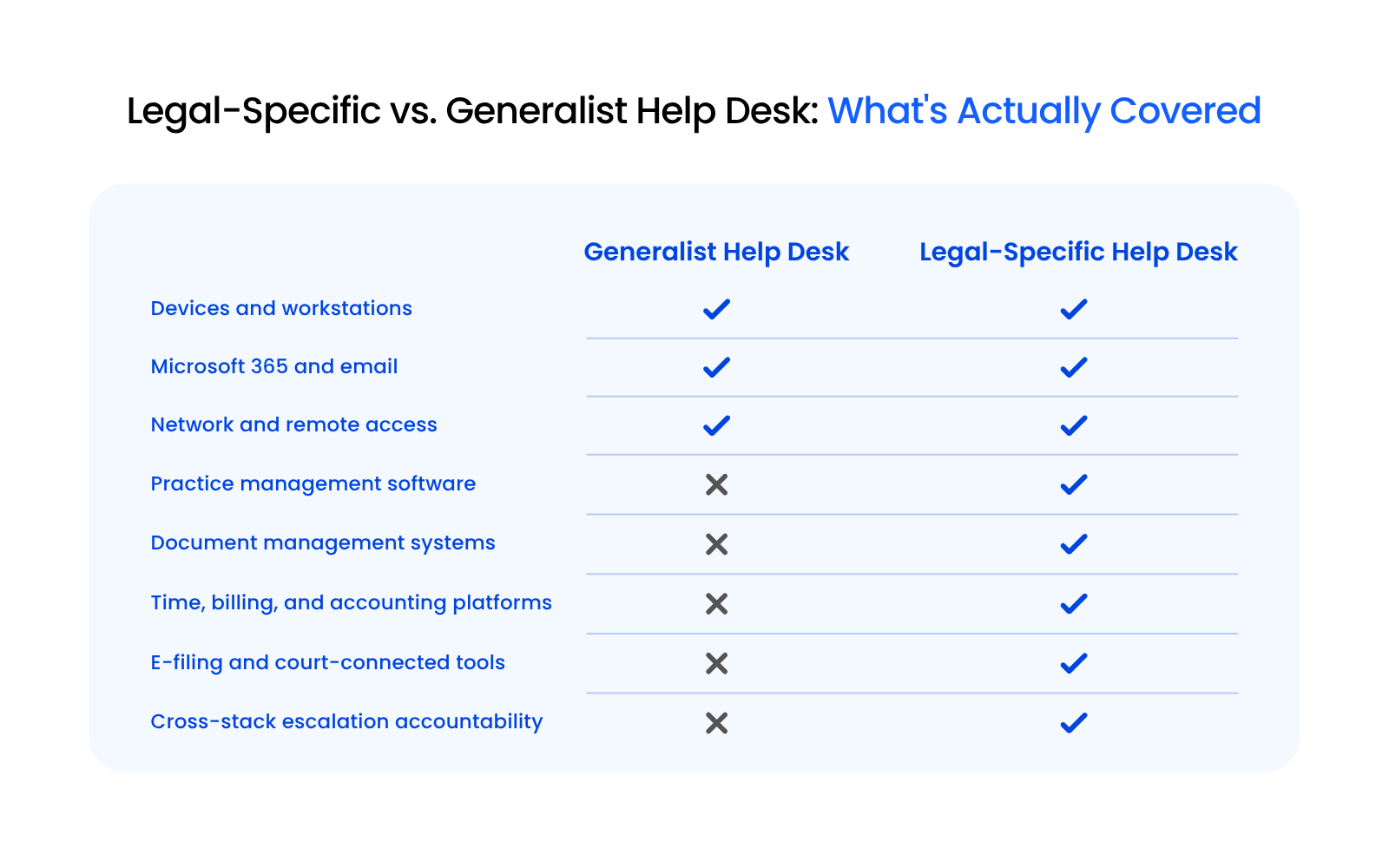
A generic IT help desk handles the infrastructure layer: computers, network access, email, operating systems.
When a lawyer calls about a practice management system that won’t load or a document management platform throwing errors, a generalist provider often hits a wall.
That software isn’t in their stack. It’s not their problem, or so they’ll say.
A legal-specific help desk covers the full environment law firms actually run.
That includes:
That coverage matters operationally. Fewer vendor handoffs, faster diagnosis, and one accountable party when something breaks before a deadline.
Legal-specific help desk support resolves problems across the full stack, including the software layer where generalist providers routinely stop.
That’s the functional difference, and for a law firm, it’s the one that matters most.
Why Legal-Specific Expertise Changes the Support Experience
When a generalist IT provider picks up the phone and hears “Clio isn’t syncing” or “NetDocuments keeps throwing an authentication error,” there’s often a pause.
Not a troubleshooting pause. A “what is that?” pause.
That moment is where legal-specific expertise either exists or it doesn’t.
A technician who doesn’t know Clio from a generic CRM, or who has never worked inside iManage or Worldox, can’t triage a legal software problem effectively.
They can’t isolate whether the issue is in the application, the integration, or the infrastructure. They can’t ask the right questions. Diagnosis stalls before it starts.
Legal-specific help desk support changes that from the first call.
Technicians who know the legal software stack can work across the full environment — practice management, document management, time and billing, e-filing systems — and identify where a problem actually lives, faster and with fewer false starts.
Bar rules add another layer that generalist providers rarely account for. ABA Model Rules 1.1 and 1.6 create ethical obligations around technology competence and client data protection.
A legal-specific provider understands those obligations and supports the firm both technically and operationally.
The Vendor Finger-Pointing Problem (and How a Legal-Specific Help Desk Solves It)
Most law firms have experienced this, even if they haven’t had a name for it.
When something breaks, it almost always unfolds the same way:
That’s the vendor finger-pointing problem. If your firm has ever resolved an IT issue by making multiple calls to multiple parties, you’ve been in it.
Generalist IT providers own the infrastructure layer. Software vendors own their application. The gap between those two things is where law firm IT problems live.
A legal-specific help desk closes that gap. When a technician knows both the infrastructure and the legal software stack, they can find the problem and fix it without bouncing the firm between vendors.
One call. One accountable party.
That accountability matters more in a legal environment than most.
A frozen e-filing portal an hour before a deadline isn’t a minor ticket. A locked account before a client call carries real consequences. Generalist providers aren’t built to understand that urgency or respond to it accordingly.
How Help Desk Support Fits Within Managed IT Services
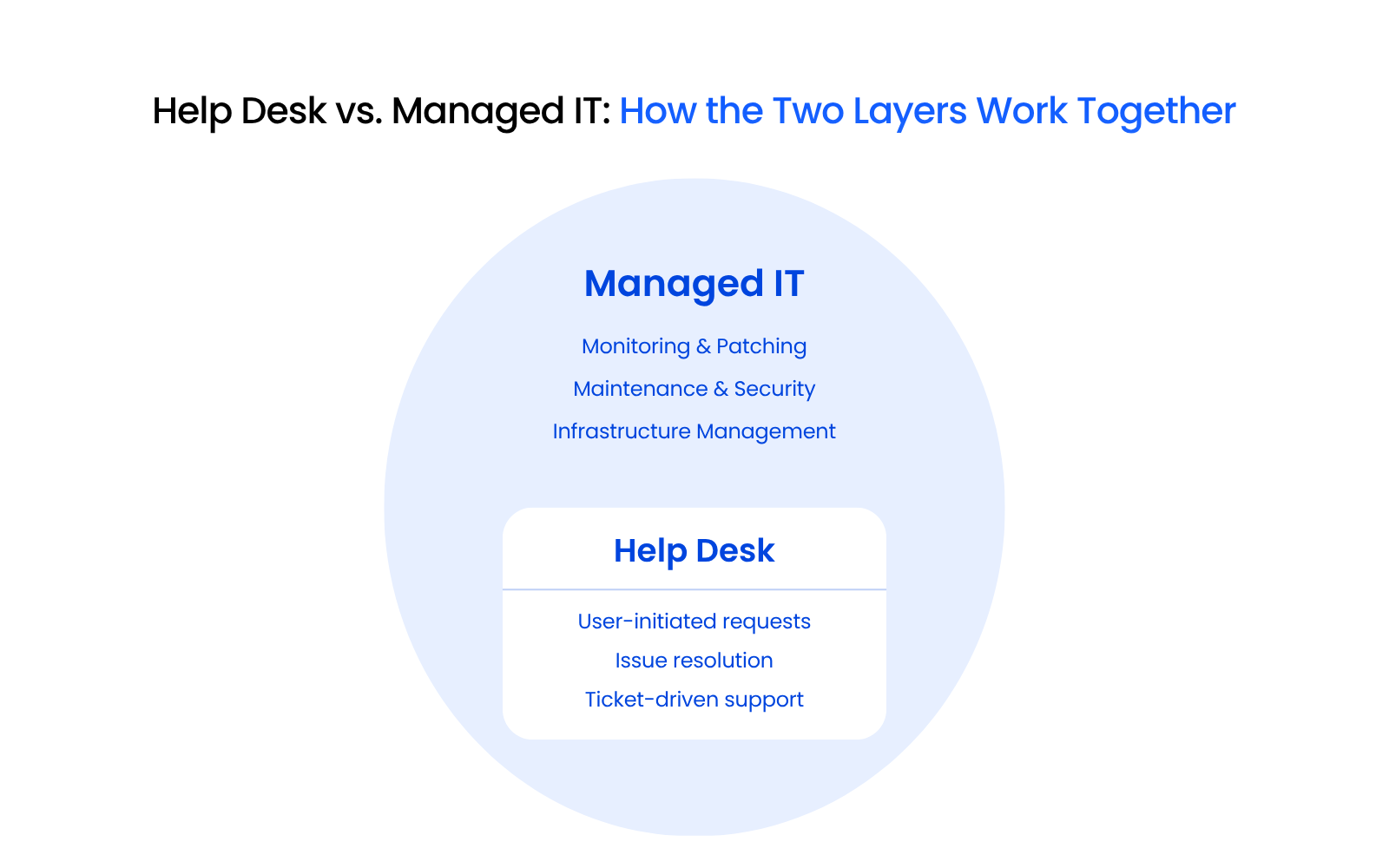
Help desk and managed IT are related, but they’re not the same thing, and evaluating them separately leads to gaps.
Help desk is the reactive layer. Someone submits a ticket, a technician responds, the problem gets resolved.
Managed IT is the proactive layer. Monitoring, patching, security, and infrastructure maintenance that reduces how often those tickets get submitted in the first place.
The two work together. One without the other leaves something uncovered.
For law firms evaluating providers, the practical takeaway is straightforward: don’t assess help desk support in isolation.
The quality of the help desk is directly tied to the managed IT model behind it.
A provider that bundles both — and builds them around legal environments specifically — is a more reliable foundation than a standalone support line.
In-House vs. Outsourced Help Desk: What Makes Sense for Most Firms
Some law firms maintain internal IT staff.
For larger firms with the headcount and budget to support it, that can work well. For most small-to-midsize firms, the math doesn’t hold up.
A full-time in-house IT support hire often costs roughly $40,000 to $56,500 a year in salary alone at the entry help desk level, and more experienced support roles run much higher — before benefits, training, and turnover costs are added.
When that person is unavailable, support stops. When a legal software issue falls outside their experience, the firm is back in the same position as having a generalist provider.
An outsourced help desk through a managed IT provider addresses those gaps directly: broader coverage, after-hours support, a team rather than a single point of failure, and — with a legal-specific provider — depth across the legal software stack that a single in-house hire is unlikely to match.
Cost predictability is another factor. Outsourced managed IT typically runs at a fixed monthly rate, which is easier to budget against than salary, benefits, training, and turnover costs combined.
For firms under 50 attorneys, an outsourced help desk within a managed IT relationship tends to offer better coverage, more legal software depth, and more predictable cost than maintaining in-house staff.
What to Look for in a Law Firm Help Desk Provider
Not every legal IT provider that claims to serve law firms has the depth to back it up. These are the criteria that actually matter when evaluating a legal-specific help desk.
Does the Provider Know Your Legal Software?
Ask directly which platforms they support.
Clio, MyCase, LexWorkplace, NetDocuments, iManage, Worldox, Tabs3, ProLaw — a provider with real legal software depth will answer without hesitation.
One that hedges or speaks only in generalities about “line of business applications” is telling you something important.
How Do They Handle Response Time and Escalation?
Response time commitments should be specific and tiered — a locked account before a client call is not the same priority as a printer configuration issue.
Ask how the provider defines response time, what their escalation path looks like, and who owns a ticket when it crosses from infrastructure into application support.
Do They Own the Full Stack or Pass the Buck?
The provider should cover devices, network, Microsoft 365, and legal software without carving out exceptions that push the firm back into vendor finger-pointing.
Single-point accountability is the baseline, not a premium feature.
Do They Understand Legal Confidentiality Obligations?
A provider serving law firms should understand the ethical obligations created by ABA Model Rules 1.1 and 1.6 around technology competence and client data protection.
They don’t need to be lawyers, but they should be able to speak to how their practices support the firm’s obligations, not just their own compliance posture.
How Uptime Legal Approaches Help Desk Support for Law Firms
Legal-specific help desk support is one layer of a broader managed IT relationship. And for most firms, that relationship is what determines whether technology is a liability or a stable foundation.
If your current setup leaves gaps in legal software support, response accountability, or cross-stack coverage, it’s worth understanding what a purpose-built alternative looks like.
WHAT’S NEXT
Frequently Asked Questions

Uptime Legal’s Technology Solutions
Cloud, software, IT, and document management built for today’s law firms.