Table of Contents
Your firm depends on software like PCLaw, Time Matters, or Tabs3, and for years that meant owning a server to run it. Servers are expensive, they break, and they tie your team to the office.
A private cloud removes the server without removing the software. It hosts your legal applications on a secure, dedicated platform you reach from anywhere, with maintenance, backups, and security handled for you.
It’s one of several cloud solutions for law firms worth understanding before you renew another server. Here’s what a private cloud is, how it works, what it costs, and how to choose one.
Why Law Firms Relied on In-Office Servers
For years, running shared legal software meant buying a server and keeping it alive in a closet at your office.
Practice management, billing, and document management were built to be shared across the firm, and sharing them required a server on site. Once you bought that server, keeping it running became a standing job.
That job never really ended:
A failed server meant lost hours. An aging one meant a looming bill.
The server was never the point of your firm, but it demanded attention like it was. Then the way legal software runs started to change.
Web-Based and Server-Based Legal Software Today
Today, law firms run a mix of two kinds of software, and the difference shapes your options.
Web-based software runs in a browser and needs no server. Server-based software installs on a machine and tends to be more capable. Plenty of firms run both.
Web-based tools are easy to reach from anywhere and carry no IT upkeep. Server-based tools are often more powerful and customizable, which is why many firms of five or more people still rely on them.
So you seem to face a tradeoff: the convenience of the cloud, or the software your firm actually runs on. A private cloud is how you get both.
What Is a Private Cloud?
A private cloud is a hosted, single-tenant environment that runs your firm’s existing legal software on dedicated servers you reach from any device. Instead of owning the server, you use a provider’s, and they keep it running.
A private cloud generally includes:
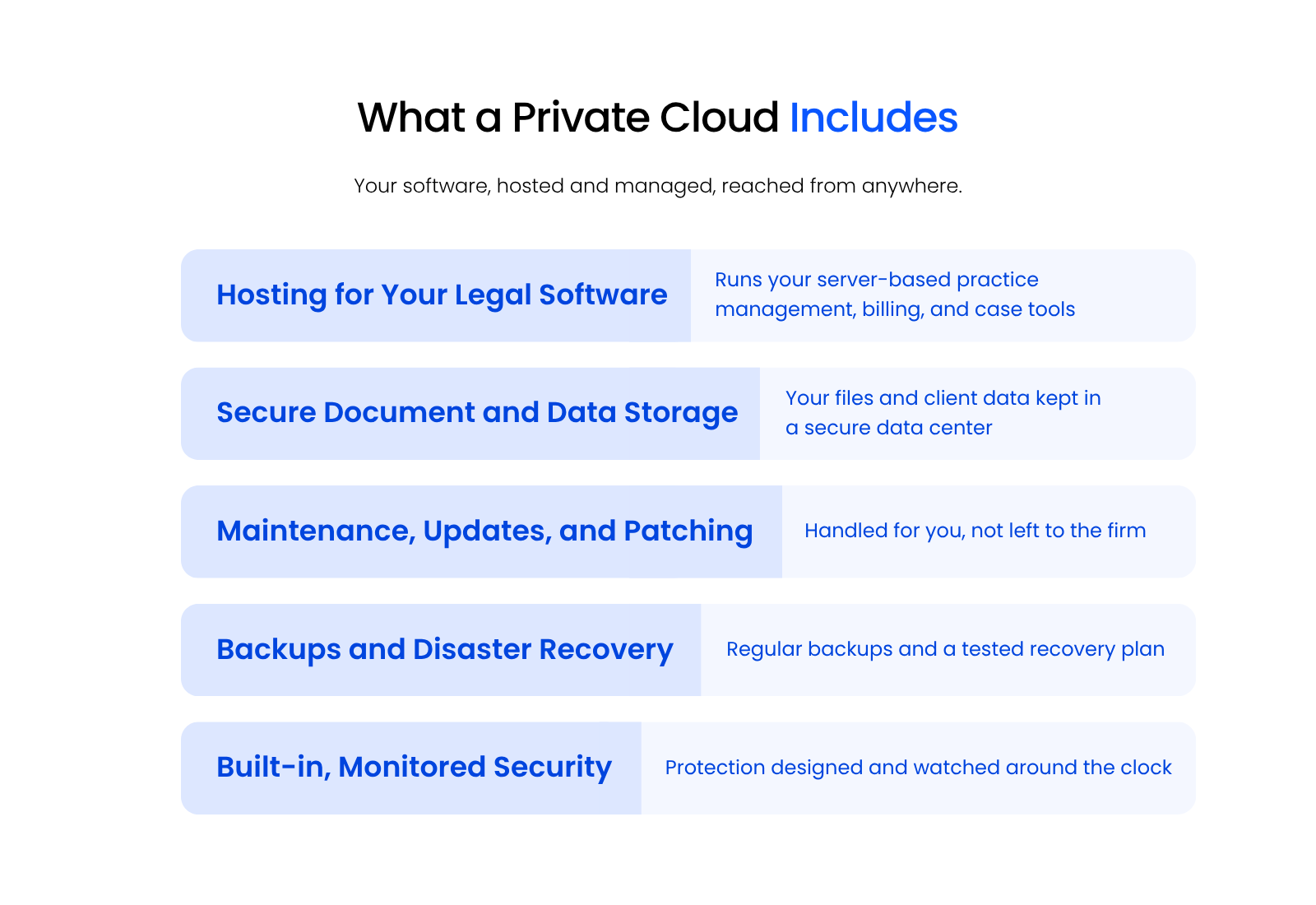
Your software works the way it always has. The difference is where it lives: on a dedicated platform in a secure data center instead of a box in your office. Strong providers own their infrastructure rather than reselling space on Azure or AWS, and they run redundant data centers so your firm isn’t tied to a single location.
Moving over is a managed process, not a weekend scramble. A capable provider runs a deep discovery first, assigns a project manager and an engineer, and plans the cutover so your team keeps working. From your desk, the change is mostly invisible.
The next question is usually about the word “private.”
The “Private” in Private Cloud
Single-tenancy is what makes a private cloud private. Your firm gets its own dedicated environment, separate from every other client.
In a multi-tenant setup, many organizations share the same servers and resources. For a firm holding privileged client data, that sharing adds risk and can affect performance. A private cloud keeps your firm as the only tenant, which means tighter control, real isolation, and consistent performance you don’t have to share.
Private Cloud vs. Public Cloud for Law Firms
The difference between a private and public cloud comes down to tenancy. A private cloud is dedicated to your firm alone. A public cloud shares the same infrastructure across many unrelated organizations.
Both are “the cloud,” and both can be secure. For a law firm, the distinction matters most where confidential client data, performance, and control are concerned.
| Dimension | Private Cloud | Public Cloud |
|---|---|---|
| Tenancy | Single-tenant: your firm alone | Multi-tenant: shared across many users |
| Data isolation | Dedicated environment for your data | Data shares infrastructure with others |
| Performance | Consistent, not affected by other tenants | Can vary with overall demand |
| Premise-based legal software | Hosts PCLaw, Tabs3, ProLaw, and similar | Often can’t run server-based legal apps |
| Control and customization | High; tailored to your firm | Limited to the provider’s standard setup |
| Best fit for | Firms running dedicated legal software and holding sensitive data | Firms needing simple, standardized web apps |
For most firms, the deciding factor is confidentiality. Your duty to protect client information doesn’t pause because the data moved to the cloud. A single-tenant environment makes it easier to know exactly where your data lives, who can reach it, and how it’s protected, which is harder to guarantee when you’re one of thousands of tenants on shared infrastructure.
A public cloud can be the right call for simple, standardized tools. When your firm depends on dedicated legal software and sensitive client files, a private cloud gives you the isolation and control that fit how a firm has to operate.
How Private Cloud Works: The Virtual Desktop
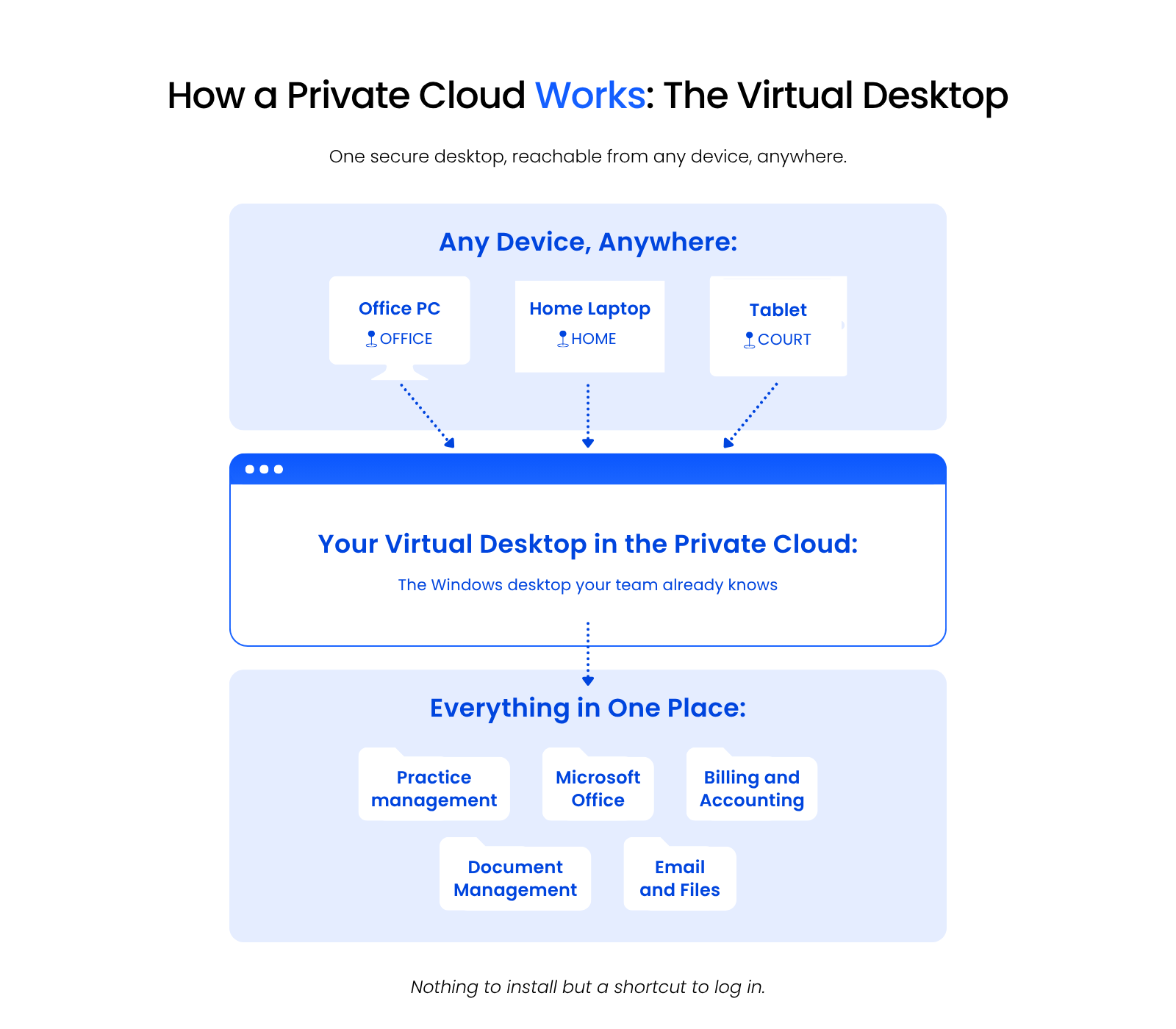
A virtual desktop is your portal into the private cloud, available anytime, anywhere, from any device.
It looks and behaves like the Windows desktop your team already knows. It holds your everyday tools: Word, Excel, Outlook, your practice management software, your accounting software, and your document management system. Software that used to be stuck on one office computer becomes available wherever you work.
These platforms are also called Desktop-as-a-Service, and they’re the front end of your private cloud. Your provider handles maintenance, updates, backups, and security.
Performance doesn’t depend on your local hardware, so even older machines can run demanding applications. In most cases, the only thing installed on a computer is a shortcut to log in.
When you sign in, you reach everything in one place:
Nobody has to install or update applications on every machine anymore.
Private Cloud Demonstrated
Most virtual desktops look and work like any other Windows desktop, with shortcuts, a start menu, and a recycle bin. They’re standardized with firm-wide applications and can be customized for each person. Uptime Cloud includes a short demo of exactly this.
What Software Can Run in a Private Cloud?
A private cloud can host nearly any Windows-based application your firm uses. The specifics vary by provider, but the range is wide.
That usually covers:
One real advantage is that a private cloud can run software that was never built to be cloud-ready, including legacy programs and custom-developed applications. That’s often the deciding factor for a firm tied to a specific tool.
Look for a provider with deep experience hosting your particular software and a platform built for legal work, with a real understanding of legal workflows, confidentiality, and security standards.
Should Your Law Firm Move to a Private Cloud?
A private cloud is probably the right move if your firm:
If two or three of those describe your firm, a private cloud is worth a serious look.
Cloudify Your Legal Software
You can move premise-based legal software to the cloud and run it like a web app, with more accessibility, reliability, and security than a local install.
Take Tabs3. By default it’s premise-based, installed on a firm’s office server.
Cloud technology can change that. Tabs3 can be moved to a platform such as Uptime Cloud and run as a cloud app, reachable from anywhere.
That works well if your firm has already started down a cloud path. For a broader setup, a full private cloud or virtual desktop hosts and manages multiple applications in one place.
How to Make Your Legal Software a Cloud App
Making the switch doesn’t mean replacing or re-buying your software.
The tool doesn’t change. Only where it runs does.
Private Cloud Costs
A private cloud for a law firm is typically priced per user per month. What you pay depends on how many users you have, how many applications you run, and how demanding those applications are.
As a rough guide, Uptime Cloud’s Single App Hosting starts at $495 per month for three users, plus $60 per additional user. A full private cloud is priced per user per month, from about $195 per user for smaller firms down to $125 per user for the largest firms.
Compared with owning servers, a private cloud is almost always the more economical choice, and the financial case for cloud only gets stronger as your firm grows. The savings show up in several places:
Set the predictable per-user cost against the unpredictable cost of buying, maintaining, and replacing servers, and the private cloud usually wins on total cost of ownership.
You can run the numbers for your own firm with our on-premise vs. private cloud cost comparator.
Cloud Security and Compliance for Law Firms
For most law firms, a managed private cloud is more secure than the server sitting in their own office, not less. The instinct that data feels safer down the hall is common, and it’s usually wrong.
A managed private cloud brings protection most small firms can’t run on their own:
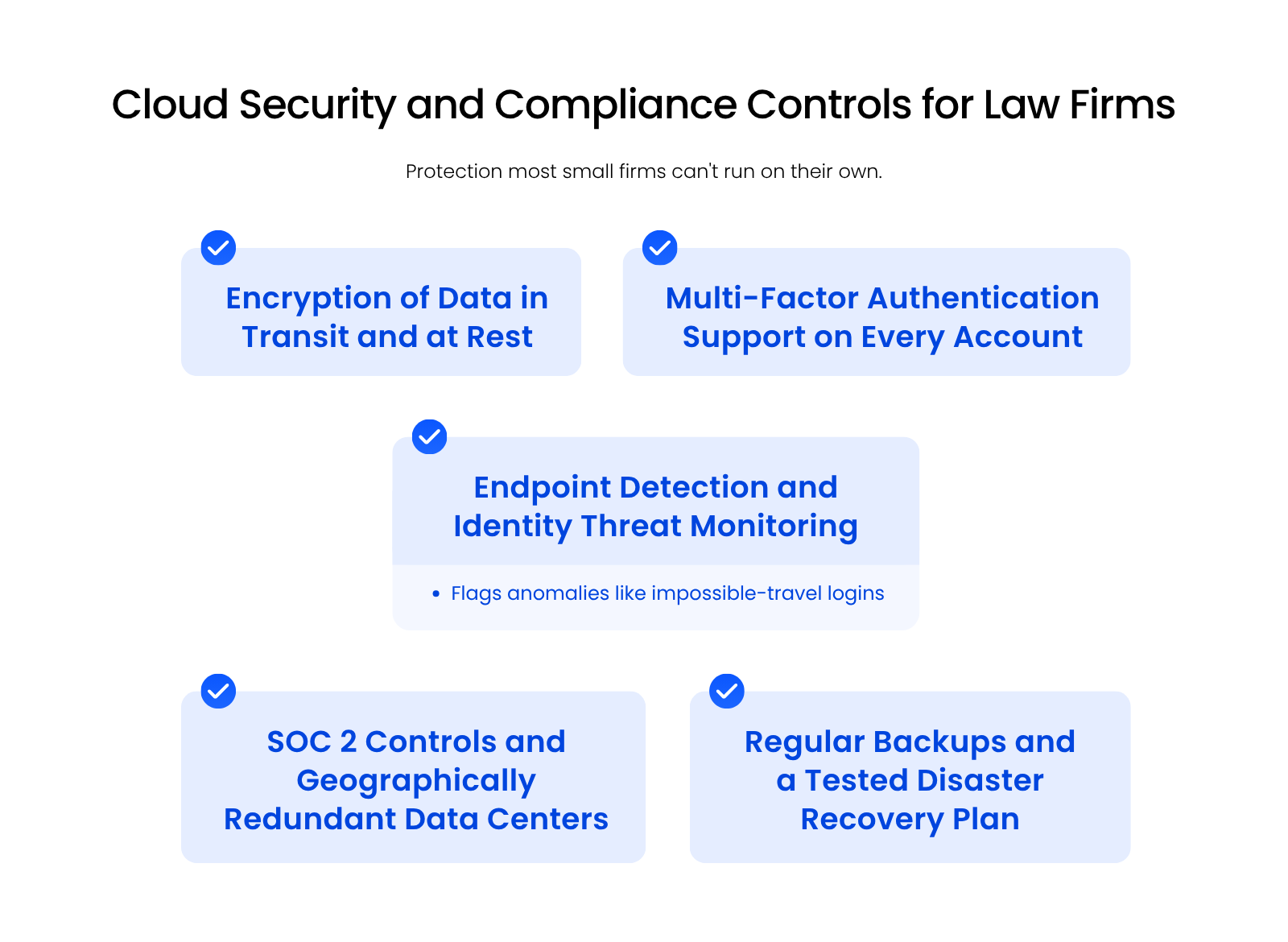
Consumer-grade email, basic antivirus, and standard anti-spam aren’t enough on their own. The tooling that actually stops modern attacks takes expertise and budget that a managed cloud spreads across many firms.
Security ties directly to your professional duties. Bar rules on competence and confidentiality expect you to take reasonable steps to protect client information, and a serious provider helps you meet that bar with documented controls and a North American footprint, including a Toronto office, for firms with regional preferences. None of this is legal advice, and a provider can’t promise compliance for you, but the right infrastructure makes meeting your obligations far more realistic.
Keep one thing clear: the provider runs the security infrastructure, and your firm still owns everyday habits like strong passwords and careful device use. Security is shared, and both sides matter.
Private Cloud Due Diligence
The right private cloud provider owns its own infrastructure, uses bank-grade security, and has deep experience with your specific legal software. Plenty of IT companies offer hosting; far fewer do it well for law firms.
Start with the non-negotiables. Any provider you consider should:
Then look at how they operate:
The legal-specific experience is the part firms underweight. Ask how many law firms a provider actually serves, and whether they’re certified in or genuinely experienced with your core practice management software. That software sits at the center of your firm, and if your host doesn’t truly know it, everything downstream gets harder.
This is where owning the infrastructure shows its value. A provider running its own SOC 2 environment, redundant data centers, and a 99.99% uptime commitment can stand behind those promises directly, instead of pointing at a third party.
Future-Proofing Your Law Firm with a Private Cloud
A private cloud keeps your firm ready for what’s next, without betting on any single prediction. The foundation does the work: anywhere access, room to scale, and infrastructure modern tools can run on.
Built for Hybrid and Remote Work
Hybrid and remote work are how firms operate now, not a temporary arrangement. A private cloud makes secure access from anywhere the default, so your attorneys and staff reach the same software and files whether they’re in the office, at home, or in court.

Ready for AI and What Comes Next
A modern cloud foundation is what lets your firm adopt new tools instead of being held back by aging hardware. As AI features arrive in legal software and security tooling keeps advancing, a private cloud gives you a current, well-managed platform to run them on. Scaling up or adding applications doesn’t mean another capital purchase; the platform grows as your firm does.
The firms that handle change best are the ones whose infrastructure can absorb it without a rebuild.
A Private Cloud Trades Server Headaches for Room to Grow
A private cloud gives your firm the software it relies on without the server that used to come with it. You get access from anywhere, security a small office can’t match on its own, and costs you can predict per user instead of surprise repair bills. As your firm grows or your tools change, the platform grows with you. The real question is what your current server is costing you to keep.
WHAT’S NEXT
Frequently Asked Questions

Uptime Legal’s Technology Solutions
Cloud, software, IT, and document management built for today’s law firms.