Table of Contents
Your office was doing more work than you realized. Not the lease or the lobby, the quiet infrastructure underneath: a place for your files to live, a network that let people reach them, a door that decided who got in.
When you close the office, all of that leaves with it.
That’s the part of setting up a virtual law firm nobody hands you a checklist for. You’ll find plenty of advice on whether to go virtual and almost none on what replaces each of those jobs once you have.
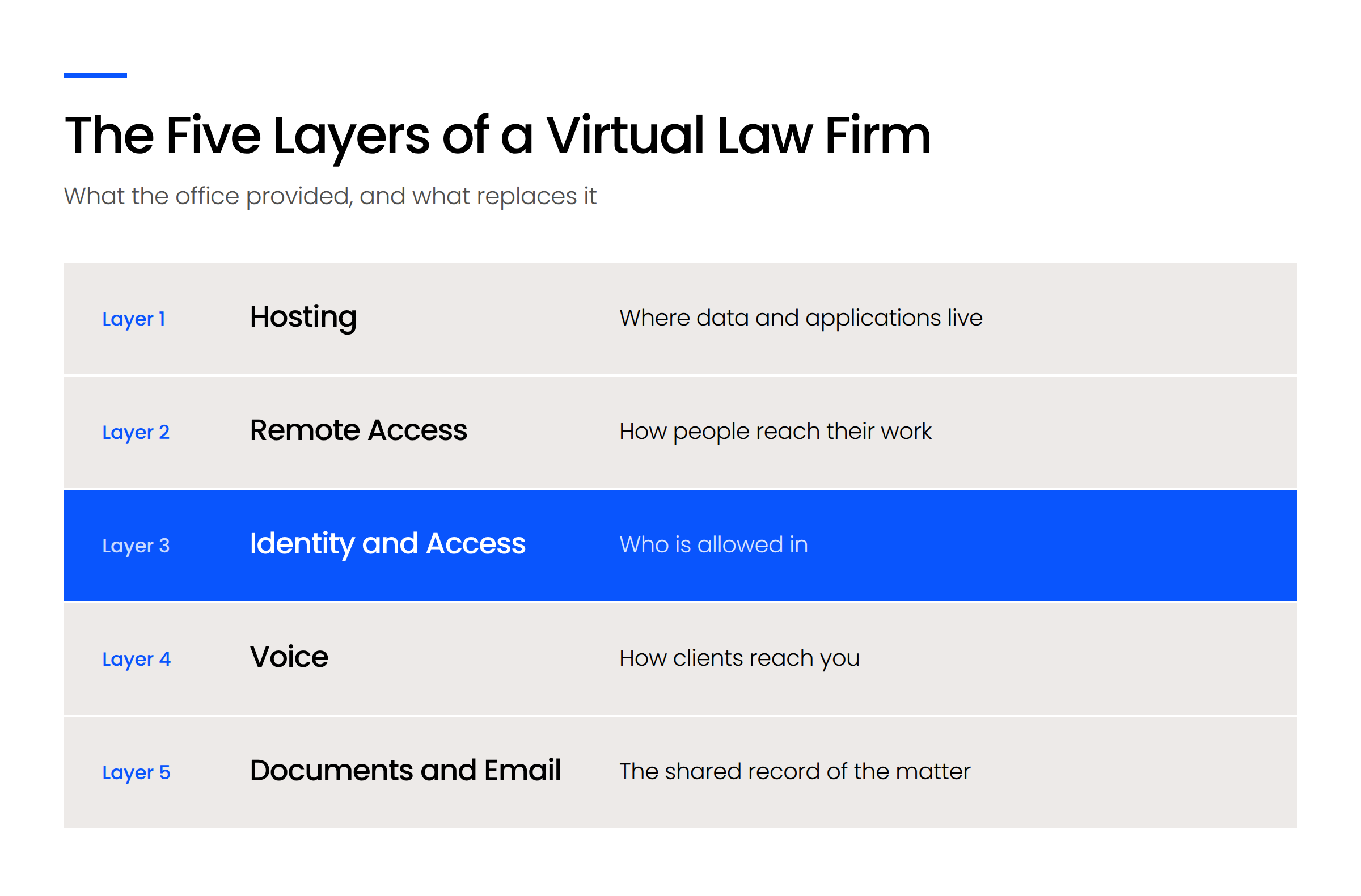
There are five layers. Together they’re the cloud infrastructure your firm now runs on, and they depend on each other in a specific order. Most firms get three of them right and discover the other two the hard way.
We build these environments for law firms, and we’ve learned that the layer firms skip is never the one they expect.
What Going Virtual Actually Removes
Going virtual removes five things at once: where your data lives, how people reach it, who is allowed in, how clients reach you, and where the shared record of a matter is kept.
None of those stop being necessary. They just stop being handled by a building.
That’s the reframe worth making early, because it changes what you’re shopping for. You’re not choosing software. You’re rebuilding infrastructure that used to come bundled with the rent.
The Five Jobs Your Office Was Doing
Think about what the office actually did for your firm, mechanically.
It gave your data somewhere to sit, usually a server in a closet. It gave people a network that reached that server without anyone thinking about it. It acted as a boundary, because being inside the building was most of what it took to be trusted. It carried a phone number that rang at a desk. And it held the filing cabinet, or the shared drive that replaced the filing cabinet, where the record of a matter lived.
Close the office and every one of those becomes a decision you have to make on purpose.
Irrelevant is the word doing the work there. Not “possible from home.” Irrelevant.
Why “Which Software Should I Buy?” Is the Wrong First Question
Most firms start here, understandably. Software is the part of the stack you can see, compare, and put a price on.
The problem is that buying applications before you’ve decided where they run and who’s allowed to reach them leaves you with good tools you can’t use safely from anywhere. You end up with a practice management system you love and no answer for the paralegal opening it on a personal laptop in an airport.
Decide the foundation first. The software conversation gets much shorter afterward.
Where Should Your Firm’s Data and Applications Live?
Your firm’s data and applications should live in cloud systems your firm doesn’t host itself, with any application that has no cloud version run as a published application rather than left on a machine in an office.
This is the first decision because everything else sits on top of it. You can’t sensibly design remote access, identity, or document management until you know where the things being accessed actually are.
The goal is a firm that owns no server. That sounds aggressive if you’ve had one for fifteen years, and the comparison between cloud and on-premise infrastructure turns on more than cost. In practice it’s the single change that makes the other four layers straightforward.
Cloud-Native Legal Software
Start by auditing what you actually run, application by application. For most small firms the list is shorter than expected: practice management, document management, accounting, email, and two or three specialty tools.
Sort each one into three buckets.
Most firms find one item in that third bucket. Occasionally two.
What to Do With the Application That Has No Cloud Version
One legacy application is the most common reason a firm stays half-migrated for years. The logic is understandable: the application can’t move, so the server stays, so the network stays, so the office stays useful, so nothing really changes.
You don’t have to accept that chain. A published application runs the software on infrastructure your provider manages and delivers just that application to whoever needs it, without your firm keeping a server to host it. The rest of your stack moves. The one stubborn program comes along as a passenger.
Firms that skip this step don’t get a virtual firm. They get an office nobody sits in, still running everything.

How Do People Reach Their Work From Anywhere?
People should reach their work directly from the device in front of them, not by connecting to a computer that still sits in an office.
That distinction is the whole layer. It’s also where most firms land in an uncomfortable middle state and stay there.
The middle state looks like this. The server is still in the building. People who aren’t in the building remote into a machine that is. It technically works. It’s also slow, it breaks when the office internet does, and everyone quietly resents it. Aaron describes the old pattern as needing to be in the building or physically remoting into a computer that is, and calls it both unreliable and slow.
What firms tell us they want is to work directly from their own workstation and keep secure access when they travel. It’s a reasonable request, and achievable once the hosting layer is settled.
When a Virtual Desktop Is the Right Answer
Virtual desktops earn their cost in specific situations.
You have applications that genuinely can’t move and several people who need them daily. You have control requirements strict enough that you want the data never to touch a local machine. You have people working from places you don’t manage, including internationally, where you’d rather the work happen inside an environment you control than on whatever hardware is nearby.
If two or three of those describe your firm, a virtual desktop is worth pricing. Our page on virtual desktops for law firms covers how they work, what they cost, and what runs well inside one.
When It Is Not
If your software is already cloud-based, you’re probably paying for complexity you’ll come to resent.
A virtual desktop adds a layer between your people and their work. When that layer is solving a real problem, the tradeoff is worth it. When the problem is already solved because the applications live in the cloud, you’ve added a login, a performance ceiling, and a monthly bill for nothing.
We’ve had firms come to us paying around $1,500 a month for a virtual desktop environment they inherited rather than chose, and wanting to work directly from their own workstations again. If that sounds familiar, the question isn’t how to improve the virtual desktop. It’s whether you still need one.
Identity and Access: The Layer Most Firms Skip
Identity replaced the office as your firm’s security boundary, and enforcing it takes three controls working together: multi-factor authentication, device authorization, and location restriction.
This is the layer firms underbuild, and it’s underbuilt for a structural reason. The other four announce themselves when they’re missing. Nobody can open a file, the phone doesn’t ring, somebody can’t find a document. This one stays silent until the day it doesn’t.
What Replaced the Office as Your Security Boundary
In an office, the network did most of the work. Being inside the building, on the firm’s network, was most of what it took to be treated as trusted. It wasn’t sophisticated. The physical door filtered everyone.
Remove the building and that filter is gone. What’s left between client data and the open internet is whoever can prove they’re allowed.
The property that makes a virtual firm work is the same property that exposes it. Work from anywhere, on any device, is the feature and the risk in one sentence.
The Three Controls That Go Missing
Most firms implement the first control and stop.
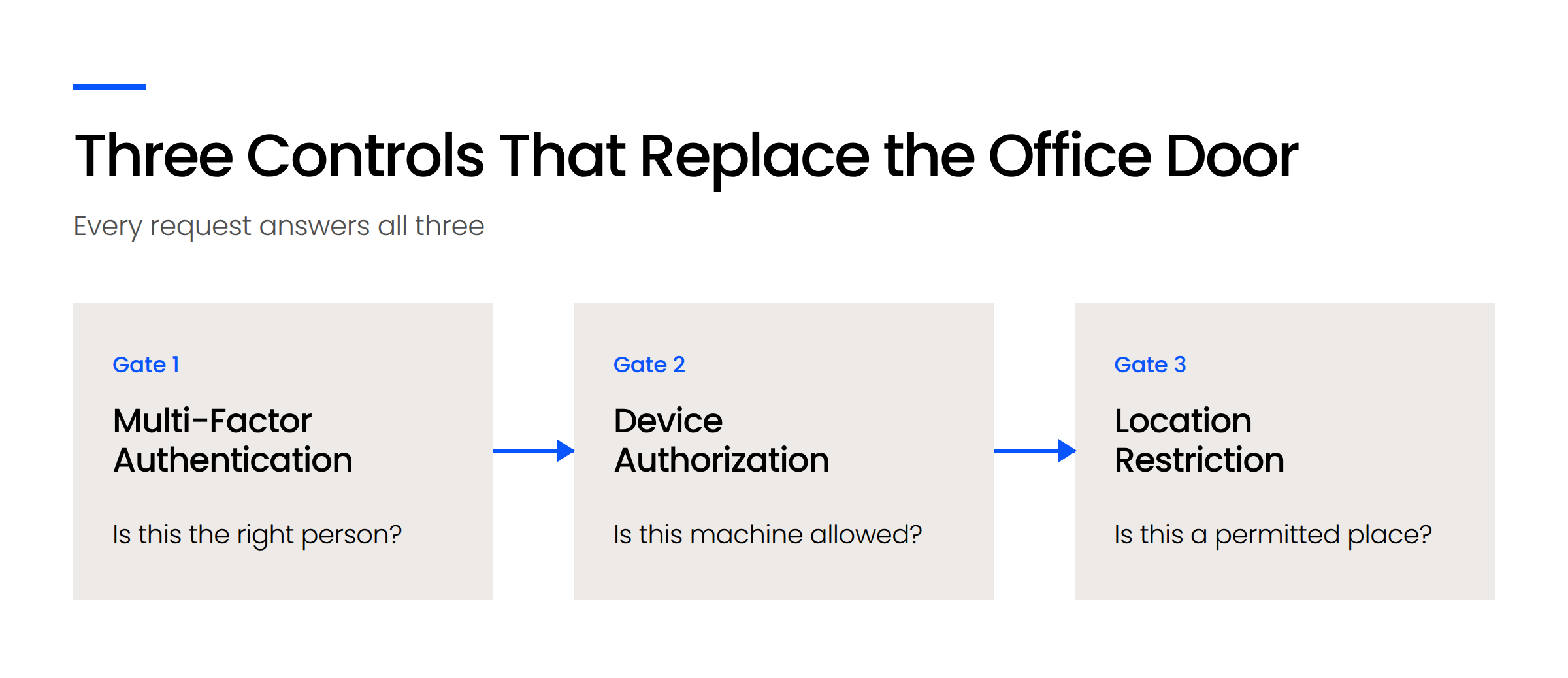
Multi-factor authentication confirms the person. It’s the one everyone knows, the one insurance questionnaires ask about, and the one most firms have.
Device authorization confirms the machine: Your systems should be able to answer whether a given laptop or phone is permitted to reach firm data at all, rather than accepting any device that arrives with correct credentials. A personal laptop with no encryption, no management, and a shared household login is not the same risk as a firm-issued machine, and without this control your systems can’t tell them apart.
Location restriction confirms the place: This can be as broad as allowing access only from inside the United States, or as narrow as a specific office or IP address. Firms with people who travel often assume this is incompatible with mobility. It isn’t. It’s a rule you write deliberately rather than an absence of rules.
The second and third are what get skipped. Setting them up takes real configuration work, which makes them look expensive next to the first, and some firms decline them as overkill. The gap that leaves is larger than it appears, because these controls are sequential rather than additive. Each one answers a question the others can’t.
There’s a professional dimension here too. The ABA Model Rules, adopted in some form by most states, ask lawyers to make reasonable efforts to prevent unauthorized disclosure of client information. Once your people work from personal devices in places you don’t control, what counts as reasonable starts to include knowing which devices those are.
That’s a judgment your firm makes with your own bar’s guidance, and it’s worth making deliberately.
What Happens When Someone Leaves
Here’s the scenario that makes this concrete.
An associate leaves. Someone disables their email. Six months later you discover they still had access to the document system, the billing platform, and a file-sharing account nobody remembered setting up, because each one had its own login and offboarding meant working through a list from memory.
That’s a reportable problem, and it’s common. Centralized identity is what turns removal into a single action instead of a scavenger hunt. One account, disabled once, closes every door.

Why Multi-Factor Authentication
A closer look at the first of the three controls, and why it stops being enough on its own.
Phones, Reception, and Your Firm’s Address
Your firm number moves to a cloud phone system that routes to whoever is covering, and your registered address becomes a separate decision from where anyone actually works.
This is the shortest layer, and that’s not an oversight. There are fewer decisions here than anywhere else in the stack.
Keeping the Firm Number
The number on your letterhead and in every client’s phone should survive the office closing. A cloud phone system ports it and routes calls to people wherever they are, on laptops or mobile phones, with the routing rules you set.
What changes is that “who’s covering the phones” becomes an explicit rule rather than a function of who’s sitting nearest the front. Most firms find that clarifying. Our VoIP for law firms page covers how the systems work and what to look for.
The Address Question
You’ll still need an address. Bar rules generally expect a firm to have a registered business address, and the specifics vary meaningfully between jurisdictions, including whether a residential address or a mail forwarding service is acceptable.
Treat it as a planning item early rather than a surprise at registration. Check your own state bar’s current guidance, since this is one area where the rules have moved in recent years and continue to.
Documents and Email Without a Shared Drive
Documents and email in a virtual firm belong in a matter-centric system where everything relating to a case sits together, searchable by anyone with the right access, regardless of who received it.
This layer is where firms most often carry an old habit into a new environment. Moving a folder tree into cloud storage feels like progress. It mostly relocates the problem.
Why the Matter Is the Organizing Unit
A folder tree encodes one person’s mental model. It works beautifully for the person who built it and poorly for everyone else, which is the moment it matters.
Organizing around the matter removes the guessing. Everything connected to a case lives with the case, and finding a document means knowing which matter it belongs to rather than which colleague filed it and how they were thinking that week.
The test is simple. If a paralegal who’s never touched a file can locate the right document in under a minute, the system works. If finding it requires asking someone, you’ve moved a filing cabinet into the cloud.
Email Is Part of the File
Email is the gap most firms leave open.
When correspondence lives in individual inboxes, the record of a matter is incomplete by definition. The letter is filed and the negotiation that produced it isn’t. Then someone leaves, and half the history of the matter leaves with them.
A document management system built for firms treats email as part of the file, saved to the matter alongside everything else. LexWorkplace handles this layer, storing documents and email together by matter with full-text search across both. It’s one component of the five, and it only works properly once the layers underneath it are in place.
What Does a Virtual Law Firm Cost, and What Should You Build First?
Build hosting first, identity second, and remote access third, because each layer depends on the one before it, and opening access to an environment with no boundary is the one sequence error that’s hard to reverse.
Cost matters less than order here. The total for a small firm generally lands below what an office costs, and the financial case for cloud only widens once you count utilities, furniture, and the hardware you no longer replace. The order you build in is what determines whether the money works.
What to Build First on a Limited Budget
Notice what changes between this order and the order you read about the layers in. Identity moves up.
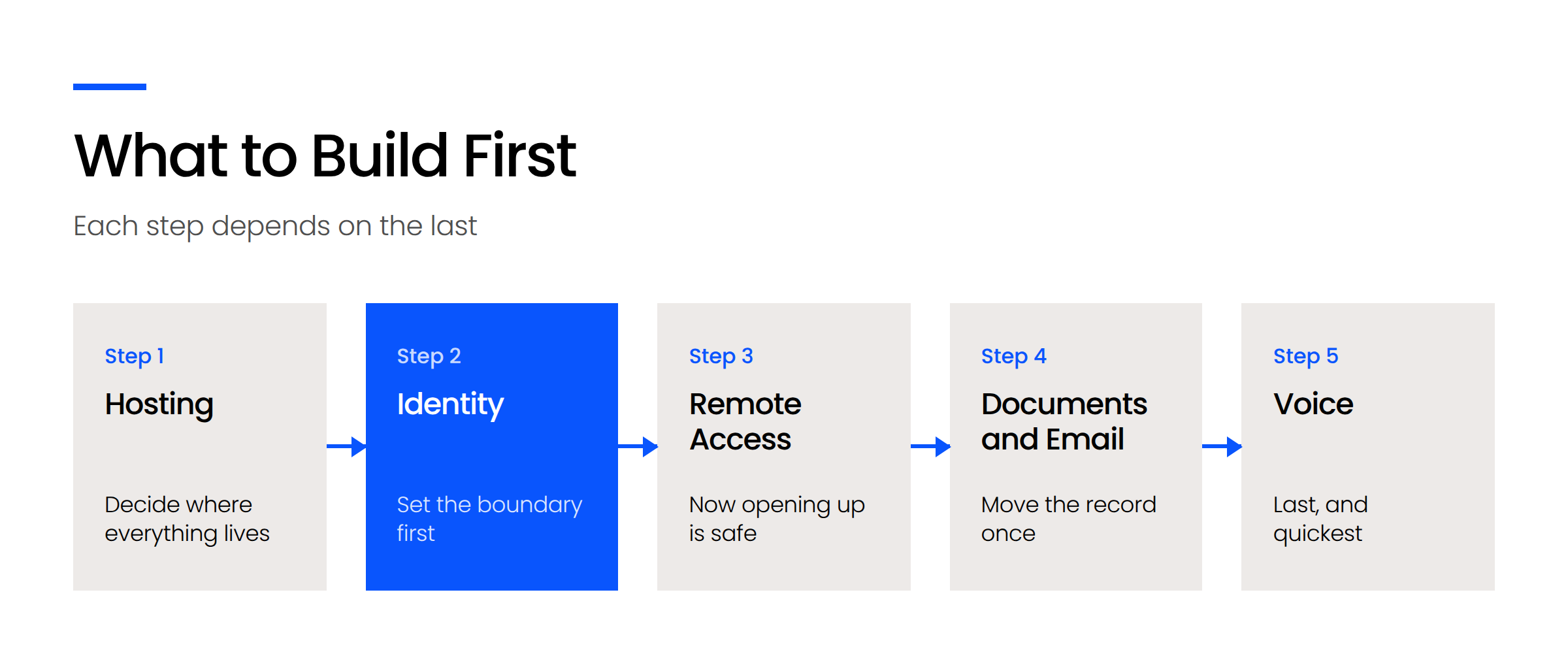
That’s deliberate. Hosting comes first because nothing else can be decided until you know where things live. Identity comes second, before remote access, because the boundary has to exist before you open the doors. Opening broad access to an environment with no device or location controls, then retrofitting those controls onto people who’ve grown used to working without them, is the most expensive sequence mistake available to you.
Documents and email come fourth, and they’re best moved once, deliberately, rather than twice. Voice comes last because it’s the quickest to change and the least dependent on anything else.
Those shapes matter more than the totals, because four of the five scale with headcount and one of them is avoidable entirely.
Which Firms This Stack Actually Suits
This suits more firms than the phrase “virtual law firm” suggests, and it isn’t only for people starting from nothing.
Plenty of firms arriving at this question already exist. The lease is up, half the staff has been remote for years, and the office has become an expensive habit. The stack is the same either way. The only real question is whether you have applications that genuinely can’t move, and that’s usually answerable in an afternoon.
What we see in practice is a spread. Newer firms increasingly operate with no brick and mortar at all. Established firms keep a smaller space with a good conference room and drop-in desks for people who want to come in. Both patterns run on one laptop per person that works identically at home, at court, and on the road, with docking stations wherever people land.
The strongest argument for the model is one firms rarely lead with. When location stops mattering, your hiring pool stops being everyone willing to commute twenty miles. For a firm trying to build a bench, that constraint was probably costing more than the rent.
Build the Boundary Before You Open the Door
The firms that do this well aren’t the ones that bought the best software. They’re the ones that decided where their data would live, set the boundary around it, and only then opened access from anywhere.
If you’re partway in already, you don’t have to start over. Work out which of the five layers you’ve addressed deliberately and which ones you inherited by accident. The second list is usually shorter than you’d fear and more urgent than you’d like.
WHAT’S NEXT
Frequently Asked Questions

Uptime Legal’s Technology Solutions
Cloud, software, IT, and document management built for today’s law firms.