
Table of Contents
Most firms choose between Google Workspace and Microsoft 365 the same way: price per user, whichever apps people already know, whatever the last firm used.
Those are the wrong criteria for a decision about where your client confidential data lives.
Both suites handle email, documents, and calendars competently. The difference that matters sits in the admin console, in what each platform lets you do about confidentiality, retention, legal hold, and the phone your associate reads client email on.
Judged that way, Microsoft 365 for law firms is the better fit. It’s only the better fit if you buy the plan tier where those controls actually live, and they aren’t in the entry plans most comparisons quote.
We manage cloud platforms for law firms without internal IT, and the tier is where this decision gets won or lost.
What Are You Actually Choosing Between?
Choosing between Google Workspace and Microsoft 365 is a decision about who can control your client data and how, because both suites handle email, documents, and calendars well enough for legal work.
That concession is worth making plainly. Word and Google Docs both draft briefs, Outlook and Gmail both handle a busy litigator’s inbox, and Teams and Google Meet both run a client call without incident.
If your firm switches platforms expecting the writing and email experience to get better, you’ll be disappointed. The apps reached parity years ago, back when these products were still called Office 365 and G Suite.
Most firms decide anyway, on three criteria:
Those three criteria answer a question about productivity software, and nothing about the obligations your firm carries the moment a client file lands on that platform.
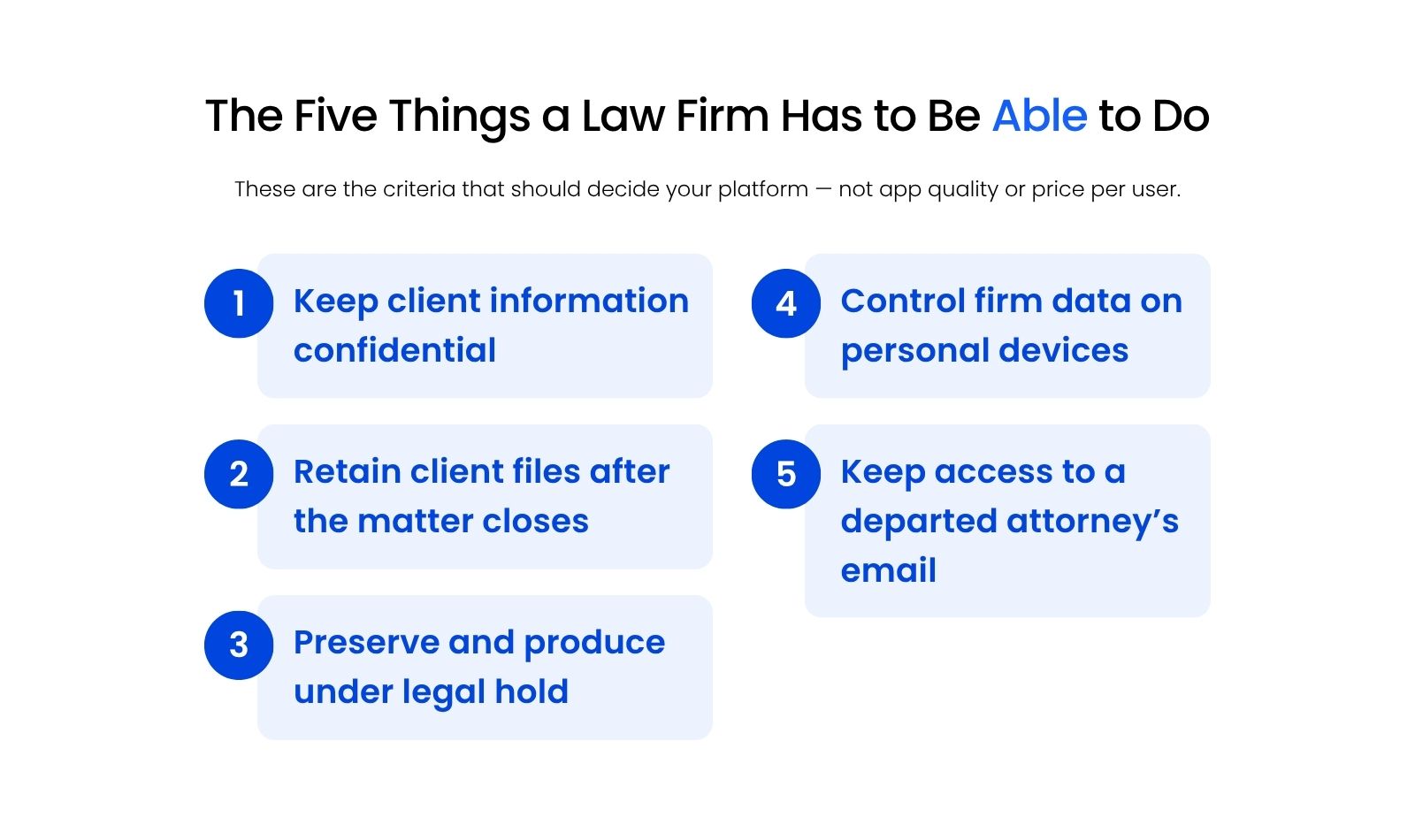
The real question is narrower and more useful: which platform lets your firm keep client information confidential, retain it after the matter closes, freeze and produce it when someone demands it, control it on a phone your firm doesn’t own, and reach a departed attorney’s email a year after they left?
Those are the criteria that follow.
What Does a Law Firm Actually Have to Be Able to Do?
A law firm’s platform has to support five specific duties: client confidentiality, file retention beyond the life of the matter, legal hold and production, control of firm data on devices the firm doesn’t own, and continued access to a former attorney’s email.
These come from your professional obligations, your malpractice exposure, and increasingly from the outside counsel guidelines your corporate clients send over before they’ll open a matter. Each one maps to something specific a platform either does or doesn’t let you do.
Protecting Client Confidentiality
Your firm has to make reasonable efforts to prevent unauthorized access to client information, and be able to describe what those efforts are.
ABA Model Rule 1.6(c) states that a lawyer shall make reasonable efforts to prevent the inadvertent or unauthorized disclosure of, or unauthorized access to, information relating to the representation of a client.
State analogues and cloud-computing ethics opinions build on that standard, including ABA Formal Opinion 477 on securing electronic client communications, and they consistently frame it as a duty of reasonable care rather than a checklist.
That distinction matters when you evaluate platforms. No plan tier, product, or configuration makes your firm compliant. A platform gives you specific controls to point at and a record showing they were switched on.
Retaining Client Files After the Matter Closes
Client files and email have to survive the end of the matter and the departure of the attorney who handled it.
Retention periods vary by jurisdiction, matter type, and your own engagement letters, so treat any universal number with suspicion. The platform requirement is the same everywhere: you need retention you set once and the platform enforces, rather than retention that depends on nobody emptying a mailbox.
Preserving and Producing Under Legal Hold
Your firm has to be able to freeze relevant data on demand and export it in a usable form.
When a preservation obligation attaches, you need to stop deletion across mailboxes and document storage immediately, including deletion by the user who owns the account. You then need to search what you froze and export it in a format opposing counsel or your own e-discovery vendor can work with.
Both platforms do this. Neither does it in the plan a small firm typically buys, which is the point the comparison table makes concrete.
Controlling Firm Data on Personal Devices
You need to know which devices reach client data and be able to remove that access remotely.
This is the obligation firms are least prepared for, because the exposure arrived gradually, alongside the shift to remote work.
An associate adds firm email to a personal phone. A partner reads a settlement draft on a home iPad. A paralegal syncs a document folder to a laptop your firm has never seen.
Mike Dewdney, Director of Cloud & IT at Uptime Legal, takes the position that anything touching client confidential data belongs on firm-owned equipment. He also points at the renewal consequence: firms that can’t produce a device policy get declined for cyber coverage or repriced when the policy comes up.
At minimum, your platform has to let you require conditions before a device reaches client data, and let you revoke that access from the admin console when a phone walks out the door.
Keeping Access to a Departed Attorney’s Email
A former attorney’s mailbox usually has to be retained and searchable without their account staying active.
Firms discover this constraint at the worst time, which is the month they try to cut licensing costs after a departure. You often can’t simply delete the mailbox, because it holds client communications you’re obligated to keep. Whether you can retain it without paying for a full seat is a licensing question, and the two platforms answer it differently.
Google Workspace vs. Microsoft 365: A Side-by-Side Comparison for Law Firms
Measured against the five obligations above, Microsoft 365 and Google Workspace both cover the essentials, but they name different tools for each job and unlock them at different plan tiers.
Read this table by row rather than by column. The row is the obligation your firm carries, and the two cells are what each platform calls the tool plus the cheapest plan that includes it.
Plan inclusions in this table were checked against Microsoft and Google licensing documentation in August 2026.
The pattern in that table matters more than any single row. Both platforms put every one of the five capabilities behind a mid-tier plan, so the entry tiers fail the same test on both sides.
Where they separate is coherence. Microsoft’s five answers arrive in one bundle at one tier, Business Premium. Google’s arrive at Business Plus for four obligations and at Enterprise Standard for confidentiality controls, which means a Workspace firm hits its ceiling one tier earlier than the licensing page suggests.
How Do Google Workspace and Microsoft 365 Differ on Security and Compliance?
Google Workspace and Microsoft 365 differ most in the administrative layer, where Microsoft Purview handles retention and eDiscovery, Microsoft Intune manages devices, and Entra ID centralizes identity, against Google Vault and Google endpoint management on the other side.
You’ve probably never opened either admin console, so here’s what each name actually refers to:
We administer both platforms for law firms without internal IT, and the administrative layer is where the practical difference shows up. At the top tier both platforms can do the same work. The gap is how much of it a firm without a full-time administrator can realistically turn on and keep on.
Microsoft consolidated its separate eDiscovery tools into a single eDiscovery experience in the Purview portal in 2025, though the licensing tiers behind it still differ.
Retention, Legal Hold, and eDiscovery
Microsoft Purview and Google Vault both hold and export data on demand, and neither is included in the entry plans.
Vault is the more approachable of the two. Retention rules and holds live in one console, the search interface is close to Gmail’s, and a firm administrator can learn it in an afternoon. Its reach stops at Gmail, Drive, Chat, and Meet recordings.
Purview reaches further and asks more of you. Retention policies span Exchange, SharePoint, OneDrive, and Teams, retention labels can apply automatically by content type, and eDiscovery (Standard) handles most firms’ production needs. The interface assumes an administrator who thinks in policies and scopes.
For a firm with no IT staff, Vault’s smaller surface is a genuine advantage. For a firm with a litigation practice and recurring preservation obligations, Purview’s depth is worth the learning curve.
Managing Devices Your Firm Doesn’t Own
Microsoft Intune and Google endpoint management both let you require conditions before a device reaches client data and remove that access remotely.
Both handle the basics the same way: require a passcode and encryption, contain firm data in a managed work profile, and wipe that profile without touching the associate’s photos. Both will also frustrate you the first time an attorney refuses to enroll a personal phone.
Intune’s advantage is app protection policies, which apply rules to Outlook and Teams on an unenrolled device. That gives you a middle path between full device enrollment and no control at all, and it’s the setting that resolves most partner objections.
One Identity, One Place to Shut It Off
Centralized identity means ending someone’s access once rather than remembering every system they could still reach.
Removing one departing employee from a firm’s systems often means clearing them from eight or more separate portals: the email platform, the practice management system, the document management system, the billing system, the VPN, the phone system, the e-filing accounts, and whichever cloud apps a practice group signed up for on a credit card. A miss surfaces months later, and by then it counts as a breach rather than an oversight.
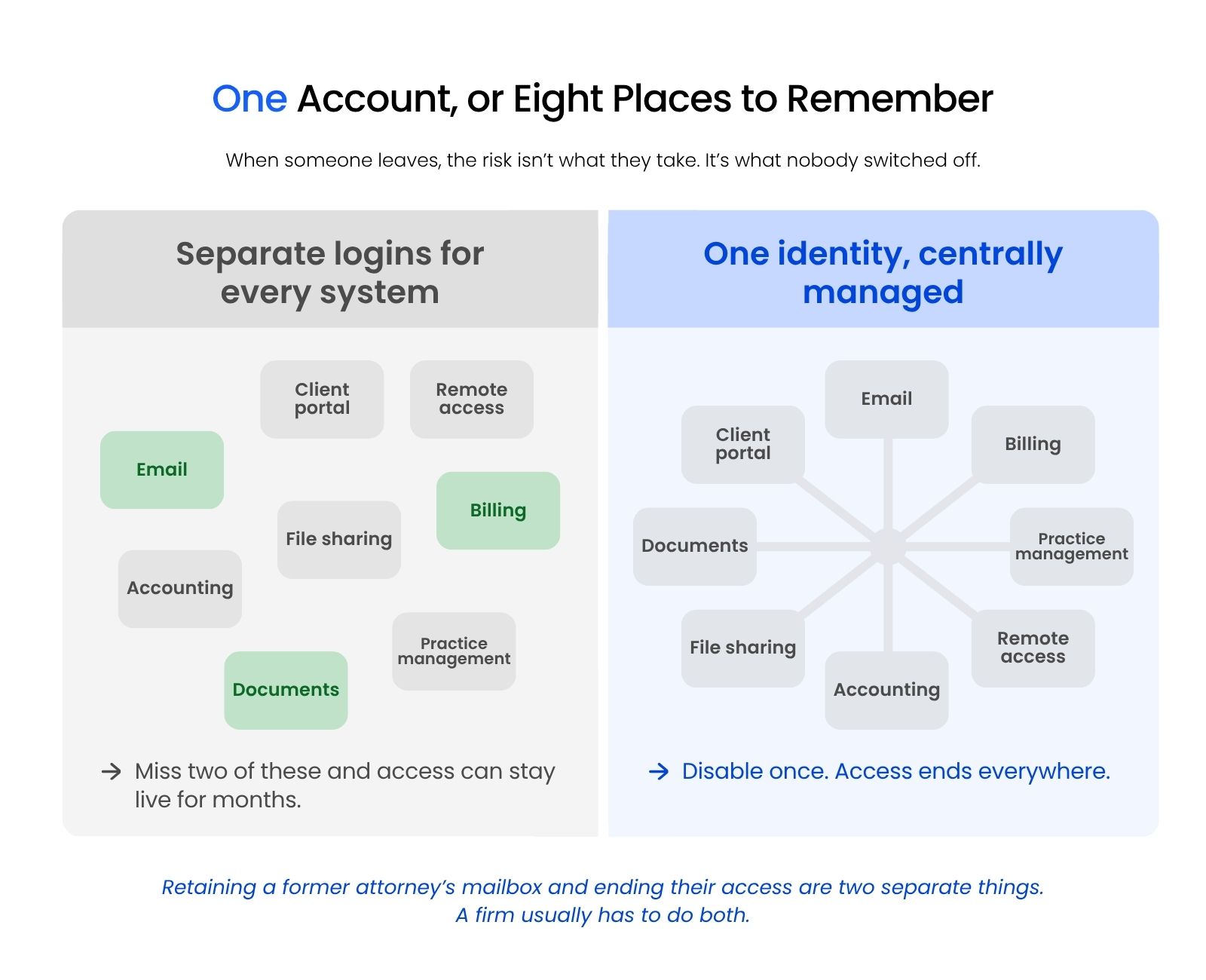
Both platforms cut that list by making themselves the single sign-on provider for the apps that support it, which is one of the highest-leverage moves available in law firm cybersecurity. Microsoft goes further at Business Premium, because Entra ID P1 arrives there with conditional access attached, while Google’s equivalent control sits in Enterprise Standard.
Conditional access is easy to decline as excessive, and it’s the control that pays for itself.
Four and a half minutes is the difference between an incident report and a client notification letter. That window exists only when identity runs through one system that can revoke access everywhere at once.
Which Plan Tier Does Your Firm Actually Need?
The plan tier decides whether your platform choice holds, because Purview retention and Intune device management require Microsoft 365 Business Premium or an E-tier plan, Litigation Hold requires Exchange Online Plan 2 or the Archiving add-on, and Google Vault requires Business Plus.
That sentence is the whole article compressed. A firm that chose Microsoft 365 and bought Business Standard didn’t buy the thing that made Microsoft the right answer.
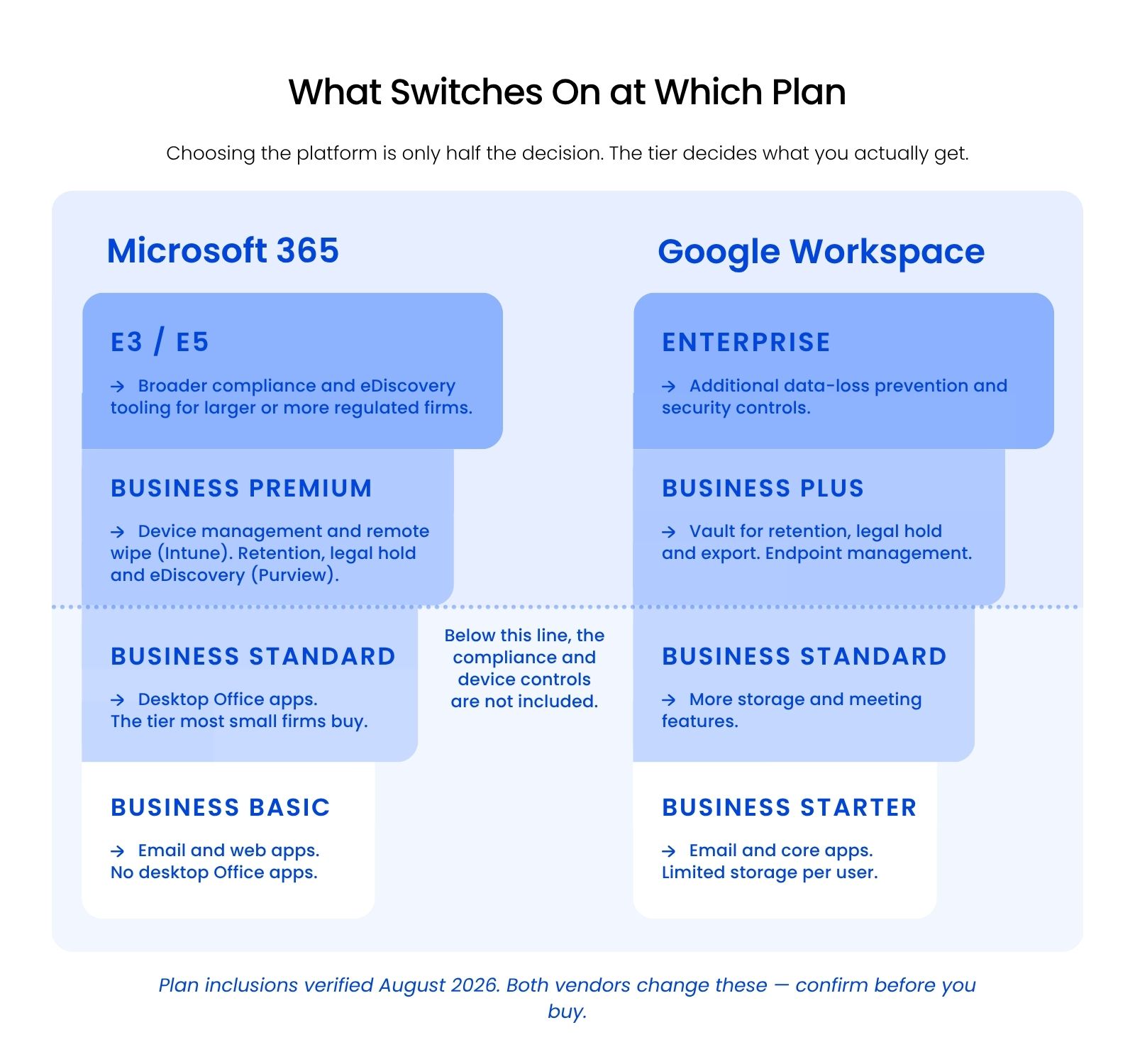
Business Standard is a productivity plan. It gives you the desktop Office apps, 1 TB of OneDrive storage per user, and Exchange mailboxes, and it stops there. No Intune, no conditional access, no Litigation Hold, no Purview retention.
Business Premium adds the entire administrative layer described above, and it’s the tier most firms under 300 users should buy. The step up from Business Standard changes more about what your firm can actually defend than any other line item in this decision.
The Business Premium versus E3 question resolves more simply than firms expect:
On the Google side the ladder is shorter. Business Starter and Business Standard leave you without Vault, which means no enforced retention and no legal hold. Business Plus turns on Vault and advanced endpoint management, and Enterprise Standard adds Context-Aware Access and enforceable data loss prevention rules.
“We’re on Microsoft 365” is not an answer to a security question, and neither is “we’re on Google Workspace.” The answerable version names the tier.
One thing no tier gives you on either platform is a backup.
Retention and legal hold preserve data inside the platform under rules you set. Neither protects you from a deletion that runs past its retention window, a ransomware event that encrypts synced files, or an administrator error. That gap is why cloud backup for law firms is a separate line item, so budget for third-party backup on top of whichever platform you choose.
Licensing changes, and plan inclusions change with it. Confirm the current inclusions on Microsoft’s and Google’s own plan pages before you sign a renewal.
When Is Google Workspace the Better Choice?
Google Workspace is the better choice when your firm has no internal IT, wants fewer controls to misconfigure, and can meet its retention and device obligations at Business Plus.
The case for Workspace rests on something Microsoft genuinely doesn’t offer: a smaller administrative surface.
Business Premium gives your firm hundreds of settings across four consoles (the Microsoft 365 admin center, the Purview portal, Intune, and Entra), every one of them something somebody has to configure correctly and revisit when Microsoft changes a default. A firm with no administrator often ends up with Intune licensed and unconfigured, conditional access licensed and never enabled, and retention policies nobody scoped.
Workspace concentrates the equivalent controls in one console with fewer paths to a wrong answer. Vault’s retention rules are hard to misread, endpoint management defaults are sensible, and the admin console has one search box that finds the setting you want.
Choose Google Workspace if your firm matches one of these profiles:
That last profile deserves more weight than comparison articles give it. Switching platforms costs money, attention, and a month of low-grade friction. Do it because your current platform can’t meet an obligation, not because a comparison table came out narrowly the other way.
How Do You Make the Call, and What Does Switching Cost?
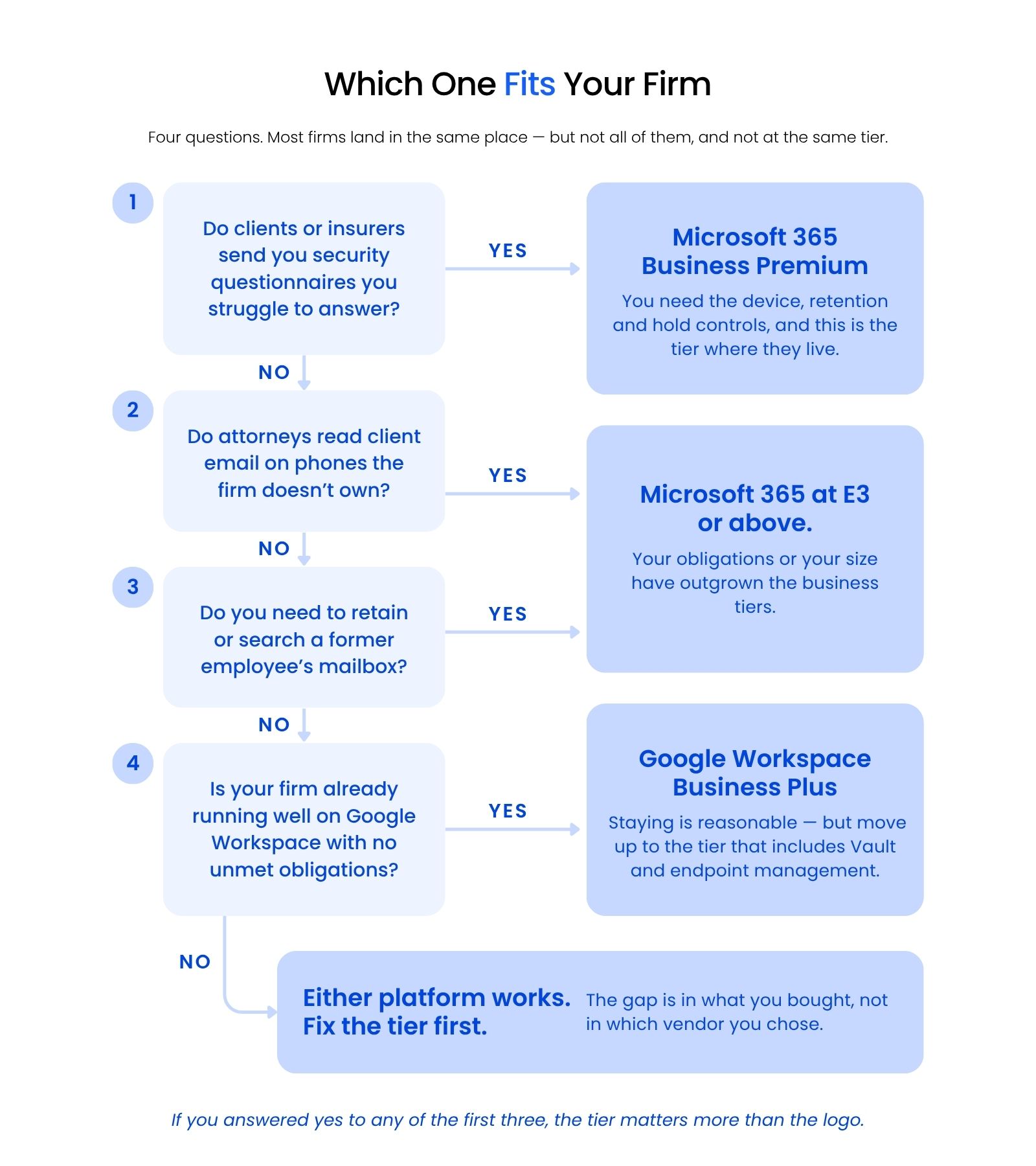
Most firms should choose Microsoft 365 at Business Premium, and switching platforms means a discovery and planning phase, a cutover completed in one day, and about a week of catching what the plan missed.
The recommendation carries its condition. Microsoft 365 is the better platform for most law firms at Business Premium or above, because that tier bundles every one of the five obligations in one place with one identity behind them. At Business Standard, Microsoft’s advantage disappears, and a Workspace firm on Business Plus is better positioned than a Microsoft firm on Business Standard.
If you’re staying put, the useful next step is smaller than a migration: open your billing page, find the plan name, and check it against the tier column in the table above.
If you’re moving, Aaron Eittreim, EVP Sales at Uptime Legal, describes a platform migration in four stages:
- 1
Discovery and planning. A project manager and an engineer inventory mailboxes, shared drives, distribution lists, devices, and the applications that authenticate against your current platform. This stage is where migrations succeed or fail.
- 2
Pre-migration. As much data as possible moves ahead of the cutover date, running in the background while your firm works normally.
- 3
Cutover. Mail routing switches and the remaining delta syncs. A well-planned cutover finishes in one day, usually across a weekend.
- 4
The first week. Your team catches the gremlins: laptops, tablets, and phones that weren’t present on cutover day, printer and scanner glitches, and the one application only two people use that discovery missed.
That fourth stage is the one firms don’t budget for and the one that determines how the migration is remembered.
Your email survives the move if you plan the exit before you cancel. Mailboxes migrate into the new platform while the old subscription is still active, and Google Takeout or a Vault export captures anything the migration tool leaves behind. Cancel the old subscription first and the data leaves with it once the retention window closes.
Uptime Legal runs these migrations and provides ongoing managed IT for law firms afterward, including the Business Premium controls that often sit licensed and unconfigured.

The Platform Matters Less Than the Tier
Microsoft 365 is the better fit for most firms because of its administrative layer: retention you can enforce, devices you can reach, and one place to end someone’s access. Google Workspace earns the pick for firms already running well on it that can meet the same obligations at Business Plus.
Either way, check what your current plan actually includes before you renew. That’s the decision most firms haven’t made yet.
WHAT’S NEXT
Frequently Asked Questions

Uptime Legal’s Technology Solutions
Cloud, software, IT, and document management built for today’s law firms.