Table of Contents
Your firm’s inbox handles wire transfer authorizations, DocuSign links, contract redlines, court filing notifications, and document requests from external parties every single day.
That’s legal practice. It also describes what a sophisticated phishing attack looks like.
The risk here is structural. Legal workflows are built to move sensitive materials quickly and extend trust to clients, opposing counsel, courts, and transaction parties. Phishing attacks are engineered to fit that environment precisely.
That’s why phishing has to be treated as part of a broader approach to cybersecurity for law firms, not just a one-off training issue. Email and documents aren’t just how your firm communicates. They’re the attack surface.
Why Law Firms Are a High-Value Phishing Target
Your firm handles a specific kind of data — the kind that moves client funds, establishes legal privilege, and carries professional liability in every message.
A compromised mailbox at your firm gives an attacker access to wire transfer authorizations, matter communications, and documents that can directly affect client outcomes. The cybersecurity risks law firms face go well beyond sensitive data — they extend to client funds, privilege, and professional liability.
Your firm sits at the intersection of high-value data and trust-based external communication. That’s exactly where targeted attacks are designed to land.
The Combination of Data Type and Workflow Speed
Legal workflows move fast by design. Wire transfers are authorized by email.
Retainer agreements are DocuSign’d and returned the same day. Filing deadlines arrive as email notifications requiring action before close of business.
That combination — high-value materials, external parties, and built-in urgency — is precisely what attackers engineer their campaigns around. The speed that makes your firm efficient is the same speed that reduces the margin for scrutiny.
Email and Documents Are the Attack Surface, Not Just the Channel
Think about what legal practice looks like as a communication flow.
Your clients send documents for review by email. Opposing counsel delivers contract redlines as email attachments. Courts issue filing confirmations to your inbox.
Third-party platforms — DocuSign, Adobe Sign, Google Drive — send links your team clicks without a second thought. Wire transfer instructions arrive before a closing. Intake forms come in from clients who’ve never set foot in your office.
That’s Tuesday at your firm.
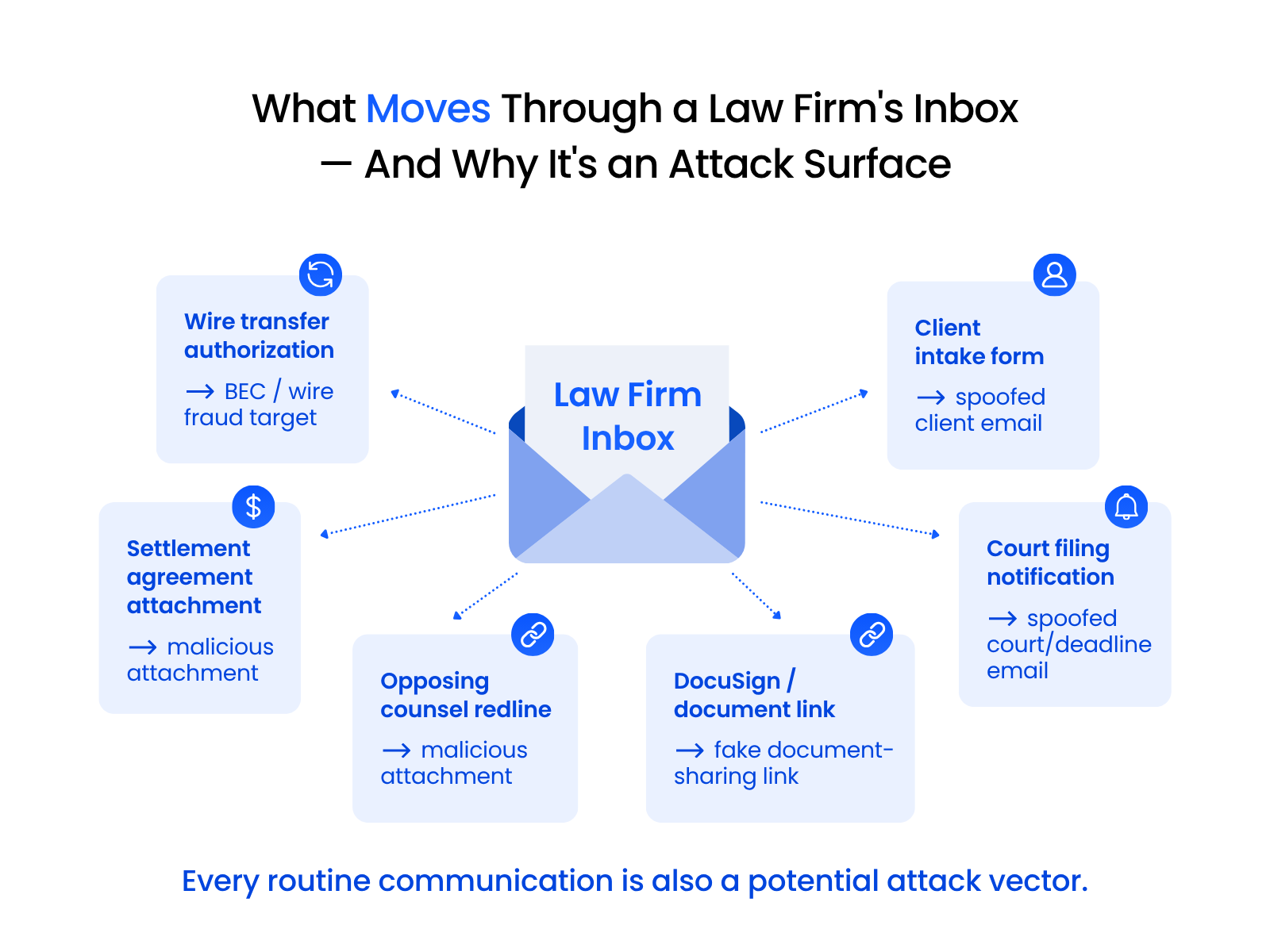
What Moves Through a Law Firm’s Inbox Every Day
The routine materials in your firm’s email: settlement agreements, wire transfer authorizations, retainer letters, court filing confirmations, contract redlines from opposing counsel, and document-sharing links from platforms your team uses every day.
Every one is a legitimate use of email. Every one is also something an attacker can impersonate.
Your team opens these without hesitation because that’s what legal work requires. The exposure is structural.
Why Urgency Compounds the Risk
Every filing deadline, closing date, and settlement conference creates a window where urgency is already in the air. Your team is accustomed to responding quickly — in legal practice, a slow response often has a real cost.
Phishing attacks are designed to fit inside that window. A request that arrives right before a deadline, references a pending matter, and asks for action before close of business looks exactly like a dozen other legitimate requests that came in the same week.
That urgency is a feature of legal practice. It’s also something attackers specifically count on.
How Phishing Exploits Legal Workflows
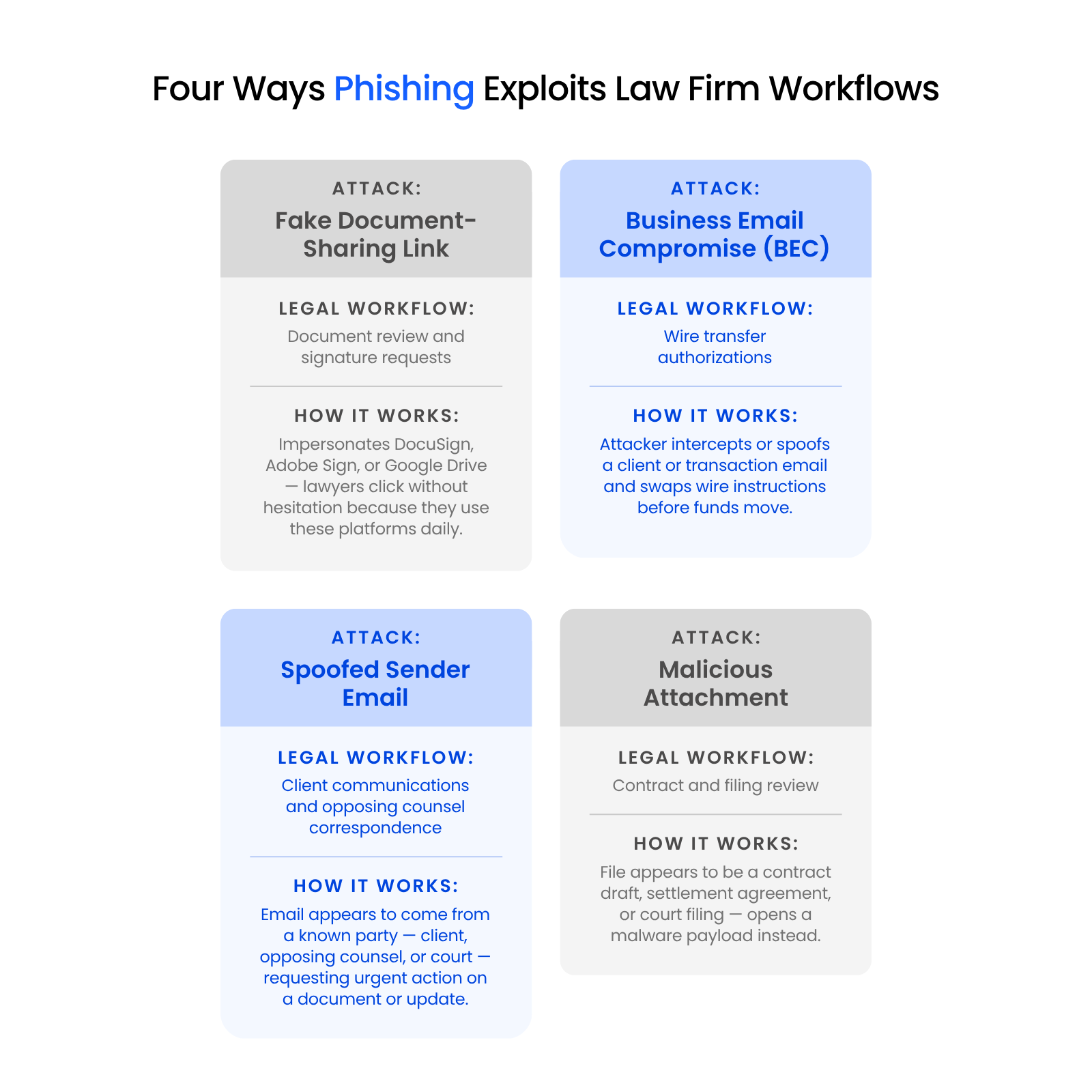
Phishing is one of the most significant threats to law firm data security — and each successful attack maps to a workflow pattern your team handles so routinely it doesn’t register as worth scrutinizing. Four patterns cover most of what your firm is likely to encounter.
Fake Document-Sharing Requests
Your team uses DocuSign, Adobe Sign, Google Drive, and Dropbox constantly. An attacker who sends a link impersonating one of those platforms sidesteps technical defenses entirely — they’re sending something that looks identical to what your team opens without thinking.
The platform looks right. The sender looks right. The file name references a real document type.
The only difference is the destination.
Business Email Compromise Targeting Wire Transfers
Of all the attack patterns targeting law firms, BEC — business email compromise — carries the highest financial exposure.
Your matters routinely involve large fund movements: closings, settlement disbursements, escrow releases, trust account transfers. Those instructions travel by email.
The mechanics: an attacker compromises or spoofs a client or counterparty email, monitors the thread, and at the moment funds are about to move, substitutes their account details for the legitimate instructions.
Spoofed Sender Addresses
A spoofed email doesn’t need to break through your defenses. It just needs to look like something your firm receives routinely.
An email appearing to come from a known client, opposing counsel, or court administrator — asking for urgent action on a document or a matter update — matches the pattern of dozens of legitimate requests your team sees every week. The address looks familiar. The request is the kind you’d normally act on without question.
Malicious Attachments Disguised as Legal Documents
Legal work arrives in your inbox as PDFs and Word files. That’s expected — it’s how opposing counsel sends contract redlines, how courts issue filings, how clients send documents for review.
An attacker who embeds malware in a file named after a real document type exploits something your team does automatically: open attachments from external parties. The file looks like any other document your team receives — because it is one. The distinction is invisible until after the click.

Why AI Is Making These Attacks Harder to Spot
Phishing training has historically focused on spotting typos, awkward phrasing, and generic urgency. Those were reliable signals — and AI has eroded them.
What AI-Enhanced Phishing Looks Like in Practice
An AI-generated phishing email doesn’t have spelling errors. The tone matches the formality level of legal correspondence. In some cases, the message references your firm’s actual name, a real practice area, or language scraped from your website or public filings.
A concrete version: an attacker sends an email appearing to come from the managing partner, addressed to a paralegal, referencing an active client matter — requesting urgent wire transfer approval before a client call. The email is grammatically clean, appropriately formal, and written in a tone consistent with how that partner actually communicates.
That email doesn’t look like what security training says phishing looks like. That’s the point.
Why Familiar Detection Signals Are Fading
Typos, awkward phrasing, and generic “Dear Customer” greetings were useful red flags because most phishing emails had them. That’s less true now.
AI-generated content can be contextually appropriate, grammatically correct, and tonally calibrated to its target. The signals your team has been trained to look for are still worth understanding — they’re just no longer sufficient as a primary defense.
Your team needs pattern recognition built around how legal work actually moves.
Cybersecurity Risks for Firms
A breakdown of the cybersecurity risks law firms face — the specific threats, why legal practices are high-value targets, and what exposure actually looks like.
What to Watch for in Your Firm’s Actual Workflow
Recognizing phishing at your firm requires different thinking than general awareness training. The right question is whether a request fits the actual pattern of how this matter, this relationship, and this transaction typically work.
Uptime Legal managed a case that illustrates what’s at stake. A client had declined to implement conditional access management, concluding it was more than they needed.
When the managing partner’s email was compromised, Uptime Legal’s identity threat detection shut the account down in exactly four and a half minutes from the time of breach. Without that detection in place, nobody would have known until 1,000 emails had already blasted to clients, colleagues, and opposing counsel.
Four and a half minutes prevented a reputational event that would have taken months to recover from.
Document Requests That Don’t Match the Pattern
Before opening any document-sharing link you weren’t expecting, ask one question: is this consistent with where this matter or relationship actually is right now?
A DocuSign request that arrives before you’ve finalized anything for signature is worth pausing on. A Google Drive link from a client you’ve been communicating with only by phone is worth pausing on. A file-sharing notification for a matter that’s been dormant is worth pausing on.
Pause, and verify through a separate channel.
Wire Transfer Instruction Changes
Any request to update wire transfer instructions — for any reason, from any apparent source — requires phone verification before funds move. Every time. No exceptions.
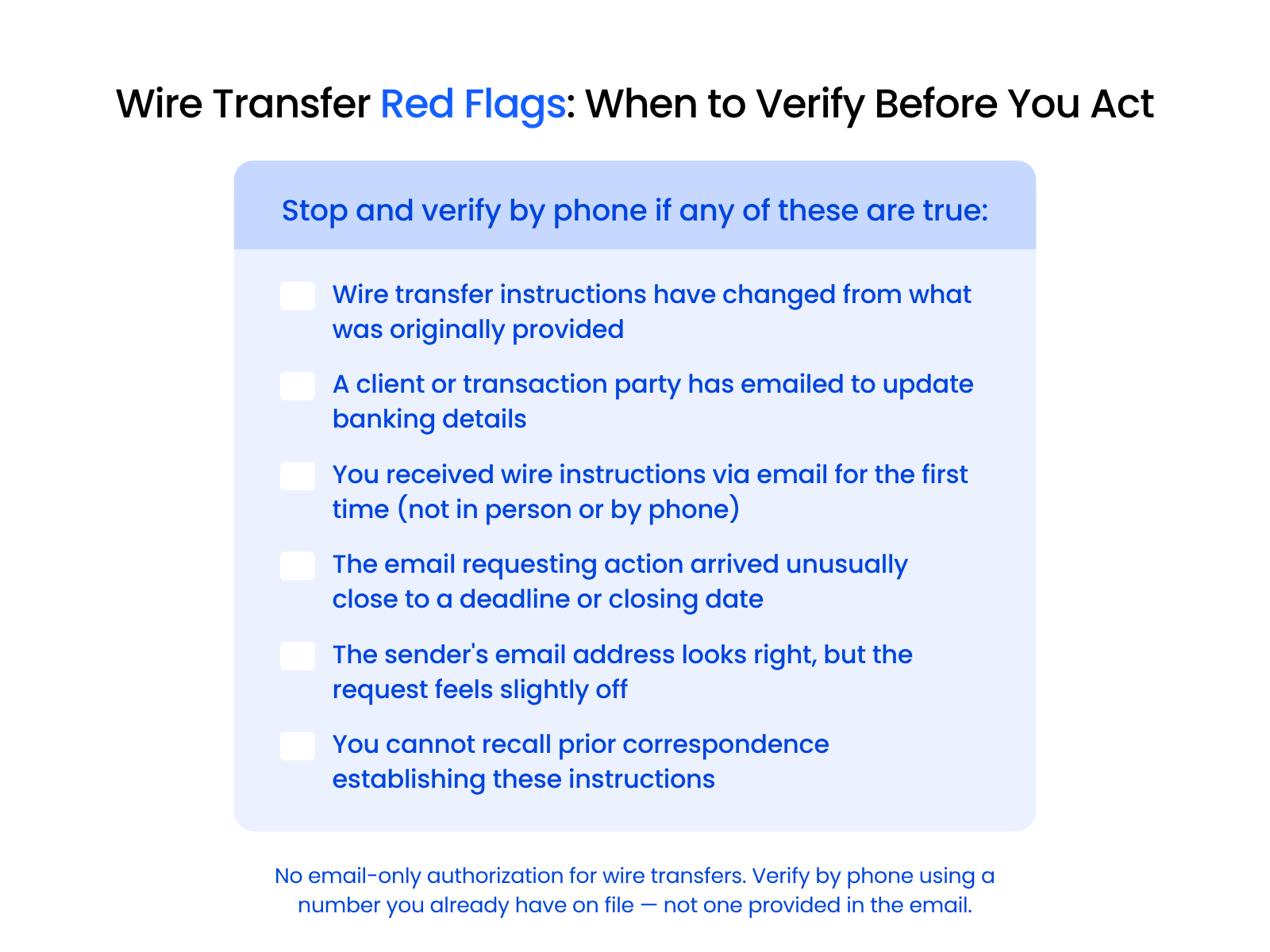
The verification number must come from your own records, not from the email. An attacker who controls a spoofed account also controls any contact information in that message.
Urgent Requests from Known People
Urgency is legitimate in legal practice. It’s also the most common pressure tactic in sophisticated phishing.
When an email combines a familiar sender, an urgent request, and a time constraint — “please act on this before the client call,” “we need this before close today” — that’s the pattern most likely to short-circuit normal caution. The more urgent the request, the more important the pause.
A 30-second phone call to confirm is almost always worth it.
How Law Firms Can Reduce Their Exposure
Structural problems require structural solutions. Reducing phishing exposure at your firm means implementing controls that address the specific vulnerabilities legal workflows create — not just adding more generic security awareness training.
Mike, a cybersecurity specialist at Uptime Legal, explains why basic protections alone fall short. Anti-spam filters stop some phishing attempts — but attackers can step over 2FA, and once they’re through those layers, they’re effectively you in the system.
No single layer is sufficient. The goal is to make each layer do its part.
Email Authentication (DMARC, DKIM, SPF)
Three email authentication standards work together to verify that mail claiming to come from your domain actually comes from your domain.
All three should be in place if your firm handles any client communications by email.
Purpose-Built Document Management over Consumer File Sharing
When your team shares documents through personal Google Drive links or consumer Dropbox accounts, every link they send looks like a phishing attempt — because it looks identical to one.
Purpose-built legal document management — like LexWorkplace — changes that. Documents are accessed through an authenticated environment designed for legal workflows, not through generic file-sharing links that anyone can impersonate.
The authentication model is strong enough that recipients can tell the difference between a real request and a fake one. Consumer tools don’t get you there.
MFA and Identity Protection
Multi-factor authentication on email and document platforms means a compromised password isn’t enough to get in. That’s the first layer.
Identity threat detection and response — ITDR — is the second. It monitors account activity for anomalies: impossible travel, unusual login locations, unfamiliar devices, mass email sends. When something looks wrong, the account gets flagged or locked automatically.
Protecting against the attacker who already has valid credentials requires a full layered defense.
Firm-Specific Phishing Awareness
Generic phishing training teaches your team to look for typos and suspicious senders, a standard that’s becoming increasingly insufficient.
Effective awareness training for your firm covers the scenarios that show up in your practice: wire transfer verification protocols, document request authentication steps, and what to do when a “client” emails to update banking details the day before a closing.
Your firm is most at risk when training prepares it for the generic attack rather than the specific one. Uptime Legal works with firms like yours to build security programs around your actual risk profile, including phishing awareness built specifically around how legal workflows get targeted.
Making the Right Call for Your Firm
Phishing succeeds in law firms because it fits perfectly into how legal practice actually works. Your email is the operating system of your firm. Attackers know this, and they engineer their attacks to look exactly like what you receive every day.
The good news is that structural problems have structural solutions. Email authentication, purpose-built document management, verified wire transfer protocols, and identity protection aren’t optional upgrades. They’re the controls that close the gaps your workflows create.
Your firm can’t change the structure of legal work. It can make that structure much harder to exploit.
WHAT’S NEXT
Frequently Asked Questions

Uptime Legal’s Technology Solutions
Cloud, software, IT, and document management built for today’s law firms.