Table of Contents
Right now, someone at your firm can probably access every client file you’ve ever created. Not just their own matters – all of them.
The billing admin. The paralegal supporting two active cases. The associate who left six weeks ago.
Most cybersecurity for law firms conversations start with phishing or ransomware. Access control is the piece that rarely comes up – and it’s the piece that determines how much a single compromised credential, or a single departure, can actually expose.
What Access Control Actually Means for a Law Firm
Access control comes down to one question every managing partner should be able to answer: right now, who at your firm can see which client files, on which systems, and under what conditions?
Most firms can’t answer that – not because the information is hidden, but because access was never deliberately configured. When someone joins, they get provisioned with whatever is convenient. At most small firms, that means everything.
That default isn’t a malicious design decision. It’s the path of least resistance. It’s also the source of most access-related security and ethics exposure at firms that have never thought to look at it — and it is what Microsoft Copilot inherits the moment a firm turns it on.
The “Everyone Has Access to Everything” Problem
Small law firms almost universally default to firm-wide access. Every employee can see every client file – not because someone decided that was the right policy, but because nobody decided anything at all.
The problem becomes concrete the moment something goes wrong. If a staff member’s credentials are compromised through a phishing attack, the attacker doesn’t just get into that person’s matters – they access everything that person could access. At a firm without access controls, that’s the entire client roster. Every active matter. Every document in the system. How those credential attacks actually unfold is covered in our breakdown of cybersecurity risks for law firms.
Departing employees are the other exposure vector most firms underestimate. A staff member who copies files before their last day, or whose accounts aren’t fully disabled on departure, walks out with whatever level of access they had – which, at most small firms, is everything.
Why Access Control Is an Ethics Issue, Not Just a Security Issue
Attorney-client privilege is matter-specific. It attaches to a particular client on a particular matter, which means the confidentiality obligation attaches there too.
An attorney working a personal injury case has no professional need to access a client’s corporate M&A files, even at the same firm. A paralegal assigned to two active matters has no professional need to view files for cases they’ve never touched. Giving everyone that access by default creates professional responsibility exposure most firms haven’t stopped to examine. Good client data security starts with deliberate configuration, not default settings.
ABA Model Rule 1.6 requires attorneys to make reasonable efforts to prevent unauthorized disclosure of client information. When a breach occurs and the post-mortem reveals that everyone at the firm had access to everything, “everyone had access” doesn’t soften the analysis. It makes it worse.
The Principle of Least Privilege for Law Firms
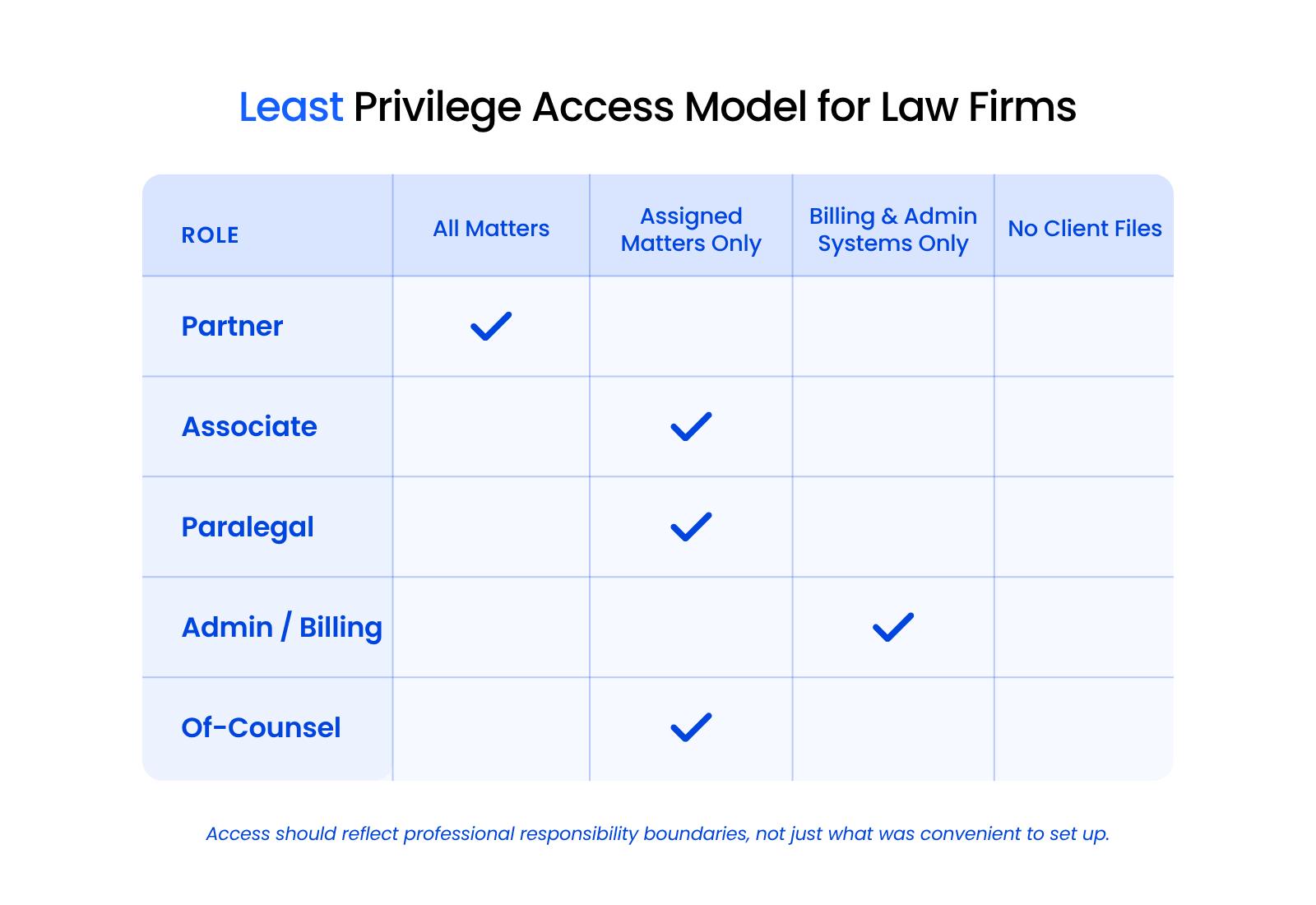
Least privilege has a simple definition: give every user access only to what their role requires – nothing more. For law firms, that translates to matter-level access control rather than firm-wide document access.
Here’s what that looks like by role.
Attorney-Level Access
Attorneys get access to the matters they’re actively working on. A personal injury attorney with three active cases doesn’t need visibility into the firm’s corporate or estate planning files, even if those matters are open and active.
Of-counsel relationships and lateral hires are where over-provisioning tends to happen. Provisioning a new of-counsel with firm-wide access “because it’s easier” is how firms end up with configurations nobody intended and nobody maintains.
Paralegal and Staff Access
Paralegals should be provisioned to the matters they’re supporting, not to every active matter in the system. Provisioning by practice group rather than by matter assignment is a common shortcut that consistently creates broader access than the role actually requires.
A paralegal supporting two personal injury cases doesn’t need visibility into every file in the system. Limiting access to assigned matters reduces exposure without affecting their ability to do the work.
Admin and Billing Access
Billing and admin roles need access to financial data and firm operations, not to client case files. Billing access doesn’t equal matter access, and conflating the two is one of the most common misconfigured setups at small firms.
A billing administrator generating invoices and reviewing time entries doesn’t need to open client correspondence or view communication logs. Separating those levels is straightforward once the firm decides to configure them deliberately.
Off-Boarding: The Access Control Failure Most Firms Don’t Think About
Departing employees are the most consequential access control failure point at small law firms – and one of the most common IT mistakes firms make without realizing it. The Microsoft 365 account gets disabled on the last day, and the off-boarding is considered complete.
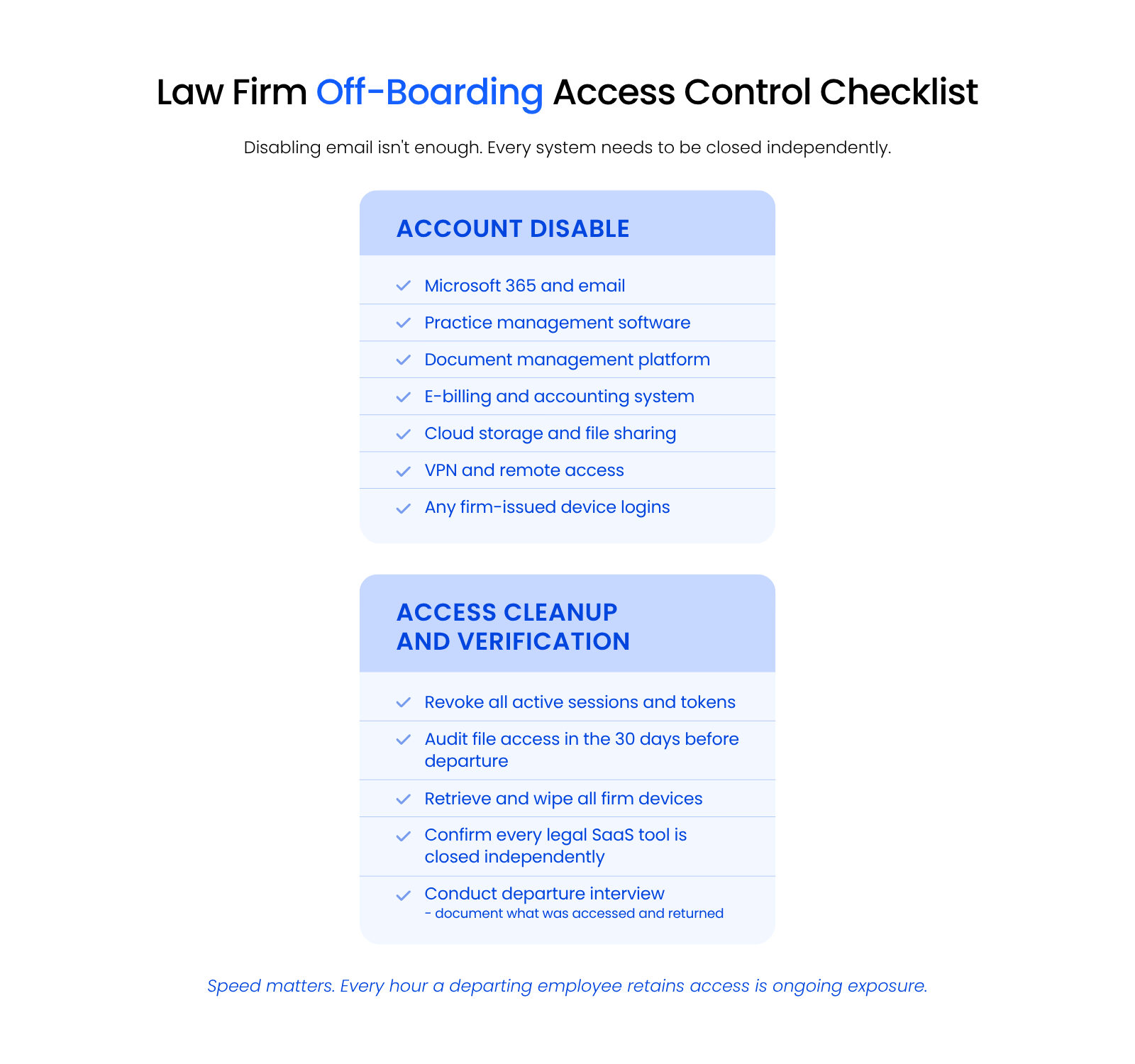
The problem is that legal SaaS tools – practice management software, document management platforms, e-billing systems – almost always have independent credentials not connected to central identity management. Disabling a Microsoft account doesn’t disable access to Clio, LexWorkplace, Tabs3, or whatever document management portal your firm uses. Those accounts stay active until someone closes them manually, and at most small firms, nobody does.
Speed matters. Every hour a departing employee retains access to firm systems is ongoing exposure. A clean off-boarding process covers:
Access Control in Document Management: Generic vs. Legal-Grade
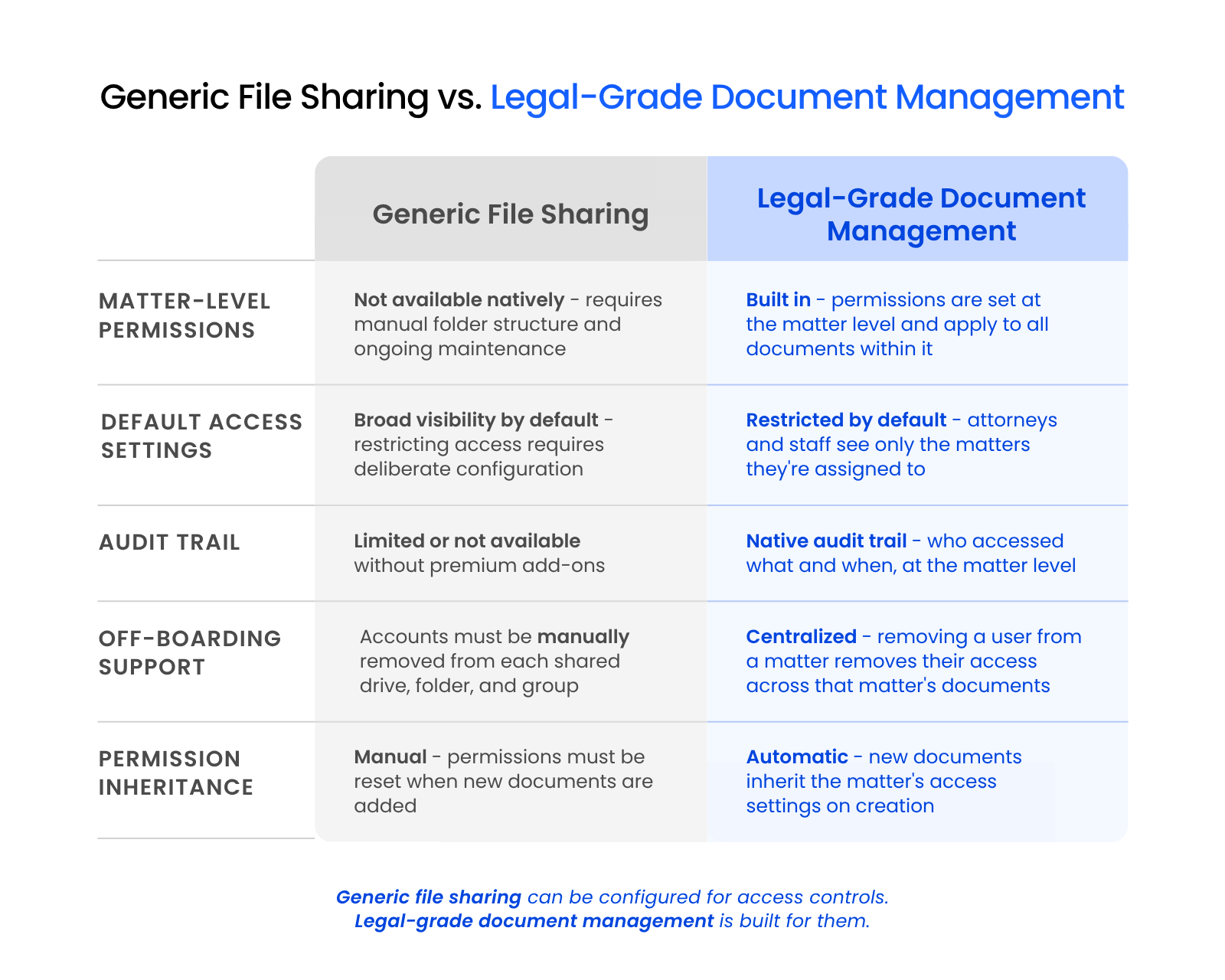
The file-sharing tools your firm probably already uses – SharePoint with default settings, shared Google Drive – can be configured for basic access controls, with “configured” being the operative word.
Out of the box, both default to broad visibility. Getting to matter-level access control requires manual setup, ongoing maintenance, and administrative overhead most small firms don’t have the capacity to sustain. When staff change or new matters open, those configurations drift without anyone noticing.
Legal-grade document management is built differently. Matter-level access controls are a native feature – permissions are set at the matter level, inherited by the documents within it, and maintained without requiring manual reconfiguration every time something changes. LexWorkplace, for example, is built around matter-based access as a core architecture decision: attorneys and staff see the matters they’re assigned to, and the system enforces that without placing the burden on whoever manages IT.
Implementing Access Controls Without Disrupting Your Firm
Access control doesn’t require an IT overhaul. For most firms, the starting point is a permissions audit: map who currently has access to what, identify the highest-risk gaps, and close them in order.
Start with client files, where the most sensitive data lives and matter-level controls have the most immediate impact. Then look at billing and admin access, which is misconfigured at most firms that never deliberately separated roles.
Any recent departures that weren’t fully off-boarded should be near the top of the list too. Active accounts that should be closed are often a faster fix than firms expect. Pairing access controls with multi-factor authentication adds a second layer to the model – access controls define who’s authorized, and MFA verifies that the person logging in actually is who they claim to be.
If your firm hasn’t mapped current permissions recently, a law firm IT assessment covers access controls as part of a broader review of your security posture. Uptime Manage handles ongoing access management as part of a managed IT relationship – provisioning new users, running off-boarding, and keeping permissions aligned with how the firm actually works.
Frequently Asked Questions

Uptime Legal’s Technology Solutions
Cloud, software, IT, and document management built for today’s law firms.