Table of Contents
Cyber insurance for law firms is no longer just an insurance purchase. It has become a test of whether the firm’s IT environment can withstand underwriting scrutiny.
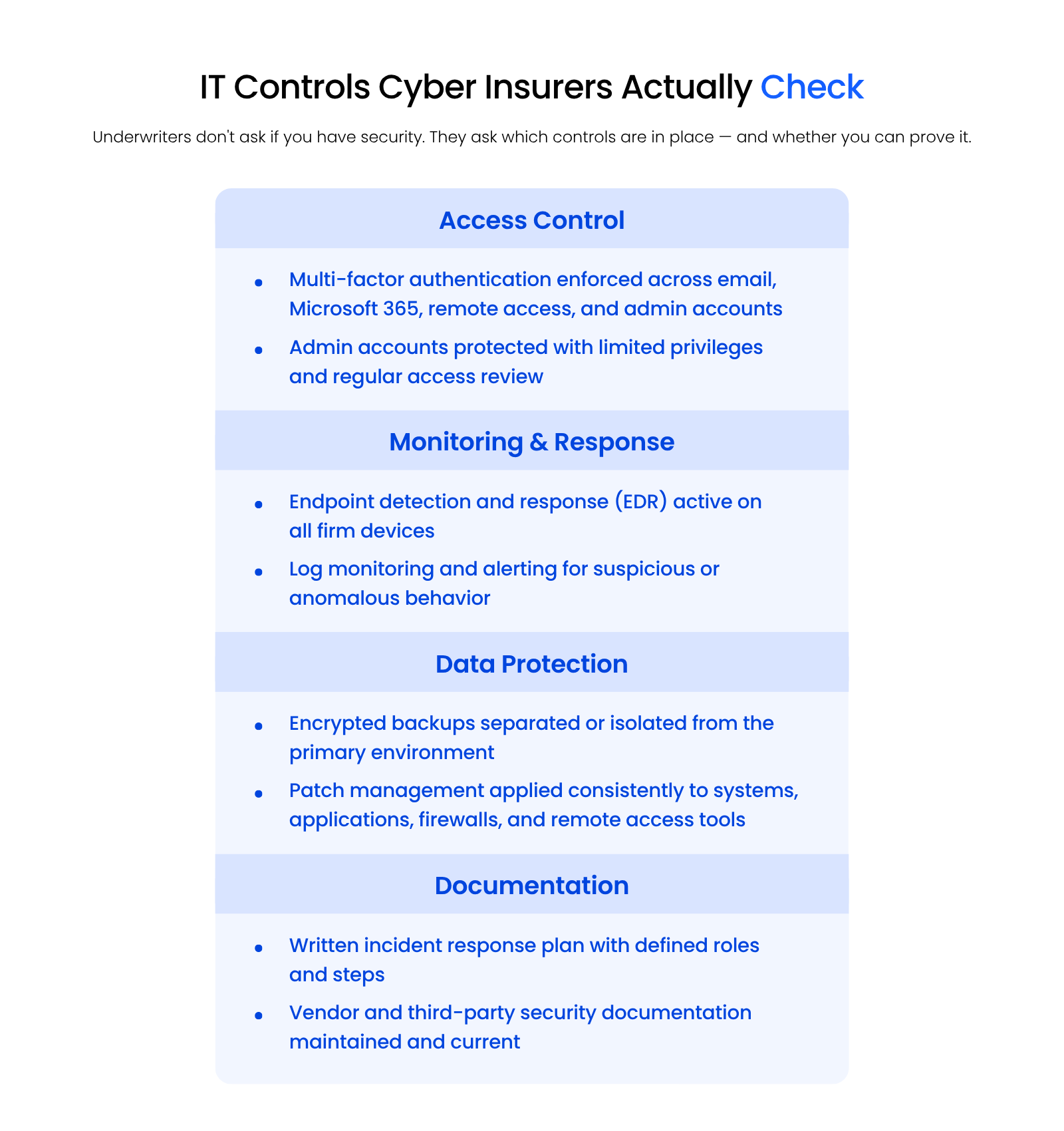
Underwriters now require proof that specific controls are in place — multi-factor authentication, endpoint detection and response, secure backups, patch management, monitoring, and incident response planning. Firms that can’t show those controls face higher premiums, exclusions, or denial.
That’s where NIST helps — as a structured way to organize the controls insurers already require, not as a compliance mandate.
Cyber insurance readiness is one piece of cybersecurity for law firms more broadly — the controls underwriters check are the same ones that protect privileged client data every day.
Cyber Insurance Is Getting Harder to Qualify for: Here’s Why
Cyber insurance is getting harder for law firms to qualify for because underwriters now require documented proof of specific IT controls, not just confirmation that a firm has IT support.
That makes the firm’s IT environment part of the cyber insurance conversation.
Rising Denials and Premium Increases
Cyber insurance pricing depends on many factors: firm size, claims history, coverage limits, practice area, carrier appetite, and the strength of the firm’s controls.
Even when the broader insurance market is stable, weak controls can still create problems.
A firm that can’t show basic protections may face harder underwriting, required remediation, higher premiums, exclusions, or denial.
Stricter Underwriting Requirements
A vague “we have IT support” answer isn’t enough anymore.
Underwriters may ask whether the firm can demonstrate:
The issue is proof. Law firm leaders may assume those controls are handled until the questionnaire asks for evidence.
The Questionnaire Problem
Cyber insurance questionnaires are forcing firms to confront IT gaps they may have ignored or misunderstood.
That’s the practical challenge. A firm can’t answer accurately unless someone understands how the IT environment is actually configured, monitored, and documented.
What Insurers Actually Check When Underwriting a Law Firm
Cyber insurance requirements vary by carrier and policy. Still, many questionnaires focus on the same core controls.
Multi-Factor Authentication (MFA)
Multi-factor authentication (MFA) requires users to verify their identity with more than a password.
For law firms, MFA should usually cover email, Microsoft 365, remote access, admin accounts, cloud systems, and core applications where supported.
The detail matters. “Some users have MFA” is weaker than “MFA is enforced across users, admin accounts, and remote access systems.”
Endpoint Detection and Response (EDR)
EDR monitors devices for suspicious behavior that basic antivirus may miss.
Law firm endpoints include laptops, desktops, and sometimes servers. A compromised device may expose email, documents, billing systems, practice management software, or remote access tools.
EDR helps identify suspicious activity such as ransomware behavior, credential misuse, unusual scripts, or attempts to move across the environment.
Backup and Recovery Systems
Backups must be secure, monitored, and restorable.
A stronger backup posture usually includes:
A backup that has never been tested is closer to a hope than a recovery plan.
Patch Management and Monitoring
Patch management keeps systems, applications, firewalls, and remote access tools updated against known vulnerabilities.
For law firms, this includes more than ordinary workstation updates. It should account for Microsoft 365, network devices, remote access tools, servers, and legal software where applicable.
This matters because exposed perimeter systems remain a major cyber risk. Coalition’s 2025 Cyber Threat Index reported that most ransomware claims in 2024 began with compromised perimeter security appliances, such as VPNs or firewalls.
This is also where inaccurate questionnaire answers become dangerous.
The firm’s answers should match the firm’s reality.
Where NIST Fits In, and Why It’s Not the Point
NIST is useful because it gives cybersecurity structure.
For law firms, the NIST Cybersecurity Framework maps well to the same categories insurers care about:
NIST as IT Context, Not Compliance Requirement
Most small and mid-size law firms aren’t trying to become formally “NIST compliant.”
For this audience, NIST is better understood as context. It helps organize the controls insurers already ask about: access control, monitoring, response planning, recovery, governance, and documentation.
For most law firms, the goal isn’t NIST certification. The goal is an IT environment that passes underwriting scrutiny and holds up under a claim.
What Law Firms Actually Need vs. Framework Terminology
A managing partner doesn’t need to start with framework vocabulary.
The firm needs clear answers to practical questions:
NIST helps organize the work. Cyber insurance readiness depends on whether the firm can show the work is actually being done.

Why Most Law Firm IT Environments Fail the Underwriting Checklist
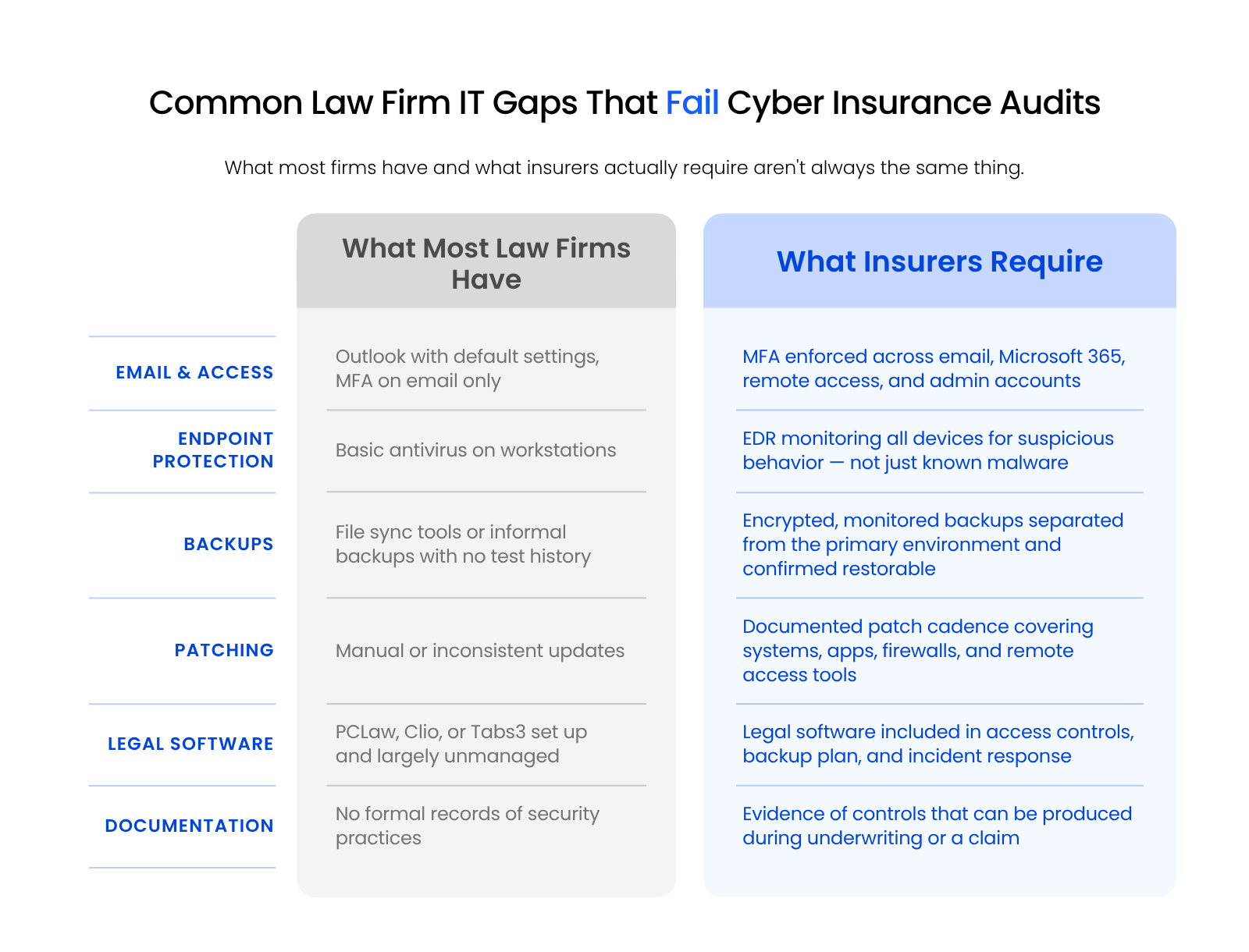
Most law firm IT environments fail the underwriting checklist because their controls are incomplete, inconsistently applied, or impossible to document — even when the firm believes it’s covered.
They may have Microsoft 365, antivirus, backups, a firewall, and an IT provider.
That doesn’t automatically make the environment cyber insurance-ready.
Fragmented Consumer-Grade Tools
The gap often appears when basic tools are used without centralized management, monitoring, or documentation.
Common problems include:
Often the protection is there but incomplete, inconsistent, or hard to prove.
Legal Practice Management Software Vulnerabilities
Law firms aren’t generic small businesses. Their environments usually include practice management, billing, accounting, document, scanning, email, and remote access systems tied directly to client work.
Systems like PCLaw, Clio, Tabs3, Time Matters, ProLaw, QuickBooks, and Worldox can affect cyber insurance readiness because they touch sensitive client and matter data.
The firm needs to know:
A generalist IT provider may handle workstations and email. Legal software is different — it touches matter data, billing, document systems, and client communications in ways standard SMB security often doesn’t account for.
No Centralized Monitoring or Documentation
Cyber insurance readiness depends on both controls and evidence.
A firm may have some protections in place, but if no one can produce documentation, leadership may still struggle during underwriting, renewal, client review, or claim investigation.
This matters more in a law firm because cybersecurity is tied to confidential client information. ABA Model Rule 1.6 says lawyers must make reasonable efforts to prevent unauthorized access to or disclosure of information relating to the representation of a client.
That matters beyond compliance. Law firm cybersecurity is tied to confidentiality obligations, client trust, and professional exposure.
How Managed IT Closes the Gap
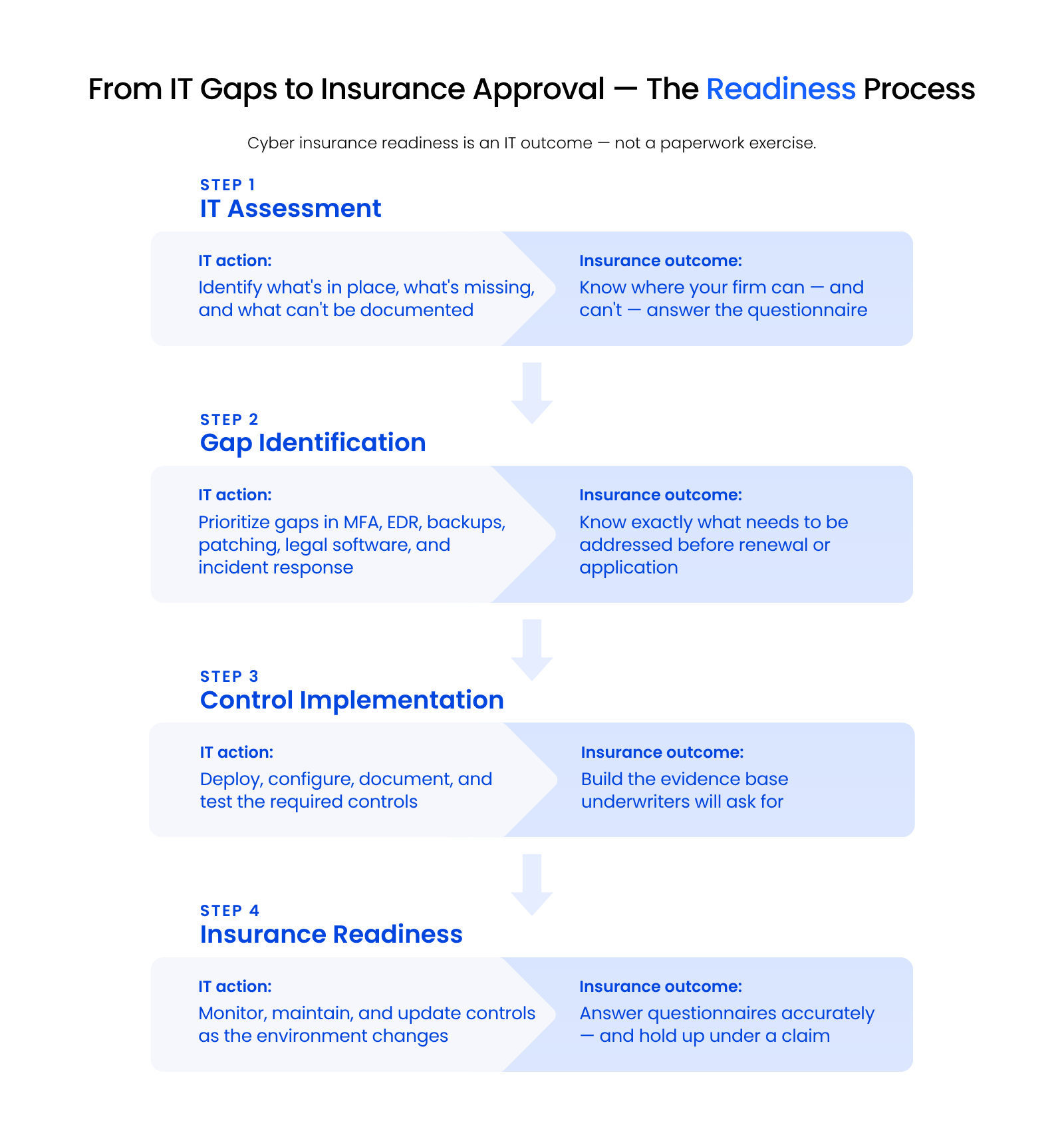
Managed IT closes the readiness gap by keeping controls monitored, patched, tested, and documented continuously — the ongoing maintenance that underwriting rewards and that pre-renewal cleanup can’t replicate.
A firm may enable MFA, improve backups, install EDR, and write an incident response plan before renewal. Those steps help. The environment still needs to be monitored, documented, patched, reviewed, and adjusted over time.
That’s where managed IT for law firms becomes relevant.
Continuous Monitoring and Documentation
A managed IT provider should help the firm keep security controls active and visible.
That includes:
This is the difference between having tools and having an environment someone can explain clearly to an underwriter.
Legal-Specific Security Configurations
Law firms need IT support that understands how legal work actually happens.
Microsoft 365, remote access, legal software, document systems, email, billing tools, and accounting systems all need to work together securely. Security decisions affect how attorneys access files, how staff work remotely, how client data is stored, and how quickly the firm can recover after disruption.
Uptime Manage provides managed IT built specifically for law firms — which means the security configuration, monitoring, and documentation that underwriters ask about are maintained as part of day-to-day IT operations, not assembled before a renewal.
No managed IT provider can guarantee approval, pricing, coverage terms, or claim outcomes. Those decisions belong to the insurer.
Managed IT can help the firm build, maintain, and document the controls underwriters commonly ask about.
Audit-Ready Incident Response Planning
Incident response planning is where many firms are least prepared.
A practical plan should identify:
Managed IT helps make the plan usable, not theoretical.
It also helps with the questionnaire process itself.
That matters because the firm’s answers should reflect the real environment. When the IT provider understands the firm’s systems, legal software, security controls, and documentation, the firm is in a better position to answer accurately.
How to Assess Your Firm’s Cyber Insurance Readiness
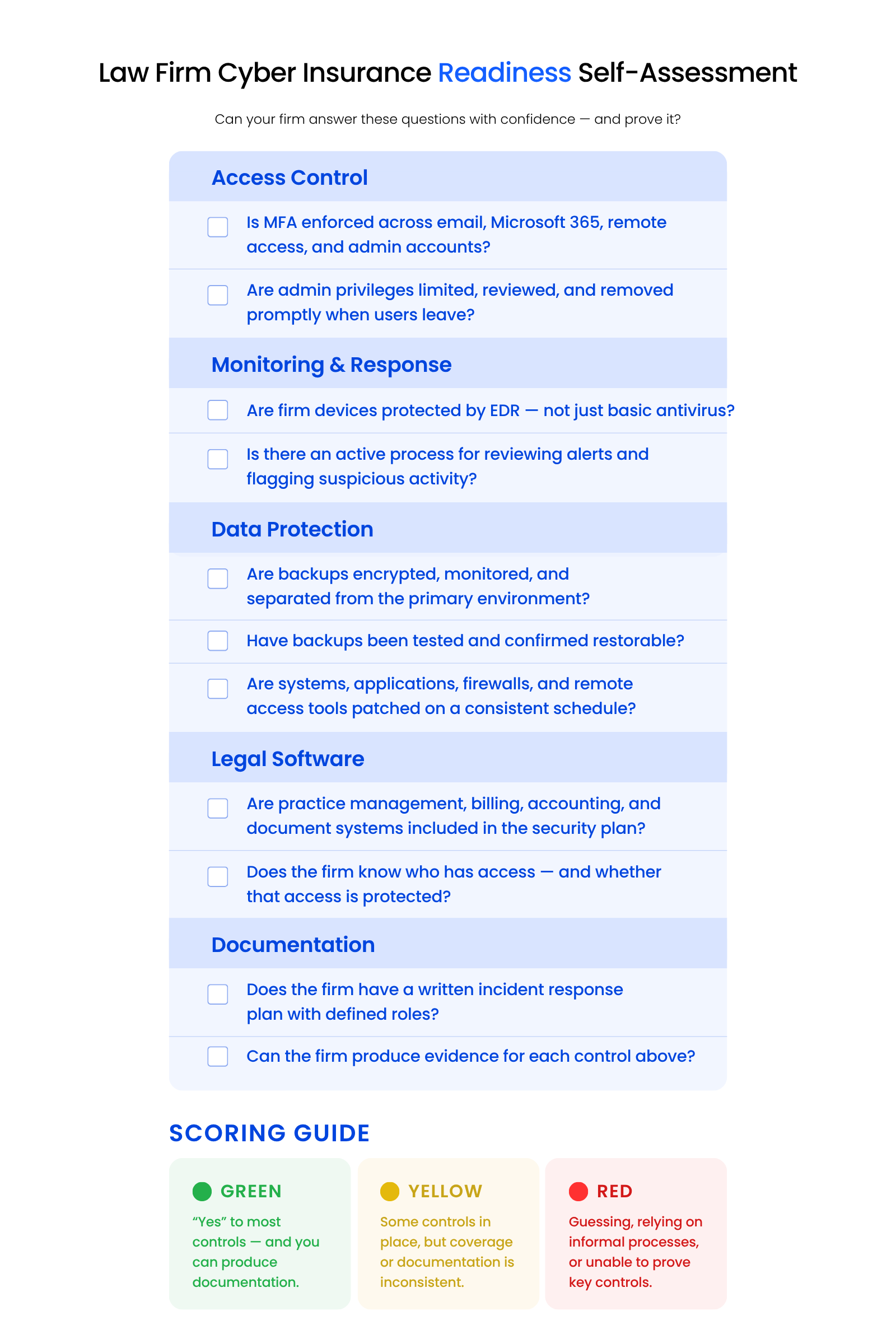
Before applying for or renewing cyber insurance, law firms should review whether they can answer key questions with confidence.
IT Controls Checklist
Use this quick self-assessment before the next questionnaire:
Documentation Requirements
Next, ask whether the firm can prove those controls exist.
Useful documentation may include:
If the firm can’t produce evidence, it shouldn’t assume the control is audit-ready.
When to Get a Professional IT Assessment
A professional IT assessment is useful when the firm is unsure how to answer a questionnaire, when the current provider can’t explain the environment, or when renewal is approaching and leadership already suspects gaps.
It is especially useful if the firm has informal backups, inconsistent MFA, older legal software, no centralized monitoring, no documentation, or no clear incident response plan.
Readiness scoring guide:
Cyber insurance readiness means having the right controls in place, keeping them current, and knowing what to do when something goes wrong. For most law firms, that starts with an honest assessment of where the gaps actually are.
What Cyber Insurance Readiness Actually Requires
Qualifying for cyber insurance isn’t a documentation exercise. It’s a reflection of whether the firm’s IT environment is actually built, maintained, and monitored to the standard underwriters now expect.
For most law firms, the gap between where they are and where they need to be is an IT problem — and a solvable one.
WHAT’S NEXT
Frequently Asked Questions

Uptime Legal’s Technology Solutions
Cloud, software, IT, and document management built for today’s law firms.