Table of Contents
Your firm didn’t choose to keep faxing. Courts, insurers, opposing counsel, and medical records custodians did, and they’re still sending.
So you got rid of the machine and started shopping for a replacement. Most guides to the best online fax services for law firms rank them on price, page allowances, and how good the mobile app is.
The plan tier decides whether you’re covered. Whether a vendor will sign a Business Associate Agreement on the specific plan you’re buying is the one thing that separates these services, and the tier most firms default to doesn’t include one.
That’s a due diligence question, and it belongs with every other decision about managed IT for law firms that touches confidential client information.
We run this review for firms without internal IT, and the tier is where it goes wrong nearly every time.
Why Do Law Firms Still Send and Receive Faxes?
Law firms still fax because courts, insurers, medical records custodians, and opposing counsel still fax, and none of them ask the firm’s preference first.
That distinction is what the rest of this turns on.
Your outbound volume is a choice you control. Your inbound volume isn’t, and it arrives whether or not anyone at the firm has thought about where it lands.
Here’s who’s still sending to you:
Every one of those carries confidential client information, and several carry protected health information your firm never asked to hold.
Getting rid of the machine solved the paper problem. It didn’t touch the obligation attached to what arrives on it, and it added a new question: some vendor now holds your client’s medical records on a server you’ve never seen, under terms you probably didn’t read.
That vendor is now part of how your firm handles client information, which is why email and documents are where the real exposure sits.
Choosing one is a due diligence decision rather than a purchasing one. The rest of this article is about how to make it, and which services survive the standard.
What Makes an Online Fax Service Secure Enough for Client Files?
An online fax service is secure enough for client files when the vendor signs a Business Associate Agreement covering the plan you buy, encrypts documents in transit and at rest, and produces an auditable delivery record on demand.
Start with the standard your firm already works under.
ABA Model Rule 1.6(c) requires reasonable efforts to prevent the inadvertent or unauthorized disclosure of, or unauthorized access to, information relating to the representation of a client. Your state’s version of that rule is what a disciplinary board would read if a client file went somewhere it shouldn’t.
The rule points at vendors directly. Comment 18 to Rule 1.6 sends you to Rule 5.3, whose Comment 3 names “using an Internet-based service to store client information” as an example of work sent outside the firm and requires reasonable efforts to ensure it’s handled compatibly with your professional obligations. That is what data security compliance actually requires.
An online fax service holds client documents on its own servers. That is the category.
A Business Associate Agreement is the cheapest public signal that a vendor’s controls are real: it’s a written commitment, it’s either offered or it isn’t, and you can check in about four minutes.
Practice area decides why you care, not whether you do:
Same vendor decision. Two different reasons for making it carefully.
A third reason arrives on a schedule. Your clients and your cyber carrier both send cyber insurance questionnaires asking whether vendors handling client data are under written agreement, and somebody at your firm answers them.
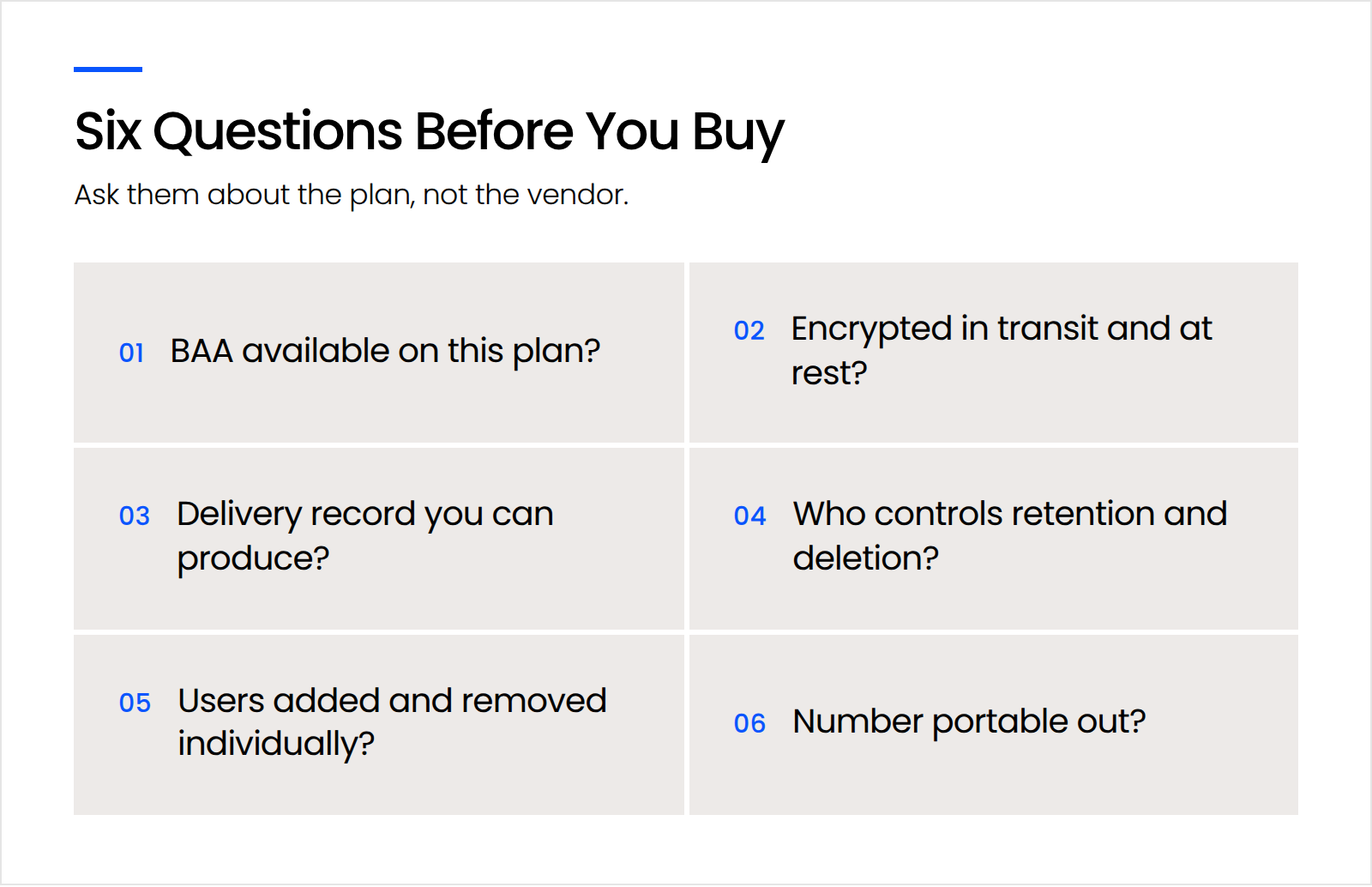
Answering that question about your fax vendor requires knowing the answer. Six criteria get you there.
Will the Vendor Sign a BAA on the Plan You’re Buying?
A Business Associate Agreement (BAA) is a contract in which a vendor commits in writing to how it may use the material you hand it, how it safeguards that material, and what it owes you if something goes wrong.
The plan tier decides whether one applies, and the tier a vendor advertises hardest is frequently not the tier that carries it.
Is the Transmission Encrypted in Transit and at Rest?
Encryption in transit protects a document while it moves between your firm and the recipient. Encryption at rest protects it while it sits on the vendor’s servers afterward, which is where it spends almost all of its life, and vendors describe it far less often.
AES-256 at rest is the one standard every service in this comparison publishes. Transit disclosures vary from unversioned SSL language to TLS 1.3, so ask which you’re getting rather than assuming a floor.
Can You Produce a Delivery Record?
An audit log is a timestamped record of what happened to a document: when it was sent, which number received it, and who at your firm accessed it. A delivery receipt is the specific confirmation that a transmission completed.
You need these the day opposing counsel says a filing never arrived, and a service that can’t produce one leaves you arguing from memory.
Who Controls Retention and Deletion?
Retention control means your firm sets how long a document stays in the vendor’s system, rather than inheriting whatever default the vendor chose.
Your firm already has a retention schedule for closed matters. A fax service with a fixed archive period, or one that keeps everything indefinitely, puts confidential client documents on a different clock than the rest of the file, and you’ll find out which clock during a records request.
Can You Provision and Remove Users Individually?
Individual user accounts let you add and remove access one person at a time. A shared mailbox with a password everyone knows can’t do that, which is what access control is for.
We see the cost of this constantly, and rarely in the fax service itself. A staff member leaves, IT disables them in the systems everyone remembers, and six months later they still hold working credentials to two nobody inventoried. A fax service bought on a credit card, outside the firm’s identity management, is exactly that kind of system.
Can You Port Your Existing Number Out?
Number portability decides whether you can leave. Your fax number is printed on your letterhead, your pleadings, your website, and every business card in the office.
Confirm portability before you sign, not when you want to switch, and ask whether the vendor charges to release a number.
Does the Plan You’re Buying Actually Include a BAA?
The plan tier decides whether a Business Associate Agreement applies, and on eFax the answer depends on which of its two plan lineups you happen to land on.
eFax publishes two. On ww2.efax.com the plans are Plus at $18.99 a month, Pro at $24.99, and Protect at $49.99, and Protect is the first one labeled “HIPAA Compliant with BAA.” On www.efax.com the plans are Personal, Business and Corporate, and there the Business plan is the first one listing a Business Associate Agreement. Both lineups are live, both take signups today, and neither links to the other.
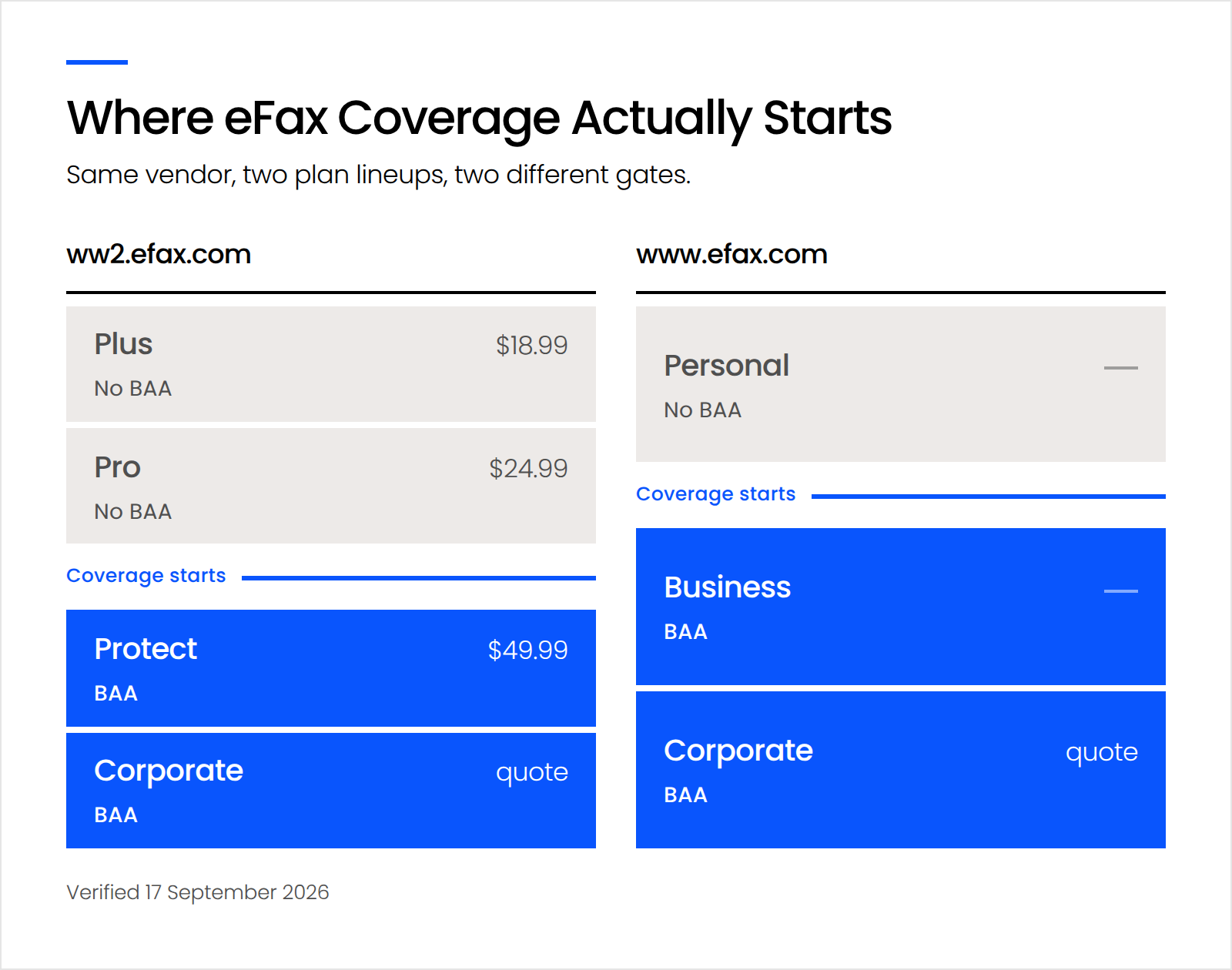
The prices don’t line up either. The Plus, Pro and Protect lineup publishes a regular monthly rate for every tier, while the Personal, Business and Corporate lineup publishes a discounted first month and no ongoing rate at all. Which lineup you see can also depend on the country you’re browsing from.
Read either pricing page and the real point makes itself. On one lineup the entry plan is labeled “HIPAA Compliant” and carries no Business Associate Agreement. On the other, the Protect plan is labeled “HIPAA Compliant with BAA.” Same vendor, same phrase, two different meanings, and a firm that reads the first as covering the second has bought the wrong thing.
That gap between a claim and a commitment is the trap.
A security claim describes what a product does. Encryption in transit, 256-bit AES at rest, an uptime percentage. All verifiable, all useful, none of them binding the vendor to anything.
A compliance commitment describes what the vendor owes you. A signed BAA allocates responsibility and creates obligations that survive an incident.
Firms conflate these constantly, and carelessness is rarely the reason. We watch the same substitution across law firm technology generally: a consumer product standing in for a business one, a spam filter counted as phishing protection, marketing copy read as evidence of a control. The pattern is a firm believing something protects them that was never built to.
Then there’s the question of who you’re actually comparing.
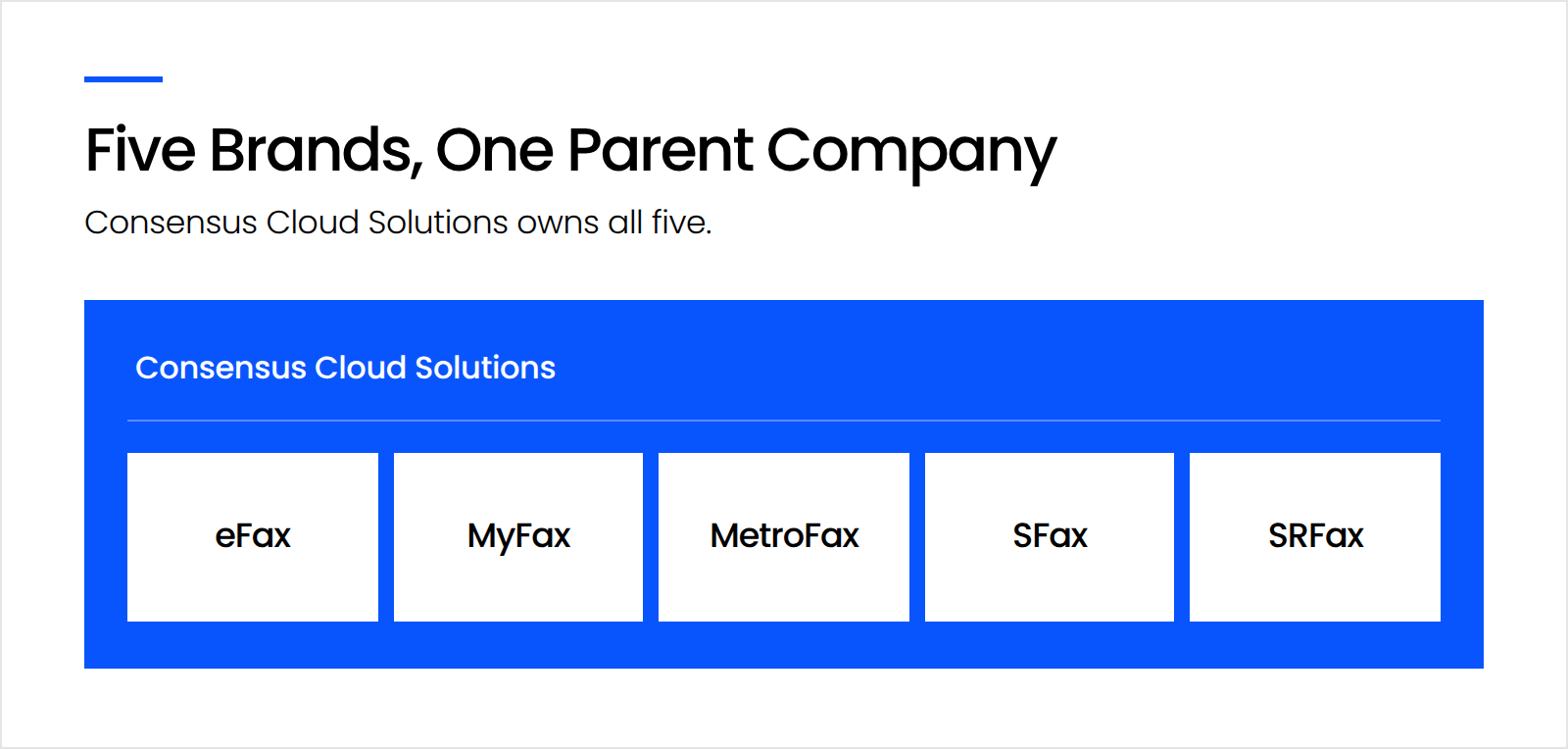
Consensus Cloud Solutions owns eFax, MyFax, MetroFax, SFax, and SRFax. A firm that decides eFax costs too much and goes looking for alternatives can work through three or four of those names without ever leaving the same parent company. Consensus’s own trademark notice lists all five, and its FY2025 annual report names them among its fax brands.
The brands keep separate websites, separate pricing, and separate support queues. None of them mention each other.
The Best Online Fax Services for Law Firms
eFax, Documo’s mFax, Notifyre, and Fax. Plus all offer a Business Associate Agreement to law firms, and they differ on which plan tier unlocks it, which certifications they hold, and how much retention control they hand over.
The comparison below measures what a firm handling confidential client information needs to know. Price is in the table because you need it, and it’s the last thing that should decide this.
Each service below is judged on the same six criteria, with one honest limitation named for every one of them.
eFax Protect and Corporate
eFax offers a Business Associate Agreement starting at Protect on one of its plan lineups and at Business on the other, and the entry tier in both carries none.
eFax is the largest brand in this category and the one your firm has probably heard of. Its Corporate tier holds HITRUST Risk-Based 2-Year (r2) certification, the most demanding credential any vendor in this comparison carries, and eFax publishes a documented REST API. Protect runs $49.99 a month for 500 pages and five team members.
The limitation: eFax is the service firms most often discover they bought at the wrong tier, and two parallel plan lineups are the reason. eFax also names no prebuilt integration with any legal practice management system, so faxes will not land in your matter files without work.
Documo (mFax)
Documo includes a signed Business Associate Agreement on every plan, starting at its $25 Solo tier, at no additional cost.
That’s the cleanest answer in this comparison. One BAA covers every Documo product, so there’s no tier arithmetic and nothing to upgrade into. Documo completes an annual SOC 2 Type II audit, which means an independent auditor observed its controls operating over a sustained period rather than checking them on a single day. Pricing on annual billing runs $25 a month for Solo, $80 for Business and $240 for Enterprise.
The limitation: Documo’s own compliance page currently describes its HITRUST e1 certification both as complete and as in progress, on the same page. Documo is also built and sold for healthcare rather than legal. If a client or carrier questionnaire names HITRUST specifically, ask Documo to confirm its status in writing before you answer.
Notifyre
Notifyre applies HIPAA compliance by default across all accounts and includes a Business Associate Agreement at no cost, though you have to ask for it rather than receiving it with the plan.
Notifyre’s pricing suits low-volume firms better than anything else here: sending is pay-as-you-go from $0.03 per page with a $10 minimum top-up, and receive plans start at $4.90 a month for 200 pages including a fax number. Notifyre is ISO 27001 certified, publishes audit trails and user access controls, and ports numbers free, assigning a temporary fax number to your account so nothing is lost while the transfer runs.
The limitation: Notifyre holds no SOC 2 Type II attestation, which is the credential client and carrier questionnaires ask about by name. Requesting the BAA is also one more step somebody has to remember at setup.
Fax.Plus
Fax.Plus holds ISO 27001 and SOC 2 Type II certification and gates HIPAA coverage behind its Enterprise plan, which also requires activating Advanced Security Controls alongside the signed BAA.
Fax.Plus is the most transparent vendor in this comparison about how it earned its credentials. Fax.Plus names EY CertifyPoint as the auditor behind both certifications, adds CSA STAR, and operates under Swiss data protection law. Firms with a security questionnaire to answer will find Fax.Plus the easiest here to document.
The limitation: Enterprise runs $79.99 per month billed annually, and that’s where HIPAA coverage begins. For a ten-attorney firm sending forty pages a month, the certifications are excellent and the price is the eFax problem wearing different clothes.
A Note on Dropbox Fax
Dropbox Fax publishes no Business Associate Agreement and no HIPAA compliance statement for its fax product, which is why it isn’t recommended here.
This is a statement about what Dropbox publishes, not a claim about the product’s engineering. Dropbox is a serious company and its file platform is widely used in law firms. Dropbox does publish BAA availability for Dropbox Sign and for its team plans, and the fax product is simply absent from both coverage lists.
There’s no published statement excluding fax either, which is its own kind of answer. A vendor that hasn’t published a BAA is a vendor you can’t answer a client questionnaire about. If your firm is using it today for anything confidential, that’s the gap to close.
Which Online Fax Service Is Right for Your Firm?
Pick the service by three things: how many people need to send, whether your practice handles protected health information as part of representation, and who will own the account once it’s running.
By volume: If your firm sends fewer than fifty pages a month, Notifyre’s pay-as-you-go model costs less than any subscription here and the math isn’t close. Past a few hundred pages, Documo’s flat Solo tier becomes cheaper and simpler to budget.
By practice mix: If you handle personal injury, medical malpractice, elder law, workers’ compensation, disability, or guardianship work, you’re touching protected health information routinely and you want the BAA to be unambiguous and the certifications independent. That points at Documo. If your practice is commercial or transactional, you still want the agreement, and you have more room to choose on price and fit.
By who administers it: If someone at your firm will own user accounts, retention settings, and porting, most of these work. If nobody will, pick the service that requires the fewest decisions after setup, which again is Documo, where the BAA arrives with the plan and there’s no tier to monitor.
Firms facing a client or carrier questionnaire that names HITRUST specifically have one answer: eFax Corporate.
What Should You Confirm Before You Sign?
Confirm four things before you sign: that your existing number ports cleanly, that retention matches your firm’s own schedule, that each user gets an individual account, and that a named person administers it afterward.
The fourth is the one firms skip, and it’s the one that costs.
That’s who inherits this. Configuring retention, provisioning users, porting a number without dropping inbound faxes, and answering the carrier questionnaire next renewal are all real work, and at most firms this size they land on someone who already has five other jobs. Uptime Manage exists for firms in exactly that position.
Buy the Plan, Not the Brand
The brand on the invoice matters less than the tier you’re on. eFax publishes two plan lineups where coverage starts in different places, four more fax brands you’ll meet while shopping belong to its parent company, and encryption in the marketing copy doesn’t mean a BAA in the contract.
Ask which plan carries the BAA, ask whether you can produce a delivery record on demand, and ask who administers the account once the trial ends. Answer those three before you sign and the rest of the comparison is detail.
WHAT’S NEXT
Frequently Asked Questions

Uptime Legal’s Technology Solutions
Cloud, software, IT, and document management built for today’s law firms.