Table of Contents
When it comes to law practice management software, law firms have more choices today than ever. Generally speaking, choice and competition are a good thing for any industry. The downside, however, is that legal software is an increasingly crowded market, and finding the right legal software for your law firm has become a daunting task.
At Uptime Legal, we work with hundreds of law firms across North America and have the privilege of seeing how many different law firms work. In our decade-plus of experience, we’ve seen one law practice management application really stand out amongst the crowd.
That software is LEAP.
Introduction to Law Practice Management
Law Practice Management (LPM) software is a platform that, to varying degrees, manages each aspect of your law firm. The scope, features and capabilities of any given Law Practice Management application varies from product to product. Some products provide basic timekeeping and billing, others provide a broader array of functions, including matter management, form/document assembly, calendaring, trust accounting, and more.
Introduction to LEAP Legal Software
LEAP is true-cloud Law Practice Management Software. LEAP provides rich tools to manage your cases and your firm, and securely stores your data in the cloud on servers powered by Amazon Web Services (AWS). AWS is the largest cloud platform provider in the world, with 99.99% uptime. LEAP provides a broad range of capabilities, in contrast to other cloud-based LPM applications in the market today.
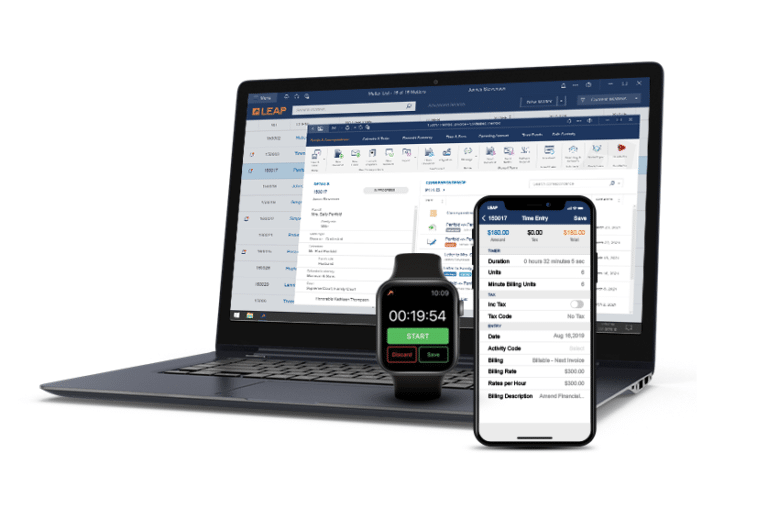
There’s no doubt that web-based software is easier to use and maintain than installable, desktop and server-based software. The trade-off, however, is usually software speed, performance, and functionality.
LEAP Legal Software aims to give law firms the best of both worlds: There is an installed desktop client (simply called the LEAP Client), which is installed on your Windows desktop. However, the data is stored in LEAP’s cloud servers, which eliminates the need for servers and IT support.
In this way, LEAP provides:

7 LEAP Stand-Out Features
LEAP excels at the expected and “standard fare” practice management functions, such as client and contact management, case management, calendaring, time, and billing.
Where LEAP really stands out is with a handful of differentiating capabilities (call them “Killer Features”).
1. Pre-Configured Matter Types
LEAP comes pre-configured with over 1,600 matter types specific to states and areas of law. This allows attorneys to easily open and manage cases from start to finish, without starting from scratch.
These case types include all common areas of law like real estate, family, litigation, commercial, and estate planning and are continuously being updated by an experienced LEAP Design and Automations Team.
Once the matter has been opened, every contact, correspondence, task, time entry, financial transaction, and file is saved and easily searched for by client or case. You can also access your legal cases wherever it’s most convenient for you with the LEAP Mobile App.
2. Automated Documents and Court Forms
Autofill legal documents to save time and reduce errors with LEAP and its seamless integration with Microsoft Word. Law firms will have access to the key templates and documents they have used for years, fully integrated within LEAP. You can create all your documents in seconds by entering data once and auto-merging the content from matters in LEAP.
LEAP has a highly experienced team dedicated to the creation and maintenance of automated local, state, and federal legal forms for all common areas of law. Gain access to the latest versions of court forms and benefit from a team with over 25 years of expertise creating documents and forms for attorneys.
3. Email Integrations
LEAP and its integrations give you everything you need to run an efficient law firm and maximize functionality within LEAP. LEAP integrates seamlessly with legal software solutions (will get to this soon), to make practicing law easier, and platforms you already use like Office 365 for Word, Teams, and Outlook.
The LEAP integration with Outlook ensures that a consistent, professional correspondence always takes place in one central location. This makes it easier to organize and search for email communications between attorney and client. Incoming and outgoing emails, and all replies, auto-save to the electronic case with the billable time instantly recorded.
4. Instant Time Recording and Billing
LEAP allows you to instantly record time spent on emails, phone calls, and documents and forms without having to start or stop a timer. Quickly capture billable time on the go with the LEAP Mobile App, Apple Watch, or Amazon Alexa. Attorneys can also customize billing codes and fixed-fee entries directly from the built-in LEAP Timesheet.
All time entries sync to the corresponding electronic matter which can be viewed and adjusted at any time before a bill is sent. When preparing the bill, LEAP gives you the ability to add click-to-pay. That means once a bill is sent, your client pays online ensuring that you get paid faster.
5. LEAP Web Portal
LEAP can utilize significant innovations that legal professionals need in today’s digital and remote business climate. Manage incoming requests from potential and current clients to fill out intake forms, pay their bills, schedule appointments, and share large documents with LEAP’s Web Portal.
6. Integrations & Apps
LEAP and its exclusive integrations and apps make it possible for law firms to work smarter, provide remote accessibility to their services, get paid faster, and innovate for the future.
LEAP’s integrations include:
7. Work Anywhere, Simplify Your IT
Keep all your case files, emails, documents, appointments, and more organized with a comprehensive case and practice management system. With LEAP, there is no more need for a server. All your system maintenance, backups, and updates are done automatically without the need for additional IT staff.
Save time, stay updated, and use revolutionary practice management innovations on multiple devices including iOS and Android mobile devices.
When Law Firms Should Use LEAP
LEAP is a good fit for law firms that want a natively-cloud practice management solution, but need the robust capabilities that’s traditionally only found in older, desktop and server-based applications.
LEAP is particularly a good fit for firms that wish to automate form and document creation, as LEAP has a strong form and document library for various jurisdictions.
LEAP is also a good fit for firms that need robust Trust and IOLTA accounting.
A LEAP Success Story
LEAP is primarily used by law firms in the US, CA, the UK and Australia. Here’s a story from just one law firm that made the switch to LEAP.
Complete Your Law Office in the Cloud
Considering LEAP for your law firm? Looking for a better Law Practice Management platform?
Uptime Legal has helped hundreds of law firms transition to the cloud. Get in touch, and an Uptime Legal specialist will help you find the right case management platform for your firm.
Get in touch with our team to learn more about Worldox in the cloud for your law firm.

Uptime Legal’s Technology Solutions
Cloud, software, IT, and document management built for today’s law firms.