Table of Contents
LEAP legal software shows up in nearly every serious search for law practice management software, right alongside Clio and MyCase. It’s a real contender that’s still missing something firms searching for it actually need.
Here’s what LEAP actually costs, how it holds up against the alternatives you’re probably also comparing, and which firms it fits best.
LEAP Legal Software: What It Is and Who Owns It
LEAP is a cloud-based practice management platform for law firms, built and sold by LEAP Legal Software. It runs on Amazon Web Services and is SOC 2 certified. It handles the core work of running a firm in one system: matters, calendaring, time and billing, document automation, and trust accounting.
Two questions matter most before you go further: how LEAP actually stores your data, and who’s behind the company.
Is LEAP Hybrid-Cloud or True-Cloud?
LEAP describes itself as cloud-based, hosted entirely on Amazon Web Services under a SOC 2–certified environment — not the hybrid on-premise-plus-cloud model this review used to describe.
It still runs a Windows desktop client that syncs to that cloud data, which is why some independent reviewers still call the setup hybrid; the data itself isn’t stored locally.
Getting this right matters for any of the cloud solutions for law firms you’re weighing, not just LEAP: a firm choosing based on outdated architecture claims is choosing based on the wrong tradeoffs.
Who Owns LEAP Legal?
LEAP was founded in Australia in 1992 by Christian Beck, who still leads the company as CEO, and has expanded into the UK and US markets since.
Uptime Legal isn’t a LEAP partner and has no referral relationship with LEAP today. That’s a fact that matters for how much weight you should put on this review versus a page written by someone still selling LEAP on commission.
LEAP’s Stand-Out Features
LEAP’s strongest capabilities are jurisdiction-specific document automation, time recording with no manual timer, and a client web portal that handles intake, scheduling, and credit card processing in one place. Those sit on top of the basics every practice management system offers: client and matter records, calendaring, time and billing.
That starts with matter setup itself. LEAP ships with more than 1,600 pre-configured matter types by jurisdiction and practice area, maintained by a dedicated LEAP team, so you open a new matter without building the structure from scratch.
Document Automation & Court Forms
LEAP automates court forms and legal documents by merging matter data directly into Microsoft Word templates. Enter information once in a matter and LEAP auto-populates the corresponding forms, instead of retyping the same details across a dozen documents.
A dedicated LEAP team maintains local, state, and federal forms across common practice areas, and the platform supports e-signature requests from every party on a document.
Time Recording & Billing
LEAP records billable time on emails, calls, and documents without you starting or stopping a timer, and can automatically log time on the go through its mobile app.
Time entries sync to the matter and stay adjustable until a bill goes out. Once it’s sent, clients can pay online, so you get paid faster than waiting on a mailed check.
The LEAP Web Portal
The LEAP Web Portal gives clients one place to fill out intake forms, schedule appointments, share documents, and pay trust or office deposits.
New-case intake forms import directly into LEAP as matters instead of requiring manual data entry, and the portal tracks prospect status with automatic follow-up logging, so a lead doesn’t quietly go cold.
Firms can also track referrals through the portal and link to it directly from their email signature.
Work Anywhere
LEAP needs no on-site server. Maintenance, backups, and updates run automatically in the background, and the system works across desktop, iOS, and Android, so your team isn’t tied to one machine or location.
It also connects to a range of named third-party tools plus deep Microsoft 365 support: see Integrations and Apps below for the full list.
Complete Feature List
LEAP’s full feature set covers matter management, trust accounting, conflict checking, and document management in a single system. The table below is a quick reference: the judgment on where LEAP actually stands out lives in the section above, not here.
Integrations and Apps
LEAP integrates with InfoTrack (e-signature and e-filing), LawConnect (secure large-file sharing), QuickBooks Online and Xero (accounting reconciliation), Zapier (workflow automation), and deep Microsoft 365 support for Word, Teams, and Outlook.
It also connects to legal-specific tools including WealthCounsel and Lawmatics.
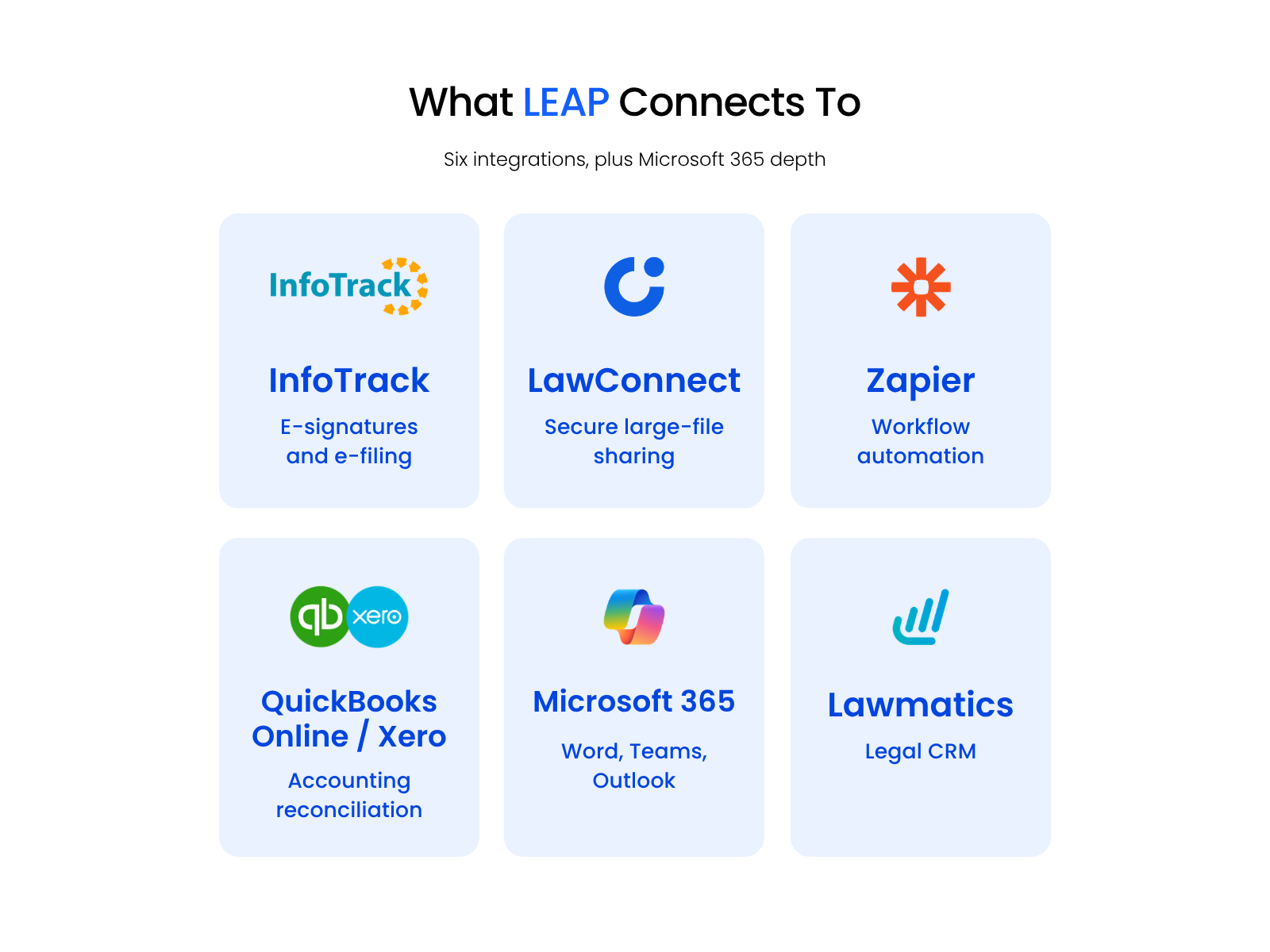
Confirm each integration is still current before you factor it into a decision. This list reflects LEAP’s stated partners as of this review, and integration lineups move.
What LEAP Users Like and Where They Struggle
LEAP users most often praise its Microsoft Office integration and billing workflow, and just as consistently name a steep learning curve as the tradeoff.
That ease of use shows up on the bottom line too, other users say — not just in day-to-day workflow.
LEAP Software Pricing: What It Actually Costs
LEAP doesn’t publish pricing anywhere, including its own site, where the only call to action is “Request Pricing“. No per-user rate, no tier, and no minimum are listed publicly.
LEAP is priced on a per-user, per-month subscription. The rate depends on your firm’s size and which modules you need: trust accounting, document automation, and the Web Portal aren’t necessarily bundled the same way on every plan.
Before you weigh that against Clio Manage, MyCase, or any other alternative, get a direct quote from LEAP for your specific firm size and needs, not a general figure quoted for someone else’s firm.
LEAP Alternatives: How It Compares
LEAP is strongest for firms that need deep, jurisdiction-specific document automation and built-in trust accounting in one system. Firms that want the simplest, lowest-cost cloud tool, without that depth, are usually better served elsewhere.
The comparison below breaks down where LEAP holds an edge and where it doesn’t, across the four things that actually decide a switch.
Clio, MyCase, PracticePanther, Smokeball vs. LEAP
Across document automation, trust accounting, cloud model, and price, LEAP’s edge is automation depth, and Clio’s or MyCase’s edge is simplicity and lower cost. PracticePanther and Smokeball sit closer to Clio and MyCase than to LEAP on automation depth, each with its own approach to time capture and billing.
Trust accounting is worth checking carefully whichever system you’re evaluating. Dennis Dimka points out that standard accounting tools like QuickBooks don’t understand trust-account rules at all, so whether a tool handles trust/IOLTA accounting natively, or needs a bolt-on, is a real due-diligence question across every option on this list, not just LEAP.
It’s also worth checking what “document management” actually means in each tool. Most practice management platforms bundle only a rudimentary, Dropbox-like file store, without OCR, tagging, or full-text search, and firms often don’t discover that gap until after they’ve committed.
That caution applies across all four alternatives here, not just LEAP.

What to Check Before Switching Practice Management Systems
Before switching core practice management systems, get fixed cutover and training dates, confirm what data actually migrates, and name who’s likely to resist the change before it happens.
Firms changing core systems tend to under-invest in a choreographed communication plan from firm leadership before cutover.
That means naming why the change is happening, pinning down actual cutover and training dates instead of leaving them open-ended, and identifying which specific people will resist even a change that’s clearly good for the firm.
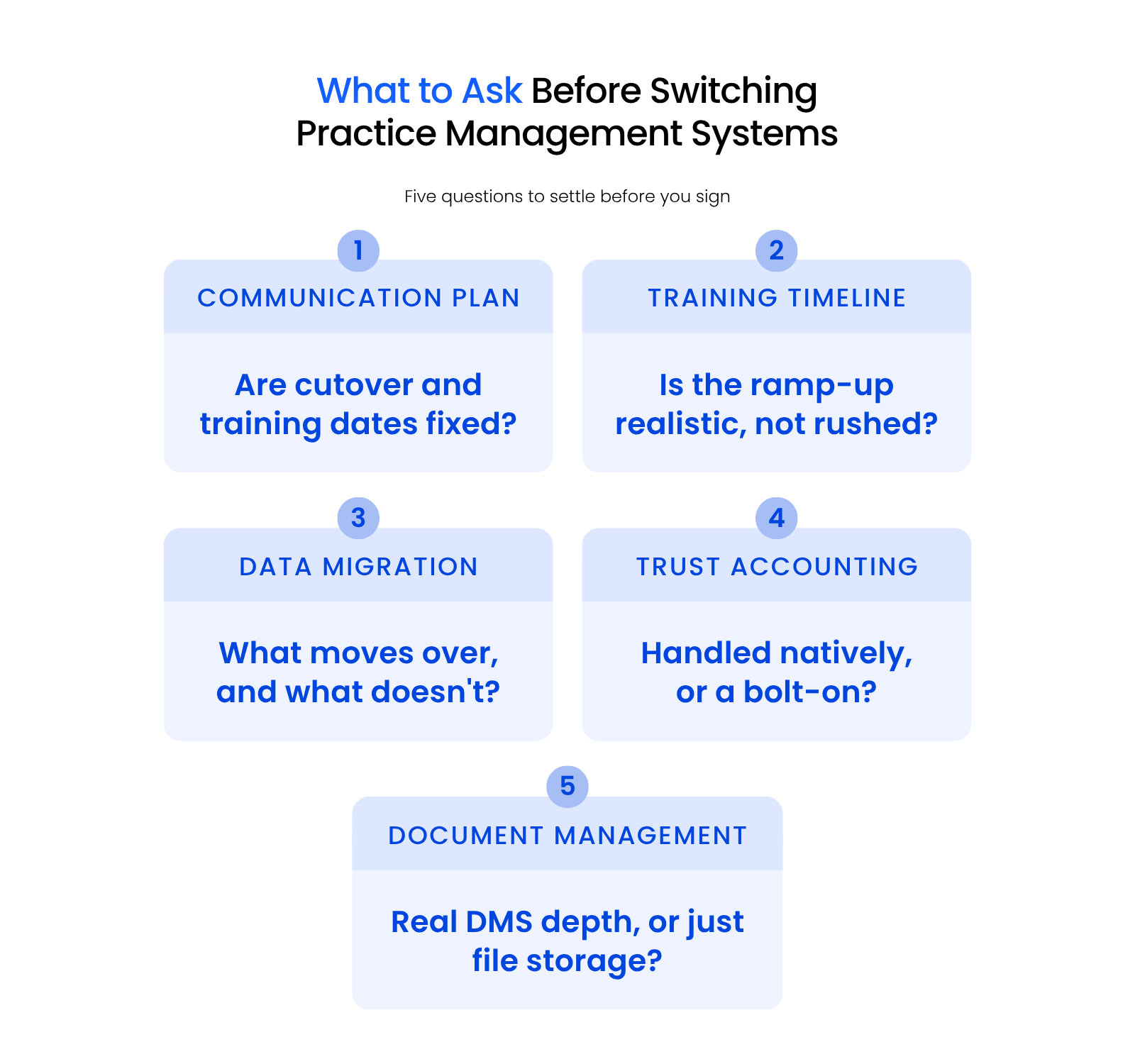
Realistic onboarding timelines matter as much as the communication plan. A rushed training schedule is how firms end up half-trained on a new system while still running the old one in parallel.
Ask specifically what data migrates automatically, what has to be re-entered by hand, and whether trust accounting balances carry over cleanly or need manual reconciliation.
These questions apply whether you’re moving onto LEAP or any other system. Get a specific, dated migration and training plan in writing before you sign, not a general assurance that someone will “take care of it.”
This is due-diligence guidance for evaluating any switch, not a pitch for a service we sell: Uptime Legal isn’t a LEAP partner and doesn’t handle migrations onto it.
The Verdict on LEAP for Law Firms
LEAP earns its place on this list. Firms that need jurisdiction-specific document automation, built-in trust accounting, and one integrated system instead of three bolted-on tools get real value here.
Firms that just want the simplest, lowest-cost cloud tool, or a practice too small to need matter-type automation, are usually better served by Clio or MyCase.
The one number LEAP won’t give you is price. Ask for it directly, compare it against what you’d pay elsewhere, and weigh that against what jurisdiction-specific automation and trust accounting are actually worth to your firm.
Frequently Asked Questions
WHAT’S NEXT

Uptime Legal’s Technology Solutions
Cloud, software, IT, and document management built for today’s law firms.