Table of Contents
Your paralegal opens the case management system, downloads the demand letter she needs, and closes the tab. Nobody looks at the task list. The filing deadline for that case lives on a desk calendar.
A larger firm can have the opposite problem. Its documents are filed, versioned, and searchable, but case status lives in personal Outlook calendars and one senior paralegal’s memory.
Both firms are stuck on the case management vs. document management question, and both own capable software. Each is using one system for the other’s job, usually because someone chose the practice management software before anyone mapped how matters move through the firm.
We see both setups when firms bring us in to support their legal software, and the fix almost always starts with the workflow before anyone buys anything new.
What Is the Difference Between Case Management and Document Management?
Case management runs the matter itself (deadlines, tasks, parties, and where the case stands), while document management runs the matter’s content: its documents, versions, full-text search, and filed email. One tells you what’s due on a matter and who owns it. The other tells you which draft of the settlement agreement is current and where the client’s approval email went.
Deadlines and case stages drive litigation work, and that’s what case management, a branch of practice management, is built to handle. Document management sits under every practice area, because every matter produces files and email.
The line blurs because both systems touch every matter, and both can hold a file. That overlap is where the trouble starts: a system that can hold a file gets treated as the place files belong, whether or not it was built for them.
What Happens When Case Management Becomes a File Cabinet?
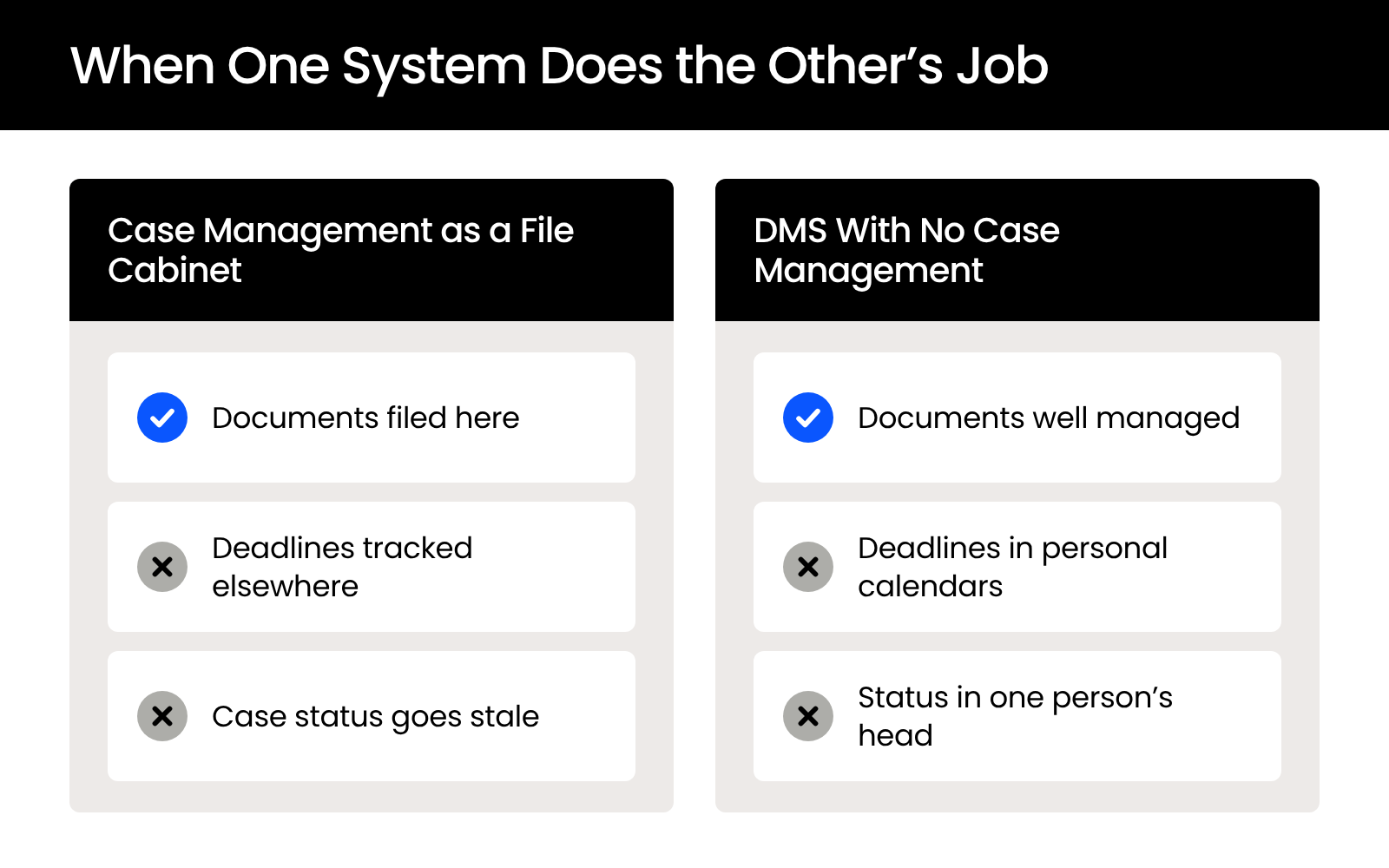
When your firm uses its case management system mainly to store files, you’re paying for deadline, task, and status tracking you don’t use, and getting document storage that usually wasn’t designed to manage a litigation file.
Picture a personal injury firm running a well-known PI case management platform. Asked what value they get from it, the team says they use it primarily for document storage, and they’ve started wondering whether shared Google Drives would do the same job.
That question makes sense from where they sit, and it points to a system doing a fraction of the work the firm is paying for.
What the Firm Is Paying For and Not Using
Case management earns its cost in the features that run the case, and those are the features a file-cabinet setup never opens. Platforms built for litigation typically include:
None of that runs if the only thing anyone does in the system is download attachments.
Why Storage Inside Case Management Runs Thin
Storage built into a case management system is designed for attaching files to a case, and a PI or litigation file outgrows that fast. Medical records arrive in bulk, demand package drafts go through several rounds, and settlement documents move back and forth between your office and opposing counsel.
Each of those files ends up attached to the case, while the email that explains why a draft changed often stays in someone’s inbox. Everything is stored, and finding the right file in the right version still depends on someone remembering where it went.
Signs Your Case Management System Is Mostly Storage
A few patterns show up when a case management system has drifted into file-cabinet duty:
If two or three of these sound familiar, the software is doing what it was set up to do, which is the one job it wasn’t bought for.
What Happens When a Firm Has a DMS but No Case Management?
A firm with a DMS and no case management has its documents under control and its matters on nobody’s system: deadlines sit in personal calendars, status lives in weekly meetings, and one paralegal knows where everything stands.
Now take a larger firm that runs a dedicated document management system for its documents and a separate tool for timekeeping. Its files are organized, versioned, and searchable, and nothing tracks the matters themselves.
This setup is easy to miss, because the part everyone sees every day, the documents, works well.
Where Deadlines and Status End Up Living
Without case management, the tracking still happens. It spreads across whatever tools people already have open:
Each of those works for the person who keeps it, and none of them gives your firm a single view of what’s due.
Why It Gets Riskier as the Firm Grows
When deadline tracking lives in one person’s calendar or memory, a vacation, a departure, or a missed handoff can mean a missed filing date. A missed statute of limitations or discovery deadline can’t be fixed by finding the right document later.
Growth multiplies the handoffs. More attorneys and more matters mean more dates moving between people, and every handoff is a point where a date can drop out of one calendar without landing in another.
Signs Your Matters Are Tracked Outside Any System
The clearest sign is the answer your firm gives when someone asks where a case stands. If the answer is “ask the senior paralegal,” a spreadsheet tab, or “we’ll cover it at the case meeting,” your matters are being tracked outside any system.
Two other tells are worth watching for. New staff learn the caseload by shadowing someone instead of opening a system, and one person’s time off leaves everyone double-checking dates by email.
Can a Shared Drive Do Either Job?
No. A shared drive like Google Drive stores files well, but it can’t track a deadline, run a task list, or show where a case stands, and it doesn’t file email to a matter or organize documents around clients and matters.
On the case management side, a shared drive has nothing to offer. There’s no calendar, no task list, and no case status, so deadlines drift back into Outlook and into people’s heads.
On the document management side, it covers storage and search, but it can’t:
Without that structure, the filing system becomes whatever habits each person brings.
A shared drive is tempting because your firm is probably already paying for it. It solves storage, which was never the hard part.
Why Do Firms End Up Using One System for the Other’s Job?
Firms end up using one system for the other’s job because they chose the software before they defined the workflow, so the system took whatever shape its first users gave it.
It usually starts with a real need. One department wants better case tracking, or the firm needs somewhere to put documents, and a product gets picked to solve that one problem.
Then the first users make it do whatever they need that week. A case management system becomes the place files go because it’s already open, and a DMS becomes the unofficial tracker because it’s the system everyone trusts.
The setup feels good enough, and good enough becomes the permanent arrangement. The other half of the problem is the hope that one product can cover both jobs.
The fix starts with deciding which job belongs to which system, before anyone buys or reconfigures anything.
How Do You Fix a Misused System Without Starting Over?
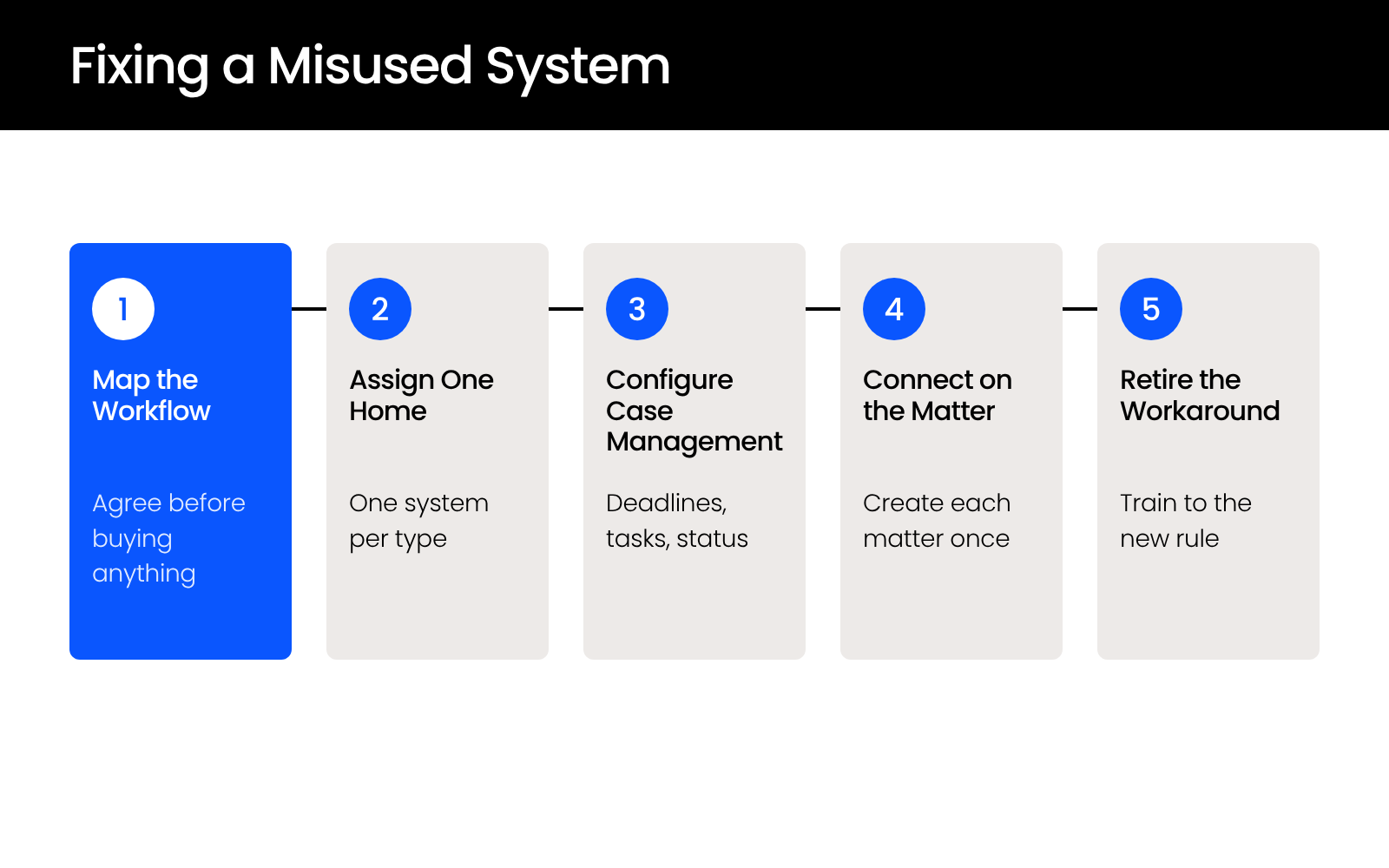
Start by mapping how a matter moves through your firm, give each type of information one system of record, then configure and connect the software you already own. The order matters more than which product your firm runs, and it rarely begins with buying anything.
The five steps below follow that order, and each one depends on the step before it.
Map the Matter Workflow Before You Touch the Software
Set the software aside and map how a matter moves from intake to close, with the people who do the work in the room. Write down:
Keep going until everyone agrees on the map. The disagreements you surface here are usually the same ones that turned the current system into a workaround.
Give Every Type of Information One System of Record
Deadlines, tasks, and case status belong in case management, and documents and email belong in document management. Every type of information gets exactly one home.
Holding to that rule is the hard part. A deadline tracked in both the case management system and an attorney’s Outlook calendar has two versions, and your firm can’t tell which one is right.
Configure Case Management to Actually Run Cases
Build what the workflow calls for:
Once those are in place, the case management system carries the case from intake to close instead of holding its files.
If your firm has been using case management as storage, this is the step where the features you’ve been paying for start doing work.
Connect the Two Systems on the Matter
Sync matters between the two systems so each matter is created and named once. Many case management and document management products offer integrations for this, so confirm what yours supports before you build around it.
An integration keeps records aligned across both systems while each system does its own job.
Retire the Workaround and Train to the New Rule
Once the right system carries a job, retire the workaround that used to carry it: the desk calendar, the tracking spreadsheet, the habit of saving files to a shared drive. If the old tool stays available, people will keep using it.
When a system change goes badly, the cause is usually communication. Before training starts:
People don’t have to agree with the decision, as long as they know the reason for it. Mapping the workflow, configuring the software, and training your team on it is the legal software work we do for firms.
Start with the Workflow, Then Let Each System Do Its Job
A case management system full of files and a DMS with no case tracking come from the same shortcut: the software arrived before anyone decided which system owns what. Fixing it takes a mapped workflow, one home for each type of information, and the discipline to retire the workaround once the right system is doing the job.
The first step needs no software. Put the people who open, calendar, and file your matters in one room, and map how a matter moves from intake to close before anyone changes a setting.
WHAT’S NEXT
Frequently Asked Questions

Uptime Legal’s Technology Solutions
Cloud, software, IT, and document management built for today’s law firms.