Table of Contents
The infrastructure that should be stopping phishing emails from reaching law firm inboxes — and flagging compromised accounts when attacks succeed — usually isn’t configured correctly. At most small and mid-size firms, it’s barely configured at all.
DMARC policies set to soft fail. MFA enabled but not enforced across every system that touches firm data. Default Microsoft 365 settings that were never hardened past out-of-box. These are infrastructure gaps, and they’re why phishing keeps working — and why cybersecurity for law firms can’t stop at awareness training.
Training doesn’t close them. Proper configuration does.
This article covers the specific controls most firms are missing and what a properly secured email environment actually looks like.
Law Firms Are a Specific, High-Value Target
Law firms hold some of the most sensitive data that exists: privileged communications, client funds, trust accounts, M&A intelligence, active litigation strategy. That combination makes them a priority target, not a niche one.
36% of law firms reported a security incident last year, and that number is almost certainly understated. Many firms don’t know they’ve been compromised until well after the fact, if they ever find out at all.
Small and mid-size firms tend to assume they’re under the radar. They’re not.
Attackers aren’t hand-selecting targets based on firm size. They run volume — compromising as many email accounts as possible and waiting for an opportunity to surface.
A trust account transfer. A wire instruction. A partner impersonation. Firm size doesn’t change the value of what’s inside. It just changes how hard it is to get in.
What Firms Think Is Protecting Them — And What Actually Isn’t
Most small and mid-size firms have something in place — consumer antivirus, basic Microsoft 365, Google Drive, built-in spam filtering.
These are consumer and entry-level products that weren’t designed to stop sophisticated phishing attacks. Having them installed is not the same as being protected.
Phishing success at law firms is an infrastructure problem. Teaching staff to spot suspicious emails has value, but it doesn’t fix a missing DMARC policy or an unenforced MFA requirement.
Those gaps exist at the configuration layer, and training doesn’t touch them.
The controls that break that chain aren’t configured at most small firms.
The Email Security Controls Most Law Firms Don’t Have Right
The controls firms have are often misconfigured, partially deployed, or set to defaults that were never hardened. Here’s where the gaps consistently appear.
DMARC, SPF, and DKIM: Why Your Domain May Be Spoofable Right Now
These three protocols work together to verify that emails sent from your domain are legitimate.
The problem is that most small firms either lack these records entirely or run SPF with a soft fail setting.
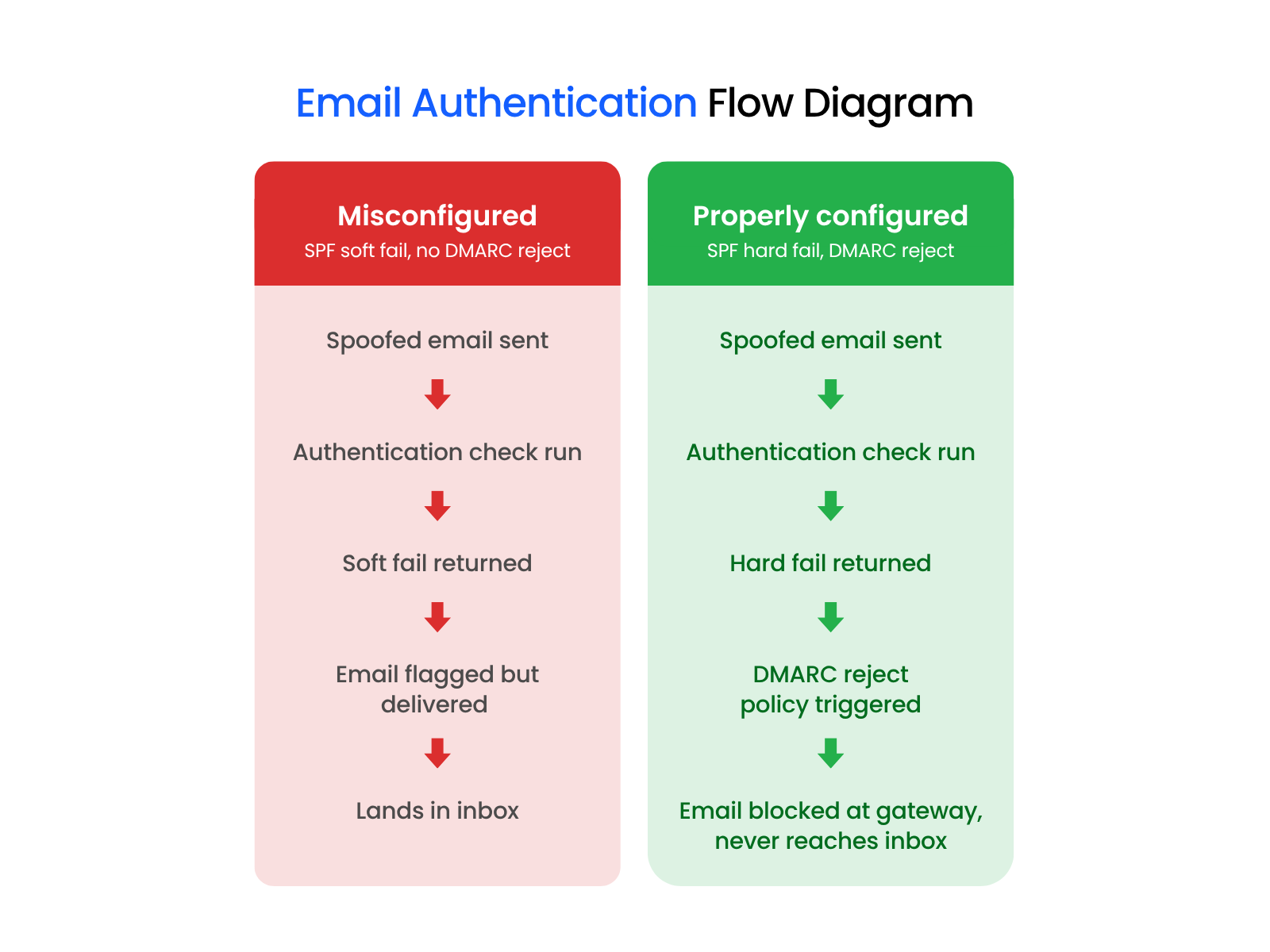
Soft fail means a spoofed email from your own domain still gets delivered — it’s flagged, not blocked.
Without a DMARC reject policy in place, an attacker can send an email that appears to come from a partner’s address and it will land in the recipient’s inbox.
Microsoft’s January 2026 reporting confirmed that misconfigured email authentication records are directly fueling a surge in domain spoofing attacks.
The configuration exists. Most firms just haven’t set it correctly.
MFA Enforcement Gaps: Turned On Isn’t the Same as Locked Down
Multi-factor authentication is one of the most commonly cited security recommendations, and one of the most commonly misconfigured controls at small firms.
Many firms have enabled MFA for Microsoft 365 email. That’s a start. But MFA enabled for one application doesn’t mean it’s enforced everywhere that matters.
Case management systems, client portals, remote access tools, and VPNs often sit outside that protection entirely. Attackers go straight for those gaps.
Closing them requires conditional access policies, which are rules that enforce MFA across every application that touches firm data, not just email. Most small firms have never configured them.
It’s one of the first things Uptime Legal addresses when onboarding a new firm client.
Default Email Filtering Isn’t Enough Anymore
Microsoft 365’s out-of-box settings include basic spam filtering. That’s not the same as advanced threat protection, and the difference matters.
Modern phishing kits — including tools like Tycoon2FA — are specifically engineered to bypass basic filtering. They use adversary-in-the-middle techniques that intercept authentication sessions, allowing attackers to capture credentials and session tokens even when MFA is enabled.
Basic spam filters weren’t built to catch them.
Microsoft Defender for Office 365 includes advanced filtering capabilities that can stop these attacks, but those policies don’t ship enabled by default. They require deliberate configuration.
Firms running out-of-box M365 settings are not running advanced threat protection, regardless of what their subscription tier says.
No Monitoring for Identity-Based Threats
This is the gap most firms have never heard of, and the one that makes every other misconfiguration significantly more dangerous.
The attack chain works like this: a phishing email gets through basic filtering, the attacker uses an adversary-in-the-middle kit to bypass MFA, and they’re now operating inside the firm’s systems with valid credentials.
At that point, without the right monitoring in place, nothing flags the intrusion. No alert fires. The attacker is effectively operating as the attorney.
Identity Threat Detection and Response (ITDR) tools catch the anomalies that standard security tools miss — impossible travel, logins from unrecognized devices, unusual access patterns that don’t match normal behavior. Without ITDR, those signals go undetected.
Unmanaged Devices Connecting to Firm Data
If attorneys and staff are accessing firm data from personal devices without enforced device management policies, the firm has no visibility into what’s connecting to its systems. There’s no way to know whether those devices are patched, encrypted, or compromised.
Cyber insurers treat unmanaged devices as a material risk and price accordingly.
The most common reasons law firms get denied coverage or repriced at renewal include:
Insurers treat these as indicators of unmanaged risk — because they are.
A personal device with local admin privileges and no endpoint detection connecting to firm systems is a wide-open attack surface.
The firm often has no idea it’s exposed until coverage is denied or a claim is filed.
Business Email Compromise: What Happens When These Controls Are Missing
When email security controls are missing or misconfigured, the highest-consequence outcome is theft.
Business email compromise (BEC) is the attack type that turns a misconfigured environment into a financial catastrophe. Attackers just need access to the right email account at the right moment.
The pattern at law firms is consistent.
An attorney’s email gets compromised. The attacker monitors the inbox quietly, waiting. When a wire transfer is about to go out — a settlement disbursement, a trust account transfer, a closing — they intercept the thread and swap in new payment instructions. The money moves. By the time anyone realizes what happened, the funds are unrecoverable.
This isn’t theoretical. It happens at small firms regularly, and the losses run into the hundreds of thousands of dollars.
The Real Reason These Gaps Exist: No One Owns Email Security
Most small and mid-size law firms don’t have a dedicated security engineer. Many don’t have a full-time IT person at all.
The person responsible for technology is often a generalist — someone managing printers, setting up laptops, and handling password resets alongside everything else on their plate.
Email security configuration isn’t a one-time setup. DMARC policies need to be implemented and monitored. Conditional access rules need to be configured and maintained as the firm’s systems change. Defender policies need to be tuned. ITDR tools need to be deployed and watched.
That requires ongoing expertise most firms simply don’t have in-house.
It’s not negligence but a resource reality.
That’s the structural problem. And it doesn’t fix itself over time — it compounds, as threats evolve and configurations drift further from where they need to be.
This is what a legal-specific managed IT provider addresses.
Not as a one-time project, but as an ongoing responsibility to keep security configurations current, monitored, and actually enforced.
What a Properly Configured Email Security Posture Looks Like
A firm with properly configured email security doesn’t just have these tools. It has them set up correctly and kept that way.
In practice, that means:
| Control | What It Does | Common Misconfiguration | What Good Looks Like |
|---|---|---|---|
| DMARC | Tells mail servers what to do when email fails authentication | Set to monitor (p=none) or quarantine instead of reject | p=reject policy enforced |
| SPF | Specifies which servers can send email on behalf of your domain | Soft fail (~all) instead of hard fail (-all) | Hard fail (-all) configured |
| DKIM | Cryptographic signature verifying email hasn’t been tampered with | Not configured at all | Enabled and aligned with DMARC |
| MFA | Requires a second factor to verify identity at login | Enabled for email only, not enforced across all systems | Conditional access policies enforced across all applications |
| Email Filtering | Scans incoming email for threats | Out-of-box M365 defaults only | Microsoft Defender advanced policies configured and tuned |
| ITDR | Monitors identity behavior for anomalies | Not deployed | Active monitoring with alerts for impossible travel, unrecognized devices |
| Device Management | Controls what devices can connect to firm systems | No BYOD policy, no MDM, local admin privileges allowed | MDM enforced, BYOD policy in place, admin privileges restricted |
That’s the baseline. Most small firms aren’t there yet.
Fixing the Gap Before an Attack Forces the Issue
The controls that stop phishing attacks aren’t exotic — they exist in tools most firms already pay for. The problem is configuration, not access.
For firms without dedicated IT security staff, that gap doesn’t close on its own. A managed IT provider who understands law firm environments can get these controls in place and keep them there.
If you’re not sure whether your email security posture is properly configured, that’s the conversation to start.
WHAT’S NEXT
FAQ

Uptime Legal’s Technology Solutions
Cloud, software, IT, and document management built for today’s law firms.