
Every business out there uses some form of technology to complete daily activities. Your law firm is no exception. To ensure your tech is efficient, secure, and available when needed, you require IT support. After all, you’re a busy attorney—not a tech guru.
Modern law firms use technology that requires specific, esoteric knowledge for adequate IT support. For example, you require support that’s knowledgeable in your practice management software. While a generalist IT provider may be able to support the basic elements of IT, such as troubleshooting computer problems, your law firm needs more.
How do you find the right IT support provider for your law firm? What should you be looking for? This guide will answer these questions and more so you can choose a vendor with confidence.
Note: We’ll be using the terms “MSP,” “IT support provider,” and “IT vendor” interchangeably throughout this guide. For purposes of this article, we’ll consider all three to mean the same.
What is the Role of IT Support for Law Firms?
IT support plays a crucial role for law firms, focusing on the comprehensive management and maintenance of both hardware and software systems.
This specialized department is dedicated to providing consistent technical support to all employees, ensuring seamless operations. A key aspect of their responsibility includes safeguarding the firm’s data, maintaining stringent compliance with legal standards, and implementing robust security measures.
Why You Need Dedicated Law Firm IT Support for Your Firm
Firm owners have a breadth of experience in a wide range of areas. After all, you’re an attorney and a business owner. If you’re a solo attorney or the owner of a small firm, you may even be the project manager, the HR director, and the customer service team, all rolled into one.
Yet, you should never be your own IT support provider. Technology is the backbone of your firm and it requires focus. IT support ensures that all technological tools, from communication to case management systems, are well-integrated and running optimally, streamlining operations.
Given the modern work landscape, IT support also plays a crucial role in setting up secure remote access, ensuring attorneys can work effectively from any location.
Furthermore, it aids in setting up secure communication systems, vital for effective collaboration and clear communication with clients.

Your time outside of client work is best spent refining and growing your law practice. IT support providers do so much more than troubleshooting a poor internet connection or a mouse that refuses to cooperate.
The right IT partner keeps your firm productive, ensures you’re able to scale your tech as your firm grows, protects your systems from security mishaps, and helps your firm get the most from its technology investment.
Engaging a dedicated IT support team is cost-effective in the long run, potentially eliminating the need for in-house IT staff. Moreover, in the event of technical issues, IT support ensures business continuity, which is critical to client service and the firm’s reputation.
In-House vs Outsourced Law Firm IT Support
The traditional method of obtaining IT support was to hire an in-house team of IT professionals. This isn’t cost-effective for smaller firms, however. While hiring in-house specialists might be great for large firms, there are better options for smaller ones.
Managed service providers (MSPs) are third-party teams that deliver IT support to your firm. Traditionally, they remotely manage your law firm’s on-premise servers and provide IT help desk services. And, because on-premise IT infrastructure requires hands-on administration, MSPs may provide boots-on-the-ground services, either as-needed or on a regular schedule.
Here are a few of the many benefits to choosing an MSP over an in-house team:
Law Firm IT in the Cloud
Finally, our third method for managing law firm IT: Your Cloud-Service Provider
And, I’m not talking about abandoning any server-based Practice Management or Document Management Software that your firm relies on in exchange for a watered-down web application.
Let me explain.
Many of the best case management applications (as well as other types of software used by law firms) require a server; it needs a place to live. That’s why many law firms have servers in the first place. And for many years, if you wanted to run practice management software like ProLaw, PCLaw, Time Matters, Tabs3, or even Timeslips and QuickBooks, you needed a server, one way or another.
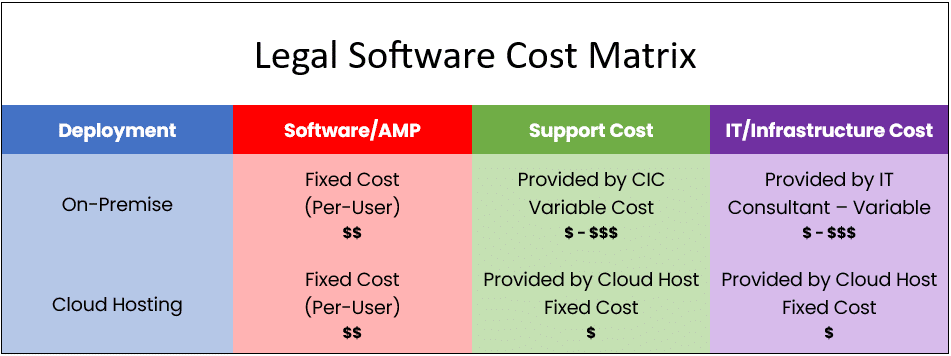
This used to mean that you had to buy a server and (hopefully, following method #2 above) retain a capable IT consulting firm to manage it for you.
Today, you have another option: A Private Cloud.

Managed Cloud Services for Law Firms:
This specialized suite of technology provides flexibility, security, and useful resources for law firms. Learn more!
A private cloud is a completely hosted, secure IT platform for your law firm and all of your software, documents, data, and (sometimes) more. Applications like those I mention above require a server (as I said, one way or another); and in the case of private cloud, a private cloud acts as your server.
Here’s how it works.
With a private cloud, the cloud provider builds dedicated, private cloud servers just for your law firm. They’ll install your legal software (and other software), move your data, documents and in some cases email from your local, on-premise servers to your new servers in the cloud, or your new private cloud.
With the right private cloud company, that company will be esoterically knowledgeable about the software your firm relies on. They’ll know how to install it, support it, optimize it, and keep it running at peak performance. (Have you ever had an IT consultant give you that deer-in-the-headlights look when you present a problem within your legal software?)
The cloud service provider is responsible for all backups, maintenance, updates, and cybersecurity. Your firm simply logs in (from anywhere, anytime on any device) and gets to work.
And everything just works.
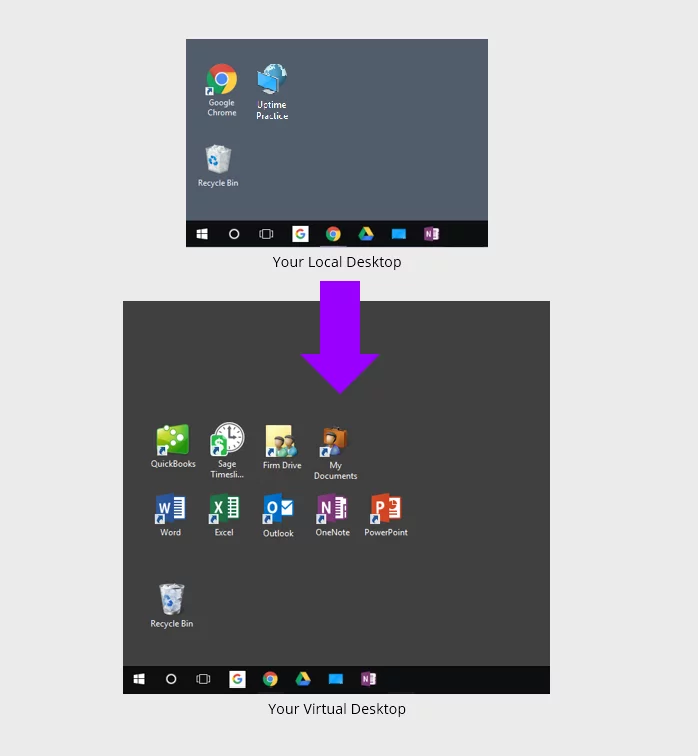
Each person in your firm logs into a virtual desktop, which runs full-screen and across all of your monitors. In your virtual desktop you’ll find your legal software, your file system (the “S: drive”), your Office suite, Outlook email—everything you need to work.
Law Firm IT in the cloud brings the benefits of managed, proactive, IT with the added benefits of:
What to Look for in a Law Firm IT Support Provider
Law Firms Are Different
If there’s one insight we want you to glean from this guide, it’s this: law firms are different from the next business.
Your firm uses specialized tech tools and software for client, practice, and document management. The IT vendor you choose should understand these needs and your differences for the best results.
We have the opportunity to speak to many law firms and attorneys who work with local IT companies. And we’ve witnessed a recurring theme across many law firms.
Here’s the problem.
Generalist law firm IT support providers are all too eager to support the “vanilla” elements of your law firm’s technology (desktops, laptops, Office 365, Exchange, virus protection), but they shy away from taking any accountability or providing support for your firm’s legal software.
Time and time again, we see this phenomenon occur in the form of:

Managed IT Services for Law Firms:
Whenever you’re ready, we’re here to managed your IT. Read this article to learn more about the value of outsourcing your IT to a professional.
Legal Software Software Expertise
Perhaps one of the most important things you should look for is technical and law-specific software expertise. After all, your IT vendor should know the tech tools they’re working with and how to use them effectively.
There are plenty of basic competencies your vendor should have. For example, your IT provider should be able to:
Beyond both basic and complex IT know-how, your vendor should also have experience with a wide range of law-specific software. When we say experience, we mean they should be able to help you set up, use, troubleshoot, and improve your use of these tools.
Law-specific software your vendor should know includes:
















Scalability
As your firm grows and evolves, so will your technology needs. You’ll need more hardware, additional users, more file storage, and other components. For example, you’ll likely consider VoIP for Law Firms.
The vendor you choose should be able to scale along with you to best support your business.
The day may also come where you need to evaluate or implement new legal software (practice management, document management, and/or accounting software).
Related: Law Firm Software: Your Guide to Building Your Tech Stack
Your IT support provider should also be able to give you advice on changes you can make to your tech stack that will enable growth.
Don’t hire a vendor that’s simply a tech repair business. Instead, hire someone you can trust to deliver expert, industry-specific advice on using tech to build your business.
Proactive IT Management
The best way to ensure your systems are always ready for work when you are is to be proactive, eliminating potential IT issues before they occur. Proactive IT support and management is the process of monitoring your systems to identify and solve potential problems.
Great vendors will be proactive in their management. Others are reactive, which means they only work on issues that have already occurred. Some refer to this as the “break-fix” approach. Something breaks, they fix it, over and over again.
The best benefit of proactive IT management is the elimination of downtime resulting from tech issues. It costs you every minute your tech tools are unavailable. This can greatly impact your bottom line.
By being proactive, you can prevent costly downtime and ensure business continuity.

Remote Law Firm IT Support
Your vendor should provide remote support capabilities. This is especially important if you are using the cloud. Some vendors may draw the line at supporting your local equipment, such as your firewall or switch. These components play a critical role in how your connection to and from the cloud works.
At a minimum, your provider should offer some basic remote support of your local network in addition to the support provided for cloud components. This means your vendor can access your local network from another location via a remote desktop.
Remote support also improves response times. Through a remote desktop connection, your provider doesn’t have to send an IT specialist to your location, wasting critical time (and maybe even resulting in an additional fee for the trip). Instead, issues can be resolved almost immediately from anywhere.
How to Find the Right IT Support for Law Firms
The good news is that there are many IT support providers out there. Yet, with so many vendors to choose from, how do you ensure you make the right choice?
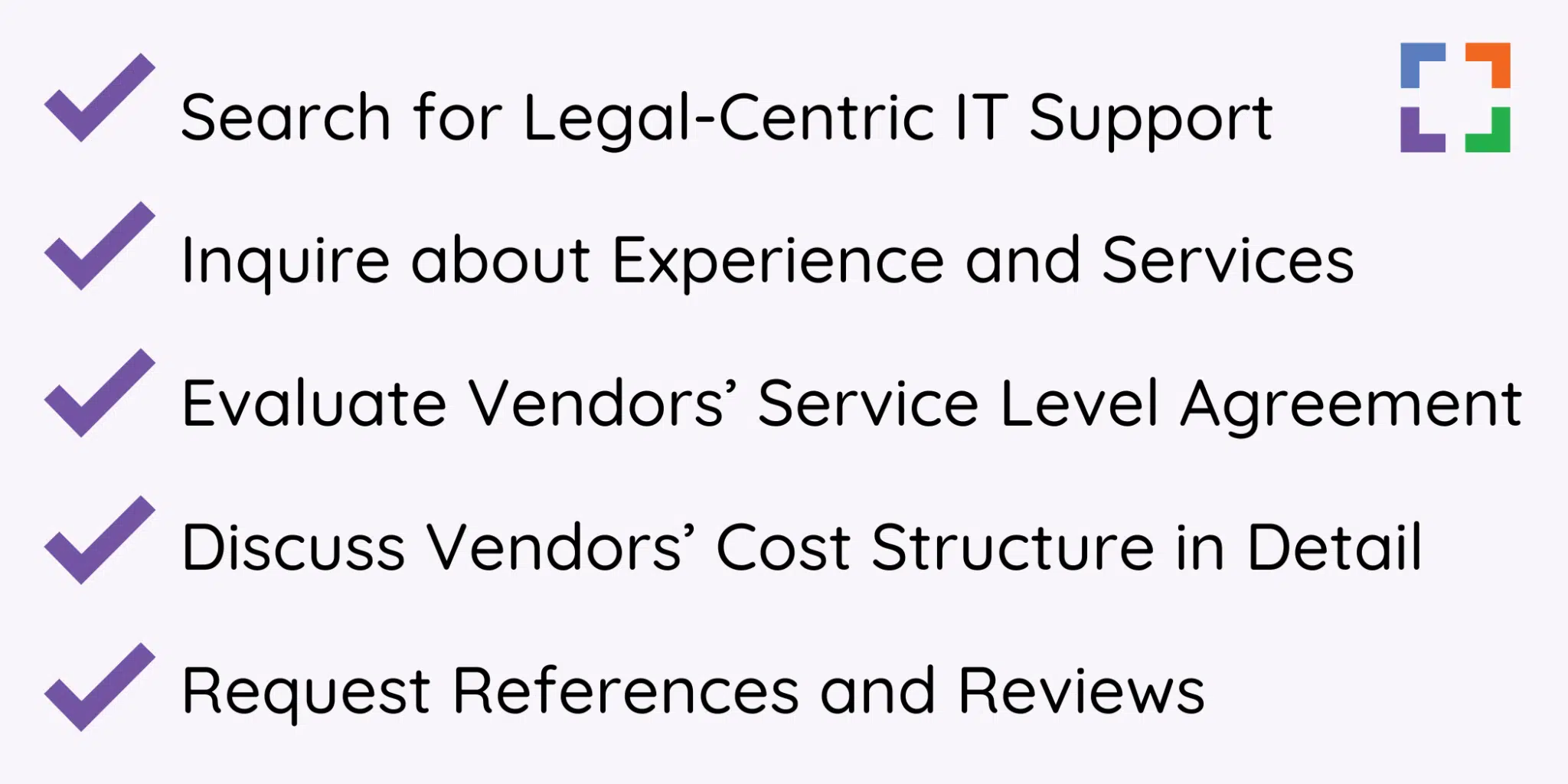
Start by taking these steps.
Important: When selecting a law firm IT support vendor, they must be the right fit for your unique firm. You know your IT needs best. Also, remember that the best IT support doesn’t have to be local. Modern technologies make remote IT support just as effective as local support.
1. Search for Legal-Centric IT Support
We’ve already talked a lot about this, but it’s so important. Law firm IT is a different thing entirely.
You work with confidential client data that must be protected by tough security measures. You use software such as LexWorkplace or PCLaw that are law-specific solutions. Your firm’s technology must also be compliant with ABA standards and other regulations.
And those needs are only scratching the surface. The right IT support for your firm understands these needs and more. Having a few law firms as clients isn’t enough for an IT provider to truly grasp the nature of law firm IT.
Instead, you should choose a provider that has extensive experience working with many law firms and chooses to do so exclusively.
2. Inquire about Experience and Services
During your initial search, you should come away with a list of potential vendors. Now, the deep work begins. You’ll want to start by reaching out to the individual vendors, so you can get to know their services and what they can offer your firm.
You’ll want to ask plenty of questions, so you can walk away with a good understanding of the vendor’s capabilities and offerings. Here are some questions to get you started:

How to Choose the Right IT Provider:
The right IT provider ensures uptime, security, and easy access to all of the tools you require to complete your tasks and accomplish your goals.
3. Evaluate Vendors’ Service Level Agreement (SLA)
A service level agreement (SLA) outlines what you can expect from your vendor. It lists the expectations of both parties and defines what happens when requirements aren’t met. It’s a critical document you should review for each vendor you’re considering for your firm.
When reviewing the SLA, consider what service limits you’re willing to allow and which ones you can’t ignore. You’ll want to ensure you’re comfortable with the SLA before moving forward since your working relationship will be built upon it.
For example, are you comfortable with a 24-hour response time (or more) when issues arise? If not, you may need to look elsewhere.

4. Discuss Vendors’ Cost Structure in Detail
Beyond service agreements and capabilities, you’ll also want to make sure you’re comfortable with the vendor’s cost structure. You should familiarize yourself with what’s included, what’s not, and what additional fees may exist.
How Much Will an IT Support Provider Cost?
MSPs typically require monthly payments, much like a subscription. And some MSPs will require a monthly fee per user. Monthly costs may range from anywhere to a couple of hundred to a couple thousand dollars each month, depending on your needs and the size of your firm.
It’s also possible to pay hourly for IT services, but we generally recommend against this method.
By paying hourly, you’ll more than likely feel the need to complete basic IT tasks yourself to save cash. Unfortunately, this takes time away from your firm and other critical business activities, may add up over time, and may leave you stranded in a time of need if they’re not available.

The Financial Case for Cloud for Law Firms:
The cloud can be substantially more cost-effective than its alternatives. Learn more.
Questions to Ask Your Vendor Regarding Pricing
Be sure to discuss what’s not included in the monthly cost. For example, what other project fees or extended services fees are not included or covered?
You’ll also want to make sure the vendor isn’t nickel-and-diming you. Some MSPs will require additional fees for even basic IT functions. Things to specifically ask your vendor about include:
5. Request References and Reviews
It’s one thing for an IT service provider to say they can handle IT support for law firms, but it’s another to have proof. As any good attorney would, it’s important to do your due diligence here. Ask the vendor for references from past or current law firm clients. Then, reach out to them to learn more about their experience.
Reviews and testimonials are also a great way to ensure the IT provider you’re choosing is worthwhile.
For example, check out Uptime Legal’s Testimonials.

Beware Server Proliferation (Pushed by Your IT Firm)
After working with hundreds of law firms for the past decade plus, I want to caution law firms that are being advised by a local IT firm or Managed IT provider.
If you’re like many law firm lately, you’ve moved some, if not many, of your software functions to web-based/cloud based software. For instance, perhaps you’ve moved:
Many law firms are in some phase of transitioning each element of their firm’s technology to cloud-based tools. And with each step, there’s one less thing your on-premise server is needed for.
The natural progression here is that, eventually, there is no remaining need for an on-premise server. Once you’ve moved email, your main software applications, and your files/folders to the cloud, there is no longer a need for on-site servers in the first place.
But here’s the thing.
Most local IT service providers understand that no on-site servers means far less for them to manage, which directly translates to less revenue for them. It costs (a lot) less to manage a law firm that doesn’t have servers and is using entirely cloud-based tools.
Unfortunately, this leads many local law firm IT support companies to insist: “No, you still need a server for (XYZ reason).” These purported reasons may include:
The truth is, these few remaining utility functions can be cost-effectively moved to other cloud-based services (such as Microsoft Azure or Uptime Cloud), truly eliminating any residual need for on-premise servers.
Unfortunately, we’ve witnessed local IT firms cling to on-site servers to keep their management fees and revenue intact.
If you’ve moved all data, document,s and apps to the cloud, make no mistake: You no longer need on-site servers or the ongoing cost to maintain them.

Legal Data Management & Storage Solutions for Law Firms:
How you store and manage your data, especially as a law firm, is highly critical.
Frequently Asked Questions

Uptime Legal’s Technology Solutions
Cloud, software, IT, and document management built for today’s law firms.