Table of Contents
An AI note-taker probably sat in on one of your client meetings this month. Someone turned it on because it saved them an hour, and nobody asked what the tool agreed to on your behalf.
That’s the actual risk with AI transcription tools for law firms, and it comes down to four things every tool does with what it hears: how it captures the conversation, whether it processes your recordings to train a model, where it stores the audio, and who it automatically sends the transcript to.
The answers change by tool and by plan tier, and the consumer tiers most people sign up for are where the rights get reserved. But most of them are settings you can change this afternoon.
We run this review for firms without internal IT, and the same four answers decide it nearly every time.
The Bot in Your Client Meeting Already Agreed to Something
When an AI note-taker joins a client meeting, the terms it operates under were accepted by whoever installed it, and those terms govern what happens to the conversation. Nobody at your firm negotiated them. In most cases nobody read them.
These tools arrive through individual adoption, which is why the review never happened.
How an AI Note-Taker Ends up in a Privileged Meeting
These tools enter your firm through one person’s decision rather than a firm-wide one, which is exactly why nobody reviewed the terms. The pattern is consistent:
Every step is reasonable on its own, and the result is a third-party service sitting in privileged conversations under terms your firm never evaluated.
What Accepting the Terms Actually Committed Your Firm To
Clicking through a consumer-tier agreement typically grants the vendor rights your firm would never grant in a signed engagement letter. Free and individual plans commonly permit the vendor to use your recordings to improve its models, with the opt-out buried in settings rather than presented at signup.
Otter’s free and Pro tiers work this way. Its policy also reserves the right to keep recordings after you delete them, where the vendor decides that serves a legitimate business purpose.
The gap between what your firm assumes and what the agreement says is where the exposure lives.
Client security questionnaires and cyber-insurance renewals both ask how your firm handles confidential material, and they’re usually what forces a real law firm cybersecurity conversation.
Answering from assumption carries real consequences: a client who concludes they were misled ends the relationship, and an inaccurate answer on an insurance questionnaire can undermine a claim when you need it most.
Three Different Problems Everyone Calls “Privilege”
A privilege problem with an AI transcription tool is actually one of three distinct failures: a confidentiality breach, a waiver of privilege, or a question of admissibility. They carry different consequences and different remedies, and collapsing them into one worry is why most guidance on this topic is impossible to act on.
The three sections below separate them.
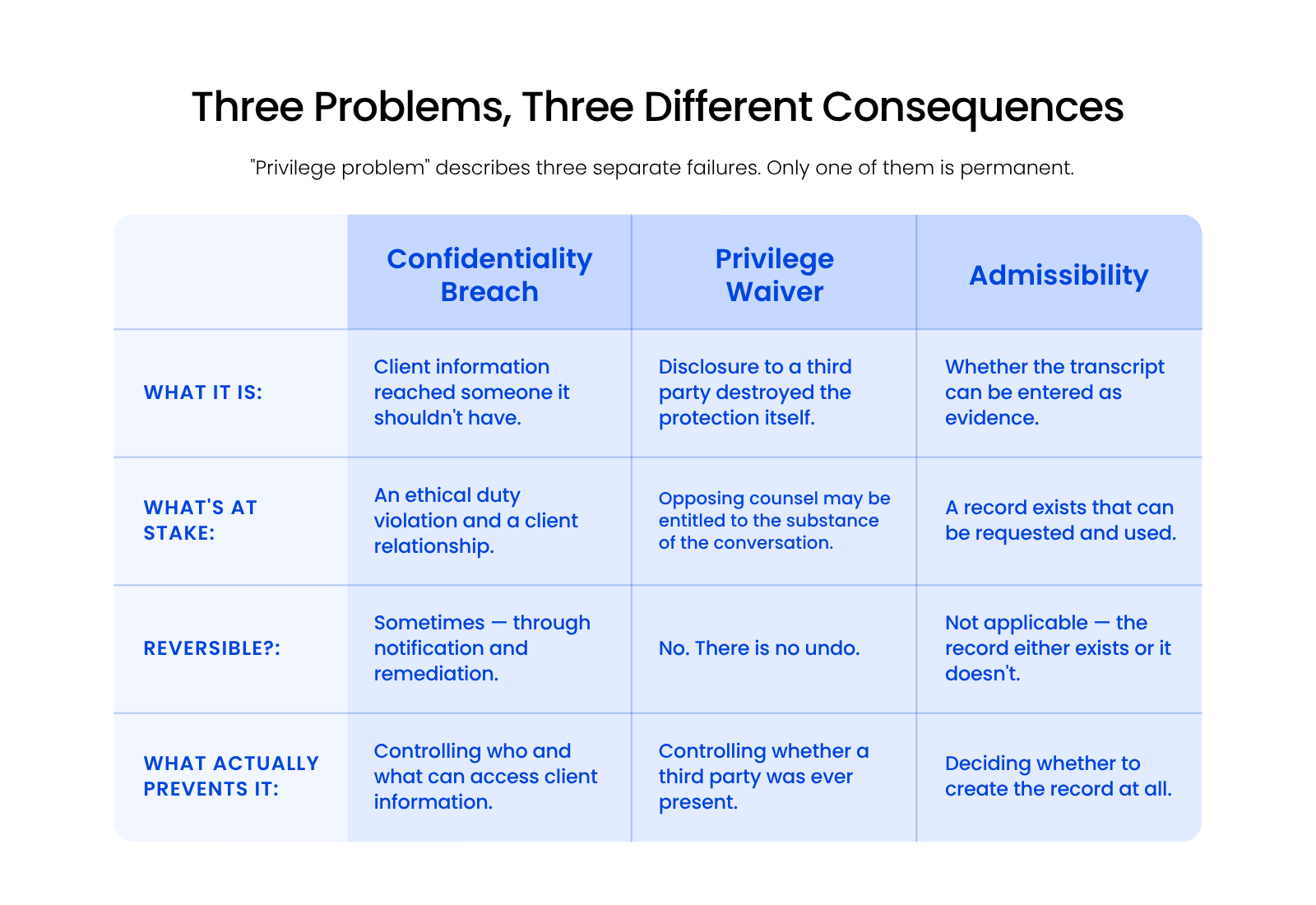
Only one of the three is permanent, and that’s the one worth organizing your policy around.
Confidentiality Breach: A Duty Violation
A confidentiality breach means client information reached someone it shouldn’t have, which implicates your duty under ABA Model Rule 1.6 to protect information relating to the representation. Rule 1.6(c) asks you to make reasonable efforts to prevent inadvertent or unauthorized disclosure.
A breach is serious and often remediable. You can notify the client, close the gap, document what changed, and continue the representation.
Privilege Waiver: The One You Can’t Undo
Waiver means disclosure to a third party destroyed the protection itself, and no vendor remediation restores it. Where a confidentiality breach damages trust, waiver removes a legal shield.
If privilege is waived over a conversation, opposing counsel may be entitled to its substance. There’s no notification process that reverses that, and no apology from a transcription vendor that puts it back.
Admissibility: A Separate Question Entirely
Admissibility asks whether a transcript can be entered as evidence, which is a different question from whether creating it compromised confidentiality. Most vendor content that touches legal risk at all addresses this one, usually framed as whether a transcript is court-admissible.
Admissibility matters, and it isn’t your first concern here. A transcript can be perfectly inadmissible and still have cost you the privilege.
The Four Places a Privileged Conversation Can Leak
An AI transcription tool is safe for privileged meetings only when your firm can answer what happens at all four exposure points:
Standalone note-takers like Otter and Fireflies reserve training rights on their free and individual tiers. Zoom AI Companion and Microsoft 365 Copilot contractually exclude training. The difference is the plan you’re on, not the logo.
These four points are the whole evaluation. Each one maps to a specific setting or contract term you can check, and the four sections below give you the question that tests each.
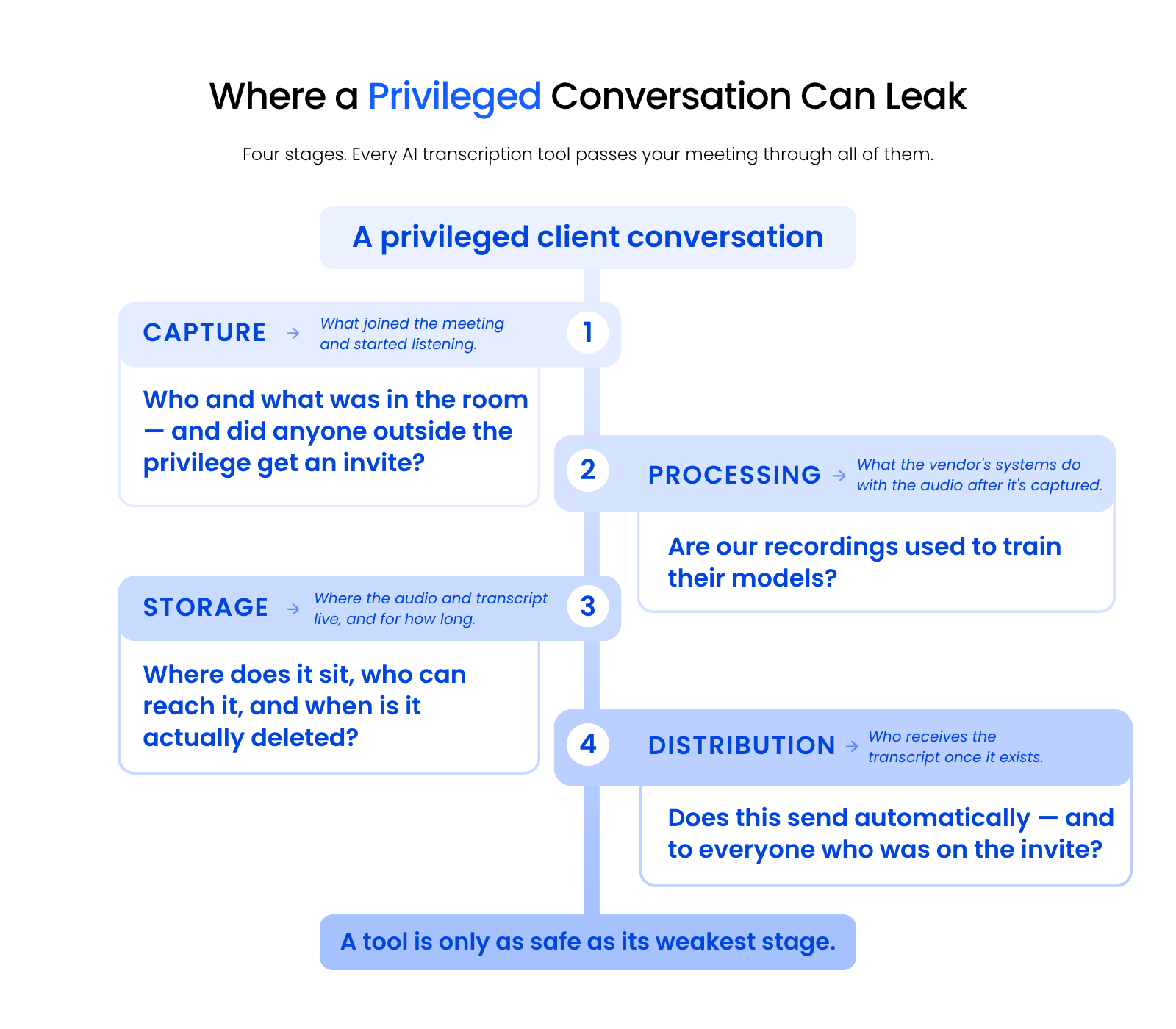
Treat the framework as a sequence. A conversation passes through all four stages in order, and a tool is only as safe as its weakest one.
Capture: What Joined the Meeting
Capture covers what started listening and who was on the invite when it did. The question that tests it: did anyone outside the privilege receive an invitation, and did the tool join without an explicit decision?
An auto-join setting means the tool attends meetings nobody cleared it for. A forwarded calendar invite means a participant you didn’t plan for.
Processing: Whether Your Recordings Train Someone’s Model
Processing determines whether your client conversations become training data that can surface in another user’s results. This is the highest-stakes item in the framework, and the one most often buried in terms rather than exposed as a setting.
The ABA addressed this directly in Formal Opinion 512, its first formal ethics guidance on generative AI, issued in July 2024.
The opinion concludes that a lawyer needs informed client consent before entering information relating to the representation into a self-learning AI tool. It also holds that boilerplate language in an engagement letter doesn’t count: the client has to hear why you’re using the tool, what the specific risks are, and what information gets disclosed.
A transcription tool that trains on your recordings is exactly that kind of tool.
Storage: Where the Audio Lives, and for How Long
Storage is a legal data management question: where the recording physically lives, who can retrieve it, and when it’s actually deleted. Deleting a transcript in the interface removes it from your view, not necessarily from the vendor’s systems.
Otter’s privacy policy reserves the right to keep recordings and transcripts after you delete them, where Otter determines that serves a legitimate business purpose.
Ask where the data resides, which sub-processors touch it, and what the retention window is once you’ve asked for deletion.
Distribution: Who Gets the Transcript Automatically
Distribution is the least-known exposure point, because transcript sharing is usually left to whoever set the tool up. Fireflies defaults to letting each teammate choose their own email settings, which means the answer at your firm depends on a decision no partner made.
If opposing counsel, a client’s accountant, or a third party sat on that invite, the transcript reaches them without anyone deciding to send it.
Automatic sharing to connected cloud drives and note apps creates the same problem one step removed. Check both.
Mapping each stage to the obligation it implicates makes the review concrete:
| Exposure Point | What It Controls | The Duty It Implicates | The Question That Tests It |
|---|---|---|---|
| Capture | What started listening, and who was present | Reasonable efforts to prevent unauthorized disclosure (Rule 1.6(c)) | Did anyone outside the privilege get an invite? |
| Processing | Whether recordings train the vendor’s models | Confidentiality of information relating to the representation (Rule 1.6) | Are our recordings used for model training? |
| Storage | Location, access, and retention of audio and transcripts | Reasonable efforts, plus technology competence (Rule 1.1, Comment 8) | Where does it live, and when is it truly deleted? |
| Distribution | Who automatically receives the transcript | Risk of third-party disclosure and privilege waiver | Does this send to everyone on the invite? |
Bar rules vary by state, and what counts as a reasonable effort isn’t settled the same way everywhere. Use the four questions to establish the facts, then apply your own jurisdiction’s standard to them.
What to Ask a Vendor, and What Their Answers Actually Mean
The four questions worth asking a transcription vendor map directly to the four exposure points, and a real answer names one of them specifically. Most vendor security pages answer a question you didn’t ask.
The two sections below cover the questions that work and the reassurances that only sound like answers.
The Questions That Get Real Answers
Asking what happens at a named stage forces a specific answer that a compliance-page summary can’t satisfy. Put all four in writing:
Any vendor selling to regulated buyers can answer all four. A vendor that won’t answer in writing has given you your answer.
Reassurances That Aren’t Answers
SOC 2 compliance, encryption at rest, and “we don’t sell your data” are each true statements that leave the training and retention questions untouched. They describe real controls and they answer a different question.
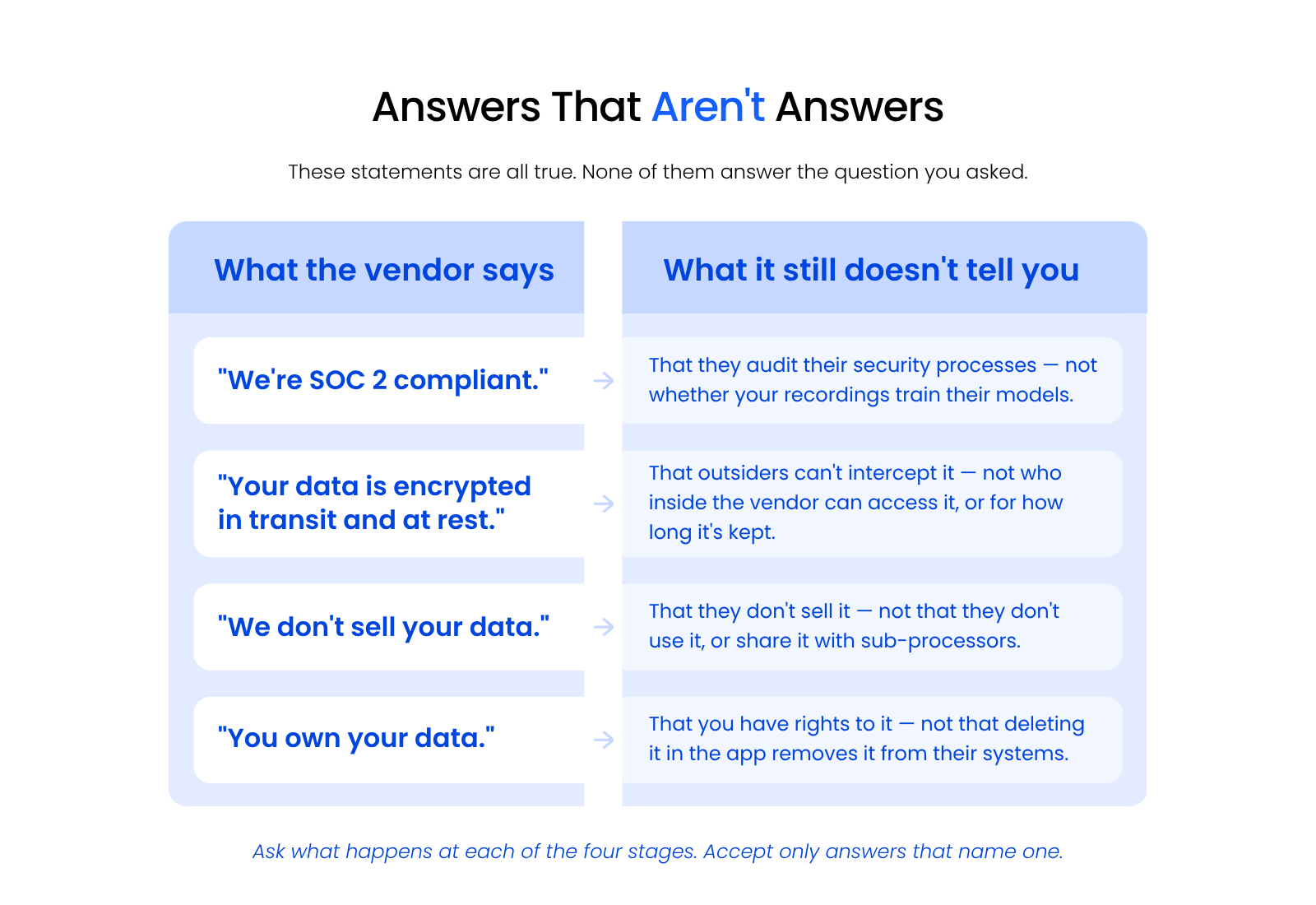
The pattern is consistent: each statement is accurate, and none of them tells you what happens at a named stage. Safe tools exist, and identifying them takes more than reading the security page.
That difficulty is the reason to run the four questions rather than trust a summary. The answers exist, and they’re usually not on the marketing page.
The Settings to Change Before the Next Recorded Client Call
Before the next recorded client call, turn off auto-join, disable model training, set the shortest available retention period, and stop automatic transcript distribution. Most of the exposure across all four points is controlled by settings you can change in an afternoon.
The two sections below cover what to change now and what to write down afterward.
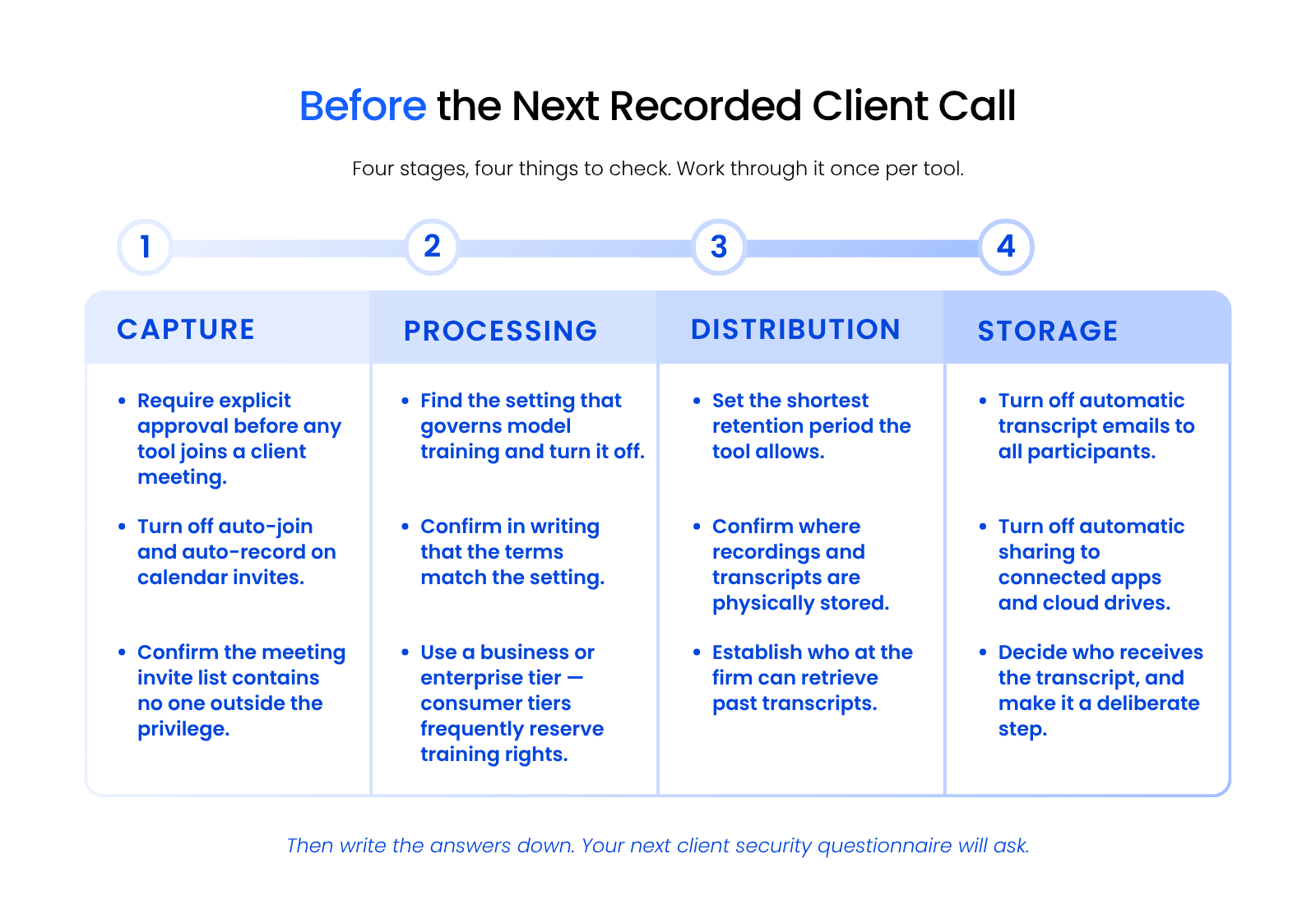
Work through it once per tool your firm allows, and treat anything you can’t change as a reason to reconsider the tool.
Defaults Worth Turning Off Immediately
Auto-join, model training, indefinite retention, and automatic transcript sharing are the four defaults that create the most exposure with the least awareness. Each one has a direct fix.
Move your firm to a business or enterprise tier if you’re on a consumer plan, since that’s often where the training rights actually change. Then require explicit approval before any tool joins a client meeting, cut retention to the minimum the tool offers, and treat the absence of a retention setting as its own answer.
In Otter, configurable retention starts at the Business tier, so a firm on a consumer plan has no retention control at all.
What to Write into Firm Policy
A workable policy names which meetings may be recorded, who approves a new tool, and where transcripts are allowed to live. Keep it short enough that people follow it.
Write down the four answers for every approved tool and date them. Vendor terms change, and a dated record is what lets you answer a client questionnaire without guessing.

The Meetings You Shouldn’t Record at All
Configuration doesn’t make every meeting safe to record, because a transcript converts an otherwise ephemeral conversation into a durable record that can be requested later. That’s the part most guidance on this topic misses entirely.
Some conversations are better left unrecorded regardless of how well the tool is configured:
A well-configured tool still leaves you with a permanent record of the conversation.
How Do You Review This Without a Compliance Team?
Reviewing an AI transcription tool without a compliance team means getting someone outside the vendor to verify the four exposure-point answers in writing. A firm of fifteen attorneys with no in-house IT can do this, and reading vendor marketing isn’t how.
Send the four questions to the vendor and keep the response. Have someone technical read the answers against the tool’s actual settings, because the two don’t always agree. Then record what you found with a date on it.
For a firm with no internal IT function, this review is part of what managed IT for law firms covers. Uptime Legal does it alongside the policy work that follows. Firms that want to handle it themselves can, as long as the answers end up written down rather than assumed.
Your Firm Doesn’t Need to Ban AI Transcription
The firms that handle this well answer four questions about every tool they allow: what joined the meeting, whether the vendor trains on the recording, where the audio lives, and who receives the transcript. Then they change the settings whose answers don’t hold up.
Do that once per tool and write down what you found. The next time a client sends a security questionnaire or an insurer asks how you handle confidential material, you’ll have a real answer ready.
Some conversations still shouldn’t be recorded. Knowing which ones is part of the same judgment.
WHAT’S NEXT
Frequently Asked Questions

Uptime Legal’s Technology Solutions
Cloud, software, IT, and document management built for today’s law firms.