The shift towards cloud computing is more than just a trend—it’s a strategic move that law firms of all sizes are making to stay ahead.
But what does this mean for your firm financially?
In our comprehensive analysis, we dive deep into the economic benefits of cloud computing, comparing it against traditional on-premise servers and exploring the burgeoning world of web applications.
We’ll guide you through the upfront, ongoing, and those often overlooked unplanned costs, providing you with a clear financial perspective.
Introduction
Over the past several years I’ve talked to hundreds of law firms (and IT companies that serve law firms). An undeniable trend across most of these conversations is, as law firm on-premise servers become end-of-life, fewer and fewer law firms are replacing onsite servers with new servers.
That is to say, for most firms, their current on-premise servers will be their last.
It’s probably no surprise that most law firms, large and small, are moving to web-based software and private clouds to host and manage their applications and data. Increasingly, when a law firm’s servers approach the end of their useful life, replacing them with new servers is becoming ‘Plan Z.’
Why? Because the cloud, in all of its form, is wholesale better than managing in-house, on-premise IT.
Comparatively, cloud-based solutions are:
I’ve written and spoken at length about the functional, operational, and security benefits of cloud computing for law firms.
In this article, I’ll unpack and walk you through the economic benefits of cloud computing. Within the broad umbrella of “cloud solutions for law firms,” I’ll also drill down and compare the economics of web-based software against private cloud solutions.
On-Premise IT Cost Analysis
The expenses involved in setting up and sustaining an on-premises server, along with its IT infrastructure, are unpredictable and often concealed. These costs fluctuate based on the frequency of server replacements, the extent of reliance on external IT support, and the proactive measures taken towards IT management.
To begin, let’s establish the expected lifespan of your servers. Conventional IT wisdom recommends a server replacement every 3 to 5 years—surely, you’re not waiting for them to fail completely, right?
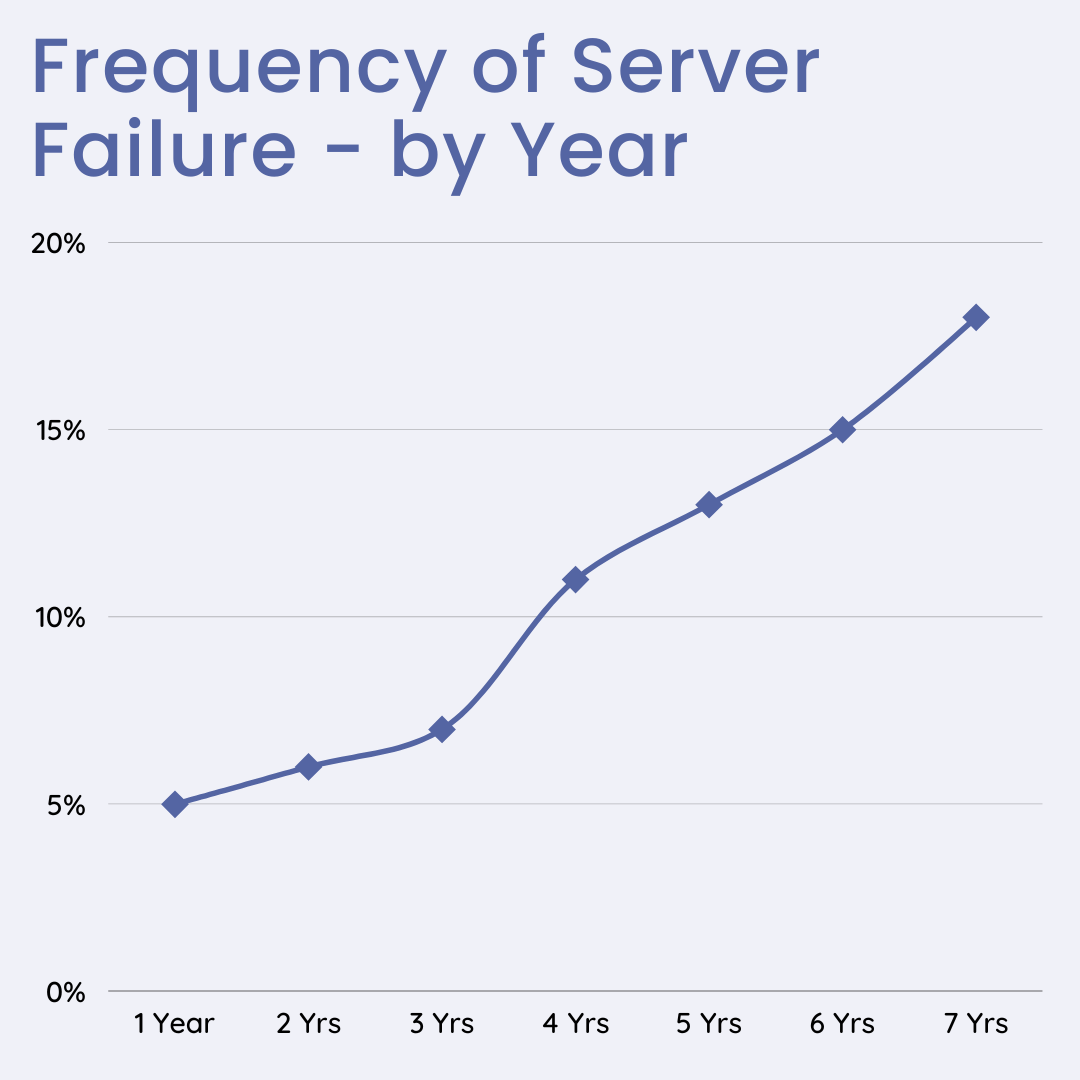
This replacement cycle will serve as our basis for analyzing the total cost of owning an on-premises setup, allowing for a direct comparison with cloud solutions on a like-for-like basis.
Within this timeframe, we’ll pinpoint every potential cost tied to the servers and the broader IT framework of your firm. Here’s a breakdown of the costs you’re most likely to encounter throughout the lifespan of your server:
On-Premise Costs: Up-Front
First, we’ll analyze all costs incurred each new server cycle (once per analysis period).
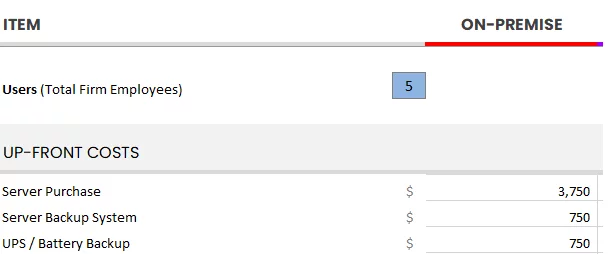
That is: buying and implementing server infrastructure:
I suggest gathering quotes for each of the previously mentioned costs and meticulously documenting them in a spreadsheet. By summing up these figures, you’ll gain a comprehensive understanding of the total upfront investment required for embarking on another on-premise IT lifecycle.
It’s crucial to recognize that the bulk of these expenses are significantly influenced by the specific software solutions your law firm employs. The quantity and capacity of the servers you require hinge on these choices.
Questions to consider include:
The answers depend largely on the type of software you’re using, particularly your Practice Management and Document Management systems, and their respective server specifications.
For example, robust applications such as iManage, ProLaw, and Worldox demand substantial computational resources. Conversely, solutions like PCLaw and Tabs3 are far less demanding in terms of server capabilities.
Use our Cloud Cost Comparator to tally up all relevant up-front costs for your firm.
On-Premise Costs: Ongoing
Next, we’ll analyze costs incurred on an ongoing basis.
We’ll identify monthly recurring costs (and will extrapolate those over our full analysis period).
Tally up what you do, or will spend on an ongoing basis. This should include fixed monthly costs (such as a Managed IT Provider contract) as well as sporadic, less predictable costs (such as hourly IT support).
Sidebar: Plug-And-Pray Doesn’t Count
At the heart of this financial analysis lies a critical assumption: your law firm’s IT management is proactive, not merely reactive.
The pitfalls of a reactive, or “plug-and-pray,” approach to IT management are numerous:
On-Premise Costs: Total
For our bottom line, simply do the math:
(Total Up-Front Costs) + (Total Unplanned Costs) + (Monthly Ongoing Costs x Analysis Period)
Web Application Cost Analysis
Next we’ll analyze the total cost of using web-based software.
As you might imagine, going the route of Software-as-a-Service (SaaS) typically means less up-front cost (but certainly not zero), and more monthly recurring costs.
Web Application Costs: Up-Front
The up-front investment of web applications varies based on the software you use (or intend to use), its complexity, and the level of support your firm needs.
For instance, if you’re starting a new firm (and have no historical data to import), and are implementing a lightweight, web-based law practice management application, your up-front costs may be minimal.
On the other hand, if you’re implementing more robust or sophisticated practice management software (or document management software), there’s likely a greater need for data conversion, setting up of accounting preferences, and training for your team.
Sometimes the software company provides the necessary onboarding (including data conversion, setup, and training), but often they will refer you to an authorized consultant.
In any case, capture the entire amount to implement your web applications, including training for your entire staff.
Web Application Costs: Ongoing
The ongoing costs of a pure web-based law firm are pretty straight-forward.
Most web-based applications charge a fixed fee per-user, per month. To determine your monthly costs, add up the total of each web-based application that your firm will use.
A common pitfall here is to under-budget your total monthly costs, forgetting all of the different cloud-based services your firm is likely to need.
Consider the monthly costs for all services your firm needs, including:
Your firm will almost certainly need some combination of the software above, each having their own fee per-user, per month.
Web Applications: Total Cost
Finally, we can discern our total cost over our analysis period by simply adding up our annual and up-front costs.
(Total Up-Front Costs) + (Monthly Ongoing Costs x Analysis Period)
Private Cloud Cost Analysis
Lastly, let’s delve into the financial aspects of adopting a Private Cloud solution.
Typically, the expenses associated with a Private Cloud are stable and foreseeable. A trustworthy Private Cloud provider offers a comprehensive package of IT essentials required by your firm at a consistent, per-user monthly rate.
Opting for a Private Cloud means accessing a complete IT infrastructure, inclusive of platforms, applications, and services vital to your law firm’s operations. This encompasses almost all the elements you’d otherwise need to individually acquire and manage with an on-premises setup.
The huge benefit of a private cloud is that it gives your firm a secure cloud workspace to run your non-cloud-based legal software (which is traditionally more robust and feature-rich than it’s web-based counterparts), without the need for in-house servers and onsite IT staff.
Suppose your law firm relies on premise-based law practice management software such as PCLaw, Time Matters, ProLaw, Tabs3 or Needles.
A Private Cloud effectively cloud-ify’s your non-cloud software, giving you the power of your existing software, with all of the advantages of the cloud.

Private Cloud Costs: Up-Front
The up-front costs associated with a Private Cloud relate to migrating your applications, documents, data, and email from their current home (often a law firm’s in-house server) to the new private cloud platform.
This often includes:
The initial investment required for transitioning to a Private Cloud can differ significantly based on the scope of the migration—whether it involves shifting a single application or your entire technological framework to the cloud.
Also, the complexity of the applications being migrated plays a crucial role in determining these up-front costs, as some software demands more intricate migration processes than others.
A reliable Private Cloud provider should be able to offer a definitive quote for migrating your firm’s operations, including users and applications, to their cloud environment. The provider’s expertise in handling the migration of various legal software applications, especially considering their complexity, serves as a strong indicator of their proficiency in catering to law firms’ specific cloud needs.
Private Cloud Costs: Ongoing
Similarly, the ongoing costs of a law firm private cloud should be transparent and fixed.
Your chosen private cloud solution should include all of the IT elements that you would otherwise need to procure in an on-premise environment, including:
With your IT and infrastructure provided for a fixed fee, per user, per month: your costs may be less each year and significantly more predictable.
To calculate the total cost of a Private Cloud model for your firm, simply multiply the fixed monthly cost of a Private Cloud solution by the number of months in the analysis period, then add any setup or onboarding fees quoted by the provider.
(Total Up-Front Costs) + (Monthly Ongoing Costs x Analysis Period)
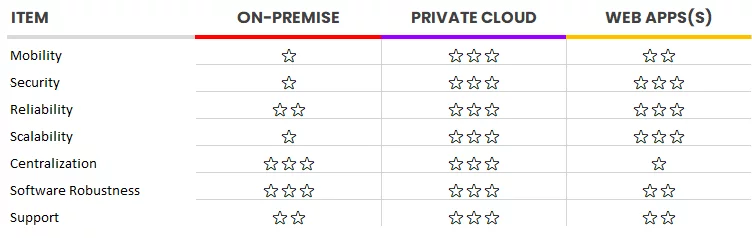
Capabilities & Limitations – The Intangibles
We’ve walked through the economics of On-Premise IT vs. Web Applications vs. Private Cloud.
But, of course, there’s more to this analysis than just economics.
Each of these three routes come with limitations, risks, caveats and advantages that are difficult to quantify.
Cloud Cost Comparator- Run Your Own Numbers
Now that we’ve walked you through how to do a side-by-side comparison of On-Premise vs. Web Applications vs. Private Cloud, we encourage you to run your own numbers using our Cloud Cost Comparator.
Frequently Asked Questions

Uptime Legal’s Technology Solutions
Cloud, software, IT, and document management built for today’s law firms.