Table of Contents
Your firm probably has a firewall, antivirus software, and maybe MFA on email. That covers your law firm’s cybersecurity perimeter.
Then an attorney’s mailbox gets compromised on a Tuesday morning. The firewall held, so the question that matters now is what that account could open.
Who can open a matter file? How is privileged communication stored? What happens when someone signs in as your associate from a device you’ve never seen?
Data security for law firms answers those questions with six controls, put in place in order: encryption, access and permissions, data classification, data loss prevention, endpoint patching, and backup.
This guide walks through each control in that order, then covers what your controls need to do when something gets through anyway.
Data Security vs. Cybersecurity: Why Law Firms Need Both
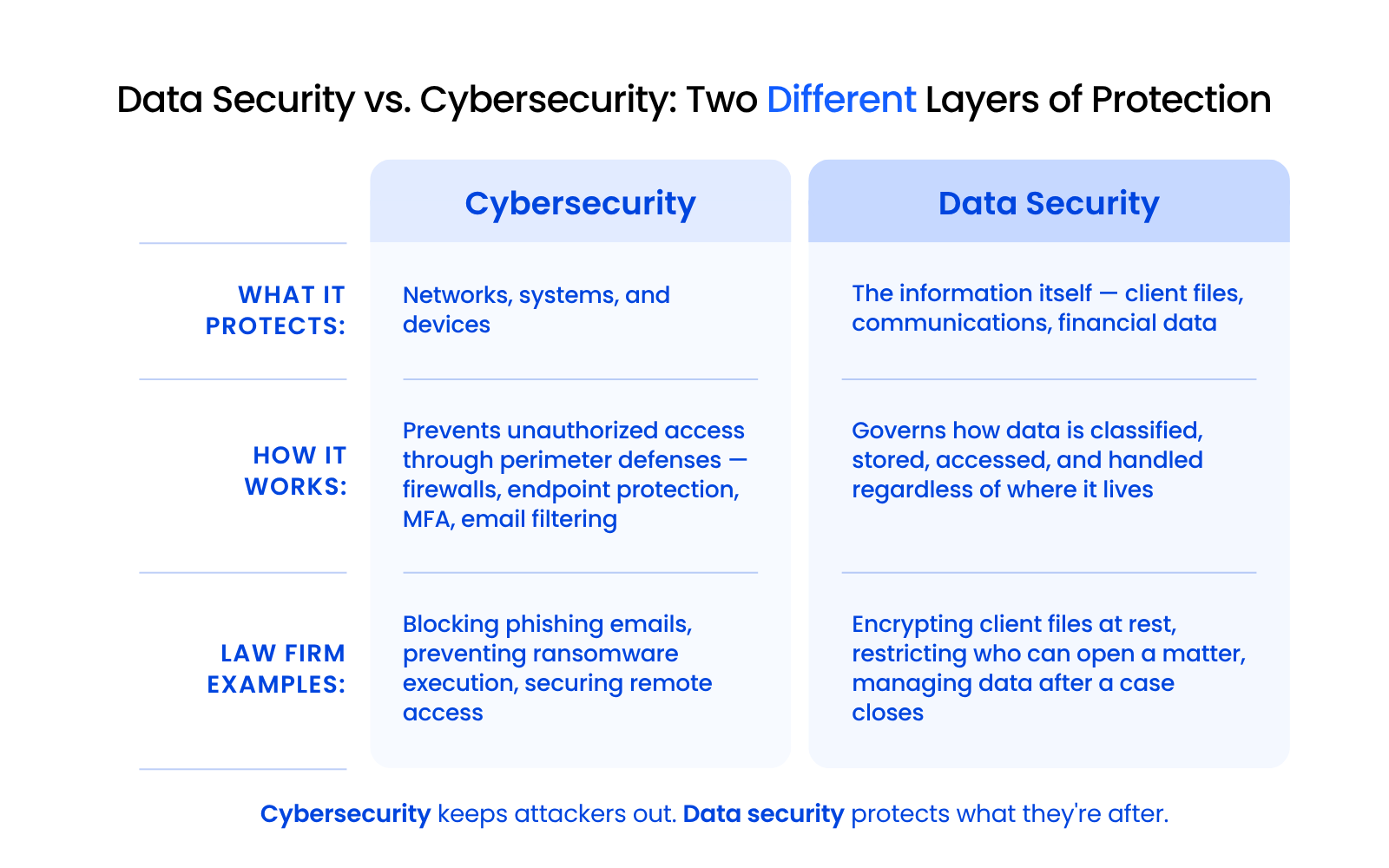
Your firm needs both layers because a strong perimeter can still leave every client file open to anyone who’s already signed in.
What Each Layer Protects
Cybersecurity protects your infrastructure: networks, devices, endpoints, and the systems that move data from one place to another. It includes firewalls, endpoint protection, email filtering, and multi-factor authentication.
Data security protects the information itself. It governs how client files are classified, stored, accessed, and handled, regardless of where they live or how the infrastructure around them is secured.
Why Law Firms Need Both Layers
A firm can have strong cybersecurity and still have a data governance failure.
Picture this: every attorney at your firm can open every client file. There’s no matter-level segregation, no classification system, and no audit trail showing who accessed what.
Your firewall is current, your endpoints are monitored, and your email is filtered. A departing associate could still download privileged files from matters they were never assigned to, and nobody would know.
That’s the gap data security closes.
How a Law Firm Data Breach Reaches Client Data
A law firm data breach usually starts with one compromised mailbox or device and reaches client data through whatever that account is allowed to open. Here’s that path, traced from the data side.
Where Law Firm Breaches Start
Compromised mailboxes and spoofed email are the most common starting point we see at the firms we support. Once an attacker has an attorney’s password, they’re working as that person.
Stolen or unmanaged laptops and unpatched devices are the other usual entry points. Most of the threats facing law firms end in the same place: an account or device with access to client files.
What an Attacker Can Reach Once Inside
Once inside, an attacker can reach everything that account or device can. At many firms, that includes:
That last one is where the money goes. An attacker sitting in a compromised mailbox waits for a trust account transfer, then sends the client or the bank new wire instructions from a thread everyone already trusts.
Why Law Firm Data Is the Target
Client financial records, trust account credentials, and privileged communications carry immediate monetary value, which makes law firm data worth more to an attacker than most business data.
ABA Model Rule 1.6(c) asks lawyers to make “reasonable efforts” to prevent unauthorized disclosure of, or access to, information relating to a client’s representation. That standard doesn’t come with a checklist, and what the rules require depends on your jurisdiction.
The Law Firm Data Security Control Set, in Order
Law firms protect client data with six controls, put in place in this order: encryption, access and permissions, data classification, data loss prevention, endpoint patching, and backup. The order matters because each control makes the next one easier to enforce, and the first two cut the most exposure fastest.
Here’s how each control works in a breach and what running it looks like day to day:
Together, the controls work as layers an attacker has to get through before reaching client data.
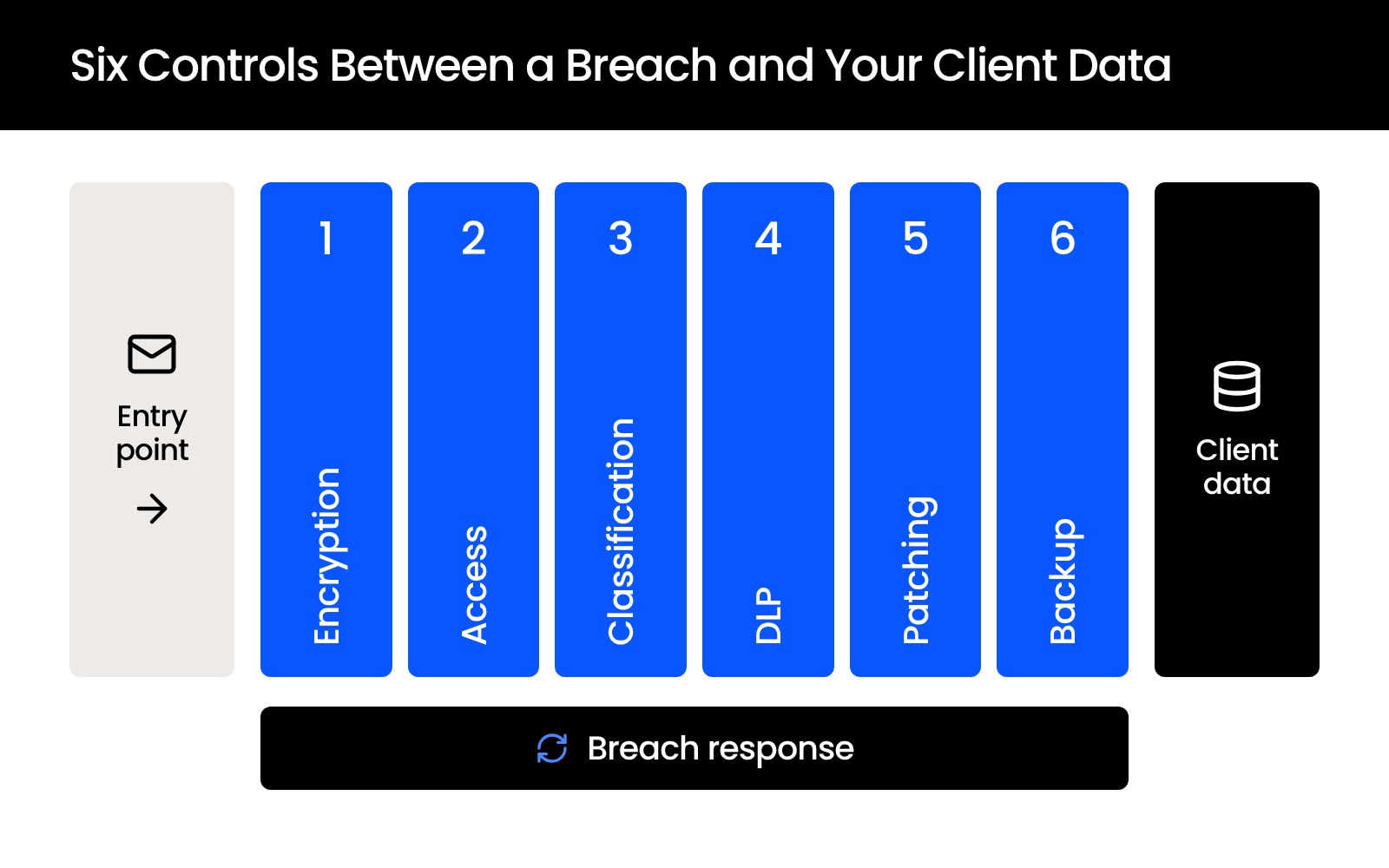
When one of them fails, breach response takes over, covered in the last section.

Encryption Standards for Law Firms: At Rest and in Transit
Law firms should encrypt client data at rest with AES-256 on servers, the document management system, and backups, with full-disk encryption on every laptop, and with TLS 1.2 or higher (TLS 1.3 where supported) for data in transit, including email that carries privileged material. Both are industry standards that no bar rule mandates, and the other five controls depend on them.
Encryption at Rest
Every firm laptop and desktop should have full-disk encryption turned on: BitLocker on Windows, set by policy to XTS-AES 256-bit because Windows defaults to 128-bit, and FileVault on Mac. If a device is lost or stolen, the drive is unreadable without the key.
Your document management system, cloud storage, file servers, and backups should all encrypt stored data too. Client files and trust records get the strictest handling: encryption plus access limited to the matter team.
Encryption in Transit and Email
TLS protects data moving between devices and services. Set TLS 1.2 as the minimum everywhere and turn off older protocols.
For email carrying privileged material to outside recipients, add message encryption. Microsoft 365 Message Encryption is the common option for firms on Microsoft 365, and it can keep a message encrypted for the intended recipient and stop it from being forwarded.
Who Holds the Keys
Recovery keys should be escrowed centrally, by your firm or your IT provider, so a lost laptop can be locked out and a departing attorney can’t walk away with a drive only they can read.
Access Controls: Who Sees What Client Data When
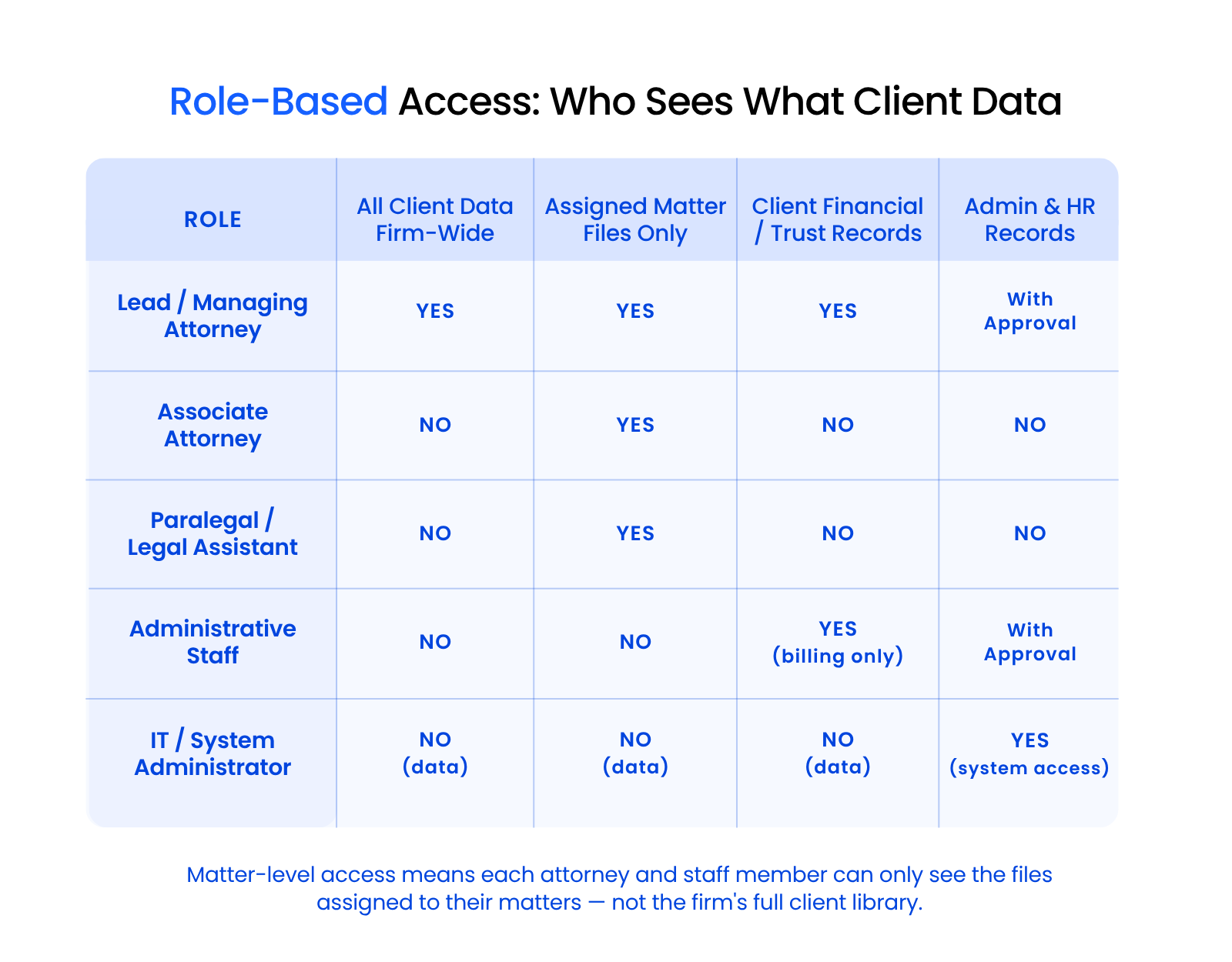
Law firms should give each person access only to the matters they’re assigned to, at the lowest permission level their work needs, and control every device that reaches client data. Role-based access control decides what someone signed in as your associate can open, including an attacker using their password.
Permission Levels for Legal Teams
Access should be scoped by role and by matter. A lead attorney on a case needs full access to that matter’s files. An associate assigned to the same matter needs access to the work product.
A paralegal needs access to the documents they’re working on. None of them need access to every file across every client the firm represents.
In your systems, that comes down to five permission levels:
Start everyone at the lowest level their role needs. Many firms default to broad access with few restrictions, and tightening that down to matter-level access by role is one of the highest-impact changes you can make for client data security.
Matter-Level Segregation and Ethical Walls
Every matter at your firm is its own data boundary. An attorney working on one client’s real estate closing shouldn’t have default access to another client’s trust litigation files.
When a conflict comes up, an ethical wall blocks the conflicted attorney or staff member from that matter entirely. Review access on a set schedule, such as every quarter, and remove a departing employee’s access the same day they leave.
Conditional access policies in Microsoft Entra ID can also limit sign-ins by device, device compliance, location, and application. Firms often decline them as overkill until a breach shows what they would have stopped.
Device Control and Remote Wipe
An unmanaged laptop with no encryption, no remote wipe capability, and no conditional access policy is a direct path to client data exposure. The safest setup is firm-owned equipment, because the firm can’t control how a personal device is secured, shared, or eventually disposed of.
If your firm allows personal phones for email, enroll them in device management like Microsoft Intune before they connect. The firm can then require a PIN and encryption, keep firm email inside a managed app, and wipe firm data when a phone is lost or an attorney leaves.
Data Classification: Organizing Information by Risk and Privilege
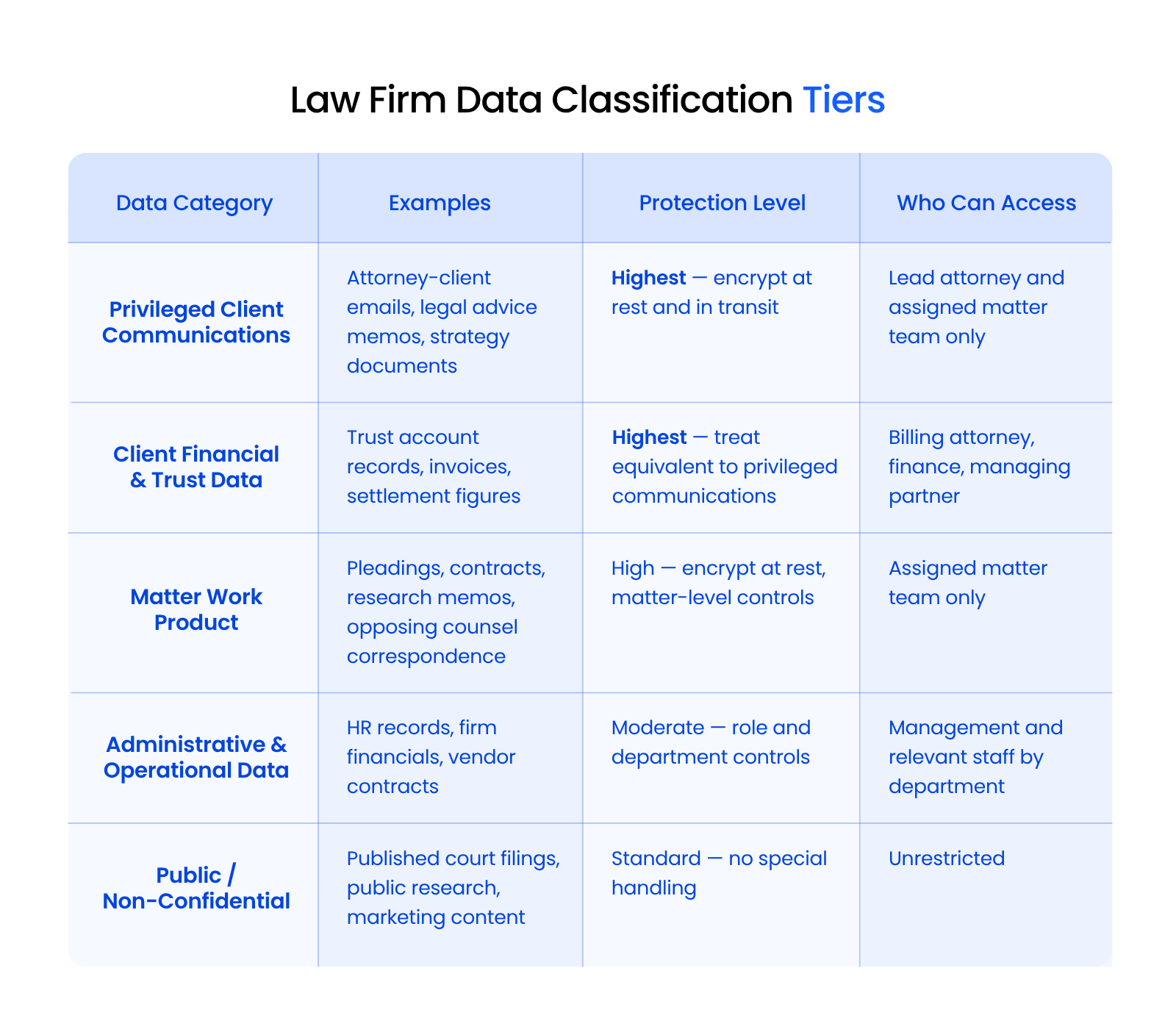
Law firms should classify data into five tiers (privileged client communications, client financial and trust data, matter work product, administrative and operational data, and public information) and protect each tier to match. If you don’t know what data you hold or how sensitive it is, you can’t protect it appropriately.
The Five Data Tiers in a Law Firm
Your firm handles five broad categories of information, each with different protection requirements:
Privileged client communications include attorney-client correspondence and case strategy documents. This is the highest-sensitivity tier.
Client financial and trust data includes financial records and trust account information. It sits at the top of the protection scale alongside privileged communications.
Matter work product includes pleadings, contracts, research memos, and correspondence with opposing counsel. High sensitivity, scoped to the assigned matter team.
Administrative and operational data includes HR records, firm financials, vendor contracts, and marketing materials. Moderate to low sensitivity depending on the content.
Public information includes published court filings and marketing content. It requires no special handling.
Matching Protection to Each Tier
Map each data type to a protection tier. Keep the classification simple, and apply it the same way everywhere.
Privileged client communications and client financial data get the highest protection: encryption at rest and in transit, access restricted to lead attorneys and assigned matter teams only. Matter work product gets matter-level access controls. Administrative data gets role-based and departmental controls.
The tier is also what the next control acts on. Sensitivity labels and DLP policies read it to decide what can be shared, forwarded, or downloaded.
Implementing Classification in Practice
You don’t need enterprise data loss prevention software to start classifying data. Start with how files are organized, named, and stored in your document management system.
The practical question is whether your current system supports matter-level organization with consistent access rules, or whether client files are scattered across shared drives, email inboxes, and local desktops with no structure at all.
Data Loss Prevention for Law Firms
The best DLP approach for a law firm is to label client data by classification tier, set policies that block or flag risky movement like external sharing and personal-email forwarding, and monitor activity so you know when it happens. Start with the top two tiers.
What DLP Does in a Law Firm
Tied to your classification tiers, DLP policies in tools like Microsoft Purview can block or warn on:
Run new policies in warn-and-log mode for a few weeks to see what normal activity looks like, then switch the highest-risk rules to block.
Monitoring and the Audit Trail
Protecting data also means watching how it moves. You need monitoring tools that track login activity, user behavior, access patterns, and unusual download or sharing activity. When someone signs in from an unfamiliar location or accesses files outside of normal patterns, your systems should flag it.
That monitoring creates the audit trail you’ll need if something goes wrong, whether it’s a breach investigation or a client asking who opened their files.
When evaluating IT providers for your firm, look for teams like Uptime Legal that build this monitoring into their cloud and security infrastructure from the start.
Endpoint Patching at Scale: Keeping Law Firm Devices Current without Disrupting Client Work
Law firms patch hundreds of endpoints without disrupting client work by managing updates centrally and rolling them out in phases: a pilot group first, then practice groups, then the full firm, scheduled around deadlines and reported device by device. Patching belongs in your data security plan because an unpatched laptop gives an attacker a known way into everything its user can reach.
It’s one part of ongoing IT monitoring and maintenance.
Phased Rollouts, Starting with a Pilot Group
Each patch goes to a small pilot group first, so a bad update breaks a few machines instead of the whole firm.
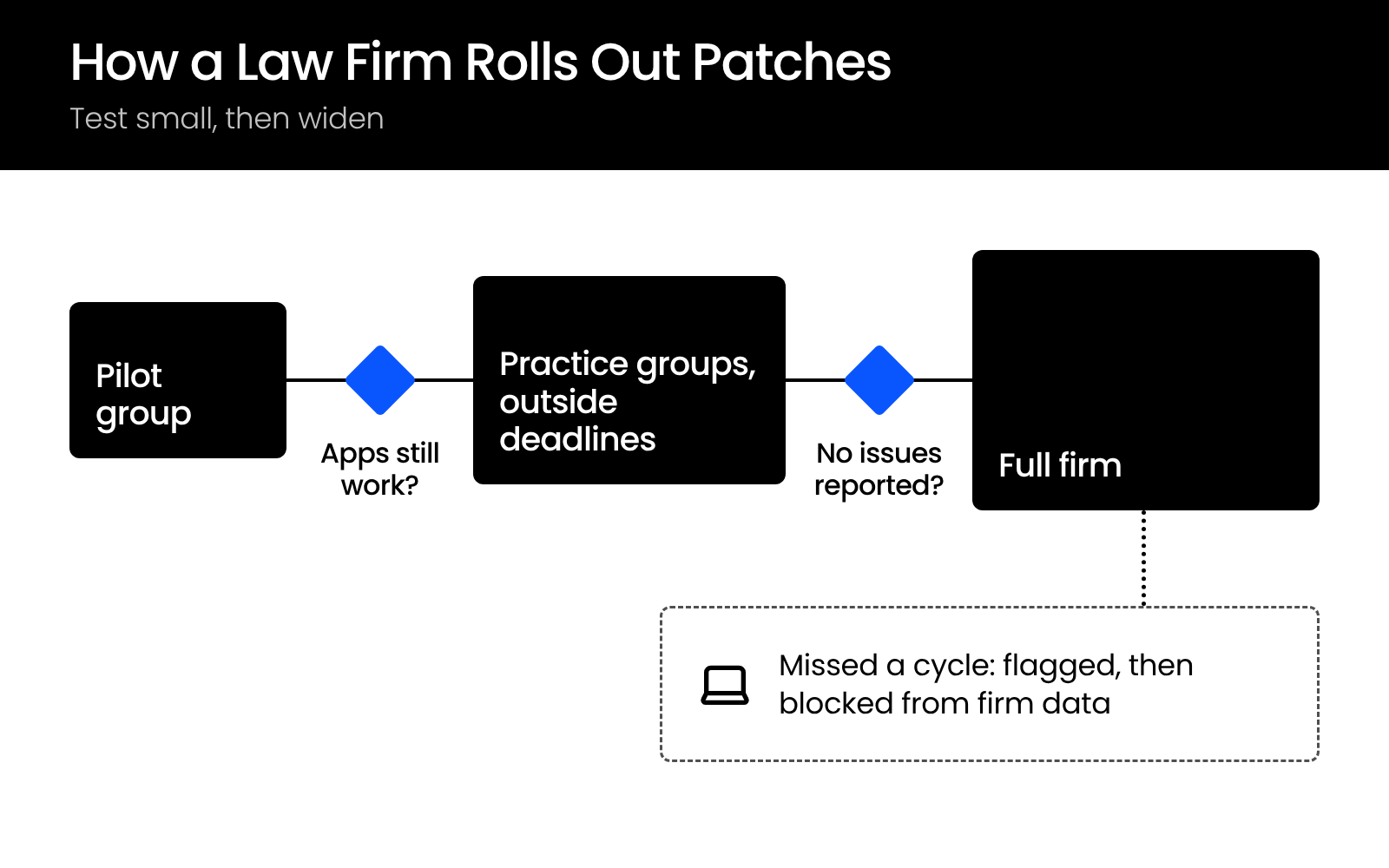
Give each ring a few days before the next one starts, so a broken add-in shows up while it affects only a handful of people.
Scheduling around Filing Deadlines and Trial
Set maintenance windows against the court calendar. Updates install overnight or on weekends, and attorneys heading into trial or a filing deadline can defer a restart for a set number of days.
A deferral window with a hard limit keeps a partner’s laptop from a forced restart the night before trial without letting any device fall months behind.
Testing Legal Applications Before They Break
Before a patch reaches practice groups, check it against the legal applications your firm runs every day:
Patch third-party applications on the same schedule. Windows Update handles Windows, drivers, and some Microsoft products, so browsers, PDF readers, and other common apps need their own update process.
Reporting and Exceptions
Patch-compliance reporting shows which devices missed a cycle. A device that misses one gets flagged, and if it stays behind, conditional access blocks it from firm data until it’s updated.
Backup That Meets Client Confidentiality Requirements
A backup setup meets law firm confidentiality needs when the copies are encrypted, restricted to named administrators, immutable or offline so ransomware can’t alter them, stored separately from production, and restore-tested on a schedule. A backup is a full copy of your client files, so it needs the same protection as the originals and the same care you give your disaster recovery plan.
What a Confidential Backup Setup Includes
A backup that covers matter files, email, and client financial data protects confidentiality when it has these pieces in place:
Microsoft 365 Needs Its Own Backup
Many firms assume their Microsoft 365 data is safe because Microsoft stores it, but Microsoft’s shared responsibility model leaves your firm responsible for its own data in every cloud service. A third-party backup that copies Exchange email, SharePoint, OneDrive, and Teams continuously into a separate data center gives your firm a second location and a second vendor, outside the reach of anyone who gets into your tenant.
Test Your Restores
A backup you’ve never restored from is an untested assumption. Test restores on a schedule, document the results, and know how quickly you can get client data back before you need to.
Secure Destruction at the End of Retention
When client data reaches the end of its retention period, destruction should be verifiable: overwritten storage, documented deletion, and confirmation that no copies remain on backup media, local devices, or email archives.
Most firms have no formal process here. Building one takes a decision, a documented procedure, and consistent follow-through, with no specialized software needed.
Breach Response: What Your Controls Need to Do When Something Gets Through
When a breach gets through, the first job is containment: find the entry point, close it, and cut off the attacker’s access before you do anything else. The six controls above also decide how fast you can contain a breach and how much you can prove afterward.
Contain It First
Containment runs in a set order:
The same order applies whether the attacker came in through a mailbox or a laptop.
At one firm we support, a managing partner’s email was compromised after the firm had declined conditional access, and our identity threat detection and response shut the account down within minutes.
Preserve the Evidence
The logs and access trail from your monitoring show who opened what, and both counsel and your cyber insurance carrier will need them. Capture them before anyone wipes and reimages an affected device.
Escalate and Notify
Bring in legal counsel, your cyber insurance carrier, and forensic support before you decide anything about notification.
All 50 states have data breach notification laws, and each sets its own rules for who has to be told and when. ABA Formal Opinion 483 (2018) addresses a lawyer’s duty to notify current clients after a data breach. What notification requires for your firm depends on where you and your clients are.
Legal note: Breach notification requirements vary by jurisdiction and practice area. Consult your firm’s legal counsel for guidance specific to your situation.
Protecting Client Data Starts at the Data Layer
A firewall keeps most attackers out, and the six controls decide what the ones who get in can reach.
Encrypt every device and tighten permissions first, because those two limit the damage from a stolen laptop or a compromised mailbox fastest. Then classify your data so DLP knows what to protect, and keep patching and tested backups on a schedule your attorneys never have to think about.
Work down the list one control at a time, and each one makes the next easier to put in place.
WHAT’S NEXT
Frequently Asked Questions

Uptime Legal’s Technology Solutions
Cloud, software, IT, and document management built for today’s law firms.