Table of Contents
Most law firms don’t choose break-fix IT. They just never stopped using it.
It works until it doesn’t — and when it stops working, it usually happens at the worst possible moment.
The real cost is the billable hours lost, the security gaps that built up between service calls, and the growing dependence on a model that has no incentive to prevent the next problem.
For law firms managing client confidentiality obligations, specialized software, and time-sensitive work, the stakes of reactive IT are higher than they are for most businesses.
This article breaks down how break-fix and managed IT actually compare — so you can make or defend that call with confidence.
What Is Break-Fix IT?
Break-fix IT is a reactive support model.
Your firm calls for help when something fails, a technician fixes it, and you pay by the hour. There’s no ongoing relationship, no monitoring, and no proactive work happening between calls.
It’s the default for many small law firms — not because it’s the right choice, but because it’s the path of least resistance.
You don’t sign a contract. You don’t pay a monthly fee. You just call when something breaks.
The problem is that “when something breaks” often means a server is down, a workstation won’t connect, or a deadline is at risk.
At that point, you’re paying emergency rates — typically $150 to $300 per hour — and absorbing whatever downtime comes with it.
For a law firm, that downtime has a specific cost: billable hours.
What Is Managed IT?
Managed IT is a proactive support model.
Your firm works with a provider who monitors your systems continuously, handles maintenance on an ongoing basis, and resolves issues before anyone at the firm notices them.
The pricing works differently too. Managed IT runs on a flat monthly fee, typically billed per user.
That shift from reactive to proactive matters in three specific ways:
For law firms specifically, that ongoing relationship matters.
A managed IT provider supporting legal clients understands your software stack — Clio, PracticeMaster, PCLaw, LexWorkplace — and knows how to support it. A break-fix technician dispatched from a general IT company usually doesn’t.
The shift is already well underway.
Firms are increasingly moving toward managed IT services because the reactive model no longer meets the demands of modern law practice.
How They Compare for Law Firms
The two models look similar on paper. In practice, they work very differently.
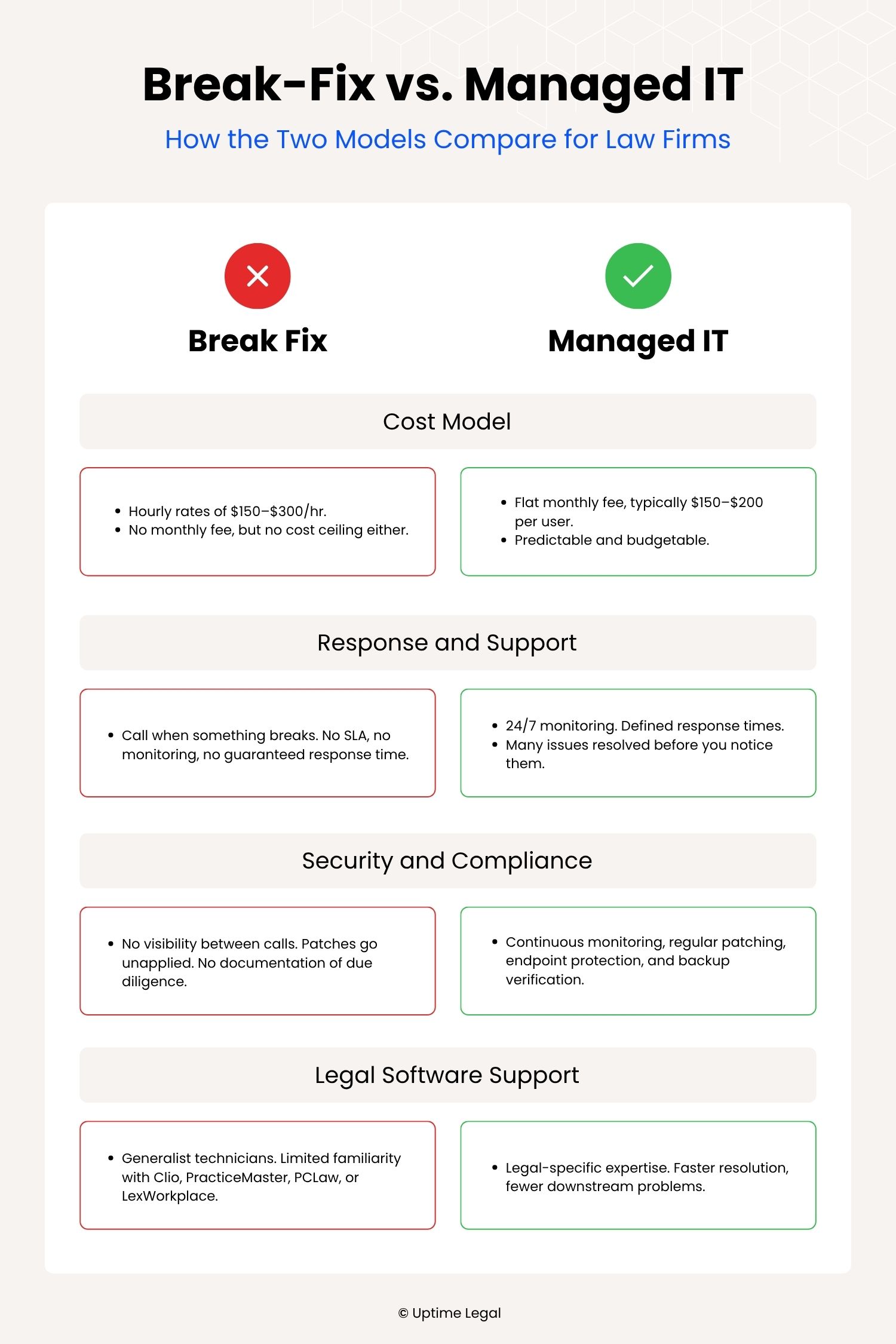
Here’s how they compare across the factors that matter most to a law firm.
Cost Model
Break-fix has no monthly fee. That feels like an advantage until something goes wrong.
Emergency IT rates typically run $150 to $300 per hour. There’s no cap, no predictability, and no incentive for the technician to prevent the next problem.
A single server failure or ransomware incident can generate a bill that dwarfs months of managed IT costs.
Managed IT runs on a flat monthly fee, typically priced per user.
Most providers in the legal space charge somewhere in the range of $150 to $200 per user per month, depending on firm size and scope.
It keeps costs predictable and budgeting straightforward. And the provider has a direct financial incentive to keep things running.
Response and Support
With break-fix, response time depends on availability.
You call, you wait, and you hope someone can get there before a deadline slips or a client meeting falls apart. There’s no SLA, no priority queue, and no one monitoring anything between calls.
Managed IT operates on a defined support structure.
Most providers offer 24/7 monitoring and a committed response time, often within one to four hours for critical issues. In a lot of cases, problems get resolved remotely before they affect anyone at the firm.
The relationship is ongoing, not transactional.
For a law firm where downtime costs billable hours, that structure is the core of the value.

Cybersecurity for Law Firms:
Cybersecurity, especially for law firms, is nothing to be trifled with. Utilize this article to understand the risks, the best practices, and more.
Security and Compliance Posture
Break-fix has no visibility into your environment between service calls.
Patches go unapplied. Vulnerabilities go undetected. You find out something is wrong when it’s already a problem.
That creates real exposure for law firms.
The ABA’s Model Rules require firms to make reasonable efforts to protect client data. A break-fix model provides no ongoing safeguards, no monitoring, and no documentation that reasonable precautions were taken.
Managed IT includes continuous monitoring, regular patching, endpoint protection, and backup verification. It doesn’t guarantee you’ll meet the ABA’s legal technology compliance expectations, but it gives firms the infrastructure to support it.
That matters when a client asks about your data security practices, or when something goes wrong and you need to demonstrate due diligence.
Legal Software Support
Most break-fix technicians are generalists. They can fix a crashed workstation or reset a router.
They’re less likely to know how Clio handles matter-level permissions, why PracticeMaster is throwing a sync error, or how to configure LexWorkplace for a new remote user.
Legal software has specific dependencies, update cycles, and integration points. A provider who doesn’t work with law firms regularly will not know them.
A legal-specific managed IT provider does. That depth of knowledge reduces resolution time and reduces the risk that a technician’s fix creates a new problem downstream.

When Break-Fix Still Makes Sense
Break-fix isn’t wrong for every firm.
For a solo attorney or a two to three person practice with minimal software, a single workstation, and no remote access requirements, the economics of managed IT may not add up. If your technology footprint is small enough that you rarely need IT help, paying a flat monthly fee for ongoing support is hard to justify.
The threshold shifts fast, though.
Once a firm adds cloud software, remote staff, or client data obligations that require documented security practices, break-fix stops being a cost-saving choice and starts being a liability.
Signs Your Law Firm Has Outgrown Break-Fix
Break-fix works until your firm’s technology environment becomes too complex, too critical, or too exposed to manage reactively.
Most firms don’t hit a single breaking point. They accumulate them.
Check your situation against this list:
If two or more of these apply, your firm has likely outgrown break-fix. The question becomes when to make the chance.
What Legal-Specific Managed IT Actually Looks Like
Not all managed IT providers are the same.
A general MSP can handle basic monitoring, patching, and helpdesk support. What they often lack is deep familiarity with the software stack a law firm actually runs.
Clio, PracticeMaster, PCLaw, and LexWorkplace each have their own configurations, integrations, and failure points.
A legal-specific managed IT provider knows those systems and how they behave in practice.
Support is built around how law firms work, including matter-centric workflows, document management dependencies, Outlook integration, and the compliance expectations around client data.
One midsize firm that moved to Uptime Manage had been dealing with recurring disruptions that cut into billable time for years. After the switch, staff spent less time dealing with software issues, response times dropped significantly, and they stopped explaining their environment from scratch every time something broke.
That’s the role a legal-specific managed IT provider should play.

What Switching Looks Like
The most common reason firms stay on break-fix isn’t cost. It’s the assumption that switching IT providers will be disruptive. In most cases, it’s not.
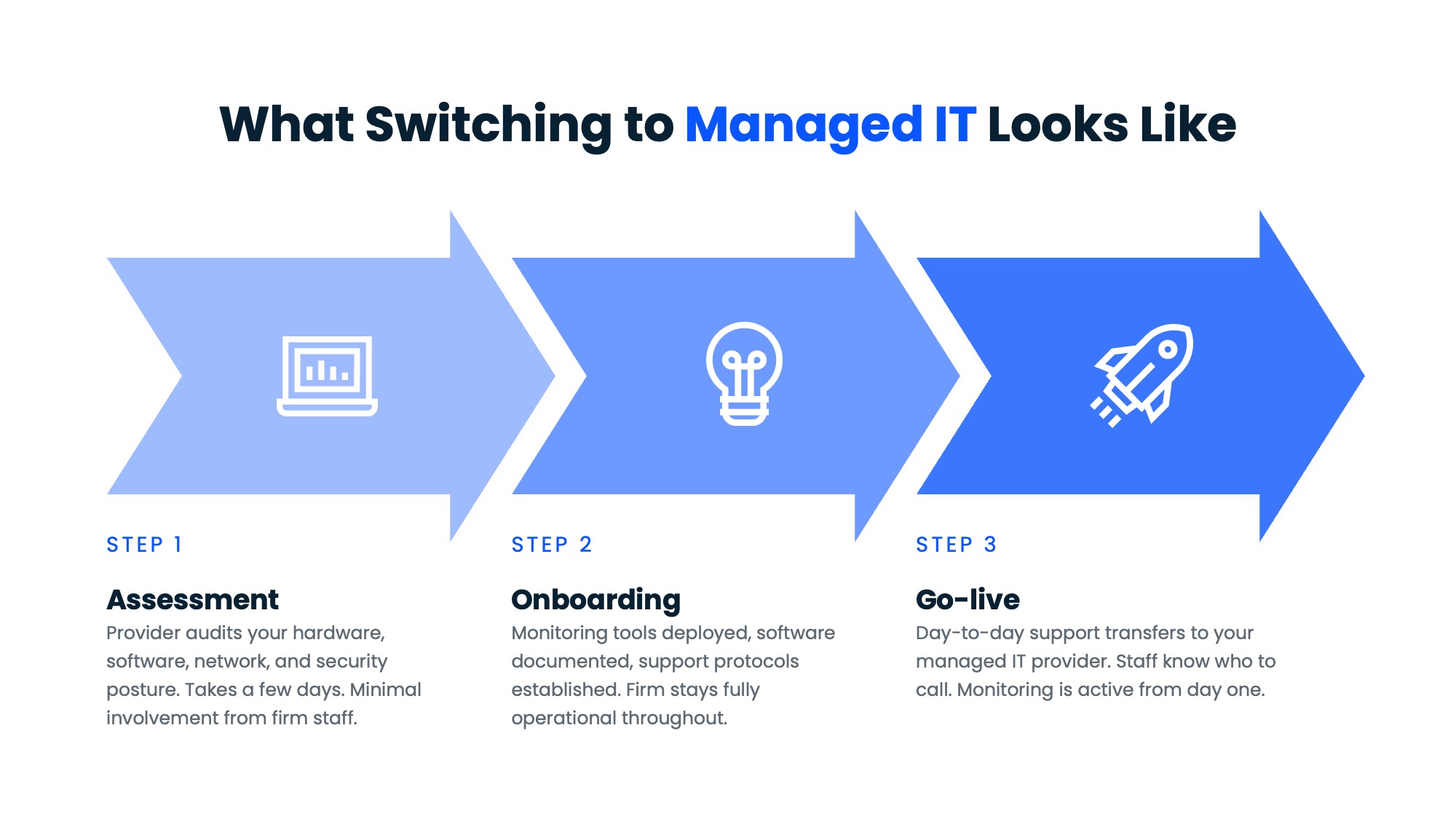
A typical transition to managed IT moves through three phases.
1. Assessment
The provider audits your current environment — hardware, software, network configuration, and security posture.Your team answers some questions and provides access.
This gives both sides a clear picture of what exists, what needs attention, and what the ongoing support scope will cover. It usually takes a few days and requires minimal involvement from firm staff.
2. Onboarding
The provider deploys monitoring tools, configures remote access, documents your software stack, and establishes support protocols.
Staff start to notice small things: a helpdesk number to call, a ticketing system for requests, faster response times on issues that used to sit unresolved.
The firm stays fully operational throughout.
3. Go-live
Day-to-day support transfers to the managed IT provider.
Escalation paths are defined and monitoring is active.
Instead of tracking down whoever fixed something last time, staff have a single point of contact who already knows the environment.
The firms that delay this decision usually do so because switching feels like a project. It’s closer to a handoff.
Is Break-Fix Holding Your Firm Back?
Most firms don’t leave break-fix because they decided managed IT is better. They leave because something goes so wrong that it forces the decision.
The firms that switch proactively do so because they’ve done the math on downtime, emergency rates, and billable hours lost.
That math tends to be persuasive. The question is whether you run it before or after the next incident.
WHAT’S NEXT
Frequently Asked Questions

Uptime Legal’s Technology Solutions
Cloud, software, IT, and document management built for today’s law firms.