Table of Contents
Most firms start asking this question for a reason.
The current setup is straining — a break-fix arrangement that’s gotten expensive, an informal IT contact who’s stretched too thin, or a security incident that made the gaps visible.
Sometimes it’s simpler: the firm is growing and the old approach isn’t keeping up.
The standard argument for outsourcing IT is predictable monthly costs versus the overhead of a full-time hire. That comparison is real, but it’s not what actually drives the decision for law firms.
The more important question is whether a single in-house IT person can credibly handle cybersecurity, legal software support, bar compliance obligations, and day-to-day help desk — simultaneously, without gaps.
For most firms under 50 attorneys, the honest answer is no.
This article explains the real tradeoffs and gives you a practical framework to decide.
Why Law Firms Outgrow Their IT Setup
Most law firms don’t make a deliberate choice about IT structure. It happens gradually.
Someone on staff becomes the unofficial tech person. A break-fix vendor gets called when things break. The firm adds people, adds software, adds complexity, and the IT setup doesn’t keep up.
For a while, that works. Then the risk starts to concentrate.
The trigger is usually something concrete: a security incident, a ransomware scare, a staff departure that takes institutional IT knowledge with it, or a partner who starts asking hard questions about client data protection.
Sometimes it’s simpler — the firm just keeps growing and the current setup can’t handle the load.
The problem is structural. Informal IT arrangements were never built to cover what the job actually requires:
According to the ABA’s 2023 Cybersecurity TechReport, 29% of law firms have experienced a security breach. And that number almost certainly understates the reality, since many incidents go undetected or unreported.
That’s a lot to ask of one generalist hire, a part-time vendor, or whoever happens to know the most about computers. It’s also what makes the cost comparison more complicated than it first appears.
What In-House IT Actually Costs a Law Firm
The salary number is the easy part. What firms often underestimate is everything that surrounds it.
The Salary and Overhead Reality
A qualified IT professional with enough experience to support a law firm — managing security, cloud infrastructure, legal software, and day-to-day help desk — typically commands a salary between $65,000 and $95,000 depending on market and experience level.
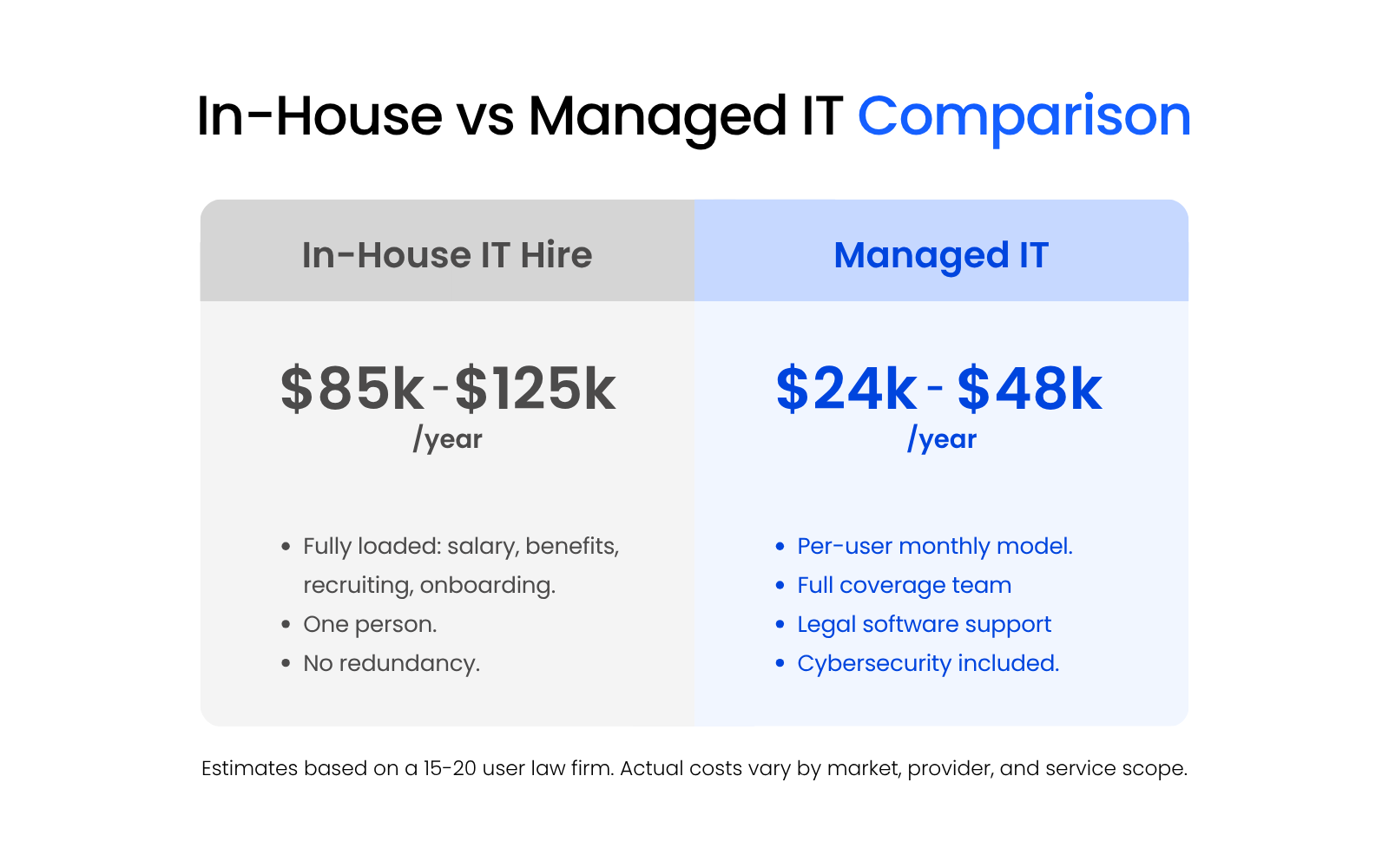
Add benefits, payroll taxes, and paid time off, and the fully loaded cost lands closer to $85,000–$125,000 annually.
That’s before recruiting.
A specialized IT hire can take months to find and cost $10,000–$20,000 in recruiter fees or job board spend. Once hired, onboarding takes time. If that person leaves — and IT turnover is high — the firm absorbs those costs again.
To make that concrete: a 20-attorney firm paying $90,000 in base salary is likely spending $110,000–$120,000 fully loaded for a single hire.
A legal-focused managed IT service provider for the same firm typically runs $100–$175 per user per month — roughly $24,000–$42,000 annually for 20 users.
The cost difference is significant. So is what each model actually covers.
Illustrative in-house IT cost model
5–30 attorney law firm · annual estimates
| Line Item | Annual Estimate | Notes |
|---|---|---|
| Base salary Mid-level IT professional |
$65,000 – $95,000 | Varies by market, experience, and specialization |
| Benefits and payroll taxes ~25–30% of base salary |
$16,000 – $28,000 | Health, dental, 401k, employer FICA |
| Recruiting and hiring One-time, but recurring on turnover |
$10,000 – $20,000 | |
| Onboarding and training First 60–90 days |
$3,000 – $8,000 | Lost productivity, certifications, tool access setup |
| Turnover risk (amortized) IT turnover runs high |
$5,000 – $12,000 | Annualized recruiting + onboarding cost if hire leaves in 2–3 years |
| Coverage gaps Nights, weekends, PTO, illness |
Unquantified risk | No coverage when the hire is unavailable — no bench, no redundancy |
| Total fully loaded cost (est.) | $85,000 – $125,000+ | Excluding coverage gaps and turnover replacement |
Estimates are illustrative. Actual costs vary by firm size, geography, and role requirements. Coverage gaps and turnover replacement costs are not included in the total.
The in-house hire is one person with one skill set, available during business hours. The managed IT provider brings a team with depth across security, legal software, cloud infrastructure, and help desk — available around the clock.
For most firms at this size, that’s not a close comparison.
The Coverage Problem: What One Person Can’t Realistically Do
Salary is a cost. Coverage is a risk.
A single IT hire is expected to handle a wide range of responsibilities simultaneously:
No single generalist covers all of that with real depth.
Something gets deprioritized. Security monitoring slips when help desk tickets pile up. Legal software expertise is absent because the hire came from a general IT background. Nights and weekends go uncovered because there’s no one else.
When that person takes vacation, gets sick, or resigns, the firm’s IT coverage goes with them. There’s no bench, no redundancy, and no continuity.
That’s a structural problem with the single-hire model.
What Outsourced (Managed) IT Costs — and What You Get for It
Managed IT services for law firms typically run on a per-user, per-month pricing model.
For most small to mid-size firms, that lands somewhere between $100 and $200 per user per month, depending on the provider, the scope of services, and whether cybersecurity tools are bundled in.
For a 15-attorney firm with 20 total users, that’s roughly $24,000–$48,000 annually — a fraction of what a single fully loaded in-house hire costs, and with broader coverage.
A well-scoped managed IT agreement for a law firm should cover:
The per-user model scales cleanly with headcount. When the firm grows, the cost adjusts. There’s no recruiting cycle, no benefits overhead, and no coverage gap when someone is unavailable.
What it doesn’t include is worth understanding before you sign.
Most managed IT agreements are scoped. Major infrastructure projects, new office builds, and large migrations typically fall outside the monthly retainer and get billed separately.
Cybersecurity tools are sometimes bundled, sometimes add-ons. Legal software support — configuration, integrations, troubleshooting for platforms like Clio or NetDocuments — may or may not be included depending on the provider’s experience and how the agreement is written.
Before assuming a managed IT agreement covers what your firm needs, confirm three things explicitly:
A general MSP that passes those checks is a reasonable baseline.
A legal-specialist MSP that passes them brings something a generalist can’t — familiarity with the specific environment law firms operate in. That distinction matters more as the firm’s risk profile and software complexity grow.
The Legal-Specific Factors That Change the Calculation
Most IT comparisons stop at cost and coverage.
Those aren’t the only stakes for law firms.
Under-resourced IT creates compliance exposure, ethical risk, and operational gaps that don’t show up in a general cost model, and that most generic MSP articles never mention.
Bar Compliance and the Duty to Protect Client Data
Lawyers have an ethical obligation to understand technology. ABA Model Rule 1.1 defines competence to include keeping up with the benefits and risks of relevant technology, including the systems that store and transmit client data.
The rule doesn’t prescribe a specific IT setup.
How Law Firms Can Meet Bar Association Tech Competency Standards:
Find out what bar associations actually expect from law firms on technology — and what having the right IT support has to do with it.
A firm with known security gaps, outdated infrastructure, or no incident response plan is operating with ethical exposure. A breach can trigger a bar complaint, a malpractice claim, and the loss of a client relationship.
What that looks like in practice:
- A firm suffers a ransomware attack that exposes client files. They had no incident response plan, no offsite backup, and no documented security policy.
- The client files a bar complaint.
- The state bar’s review focuses not on the attack itself, but on whether the firm took reasonable precautions.
- Under-resourced IT becomes an ethics question, not just an operational one.
State bars have been specific about this. California, New York, and several other states have issued formal ethics opinions reinforcing that the duty of confidentiality extends to how client data is stored, secured, and transmitted digitally.
Legal Software Support Is a Specialized Skill Set
A generalist IT hire can support standard business software. But supporting a legal-specific stack requires specialized knowledge.
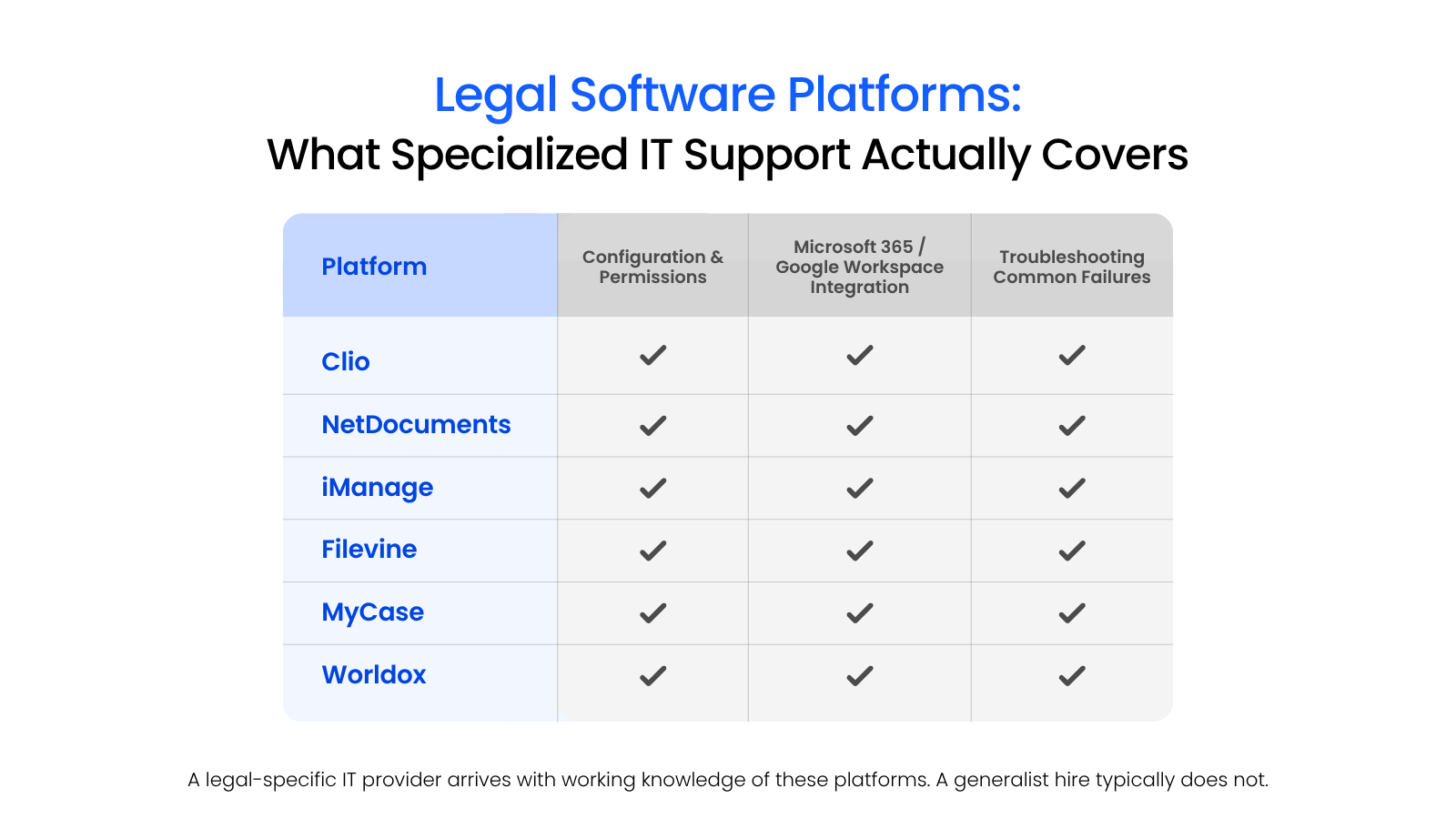
Platforms like Clio, NetDocuments, LexWorkplace, Filevine, and MyCase have their own architecture, permission structures, integration requirements, and failure modes.
When something breaks in a document management system the day before a filing deadline, the cost is measured in missed deadlines, billing gaps, and client exposure.
Most general IT staff don’t have experience with these platforms. It’s a realistic limitation of hiring a generalist for a specialized environment.
A firm running Clio or NetDocuments needs IT support that already knows how law firms operate, how their systems behave, how they integrate with Microsoft 365 or Google Workspace, and what to do when they don’t.
Security Gaps Hit Law Firms Differently
Law firms are high-value targets. They hold sensitive client information that adversaries actively seek out: M&A details, litigation strategy, personal injury records, and estate documents.
According to the ABA’s 2023 Cybersecurity TechReport, 29% of law firms have experienced a security breach. Small and mid-size firms account for a significant share of those incidents. They’re often easier targets precisely because their defenses are thinner and their security programs less mature.
The consequences of a breach at a law firm stack in ways that don’t apply to most businesses:

Cybersecurity Risks for Law Firms: 5 Threats That Could Take You Down:
See the specific threats law firms face and why a general security posture isn’t built to handle them.
A single IT hire focused on day-to-day help desk work rarely has the depth to manage a full cybersecurity program. Endpoint protection, email security, access controls, incident response, and vendor risk management all require consistent, specialized attention.
Those are baseline requirements for a law firm.
When In-House IT Makes Sense for Law Firms
Outsourced IT is the right model for most small and mid-size firms.
Larger firms operate under different conditions, and some of those conditions make in-house IT a legitimate choice.
The threshold where in-house IT starts to make financial and operational sense is roughly 100 attorneys or more. At that scale, the firm generates enough IT demand — across locations, practice groups, systems, and users — to justify full-time staff.
The volume of daily support requests alone can occupy one or more people. Add infrastructure management, software administration, and vendor coordination, and the workload supports dedicated headcount.
Complexity is the other driver.
Firms with highly specialized or sensitive environments — government contractors with security clearances, firms handling classified matters, or practices with unusual data sovereignty requirements — may need IT staff embedded in the organization rather than shared across a provider’s client base.
Those environments require more control and institutional knowledge than most MSP relationships are structured to provide.
A few conditions where in-house IT is a reasonable call:
That last scenario — an internal coordinator working alongside an outsourced provider — is worth naming separately. Many mid-size firms benefit from this hybrid model.
The internal person handles day-to-day communication, software procurement, and user onboarding. The MSP handles security, infrastructure, and anything requiring specialized technical depth. The two roles don’t overlap; they complement each other.
The honest summary: firm size and operational complexity determine whether in-house IT is sustainable, not preference.
For most firms under 75–100 attorneys, the staffing depth required to cover the full scope of legal IT — security, compliance, help desk, legal software, and cloud infrastructure — exceeds what a single hire can deliver.
A Decision Framework by Firm Size
The right IT model depends on what your firm actually needs to cover. Use the table to orient, then read the subsection that applies.
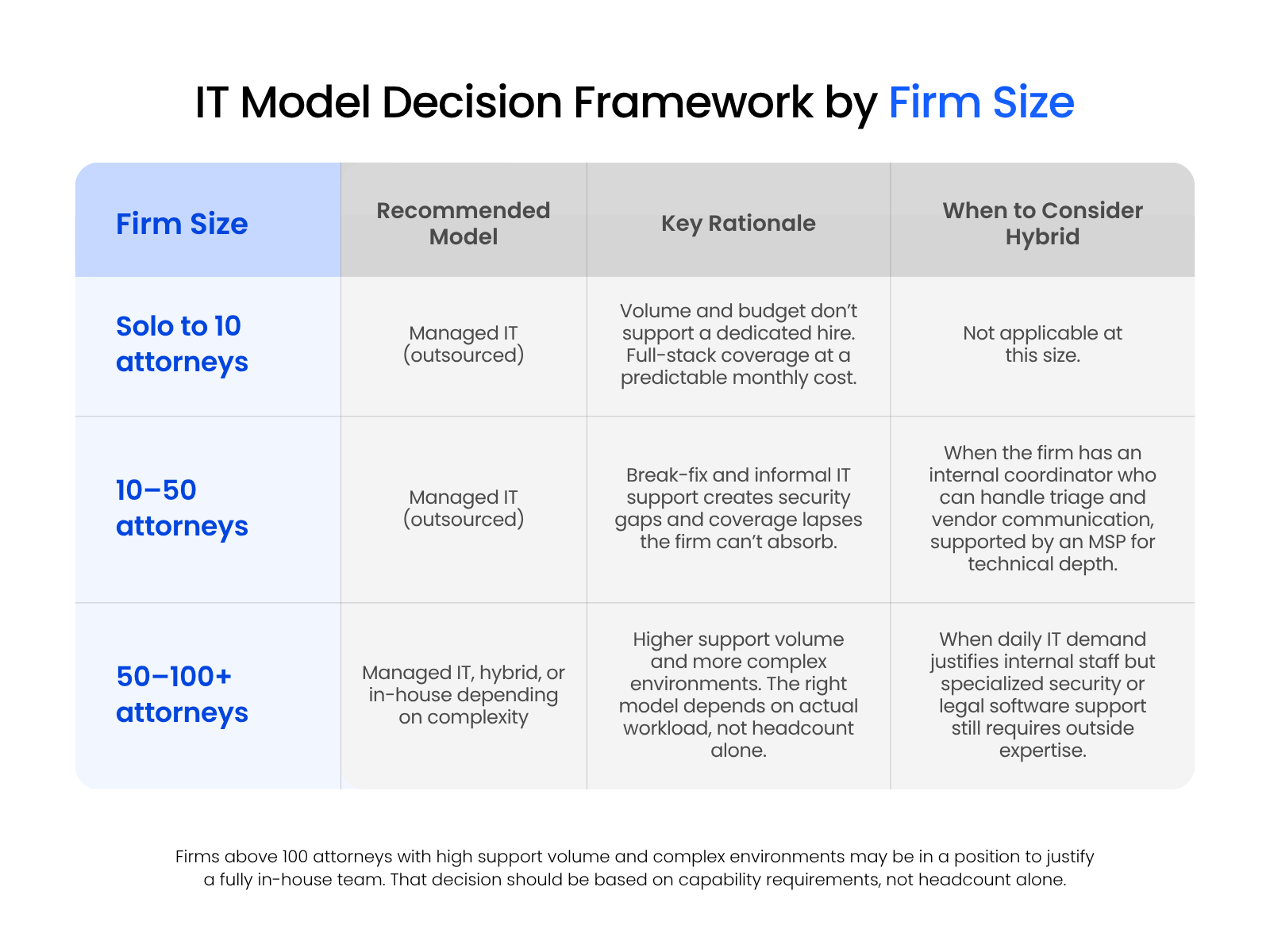
Solo to 10 Attorneys
In-house IT isn’t a realistic option at this size. The volume of work doesn’t justify a dedicated hire, and the cost of one would consume a disproportionate share of operating budget.
A legal-specialist managed IT provider covers the basics — reliable infrastructure, security hygiene, legal software support — at a predictable monthly cost. For most firms in this range, that’s the clear call.
10–50 Attorneys
This is the range where firms most commonly outgrow their current setup. The informal arrangements that worked at 10 attorneys — a break-fix vendor, a part-time contact, an internal person wearing too many hats — start showing gaps in security, software support, and incident coverage.
A managed IT provider with legal-specific experience is the practical fit for most firms here.
Firms approaching 50 attorneys may benefit from a hybrid model: an internal coordinator handling day-to-day triage, supported by an MSP for technical depth.
50–100+ Attorneys
Firms in this range have more options and more complexity.
Daily IT demand is higher, the technology environment is more layered, and managed IT costs begin to approach the cost of dedicated staff.
A hybrid model — one or two internal IT staff paired with a specialized provider for security or legal software — works well for firms with multiple offices or complex infrastructure.
Firms above 100 attorneys with sustained high support volume may be in a position to justify a fully in-house team. That decision should be based on actual workload and capability requirements, not headcount alone.
What to Look for If You Outsource — and Why Legal-Specific Matters
Deciding to outsource IT is one decision. Choosing the right provider is another, and for law firms, the distinction matters.
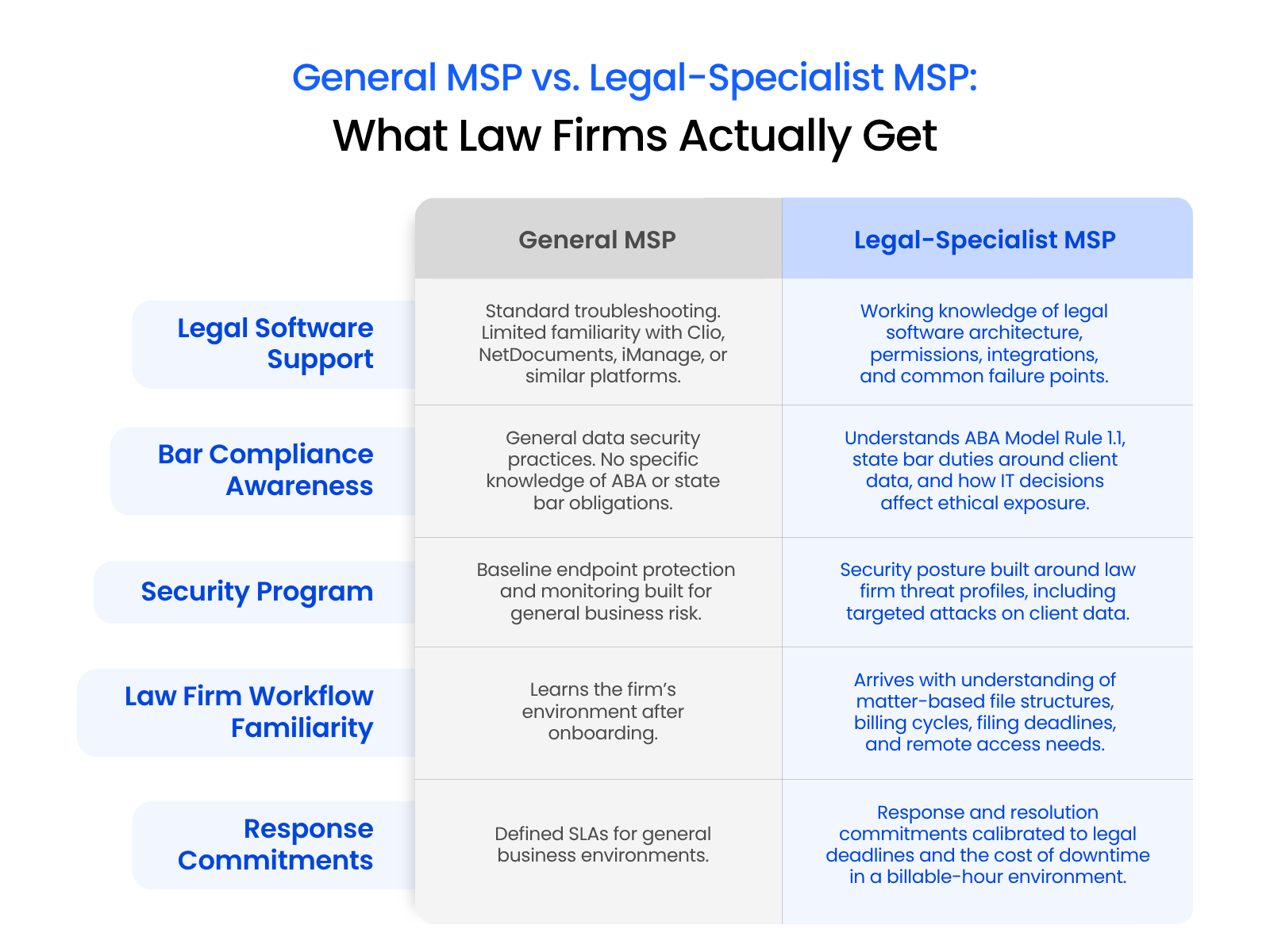
A general MSP can handle standard business IT — network monitoring, help desk, device management, Microsoft 365 support. That covers the basics.
What most general providers lack is familiarity with the specific environment law firms operate in: the compliance obligations, the legal software stack, the data sensitivity, and the operational stakes when something goes wrong mid-case.
When evaluating a managed IT provider, a law firm should be looking for evidence of legal-specific experience, not just general competence.
What that looks like in practice:
A general MSP is better than no managed IT. A legal-specialist MSP is better for law firms specifically because the gaps a generalist leaves tend to show up in the areas where law firms have the least tolerance for failure.
Making the Call for Your Firm
The in-house vs. outsourced question is really a question about coverage.
Can your current IT setup handle security, compliance, legal software support, and after-hours incidents without critical gaps?
For most small and mid-size firms, the honest answer is no.
If your current setup depends on one person, lacks legal software depth, or has no real incident response plan, you likely already have your answer. It becomes a resourcing question with a clear outcome.
What you do next is what matters.
WHAT’S NEXT
FAQ

Uptime Legal’s Technology Solutions
Cloud, software, IT, and document management built for today’s law firms.