We’ll be discussing Juris Support today — a specialized tool for timekeeping, billing, and accounting aimed at law firms.
The landscape of Juris support can sometimes seem intricate.
Given that LexisNexis, a network of Juris consultants, and various IT professionals all present their services, it can be a tad challenging to pinpoint the optimal path for obtaining Juris assistance.
This article aims to shed light on the array of available options and outline strategies for attaining the most efficient Juris Support. From sanctioned routes to external providers, we’ll guide you on how to discern and leverage these resources, ensuring top-tier support for your Juris setup.
By the end, you’ll have the answers to:
Whether you’re a veteran user or a firm just starting with Juris, this guide is designed to assist you in maximizing the potential of this powerful software, thereby enhancing your firm’s efficiency and productivity.
The Best Juris Support
Adding to its allure is the vast network of third-party consultants and tech specialists proficient in deploying Juris, training your personnel, and even assisting with your accounting duties.
Such comprehensive support plays a pivotal role in determining your overall success with Juris. To select the most suitable support for your law firm, it’s imperative to delve into and comprehend the advantages and disadvantages associated with each option.
Let’s dive in!

Managed IT Services for Law Firms:
Whenever you’re ready, we’re here to managed your IT. Read this article to learn more about the value of outsourcing your IT to a professional.
Juris Software Overview
Juris is most suitable for firms with 5-10 time-keepers. While solo practitioners and larger entities can also employ it, its design shines best for this specific size.
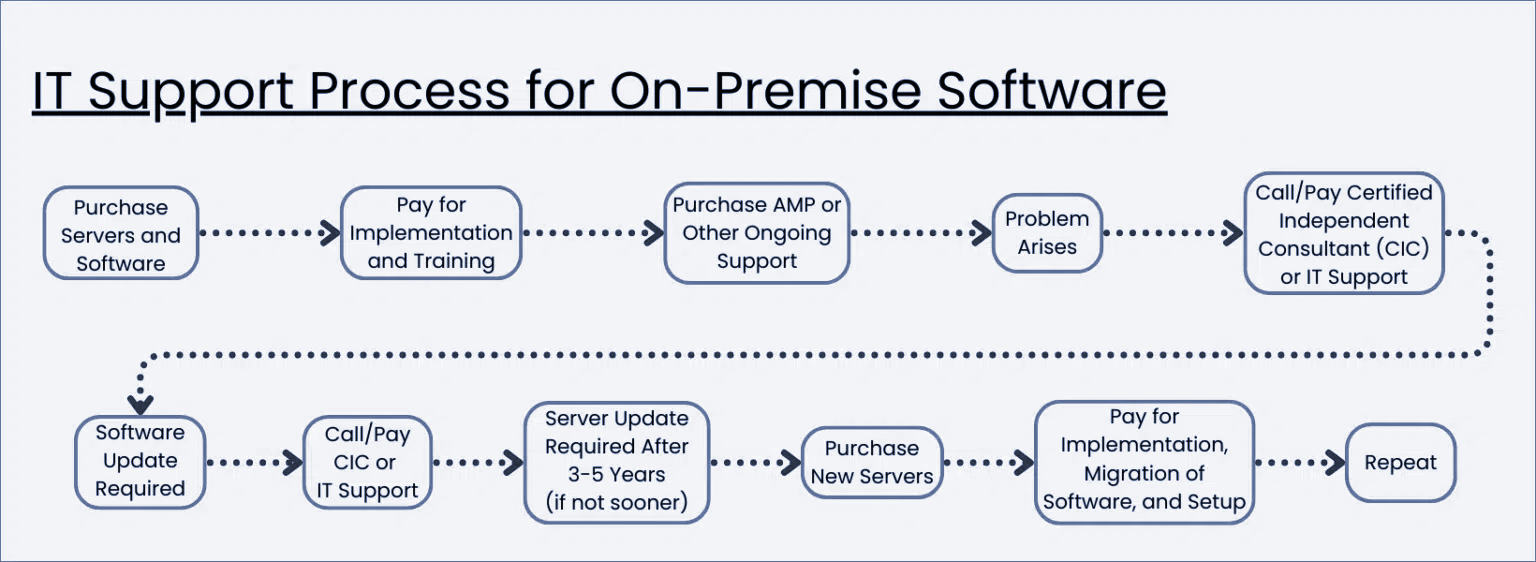
Being server-based, Juris is designed for on-premise operation. This means the software resides on servers, often situated in places like a firm’s closet or copy room. Subsequently, the software can be installed on individual computers throughout the firm for daily use.
Juris comes in three primary modules:
- Juris (Sometimes called “Juris Core”) – the core/base legal accounting software
- Juris Suite – An add-on module that provides additional functionality
- Juris Go – The mobile app for Juris (Android and IOS)
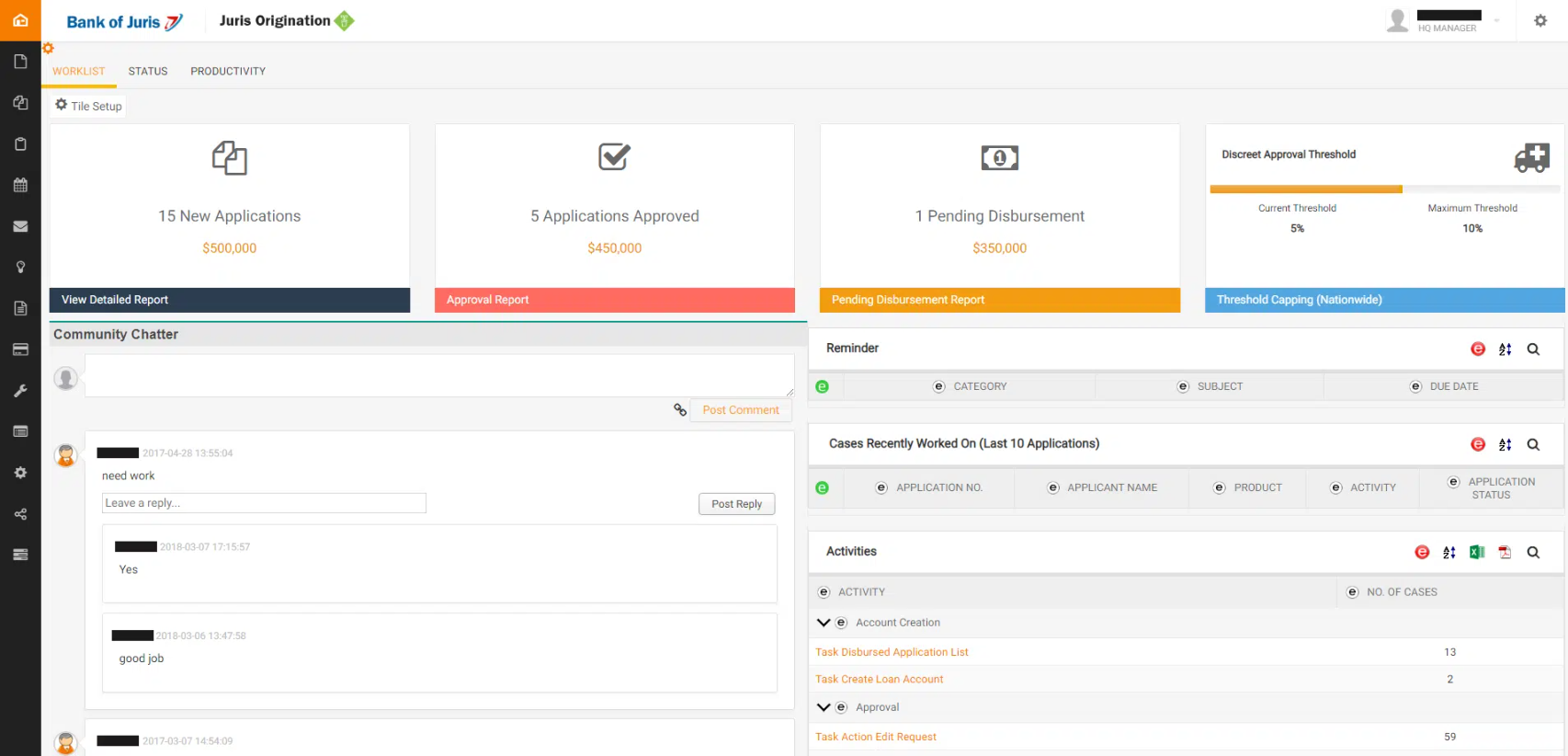
Features of Juris include:
Features with the Juris Suite Add-On:
Juris Go
Juris Go stands out as an all-encompassing time-tracking application, specifically crafted for on-the-go time entry.
The app simplifies the process, enabling attorneys to bolster their profits via an intuitive timekeeping procedure.
With minimal fuss, timekeepers can effortlessly log hours both in real-time and for subsequent referencing.
Designed for compatibility with both smartphones and tablets, Juris Go can be effortlessly synced with Juris Suite, ensuring smooth matter searches.
Juris, in its entirety, provides a powerful software solution, ensuring meticulous management of accounting, billing, and financial tasks. It equips law firms with the essential tools to monitor and carry out critical operations seamlessly.
The LexisNexis Software Ecosystem
Now, let’s explore where Juris stands in the extensive landscape of legal software.
LexisNexis boasts an array of legal software offerings tailored to cater to diverse needs stemming from the myriad sizes and specialties of law firms. Recognizing that not every legal entity necessitates the full spectrum of every tool, LexisNexis has meticulously designed a suite of products to cater to varied requirements while ensuring flawless integration between them.
Consider the numerous law firms that laud Juris for its potent accounting prowess combined with its streamlined, user-friendly Practice Management functions. Yet, this blend might not be the ideal match for all.
Some practices might have a need for more intricate features for handling their cases, such as rule-driven calendaring, document and form compilation, and customizable case screens.
Time Matters, another popular product from LexisNexis, hones in on in-depth case management, excluding any accounting functionalities. This positions it as an excellent counterpart to Juris, allowing both to collaborate in a front-office and back-office setup, presenting a comprehensive solution.
Then What?
Even with its user-friendly interface and straightforward functions, LexisNexis understands that there might be moments in your firm’s journey when you seek support.
Maybe you’re encountering challenges during the initial implementation of Juris, or perhaps you’re switching to Juris from another case management system.
You might also consider delegating billing and accounting tasks.
To address these varied needs and offer an extensive array of support solutions to its software users, LexisNexis initiated the Certified Independent Consultant (CIC) program.
Through this initiative, software and IT experts can undergo training and earn certification on LexisNexis products, Juris included.
This guarantees you can tap into expert guidance whenever necessary, elevating the benefits of adopting Juris for your law firm’s operations.

The Financial Case for Cloud for Law Firms:
The cloud can be substantially more cost-effective than its alternatives. Learn more.
Juris is owned and marketed by LexisNexis. Purchases must be made directly through LexisNexis. Once acquired, you should first decide (a) whether you require external assistance for its setup and/or continual usage, then (b) identify the most suitable entity to assist you, and lastly (c) choose where to host it (either on your firm’s servers or in a private cloud).
Additionally, it’s beneficial to opt for the Juris Annual Maintenance Plan (AMP), a yearly subscription ensuring you receive the newest versions and updates for Juris, alongside valuable support and training resources.
Getting Juris Support
As a Juris user, you have three unique options for acquiring support.
Your choice can be singular or a mix of these three, contingent on how Juris is utilized in your firm and the intensity of support your firm necessitates.
1. LexisNexis
When you invest in Juris and maintain your Annual Maintenance Plan (AMP), you gain entitlement to product support directly from LexisNexis.
This encompasses help desk assistance, as well as access to the Juris online knowledge base and educational resources.
Opting for Juris support is particularly advantageous for firms with sporadic support requirements, often centered around how-to inquiries or swift resolutions.
Given that this is bundled in the cost of your AMP, it’s always my recommendation for firms to leverage this avenue, complementing it with other methods when needed.

2. Certified Independent Consultants (CICs)
As highlighted earlier, there exists a broad spectrum of third-party consulting and professional service entities: LexisNexis’s brigade of Certified Independent Consultants.
These are legal software and tech experts who have undergone the requisite training and certification to facilitate, support, and (in certain situations) handle accounting tasks within and related to Juris.
CICs range from consulting agencies to independent or solo consultants. They often excel in offering detailed, hands-on Juris support, especially when it comes to integrating Juris within your firm’s procedures and workflow.
Even though routine support for Juris is catered for by LexisNexis under an AMP, many law firms prefer to engage their CIC exclusively for Juris support, despite having direct support entitlement from LexisNexis.
It’s worth noting that CICs charge for their expertise (and it’s indeed valuable), so it’s essential to allocate funds accordingly.
3. Private Cloud
Lastly, we have the concept of a private cloud. A private cloud serves as a (frequently superior) alternative to having and maintaining on-premise servers and IT infrastructure.
A private cloud will house your Juris, other legal software, documents, and emails on a unified system that your firm can access from anywhere… all while bypassing the challenges associated with managing IT on-site. The ideal legal-focused private cloud solution will be tailored specifically for Juris hosting, ensuring all essential Juris support, updates, and maintenance are integral to the service.
A legal-focused Private Cloud is apt for firms aiming for mobility, seeking the heightened security provisions of the Cloud, wanting to divert from hands-on server and IT management, and desiring a consolidated offering that encompasses IT, hosting, and Juris support – all from a singular provider.
The optimal private cloud platform will feature:
- Juris hosting, maintenance (inclusive of software updates), and support
- Hosting for your additional legal and business applications
- Microsoft Office – integrated for every user
- Exchange email – allocated to each user
- Unlimited IT and software assistance
- Local antivirus and network support
- Storage provisions for your Juris database, documents, and other pertinent data
- SQL Server – a necessity for the most recent version of Juris.
A legal-focused private cloud solution is ideal for numerous law practices. A piece of advice if you’re considering this route: Ensure that your selected private cloud provider is accredited to host Juris and possesses the expertise in hosting, supporting, and upkeeping the software.
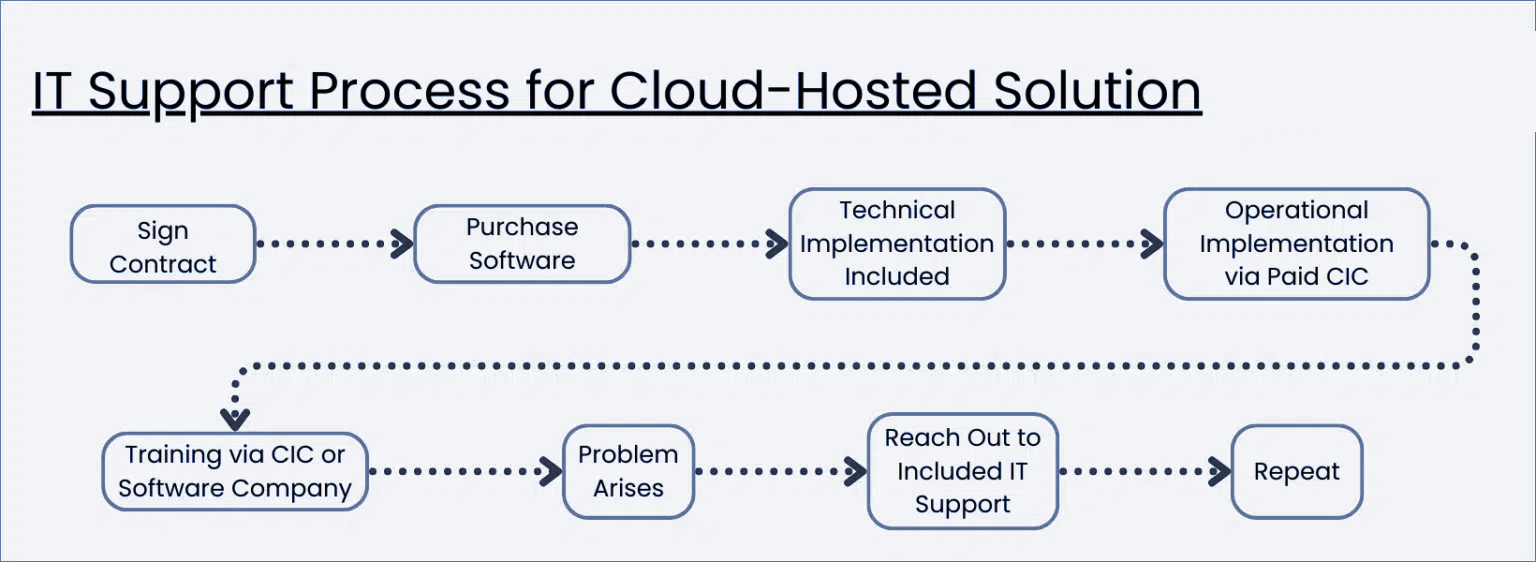
Juris in the Cloud
Juris operates as a desktop/server-based application, allowing it to be deployed either on your firm’s in-house servers or in a Private Cloud environment.
Juris Suite, especially, is a powerful software, and thus demands considerable server resources (like processing capabilities and RAM) to deliver peak performance. Hosting Juris in the cloud should be entrusted only to proficient and seasoned cloud service providers.
Many law firms, drawn by the allure of reliability, security, and mobility offered by cloud technology, mistakenly believe that migrating to a web-based application is the sole path to harness these advantages.
However, Juris and other server-based software frequently possess deeper functionalities compared to their cloud-native counterparts. By forsaking your server-centric platforms in favor of exclusively cloud-based ones, there’s a risk of sacrificing software power and capability.
By operating Juris within a secure Private Cloud through a Virtual Desktop infrastructure, your law firm can reap the benefits of cloud technology, without the burden of server maintenance or IT challenges.

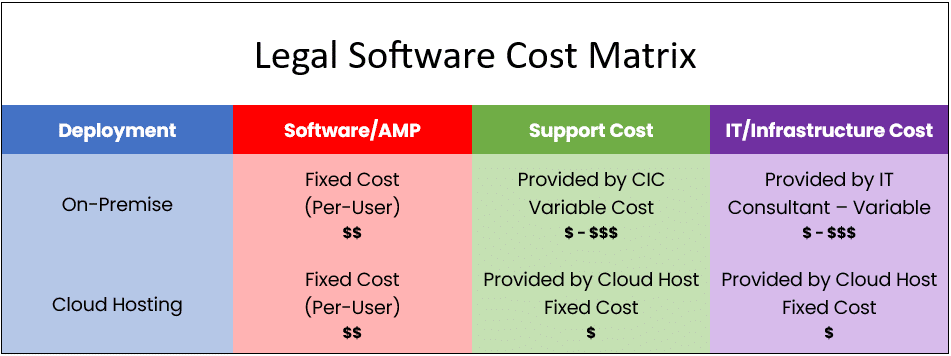
Cost of On-Premise vs. Cloud-Hosted Software
A critical consideration in your decision-making process should be the comparative costs of maintaining software in-house versus entrusting it to a cloud-hosting service.
From the comparison table provided below, it’s evident that hosting software on-premise often emerges as the pricier and less predictable option.
Opting for cloud-hosting not only alleviates you from the burdens of server and software upkeep but also spares you the hassles of IT support for your legal practice.
The reason?
Cloud hosting services run your software on their dedicated servers and periodically manage updates for you. As they specialize in these services, efficiencies are achieved, costs are curtailed, and those savings subsequently benefit you.
For a comprehensive understanding and comparison, consider using our Cloud Cost Comparator to help you determine the most efficient, cost-effective solution for your law firm.
Juris as a Cloud App
Law firms utilizing software like Juris traditionally have the responsibility of purchasing, maintaining, and managing their servers, a practice that has been constant since the inception of Juris .
Contrastingly, cloud-native software allows users to easily access the application over the internet using a browser, eliminating the demands of server upkeep.
The most straightforward approach to this transition is to migrate Juris to a standard cloud platform such as Uptime Cloud. This service transforms Juris into a web-based application running in the cloud, thereby negating the necessity for server infrastructure.
Yet, this may not be the universal solution for every firm, and here’s why…
For law firms that predominantly operate using Juris or comparable singular software, such a cloud platform might be adequate. However, if your firm integrates other software solutions, like Time Matters for document management, individualized strategies might be imperative for each distinct software.
In such scenarios, you might discover that a holistic approach, like adopting a Private Cloud or Virtual Desktop, aligns better with the comprehensive requirements of your firm.
For a deeper dive into these alternatives, continue reading ahead!

IT Support for Law Firms:
Understanding your options for support is essential to knowing what to expect when something hits the fan — or better yet, before something does.
Juris in a Private Cloud
Now that we’ve explored the advantages of using Juris in the cloud, let’s examine its operational dynamics in such a setup.
But first, a brief distinction between cloud-based (or web-based) software and desktop/server-based software.
Before the widespread adoption of cloud computing, most software globally, including practice management tools like Juris, were installed and run from a firm’s in-house servers, accessible via desktop computers for every staff member.
The “heart” or foundational components of the software, including its database, were housed on this server. Thus, a server was essential for operating on-premise software like Juris.
In essence, owning and maintaining a server became a fundamental necessity for the deployment of such software. Handling servers and internal IT was a common overhead for law firms that aimed to use legal management software.
That was the norm.
However, the contemporary tech landscape introduces us to the concept of a Private Cloud. A Private Cloud is an outsourced, managed IT environment serving a role equivalent to, or even surpassing, a traditional server. It houses a law firm’s legal tools, documents, emails, and more, providing enhanced mobility, dependability, and protection.
Desktop/server-based software like Juris inevitably requires a server. But when integrated into a private cloud, the private cloud effectively assumes the role of the server.
To be more specific, a typical law firm private cloud for Juris will often include:
The “Private” in Private Cloud
Private Clouds are so-called because every law firm (called a “tenant,” in cloud computing parlance), has their own segregated, dedicated working environment.
In most cases, that means:
- Dedicated/Private Virtual Servers
- Dedicated/Private Virtual Network (VLAN)
- Dedicated/Private Active Directory
- Dedicated/Private SQL Server/SQL Database
For those who might not be well-versed in these technological nuances, the bottom line is this: your law firm possesses a dedicated, secure digital realm exclusively for its software, files, and data, separate from other legal practices. This brings an extra layer of data security and privacy for your firm.
That’s the “back-end” of running Juris in the cloud. You and your team will interact with the Private Cloud via what’s known as a Virtual Desktop.
Juris in a Virtual Desktop
Having established the advantages of running Juris in a cloud environment and how a Private Cloud can guide this shift, it’s essential to clarify what operating within a Private Cloud entails. How will each attorney and staff member in your firm navigate this environment?
The key to understanding this is the concept of a Virtual Desktop.
Simply put, a Virtual Desktop is your familiar computer interface – just like what you see on your Windows or Mac computer – but hosted in the cloud. It offers you the privilege of accessing your desktop anytime, from anywhere, and on any device. This means you can seamlessly work whether you’re in the office, at home, or on the move.
Within this Virtual Desktop environment, all the tools you rely upon daily are housed. This includes popular programs like Microsoft Word, Excel, and Outlook, as well as specialized software like Juris, your chosen accounting tool, or any document management systems you utilize.
The beauty of the Virtual Desktop lies in its centralized nature. Instead of downloading software on individual devices, everything is installed and updated within the Virtual Desktop. This ensures every team member always has access to the latest tools and files they need, no matter where they log in from.
This digital workspace not only serves as a secure storage vault for your files but also as a collaborative platform where team members can cohesively work on projects. The Virtual Desktop breaks the chains binding you to a single machine or office location, giving the freedom to work through any internet-enabled device.
The term sometimes used in the industry for this setup is “Desktop-as-a-Service” or DaaS. This mirrors the “Software-as-a-Service” or SaaS model many are familiar with, but instead of just software, it’s your entire desktop, hosted and maintained remotely.
How Virtual Desktops Work
In a traditional computing arrangement, the essential software tailored for your law firm’s operations resides directly on the tangible hardware at your office – be it a desktop or a laptop. This conventional method relies heavily on localized operations, with each application nested within your specific device.
Conversely, within the framework of a Virtual Desktop, your local machine is often free from the bulk of direct software installations.
Usually, the singular element you’ll find on your local computer is a simple shortcut. This icon acts as a conduit, seamlessly connecting you to the expansive realm of your Virtual Desktop.
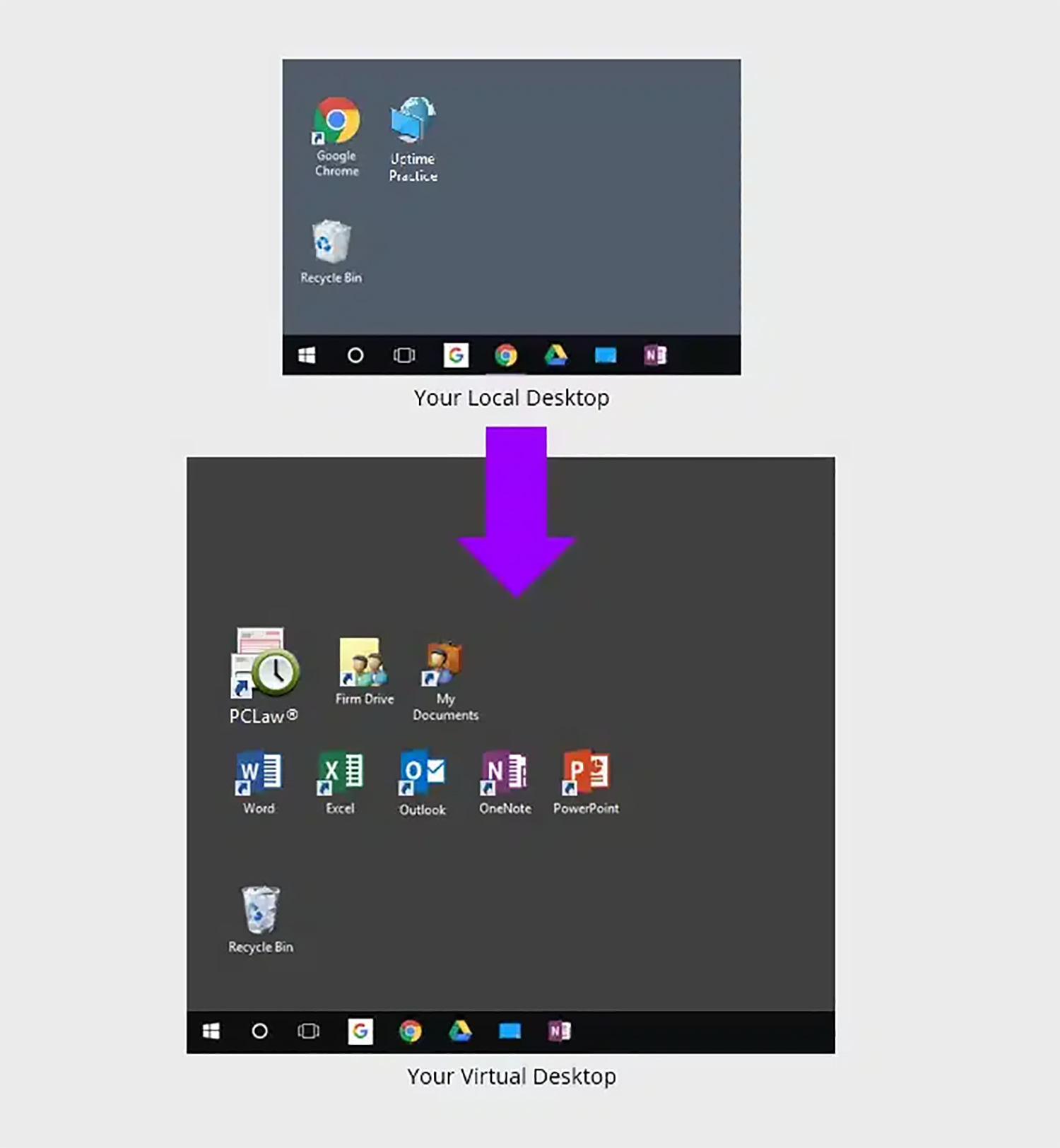
Upon logging into your Virtual Desktop, you or any member of your team can access all of your law firm’s software, documents, and data.
This includes:
- Your Juris Software
- Your Other Legal Software
- Your Productivity Software (Microsoft Office)
- Your Documents, Files and Folders
- Your Outlook & Email
This setup ensures that members of your firm can seamlessly access Juris, alongside other applications, documents, and data, irrespective of their location or the device they’re using.
Furthermore, with Virtual Desktops, the cumbersome task of installing, updating, and managing applications on every computer in the firm is no longer a concern. This responsibility is adeptly managed by your Cloud Service Provider, ensuring that all your software remains current, facilitating smoother operations.
Such an approach not only centralizes the management of your software assets but also entirely liberates you from the associated duties, bringing forth unparalleled efficiency and ease.
Virtual Desktops for Law Firms:
How They Work, and Why Your Law Firm Should Probably Use Them.
Should My Law Firm Use Virtual Desktops?
Virtual Desktops bring many advantages to law firms. Specifically, Virtual Desktops are likely the best technology route in any of the following scenarios.
- Your firm is committed to the Juris software
- Your firm uses a combination of devices (Windows, Macs, Tablets)
- Your firm needs to be able to work from anywhere
- You’re tired of dealing with servers and IT headaches
- Your firm needs to keep your applications an data secure
Closing the Loop
Again, I’m not advocating for one particular option over the others — indeed, your Juris support strategy might very well be a blend of two or even all three of these choices.
Ultimately, it boils down to what best suits the unique requirements of your law firm. I urge you to weigh your options. Engage with multiple LexisNexis Certified Independent Consultants. Consult with several Private Cloud service providers. Dive deeper into online research or have discussions with peers who also utilize Juris.
Wishing you all the best in crafting the optimal strategy for Juris support.
Onward and Upward!
Frequently Asked Questions

Uptime Legal’s Technology Solutions
Cloud, software, IT, and document management built for today’s law firms.