
— Free Kit · Windows End of Support —
Windows 10 Is Out of Support. Here’s What Your Firm Should Do Now
The first paid year of Windows 10 Extended Security Updates (ESU) ended on October 13, 2026. A Windows 10 PC now gets security updates only if someone has bought a second year of ESU for it, at $122 to $183 per PC.
Our recommendation: skip ESU. Upgrade every PC that can run Windows 11, and replace every PC that can’t.
About 10% of the computers we support were still running Windows 10 in October 2026. Across the US the share is higher: StatCounter put Windows 10 on about 19% of Windows desktops in September 2026. If your firm has a few left, it isn’t alone.
Free Kit
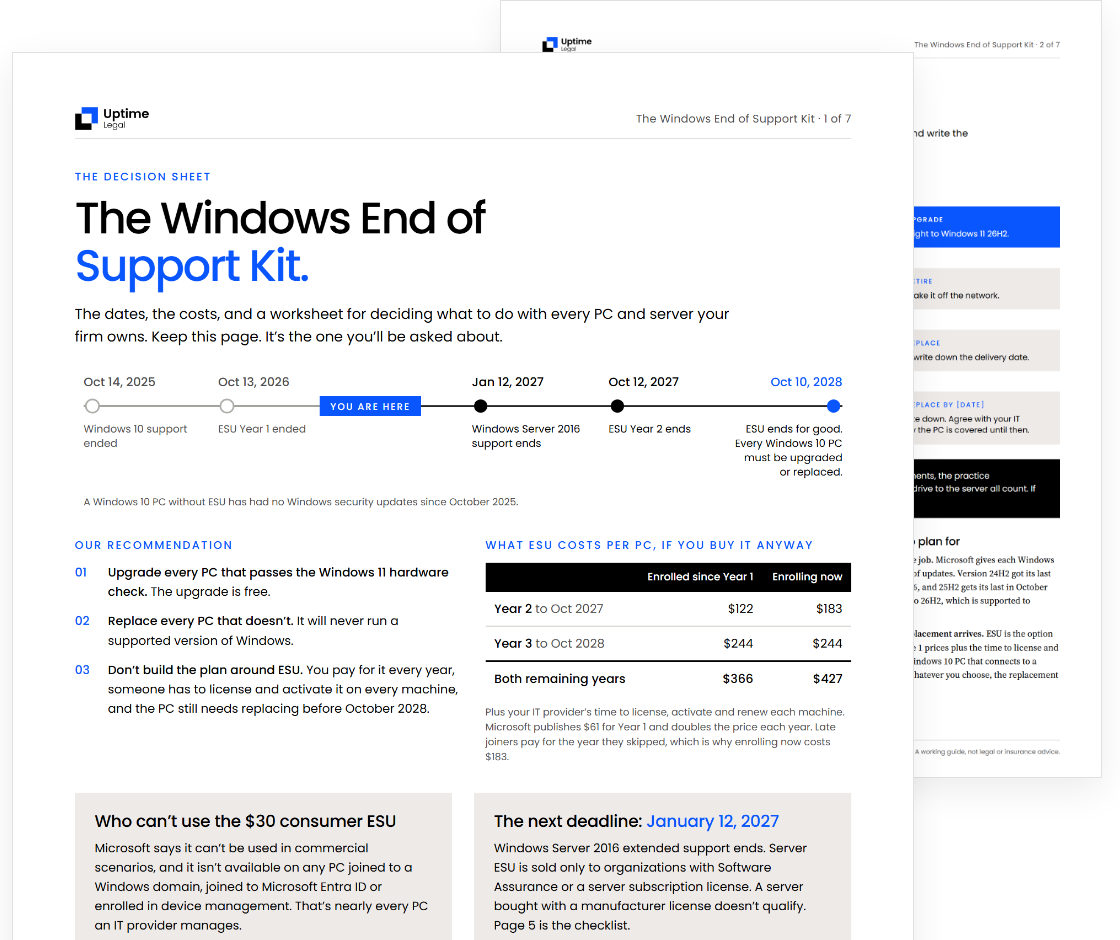
Get the Windows End of Support Kit
A one-page decision sheet, a per-PC inventory worksheet, a replacement budget sheet and a Windows Server 2016 checklist.
Free. Written by Uptime Legal for law firm partners and administrators.
The Deadlines
Every date that matters,
in order.
Oct 14, 2025
Passed
Windows 10 support ended. Since then, a Windows 10 PC gets security updates only through paid ESU.
Oct 13, 2026
Passed
ESU Year 1 ended. A PC whose firm didn’t buy Year 2 got its last security update.
You are here
Jan 12, 2027
Windows Server 2016 support ends. A firm that keeps its files or practice management software on one needs a plan before then.
Oct 12, 2027
ESU Year 2 ends. A firm still on Windows 10 pays for Year 3, the last one.
Oct 10, 2028
ESU ends for good, and so do Microsoft 365 security updates on Windows 10. Every Windows 10 PC has to be upgraded or replaced by this date.
What ESU costs per PC, if you buy it, is in the price table further down.
What Changed
What changed on
October 13, 2026.
Year 1 of ESU covered Windows 10 PCs through the October 13, 2026 security update. A firm that bought Year 1 and stopped there has had its last Windows 10 patch. A firm that never bought ESU has had none since October 2025.
The PCs still work, and Microsoft 365 apps still open. Microsoft keeps shipping security updates for Microsoft 365 Apps on Windows 10 until October 10, 2028, but stops their feature updates at version 2608.
Microsoft also says those PCs should move to Windows 11. Call its support about a problem that only happens on Windows 10, and that’s what it will ask you to do.
Our Recommendation
Upgrade or replace.
Skip ESU.
Decide PC by PC, not firm by firm. Most offices end up with a mix.
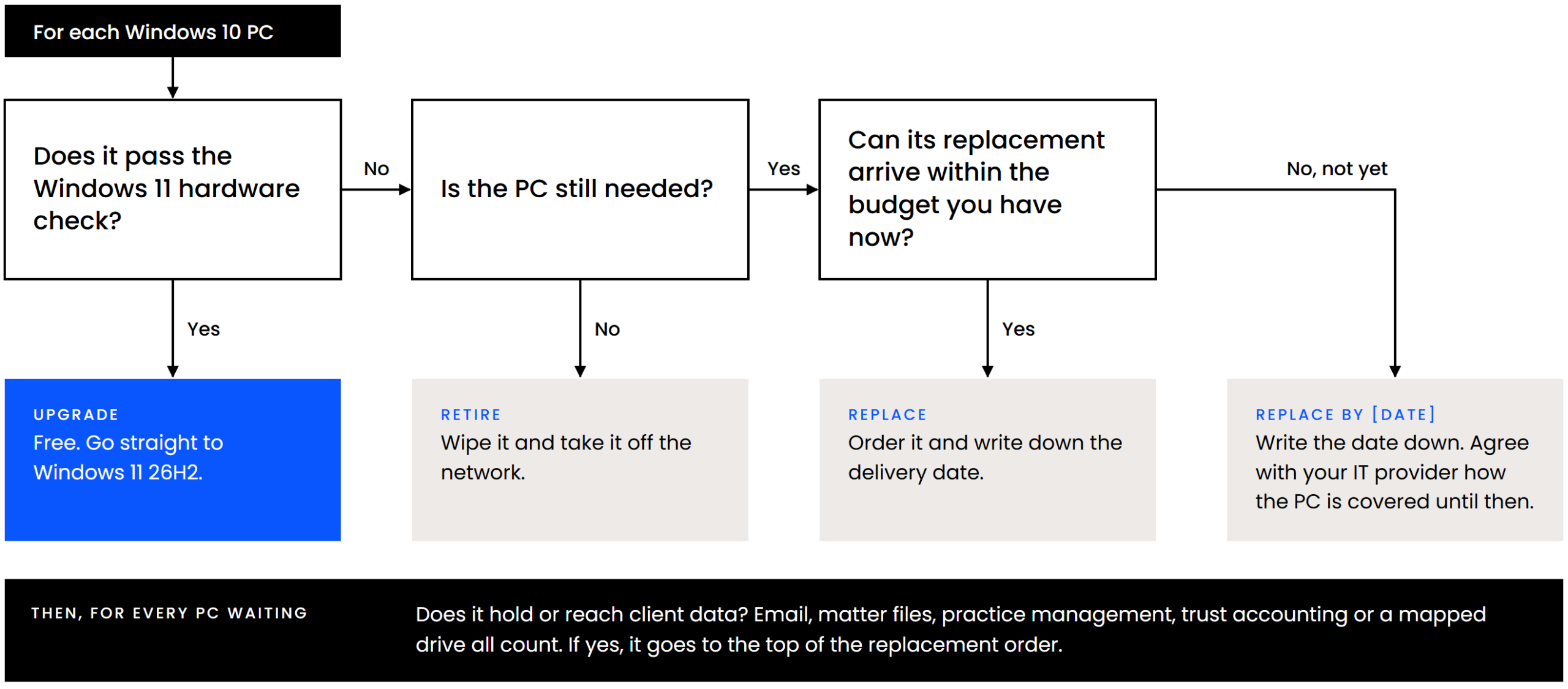
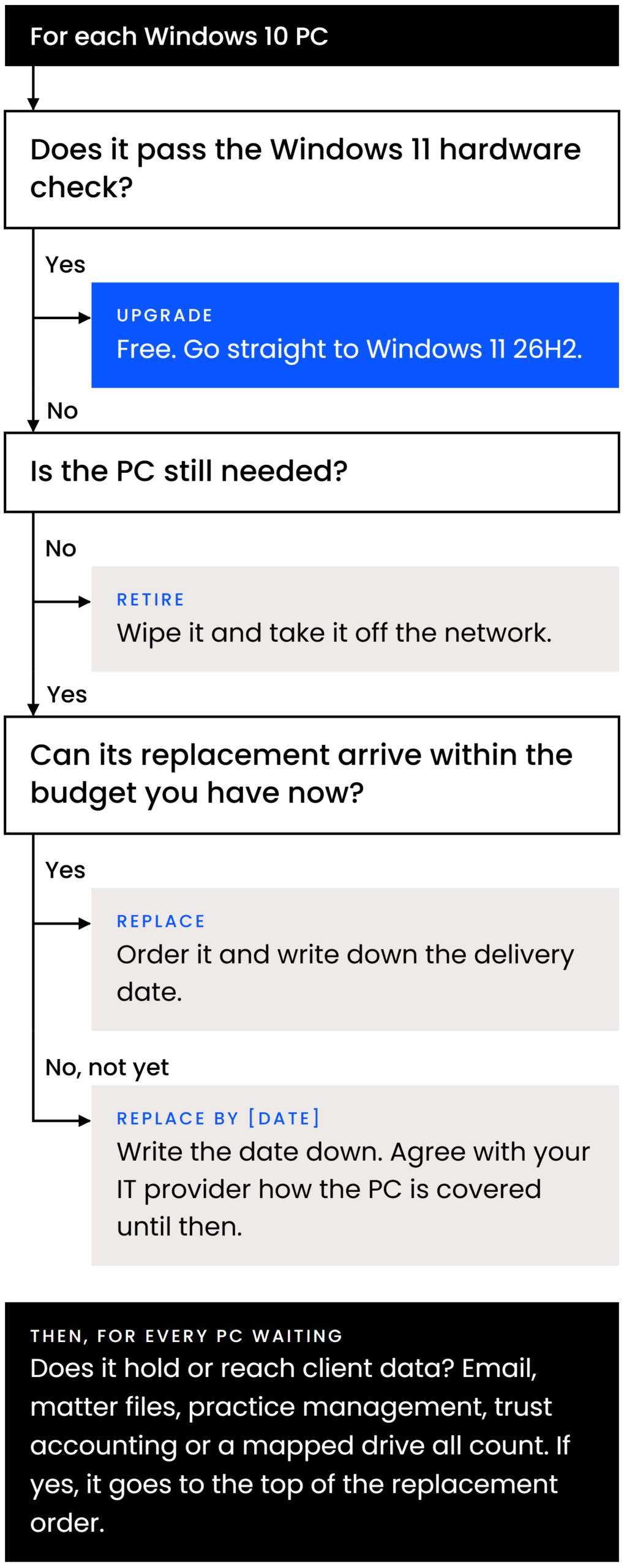
Upgrade every PC that can run Windows 11
The upgrade from Windows 10 Pro to Windows 11 Pro is free on any PC that meets Microsoft’s hardware requirements:
The TPM and the processor list are where older PCs fail. Microsoft’s PC Health Check app checks one machine; your IT provider’s management tool checks them all.
Replace every PC that can’t
A PC that fails the hardware check won’t ever run a supported version of Windows, so every dollar spent keeping it on Windows 10 delays a purchase you’ll make anyway.
Upgrading isn’t a one-time job either. Microsoft gives each Windows 11 Pro version 24 months of updates. Version 24H2 got its last update on October 13, 2026, and 25H2 gets its last in October 2027, so upgrade straight to 26H2, which is supported to October 2028.
Legal software is rarely the blocker. These versions all list Windows 11 as supported:
Intuit has already ended QuickBooks Desktop support on Windows 10. Where a legal app does stand in the way, it’s an older version that needs upgrading anyway.
In our experience, what keeps firms on Windows 10 is the cost of replacing older hardware, and not realizing the deadline has passed.
Why Not ESU
Why we don’t recommend Windows 10 ESU.
“Licensing and deploying the ESU for Windows 10 on old computers just isn’t worth it. It’s a lot of overhead beyond just paying the license fee to Microsoft.”
Mike Dewdney · Director of Cloud & IT, Uptime Legal
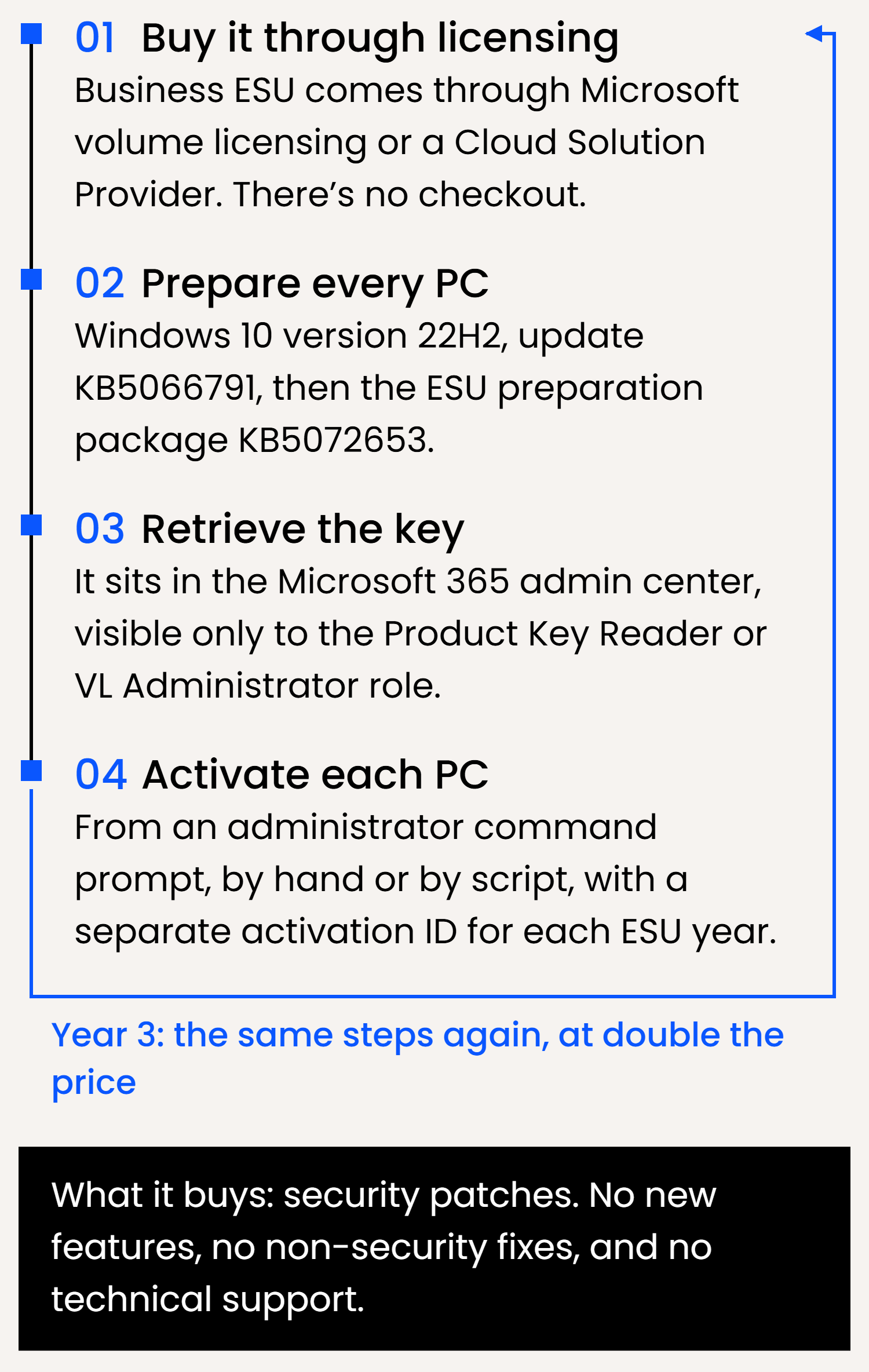
Microsoft says much the same: its lifecycle FAQ calls ESU “a last resort paid option” and “a temporary bridge” to a supported platform. The license fee is the visible cost, and Microsoft’s own instructions for business ESU show the rest:
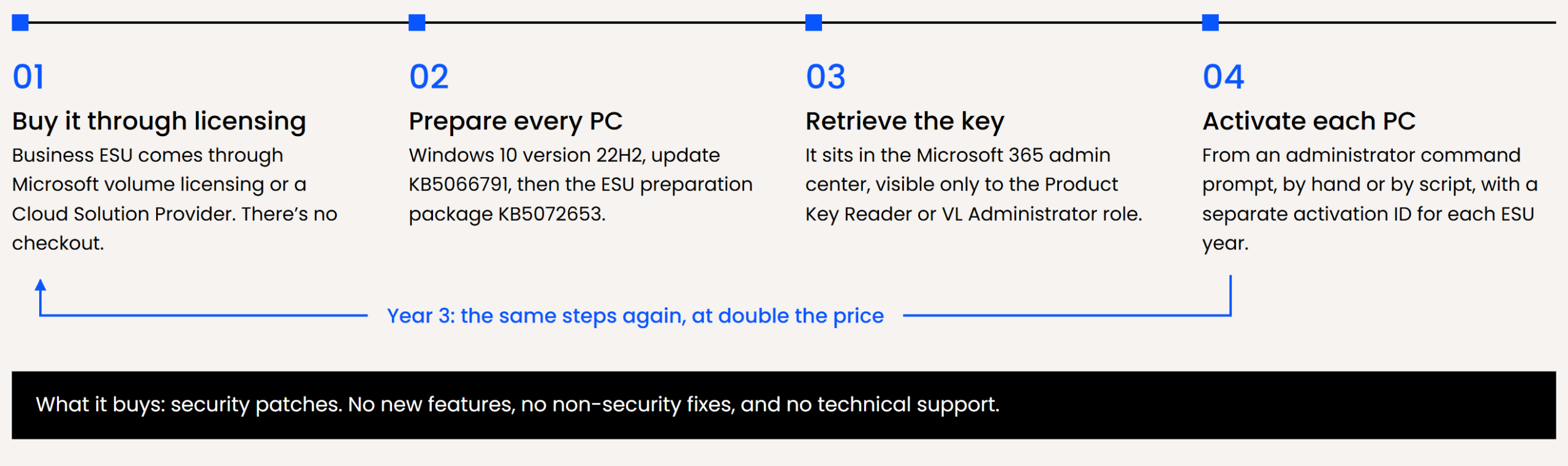
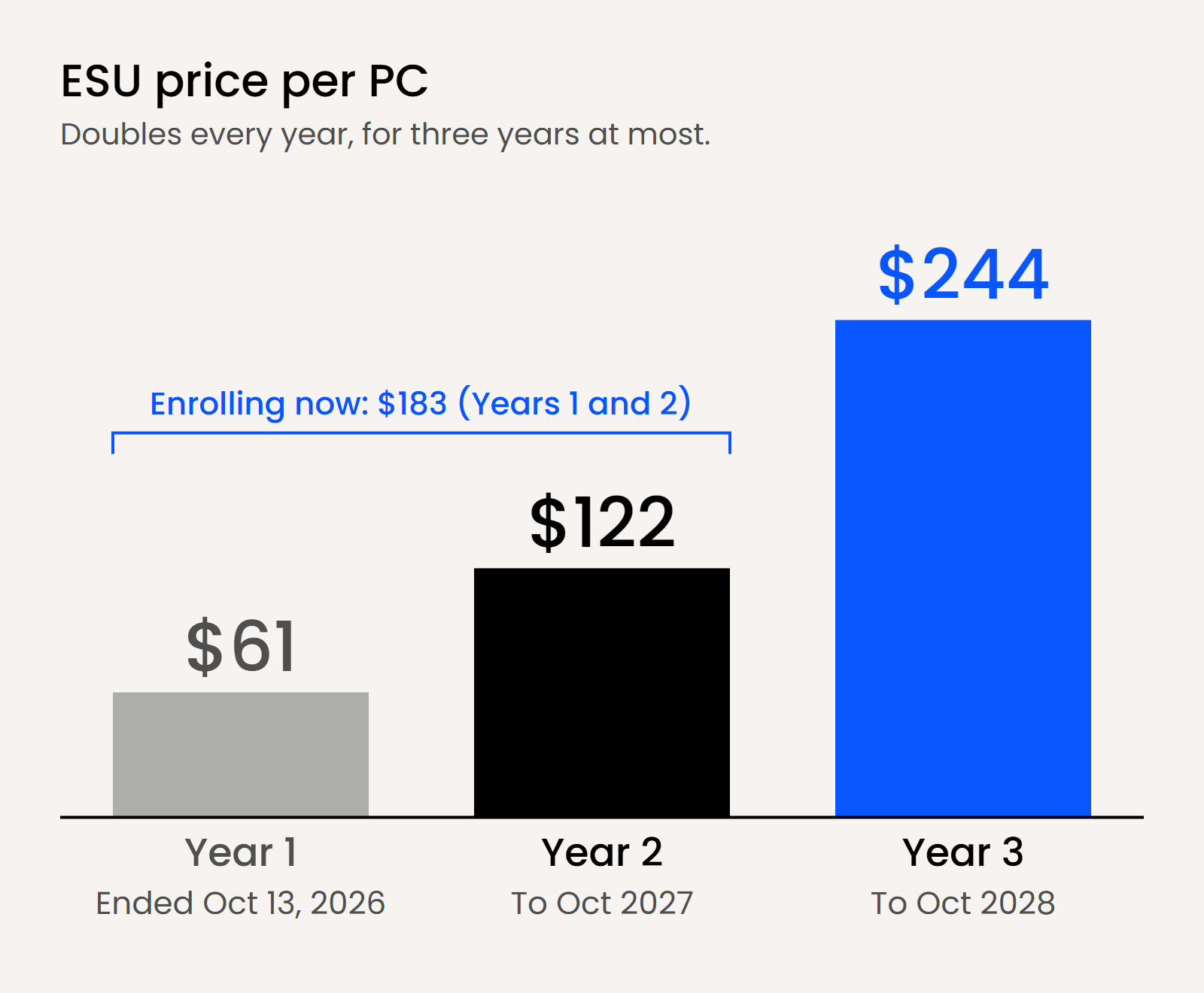
What ESU costs per PC if you buy it anyway
ESU year
Coverage
Enrolled since Year 1
Enrolling now
Year 1
Oct 2025 to Oct 13, 2026
$61
Ended
Year 2
Oct 2026 to Oct 2027
$122
$183 (Year 1 + Year 2)
Year 3
Oct 2027 to Oct 2028
$244
$244
Three years
$427
$427
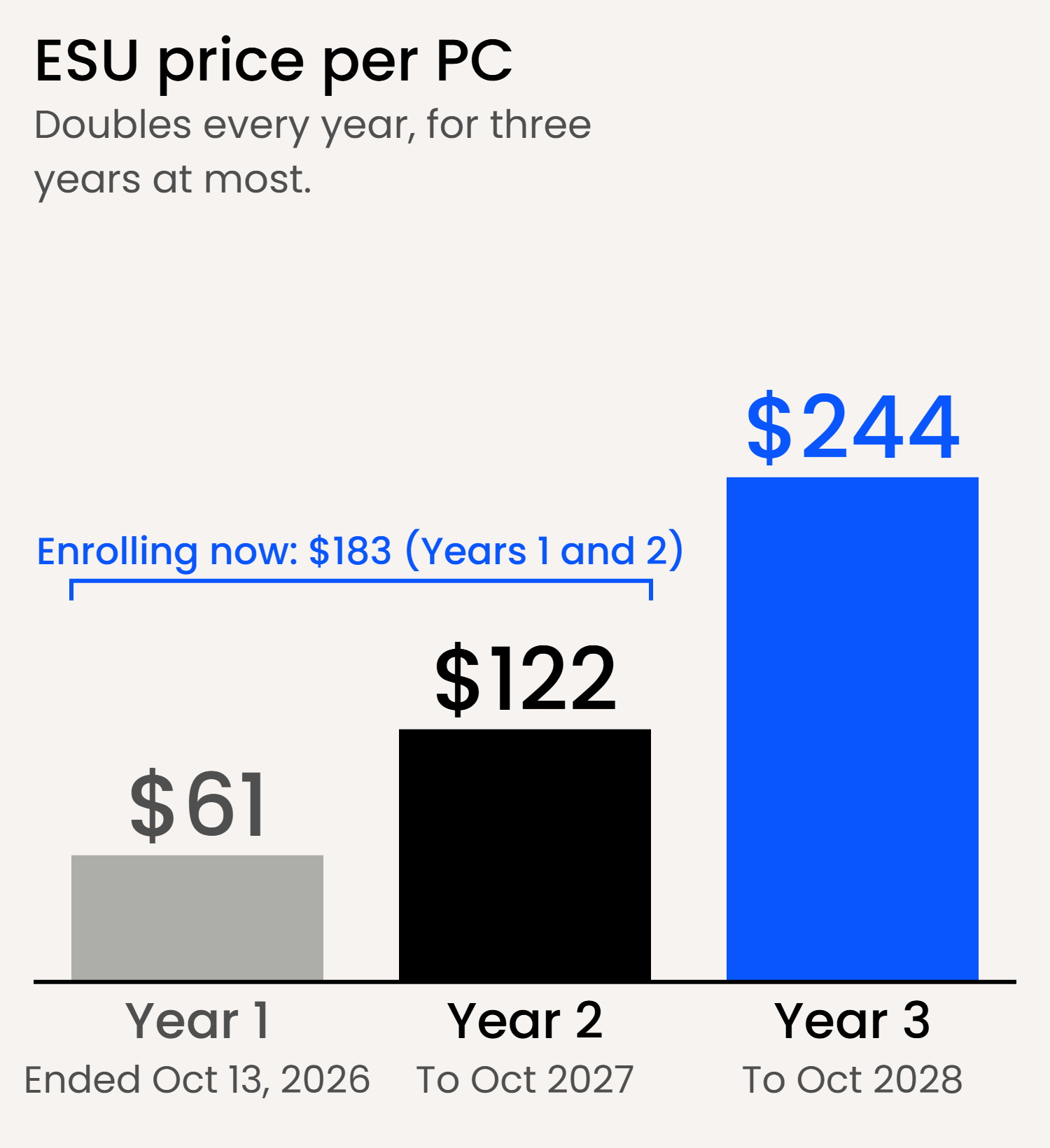
Microsoft publishes the $61 Year 1 price and one rule: the price doubles each year, for a maximum of three years. The Year 2 and Year 3 figures are that rule applied.
To price it for your firm
- Coverage through October 2027: your Windows 10 PCs × $183
- Coverage through October 2028: your Windows 10 PCs × $427
- Plus your IT provider’s time to license, activate and renew each PC
Put that next to the cost of replacing the same PCs, which you’ll pay before October 2028 either way.
Who Will Ask
Your insurer, your clients, your bar.
Your cyber insurer
Renewal applications ask:
- What your patching and lifecycle management policies are
- Whether you run any end-of-life or end-of-support software (many ask outright)
A firm running Windows 10 without ESU can’t answer those honestly and pass. With ESU it can, but only by disclosing an end-of-support operating system, for the year it has paid for, with a dated plan to retire it.
Our cyber insurance for law firms page covers what underwriters check and how to answer when the honest answer is “partly.”
Your clients
In the ABA’s 2023 Cybersecurity TechReport, 22% of respondents said a client or potential client had asked their firm to complete a security questionnaire. Those questionnaires ask about patching and lifecycle management too, and the client reads your answer before deciding to send you work.
Your bar
- ABA Model Rule 1.6(c) requires reasonable efforts to prevent unauthorized access to information relating to a client.
- Comment 8 to Rule 1.1 ties competence to keeping up with the risks of relevant technology.
A PC that has gone a year without security patches, holding client files and email, is hard to describe as a reasonable effort. Your state’s version of the rules and its ethics opinions are the ones that bind you.
The Next Deadline
Windows Server 2016 is next:
January 12, 2027.
Many firms that still run Windows 10 also run a Windows Server 2016 machine in a closet: the file server, the practice management database, the Tabs3, PCLaw or Time Matters server. Mainstream support for Windows Server 2016 ended in January 2022. Extended support ends on January 12, 2027.
Server ESU is harder to get than PC ESU. Microsoft sells it only to organizations with Software Assurance on their server licenses or a server subscription license, either through Azure Arc, with billing from January 13, 2027, or yearly through volume licensing. It covers the Standard and Datacenter editions, not Essentials, and Microsoft publishes no price. A server bought with a license from the manufacturer and no Software Assurance doesn’t qualify.
Make the server decision and the PC decision together. A firm that replaces its PCs this winter and then finds its practice management server out of support has done the project twice.
Without Software Assurance, three choices
- Upgrade the server operating system if the hardware supports it.
- Replace the server.
- Move the applications and files it holds to a hosted environment and retire it. Uptime Cloud hosts Tabs3, PCLaw, Time Matters, ProLaw and Juris.
This Month
What to do this month.
01
Count.
List every PC and server, its operating system and version, and whether each PC passes the Windows 11 hardware check. Your IT provider’s management tool exports this in minutes.
02
Upgrade the PCs that pass.
The upgrade is free, and it’s the cheapest fix on the list.
03
Order replacements for the PCs that fail.
Put a delivery date against each one.
04
Put Windows Server 2016 on the same plan.
Decide before the end of the year.
05
Update your answers.
Your insurance application, any open client security questionnaire and your incident response plan all describe your systems. Make them describe the systems you have now.
FAQ
Frequently asked questions.
What happens when Windows 10 is no longer supported?
The PCs keep running and Microsoft 365 apps keep opening. What stops is Windows security patching, plus Microsoft technical support for Windows 10.
Microsoft’s own position is that antivirus software, including Microsoft Defender, isn’t enough on its own. For a firm holding client data, an unpatched operating system is what your insurer, your clients and your bar will each ask about.
Can our firm use the $30 consumer ESU?
No. Microsoft says the consumer program can’t be used in commercial scenarios, and it isn’t available on a PC joined to a Windows domain, joined to Microsoft Entra ID or enrolled in device management.
A PC your IT provider manages fails at least one of those tests. The consumer program also ends on October 12, 2027, a year before the commercial one.
Is there any way to get Windows 10 ESU for free?
For business PCs, only by moving the desktop to Microsoft’s cloud. Windows 10 virtual machines in Windows 365 and Azure Virtual Desktop get ESU at no extra cost, and so do Windows 10 PCs that connect to a Windows 365 Cloud PC, for up to three years while the Windows 365 subscription is active.
We didn’t buy Year 1. What would we pay to start now?
$183 per PC for coverage through October 2027, because Microsoft requires late joiners to pay for Year 1 as well as Year 2. Year 3 is another $244 per PC. Add the time to license and activate each machine.
Will Microsoft 365 stop working on Windows 10?
No. Microsoft 365 Apps keep receiving security updates on Windows 10 until October 10, 2028. They stop receiving new features at version 2608, and if you open a support case for a problem that only happens on Windows 10, Microsoft’s support team will ask you to move to Windows 11.
Is Windows Server 2016 covered by the same ESU?
No. Windows Server 2016 has its own ESU, sold only to organizations with Software Assurance or a server subscription license, through Azure Arc (billed from January 13, 2027) or yearly through volume licensing. It doesn’t cover the Essentials edition, and a server bought with a manufacturer license and no Software Assurance doesn’t qualify.
Inside the kit · 7 pages
- The decision sheet
- How to decide, one PC at a time
- PC inventory worksheet
- Replacement plan and budget
- Windows Server 2016 checklist
- The three questions you’ll be asked
- What to do next
This page is a working guide, not legal or insurance advice. Prices are Microsoft’s published US figures and can change.
Not sure where your firm’s IT stands overall? The free IT Health Check takes a few minutes and grades your firm across security, cloud and backups.