
Table of Contents
Let’s talk about ProLaw Support.
ProLaw, developed by Elite (a division of Thomson Reuters), serves as a comprehensive Law Practice Management (LPM) software solution.
ProLaw stands out as perhaps the only legal software that encompasses all three essential pillars for operating a law practice — Law Practice Management, Legal Document Management, and Law Firm Accounting.
However, navigating through the various support options, such as ProLaw itself, authorized consultants, and private cloud solutions, can be a challenge.
In this article, we will discuss the various options you have to choose from while providing strategies to ensure you receive the best support for ProLaw.
By the end, you’ll have the answers to:
Whether you’re a seasoned ProLaw user or a firm newly exploring its features, this guide seeks to support you in unlocking the full potential of this comprehensive software, leading to heightened efficiency and productivity for your firm.
Introduction: The Best ProLaw Support
Simply put, ProLaw is powerful. Although it might be excessive for solo practitioners and very small firms (those with fewer than 10 members), it’s an excellent choice for midsize and larger firms seeking extensive functionality in their practice management platform.
ProLaw is modular.
Essentially, this means that they offer a suite of software modules, allowing firms to select and utilize the components they require (and potentially expand to other modules as needed).
The three core pillars of the ProLaw software suite are Practice Management, Document Management, and Accounting — you’ll be piecing components together from these categories. They may not be the best solution in each category, but they do serve well for firms looking to get their main pieces of software from a singular company.
The implementation of ProLaw can therefore be customized to your needs. However, as with any software, you’ll undoubtedly run into issues along the way.
That’s where having substantial ProLaw Support comes in, and where the focus of this article will be.
The most important thing to remember is that ensuring that you have set up support for ProLaw optimally, so you won’t have any headaches down the road.
ProLaw Review:
Learn about the features, utilization, and getting ProLaw for your law firm.
ProLaw Software Overview
ProLaw is can be utilized in 2 versions — on-premise and web-based, with both being hosted on a server.
Typically, when you opt for a web-based software, you are giving up some features and robustness in exchange for a more lightweight, flexible platform. This is no exception, but it may not be a problem.
Let’s discuss the differences between the two and what you can expect.
ProLaw On-Premise
ProLaw is long-standing software that offers robust features for those willing to utilize their traditional, on-premise software.
Of course, there are drawbacks to on-premise software such as having to concern yourself with server ownership and not being able to use the software from anywhere aside from the office (unless you have a private cloud or another workaround).
For the moment, let’s say that you don’t mind maintaining servers or have already decided to pursue a cloud-solution.
In which case, you’ll be able to look forward to the following standout features:
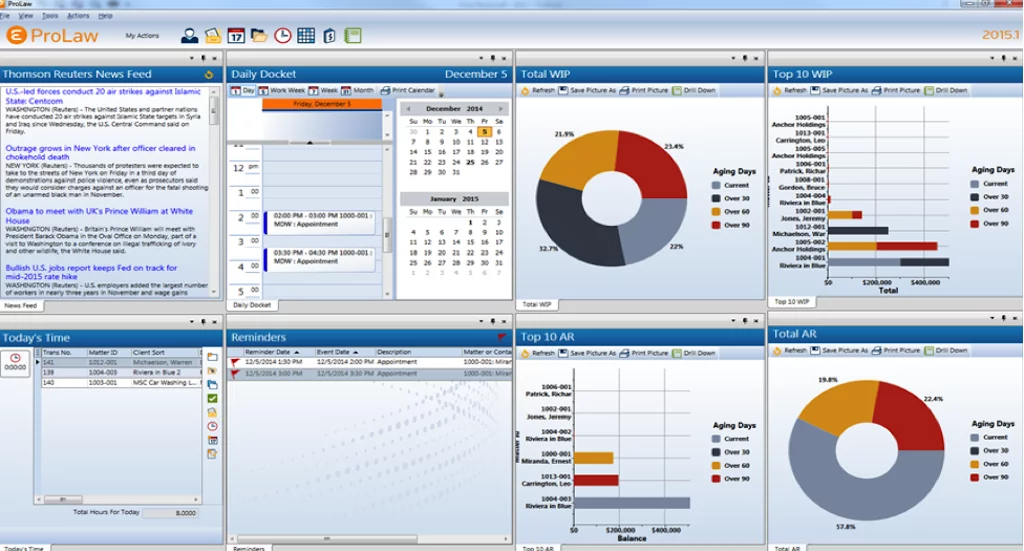
This server/desktop-based software offers a broad array of other features, including:
However, it’s important to keep in mind that ProLaw does not offer these features:
ProLaw Workspace
In the past, ProLaw software was typically installed on each computer (be it desktop or laptop) within your firm, with its database housed on your firm’s internal servers or on a Private Cloud.
Yet, as legal practices evolve, many firms are drawn to the user-friendly nature of contemporary practice management tools that run directly in a web browser. Of course, many want this without having to compromise on functionality or making a complete switch in legal software.
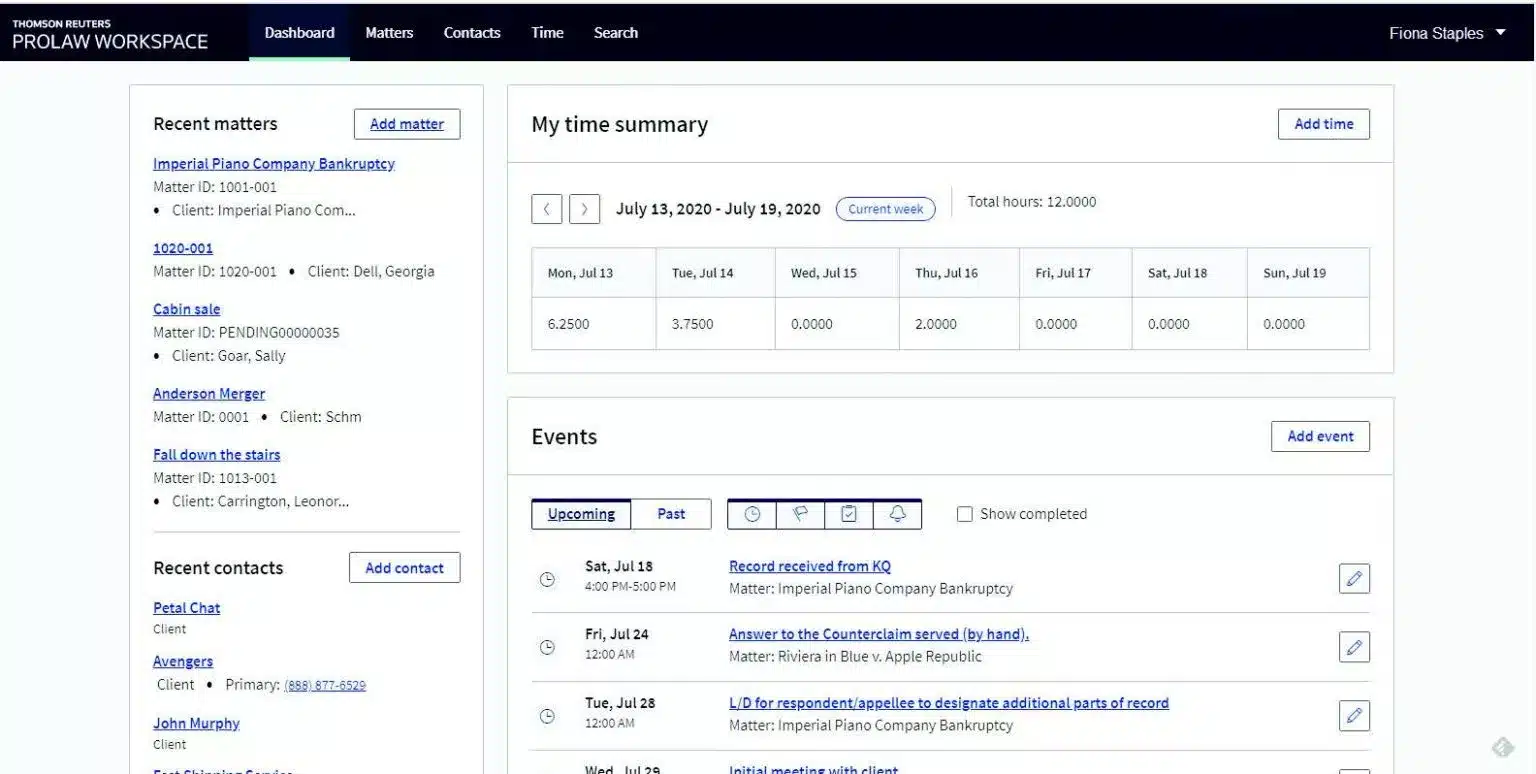
Enter ProLaw Workspace: an optional extension of the ProLaw suite. This provides selected users within your firm with a streamlined, web-centric interface to access the ProLaw system. Crucially, ProLaw Workspace isn’t a totally different system but an alternative access point to the same core database that the desktop version of ProLaw taps into.
This dual approach essentially offers your firm flexibility and choice: a feature-rich desktop experience or a more straightforward, browser-based version.
So, while some members of your firm might prefer the comprehensive ProLaw desktop application, others might opt for the web-accessible ProLaw Workspace. Both options have their unique merits and both require servers to run.
What’s the Best Option
The Desktop Interface is ideal for “power users” in your firm – those who require the comprehensive capabilities of case management, document management, and intricate accounting features.
On the other hand, the Web-Based Interface caters to more casual users within your firm. These users benefit from essential ProLaw features without the need for the exhaustive functionalities present in the robust desktop version.
When you’re deciding who will use what, it’s helpful to keep in mind that some members of your firm may prefer this slimmed down add-on as opposed to the traditional, feature-rich version.

ProLaw Workspace: Review & Guide for Law Firms:
Gain a deeper understanding of ProLaw’s Workspace offering.
Setting Up ProLaw
ProLaw must be purchased from ProLaw itself.
From there, ProLaw also requires that they do the initial setup (or at least particular parts of it). Since ProLaw is a robust platform, you’ll find that the server requirements may be more extensive than what you initially thought.
This is why it’s important that your IT company or Private Cloud Provider has a good working relationship with ProLaw.
Keep in mind that both ProLaw traditional and ProLaw Workspace still require servers in some fashion.
Your real decision is whether you want to have servers of your own or if you’ll want to absolve your firm of server responsibility by choosing a reliable cloud provider. We’ll dig more into that later.
Getting ProLaw Support
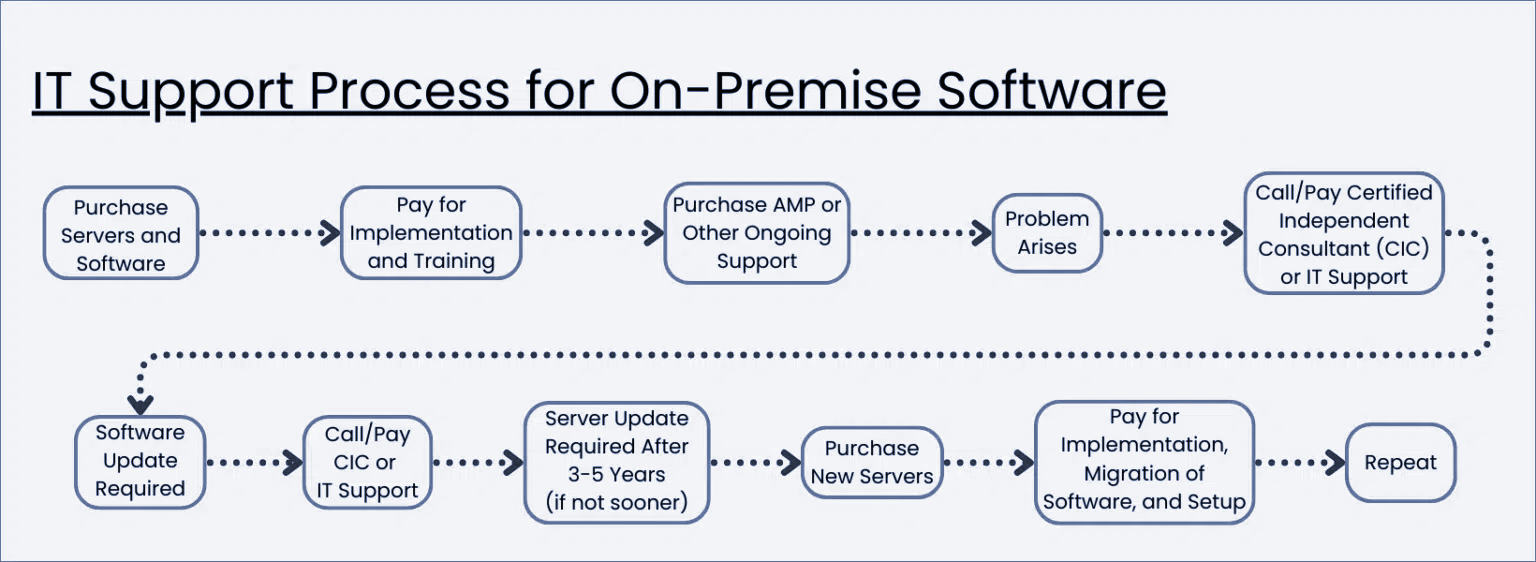
For ProLaw users, there are three specific pathways to access support. Depending on your firm’s utilization of ProLaw and the support level needed, you can opt for one or a mix of these pathways.
1. ProLaw
When you acquire ProLaw and maintain your Annual Maintenance Plan (AMP), you are eligible for product support directly from ProLaw. This support encompasses help desk assistance as well as access to the ProLaw online knowledge base and training resources.
This ProLaw support option is particularly suitable for firms that need support sporadically, typically for “how do I” inquiries or rapid solutions. Given that it’s included in the cost of your AMP, I always advise firms to leverage this avenue, and supplement with other methods if needed.
2. Certified Independent Consultants (CICs)
There exists a plethora of third-party consultants and professional service teams, but only a few are certified to provide support for ProLaw. These are experts in legal software and technology who have undergone the necessary training and acquired certification to support, deploy, and in certain instances, tailor ProLaw to specific needs.
Often, these Certified Implementation Consultants (CICs) operate as consulting agencies, though some function as independent consultants. They tend to specialize in deeper, hands-on ProLaw support, notably in integrating ProLaw into your firm’s procedures and workflows, training your personnel, and modifying ProLaw to align with your firm’s operations.
Even though ProLaw offers day-to-day support as part of the AMP, many legal practices choose to engage their CIC exclusively for ProLaw support, even when they’re eligible for direct support from ProLaw.
It’s worth noting that CICs, understandably, have fees for their services, so it’s essential to allocate a budget for this.
3. Private Cloud
Lastly, there’s the private cloud.
The private cloud has emerged as a modern alternative to maintaining and overseeing onsite servers and IT infrastructure. It hosts your ProLaw, other legal software, documents, and email on a unified platform, allowing your firm to access them from anywhere without the hassles associated with managing IT onsite.
A private cloud tailored for legal needs will be specially designed to host ProLaw, with all necessary ProLaw support, updates, and maintenance incorporated into the service.
Opting for a legal-centric Private Cloud may be the right choice if your firm seeks mobility, enhanced security offered by cloud technology, desires to steer clear of managing servers and IT in-house, and wishes to consolidate IT, hosting, and ProLaw support into one comprehensive package delivered by a singular provider.
The ideal private cloud platform will comprise:
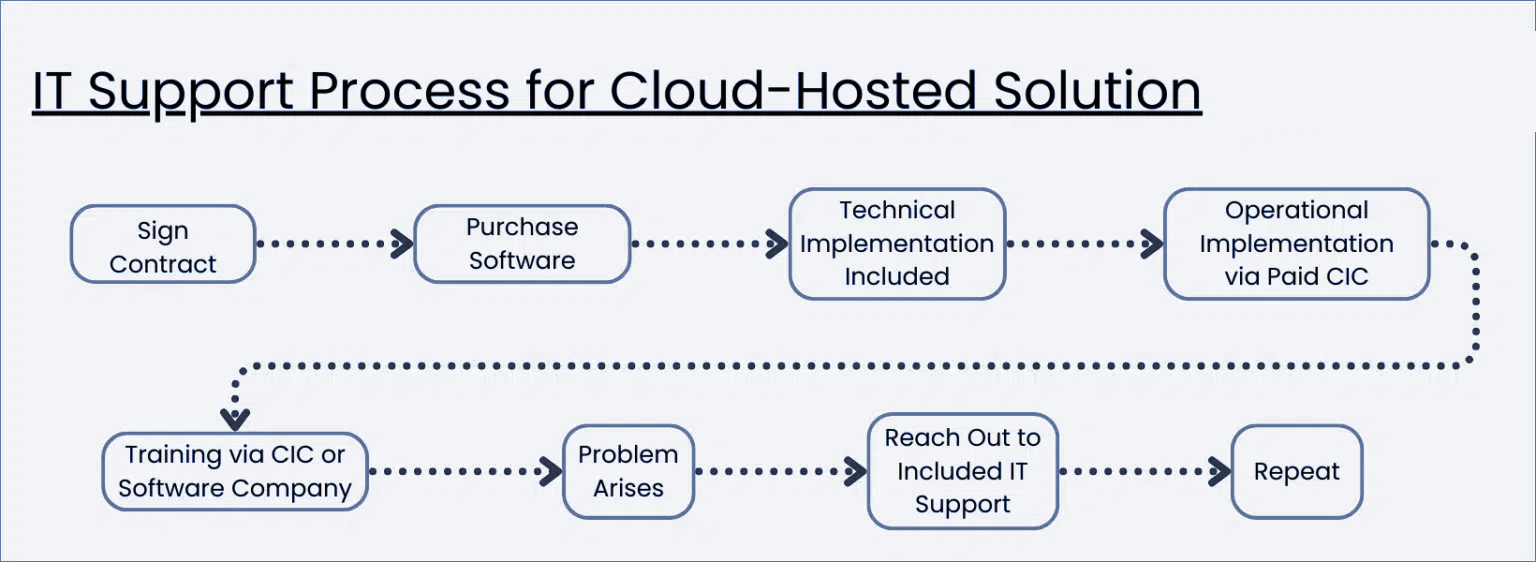
Choosing a legal-centric private cloud solution can be a wise decision for many law firms.
However, a word of caution if you’re leaning towards this option: Make sure your chosen private cloud provider is authorized to host ProLaw and has the requisite expertise in hosting, supporting, and upkeeping the software.
ProLaw in the Cloud
ProLaw, a comprehensive practice and document management software, has established itself as an indispensable asset for law firms across North America.
As the contemporary business environment increasingly embraces remote work, numerous law firms are seeking ways to reduce the expenses and complexity of managing in-house servers.
Their goal is to equip their professionals with the capability to operate smoothly from any location, breaking down geographical barriers and fostering a more harmonious work-life equilibrium.
This shift has amplified the allure of cloud technology’s potential.
In today’s digitally-driven age, cloud technology can fundamentally redefine the way law firms function, presenting advantages like cost-effectiveness, adaptability, and enhanced efficiency. When it comes to ProLaw, migrating to the cloud can morph the software from being reliant on servers to a tool that’s more versatile, user-friendly, and efficient.
Let’s delve into how law firms can seamlessly transition their ProLaw practice management software to the cloud.
Cost of On-Premise vs. Cloud-Hosted Software
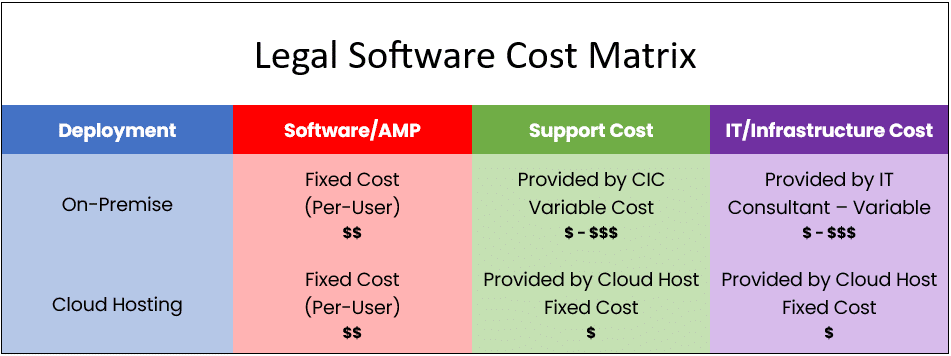
The financial comparison between hosting your software in-house and opting for a cloud hosting service should not be underestimated.
From the comparative table below, it’s evident that on-premise software typically emerges as the costlier and less predictable choice.
By selecting cloud-hosting, your law firm can shed the burdens of server and software upkeep, along with IT support tasks. This is because cloud-hosting services manage your software on their platforms and routinely carry out updates for you.
Given that their core business is centered on these services, they often achieve cost reductions, which subsequently benefit their clients.
For a thorough and insightful evaluation, we recommend utilizing our Cloud Cost Comparator. This tool can assist in identifying the most strategic and cost-efficient approach for your law firm.
Related: The Financial Case for the Cloud
ProLaw as a Cloud App
ProLaw is originally an on-premise software, designed to function on a server. Historically, law firms have hosted such software on their in-house servers. In comparison, cloud-based software is operated over the internet and accessed via a web browser, negating the necessity for on-site servers.
Nonetheless, there are multiple ways to run ProLaw in the Cloud.
For instance, platforms like Uptime Cloud can “cloudify” ProLaw. These mechanisms effectively enable you to utilize ProLaw as a web application in the Cloud, bypassing the need for individual servers.
Sounds enticing, doesn’t it? However, there’s a caveat…
This approach is most effective when a law firm intends to move only ProLaw or a single software to the cloud. For any additional software applications, distinct strategies would be necessary for each.
Should you be seeking a more all-encompassing solution, it might be worthwhile to explore options like a Private Cloud or Virtual Desktop for your firm.

The Financial Case for Cloud for Law Firms:
The cloud can be substantially more cost-effective than its alternatives. Learn more.
ProLaw in a Private Cloud
Having discussed the merits of ProLaw in a cloud environment, let’s now examine how it functions within this framework.
But first, a clarification is necessary between cloud-based (or web-based) software and desktop/server-based software.
Before the cloud computing boom, the majority of software, such as practice management tools like ProLaw, were installed on a firm’s in-house servers and accessed through the desktop computers of the firm’s personnel.
The heart of the software, encompassing its database and core functions, resided on this server. Hence, for law firms, owning a server was indispensable for operating on-premise software like ProLaw.
This meant that the ownership and upkeep of servers and in-house IT infrastructure became an inherent part of using legal management software.
That was the status quo.
Yet, the technological landscape has evolved. Now, we are acquainted with a concept called the Private Cloud.
A Private Cloud serves as a remotely hosted and managed IT platform, essentially replacing or even improving upon traditional servers. It houses a law firm’s applications, documents, emails, and other essentials, offering increased accessibility, dependability, and security.
Software like ProLaw, inherently server-based, invariably requires a server. However, when incorporated within a private cloud, the cloud essentially becomes the server.
To elucidate further, a standard law firm private cloud for ProLaw typically comprises of:

Private Cloud 101 for Law Firms:
Understand Private Cloud by reviewing how law firm software evolved from desktop-based to cloud-enabled systems.
The “Private” in Private Cloud
Private Clouds are so-called because every law firm (called a “tenant,” in cloud computing parlance), has their own segregated, dedicated working environment.
In most cases, that means:
For those new to these technologies, the core takeaway is that your law firm possesses its own dedicated, secure realm for its software, documents, and data, separate from other law firms. This ensures an added dimension of data protection and confidentiality for your practice.
That’s the “back-end” of running ProLaw in the cloud. You and your team will interact with the Private Cloud via what’s known as a Virtual Desktop.
ProLaw in a Virtual Desktop
We’ve delved into the advantages of running ProLaw on a cloud platform and the role of a Private Cloud in this. But what does it practically imply to function within a Private Cloud? How do members of your firm interact with it?
This is best explained with the idea of a Virtual Desktop.
At its core, a Virtual Desktop is like the familiar computer interface you’d find on Windows or Apple systems, but it’s hosted in the cloud and is accessible around the clock, from any location.
Typically, this Virtual Desktop comes equipped with commonly used software, including Microsoft Word, Excel, Outlook, as well as your legal practice management tools, accounting software, and document management systems.
The beauty of a Virtual Desktop lies in its ability to provide access to your law firm’s software — which traditionally might only be available on office-based computers or when connected to office servers — from any device, anywhere globally.
Such Virtual Desktop offerings are often labeled as “Desktop-as-a-Service” or DaaS, drawing a parallel to the concept of “Software-as-a-Service” or SaaS.
How Virtual Desktops Work
In a Virtual Desktop setting, the software applications are housed on remote servers in a data center. Your local computer essentially becomes a portal or a gateway to access these applications.
When you launch a program, it runs on these remote servers, not on your local machine. This setup allows you to access your software, documents, and other data from anywhere with an internet connection, using various devices.
Thus, rather than being confined to a single physical location, your digital workspace becomes universally accessible. The heavy lifting, in terms of processing and data storage, is offloaded to these robust servers, while your local device merely serves as an interface to interact with your virtualized environment.
More often than not, the only feature you’ll find on your local desktop is a shortcut – acting as a portal to your Virtual Desktop.
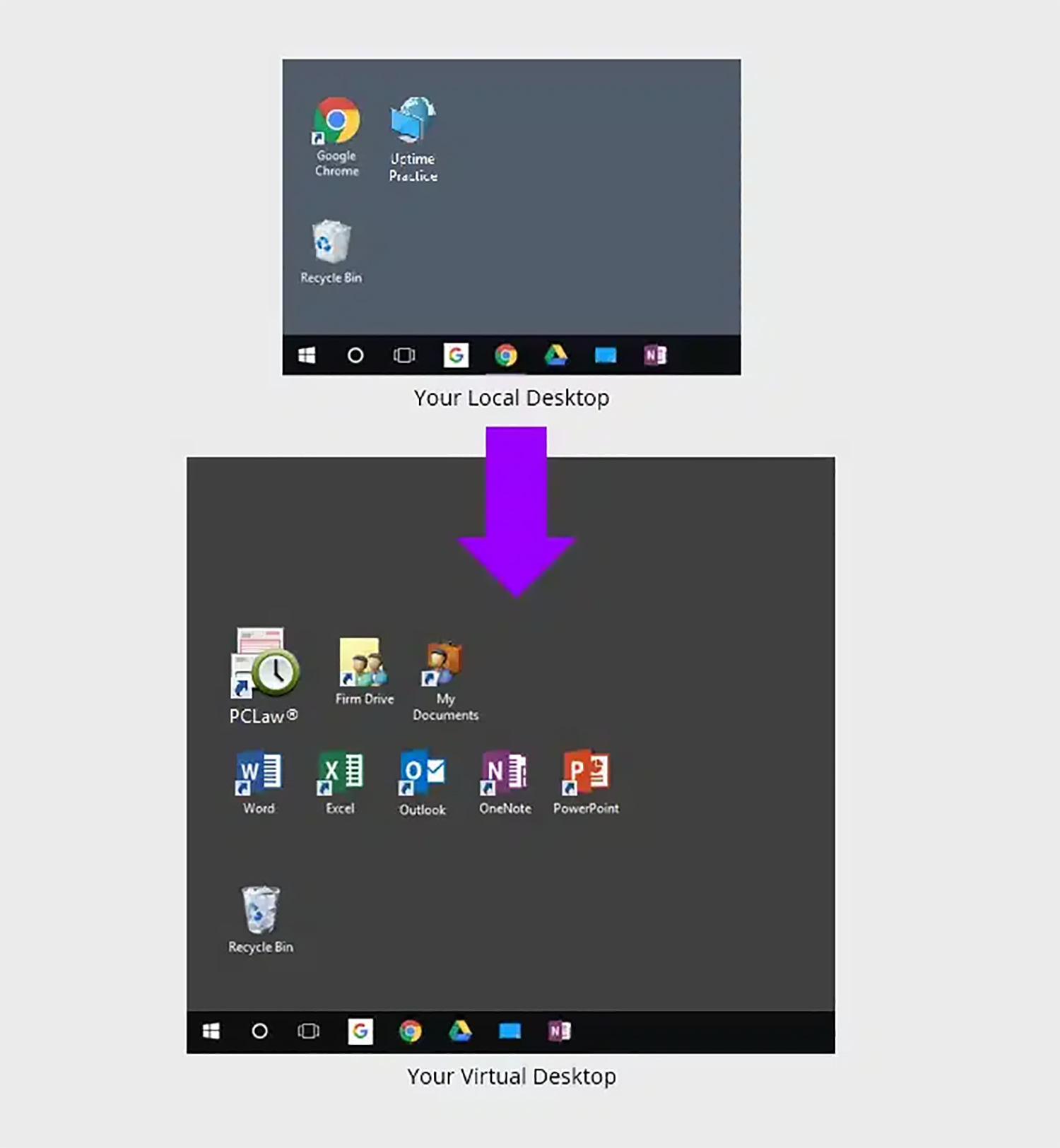
Upon logging into your Virtual Desktop, you or any member of your team can access all of your law firm’s software, documents, and data.
This includes:
With this arrangement, every member of your firm can access ProLaw, as well as all other applications, documents, and data, regardless of their location or the device they’re using.
Moreover, Virtual Desktops negate the hassle of individually installing, updating, and overseeing each software on every firm’s computer. Instead, the upkeep and modernization of all your software becomes the duty of your Cloud Service Provider, streamlining processes and eliminating potential headaches.
Such a strategy not only brings heightened ease of use but also centralizes the management of your software tools, lifting the burden off your shoulders.

Virtual Desktops for Law Firms:
How They Work, and Why Your Law Firm Should Probably Use Them.
Should My Law Firm Use Virtual Desktops?
Virtual Desktops bring many advantages to law firms. Specifically, Virtual Desktops are likely the best technology route in any of the following scenarios.
Virtual Desktops Demonstrated
For an example of working in a Virtual Desktop, watch our demonstration of Uptime Legal.
Closing the Loop
Again, I’m not implying that one of these options stands out as superior to the others. In reality, your ProLaw support strategy might encompass a blend of two or even all three of these methods. It genuinely boils down to the unique requirements of your law firm.
I urge you to investigate all the avenues available. Engage in conversations with multiple Certified Independent Consultants. Discuss with various Private Cloud providers. Dive deeper into online research, or converse with peers who also utilize ProLaw.
Wishing you success in whatever support strategy you devise for ProLaw.
Frequently Asked Questions

Uptime Legal’s Technology Solutions
Cloud, software, IT, and document management built for today’s law firms.