Table of Contents
If you’re looking into AI for law firms right now, you’re probably not starting fresh. Your firm already tried something, Copilot is the common one, and it didn’t stick.
Some people on your team think AI isn’t ready for legal work. Others think you gave up too soon.
Both sides are missing the same thing. Your firm bolted a new tool onto a stack that was already fragmented (practice management, document management, billing, and email all running separately), and then wondered why the AI added noise instead of value.
That’s the gap this piece closes: not another feature roundup, not a pitch for the next tool. A clear look at how AI actually gets used at firms like yours today, where the fragmentation problem shows up, and what a workflow-first evaluation looks like before you roll anything out again.
We help firms sort out exactly this kind of fragmentation, and that’s the lens this article uses.
Why Your Firm’s First AI Tool Didn’t Stick
The stall has a specific cause, and it sits underneath the tool. Your firm’s practice management, document management, billing and email were bought at different times, from different vendors, to solve different problems. None of them was built to hand work to the others.
Drop an AI tool into that and it inherits the problem. It sees whichever system it was plugged into and nothing else, so it answers from a partial view of the matter, confidently. An attorney who tries it twice and gets a shallow answer both times concludes the technology is not ready.
An AI tool bolted onto a disconnected stack adds one more disconnected piece. That changes what you fix next, and it’s what the rest of this article walks through: a better decision about where the first tool goes.
How Law Firms Are Actually Using AI Today
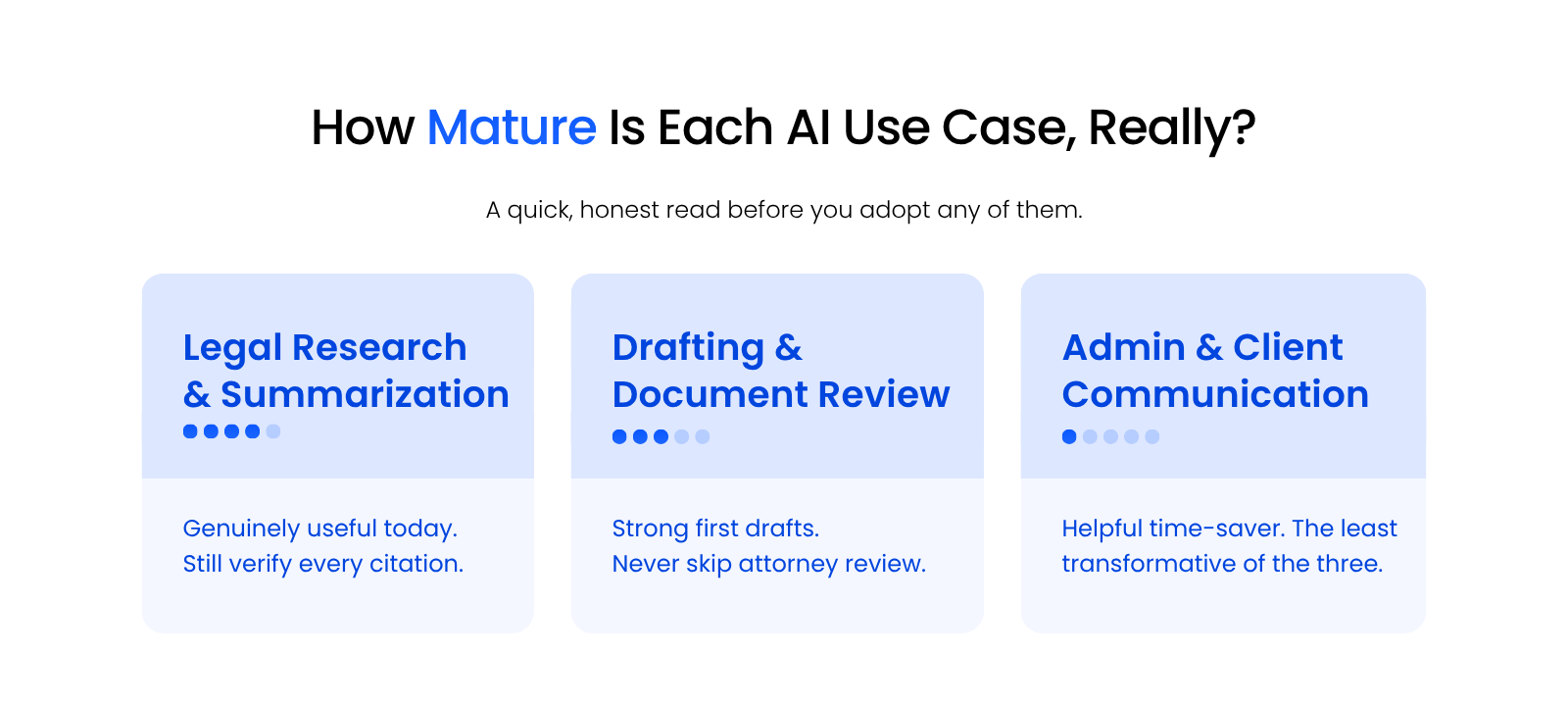
AI use inside your firm today breaks into a few concrete categories, not one yes-or-no question, and each sits at a different level of maturity. Your firm can be well ahead in one category and not even started in another.
Legal Research and Case Law Summarization
Research and summarization is where AI is furthest along in actual legal use today. Ask a general AI model to do any of these and it does useful work, fast:
This is usually where firms see AI show up first, often before any firm-wide policy exists to guide it.
The catch is that AI-generated legal research still needs a human to verify every citation before it reaches a filing, and courts have sanctioned attorneys for skipping that check. Treat the output the way you’d treat a first-year associate’s research memo: a useful head start that is still your responsibility to confirm.
Drafting and Document Review
Drafting is the next most mature use case. A general AI model or a legal-specific tool can produce a strong first draft of a contract clause, a demand letter, or a discovery response in a fraction of the time it takes to write one from scratch.
A strong starting point still needs a review pass, because the same model that writes clean, confident prose will also write a clean, confident sentence that isn’t true.

Administrative and Client Communication Work
Administrative work is the most modest AI use case in a firm today, and the easiest one to start using. These are the places it saves real time without much risk attached:
It saves a few minutes here and there, which adds up, and this is the category to keep modest expectations about.
Start here first, before touching anything client-facing, and you’ll build the internal comfort that makes the harder categories easier to evaluate later.
How Do You Fix a Stalled AI Rollout?
The fix is deciding, before rollout, exactly which workflow the AI serves and how it connects to the systems that already hold the relevant information.
Institutional knowledge about a matter ends up scattered across practice management, the DMS, billing and email, plus whatever lives in someone’s head.
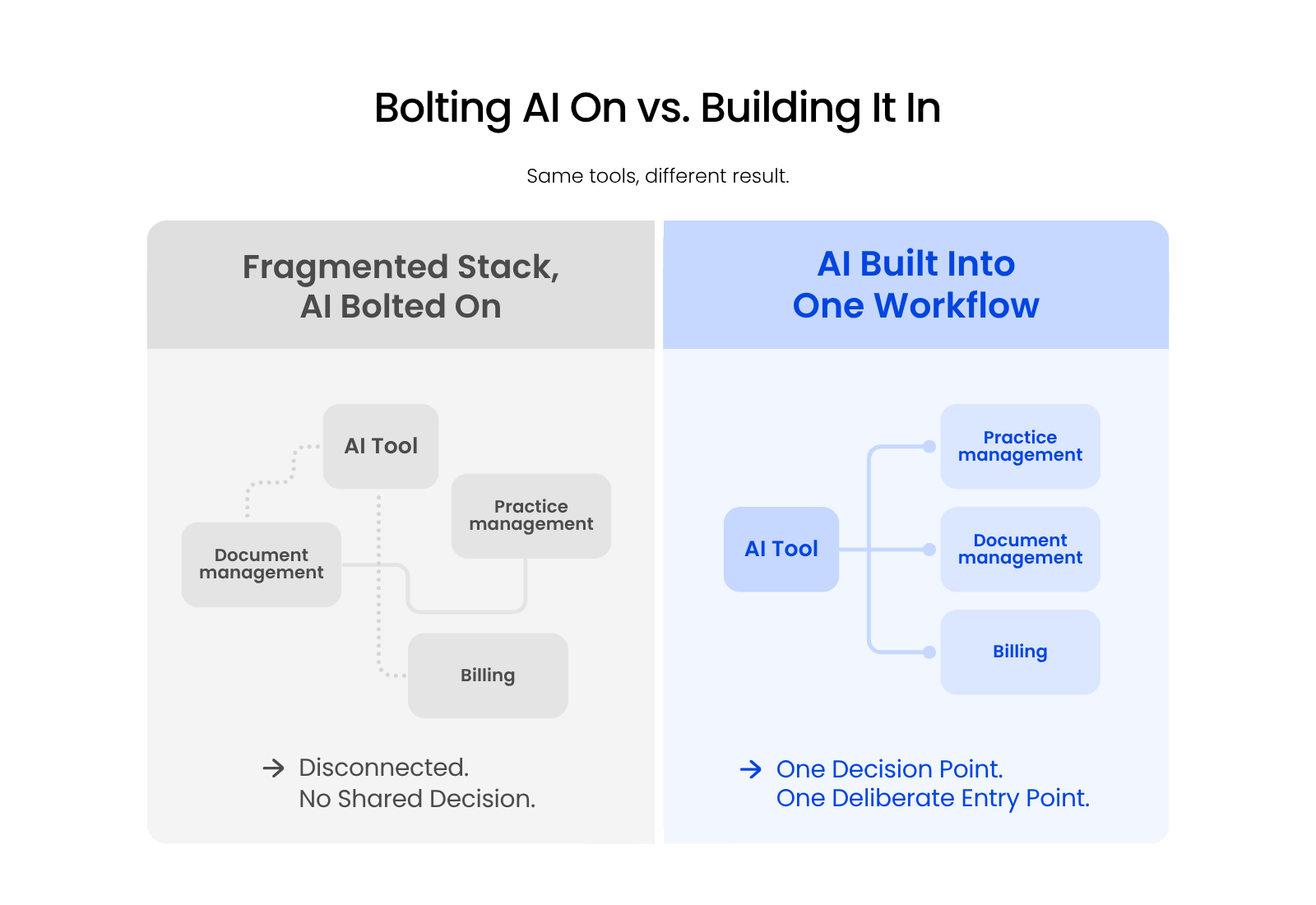
Add an AI tool to that picture without deciding where it fits, and you get a fifth disconnected system, not a fix. The tool doesn’t know which of those places holds the current version of anything, so it either guesses or it only ever sees the slice closest to wherever someone happened to plug it in.
A healthy AI setup at a firm looks like a deliberate mix: a general-purpose assistant working alongside tools built specifically for legal workflows, not one tool expected to do everything. That’s a structural decision, not a shopping decision, and it’s the one most stalled rollouts skipped.
The Risks Every Firm Has to Manage Before Scaling AI Use
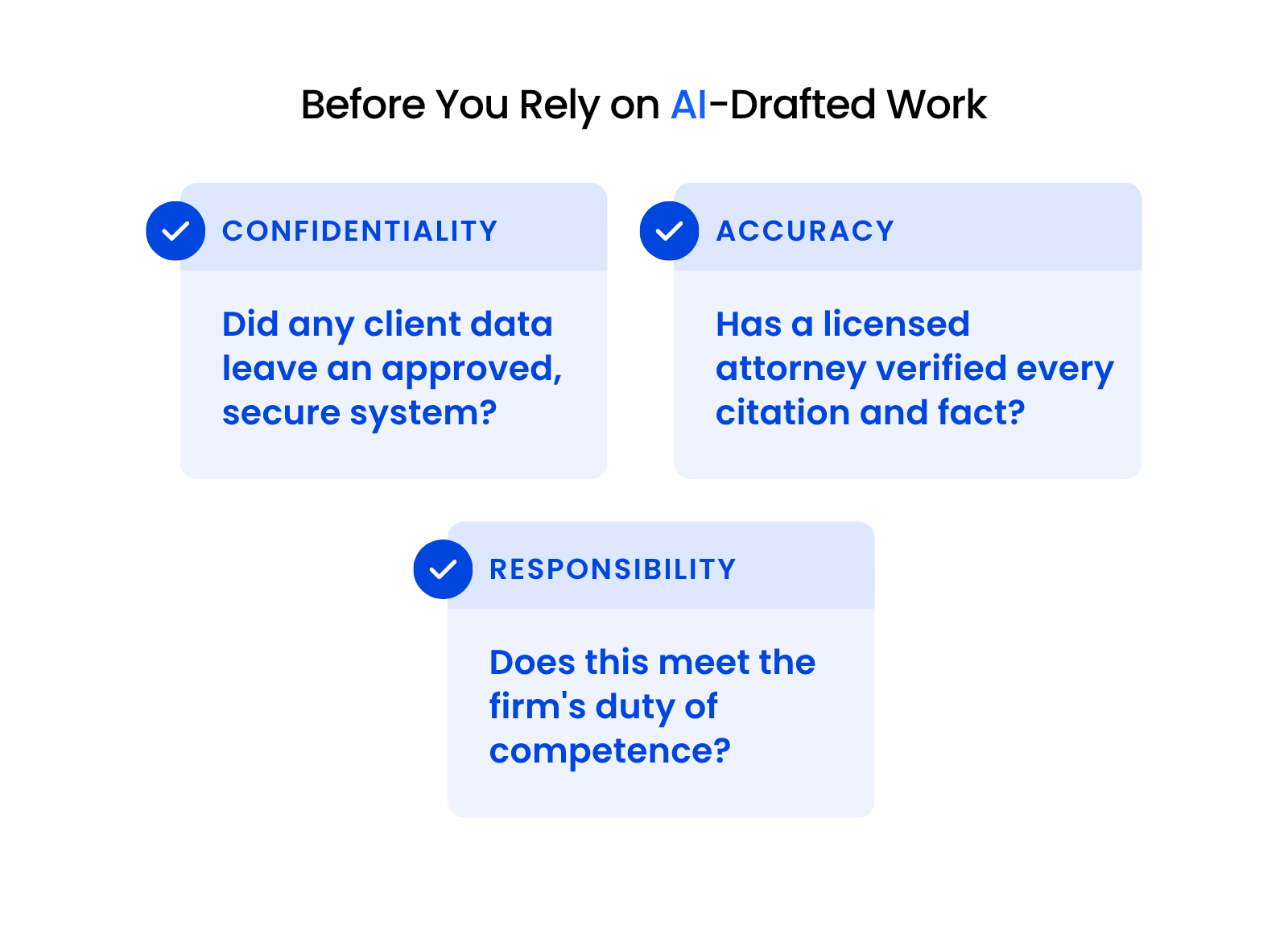
These are the three things you need to actively manage before you let AI touch more of your firm’s work: what leaves your approved systems, whether anyone checks AI output before it’s final, and what the professional-responsibility rules actually require.
Confidentiality and Client Data Exposure
Confidentiality comes first: know exactly what leaves your firm’s approved, secure systems the moment an AI tool touches client data.
A general AI model that isn’t covered by your firm’s confidentiality and security agreements can put privileged or sensitive information somewhere you don’t control, even when nobody intended that to happen.
Before any AI tool touches a client matter, confirm it runs inside an environment your firm has vetted, not just one that happened to be free or already installed on someone’s laptop.
If your firm hasn’t had that conversation with IT yet, that’s the first gap to close, before the confidentiality question becomes a live incident instead of a hypothetical one.
Hallucination and Accuracy in Legal Work
AI-drafted or AI-researched work still needs a human review pass before anyone treats it as final.
Courts have already sanctioned attorneys for filing briefs with AI-invented citations that nobody caught before they went out.
A model that produces a fluent, confident paragraph will produce an equally fluent wrong one, and it won’t flag the difference for you. The review takes a few minutes, and it’s the step that keeps a fabricated citation out of a filing.
Professional Responsibility (ABA Model Rule 1.1 and 1.6)
ABA Model Rule 1.1 and Model Rule 1.6 both apply directly here. Rule 1.1 requires a lawyer to maintain competence, and Comment 8 extends that to understanding the technology used on a matter, which means understanding what an AI tool does with the information you give it.
Rule 1.6 requires protecting client confidentiality, which means you need to know whether that AI tool retains, trains on, or shares what you feed it. Both rules set a condition on using AI for real client work rather than a bar to it: know the answers to those two questions first.
How to Evaluate AI for Your Firm Without Repeating the Same Mistakes
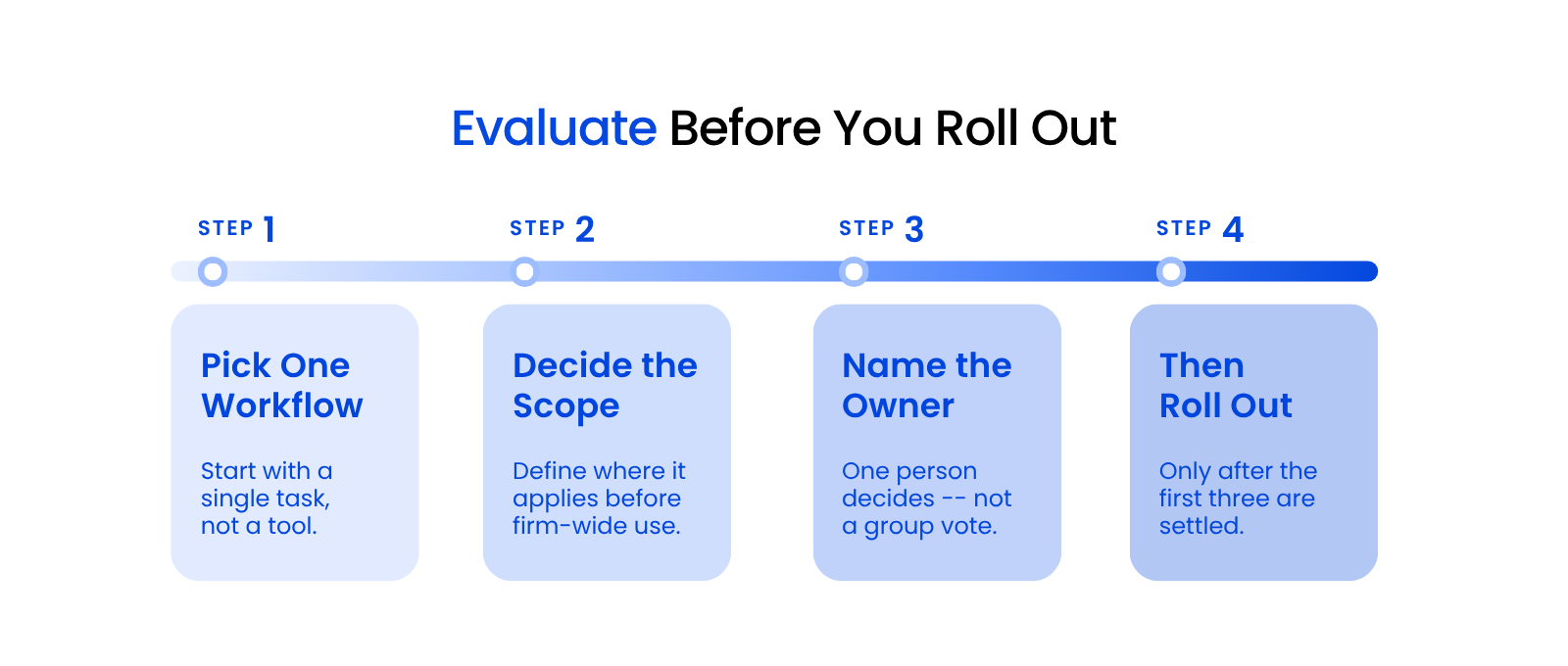
Evaluating AI well starts before you pick a tool, not after, the same way an IT assessment surfaces what a firm actually needs before recommending anything. Here’s the three-step version: pick a workflow first, decide the scope before you go firm-wide, and name who owns the decision.
Start with a Workflow, Not a Tool
Pick one specific workflow first, and let the tool follow from that, not the other way around.
A low-risk way to start: make a general AI model your browser’s home page for the workday, and let real use cases surface naturally as you work, instead of trying to plan a firm-wide rollout before anyone has used the thing.
You’ll learn more from two weeks of that than from any vendor demo. Whatever surfaces from that low-effort start becomes your candidate list for a real workflow, based on what your team is already reaching for, not on what a vendor pitched you.
Decide the Scope Before You Roll Out Firm-Wide
Once a workflow proves itself, define exactly where it applies before you open it up to everyone. Is this for one practice group, one type of matter, one specific document type?
A scoped rollout gives you a clean way to measure whether it’s working before you commit the whole firm to it. If it doesn’t hold up at that scale, you’ve limited the damage. If it does, you have real evidence for scaling it further, instead of a guess.
Who Should Own the Decision
Name one person to own the adoption decision, not a committee and not a firm-wide vote.
This is the point where the risk section above gets managed: confidentiality checks, review requirements, and professional-responsibility questions all need one accountable owner, or each partner assumes another one is handling them. That owner is exactly who was missing the first time your firm’s AI rollout stalled.
That person needs to be the one who will follow up on the confidentiality and review questions above instead of letting them drift, not the most senior partner.
Where AI for Law Firms Goes from Here
Two AI questions belong elsewhere, and this article routes them deliberately: anything specific to document management or email search, and anything specific to evaluating Microsoft Copilot.
If your question is about document management or email search inside your DMS, that’s LexWorkplace’s territory, not this hub’s. If it’s about evaluating Microsoft Copilot for your firm, a dedicated piece on exactly that is coming, and it will go deeper on Copilot than a general AI overview like this one can.
Uptime Legal helps firms make the workflow-level calls this article argues are necessary: deciding where an AI tool fits inside an existing, often fragmented, legal software stack before you roll it out further.
That’s the same specialization behind everything else on this site, applied to the newest category of tool firms are now evaluating. If you’re evaluating AI for the first time, or trying to figure out why your last attempt stalled, that’s exactly the situation this hub exists for.
The Fix Isn’t a Better AI Tool. It’s a Better Decision.
A missing workflow decision stalled your rollout, not AI. The firms getting real value aren’t running the newest tool: they picked one workflow, set the scope, and named an owner before rolling anything out further.
That’s the difference between an AI tool that adds noise to an already fragmented stack and one that earns its place in it. Start smaller than you think you need to, and make the ownership call before you pick the tool, not after.
WHAT’S NEXT
Frequently Asked Questions

Uptime Legal’s Technology Solutions
Cloud, software, IT, and document management built for today’s law firms.