Table of Contents
Let’s discuss virtual desktops for law firms.
As a law firm, you need reliable, secure technology and the ability for your team to work from anywhere.
Virtual desktops promise this by allowing your law firm to access your important software and data from anywhere, anytime.
Now, you don’t need to choose between your favorite software and the flexibility of cloud-hosted solutions.
Aside from the incredibly useful nature of being able to work from anywhere, having a virtual desktop also promises various other benefits for your firm.
As you go through this guide, you can expect to understand why virtual desktops are a useful aspect for any law firm, and the practical steps to pursue for your law firm.
Whether you’re aware of the workings of a virtual desktop or this is the first time you’re hearing about it, this guide will provide you with information and suggestions on how to utilize virtual desktops for law firms.
Introduction
Simply put, virtual desktops for law firms use the cloud to provide access to your software and data from wherever you have a computer and internet.
When we hear “the cloud,” our minds often drift to popular web-based applications like Clio for law practice management, FreshBooks for accounting, or cloud storage platforms such as Microsoft OneDrive, Dropbox, and Google Drive.
However, the cloud’s potential extends far beyond these familiar tools.
Especially for larger law firms with a team of 8 or more, there’s a pressing need for more advanced tools than just basic web-based software and standard cloud storage. These firms require comprehensive case management and intricate accounting solutions. They also need a document storage system that goes beyond the rudimentary file and folder setup.
Moreover, many law firms are already invested in and accustomed to specific practice management software, such as ProLaw, Time Matters, Tabs3, PCLaw, Worldox, and TrialWorks, among others.
For such law firms, diving into the world of Virtual Desktops could be the game-changer they’ve been searching for.
What is a Virtual Desktop?
It might sound techy, but it’s really straightforward.
A Virtual Desktop operates much like the familiar Windows or Apple desktop you use daily, whether at home or the office.
The difference? It’s hosted in the cloud, granting you access from anywhere, anytime. This means your essential tools, from Microsoft Word, Excel, and Outlook to specialized law practice management and accounting software, are always at your fingertips.
With a Virtual Desktop, the software that’s typically exclusive to your office computer or tethered to your office servers becomes universally accessible. You can tap into it from any computer across the globe.

Often, you might hear Virtual Desktop solutions termed as “Desktop-as-a-Service” or DaaS, drawing a parallel to the well-known “Software-as-a-Service” or SaaS model.
Behind the curtain, the Virtual Desktop thrives on cloud servers managed by seasoned Cloud Service Providers.
This typically translates to a hassle-free experience for you: the provider oversees system maintenance, software updates, backups, and security. Your role, along with your team’s, is simplified to logging in when you start and logging out once done.

Managed IT Services for Law Firms:
Whenever you’re ready, we’re here to managed your IT. Read this article to learn more about the value of outsourcing your IT to a professional.
How Virtual Desktops Work
In a traditional computing environment (called the “client/server” model), your core law firm software and files/folders/documents live on your law firm’s server. Your main applications (such as Microsoft Office, your law practice management software, your billing/accounting software) is installed on your physical, local desktop. That is: The workstation or laptop you use in the office.
In this traditional model, everything runs locally, and your applications are installed on your individual computer.
A Virtual Desktop is different. In a Virtual Desktop environment, very few, if any, applications are actually installed on your local computer. Often, the only icon on your local desktop is a shortcut to log into your Virtual Desktop.
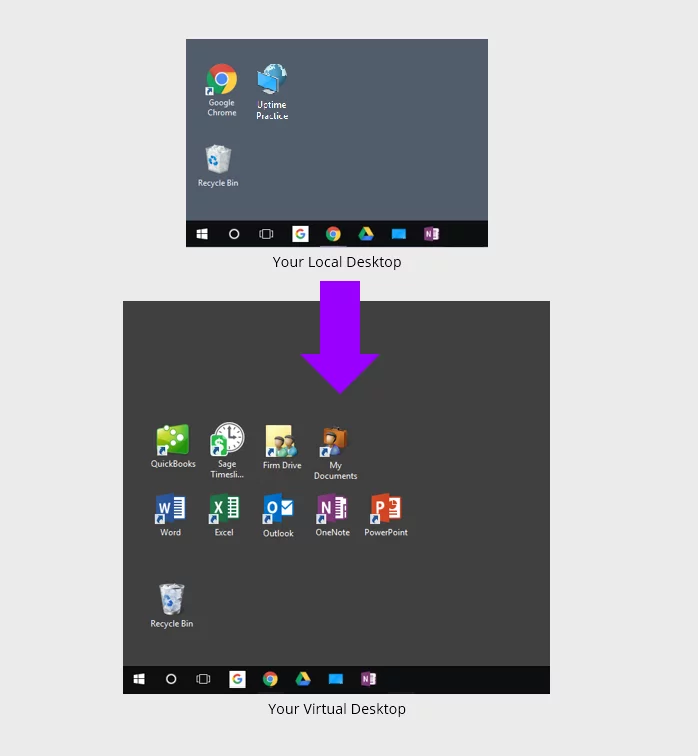
When you (or anyone in your team) logs into your Virtual Desktop, you’ll have access to all of your law firm’s software, documents and data, including:
This gives your entire firm access to all of your applications, documents and data, from anywhere, on any device.
Virtual Desktops also mean that you no longer have to install, update and maintain each of your applications on every computer within your firm. Instead, your Cloud Service Provider simply keeps all software updated for you.
What Software Can Be Used in a Virtual Desktop?
With the many clear advantages of using a Virtual Desktop for law firms, the question becomes: What software applications can run within a Virtual Desktop?
Virtual desktops can host virtually any Windows-based software. This is especially useful to law firms who run Microsoft Office, Adobe Acrobat, WordPerfect, and a myriad of practice management, case management, billing, accounting, and document management applications.
This includes today’s most popular law practice management and document management software. Traditional, premise-based practice management applications in particular tend to be more robust and feature-rich than their web-based counterparts. Virtual Desktops enable law firms to take advantage of the benefits of cloud computing, without abandoning their software for more basic, “watered-down” alternatives.
Quite a few software packages used by law firms can be run in a Virtual Desktop.
















Law firm’s should seek out a Cloud Service Provider that has extensive experience hosting these titles, and a cloud platform specifically optimized to run these specific law firm applications.
It’s also important to find a Cloud Service Provider that understands the workflow and the culture of law firms.

Under the Hood: Private Cloud
The Virtual Desktop is how each member of your law firm interacts with your cloud system. Under the hood, your Virtual Desktops are powered by something called a Private Cloud.
A Private Cloud is a hosted server (or set of hosted servers) that provides the necessary IT platform to host and run your legal software. In a Private Cloud solution, you’re effectively leveraging another company’s server, as opposed to buying/managing/maintaining your own.
Specifics vary by solution provider, but generally, a Private Cloud includes:

Azure for Law Firms:
While you’re considering the private cloud, you may have come across Azure. See how it compares.

AWS for Law Firms:
Likewise, AWS provides cloud-hosting solutions. See how it lines up.
7 Benefits of Virtual Desktops for Law Firms
1. Anywhere Access
In the fast-paced legal world, lawyers often find themselves working outside traditional office settings, be it in courtrooms, during client meetings, or while on the move.
Virtual Desktops ensure that they have consistent access to their work environment from any location. This flexibility ensures that urgent matters can be addressed promptly, and client needs are always met.

2. Enhanced Security
Client confidentiality is paramount in the legal profession. Virtual Desktops offer advanced security features such as encryption, multi-factor authentication, and regular security audits.
This means that sensitive client data is safeguarded against breaches, ensuring compliance with regulations and maintaining the firm’s reputation.
3. Cost-Efficiency
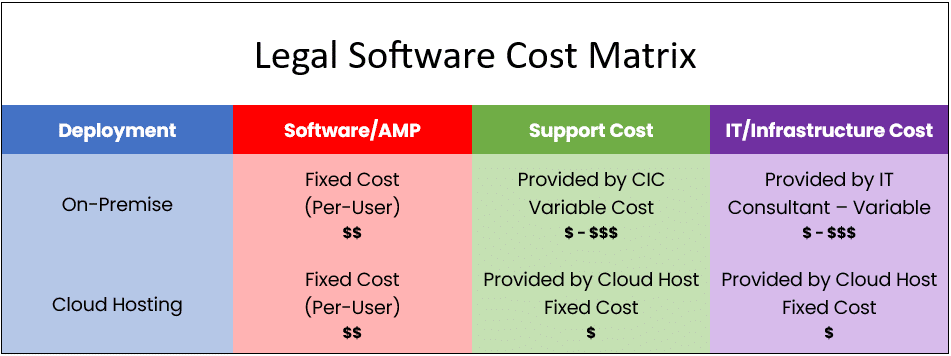
Traditional IT setups involve significant investments in hardware, maintenance, and periodic upgrades. Virtual Desktops, on the other hand, operate on a cloud-based model, drastically reducing these overhead costs.
The savings can then be redirected to other essential areas, such as talent acquisition or marketing.
4. Reduced the Burden of Server Maintenance and IT
A Virtual Desktop is an excellent solution for alleviating server burden, primarily because it shifts the computational and storage demands from local servers to cloud-based infrastructure.
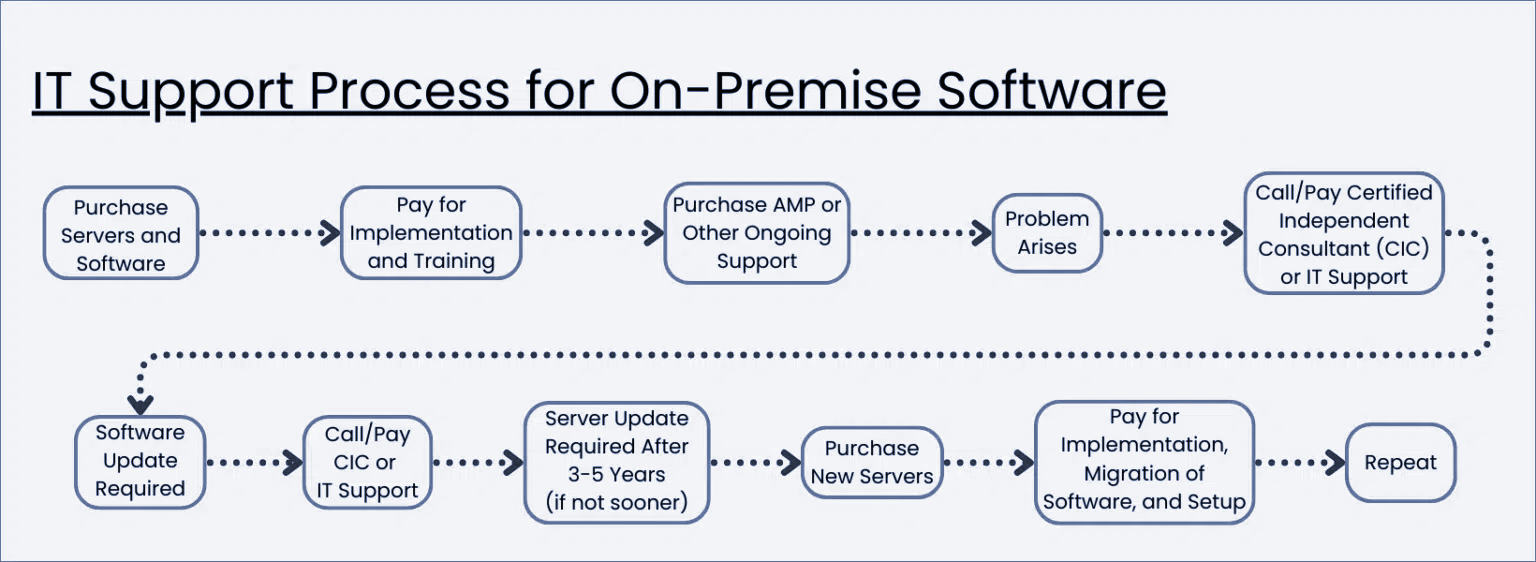
Traditional on-premises servers often face challenges in scaling, require regular maintenance, and can become overwhelmed with increasing data and application loads.
In contrast, Virtual Desktops operate on robust cloud servers managed by specialized providers. These cloud servers are designed to handle vast amounts of data and can be easily scaled to accommodate growing needs.
As a result, law firms can enjoy optimal performance without the overheads and limitations of maintaining and upgrading physical servers, ensuring a smoother, more efficient IT operation.

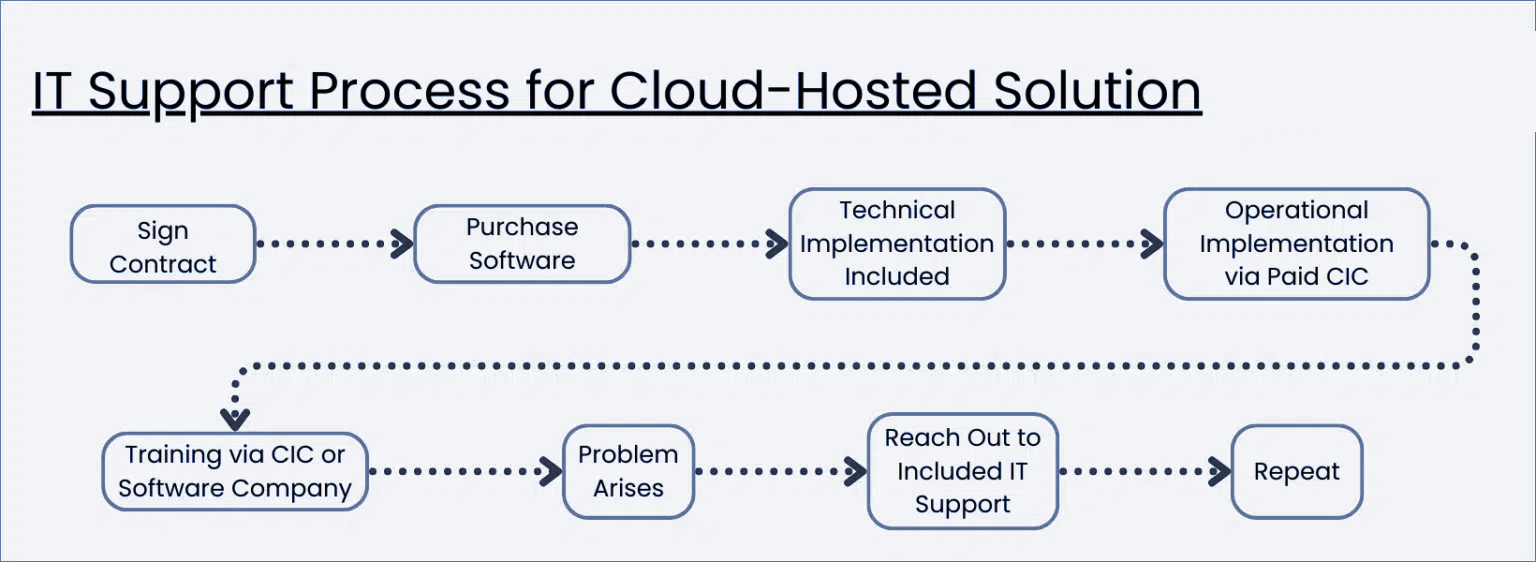
Outsourcing the management of the Virtual Desktop to a Cloud Service Provider means that routine IT services for law firms, such as maintenance, updates, and troubleshooting, are handled externally.
This allows the in-house IT team to focus on strategic initiatives, driving innovation and growth for the firm.
5. Enhanced Collaboration
With all data stored in a central location, there’s a reduced risk of data discrepancies or losses.
This centralization ensures that all team members have access to the same, up-to-date information, leading to better decision-making and streamlined operations.
Moreover, Virtual Desktops offer tools that promote real-time document sharing and collaborative application access, ensuring teams can synergize seamlessly, regardless of their geographical location.
6. Predictable IT Budgeting
The subscription-based model of Virtual Desktops offers transparency in IT expenses.
Law firms can anticipate monthly or yearly costs, making budgeting and financial planning more straightforward.
For example, take a look at the typical process for obtaining IT support for on-premise software.
On the other hand, a cloud-hosted solution promises easier, more predictable IT support.
7. Flexible Work Environment
The modern workforce values flexibility. Virtual Desktops support remote work, allowing lawyers and staff to maintain a healthy work-life balance.
This not only boosts morale but can also be a key differentiator in attracting top talent.
Should My Law Firm Use Virtual Desktops?
Virtual Desktops bring many advantages to law firms. Specifically, Virtual Desktops are likely the best technology route in any of the following scenarios.
Virtual Desktop Costs
The cost of a law firm Virtual Desktop solution will vary based on the number of people (users) in your firm, and the specific legal software your firm uses (more heavy-duty software requires more computing power).
The cost also varies based on the number of applications you’ll be hosting in the cloud, and (to a lesser degree), how much data you’ll store in the cloud.
Virtual Desktop platforms and Private Cloud solutions, in general, are almost always more economical than owning and managing in-house servers.
If you compare the up-front and ongoing cost of buying, managing, maintaining, and repairing servers over a multi-year period, to the predictable, straightforward per-user-per-month cost model of a Virtual Desktop, you’ll see that near and long-term, a Virtual Desktop almost always has the financial advantage.
You can do your own side-by-side comparison with our Cloud Cost Comparator.

The Financial Case for Cloud for Law Firms:
The cloud can be substantially more cost-effective than its alternatives. Learn more.
Virtual Desktops vs. Cloud-Hosted Applications
Understanding how law firm virtual desktops work, conceptually, is one thing. You might be wondering: What is the process of working in a Virtual Desktop?
You log onto your computer and access the internet the same way you normally would.
The main difference is that instead of going to any particular application, you click on your virtual desktop icon that brings you to your documents, hosted applications, and the rest of your data.
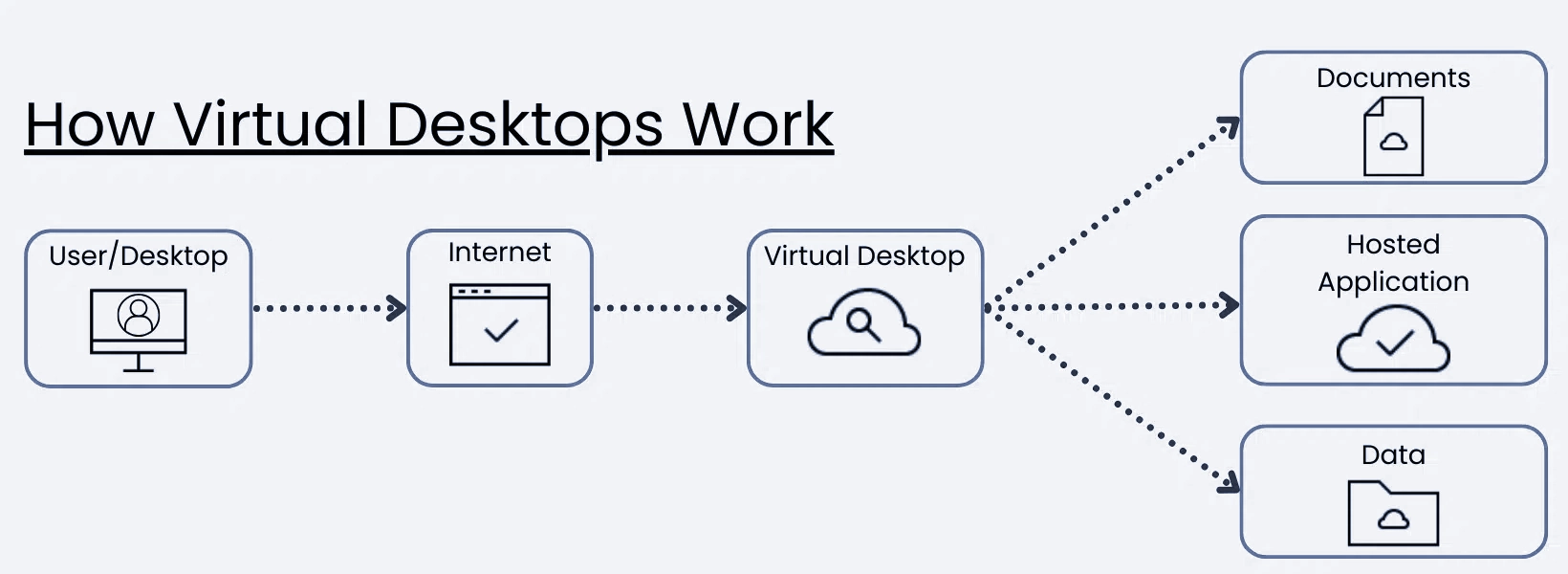
You have a desktop for shortcuts, apps and files. You have a start menu, a Recycle Bin, and any other items or options that your firm may need.
Most law firm Virtual Desktops will be standardized, with the apps and tools everyone in your firm needs, and can be additionally customized on a person-by-person basis.
By way of example, watch the demonstration video of Uptime Cloud (formerly Uptime Practice), our own cloud-based Virtual Desktop platform for law firms.
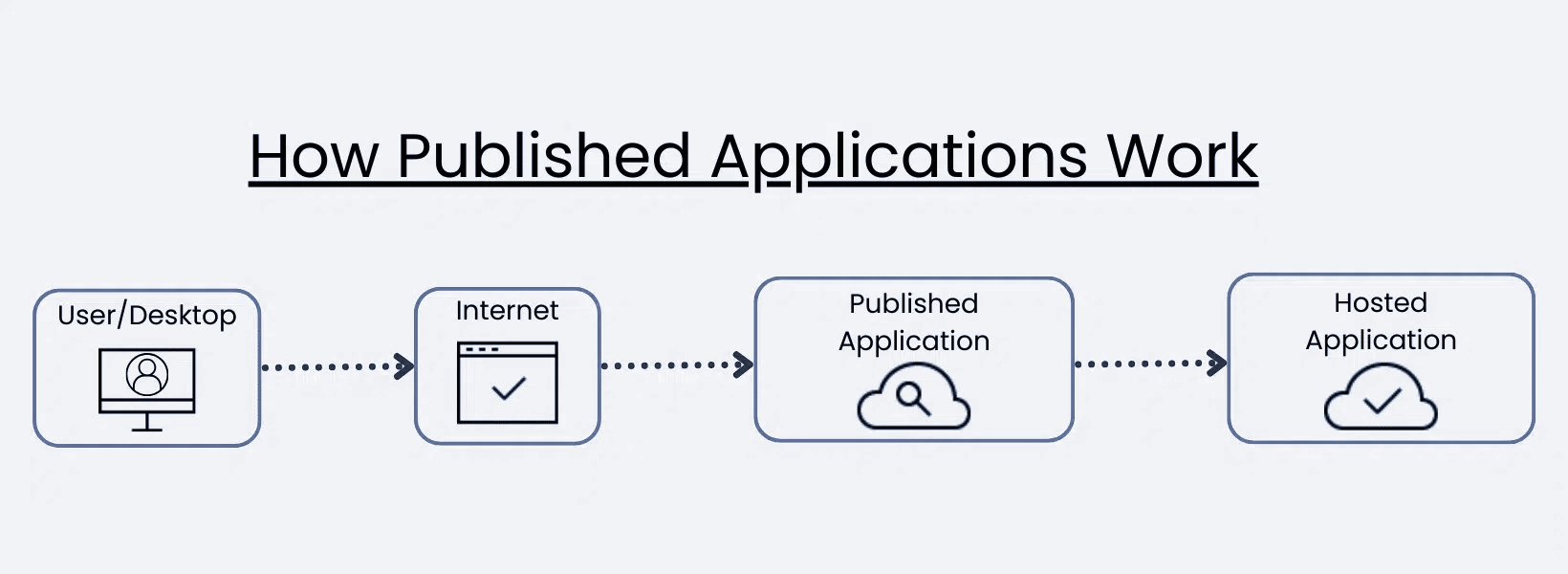
Alternatively, you could decide to host a single application on the cloud.
In this scenario, your process is pretty much the same as a virtual desktop.
However, instead of going to your virtual desktop first, you click on the icon that you have hosted, and through the internet, access the application that’s hosted on our servers.
Doing Your Due Diligence
As this article describes, Virtual Desktops bring a whole host of benefits and advantages to law firms.
It’s important, however, that if your law firm goes this route, that it finds and selects the right Virtual Desktop/Private Cloud provider for your firm.
Today, there are many IT companies and Cloud Service Providers that offer Virtual Desktop platforms.
It’s important to not only make sure that the company you select has experience hosting and supporting the software that your firm relies on, but that the company has the infrastructure and security in place to keep your data secure and your firm up and running.
Among other things, you’ll want to ensure that your chosen Virtual Desktop provider:

Juris: Complete Review, Features, Pricing:
Discover how to “cloudify” Juris into a secure private cloud for 24/7 access, NIST-level security, and a server-free office.
Frequently Asked Questions

Uptime Legal’s Technology Solutions
Cloud, software, IT, and document management built for today’s law firms.