Table of Contents
Juris legal software promises complete legal accounting for law firms. Whether it actually fits your firm depends on what you need from it.
This review breaks down what Juris actually does: its accounting and billing features, how its pricing structure works, and what real users say about running it day to day.
Juris is dedicated legal accounting software from LexisNexis, built for firms that need trust and IOLTA accounting depth that generic bookkeeping tools can’t provide. That makes it a strong option for mid-size and larger firms and a poor fit for solo practices.
If you’re comparing Juris against other options as part of a broader software evaluation, our guide to law practice management software covers how it stacks up against the rest of the market.
Accounting vs. Practice Management Software
Law Practice Management, Billing, and Accounting are three related, but discrete functions. And each can be managed with different software (or, all in one software suite). This is where the fuzzy terminology makes understanding what any given software package does confusing.
Broadly speaking, Law Practice Management software manages a firm’s clients, contacts, calendars, cases, time and expense tracking, billing and other “front-office” functionality.
Some Practice Management applications include complete accounting (including everything you see above), and some practice management applications provide time tracking, billing, and expense tracking… but leave the actual accounting to separate software (which it may integrate with).
Law Practice Management applications like Clio, Practice Panther and Time Matters do provide time tracking, billing and even reporting on billings… but they don’t provide the “rest of accounting,” and instead integrate with applications like QuickBooks to complete the picture.
This isn’t to say one method is better than the other; rather it makes defining and understanding the classes of law firm accounting software important.
Introduction to Juris
Juris is dedicated legal accounting software by LexisNexis. Juris is server/desktop-based software, which means it can run on-premise, on your firm’s in-house servers or hosted in a Private Cloud.
Juris comes in two primary modules, Juris Core and the optional Juris Suite add-on, with Juris Go as a companion mobile app for time and expense entry:
A Good Fit for Firms That…
Juris is often a good fit for law firms of 5 or more attorneys (especially law firms of 10 attorneys or more). Juris is especially useful for law firms that need sophisticated legal accounting, and find the accounting capabilities of general-purpose law practice management (or generic accounting software) lacking.
Juris is generally not well-suited for solo and very small law practices.
The Company
Juris is a product of LexisNexis, the same company that owns Time Matters and PCLaw software, also well-known for its legal research service.

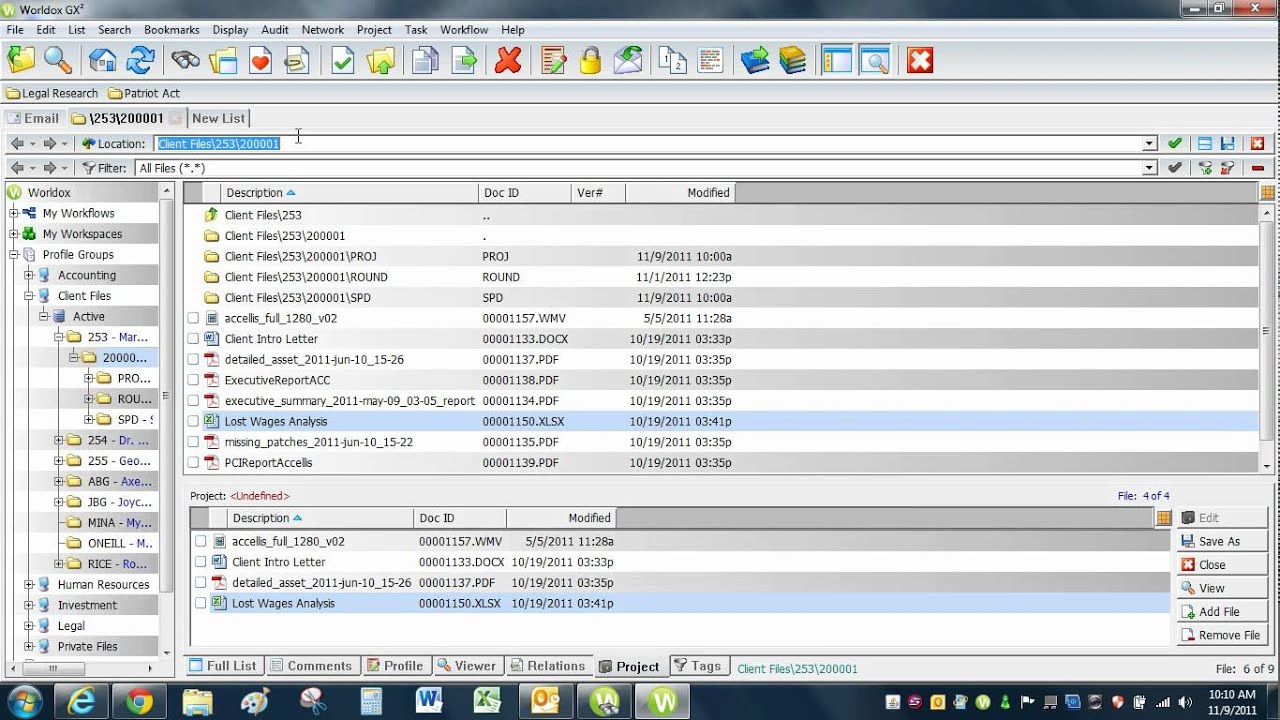
See Juris in Use
Juris in practice is a near-perfect blend of matter management, legal billing and law-firm-centric accounting software.
Screenshots


Juris Hints & Tips Video
Juris Modules & Complete Feature List
Juris comes in two primary modules, Juris (sometimes called “Juris Core”), and Juris Suite.
Juris (Core)
Time & Expense Tracking
Track billable hours and related expenses for a particular client or matter.
Invoicing
Generation of invoices, including for billable hours, contingency work, and fixed-fee matters.
Electronic Billing
Create eBills that comply with ABA and other industry-standard billing codes and requirements.
Billing Reports
Deep reporting with drill-down for additional detail. Report by billing attorney, originating attorney, working timekeeper, practice area and more.
Business Accounting
Standard business accounting, including a Chart of Accounts, Bank/Operating Accounts, standard accounting reports (P&L, Balance Sheet).
Advanced Legal Accounting
Customize your Chart of Accounts, including multi-level accounts. Segregate client and firm funds. Implement accrual or cash-based accounting. Manage disbursements and Accounts Payable.
Trust Accounting
Trust/IOLTA accounting for management of trust funds, including trust account reporting.
Conflict Checking
Search the database for related names, document each conflict check.
Juris Suite (Add-On)
Budgeting
Create a monthly firm budget, and compare each month’s actual finances to your budget (Budget vs. Actual).
Business Intelligence
Dashboards to monitor cash flow, workload, and productivity. Key Performance Indicators (KPIs), charts, and more.
Collections
Manage Accounts Receivable by client, manage collection workflow and communications.
Advanced Reporting
100+ additional advanced reports on timekeeper productivity, client/matter status, and other financial indicators.
User Feedback
We’ve aggregated and curated feedback from Juris users. This feedback is made up of feedback from our clients, legal technology consultants and online user feedback.
“Our law firm uses Juris and Juris Suite for our Work Comp Defense firm. I like that it is very user friendly when adding new contacts/employers/etc. It also alerts you in the screen pop up if the matter is already in use or if you forgot to fill out a pertinent cell.” — Jessica G.
“LexisNexis Juris is a simplified account manager, which acts as accounts payable, receivable, charges, and expenses. If integrated throughout the entire system, the application will automatically update the account so that you do not have to through different interfaces. We like the software, though found it expensive.” — Legal Administrator
“I like Juris, it’s organized, meaning you can usually find what you are looking for as long as you know where to look. I don’t like the lack of inline storage; I wanted to be able to link documents and store them within Juris and it’s not possible with our version.” — Legal Administrator
“I like the timer function to ensure both accuracy and to prevent a moment from being wasted. Stopping, starting and pausing the timer allow me to fill my day most productively and allow me to document my productivity accurately. I like the ability to print daily and weekly juris reports for supervisory review – not only am I being self-accountable, but my superiors can review my time entries to see what projects are taking up most of my time.” — Jesse K.
Juris Software Pricing
Juris pricing follows one of two structures, depending on how your firm buys it.
Juris pricing generally follows one of two structures common across LexisNexis’s legal software line — the same two-model setup we found when we reviewed PCLaw’s pricing: a per-user, monthly subscription, or a traditional perpetual license with an Annual Maintenance Plan (AMP) to keep support and updates active.
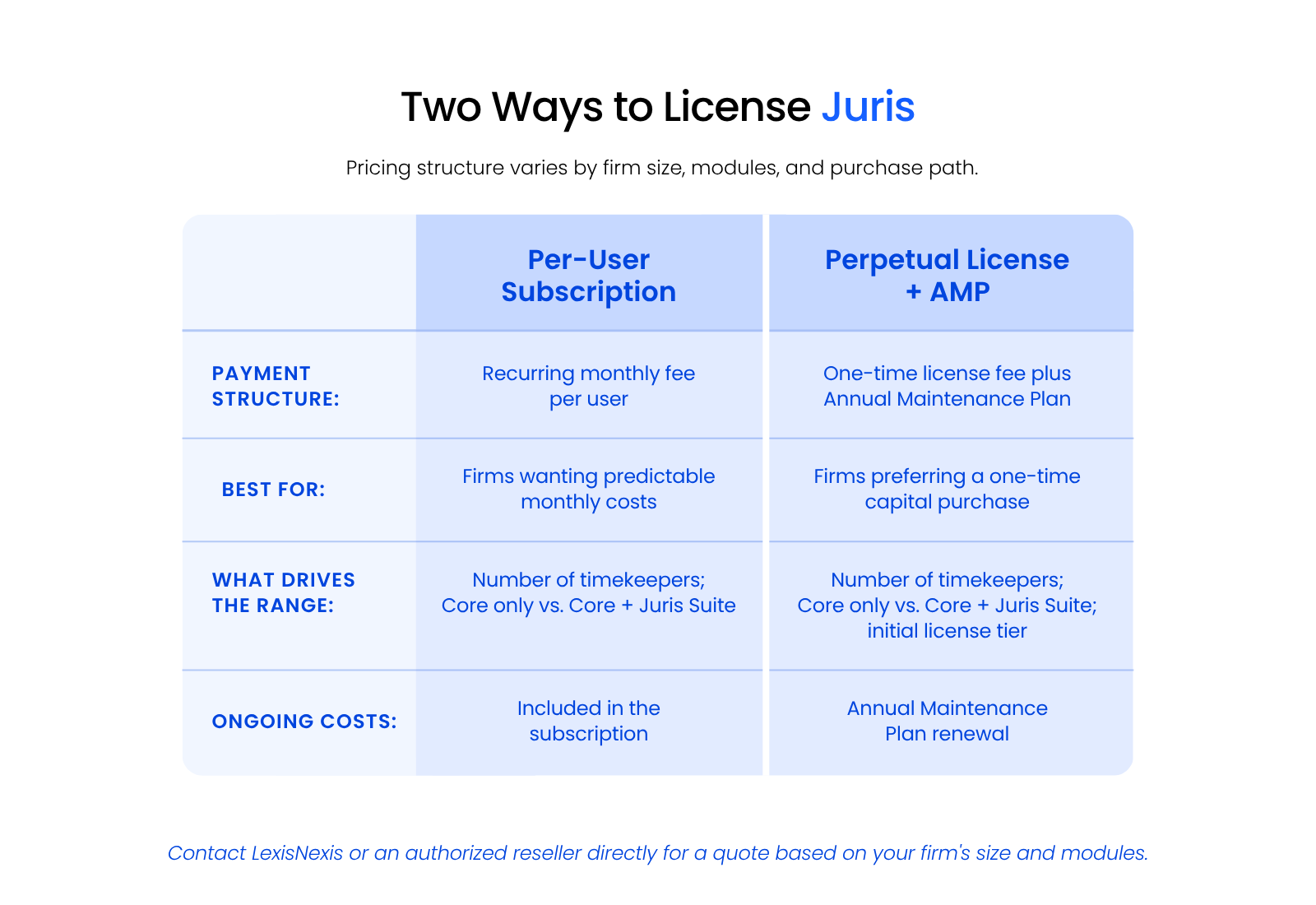
What you actually pay within either model comes down to a few factors: your number of timekeepers, whether you’re licensing Juris Core only or adding Juris Suite, and the support tier you choose.
LexisNexis and its authorized resellers don’t publish a standard rate card. Pricing is quoted directly based on your firm’s size and setup, so contact the software publisher or an authorized reseller directly for pricing information for your firm.
Juris in the Cloud
Juris runs as desktop or server-based software, which means your firm can host it on-premise or move it to a private cloud. Juris Suite in particular needs real server resources to run well, so cloud hosting isn’t a decision to make lightly.
If you’re weighing that decision, our breakdown of Juris in the cloud covers what hosting Juris actually involves.
Verdict: Should You Choose Juris?
Juris makes the most sense for firms that have outgrown basic bookkeeping.
If your firm has 5 or more attorneys, especially 10 or more, and handles real trust and IOLTA accounting, Juris gives you the depth that generic tools like QuickBooks weren’t built for. It enforces the accounting rules trust funds actually require, tracks matter-level financials the way your firm needs to see them, and scales up with Juris Suite if you need budgeting, business intelligence, or advanced reporting on top of the basics.
Firms already running other LexisNexis products, like Time Matters, may find Juris a natural fit given the shared vendor relationship.

Juris isn’t the right call for every firm, though. Solo practices and very small firms rarely need this level of accounting depth, and firms wanting an all-in-one, modern interface may find Juris’s server/desktop-based design dated next to newer all-in-one practice-management platforms.
If Juris looks like the right fit on paper, the next step is contacting LexisNexis or an authorized reseller directly for pricing and a demo based on your firm’s size and modules.
WHAT’S NEXT
Frequently Asked Questions

Uptime Legal’s Technology Solutions
Cloud, software, IT, and document management built for today’s law firms.