Table of Contents
Let’s talk about Time Matters support.
Time Matters is a comprehensive legal practice management software solution.
This platform focuses primarily on delivering robust front office practice management features.
It stands out as a product in its own right, exceeding other legal software in terms of customization potential.
However, navigating the available support options, including LexisNexis, the Time Matters consultant community, and IT providers can be challenging.
In this article, we will outline the available Time Matters support options and share guidance to help you choose the right approach.
By the end, you’ll have answers to:
Regardless of whether you’re a long time Time Matters user or just beginning your implementation, this guide is designed to help you get the most from the software and improve your firm’s efficiency and productivity.
Introduction: The Best Time Matters Support
Time Matters, an offering from PCLaw|Time Matters, has a long-standing reputation as a comprehensive Practice and Document Management software for law firms.
This software operates on a server or desktop basis and offers a broad array of features, including:
The strength of Time Matters lies in its customization capabilities. It allows for detailed tailoring, ranging from adjusting the front-end interfaces such as matter screens or reports, to modifying the back-end via custom database queries, workflows, and events.
This versatility positions Time Matters as one of the most adaptable practice management applications available.
This ensures that a specialist Time Matters consultant is available to implement and personalize the software to your needs.
An illustrative analogy would be wanting to buy a new cabinet from Ikea. Ikea understands that assembling the cabinet yourself, without proper guidance, could lead to frustrations. Therefore, Ikea only sells the cabinet if you concurrently hire a certified Ikea installer. The Time Matters approach mirrors this scenario.
To address these challenges and to provide a comprehensive range of support options to users of LexisNexis software products, the company has established their Certified Independent Consultant (CIC) program.
This allows software and IT professionals to get trained and certified on LexisNexis products like Time Matters. For certain products, such as Time Matters, the engagement of these professional consulting services is optional.
However, when it comes to Time Matters, obtaining these services is a prerequisite to purchase.

How to Use Time Matters In the Cloud:
Move Time Matters to the cloud to reduce IT costs, increase accessibility, and improve efficiency across your law firm.
Setting Up Time Matters
First, a quick review of where Time Matters lives in the world of legal software. LexisNexis has a portfolio of legal software products designed to meet the needs of a variety of sizes and types of law firms.
Not every law practice needs every feature of every application and to that end LexisNexis offers a variety of products that meet different needs and work together.
Since Time Matters is designed to manage your front-office but not your accounting, Time Matters integrates LexisNexis’ other accounting software systems, including:
Time Matters can (and often is) used as a completely stand-alone practice management platform, or can be used in conjunction with PCLaw or Juris for accounting.
Getting Time Matters
Time Matters is owned and sold by LexisNexis. You can buy it directly from LexisNexis, or from a Certified Independent Consultant, as described above. Once you have it, you’ll need to determine who is best suited to help you implement it, and how and where to host it (on your law firm’s servers or in a private cloud).
You’ll also want to subscribe to the Time Matters Annual Maintenance Plan (AMP), an annual subscription that gives you access to the latest version and update for Time Matters, as well as support and training resources.
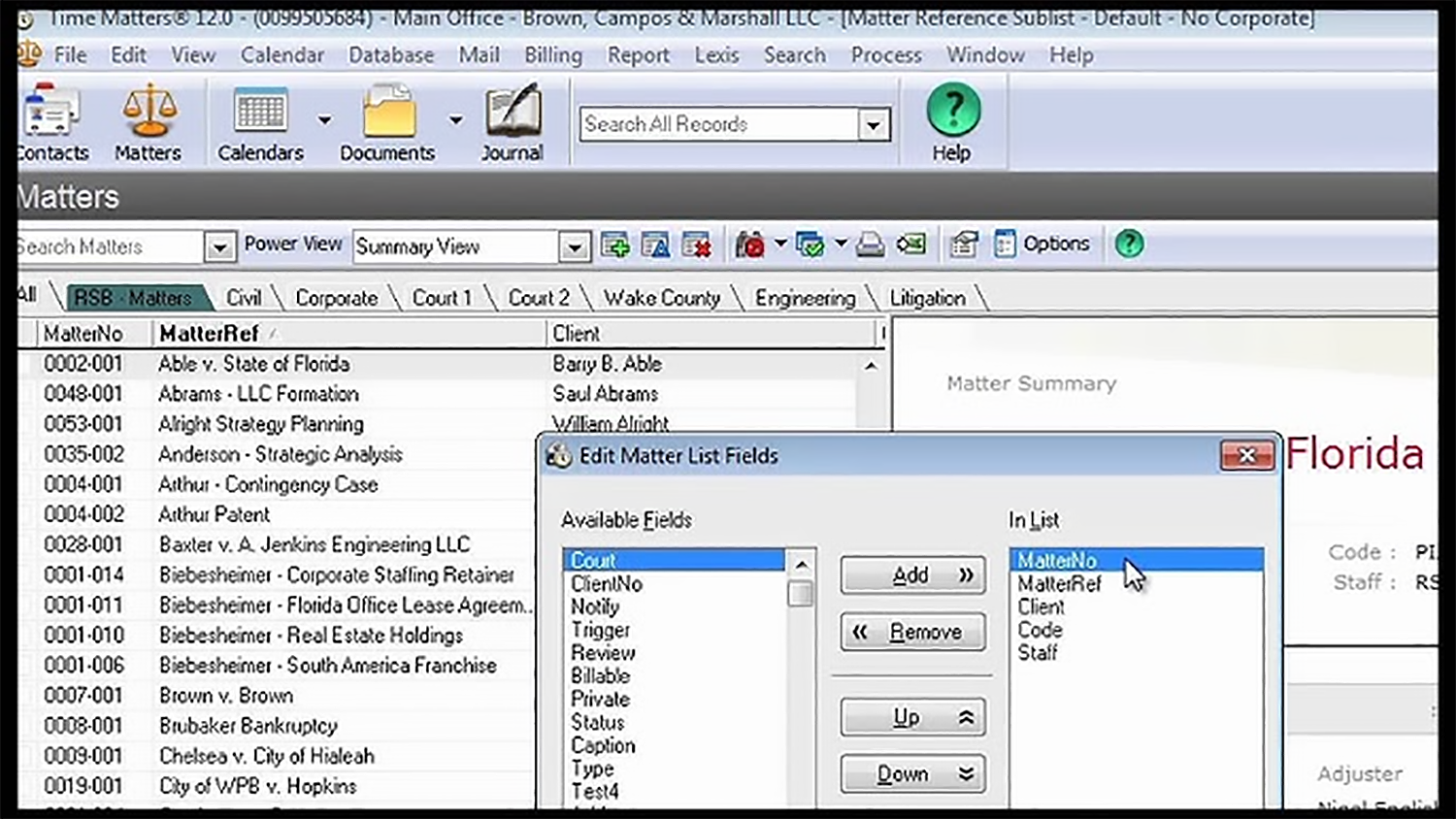
Getting Time Matters Support
As a user of Time Matters, you have three distinct avenues for obtaining Time Matters support. You can use one or any combination of the three, depending on how your firm uses Time Matters and the level of support your firm needs.
1. LexisNexis
When you purchase Time Matters and keep up your Annual Maintenance Plan (AMP), you are entitled to product support directly from LexisNexis. This support includes help desk support and access to the Time Matters online knowledge base and training materials.
This Time Matters support option is a good fit when your firm’s support needs are occasional and are usually limited to “how do I” questions or quick fixes. Especially considering it’s included in the cost of your AMP — I always recommend a firm take advantage of this method, in addition to others as necessary.
2. Certified Independent Consultants (CICs)
There are also many third-party consulting and professional service groups out there: LexisNexis’s network of Certified Independent Consultants. As described above, these are legal software and technology professionals who have obtained the training and certification necessary to support, implement and (in some cases) customize Time Matters.
CICs are sometimes consulting firms, sometimes independent or solo consultants. CICs often excel at more of the in-depth, hands-on Time Matters support services, especially implementing Time Matters into your firm’s processes and workflow, training your staff, and customizing Time Matters to work the way your firm does.
While day-to-day support for Time Matters is provided by LexisNexis as part of an AMP, many law firms still retain their CIC to provide Time Matters support exclusively, even though they’re entitled to support from LexisNexis directly.
CICs do charge for their IT services (as they should), so be sure to budget accordingly.
3. Private Cloud
Finally, there’s a private cloud.
A private cloud is the new alternative to owning and managing onsite servers and IT. A private cloud will host your Time Matters, other legal software, documents, and email on a single platform that your firm can access anywhere… all without the headaches of managing onsite IT.
The right legal-centric private cloud platform will be engineered specifically to host Time Matters, and all necessary Time Matters support, updates and maintenance will be included in the service.
A legal-centric Private Cloud is a good fit if your firm needs to be mobile, needs the enhanced security of the Cloud, wants to get out of the business of managing servers and IT, and wants their IT, hosting, and Time Matters support rolled into a single package, delivered by a single provider.
The right private cloud platform will include:
3. Private Cloud
Finally, there’s a private cloud.
A private cloud is the new alternative to owning and managing onsite servers and IT. A private cloud will host your Time Matters, other legal software, documents and email on a single platform that your firm can access anywhere… all without the headaches of managing onsite IT.
The right legal-centric private cloud platform will be engineered specifically to host Time Matters, and all necessary Time Matters support, updates and maintenance will be included in the service.
A legal-centric Private Cloud is a good fit if your firm needs to be mobile, needs the enhanced security of the Cloud, wants to get out of the business of managing server and It, and wants their IT, hosting, and Time Matters support rolled into a single package, delivered by a single provider.
The right private cloud platform will include:
Opting for a legal-focused private cloud solution can be an excellent choice for numerous law firms.
However, a piece of advice if you’re considering this route:
Ensure that your selected private cloud vendor is approved to host Time Matters and possesses the necessary experience in hosting, supporting, and maintaining the software.
Time Matters in the Cloud
Time Matters, a comprehensive practice and document management software, has proven itself to be an essential tool for law firms throughout North America.
With the modern business landscape increasingly adopting remote work, many law firms are exploring strategies to minimize the cost and intricacy of maintaining in-house servers. They aim to empower their teams with the ability to work seamlessly from any location, eliminating geographical constraints and promoting a better work-life balance.
This emerging trend has stimulated a surge in interest in the capabilities of cloud technology.
In the era of digital transformation, cloud technology can fundamentally revolutionize how law firms operate, offering a range of benefits such as cost efficiency, scalability, and heightened productivity. In relation to Time Matters, transitioning to the cloud can transform the software from a server-dependent application into a more accessible, adaptable, and efficient tool.
Let’s explore how law firms can effectively shift their Time Matters practice management software to the cloud.
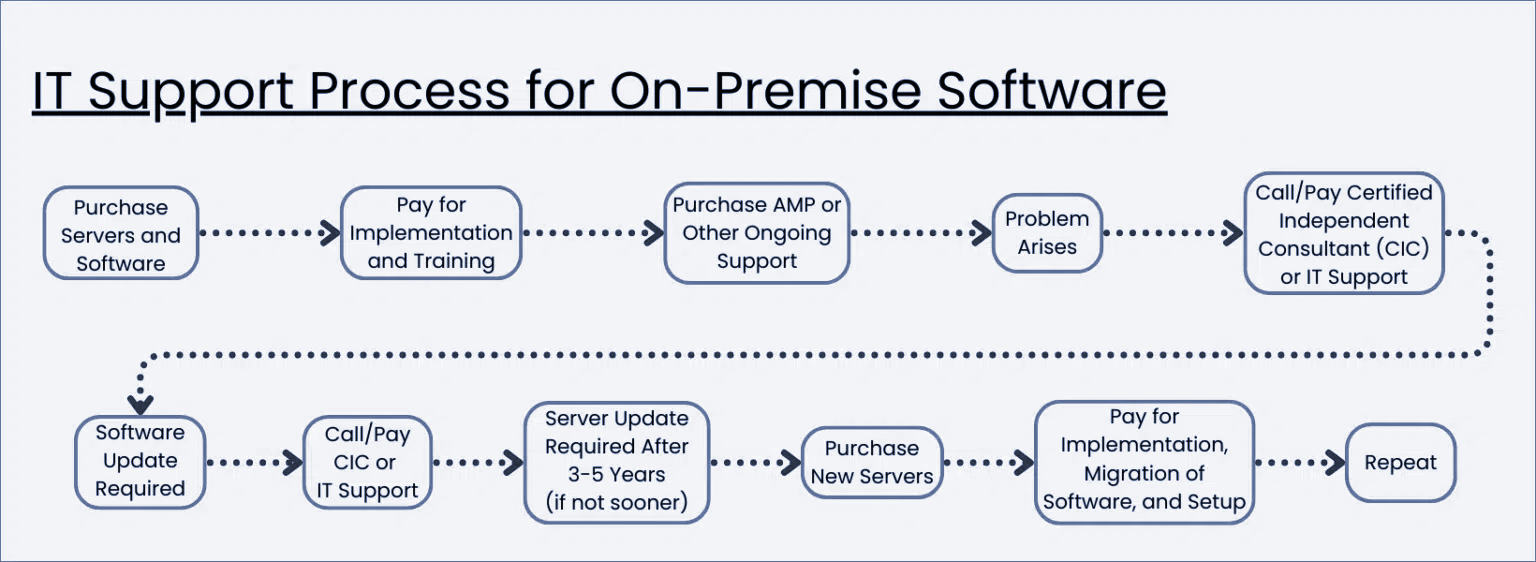
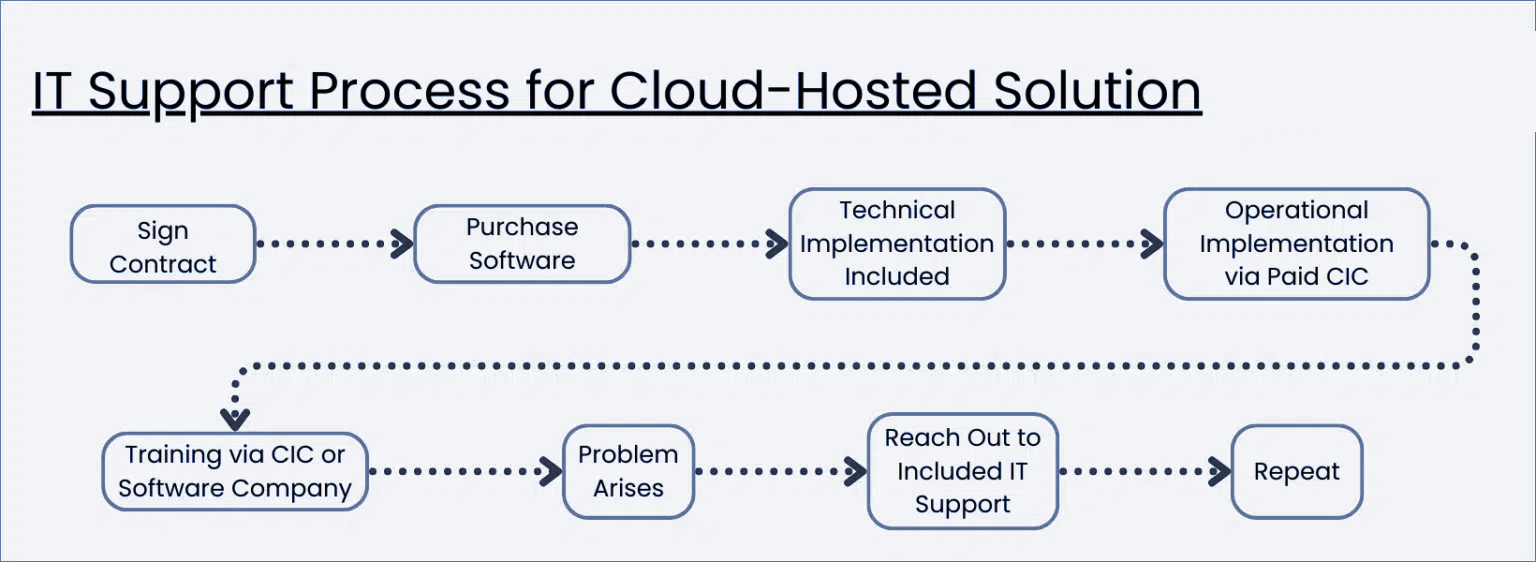
Cost of On-Premise vs. Cloud-Hosted Software
One should not overlook the cost comparison between self-hosting your software on-site versus employing a cloud hosting service.
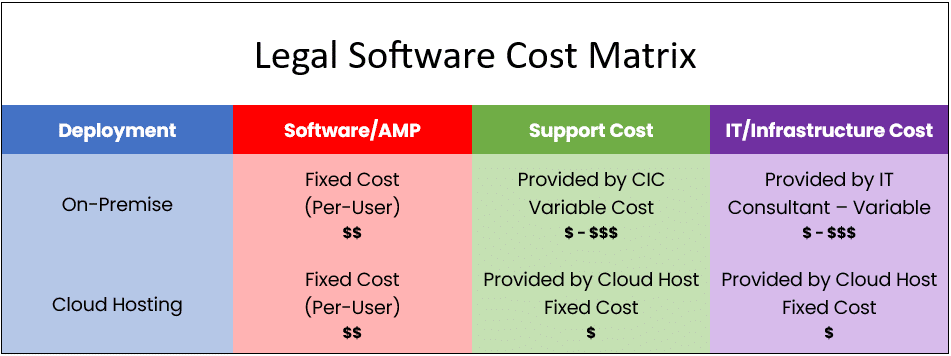
Between the two costs, as you can see in the table below, on-premise software tends to be the more expensive and unpredictable option.
Choosing cloud hosting means you can relinquish the responsibility of server and software maintenance, as well as IT support for your law firm. Cloud hosting providers maintain your software on their servers and regularly implement updates on your behalf. Because their business model revolves around these services, they are often able to reduce costs and pass those savings on to you.
To make a comprehensive and informative comparison, we suggest using our Cloud Cost Comparator, which can help determine the most efficient and cost-effective solution for your law firm.
Time Matters as a Cloud App
Time Matters is an on-premise software, originally designed to operate on a server. Traditionally, law firms maintained their own servers to host this type of software. By contrast, cloud-based software runs over the internet and is accessed through a web browser, eliminating the need for in-house servers.
That said, there are several ways to run Time Matters in the cloud.
For example, platforms like Uptime Cloud can “cloudify” Time Matters. These platforms allow Time Matters to run as a web application in the cloud, removing the need for private servers.
Sounds appealing, but there’s a catch.
This approach works best when a law firm only needs to cloudify Time Matters or another single application. If your firm relies on additional software, each application would require its own separate strategy.
If you’re looking for a more comprehensive solution, you may want to consider using a Private Cloud or a Virtual Desktop for your firm.
Private Cloud 101 for Law Firms:
Understand Private Cloud by reviewing how law firm software evolved from desktop-based to cloud-enabled systems.
Time Matters in a Private Cloud
Now that we’ve explored the reasons why Time Matters excels in a cloud environment, let’s delve into its actual functioning within this setting.
But before we proceed, it’s important to distinguish between cloud-based (or web-based) software and desktop/server-based software.
In the days before the widespread adoption of cloud computing, most software, including practice management tools like Time Matters, was installed and run from a firm’s on-site servers and accessed via the desktop computers of each employee. The “engine” or essential components of the software, including the database, were located on the server. Thus, having a server was a necessity for running premise-based software like Time Matters.
In essence, owning and maintaining a server became a crucial precondition for using such software. Managing servers and in-house IT was viewed as an inevitable responsibility for law firms looking to employ law firm management software.

This was simply how things were done.
However, times have changed. Today, we have a technology known as a Private Cloud. A Private Cloud is a hosted, managed IT platform that serves the same purpose as a server, or even surpasses it. It hosts a law firm’s legal applications, documents, emails, and more, providing enhanced mobility, reliability, and security.
Server-based software like Time Matters still needs a server. But in the context of a private cloud, the private cloud essentially takes on the role of the server.
To provide more clarity, a typical law firm private cloud for Time Matters often includes:
The “Private” in Private Cloud
Private Clouds are so-called because every law firm (called a “tenant,” in cloud computing parlance), has their own segregated, dedicated working environment.
In most cases, that means:
For those unfamiliar with these technologies, the practical upshot is that your law firm has its own private, secure space for its software, documents, and data, distinct from other law firms. This brings an extra layer of data security and privacy for your firm.
That’s the “back-end” of running Time Matters in the cloud. You and your team will interact with the Private Cloud via what’s known as a Virtual Desktop.
Time Matters in a Virtual Desktop
We’ve explored the benefits of running Time Matters in a cloud environment and how a Private Cloud can enable this. But what exactly does it mean to operate within a Private Cloud? How does each person in your firm engage with it?
This can be understood through the concept of a Virtual Desktop.
Essentially, a Virtual Desktop is a computer desktop, similar to the Windows or Apple interface you’re used to at home or work, but it’s hosted in the cloud and can be accessed anytime, anywhere. Typically, your Virtual Desktop comes preloaded with your daily-use software like Microsoft Word, Excel, Outlook, as well as your legal practice management software, accounting software, and document management software.
The advantage of a Virtual Desktop is that it makes your law firm’s software, which is usually only accessible from your office computer or when linked to your office servers, accessible from any computer, anywhere in the world.
Such Virtual Desktop solutions are sometimes referred to as “Desktop-as-a-Service,” or DaaS, making an analogy with the term “Software-as-a-Service,” or SaaS.
How Virtual Desktops Work
In a standard computing scenario, your main legal software is set up directly on your physical, on-site desktop—be it a workstation or laptop that you operate in your office. In this traditional framework, all tasks are executed locally, with software applications installed on your personal machine.
Contrastingly, a Virtual Desktop environment generally has few, if any, applications directly installed on your local computer.
More often than not, the only feature you’ll find on your local desktop is a shortcut—acting as a portal to your Virtual Desktop.
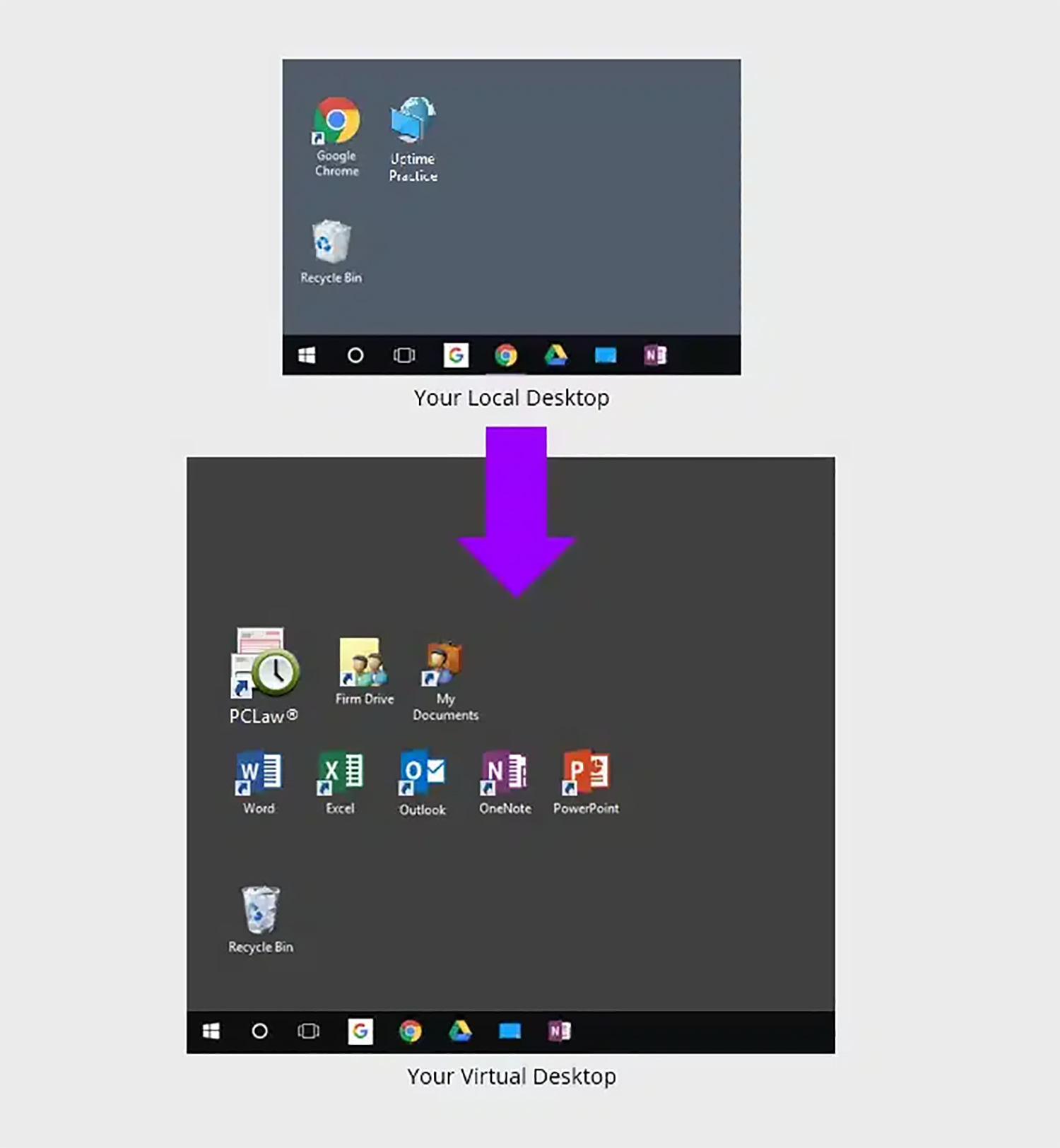
Upon logging into your Virtual Desktop, you or any member of your team can access all of your law firm’s software, documents, and data.
This includes:
This setup allows your entire firm to access Time Matters, alongside all your applications, documents, and data from anywhere, using any device.
In addition, Virtual Desktops remove the need to install, update, and maintain each of your applications on every computer within your firm. Rather, the responsibility of keeping all your software current is taken over by your Cloud Service Provider, leading to more efficient, trouble-free operations.
This approach provides an added layer of convenience by centralizing the management of your software resources and relieving you entirely of the responsibility.
Should My Law Firm Use Virtual Desktops?
Virtual Desktops bring many advantages to law firms. Specifically, Virtual Desktops are likely the best technology route in any of the following scenarios.
Closing the Loop
Again, I’m not necessarily saying that any one of these options is better than the others — in fact, your Time Matters support strategy may contain a combination of two or all three of these options. It really does come down to the specific needs of your law firm.
I encourage you to explore your options. Talk to one or more LexisNexis Certified Independent Consultants. Talk to one or more Private Cloud providers. Do more research online, or talk to colleagues of yours that also use Time Matters.
Good luck with whatever strategy you develop for Time Matters support.
Frequently Asked Questions

Uptime Legal’s Technology Solutions
Cloud, software, IT, and document management built for today’s law firms.