Table of Contents
Let’s discuss Time Matters in the cloud.
Cloud technology has the potential to redefine how law firms function, presenting numerous advantages such as cost reduction, adaptability, and heightened efficiency.
When it comes to Time Matters, shifting to the cloud can evolve the software from being tethered to servers to becoming a more versatile, user-friendly, and efficient tool.
In this piece, we will journey through the ways in which law firms can adeptly move their Time Matters practice management software to the cloud.
Who This Guide Is For
This guide on running Time Matters in the cloud is for anyone who uses Time Matters (or plans to) and wants to explore doing so in the cloud.
This includes:
In this, our ultimate guide to Time Matters cloud hosting and moving Time Matters to the cloud, we’ll walk you through everything you need to know to assess and implement Time Matters in the cloud.
Considering Time Matters?
If you’re still deciding whether Time Matters is the right practice management software for your firm, this isn’t the guide for that. This one assumes you’ve already made that call, or you’re close to it, and you’re here for the cloud-hosting mechanics specifically.
Our full evaluation of Time Matters covers the features, pricing, and our honest take on where it fits. Come back here once that’s settled, and we’ll walk you through how to actually run it in the cloud.
Why Time Matters Is Better in the Cloud
Time Matters is great, and it’s even better in the cloud.
For most law firms, life is simply better in the cloud; Time Matters is no exception. You can run Time Matters in the cloud, and before we explain exactly how Time Matters cloud hosting works, I’ll take a moment to explain why, in most cases, Time Matters is better in the cloud.
Don’t Sacrifice the Right Software for the Cloud
The cloud brings many benefits to small and midsize law firms (which we’ll enumerate shortly). Some law firms, looking for the reliability, security, and mobility of the cloud, assume that the only way to achieve these benefits is to abandon their software and move to a web-based software application.
However, as you may know, server-based software is commonly associated with more reliable features that you have used, or will use, to achieve optimal success. Don’t give up something that works this well for your law firm if there’s a way to work around that!
You can, and should, have the best of both worlds.
1. The Best of Both Worlds
The cloud brings mobility, accessibility, and security. Time Matters provides a rich, comprehensive platform for managing your firm’s cases and accounting. Being able to combine the various positive aspects of both gives the firm the ability to have your cake and eat it too.
In other words, by choosing to run Time Matters in the cloud, your firm can keep the extensive legal software that your firm is committed to and relies on, while enjoying the flexible advantages of the cloud.
2. Managing Servers & IT Is a Pain
For a long time, managing and supporting on-premise servers was simply a necessary evil you had to undertake in order to run quality legal practice management software.
Applications, like Time Matters, bring a lot of value to law firms, but it requires a server (one way or another). As a result, law firms had to face the music and just get a server.
Said server requires a lot of maintenance – both proactive (to keep it up and running) and reactive (to fix things when they break).
Owning servers means you can look forward to:
Running Time Matters in the cloud (Time Matters hosting), on the other hand, gives you the benefits of having Time Matters, without the inherent drawbacks of server ownership.
Why not hand off those responsibilities to a managed IT provider, so you can just enjoy the good parts?
3. Work from Anywhere
Being tied to a single office or computer holds modern law firms back. Today’s attorneys need to log time from home, review contracts on the go, and check deadlines from client sites. Convenience aside, this kind of access is essential.
Running Time Matters in the cloud gives your team secure, full access to your software, documents, and email—on any device, from anywhere.
Skip the clunky VPNs and remote logins. A Private Cloud with Virtual Desktops makes it simple, secure, and smooth.
Once you unchain your firm from the office, there’s no going back.
4. Data Security & Compliance
As law firms, you have ethical obligations to keep your firm and client data secure. Cyberattacks are only becoming more prevalent, and compliance requirements are only becoming more stringent.
When it comes to cybersecurity, there has been significant hesitancy when it comes to adopting the cloud. However, your Time Matters software and your law firm’s data are significantly more secure in a reputable cloud platform than on your in-office servers.
The reason?
Cloud service providers are in the very business of keeping their clients’ data secure, and usually employ stringent security measures.
Now compare that to a server in your law firm’s office, sitting unmanaged, in a coat closet or copy room. This is typically what we see with many firms.
Unfortunately, having higher security can become expensive rather quickly, and the better security you want or require, the higher it will get.
It simply doesn’t make economic sense for all but the largest law firms with in-house servers to invest in the resources necessary to build this higher level of security.
However, it does make economic and pragmatic sense for a cloud provider to invest in building and managing bank-grade security for their servers. And as a client within that system, you get your own slice of that Fortune 500-caliber infrastructure without having to bear the financial burden.
And don’t make the mistake of thinking that just because your data is physically stored in your building, it’s actually more secure in a way that matters.
If your firm (a) has a server, and (b) is connected to the Internet, then you’re already on the cloud in the sense that hackers and other online threats can reach you.
The only question is: Who’s managing your security? (Or–is it being managed at all?)
Not sure how your firm’s access is currently configured?
An IT Health Check maps what you have, flags where access is misconfigured, and gives you a clear picture of where your firm actually stands.
5. Work with Windows and Macs
It’s not uncommon for people to have their strong preferences when it comes to what computers they use. Having the freedom to choose which computer you use gives you an advantage in terms of productivity, comfort, and overall contentment.
Moreover, most desktop-based law firm software is Windows-based, which severely limits Mac users’ ability to work from their Mac computer.
Historically, this required running Parallels or similar virtual Windows software on your Mac, which is infamously slow and clunky.
Running Time Matters in the cloud, particularly in a Virtual Desktop platform, gives your Mac users the exact same access and interface with your Time Matters platform (and the rest of your law firm software) as your PC users.
Virtual Desktops are, by their nature, platform agnostic.
6. More Reliability, Less Downtime
Capable Private Cloud platforms, like Uptime Cloud, are built with enterprise-grade infrastructures and are managed round-the-clock by experienced professionals.
This minimizes downtime for your firm and maximizes productivity.
Professional-grade Private Cloud solutions typically include:
In this case, we mean redundant in the sense that we mirror these various aspects to ensure your data is safe and backed up. All of these measures add up to optimal reliability and uptime for your systems and your law firm.
7. Flexible & Scalable
The cloud itself is flexible and scalable, and running Time Matters in the cloud is no exception.
Owning and running your own servers adds a layer of rigidity to your operations. Using the cloud solution that Uptime Cloud can provide avoids some of the technological growing pains that accompany your growth and success as a company.
With a Private Cloud solution, you can add (or remove) users, applications, storage, and other features when you need them.
Unlike the rigidity and financial commitment of server ownership, the cloud helps your law firm stay agile.
8. More Economical
We’ve worked with many law firms to conduct a side-by-side financial analysis of cloud vs. on-premise IT, and we consistently find that the Total Cost of Ownership is notably less in a Private Cloud.
This is almost always the case, and keep in mind that we are factoring in the up-front costs, monthly and potential unplanned IT costs associated with server ownership, and local IT support.
We’ll cover the economics of Time Matters in the cloud in more detail below (and we’ll provide some nifty tools for you to conduct your own financial analysis).
9. Centralization
In recent years, Remote/Work from Home and Hybrid Models have become an industry norm. With these models’ growth in popularity, creeping decentralization becomes a real risk.
Law firms with multiple locations have been working against this problem for a long time. Now add employees that work (partially or entirely) from home, and the risk of data and applications being spread apart in too many different locations becomes pronounced.
Whether you’re interested in the convenience of being able to access your data from a centralized cloud, or you’re concerned about having your data and applications too spread apart, a cloud platform could be your solution.
A Private Cloud platform serves as your firm’s single, central hub, where Time Matters and all of your firm’s applications and data live.
One system to log into, one virtual workplace, regardless of the geographical makeup of your team.
Time Matters Go Mobile App
There’s an immense convenience when you can operate from multiple devices. You never know when you’ll need to manage something from the road.
Time Matters developed a mobile app called Time Matters Go.
This allows you to enter billable time and perform routine tasks from your iPhone or Android smartphone.
Receive benefits such as:
We’ve witnessed more than a few law firms move from robust applications like Time Matters to a web-based alternative… only to be disappointed and eventually switch back. Why waste your precious time and resources?
The good news is that you can keep the on-premise software you’re committed to and enjoy the benefits of the cloud in a Time Matters hosting solution.
Time Matters as a Cloud App
There are a few different workaround methods that allow you to run Time Matters in the Cloud.
First off, you’re able to “cloudify” Time Matters using a simple cloud platform such as Uptime Cloud.
With systems like Uptime Cloud, you can effectively have Time Matters in the Cloud and operate it as a web application – ridding yourself of the need to keep it on your private servers.
I know this sounds great, but there is one catch I should mention…
Solutions, such as this one, are best practice when a law firm only requires Time Matters, or another singular software, in the cloud. With any other software you use, you will need to have another strategy in place for each system/software.
If it turns out that you’re looking for a more complete solution, you may want to evaluate if using a Private Cloud or Virtual Desktop is a better solution for your firm.
Time Matters in a Private Cloud
Now that we’ve covered why Time Matters is better in the cloud, let’s talk about how exactly Time Matters in the cloud works.
To do that, let’s first take a short step back and describe the difference between cloud-based (web-based) software and on-premise/server-based software.
Before cloud computing was mainstream, most software in the world (including practice management software such as Time Matters) was installed on the firm’s on-premise server and ran from each of the employee’s individual desktop computers.
The software’s “engine,” or core components (including the database), lived on the server.
All of this meant that using software, such as Time Matters, necessitated a server in order to operate.
That is: owning (and therefore maintaining) a server became a fundamental prerequisite to use the software. Owning and managing servers and in-house IT was a requirement, and sometimes viewed as a necessary evil, in order to use law firm management software.
And that’s simply the way it was. But not today.
Today, we have the technology that we call a Private Cloud. A private cloud is a hosted, managed IT platform that provides the same (or better) function that a server would; it hosts a law firm’s legal applications, documents, email, and more while providing greater mobility, reliability, and security.
Server-based software like Time Matters requires a server – that hasn’t changed. In the case of a private cloud, the private cloud is the server.
To be more specific, a typical law firm private cloud for Time Matters will often include:
The “Private” in Private Cloud
Private Clouds are so-called because every law firm, called a “tenant” in cloud computing parlance, has its own segregated, dedicated working environment.
In most cases, this means:
If you’re not familiar with these technologies, what it amounts to is that your law firm has its own private space for its software, documents, and data separate from other law firms.
This gives your firm an added level of data security and privacy.
That’s the “back-end” of running Time Matters in the cloud. You and your team will interact with the Private Cloud via what’s known as a Virtual Desktop.
Time Matters in a Virtual Desktop
We’ve covered the benefits of running Time Matters in the cloud and how a Private Cloud is a means to that end.
But what does working in a Private Cloud look like? How does each person in your firm use it?
The answer is: a virtual desktop.
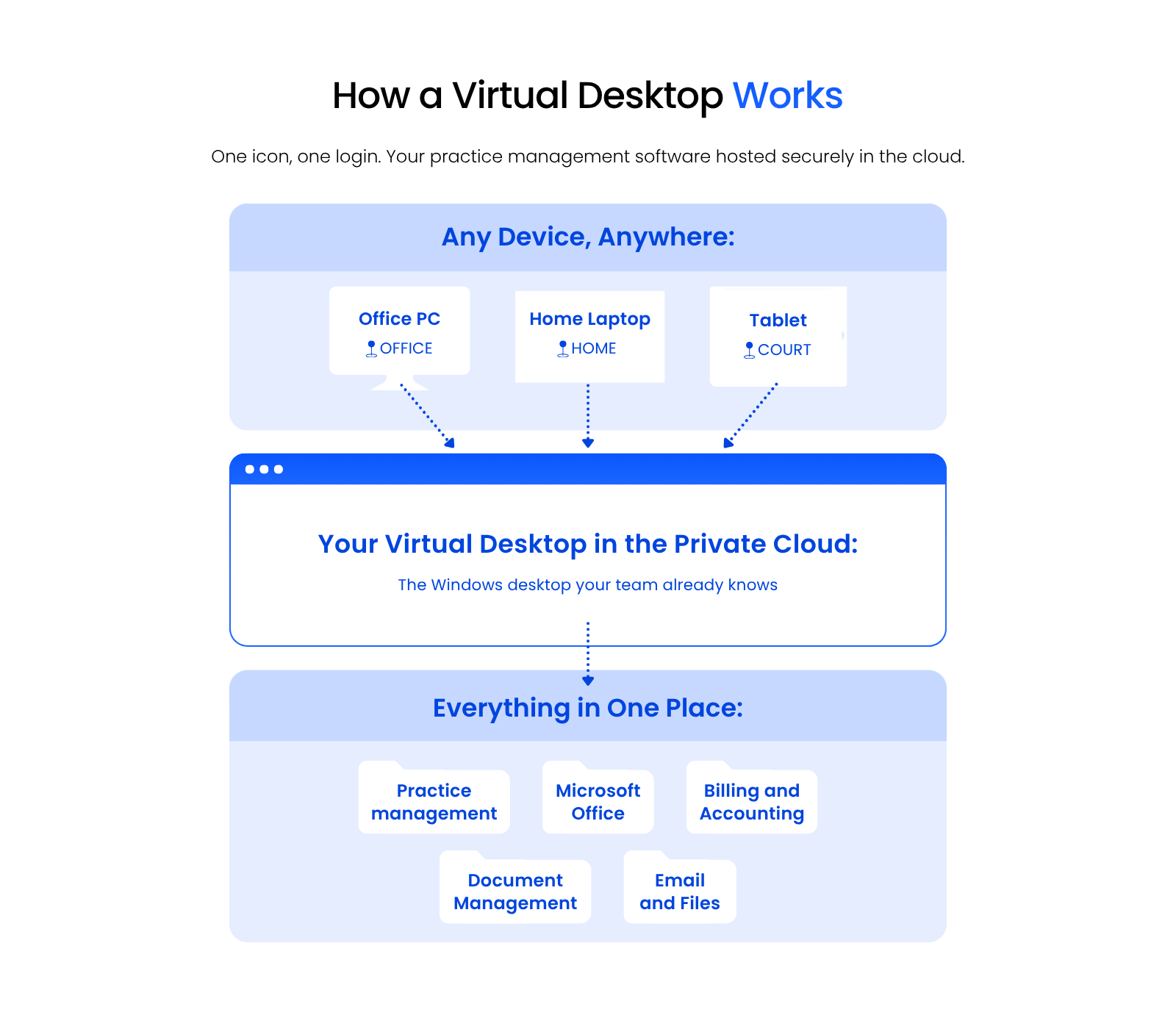
A Virtual Desktop is just like any desktop, like the Windows or Apple desktop you log into and use at home or work, which is hosted in the cloud, so you can access it anytime, anywhere.
Typically, your Virtual Desktop will have the software that you need every day, like Microsoft Word, Excel, Outlook, along with your law practice management software, accounting software, and even your document management software.
The Virtual Desktop makes your law firm’s software, which is otherwise only available from your work computer or while connected to your office’s servers, available from any computer in the world.
How Virtual Desktops Work
In a traditional computing environment, your core law firm software is installed on your physical, local desktop.
That is: the workstation or laptop you use in the office. In this traditional model, everything runs locally, and your applications are installed on your individual computer.
Meaning, if your laptop breaks or gets lost, you could potentially lose whatever hasn’t been backed up.
A Virtual Desktop is different.
In a Virtual Desktop environment, very few applications, if any, are actually installed on your local computer.
Often, the only icon on your local desktop is a shortcut to log into your Virtual Desktop.
When you (or anyone on your team) log into a Virtual Desktop, you’ll have access to all of your law firm’s software, documents, and data.
This includes:
This gives your entire firm access to Time Matters (plus all of your applications, documents, and data) from anywhere and on any device.
Virtual Desktops also mean that you no longer need to install, update, and maintain each of your applications on every computer within your firm. Instead, your Cloud Service Provider simply keeps all software updated for you.
Should My Law Firm Use Virtual Desktops?
Virtual Desktops bring numerous advantages to law firms.
Specifically, Virtual Desktops are likely the best technology route in any of the following scenarios:
If one or more of the above scenarios are relevant to you, you should probably consider the benefits of a Virtual Desktop. Odds are, you’ll start using one and wonder why you took so long to switch over.
We’ll cover selecting the right Virtual Desktop provider and doing your due diligence shortly.
Before that, please watch the video below to get an idea of how Virtual Desktops look and function.
Virtual Desktops Demonstrated
For an example of working in a Virtual Desktop, watch our demonstration of Uptime Cloud.
Once you’ve seen it in action, the next question is how to actually get there.
Migration: How to Move Time Matters to the Cloud
Now that we understand how Time Matters in the Cloud works, the benefits, and the functions, we’ll walk through how to move Time Matters to the Cloud.
This process is typically administered by your chosen Cloud Service Provider, but it could be done via a combination of IT consultants, software consultants, and cloud hosting providers.
Steps to Move Time Matters to the Cloud
Here are the steps to take to move to the cloud.
Step 1: Onboarding Project Manager
Your Time Matters cloud migration should begin the same as any well-managed project: with a single point of contact. Having a single person to talk to helps avoid confusion as they walk you through the process.
Your project manager (at Uptime Legal, we call this person the Onboarding Manager) should begin by clearly setting expectations and clearly communicating the next steps – removing any uncertainty on the path that lies ahead. Your Onboarding Manager should define specific timelines, expectations, and what is needed from you for the process to be efficient and successful.
Step 2: Discovery
While a good cloud service provider will have a well-defined and documented process for onboarding, the process should never be cookie-cutter because no two law firms are alike. Ensure that your Onboarding Manager takes the time to get to know you and your needs.
Specifically, a good Time Matters cloud migration process should begin with deep discovery and assessment of the firm’s current environment, including:
Step 3: Build
Next, your Time Matters hosting provider will begin building your private cloud environment.
If you have a good provider, they will have a well-developed process and can build your private cloud quickly. The Onboarding Manager and the accompanying engineering team will install your software, provision your email accounts, and generally spend time building the “shell” of your complete IT platform.
This process includes:
Step 4: Go-Live
Next, your Time Matters cloud provider will begin the process of collecting your data from current locations.
Each element of your firm’s technology will be migrated over – component-by-component.
This cutover process includes the migration of:
The physical transfer should be smooth, and all data will be transferred securely to the new cloud platform.
The Onboarding Manager and his team should thoroughly test every application (once data has been imported), and test computers and peripherals.
The Time Matters hosting provider should be very flexible in scheduling the cutover, including executing it over an evening or weekend, so the entire cutover process takes no more than a day, and results in little or no user downtime.
Doing it this way ensures that you are not wasting time.
Step 5: Training & Ongoing Support
A good Time Matters hosting provider knows that first impressions matter.
The key to employee adoption is a reliable, easy-to-use system from Day One. Your cloud provider should have a comprehensive plan for training your entire staff and provide an extra layer of handholding, as necessary.
The Onboarding Manager, who “owns” the migration, should be there for you on the front lines. You are going to want their help with training and tying up loose ends.
This well-managed, highly operationalized process shouldn’t end with the migration, and you won’t want it to.
A good provider of Time Matters cloud hosting will have systems for both “on-demand” support as well as account management.
The latter is a process that makes certain that beyond the day-to-day technical needs, you have a true partner and legal technology advisor.
I can’t stress this enough: A meticulously managed onboarding will be the difference between catastrophic failure and glorious success.
Everything we have outlined here is what is required for a smooth, successful transition of Time Matters (and your firm) to the cloud.
You need not feel overwhelmed.
And, if you are, that’s all the more reason to ensure that you have a trusted manager helping you along the way.
The Economics of Time Matters in the Cloud
Beyond the functional, reliability, security, and mobility benefits of Time Matters cloud hosting, there’s also the financial case for moving Time Matters to the cloud.
Running Time Matters in-house, with on-premise servers, is a deceptively expensive proposition.
You need to buy servers. You need to buy ancillary IT infrastructure, like backup systems, battery backups, and more. You need to hire a capable IT consultant to not only set up the server but proactively manage and maintain it.
And these costs are always higher in any given year than you think they will be.
To understand the economics of moving Time Matters to the cloud, we need to compare a Private Cloud solution to the costs of in-house, on-premise servers and IT.
On-Premise IT
Up-Front Costs
First, analyze all costs incurred for each new server cycle (typically 3 to 5 years).
That is, buying and implementing server infrastructure, and typically includes:
I recommend that, for each of these items above, you get pricing and record it in a spreadsheet.
Add up the total costs (be sure you’re not missing anything).
Then, you’ll have a sense of the total up-front server cost of another cycle of on-premise IT.
Many of these costs are ultimately driven by the software your law firm uses.
This is ultimately determined by the software you use, namely Practice Management and Document Management software, and the server requirements of those applications.
This is to say that there is a solid amount of variation to consider. Most law firms have specific combinations of needs, so it helps to create a baseline understanding of what costs you will incur upfront.
From there, creating a tailored plan will help you understand both what your specific company needs are and what you will need to be successful.
For now, a fundamental understanding of your needs to get started is enough to at least determine which direction you should go in.
Want some help?
Use our Cloud Cost Comparator to tally up all relevant up-front costs for your firm.
Ongoing Costs
Next, analyze costs incurred on an ongoing basis. Identify monthly recurring costs, as well as annual costs (renewals, maintenance), and determine your average monthly or annual recurring costs.
For most law firms, these often include:
Add up what you do, or will, spend on an ongoing basis. This should include fixed monthly costs (such as a Managed IT Provider contract) as well as sporadic, less predictable costs (such as hourly IT support).
For the latter, if you’re unsure of a reasonable budget for this amount, I recommend finding the average over the past two or three years.
Always a good reminder – it’s better to overshoot what your estimated budget is than to underestimate it.
Add all of these up and determine your average monthly IT spending.
On-Premise Costs: Unplanned
Finally, we need to identify and budget for some level of unplanned IT expenses.
Proactive IT does significantly reduce the chances and impact of unforeseen IT problems, but over enough time they’re likely to occur nonetheless.
These unplanned costs may take the form of:
Some costs are fixed and predictable while others are wildly unpredictable (but should be budgeted or accounted for in some way).
Again, you don’t need to get carried away, but planning for a higher budget is always better than grossly underestimating your costs.
Finally, add up your up-front costs, monthly recurring costs, and your budget for unplanned/unforeseen costs.
This is your Total Cost of Ownership for On-Premise IT.
Compare to Private Cloud
Now let’s compare this Total Cost of Ownership to that of a Private Cloud.
We’ve already demonstrated that a Private Cloud is objectively better than in-house IT in terms of reliability, security, and mobility.
While these factors are definitively important, we understand that financial considerations are up there too.
Simply comparing the costs of in-house vs. cloud-based IT shows that Private Cloud is also more economical than in-house IT.
Something of note is that (with the right Private Cloud provider) these figures are inclusive of all technology that you would otherwise have to buy and maintain. On-premise IT (as we’ve illustrated above) is fraught with hidden and unpredictable costs.
Fully managed Private Cloud costs are simple, clear, and predictable.
The Time Matters Annual Maintenance Plan
Time Matters can be subscribed to in the form of a monthly Subscription-Based License (SBL) or purchased as a perpetual license along with an Annual Maintenance Plan.
If you use Time Matters, we recommend either acquiring it in its SBL model or that your firm acquires (and renews) an AMP every year. And if your firm is hosted in the cloud, your AMP or SBL is also what gives you access to Time Matters Cloud Hosting Options in the first place.
With SBL or an AMP, your firm is entitled to:
Doing Your Due Diligence & Mitigating Risk
Now that you have a sense of how Time Matters in the cloud works and how moving Time Matters to the cloud will benefit your law firm, let’s talk about the all-important job of doing your due diligence.
There are a variety of ways your firm could accomplish a transition of Time Matters to the cloud. Whatever direction your firm goes, it’s important to do your homework.
In recent years, a problem for law firms has become that more and more companies, from small, local IT shops to generalist (non-legal-focused) cloud server providers, are throwing their hat into the ring and declaring, “Hey, we do Time Matters cloud hosting now too!”
This is a potential pitfall for law firms.
Here’s why.
Running and maintaining Time Matters in the cloud isn’t for amateurs.
Hosting Time Matters, in particular, requires special configuration and deep software expertise. It’s important to choose a provider that you don’t have to worry about falling short – now and later.
How to properly engage in due diligence when selecting a Private Cloud provider for your law firm is a subject unto itself, but here are a few key areas to review when evaluating potential hosting companies:
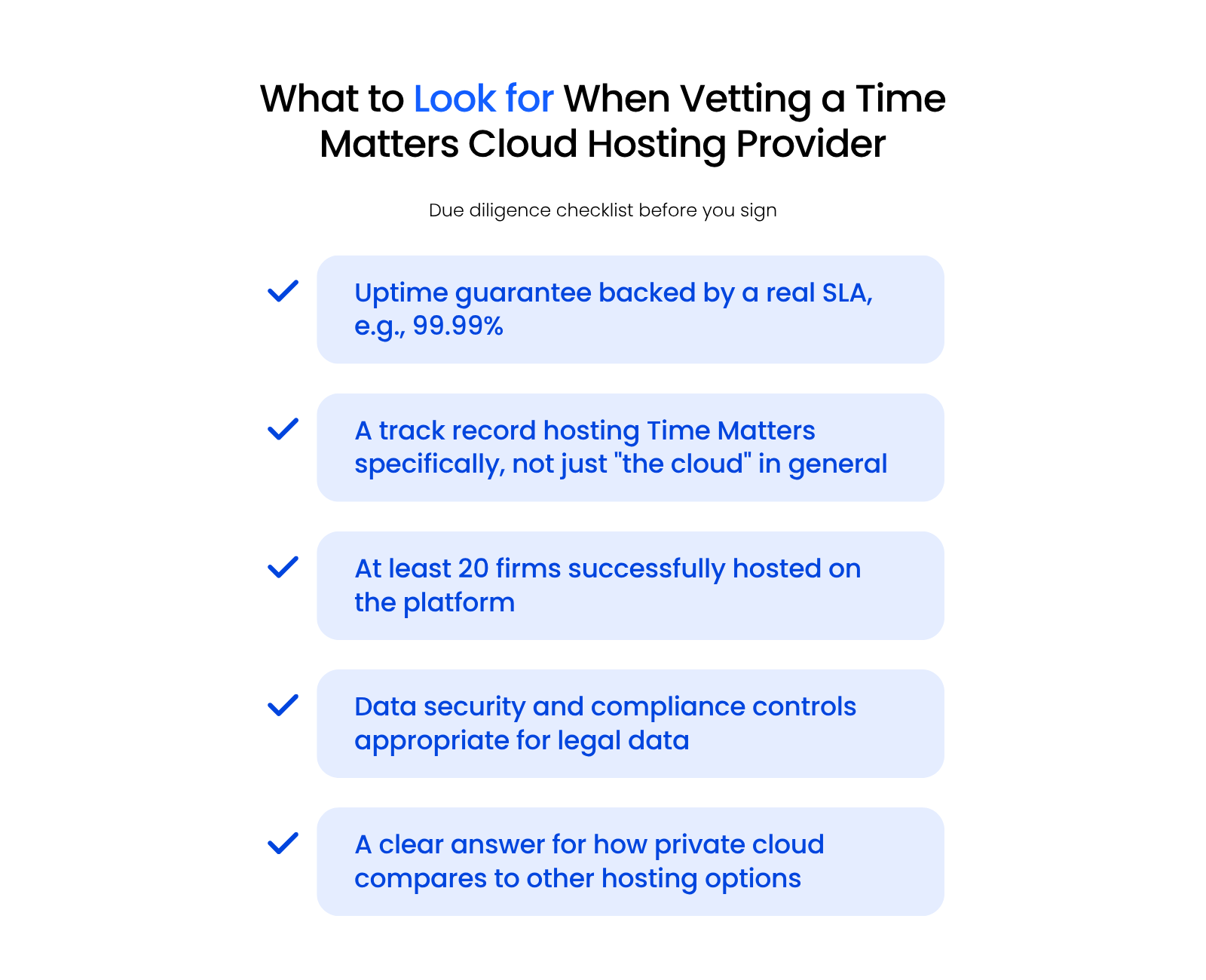
Once you’ve developed a short list of potential Time Matters hosting providers, do your homework on each company.
We recommend at least doing the following:
If the company is reputable, you can see the Google reviews for a Private Cloud provider (or any business), by simply performing a Google search for that company.
The reviews will show up in the search results sidebar.
Ready to Move Time Matters to the Cloud?
At Uptime Legal, we host Time Matters and other legal software for hundreds of law firms across North America.
Get in touch with our team to learn more about Time Matters in the cloud for your law firm.
WHAT’S NEXT
Frequently Asked Questions

Uptime Legal’s Technology Solutions
Cloud, software, IT, and document management built for today’s law firms.