Table of Contents
Let’s talk about Tabs3 Support.
Tabs3 and PracticeMaster, owned by ProfitSolv, are collectively a suite of law practice management and accounting software.
Since these two platforms are very complementary and integrative with each other, they are typically purchased and implemented simultaneously. We’ll discuss them as such.
With that being said, it’s important to get the best support. Navigating through the various support options, such as Tabs3 directly, authorized consultants, and private cloud solutions, can be a challenge.
In this article, we will discuss your choices for Tabs3 Support as well as how to navigate the process altogether.
By the end, you’ll have the answers to:
Whether you’re an experienced Tabs3 user or a firm just diving into its capabilities, this guide aims to assist you in harnessing the full power of this robust software, paving the way for enhanced efficiency and productivity for your firm.
Introduction: The Best Tabs3 Support
For law firms seeking an all-inclusive approach to billing, accounting including trust accounting, as well as an advanced system for handling clients and cases, Tabs3 and PracticeMaster are ideal choices.
With the ability to oversee both administrative and operational functions through the Tabs3 and PracticeMaster suite, it’s a suitable solution for firms aiming to consolidate their practice and accounting processes without using multiple software platforms.
However, as with any software, you’ll undoubtedly run into issues along the way.
That’s where robust Tabs3 Support comes into play, which will be the primary focus of this article.
Given the contemporary shift towards remote work, many traditionally server-based software platforms were tethered to in-office operations. However, the ability to work from anywhere has emerged as a top priority for many.
Opting for web-based software might be tempting, but they can sometimes fall short in offering the required functionalities. So, what’s the alternative? We’ll delve into those options soon.
Regardless of the path you choose, it’s paramount to ensure that Tabs3 is set up with optimal support to avoid potential challenges in the future.

The Financial Case for Cloud for Law Firms:
The cloud can be substantially more cost-effective than its alternatives. Learn more.
Tabs3 Software Overview
Tabs3 and PracticeMaster are server-based software that offers a supplemental, web-based interface for essential tasks on the go.
Allow me to detail the 3 aspects of this software suite.
Tabs3 & PracticeMaster
PracticeMaster caters to “front-office” operations by offering client and contact management, case and matter management, scheduling, and more.
Tabs3 is the complementary “back-office” solution to PracticeMaster, managing legal billing, business accounting, and trust accounting for your legal practice.
Tabs3 and PracticeMaster has been a steadfast software solution, providing robust features for those who prefer its classic, on-premise software.
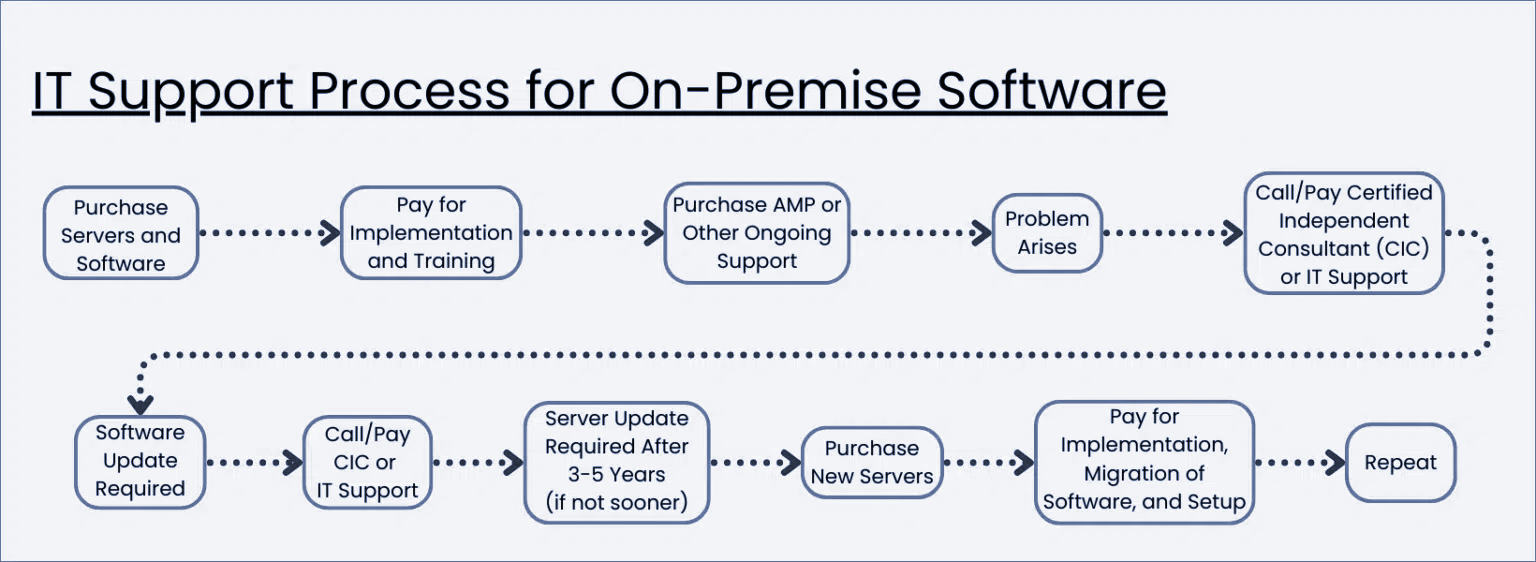
Naturally, on-premise solutions come with their own set of challenges, including the responsibilities of server maintenance and the restriction of using the software solely within the office confines unless you’re employing a private cloud or another alternative.
Assuming that server upkeep isn’t an issue for you or you’re already leaning towards a cloud solution, you can expect these notable features:

This server and desktop-based software offers a broad array of other features, including:
However, it’s important to keep in mind that Tabs3 and PracticeMaster does not offer these features:
Tabs3 Connect
Tabs3 Connect allows you to access Tabs3 and PracticeMaster from any location with internet connectivity. There’s no need for app downloads; you can just log in using your smartphone, tablet, laptop, or any remote computer.
Tabs3 Connect works as a slimmed-down access point for some of the features useful when you’re on the go. With Tabs3 Connect, you have access to details like client and contact data, fee and cost entries, your firm’s comprehensive calendar, among others.
Rest assured, the information accessed via Tabs3 Connect remains secure.
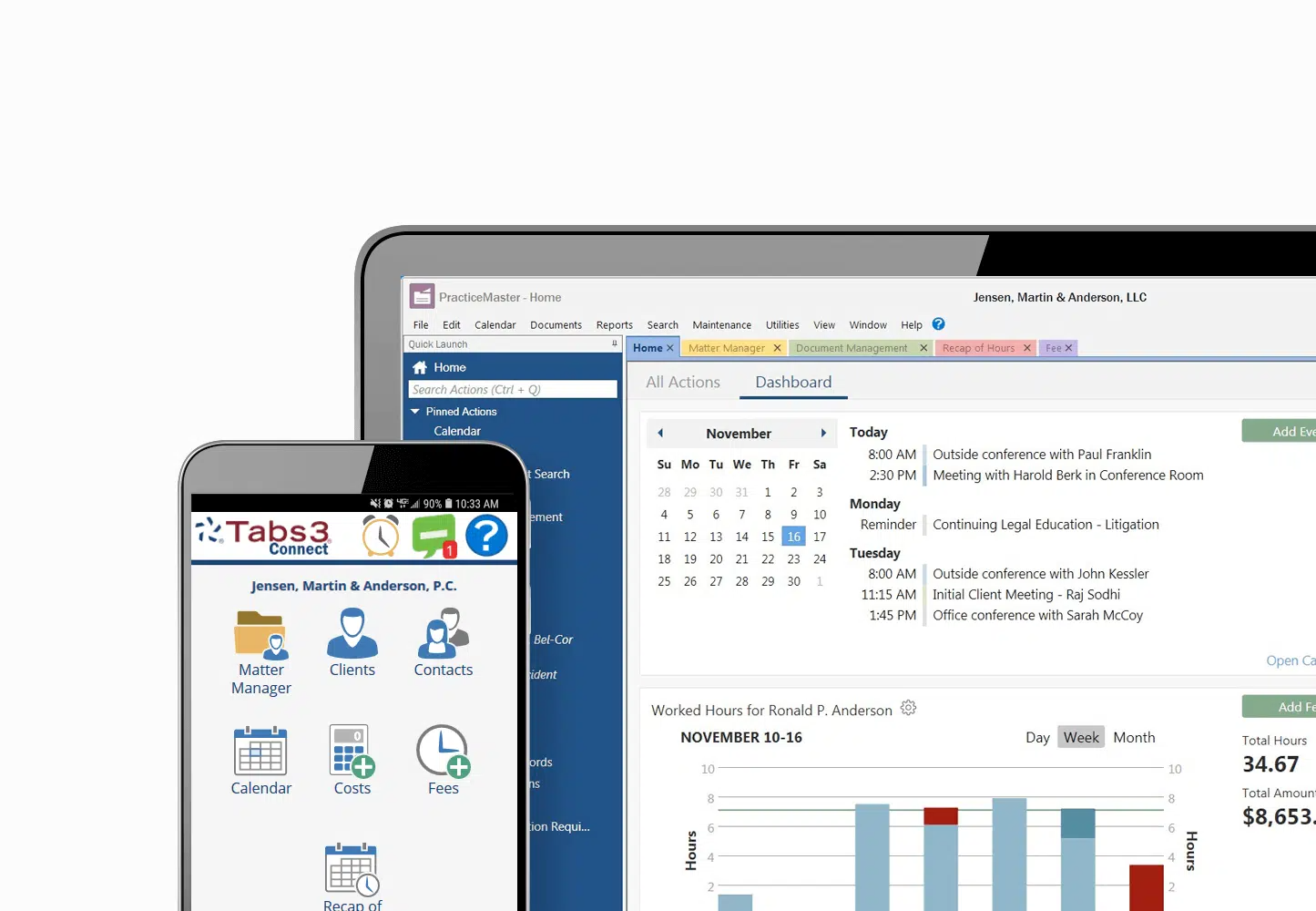
Note: Tabs3 Connect is not an equivalent, cloud-based version of the software.
Rather, it’s a supplemental interface meant to assist timekeepers when they are not in the office.
Setting Up Tabs3
First, you’ll need to buy the software. You can contact Tabs3, but they will direct you to one of the various resellers — which is the only real way to get their software.
If you’re curious about the software, you can reach out to Tabs3 for a demo.
After that, setting up Tabs3 will require servers and IT support.
The reason for this is that you need someone to come to your physical office in order to:
If you want to avoid this setup process, you can with a private cloud solution, like Uptime Cloud.
Getting Tabs3 Support
For Tabs3 users, there are three distinct avenues to seek support. Based on how your firm employs Tabs3 and the degree of assistance required, you can choose from one of these avenues or a combination thereof.
1. Tabs3
When you purchase Tabs3 and keep up with your Annual Maintenance Plan (AMP), you qualify for product support directly from Tabs3. This support includes help desk services, access to the Tabs3 online knowledge base, and training materials.
This Tabs3 support option is especially apt for firms that require intermittent assistance, often for “how do I” questions or swift resolutions.
Since it’s incorporated in the cost of your AMP, I always recommend firms to utilize this channel and complement with other approaches if necessary.
Managed IT Services for Law Firms:
Whenever you’re ready, we’re here to managed your IT. Read this article to learn more about the value of outsourcing your IT to a professional.
2. Certified Independent Consultants (CICs)
There’s a vast array of third-party consultants and professional service groups, but only a handful are certified to offer support for Tabs3.
These individuals are experts in legal software and technology, having undergone the required training and earned certification to assist, implement, and in some cases, customize Tabs3 for particular requirements.
Frequently, these Certified Implementation Consultants (CICs) work within consulting firms, though some operate as solo consultants.
They typically offer more in-depth, hands-on Tabs3 support, especially in integrating Tabs3 with a firm’s processes and workflows, training staff members, and tweaking Tabs3 to better suit a firm’s operational needs.
While Tabs3 provides routine support as part of the AMP, many law firms opt to work solely with their CIC for Tabs3 support, even if they qualify for direct assistance from Tabs3.
It’s important to highlight that CICs naturally charge for their expertise, so budgeting for this service is crucial.
3. Private Cloud
Finally, there’s the consideration of the private cloud.
The private cloud has gained traction as a contemporary alternative to the challenges of managing and maintaining on-premise servers and IT infrastructure. It hosts your Tabs3, alongside other legal software, documents, and emails on one unified platform. This setup empowers your firm to access these resources from any location, eliminating the complexities tied to in-house IT management.
A legal-specific private cloud will be meticulously crafted to accommodate Tabs3, with all the relevant Tabs3 support, updates, and upkeep integrated into the offering.
Choosing a legal-focused private cloud might be the best course of action if your firm values the flexibility of remote access, the heightened security standards that cloud technology brings, aims to sidestep the intricacies of managing in-house servers and IT, and envisions bundling IT, hosting, and Tabs3 support under a unified package offered by a single vendor.
An exemplary private cloud solution will include:
Choosing a legal-centric private cloud solution can be a wise decision for many law firms.
However, a word of caution if you’re leaning towards this option: Make sure your chosen private cloud provider is authorized to host Tabs3 and has the requisite expertise in hosting, supporting, and upkeeping the software.
Tabs3 in the Cloud
Tabs3, a comprehensive practice and lite document management software, has secured its reputation as an invaluable tool for law firms throughout North America.
With the modern business landscape progressively leaning towards remote work, many law firms are on the hunt for methods to diminish the costs and intricacies associated with managing on-premise servers.
The overarching ambition is to arm their professionals with the ability to function seamlessly from anywhere, obliterating geographical constraints and cultivating a healthier work-life balance.
This evolution has heightened the allure of what cloud technology can offer.
In our current digital era, cloud technology possesses the power to radically transform how law firms operate, offering benefits like cost savings, agility, and heightened efficiency.
In the context of Tabs3, transitioning to the cloud can evolve the software from being server-dependent to an instrument that’s notably more agile, user-centric, and proficient.
Let’s explore how law firms can smoothly migrate their Tabs3 practice management software to the cloud.
Cost of On-Premise vs. Cloud-Hosted Software
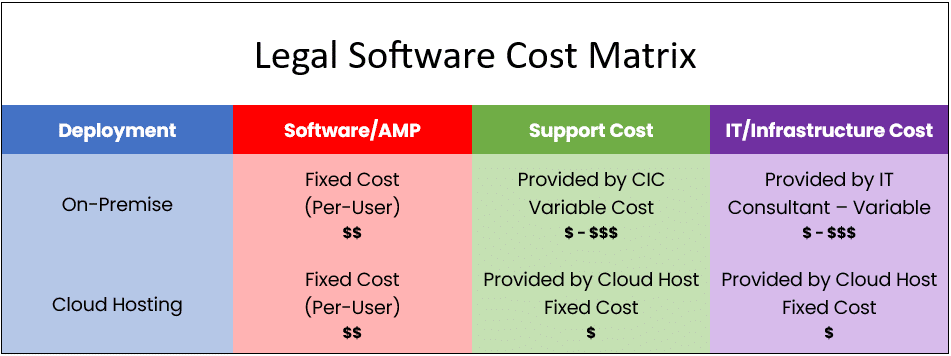
The financial contrast between managing your software in-house and choosing a cloud hosting service is significant.
The comparison table below clearly showcases that hosting software on-premise often ends up being the more expensive and less predictable option.
By gravitating towards cloud-hosting, your law firm can free itself from the responsibilities of server maintenance, software management, and IT support challenges. This is attributed to the fact that cloud-hosting providers maintain your software on their platforms, regularly performing updates on your behalf.
Since their primary focus revolves around these services, they frequently realize cost efficiencies, which in turn trickle down as benefits to their clientele.
For a thorough and insightful evaluation, we recommend utilizing our Cloud Cost Comparator. This tool can assist in identifying the most strategic and cost-efficient approach for your law firm.
Tabs3 as a Cloud App
Tabs3 was initially conceptualized as an on-premise software, crafted to operate on a server. Traditionally, law firms would host such applications on their in-house servers. Contrastingly, cloud-based solutions are managed over the internet, accessible through a web browser, eliminating the need for physical servers on site.
Yet, there exist various avenues to deploy Tabs3 in the Cloud.
For instance, platforms like Uptime Cloud can transform Tabs3 for cloud compatibility. These tools effectively let you employ Tabs3 as a web application in the Cloud, sidestepping the dependence on individual servers.
Sounds promising, right? But there’s a catch…
This methodology shines brightest when a law firm’s aim is solely to transition Tabs3 or a singular software to the cloud. For integrating other software tools, different tactics would be essential for each.
If your aspirations lean towards a more holistic solution, delving into offerings like a Private Cloud or Virtual Desktop might be a prudent move for your establishment.
For a deeper understanding of these alternatives, continue reading.

Tabs3 in a Private Cloud
After delving into the advantages of Tabs3 within a cloud setting, it’s pertinent to understand its operational dynamics within this new realm.
But first, it’s vital to differentiate between cloud-based or web-based software and traditional desktop or server-based software.
Before the ascent of cloud technology, the predominant software models, like practice management systems including Tabs3, were typically installed on a firm’s internal servers and accessed via the desktops within the firm’s premises.
The software’s nucleus, which included its database and pivotal functions, was anchored on this server. This setup made owning a server an integral necessity for firms wanting to harness on-premise systems like Tabs3.
This structure mandated that the acquisition, maintenance, and management of servers and the encompassing IT infrastructure became integral to the utilization of legal management systems.
This was the norm.
However, the tech paradigm has undergone significant transformations. Today, we find ourselves familiarized with the term Private Cloud.
A Private Cloud is essentially a virtual IT platform, hosted and managed offsite, which mirrors or even enhances the capabilities of traditional server setups. It becomes the sanctuary for a firm’s software tools, documentation, emails, and other core operational elements, promising heightened access, reliability, and protection.
Software like Tabs3, which is intrinsically designed for server-based environments, invariably leans on a server for its function. But, when integrated within the domain of a private cloud, this cloud effectively assumes the role of the server.
To shed more light, a typical private cloud setup for Tabs3 would encompass:
The “Private” in Private Cloud
Private Clouds are so-called because every law firm, called a tenant in cloud computing parlance, has their own segregated, dedicated working environment.
In most cases, that means:
That’s the “back-end” of running Tabs3 in the cloud. You and your team will interact with the Private Cloud via what’s known as a Virtual Desktop.
Tabs3 in a Virtual Desktop
We’ve explored the benefits of running Tabs3 on a cloud platform and the significance of a Private Cloud in this context. But what does it practically mean to operate within a Private Cloud? How do members of your firm engage with it?
This can be best illustrated through the concept of a Virtual Desktop.
Fundamentally, a Virtual Desktop mirrors the typical computer interface you encounter on Windows or Apple systems. However, it’s hosted in the cloud and can be accessed anytime, from anywhere.
This Virtual Desktop typically comes preloaded with familiar software, such as Microsoft Word, Excel, Outlook, in addition to your legal practice management tools, accounting software, and document management systems.
The allure of a Virtual Desktop stems from its capacity to grant access to your law firm’s software from any device, anywhere in the world.
Such Virtual Desktop services are often termed Desktop-as-a-Service or DaaS, drawing an analogy to the well-known Software-as-a-Service or SaaS model.
Virtual Desktops for Law Firms:
How They Work, and Why Your Law Firm Should Probably Use Them.
How Virtual Desktops Work
Within a Virtual Desktop environment, your software applications reside on servers stationed in a remote data center. Your local computer effectively acts as a window or gateway to these applications. When you launch a program, it operates on these distant servers, instead of your local device.
This configuration lets you access your software, files, and other data from any location, as long as you have internet connectivity, and through various devices.
In essence, your digital workspace isn’t tied to a singular physical spot; instead, it’s available anywhere.
Typically, your local desktop will only house a shortcut, serving as the entrance to your Virtual Desktop.

Upon logging into your Virtual Desktop, you or any member of your team can access all of your law firm’s software, documents, and data.
This includes:
With this setup, each member of your firm can access Tabs3, as well as all other software, documents, and data, irrespective of where they are or the device in use.
Additionally, Virtual Desktops remove the need to individually install, update, and manage each software on every computer within the firm. The responsibility for maintaining and updating all your software shifts to your Cloud Service Provider, simplifying procedures and averting potential challenges.
This approach offers enhanced user-friendliness and centralizes the administration of your software resources, significantly reducing your firm’s workload.
Should My Law Firm Use Virtual Desktops?
Virtual Desktops bring many advantages to law firms. Specifically, Virtual Desktops are likely the best technology route in any of the following scenarios.
Closing the Loop
Again, I’m not suggesting that one of these options is inherently better than the others. In truth, your Tabs3 support strategy might include a combination of two or even all three of these methods. It truly depends on the specific needs of your law firm.
I encourage you to explore all the paths open to you. Engage with several Certified Independent Consultants. Talk to different Private Cloud providers. Delve further into online research, or discuss with colleagues who also use Tabs3.
Wishing you success in whatever support strategy you devise for Tabs3 — Onward and Upward!
Frequently Asked Questions

Uptime Legal’s Technology Solutions
Cloud, software, IT, and document management built for today’s law firms.