Table of Contents
If you ask ten IT providers whether they work with law firms, most of them will say yes.
That’s the easy part.
The harder question is whether they can actually support a law firm when something breaks, when legal software gets involved, when security expectations tighten, or when a deadline is too close for vague answers and vendor finger-pointing.
A lot of firms learn that lesson too late. They sign with a provider that sounds polished, seems responsive, and checks the usual boxes. Then a real issue hits, and the firm finds out the provider is comfortable with the basics, but shaky on the parts of the environment that matter most.
This guide is built to help you avoid that mistake. It’s a decision framework for figuring out what matters most, what to ask, and what should make you walk away.
The Problem With Most Law Firm IT Providers
Most law firms don’t have an IT problem in the abstract.
They have a provider-fit problem.
On paper, the provider may look perfectly fine. They answer tickets. They help with Microsoft 365. They reset passwords. They troubleshoot printers.
None of that’s irrelevant. But law firms usually discover the real gap when something more specific happens:
That’s where the generalist pattern tends to show up.
The provider handles the “normal IT” layer. The legal-software vendor handles the application. Microsoft handles Microsoft 365. Your cloud host handles the environment. Your copier vendor handles scanning. Meanwhile, your firm is stuck in the middle, trying to figure out who actually owns the fix.
That goes beyond annoyance and creates operational drag inside the firm.
When support breaks down this way, a few things usually happen:
Choosing an IT provider isn’t just about finding adequate IT support for law firms. It’s about finding someone who can support the way legal work actually happens when multiple tools, vendors, deadlines, and risks overlap.

When General IT Fails Law Firms:
The Cost of Ignoring Legal Specialization If your firm has already felt the cost of generic support, this piece goes deeper on what breaks when a provider understands IT in general but not legal work specifically.
What “Legal-Specific IT Support” Actually Means
A lot of providers have a legal page on their website.
That doesn’t tell you much.
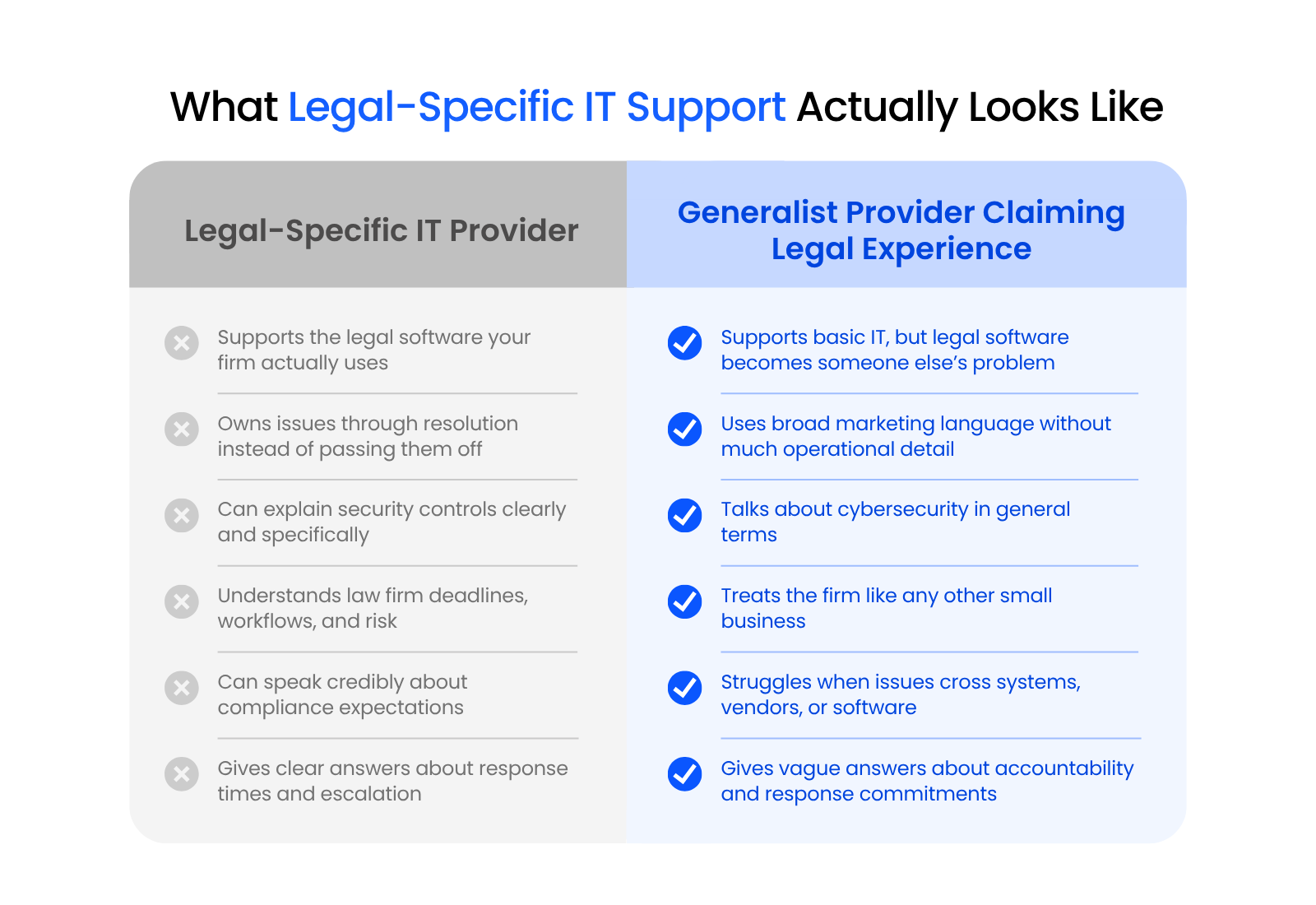
Real legal-specific IT support shows up in the details: what software they support, how they handle accountability, how they think about risk, and whether they understand the operational reality of a law firm.
Legal Software Competence Is the Real Test
This is the first thing you should press on, because it’s where the gap usually becomes obvious.
Any provider can say they “support” legal software. What you need to know is what that means in practice.
That matters because legal software is where many generalist providers quietly draw the line. They will support the workstation, the login, the internet connection, or the server. Once the issue touches the application itself, the answer often becomes, “You’ll need to call the vendor.”
Law firms don’t need magical, all-knowing IT. They need a provider that can coordinate the moving parts, stay accountable, and keep the issue moving until it’s resolved.
Security and Compliance Need More Than Marketing Language
Law firms don’t need a provider that simply says “we take cybersecurity seriously.” Every provider says that.
A good provider should be able to talk specifically about the standards law firms are already dealing with. That includes ABA Model Rule 1.1 Comment 8, which says lawyers should keep abreast of the benefits and risks associated with relevant technology, and Rule 1.6, which requires reasonable efforts to prevent unauthorized access to or disclosure of client information.
They should also be able to speak clearly about the controls cyber insurance carriers increasingly expect, including MFA, cybersecurity training, and dependable backups.
That’s categorically different from a provider who gives you a vague “we handle compliance” answer and leaves the rest implied.
Understanding Legal Workflows and Risk
The right provider also understands that downtime in a law firm is rarely just an inconvenience.
A permissions error, scanner failure, sync issue, remote-access problem, or software slowdown can affect filings, billing progress, client communication, or document access when the firm is already under pressure.
Good legal IT support accounts for that. It treats responsiveness, clarity, and ownership as part of the service, not as optional nice-to-haves.
The Criteria That Matter Most and How to Evaluate Them
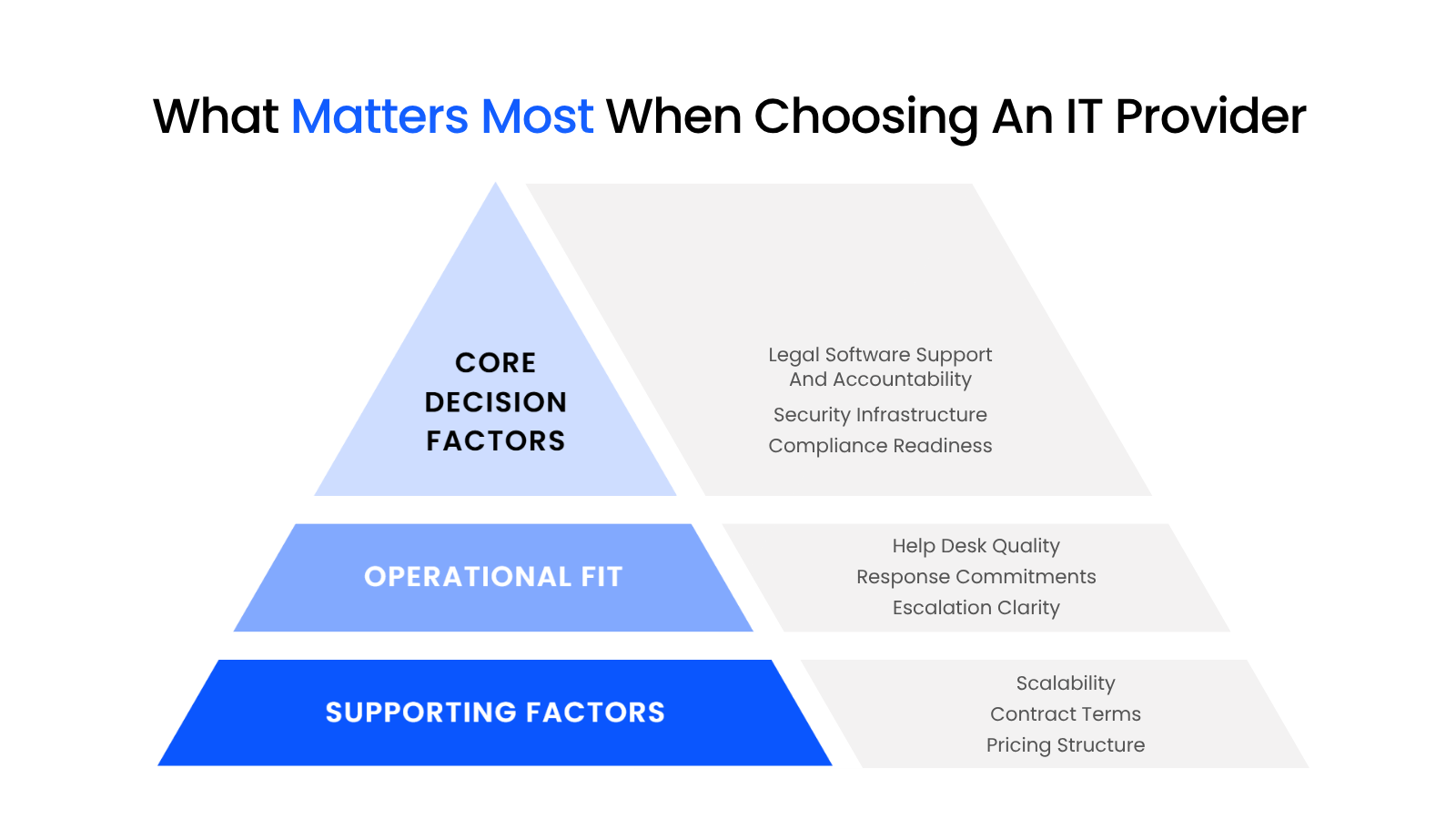
Not every buying criterion deserves equal weight.
Some criteria are decisive, while others are supporting details.
Here’s how your firm should prioritize them.
1. Legal Software Support and Accountability
This is the biggest factor.
If your provider can’t clearly support the applications your firm depends on, you are going to feel it sooner or later.
That doesn’t mean they have to build the software. It means they should know how to support the environment around it, troubleshoot intelligently, communicate with the software vendor, and keep the issue moving.
What to listen for:
Be careful with answers that sound polished but thin. A provider should be able to explain how they support your environment, not just say they work with law firms.
2. Security Infrastructure for Law Firms
This is where provider conversations often start sounding polished and meaningless.
A strong answer sounds concrete. You should hear how they approach identity and access, endpoint security, email protection, backups, monitoring, recovery, and response.
What to listen for:
If the answer stays abstract, that usually tells you the provider is light on specifics.
3. Compliance Readiness and Bar Awareness
A good provider should understand the obligations sitting underneath a law firm’s technology decisions. That includes:
If a provider can’t speak clearly about those realities in practical terms, they probably don’t understand the legal environment as well as they claim.
4. Help Desk Quality and Response Commitments
A provider can sound great during the sales process and still leave your team hanging once the contract starts.
That’s why response commitments, escalation paths, and day-to-day support experience matter. If your staff can’t get a straight answer, if urgency is fuzzy, or if nobody seems to own escalations, frustration builds fast.
What to listen for:
Support quality shows up in whether the firm can keep moving when something important is off, not just in whether the law firm help desk sounds friendly.
5. Scalability and Contract Terms
This matters, but it should not outrank the essentials above.
A firm that plans to grow, add attorneys, deepen security, or shift core systems needs a provider that can grow with it. Just as important, the agreement should be understandable.
Look closely at:
This is also where infrastructure fit starts to matter more. A firm that’s growing may need stronger cloud hosting services, more mature onboarding and offboarding, or cleaner support around remote work and hosted legal applications.
Red Flags to Watch For
Some providers should make you slow down, and others should make you walk away.
Most firms can spot the obvious red flags. The harder part is understanding what those signs reveal about the provider behind them.
In many cases, they point to deeper problems in the service model long before the contract is signed. Vague answers can hint at weak accountability, and soft contract terms often suggest a relationship that may become frustrating once the firm is locked in.
Here are the red flags to take seriously.

How to Vet and Transition to the Right IT Provider for Your Law Firm:
If your firm is already thinking about moving on from a weak provider, this guide covers how to evaluate the switch and transition with less disruption.
Questions To Ask Before You Sign
These questions should do real work, not sound like generic discovery prompts anyone can answer with a polished paragraph and a smile.
These are the questions to use in a provider conversation:
- 1
If our legal software goes down on a Friday afternoon, who owns the fix?
- 2
Which legal applications do you actively support today, and what does that support include?
- 3
How do you handle issues that involve Microsoft 365, permissions, remote access, and legal software at the same time?
- 4
What security controls do you standardize across your law firm clients?
- 5
What are your response-time commitments for urgent issues, and how are escalations handled?
- 6
Can you share examples of law firms you support that are similar to ours in size or complexity?
- 7
What does your monthly agreement include, and what commonly falls outside scope?
- 8
If our firm grows or changes core software, how does your support model scale with us?
The questions matter, but the shape of the answers matters just as much.
Strong answers usually sound like this.
A strong provider usually doesn’t seem irritated by specifics. They tend to sound like they have heard these questions before and already know how they handle them.
Weak answers usually sound like this.
Not every imperfect answer is a dealbreaker, but patterns matter.
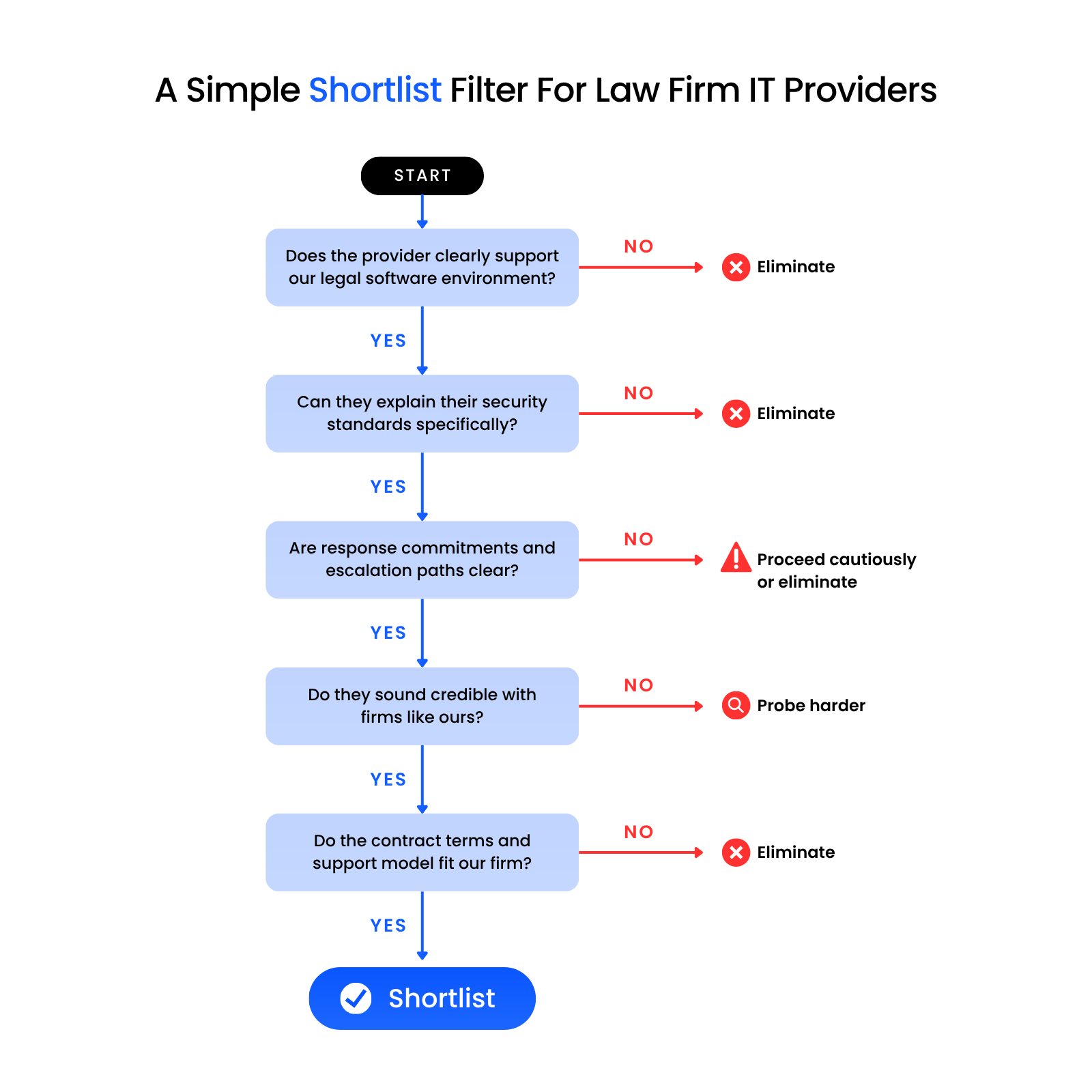
If the provider starts sounding foggy the moment you ask about legal software accountability, escalation structure, or cross-system troubleshooting, that tells you something useful before you sign.
How Firm Size Affects The Decision
The criteria stay mostly the same from firm to firm. What changes is how heavily each one should weigh in the decision.
A smaller firm may care most about responsiveness, simplicity, and avoiding expensive overkill. A larger firm may care more about structure, documentation, scalability, and consistency across a more complex environment.
Solo to 10-Attorney Firms
Smaller firms usually need simplicity, responsiveness, and strong fundamentals.
They often can’t afford a provider that adds process for the sake of process. They need support that’s easy to reach, security that’s sensible, and legal-software help that doesn’t disappear the moment an issue gets more complicated than a password reset.
At this size, put extra weight on:
Budget matters here, but so does avoiding false economy. Cheap support that creates delays, confusion, or repeated work is rarely cheap in practice.
10 to 25-Attorney Firms
This is often where informal IT starts breaking down.
The firm is larger, more collaborative, and more dependent on systems working consistently across multiple attorneys and staff members.
It becomes harder to rely on one internal ‘tech-savvy’ person, one outside technician who knows the setup by memory, or a loosely coordinated patchwork — which is exactly when most firms start evaluating outsourced IT for law firms.
At this size, firms usually need more of the following:
This is also where a shaky provider starts becoming more expensive, because the cost of confusion touches more people more often.
25 to 75-Attorney Firms
At this size, operational maturity matters much more.
The firm may need tighter documentation, stronger escalation structure, cleaner reporting, and a provider that can support more complexity without getting reactive or loose. There’s usually less room for ambiguity because the downstream effect of problems is larger.
What tends to matter more here:
The cost of choosing wrong rises at this level. Problems affect more attorneys, more matters, more staff time, and more client-facing risk.

Choosing a Provider You’ll Actually Want to Stay With
The strongest providers usually stand out in the same areas: they can support the legal software your firm depends on, explain their security standards in practical terms, stay accountable when systems overlap, and communicate clearly when something urgent happens.
That’s also where the difference between a legal-focused provider and a generic MSP should start to feel more concrete.
Uptime Legal, for example, doesn’t just position itself around general IT support. Uptime Manage emphasizes expert-certified legal software support, Microsoft 365 support, unlimited help desk, an assigned IT manager, managed endpoint detection and response, backup and disaster recovery, and compliant email archiving.
A short conversation can still tell you a lot. If the answers sound specific, grounded, and operationally clear, keep going. If they stay broad, polished, or slippery once the questions get more practical, keep looking.
WHAT’S NEXT
Frequently Asked Questions

Uptime Legal’s Technology Solutions
Cloud, software, IT, and document management built for today’s law firms.