Juris Software, renowned for aiding small to midsize law firms in time, billing, and legal accounting, faces a shift.
Using on-premise software is becoming outdated. With the cloud offering enhanced security, better uptime, and affordability, it’s clear why law firms are moving away from in-house servers.
This article discusses the transition of Juris Software to a cloud-based platform, providing easier access to essential billing and accounting tools.
Who This Guide is For
This guide on making Juris Software Cloud-Based is for law firms who currently use Juris, or is considering it, and wants to take advantage of the multitude of benefits that moving to the cloud offers.
This includes:
- Law Firm Partners creating and/or developing the IT strategy for their firm.
- Law Firm Administrators with the responsibility of managing their company’s technology.
- Law Firm IT Consultants interested in learning about better solutions for their clients’ applications.
Our Ultimate Guide to Juris in the Cloud provides you with roadmap, from education to execution, to harness the power of Juris when cloud-based.
Introduction to Juris Legal Accounting
This section is for readers new to Juris or anyone who wants a quick primer on the company behind these billing and accounting tools. If you already know Juris and want to jump to cloud use, feel free to skip ahead.
LexisNexis created Juris years ago to provide law firms with time, billing, and accounting software. Juris is typically used by firms with at least 5 to 10 timekeepers.
Juris is server-based. It is designed to run on your firm’s on-premises server with the desktop client installed on each computer.
There’s also a Private Cloud option, which offers more flexibility on where you can use the software.
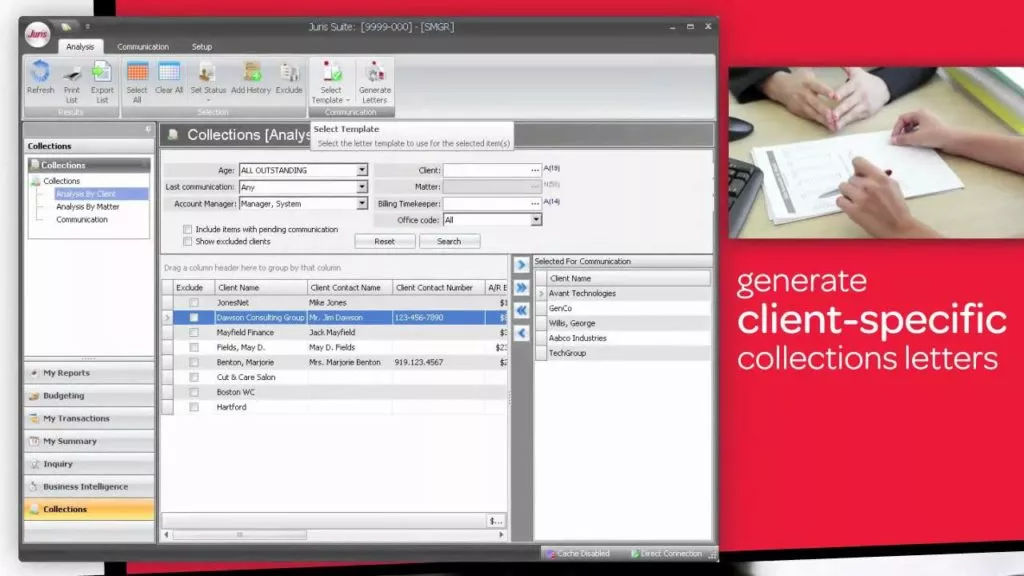
Juris software comes in three primary modules:
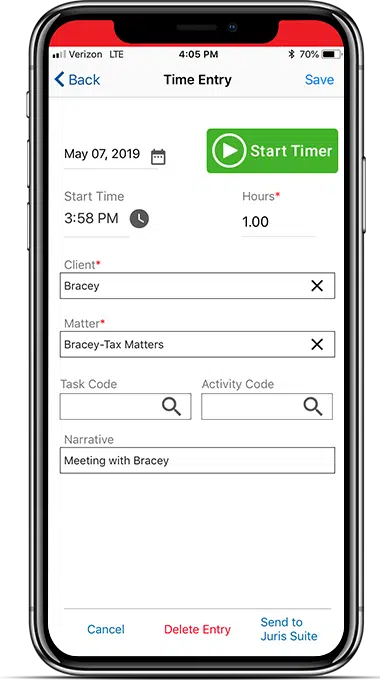
Juris Go is a comprehensive time-tracking app developed for mobile time entry.
This helps streamline the process, so lawyers can maximize profits through an easy-to-use timekeeping process.
With hardly any effort, timekeepers can track time for the present moment and future reference.
It works on a smartphone or tablet and can be integrated with Juris Suite for seamless matter lookups.
Juris as a whole offers robust software to ensure that you are handling your accounting, billing, and financial management with software to track and execute necessary functions for your law firm.
Who Juris is Good For
Juris is often a good fit for law firms of 5 or more attorneys. It is especially useful for law firms that need sophisticated legal accounting.
Juris is an especially good fit for firms that use Time Matters. Juris is generally not well-suited for solo and very small law practices.
Don’t Sacrifice the Right Software for the Cloud
The cloud brings reliability, security, and mobility but many firms assume they must abandon their software.
In practice, Juris and other server-based platforms often offer more robust features than cloud-native alternatives.
You can avoid that detour. Keep the software you prefer and still gain cloud benefits by using a Juris cloud-hosting solution.

Juris: Complete Review, Features, Pricing:
Discover how to “cloudify” Juris into a secure private cloud for 24/7 access, NIST-level security, and a server-free office.
Why Juris is Better in the Cloud
Juris provides great billing and accounting software to law firms.
Their software is only enhanced when utilized through the cloud.
In most cases, law firms’ favorite software is experienced better in the cloud. I understand that you know Juris as server-based software, but let’s talk about why and how you can run Juris in the cloud.
But before we talk precisely about how it works, let’s talk about why.
1. Combine the Best of Both
The cloud delivers mobility, anywhere access, and strong security.
Juris is built for billing, accounting, and firm financials, and it integrates with Time Matters for case/matter and document management. Running Juris in the cloud preserves the reliability of the software your firm relies on while unlocking seamless, anytime access to your data.
It’s a strategic way to keep proven workflows and gain the agility and efficiency of the cloud—the best of both worlds.
2. Managing Servers and IT is a Hassle
For years, running quality legal billing software meant living with on-premise servers.
Juris brings real value—but it requires a server, so firms bought one. If you’ve been around, you’ve likely supported them longer than you’d like. If you’re newer, you may still avoid them altogether.
Owning servers is a hassle. For a long time it was the only way to run the software you wanted—and, ironically, server-based tools are often more capable than cloud-native alternatives.
Servers demand constant care: proactive (keep them healthy) and reactive (fix them when they break).
To run Juris on-premise, you’ll need to:
Contrary to these headaches, running Juris in the cloud allows you to still reap the benefits of a robust server-based software without the inevitable drawbacks that accompany server ownership.

3. Work from Anywhere
There was a time when using software in one location was fine. Today, that’s restrictive—teams are expected to be operational anytime, anywhere. Whether for remote work or simple convenience, you’ll want access to Juris when you need it.
Making Juris cloud-based gives your firm secure, anywhere access. With the right solution, you can also reach all required applications, data, and email from any device or location.
Skip clunky VPNs and remote-to-office logins. Running Juris in a Private Cloud provides a secure, user-friendly virtual desktop experience.
4. Data Security and Compliance
Law firms have a moral duty to protect sensitive data—their own and their clients’.
Cyberattacks are now commonplace, and regulators have tightened requirements for how data must be handled. Contrary to outdated belief, a reputable cloud platform is often more secure than most in-house servers; protecting data is their core business.
What reputable cloud providers typically deliver:
Now compare that to the common on-prem reality: servers sitting in a closet or copy room, often under-managed because top-tier security is cost-prohibitive for most small and midsize firms.
For cloud providers, investing in “bank-grade” controls does make economic sense—so you can leverage that scale.
As our client, you use a dedicated slice of enterprise-class infrastructure that’s actively managed and maintained for security and compliance.
5. Operate from Windows or Mac
More firms are adopting Macs—sometimes firm-wide (especially in smaller firms) and often in mixed Windows/Mac environments. Many people, including executives, also prefer Macs at home.
That matters because most desktop legal software is Windows-based, which limits efficiency for Mac users. In the past, the workaround was running Windows on a Mac via Parallels or similar tools—often slow and cumbersome.
Running Juris in the cloud—especially via a Virtual Desktop—solves this. Mac users get the same secure, full-featured access to Juris (and other firm software) as PC users. Virtual Desktops are platform-agnostic, enabling seamless access across operating systems.
6. More Reliability, Less Downtime
Reputable Private Cloud platforms, like our own Uptime Cloud, have extensively built-out infrastructures made to host your applications with fantastic uptime and reliability for your firm.
They are managed by professionals, around the clock, to ensure your company receives the minimal downtime along with the most optimal productivity.
Private Cloud solutions typically offer professional-grade service in the form of:
All of these measures are considered and implemented for your firm, so you don’t have to.
7. Flexible and Scalable
The cloud is flexible and scalable, and running Juris in the cloud is no exception.
Opting for a Private Cloud solution empowers your law firm to flexibly add or remove users, applications, storage, and other features as needed.
Unlike the inflexibility and financial obligations of server ownership, the cloud enables your firm to maintain agility and adaptability.
Virtual Desktops for Law Firms:
How They Work, and Why Your Law Firm Should Probably Use Them.
8. More Economical
We’ve worked with many law firms to conduct a side-by-side financial analysis of cloud vs. on-premise IT, and we consistently find that the Total Cost of Ownership is notably less in a Private Cloud.
Taking into account the initial expenses, ongoing monthly costs, and unforeseen IT expenditures related to server ownership and local IT support, this holds true in the majority of cases.
We’ll provide the economics of Juris in the cloud in more detail below (as well as some handy tools for you to conduct your own financial analysis).
9. Centralization
In the current shift towards Work From Home and hybrid work models, the growing threat of decentralization poses a significant risk.
Law firms with multiple locations have long grappled with this issue. However, considering all of the employees working remotely, either partially or entirely, the dispersion of data and applications across numerous locations becomes even more evident.
A Private Cloud platform serves as the centralized hub for your firm to house Juris – along with all other applications and data. It provides a unified system to log into and creates a virtual workplace, overlooking your team’s geographical whereabouts.
Juris as a Cloud App
Juris is premise-based software.
This means that it was created to run on a server. From its conception until present day, Juris required law firms to own, operate, and maintain their own servers to host this software.
Whereas cloud-based software operates through the internet, so you’re able to access it through a browser – without the need to retain servers.
One way to get around the way Juris was set up is to run it as a cloud app. Let’s talk about how.

Foremost, the simplest way is to “cloudify” Juris by running Juris through a simple cloud platform such as Uptime Cloud.
Through a system like Uptime Cloud, you can run Juris in the cloud by operating it as a web application. This is one way to rid yourself of the burden of server ownership.
While this is a good solution, it’s not always the best. Here’s why…
If your law firm only requires Juris or another singular software, then it would be no problem. However, if your firm needs to run something else, say Time Matters for your document management, then you’ll need to have another strategy for each other system/software.
Instead, perhaps you’re looking for a more holistic approach. If so, consider using a Private Cloud or Virtual Desktop as a better solution for your firm.
Juris in a Private Cloud
Now that we’ve covered the benefits, here’s how Juris in the cloud works—and how it differs from web-based apps versus desktop/server software.
Cloud computing was first put into broad practice by Google and Amazon around 2006, grew steadily, and became mainstream closer to 2012.
Before then, most firm software (including Juris and other practice-management tools) was installed on in-house servers. Staff ran the desktop client on their PCs while the database and core application lived on the server.
In practical terms, using Juris meant you also needed a server.
Owning and maintaining that server—and the in-house IT to support it—was seen as mandatory, a necessary but burdensome part of running law-firm software. There wasn’t much choice.
But not today.
Today, we can utilize a technology called the Private Cloud. A private cloud is a hosted, managed IT platform that provides the same (or better) function that a server would. Namely, it hosts a law firm’s legal applications, documents, email, other data while providing greater mobility, reliability and security.
With server-based software such as Juris, a server in some fashion is still required for it to run (with no change in sight).
In the case of a private cloud, the private cloud is the server.
To provide further clarity, a typical private cloud setup for Juris in a law firm often encompasses the following:
The Private in Private Cloud
Private Clouds are so-called because every law firm (called a “tenant,” in cloud computing parlance), has their own segregated, dedicated working environment.
In most cases, that means:
- Dedicated/Private Virtual Servers
- Dedicated/Private Virtual Network (VLAN)
- Dedicated/Private Active Directory
- Dedicated/Private SQL Server/SQL Database
If you’re not familiar with these technologies, here’s the rundown. We separate your firm’s software, documents, and data from other law firms, thus giving you extra security and privacy protection.

Private Cloud 101 for Law Firms:
Understand Private Cloud by reviewing how law firm software evolved from desktop-based to cloud-enabled systems.
If you’re not familiar with these technologies, here’s the rundown. We separate your firm’s software, documents, and data from other law firms, thus giving you extra security and privacy protection.
Juris in a Virtual Desktop
Now that we’ve covered why and how Juris runs in a Private Cloud, here’s what day-to-day use looks like.
The short answer: a Virtual Desktop.
It’s the same kind of Windows or macOS desktop you use at the office—only it’s hosted in the cloud. You sign in from any location, at any time, and everything is there.
Your Virtual Desktop typically includes:
- Everyday tools like Microsoft Word, Excel, and Outlook
- Your practice management, accounting, and document management software—including Juris
This setup lets every team member access firm software from anywhere, without being tied to a specific workstation. Virtual Desktop solutions are also known as Desktop-as-a-Service (DaaS)—similar in concept to Software-as-a-Service (SaaS).
How Virtual Desktops Work
Traditionally speaking, your computing environment at work operates by having the software you need installed on your literal, local computer – whatever you use in the office.
Everything is local and installed individually.
A Virtual Desktop is different. In a Virtual Desktop environment, very few, if any, applications are actually installed on your local computer. Often, the only icon on your local desktop is a shortcut to log into your Virtual Desktop.

Once you or any member of your team logs into the Virtual Desktop, you will have full access to all of your law firm’s software, documents, and data.
The Virtual Desktop serves as a centralized platform where you can seamlessly work with all the essential tools and resources required for your firm’s operations.
This includes:
- Your Juris Software
- Your Other Legal Software
- Your Productivity Software (Microsoft Office)
- Your Documents, Files, and Folders
- Your Outlook & Email
This gives your entire firm access to Juris (and all your applications, documents, and data) from anywhere, on any device.
Another bonus!
Virtual Desktops also mean that you no longer have to manually install, update, and maintain each of your applications on each computer within your firm. Instead, your Cloud Service Provider will simply keep all software updated for you.

The Financial Case for Cloud for Law Firms:
The cloud can be substantially more cost-effective than its alternatives. Learn more.
Should My Law Firm Use Virtual Desktops?
Virtual Desktops offer numerous benefits to law firms, particularly in the following scenarios where they are often the optimal technology solution:
We’ll cover selecting the right Virtual Desktop provider, and doing your due diligence, shortly.
Migration: How to Move Juris to the Cloud
Now that we understand how Juris in the Cloud works, the benefits, and the functions, we’ll walk through how to move Juris to the Cloud.
This process is typically administered by your chosen Cloud Service Provider but could be done via a combination of IT consultants, software consultants, and cloud hosting providers.
Here’s what to do.
Effective training should include:
Ongoing support to expect:

The Economics of Juris in the Cloud
Beyond the functionality, security, reliability, and mobility that Juris cloud hosting provides, there’s also the economic case for moving Juris to the cloud.
Running Juris in-house, with on-premise servers is a deceptively expensive proposition.
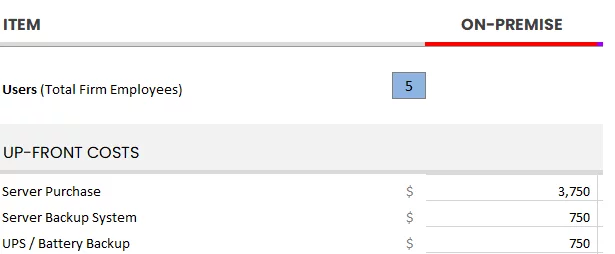
You have to buy servers. You have to buy ancillary IT infrastructure, like backup systems, battery backups, and more. You have to hire a capable IT consultant to not only set up the server, but proactively manage and maintain it.
And these costs are always higher in a given year than you think they will be.
To understand the economics of moving Juris to the cloud, we need to compare a Private Cloud solution to the costs of in-house, on-premise servers and IT.
On-Premise IT
Up-Front Costs
To start, analyze all costs incurred each new server cycle (which is typically only 3 to 5 years).
This entails the costs of buying and implementing server infrastructure, and usually includes:
- Acquiring server hardware
- Procuring backup hardware and software
- Setting up Uninterruptible Power Supply (UPS) or battery backup systems
- Obtaining Windows Server licensing
- Acquiring SQL Server licensing
- Setting up desktop and network infrastructure
- Implementing the system with the assistance of an IT consultant
In order to properly understand these costs, I recommend that you get pricing for each of these aspects, record it in a spreadsheet, and add them up.
With this, you’ll have a sense of the total up-front cost of on-premise IT.
It is worth noting that the costs associated with server setup and maintenance are heavily influenced by the software used by the law firm.
- How many servers are required and how powerful should they be?
- Is it necessary to have multiple dedicated servers?
- Would VMWare virtualization be necessary?
Ultimately, these questions are determined by the software utilized, particularly the Practice Management and Document Management software, and their respective server requirements.
Ongoing Costs
Unfortunately, the financial cost of servers needs to account for another aspect. Now that we’ve covered the upfront costs, we can analyze costs you would incur on an ongoing basis.
To achieve this, identify monthly recurring costs, as well as annual costs (renewals, maintenance), and determine your average monthly or annual recurring costs.
Common components of these costs for many law firms typically include:
- Managed IT Service
- User Support / IT Help Desk
- Offsite / Remote Backup
- Remote Access Solution (VPN, RDS, etc.)
- Practice Management Software
- Office 365
- Security Maintenance & Renewals
Add up what you currently, or will, spend on an ongoing basis.
This should include fixed monthly costs (such as a Managed IT Provider contract) as well as sporadic, less predictable costs (such as hourly IT support). For the latter, if you’re unsure of a reasonable budget for this amount, I recommend finding the average over the past two to three years.
The total of all of these determines your average monthly IT spend.
On-Premise Costs: Unplanned
Finally, we need to identify and budget for the inevitable hiccups that you may face with server ownership. You are bound to encounter some level of unplanned IT expenses.
While proactive IT measures significantly decrease the likelihood and impact of unforeseen IT problems, it is important to acknowledge that over a sufficient period of time, such issues are still likely to occur, albeit less frequently.
Still, these unplanned costs may take the form of:
- Unplanned Server Crashes
- Unplanned Network Repair
- Unplanned Data Recovery Costs
- Software Updates that Prompt Server Upgrades
As you can see, while some costs are fixed and predictable, others are wildly unpredictable (but should be budgeted or accounted for in some way nevertheless).
With all things considered, total your up-front costs, monthly ongoing costs, and your budget for unplanned/unforeseen costs:
This is your Total Cost of Ownership for on-premise IT.
Compare to Private Cloud
Now, compare this Total Cost of Server Ownership to that of a Private Cloud.
We’ve already demonstrated that a Private Cloud is objectively better than in-house IT — in terms of reliability, security and mobility. But simply comparing the costs of in-house vs. cloud-based IT shows that Private Cloud is also more economical than in-house IT.
Private Cloud costs typically include:
- One-time Implementation Fee, typically ranges from $2000 to $6000
- All-Inclusive Monthly Fee, often around $105 to $159 / User / Month
It is worth mentioning that, with the appropriate Private Cloud provider, these cost comparisons encompass all the technology that would otherwise need to be purchased and maintained. In contrast, on-premise IT, as demonstrated earlier, often involves hidden and unpredictable costs.
Who wants this kind of surprise?
A fully managed Private Cloud provides costs that are simple, clear, and predictable.
Doing Your Due Diligence and Mitigating Risk
Now that you know how Juris in the cloud works—and what it can do for your firm—it’s time for due diligence.
There are many ways to migrate Juris to the cloud. Whatever path you choose, do your homework. A growing number of vendors—from solo local IT shops to large, generalist providers—claim they can host Juris. Claims aren’t competence.
Running and maintaining Juris in the cloud isn’t for amateurs. It requires specific configuration and deep product expertise.
What to verify with any prospective provider:
Once you’ve developed a short list of potential Juris hosting providers, do your homework on each company.
We recommend:
- Obtaining and contacting references.
- Asking for and reviewing the provider’s case studies / success stories.
- Reading the available Google reviews for the provider.
To see the Google reviews for a Private Cloud provider (or any business), if the company is reputable you can simply perform a Google search for that company, and the reviews will show up in the search results sidebar.
For example:

Frequently Asked Questions

Uptime Legal’s Technology Solutions
Cloud, software, IT, and document management built for today’s law firms.