Table of Contents
Every business out there uses some form of technology to complete daily activities. Your law firm is no exception. To ensure your tech is efficient, secure, and available when needed, you need IT support.
Modern law firms use technology that requires specific knowledge for adequate IT support. While a generalist IT provider may be able to support the basic elements of IT, like troubleshooting computer problems, your law firm needs more.
How do you find the right IT support provider for your law firm? What should you be looking for?
This guide will answer these questions and more so you can choose a vendor with confidence.
What Is the Role of IT Support for Law Firms?
The role of IT support in a law firm is broader than many firms initially assume. Yes, it includes troubleshooting when something breaks, but it should also include the day-to-day oversight that keeps the firm from constantly drifting into avoidable problems.
That means supporting the people, systems, and workflows the firm depends on, including:
For law firms, that role also needs to extend into the software layer that generic IT providers often try to stand beside rather than own.
It’s not enough to say, “the network is fine,” if the issue is actually affecting Clio, ProLaw, PCLaw, Tabs3, Time Matters, iManage, NetDocuments, or another system the firm depends on to do real work.
A good law firm IT support provider helps keep the whole environment usable, not just technically alive. That includes reducing recurring friction, helping staff work more consistently, coordinating with outside vendors, and improving the environment over time instead of simply reacting to whatever catches fire next.
Why You Need Dedicated Law Firm IT Support for Your Firm
Law firms usually don’t start looking for better IT support because everything is going smoothly. The push usually comes after something exposes how fragile the environment really is. Maybe it’s:
Or maybe the wake-up call is less dramatic and more annoying: the same recurring issues, the same workarounds, the same growing sense that the firm is losing too much time to technology friction that should not be normal.
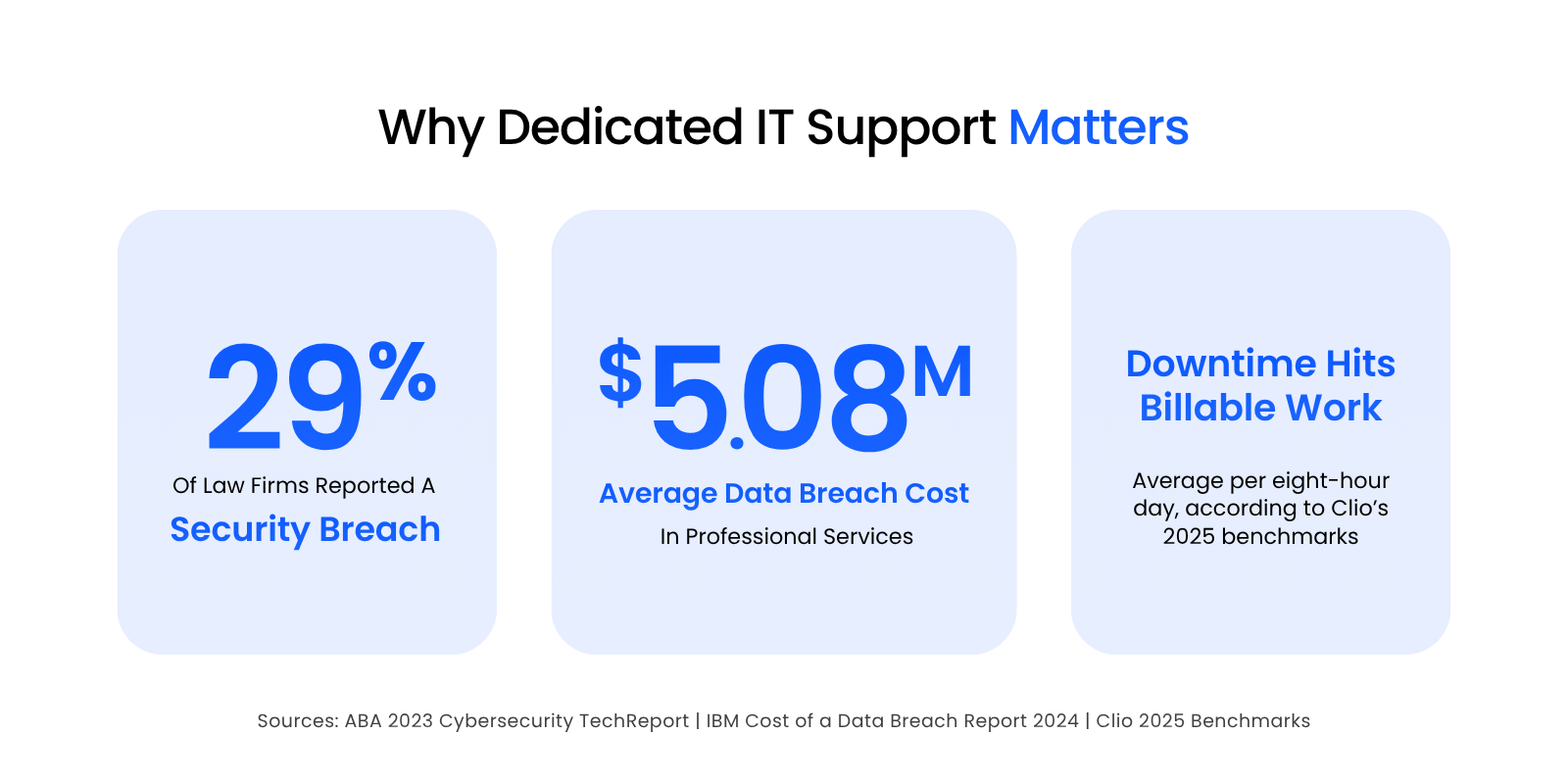
That matters because bad IT in a law firm interferes with billable work, slows internal coordination, creates avoidable pressure on attorneys and staff, and makes the firm harder to run.
A single hour of firm-wide downtime at a 20-attorney firm can represent thousands of dollars in lost billable capacity before you even account for staff time, missed momentum, delayed client response, or the cleanup work that follows.
In a law firm, downtime quickly becomes a practice-protection issue.
The law firm cybersecurity risk is not theoretical, either.
Firms aren’t just expected to be secure anymore. They are increasingly expected to prove it.
IBM’s Cost of a Data Breach Report 2024 put the average breach cost for professional services organizations, a category that includes legal, accounting, and consulting firms, at $5.08 million. The same report found that the global average time to identify and contain a breach was 258 days. That’s a long time for a firm to be exposed, disrupted, or operating without clarity.
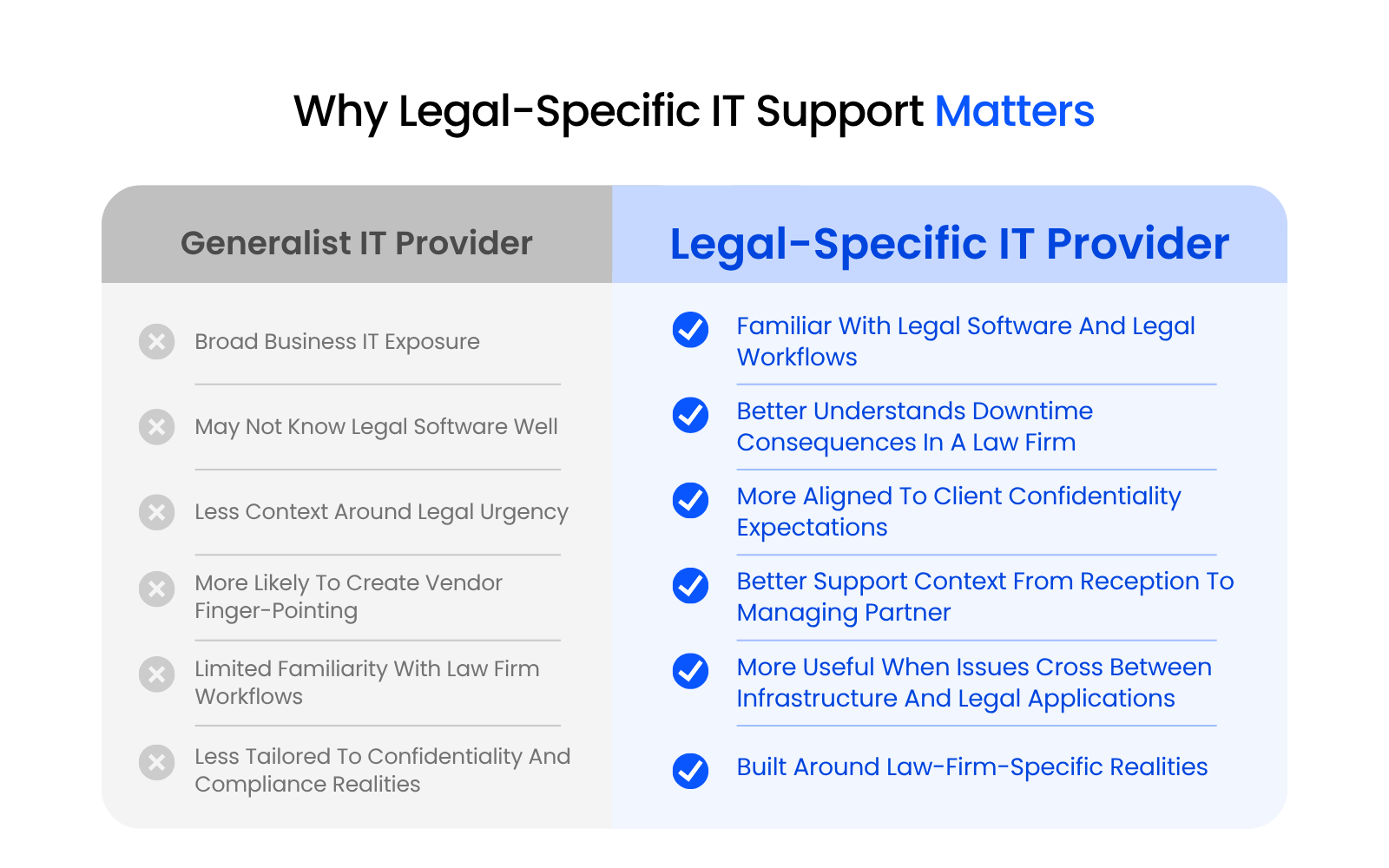
This is where dedicated law firm IT support matters. A provider built around law firms is more likely to understand the software, workflows, urgency, and confidentiality issues that shape daily operations.
A generalist provider may be perfectly competent with broad infrastructure and still leave the firm stuck in the most common version of IT finger-pointing: Microsoft says it’s the legal software, the legal software vendor says it’s the environment, and the firm is left refereeing the whole thing while work slows down.
Dedicated law firm IT support doesn’t eliminate risk. It does, however, put the firm in a much better position to reduce avoidable issues, respond faster when problems do happen, and support the way legal work actually gets done.
In-House vs Outsourced Law Firm IT Support
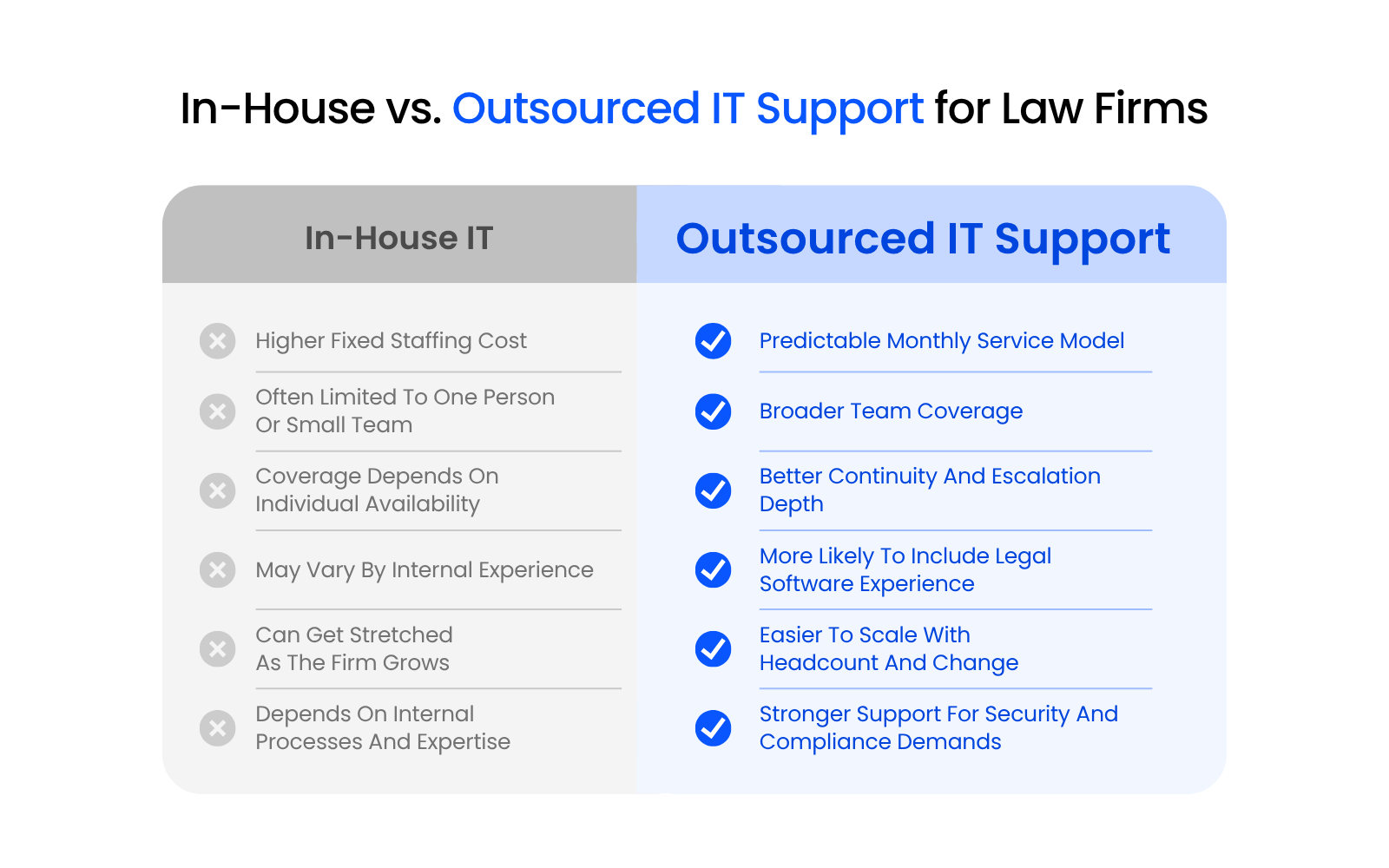
The traditional method of obtaining IT support was to hire an in-house team of IT professionals. This isn’t cost-effective for smaller firms, however. While hiring in-house specialists might be great for large firms, there are better options for smaller ones.
Managed service providers (MSPs) are third-party teams that deliver IT support to your firm.
Traditionally, they remotely manage your law firm’s on-premise servers and provide IT help desk services. And because on-premise IT infrastructure requires hands-on administration, MSPs may provide boots-on-the-ground services, either as-needed or on a regular schedule.
Law Firm IT in the Cloud
Finally, our third method for managing law firm IT: the cloud. There’s a whole range of cloud solutions for law firms, but they share one idea — your software and data live in a secure hosted environment instead of a server in your office.
Many of the best case management applications (as well as other types of software used by law firms) require a server; it needs a place to live. That’s why many law firms have servers in the first place. And for many years, if you wanted to run practice management software like ProLaw, PCLaw, Time Matters, Tabs3, or even Timeslips and QuickBooks, you needed a server.
This used to mean that you had to buy a server and retain a capable IT consulting firm to manage it for you.
Today, you have another option: a private cloud.
A private cloud is a completely hosted, secure IT platform for your law firm and all of your software, documents, data, and (sometimes) more. Applications like those I mention above require a server (as I said, one way or another); and in the case of private cloud, a private cloud acts as your server.

Private Cloud 101 for Law Firms:
Understand Private Cloud by reviewing how law firm software evolved from desktop-based to cloud-enabled systems.
With a private cloud, the cloud provider builds dedicated, private cloud servers just for your law firm. They’ll install your legal software (and other software), move your data, documents and in some cases email from your local, on-premise servers to your new servers in the cloud, or your new private cloud.
With the right private cloud company, that company will be esoterically knowledgeable about the software your firm relies on. They’ll know how to install it, support it, optimize it, and keep it running at peak performance. (Have you ever had an IT consultant give you that deer-in-the-headlights look when you present a problem within your legal software?)
The cloud service provider is responsible for all backups, maintenance, updates, and cybersecurity. Your firm simply logs in (from anywhere, anytime on any device) and gets to work. And everything just works.
Each person in your firm logs into a virtual desktop, which runs full-screen and across all of your monitors. In your virtual desktop you’ll find your legal software, your file system (the “S: drive”), your Office suite, Outlook email—everything you need to work.
Law firm IT in the cloud brings the benefits of managed, proactive, IT with the added benefits of:
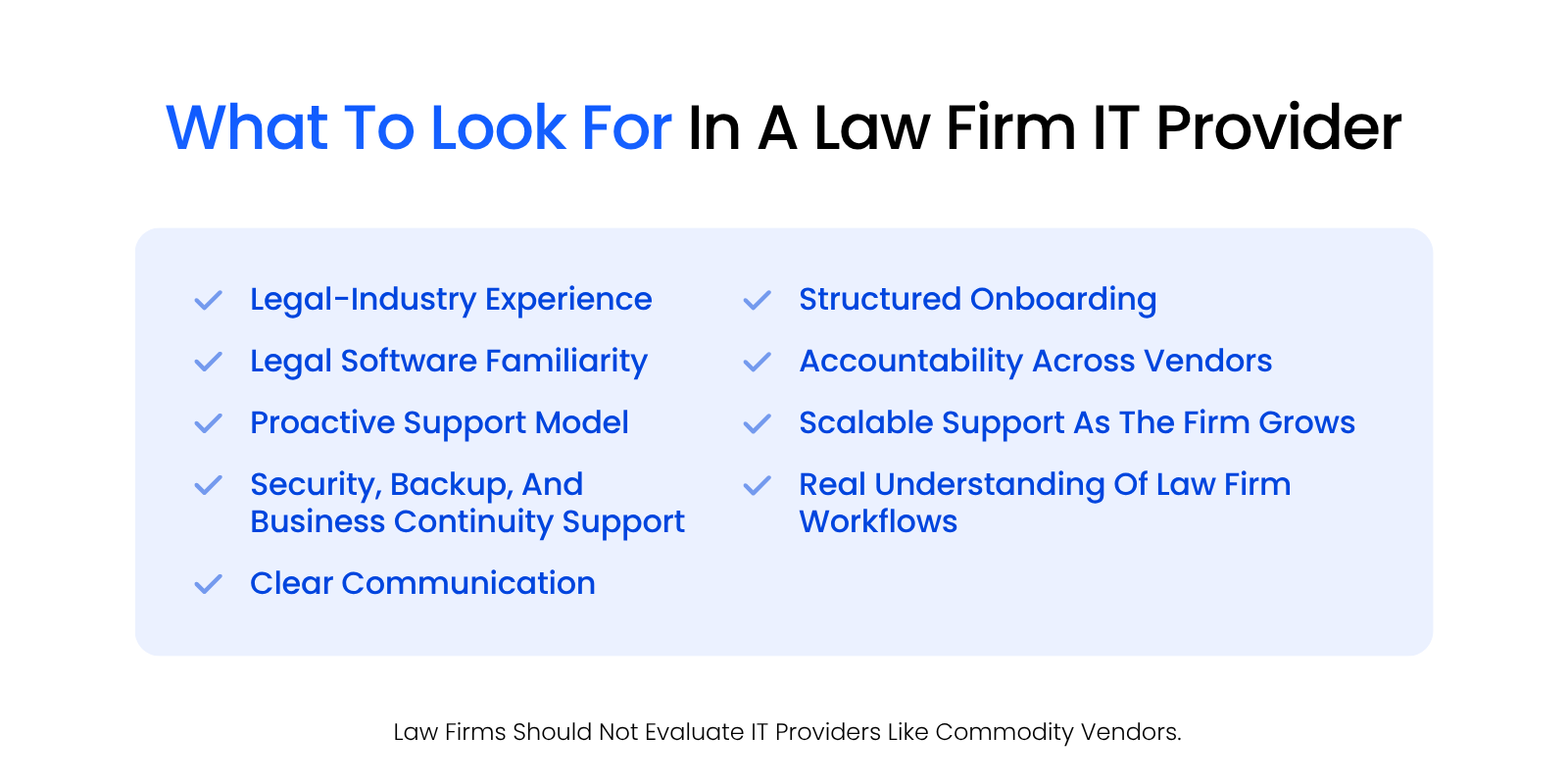
What to Look for in a Law Firm IT Support Provider
A lot of providers can say the right things during a sales process. That doesn’t mean they are equipped to support a law firm well.
The right provider should understand the environment, communicate clearly, and make the firm feel more confident, not more dependent on vague promises.
Law Firms Are Different
If there’s one insight we want you to glean from this guide, it’s this: law firms are different from the next business.
Your firm uses specialized tech tools and software for client, practice, and document management. The IT vendor you choose should understand these needs and your differences for the best results.
We have the opportunity to speak to many law firms and attorneys who work with local IT companies. And we’ve witnessed a recurring theme across many law firms.
Here’s the problem.
Generalist law firm IT support providers are all too eager to support the “vanilla” elements of your law firm’s technology (desktops, laptops, Office 365, Exchange, virus protection), but they shy away from taking any accountability or providing support for your firm’s legal software.
Time and time again, we see this phenomenon occur in the form of:
Legal Software Expertise
Perhaps one of the most important things you should look for is technical and law-specific software expertise. After all, your IT vendor should know the tech tools they’re working with and how to use them effectively.
There are plenty of basic competencies your vendor should have.
For example, your IT provider should be able to:
Beyond both basic and complex IT know-how, your vendor should also have experience with a wide range of law-specific software. When we say experience, we mean they should be able to help you set up, use, troubleshoot, and improve your use of these tools.
ABA Compliance and Ethical Obligations
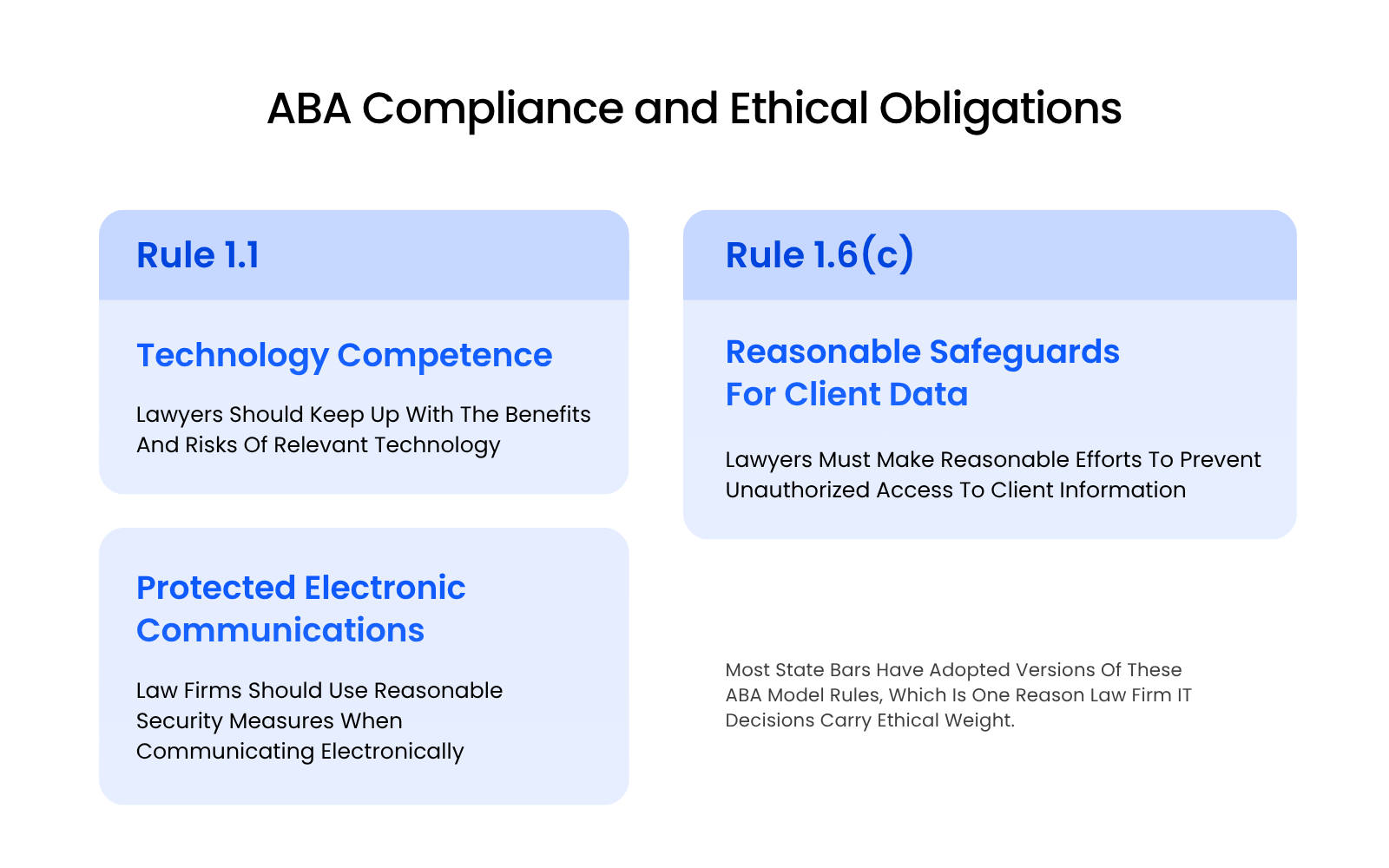
Most state bars have adopted versions of the ABA Model Rules, which is one reason law firm IT decisions can’t be treated as purely operational.
ABA Model Rule 1.1’s comment on competence says lawyers should keep abreast of the benefits and risks associated with relevant technology. ABA Model Rule 1.6(c) says a lawyer shall make reasonable efforts to prevent the inadvertent or unauthorized disclosure of, or unauthorized access to, client information.
The comment to Rule 1.6 adds that reasonableness depends on factors like the sensitivity of the information, the likelihood of disclosure, the cost of safeguards, and the difficulty of implementing them.
That doesn’t mean every IT decision turns into an ethics question. It does mean the provider a firm chooses directly affects its ability to support technology competence, confidentiality, and defensible security practices. Weak access control, poor patching, inconsistent user management, fragile backups, or sloppy remote access go beyond technical issues. In the wrong circumstances, they become professional-risk issues too.
ABA Formal Opinion 477R and related ABA guidance reinforce the same basic point: lawyers need to take reasonable precautions to protect client information, especially when communicating electronically. A law firm needs a provider that understands what “reasonable safeguards” actually look like in practice, without reducing the conversation to fear-based slogans.
Scalability
A good provider should make sense for the firm you are now and the firm you may be a year or two from now.
That means thinking beyond current headcount. Can they support new hires cleanly? Can they handle office moves, hybrid work, software changes, or more demanding client security expectations? Can they grow with the firm without turning every change into a mini project that drains time and patience?
If the answer is only “probably,” keep looking.
Proactive IT Management
Proactive support is one of those phrases providers like to throw around because it sounds responsible and expensive. It’s worth asking what they actually mean by it.
At minimum, it should mean ongoing monitoring, maintenance, patching, system review, and an effort to reduce recurring issues over time. It should also mean the provider can identify weak spots before they become everybody’s problem.
If a provider only shows up when something breaks, you’re still in a break-fix relationship, just with better branding.
Remote Law Firm IT Support
A modern law firm should not need everyone in one office, on one network, at one desk, for the day to go normally.
Remote support matters because attorneys and staff work from home, from court, while traveling, and from temporary setups that become permanent faster than anyone planned. The provider should be able to support that reality without making remote work feel like a second-class experience.
That includes user access, authentication, remote troubleshooting, application performance, device support, and enough process maturity that the firm is not improvising its way through every location-based issue.

How to Find the Right IT Support for Law Firms
A polished sales conversation doesn’t tell you much on its own.
A five-step evaluation process makes this easier.
Step 1: Define the Problems You Actually Need Solved
Start with your real environment, not the provider’s service sheet.
Ask:
This matters because a provider should be solving actual operational problems, not just presenting a menu of generic services.
Step 2: Test for Legal-Specific Experience
Don’t settle for “we support lots of professional services firms.”
Ask:
Top legal-centric IT providers should be able to answer those questions plainly and without sounding like they are discovering the category in real time.
Step 3: Validate the Support Model
“Responsive” and “proactive” don’t mean much on their own.
Ask:
You aren’t just buying technical competence. You are buying an ongoing service model. That model needs to make daily life easier inside the firm.
Step 4: Review Security and Continuity Practices
Security language gets vague fast if you let it.
Ask:
Step 5: Understand Onboarding, Accountability, and Next Steps
A good provider should be able to explain what happens after the contract, not just before it.
Ask:
A strong provider evaluation should leave you with a clearer picture of your environment, a stronger sense of what good support would look like, and a better ability to tell the difference between legal-specific expertise and generic IT sales language.
Beware Server Proliferation (Pushed by Your IT Firm)
One of the oldest bad habits in a law firm is the reflex to solve every new problem by adding another server.
A law firm gets a practice management server. Then a document management server. Then a remote-access server. Then something for backups. Then something else because one vendor wants “its own environment.”
Before long, the firm is not running a clean technology environment. It’s running a collection of technical dependencies that multiply cost, complexity, maintenance burden, and points of failure.
That kind of server proliferation is often presented as inevitable or even prudent. It’s usually neither.
Sometimes a separate environment is justified. Often, it’s just the result of provider habit, weak architecture thinking, or a support model that’s more comfortable adding infrastructure than simplifying it. Law firms should be wary of providers who default to complexity too quickly — especially when that complexity conveniently produces more billable projects or a more entrenched technical relationship.
The better question is not “How many systems can we layer in?” It’s “What is the cleanest environment that supports the way this law firm actually works?”
That’s usually the dividing line between a provider thinking like a long-term partner and one thinking like a parts catalog.
Finding the Right IT Partner for Your Law Firm
The difference between a generalist IT provider and a legal-specialist shows up gradually — in slow troubleshooting, compliance blind spots, and support that handles the infrastructure but won’t touch Clio, NetDocuments, or the systems the firm actually depends on.
It also shows up in the quiet accumulation of technology friction that makes the firm harder to run over time.
The right provider arrives with context. They understand what legal work requires and build their support model around it.
If you’re evaluating managed IT services for your law firm, we’d be glad to help you think through what your environment needs and where the gaps are.
WHAT’S NEXT
Frequently Asked Questions

Uptime Legal’s Technology Solutions
Cloud, software, IT, and document management built for today’s law firms.