
Table of Contents
Law firm accounting software isn’t just small-business accounting software with a legal label attached. The moment client funds land in a trust account, you’re operating under compliance rules that most accounting platforms were never built to enforce.
Most reviews skip past that distinction. They compare the same features side by side and rarely ask whether the software actually understands IOLTA, or where it fits inside the broader legal practice management software category firms evaluate against.
This article looks at six platforms law firms are actually running right now, Juris, PCLaw, Tabs3, QuickBooks, Timeslips, and Orion, and evaluates each one specifically on trust accounting and reconciliation rather than a generic feature list.
We host and support all six of these systems for firms across the country, and this article comes from what we’ve watched actually go wrong, and actually hold up, in trust accounting.
Why Law Firm Accounting Software Isn’t Just Accounting Software
Trust accounting compliance is what separates law firm accounting software from general small-business accounting software, and it decides whether the platform you choose actually holds up, not the length of its feature list.
The moment your firm holds client funds in a trust account, you’re subject to state bar trust accounting rules that most accounting platforms were never built to enforce. A generic small-business tool tracks money in and money out. It has no concept that some of that money isn’t yours.
That distinction changes what counts as “good” accounting software for your firm. A platform with a polished dashboard and dozens of integrations is still the wrong choice if it can’t produce a clean three-way reconciliation, or if it lets a bookkeeper disburse funds that haven’t cleared.
For most firms, that reevaluation gets triggered by something concrete: a trust accounting scare during an audit, a partner who wants better matter-level reporting, or simply outgrowing a patchwork of disconnected spreadsheets and general accounting tools that were never built for a law firm’s compliance requirements.
None of that shows up in a typical software review, which lines up feature lists side by side and moves on.
The rest of this article evaluates law firm accounting software on that basis: trust accounting depth first, reconciliation workflow second, and everything else after that.
What Law Firm Accounting Software Actually Has to Do
Law firm accounting software has to do four things well:
Miss one of those four, and the platform creates a gap somewhere else in your firm’s financial picture, even if everything else about it looks solid.
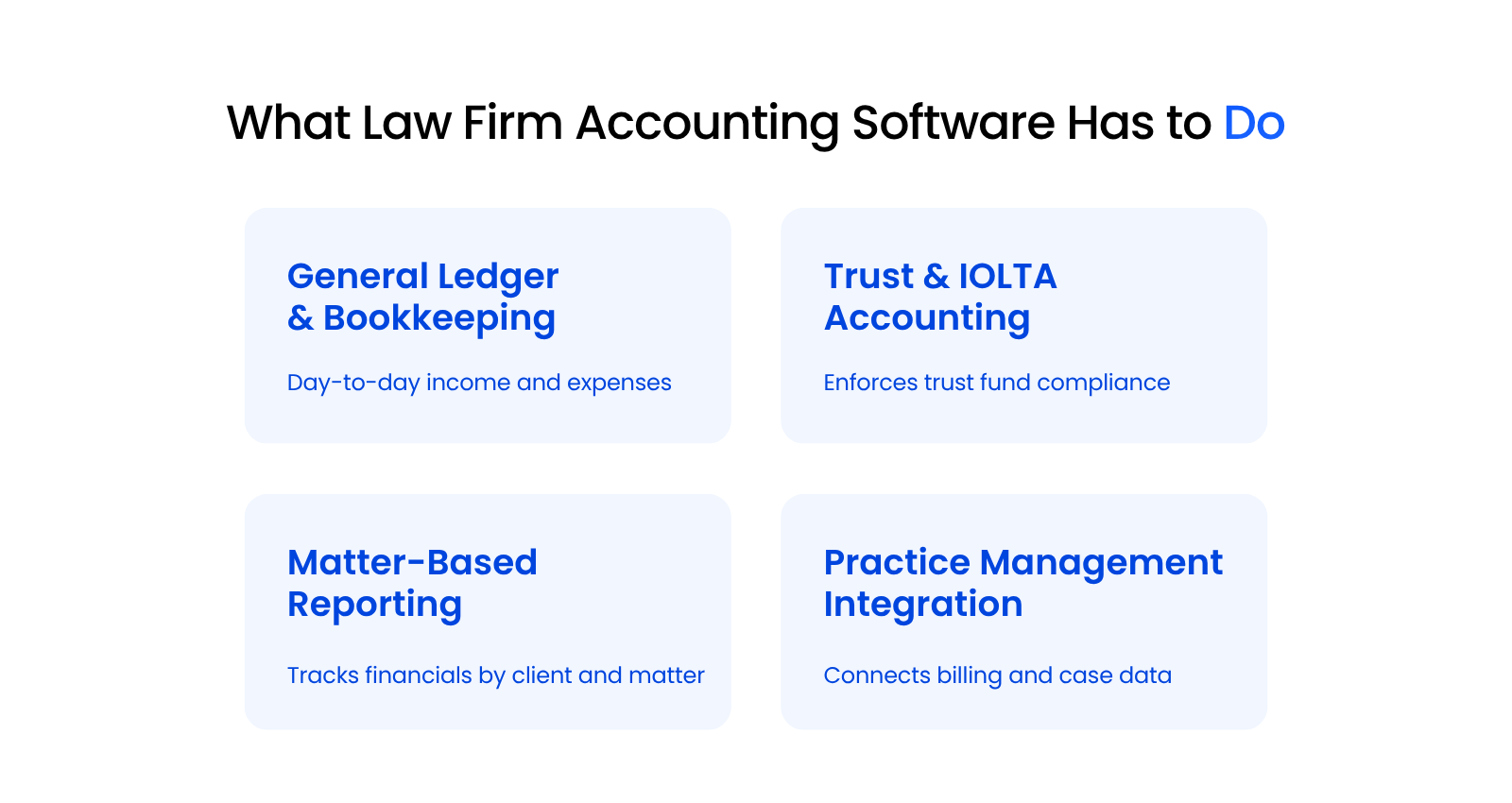
That distinction is the gap between general bookkeeping tools and software built for trust accounting: a firm needs software that knows the rules around client funds and can actually enforce them, not just record whatever gets entered.
General Ledger and Day-to-Day Bookkeeping
General ledger accounting covers the day-to-day income and expense tracking every business needs, law firm or not.
Operating account transactions, overhead, payroll, and vendor payments all run through the general ledger the same way they would at any small business, and this is the part of the platform that looks the most like standard accounting software.
Trust and IOLTA Accounting
Trust and IOLTA accounting is the piece general accounting software doesn’t know exists, and it’s the one your state bar actually audits. Every dollar a client deposits into a trust account has to be tracked separately, by client and matter, and never mixed with your firm’s operating funds.
Miss that separation, and you’re risking a compliance violation your state bar can act on.
Matter-Based Reporting
Matter-based reporting ties every transaction to a specific client and case, not just a general ledger line.
That’s what lets you answer a client’s question about their retainer balance, or pull a profitability report on a single matter, without exporting data into a spreadsheet first and reassembling it by hand.
Integration with Practice Management and Billing
Integration with practice management and billing keeps time entries, invoices, and trust transactions from living in three disconnected systems. When your billing software and your accounting software don’t talk to each other, someone on your team ends up re-entering the same data twice, and that’s exactly where reconciliation errors start.
The tighter that connection, the fewer places a number can go wrong between the moment it’s entered and the moment it shows up on a client’s bill.
Trust Accounting and IOLTA Compliance, in Depth
Trust accounting and IOLTA compliance is where law firm accounting software either earns your confidence or fails you, and it deserves more than a passing mention. This is the requirement every platform in this article gets measured against, and it’s worth understanding in enough depth to know what to actually look for.
What Three-Way Reconciliation Actually Requires
Three-way reconciliation means your bank statement balance, your software’s trust ledger balance, and the sum of every client’s individual ledger balance all match on the same day.
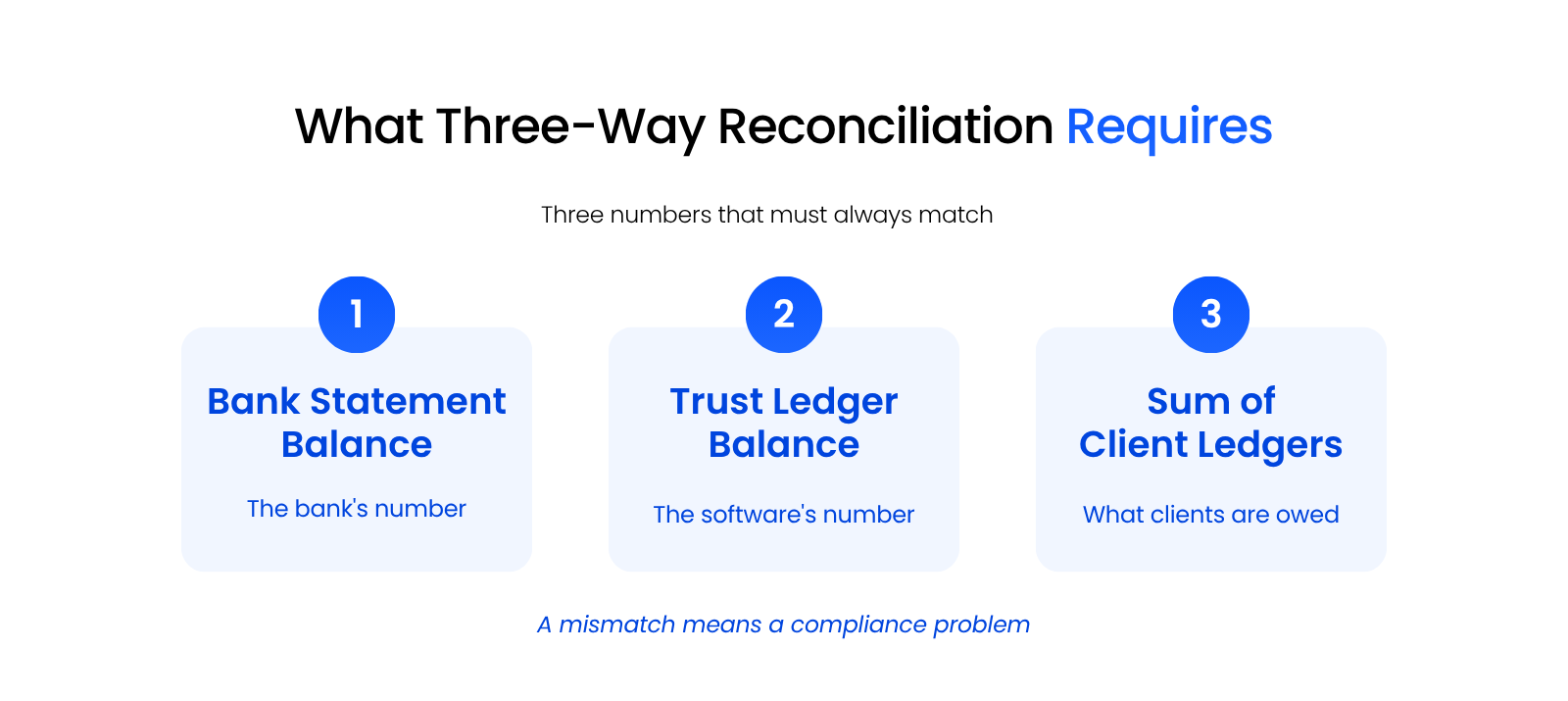
If any one of those three numbers is off, even by a small amount, your firm has a discrepancy that needs an explanation before the month closes.
That comparison is the core discipline of trust accounting, and it’s the single most common blind spot for firms running general accounting software. Nothing forces the comparison, so gaps sit unnoticed until an audit does the math for you.
Software built for trust accounting runs that comparison automatically and flags a mismatch the moment it appears.
Software that wasn’t built for it leaves the comparison to whoever’s doing your books, done by hand, on whatever schedule they remember to run it.
How State Bar Trust Accounting Rules Shape Software Requirements
State bar trust accounting rules differ by jurisdiction, but they are built on a common set of records.
The ABA’s Model Rules for Client Trust Account Records set the baseline: a receipt and disbursement journal, a separate ledger for every client or beneficiary, monthly trial balances, and quarterly reconciliations of the trust account. Your software either produces those as a byproduct of normal use, or someone on your team reconstructs them by hand.
Your state bar isn’t going to accept “the numbers were close” as an answer during a trust account audit. It wants a ledger for every client, a reconciliation performed on a regular schedule, and records that show exactly when and how each transaction happened.
North Carolina, for example, requires a monthly reconciliation of the lawyer’s records against the bank statement, plus a quarterly report proving the general ledger balance, the total of the client ledgers, and the adjusted bank balance are identical.
Software built for law firms produces that documentation as a byproduct of normal use: run a reconciliation, and the ledgers, the audit trail, and the reconciliation report are already there.
Software that wasn’t built for it makes you assemble that documentation separately, usually after the fact, which is exactly when it’s hardest to get right.
What Actually Causes Trust Accounting Failures
Trust accounting failures usually come down to software that allows a transaction the rules should have stopped, not intentional wrongdoing.
The causes that show up most often trace back to a small set of gaps:
These failures rarely start as fraud: they start as software that let something happen it should have blocked, and a bookkeeper who had no reason to think twice about it.
That’s exactly why the platform you use for trust accounting matters as much as how careful your bookkeeper is. The software is either catching these gaps before they compound, or it’s staying quiet while they do.
Get this piece wrong, and it doesn’t stay contained to the accounting department. A trust accounting problem becomes a client relationship problem, an audit problem, and in the worst cases, a bar complaint. Get it right, and it’s mostly invisible: reconciliations close on schedule, and nobody has to think about it.
How Juris, PCLaw, Tabs3, QuickBooks, Timeslips, and Orion Actually Handle This
Juris, PCLaw, Tabs3, QuickBooks, Timeslips, and Orion each handle trust accounting and reconciliation differently, and the differences are exactly what most vendor roundups skip. Here’s how each one actually holds up, platform by platform, based on what we’ve seen hosting and supporting all six.
Juris
Juris is LexisNexis’s own billing and accounting platform for law firms, and it handles trust accounting natively, with tools built to keep client and firm funds properly segregated inside the same integrated platform that handles billing and case data.
It tracks trust balances by client and matter inside the same system that handles time, billing, and case data, so a reconciliation doesn’t require exporting data anywhere else.

Firms already running Juris for practice management typically keep their trust accounting inside it for that reason: the trust ledger, the matter record, and the billing history all live in one place, which cuts down on the kind of data drift that happens when trust accounting runs in a separate system from everything else.
PCLaw
PCLaw has built-in trust accounting and three-way reconciliation tools, and it’s a common fit for firms that want billing and accounting unified in one system instead of stitched together.
Worth knowing who you’re actually buying from: PCLaw and Time Matters have been run by a LexisNexis and LEAP Legal Software joint venture since 2019, operating as a separate company from LexisNexis itself.
Its reconciliation workflow compares your bank balance, trust ledger, and client ledgers directly inside the platform, which is the exact check IOLTA compliance depends on.

Firms that outgrow spreadsheet-based trust tracking often land on PCLaw specifically because that three-way check is built into the platform as a core feature, not something layered on afterward. For a firm moving off manual reconciliation, that built-in structure is usually the whole reason for the switch.
Tabs3
Tabs3, paired with Tabs3 Trust Accounting, separates trust and general ledger functions cleanly, which suits firms that want dedicated trust-specific software rather than one combined system. That separation makes the trust side easier to audit on its own, since it isn’t buried inside a broader general ledger module handling operating expenses and payroll at the same time.

Firms running Tabs3 for billing and time tracking typically add Tabs3 Trust Accounting specifically to get that dedicated trust layer, rather than trying to make the general ledger module double as a trust accounting system.
QuickBooks
QuickBooks has no native concept of a trust account or IOLTA rules, so firms that use it for trust accounting are building the compliance layer themselves.
Can you use QuickBooks for a law firm? You can, and plenty of firms do, but QuickBooks won’t stop you from making a trust accounting mistake the way legal-specific software will.
It has no built-in three-way reconciliation, no client ledger structure built around matters, and no guardrails that flag a disbursement against insufficient trust funds.
Firms that make QuickBooks work for trust accounting typically do it through a heavily customized chart of accounts, disciplined manual processes, and close oversight from whoever’s managing the books.
That workaround also costs more than the entry price suggests.
Matter-level tracking in QuickBooks Online runs on classes, and classes are only available on the Plus and Advanced plans, so the $38 Simple Start plan can’t do the thing the workaround depends on. It’s a lot of manual risk to carry for something your state bar actually audits.
That gap is exactly why firms that stay on QuickBooks for trust accounting tend to lean hardest on their bookkeeper’s discipline and their IT provider’s understanding of the workaround, because the software itself isn’t going to catch what it doesn’t know to look for.
Timeslips
Timeslips handles time and billing well and includes basic client-funds tracking, but it isn’t built for full IOLTA compliance — most firms still pair it with QuickBooks or another general ledger tool to get real trust accounting and reconciliation. If your firm runs Timeslips for time entry and billing, your actual trust accounting exposure depends entirely on what’s handling the ledger behind it, not on Timeslips itself.

That makes the pairing the real decision. A firm running Timeslips alongside a general ledger tool with no trust-specific controls inherits that tool’s limitations, whatever they are.

Timeslips & QuickBooks in the Cloud
How legal-specific hosting closes the gaps Timeslips and QuickBooks leave open for trust accounting.
Orion
Orion Law Management Systems includes built-in, compliant trust accounting as one of its fully integrated financial management modules, alongside billing and matter management, for firms that want billing and trust accounting in one hosted system. Its trust module ties directly to the same matter records used for billing, which keeps client ledger balances and invoice history in sync without a separate export step.

For firms that want one system handling both sides of the client financial relationship, billing and trust, Orion’s integrated structure is the draw.
Line them up together, and the split is stark: four of these platforms (Juris, PCLaw, Tabs3 and Orion) build trust accounting in, and two (QuickBooks and Timeslips) treat it as something you have to build yourself.
The table below summarizes where each one lands.
Why Hosting and Support Are Part of the Decision
Hosting and support decide whether trust accounting software actually holds up day to day, not just which platform you picked.
Even the best trust accounting platform depends on the environment it runs in. Server issues, delayed patches, and support techs who don’t understand what a trust ledger is all turn a solid platform into a daily risk, no matter how well it was built.
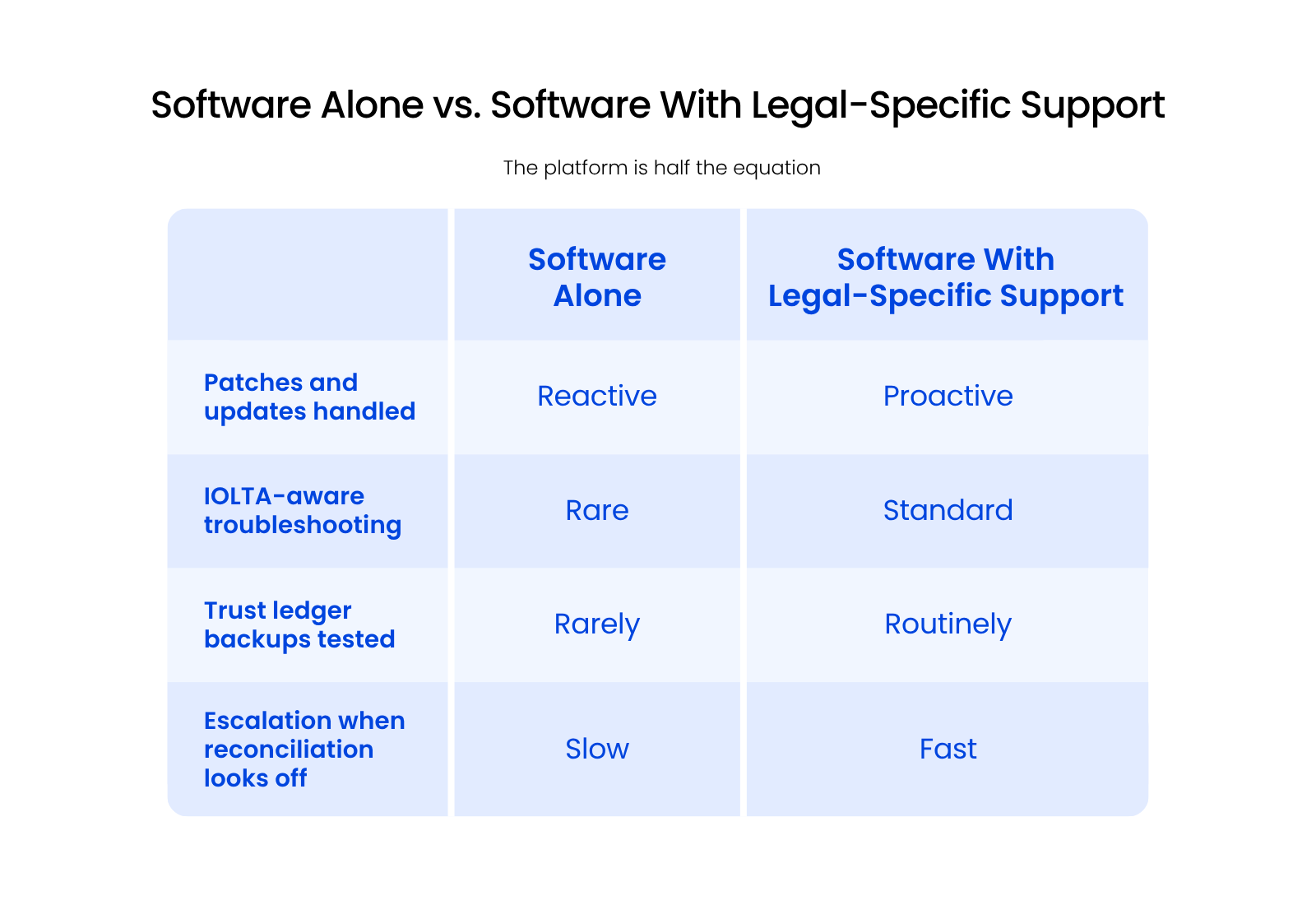
We see this play out with the IT providers firms bring in before they switch to a legal-specific one: trust accounting is exactly the kind of idiosyncratic, high-stakes system a generalist IT provider hasn’t been trained to support.
They can keep a server running, but they usually can’t tell you why a reconciliation is off.
We host and support all six of the platforms covered here, and the pattern is consistent.
Firms that pair trust accounting software with legal-specific support catch reconciliation problems faster, because the person on the other end of the ticket already knows what a trust ledger discrepancy looks like before they open the file.
That’s a reason to weigh hosting and support as part of the software decision itself, not something you sort out after the platform is already in place.
Where Billing Software Fits (and Where It Doesn’t)
Accounting and trust accounting software handle your general ledger, IOLTA compliance, and reconciliation. Billing software handles invoicing, time tracking, and client payments, and they’re not interchangeable — two of the many categories that make up law firm software.
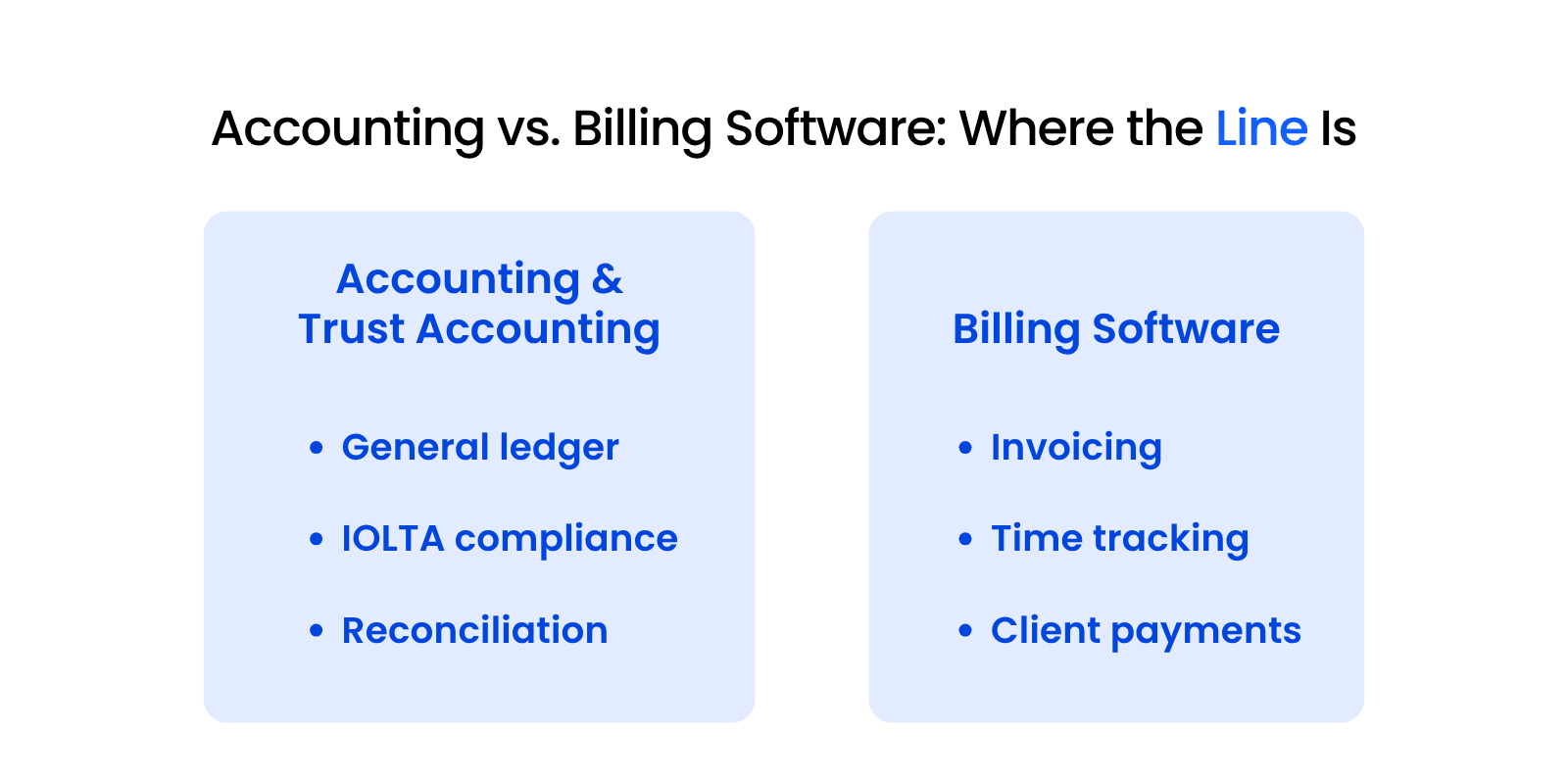
That distinction matters if you landed on this page specifically looking for billing software.
Legal accounting software and legal billing software answer two different compliance questions:
Several of the platforms covered above, including Tabs3, PCLaw, and Orion, combine billing and trust accounting in the same system, which is part of why firms standardize on them rather than running separate tools for each. Others, like Timeslips, handle billing well but need a separate accounting platform to cover trust compliance.
If your firm is specifically evaluating billing software, tools like Clio and MyCase are built around invoicing, time capture, and client payment workflows as the core product, with their own dedicated trust accounting features included.
That’s still a different starting point than the platforms this article evaluates, which are built for firms running legacy or legal-specific practice management systems where accounting and trust compliance come first.
Firms that try to solve a billing problem by evaluating accounting software, or the reverse, usually end up frustrated with a platform that was never built to solve what they actually needed.
Which one your firm needs to prioritize depends on which compliance question is causing the most pain right now: getting paid on time, or keeping trust funds straight.
How to Evaluate Your Options
Evaluating law firm accounting software comes down to three questions: how deep is the trust accounting, how well does reconciliation actually work, and who’s hosting and supporting the system.
Weigh every platform you’re considering against the same three criteria:
Get those three right, and the rest of the decision (interface preferences, specific integrations, price per user) becomes much easier to sort out.
If you’re running one of the six platforms covered here, the question worth asking next isn’t just whether the software is right. It’s whether the way it’s currently hosted and supported is doing right by your trust accounting requirements too.
Trust Accounting Is the Test That Actually Matters
Trust accounting is the test that actually decides whether law firm accounting software works for your firm. General ledger accuracy matters, and matter-based reporting matters, but neither one protects you from a trust accounting failure the way software built to enforce IOLTA rules does.
The six platforms covered here handle that test differently, and none of them get there on their own. Reconciliation workflow and hosting and support decide whether the platform actually holds up day to day.
Start with trust accounting depth. Everything else in your evaluation follows from there.
WHAT’S NEXT
FAQ

Uptime Legal’s Technology Solutions
Cloud, software, IT, and document management built for today’s law firms.