Table of Contents
Your firm tried Copilot and the results were mixed. Some of your lawyers would rather use ChatGPT, the partners don’t agree, and nobody has written down which tool, if any, may touch a client file.
That makes Copilot vs. ChatGPT a confidentiality decision. What settles it is where client data goes once a lawyer types it in, what Microsoft or OpenAI does with it there, and who outside your firm can reach it.
The plan your firm is on decides that more than the brand does, and it’s the part of using AI in a law firm you’ll have to defend to a client, an insurer or the bar.
At Uptime Legal, we set up and support Microsoft 365 and Copilot for law firms, so we’ll say where each tool fits, where it falls short, and where neither one belongs.
Is Copilot Safer Than ChatGPT for Client Data?
Whether Copilot or ChatGPT is safer for client data depends on the plan your firm uses and where that data sits: a consumer account of either tool belongs nowhere near client files, a business plan of either can qualify, and Copilot’s edge inside your firm’s Microsoft 365 environment holds only when your permissions are tight.
Firms we talk to describe a familiar stall: they tried Copilot, the results were mixed, and the partners still don’t agree on which AI tool, if any, the firm should use.
The risk sits in the type of account a lawyer uses. A consumer account someone signs up for on their own runs under terms nobody at your firm has read or agreed to, whichever brand is on it.
Copilot’s edge comes from working inside your firm’s Microsoft 365 tenant, which means your firm’s own Microsoft 365 environment, under your firm’s account and terms. Put together, every way your lawyers might use either tool falls into one of three cases:
The useful question for your firm is which of those cases each lawyer is working in today, and whether anyone has checked.

Is Copilot Just ChatGPT with a Microsoft Logo?
Copilot runs partly on OpenAI’s GPT models, alongside other models Microsoft chooses, under Microsoft’s own terms, and the difference between Copilot and ChatGPT that matters to a law firm is the account and the terms each one runs under. Microsoft sells Copilot and OpenAI sells ChatGPT, each under its own agreements.
Whatever model sits underneath, the account decides where client data goes. Lawyers using the same tool can get opposite answers to the data question: one on a personal ChatGPT Plus account, which trains on what they type unless they opt out, and another on a ChatGPT Business or Enterprise plan your firm has vetted.
Is ChatGPT Safe for Confidential Client Information?
Only on a ChatGPT business plan your firm has checked. ChatGPT Free and Plus are consumer accounts, so client information stays out of them. On ChatGPT Business or Enterprise, OpenAI doesn’t train on your firm’s data by default and your admins decide how long it’s kept, so the question becomes whether your firm has read and accepted those terms.
ChatGPT handles
What it doesn’t do
The reason to try Copilot first is convenience. It sits inside the Microsoft 365 apps where much of your firm’s work already happens, so it’s the easiest first step to take. Microsoft Copilot Chat comes with eligible Microsoft 365 licenses at no extra cost, so a firm on Microsoft 365 may already have it.
Easy to try still leaves the client-data question open, and that question turns on the plan.
Where Does Your Client Data Go in Each Plan?
Client data goes wherever the plan’s terms send it, so the useful test for each plan is the one the D.C. and Alabama bar opinions apply: does it train on what your lawyers type, does it keep it, and can anyone outside the firm reach it?
D.C. Bar Legal Ethics Opinion 388 asks lawyers to find out whether a product saves what they provide and whether their use affects the answers it gives to users outside the firm.
Alabama State Bar Formal Opinion 2026-01 tells lawyers to “use enterprise or closed systems whenever possible” and to understand that “the free version of a tool is not the same as the paid enterprise version.”
Alabama’s opinion is blunt about the default: “Most GAI platforms collect, retain, or reuse user inputs unless expressly prohibited by contract.” So the line that decides client work runs between consumer accounts and business plans, whichever brand is on them, and a paid consumer plan like ChatGPT Plus still sits on the consumer side.
Why Consumer ChatGPT and Copilot Accounts Stay Out of Client Work
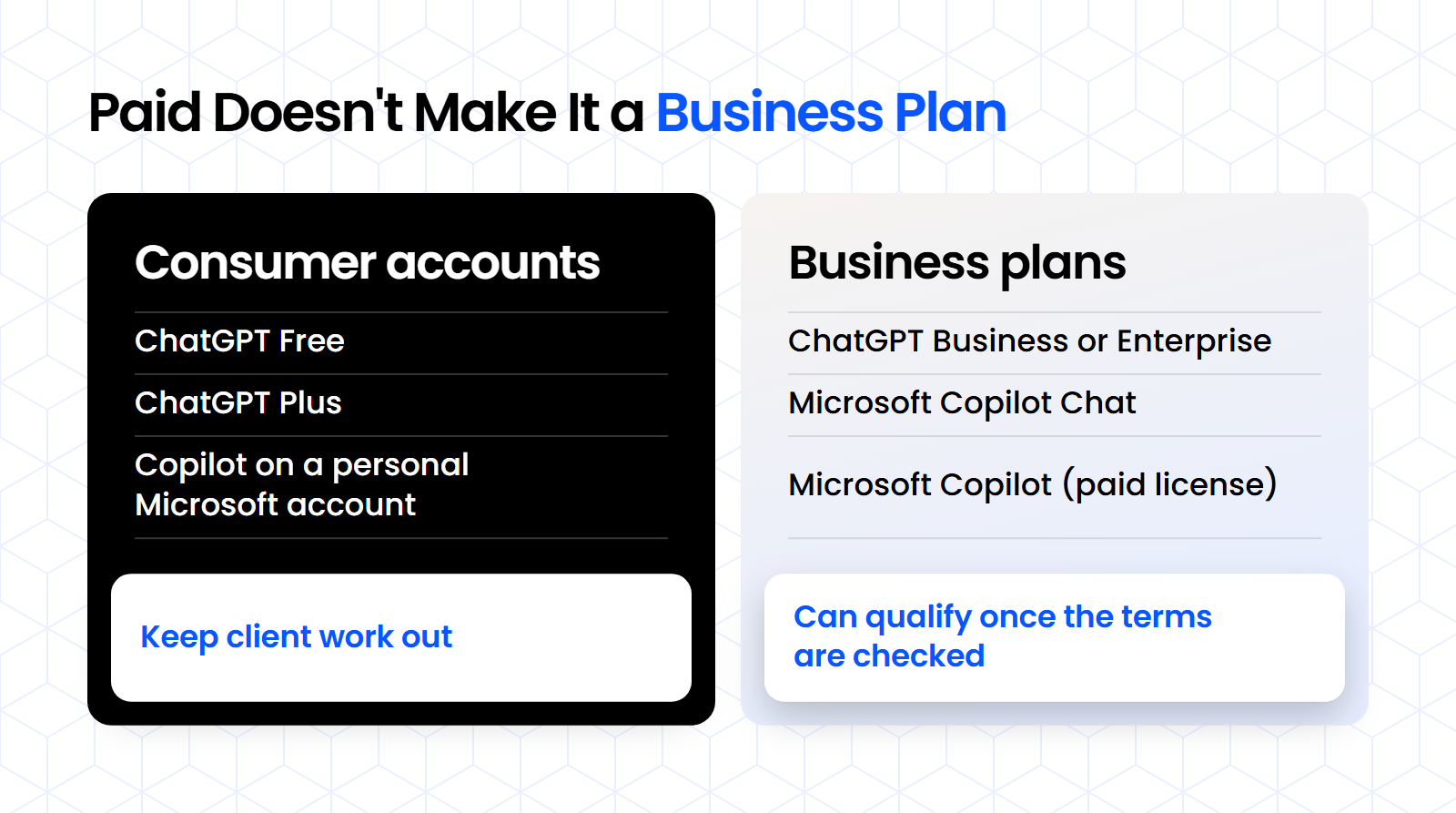
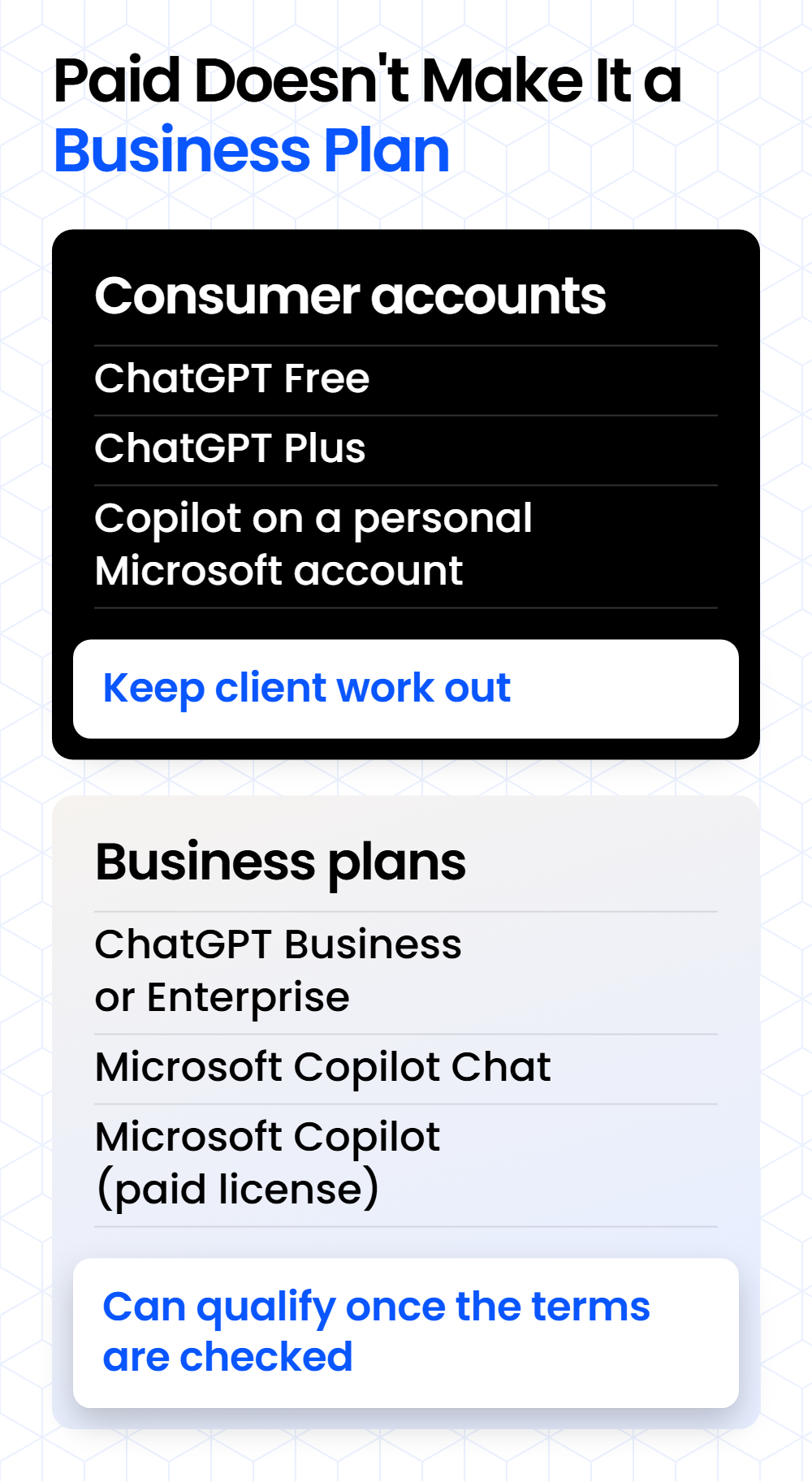
Consumer accounts of both tools stay out of client work, including a paid ChatGPT Plus plan and an account with training switched off, because each one remains a publicly available tool under a consumer agreement.
On ChatGPT Free, Go, Plus and Pro, OpenAI uses what you type to train its models, with an opt-out available. Switching training off changes that one setting, and the account itself stays personal.
North Carolina’s 2024 Formal Ethics Opinion 1 says lawyers “should avoid inputting client-specific information into publicly available AI resources.” A personal account with training off still fits that description. Here’s how the three consumer accounts compare, from OpenAI’s chat retention help page and Microsoft’s Copilot privacy FAQ:
Paid or free, with training on or off, a personal account gives your firm no agreement of its own to rely on.
When ChatGPT Business or Enterprise and Microsoft Copilot Can Qualify for Client Work
A business plan of either tool can qualify for client work once your firm has read its terms, and the plans differ on whose terms cover the data and what the tool can see inside your firm.
The column “Covered by the firm’s Microsoft 365 terms?” asks whether the data stays under the agreement your firm already has with Microsoft. For Microsoft Copilot Chat and Microsoft Copilot used with a firm sign-in, it does: Microsoft’s data protection terms cover prompts and responses the way they cover your firm’s email and files, with Microsoft acting as your data processor.
Web searches Copilot sends to Bing fall under separate terms. A ChatGPT business plan runs under a separate agreement with OpenAI, so your firm has a second set of terms to read and manage.
Whether Copilot is more secure than ChatGPT at this level depends on those terms. The business plans side by side:
Have someone read the terms behind your firm’s row before a client file goes near it.
Why Is Copilot’s Biggest Advantage Also Its Biggest Risk?
Neither tool is safer by default, because each moves the client-data risk to a different place: Copilot can surface whatever your firm’s permissions already allow inside the tenant, and a ChatGPT business plan takes what lawyers type outside it.
Copilot Sees What Your Permissions Allow
On a paid license, Microsoft Copilot works from whatever each user can already open, so a folder shared with the whole firm becomes a folder Copilot can draw on for anyone who asks.
That reach is what makes Copilot useful. An assistant that can read more of your firm’s documents gives better answers, because those documents are the record of your clients and matters. The same reach turns any folder opened too widely into a confidentiality problem and, where your firm runs ethical walls, a way around them.
ABA Formal Opinion 512 describes a related risk for self-learning tools, which learn from what lawyers type, and says it holds even when only your own lawyers use the tool.
Setting up Microsoft Copilot for law firms starts with scoping what each user can reach, so the assistant draws only on matters that user is cleared for.
A ChatGPT business plan carries a different risk. Unless your firm connects it to SharePoint or Outlook, it can’t see your tenant, so loose permissions don’t widen what it reaches; connected, it works from what each user can already open, the same way Copilot does.
Either way, everything a lawyer pastes in goes outside your tenant to OpenAI, under your firm’s separate agreement with it.
Does Keeping AI Inside the Firm Change the Ethics Duty?
State bars disagree on whether keeping AI inside the firm changes a lawyer’s confidentiality duty, and North Carolina’s 2024 Formal Ethics Opinion 1 warns that some firm-specific programs may still send what lawyers type back to the central program they’re built on.
The opinion says “some of these customized programs may continue to send information inputted into the firm-specific program back to the central program for additional use or training.” A tool with your firm’s name on it can still sit on top of a public program, so “firm-specific” and “stays in the firm” are two separate claims to check.
Florida Bar Ethics Opinion 24-1 takes the other side: it says confidentiality concerns “may be mitigated by use of an inhouse generative AI rather than an outside generative AI.”
Rules vary by state, so check your own bar’s position before you set a firm policy. Our comparison of state bar AI ethics opinions lines them up against ABA Formal Opinion 512. Treat each opinion as a list of questions your firm has to answer about the tool it picks.
Where Do Copilot and ChatGPT Fall Short in Legal Work?
Copilot falls short when your matter files sit outside Microsoft 365, ChatGPT falls short because it runs outside the Microsoft 365 controls your firm already manages, under a second contract, and both need a lawyer to review what they produce. Neither tool is the right answer for every job.
Copilot’s Answers Stop Where Its Reach Ends
Copilot can only work from what it can reach. If your matter files sit outside Microsoft 365, in a document management system such as iManage or NetDocuments or in a practice management system, Copilot works from email and Office files instead of the matter record, unless your firm adds a Copilot connector (an add-on that lets Copilot search another system) for that system.
The reach that creates the permissions risk inside your tenant also sets the limit on how much Copilot knows about a matter.
ChatGPT Runs Outside Your Firm’s Microsoft 365 Controls
ChatGPT sits outside your firm’s Microsoft 365 environment, and a business plan brings a separate admin console (the settings screen where your firm manages its users) and contract to manage.
If your firm connects SharePoint or Outlook to a ChatGPT business plan, it reaches only what each user can already open. Nothing in it knows that a lawyer on one side of a wall shouldn’t paste in a document from the other side, so that judgment stays with your people.
Both tools share one gap: their output needs a lawyer’s review, citations included. Treat a draft from either one the way a partner treats a first-year associate’s draft, checked before it goes anywhere.
Your lawyers also need to understand what the tool does with what they type. That understanding is part of their own confidentiality duty, and they can’t hand all of it to IT.
When Neither Copilot nor ChatGPT Is the Best Fit
For some work, the better answer is neither Copilot nor ChatGPT:
Your firm can approve different tools for different jobs, as long as the written rule says which tool handles which work.
How Should Your Firm Decide Between Copilot and ChatGPT?
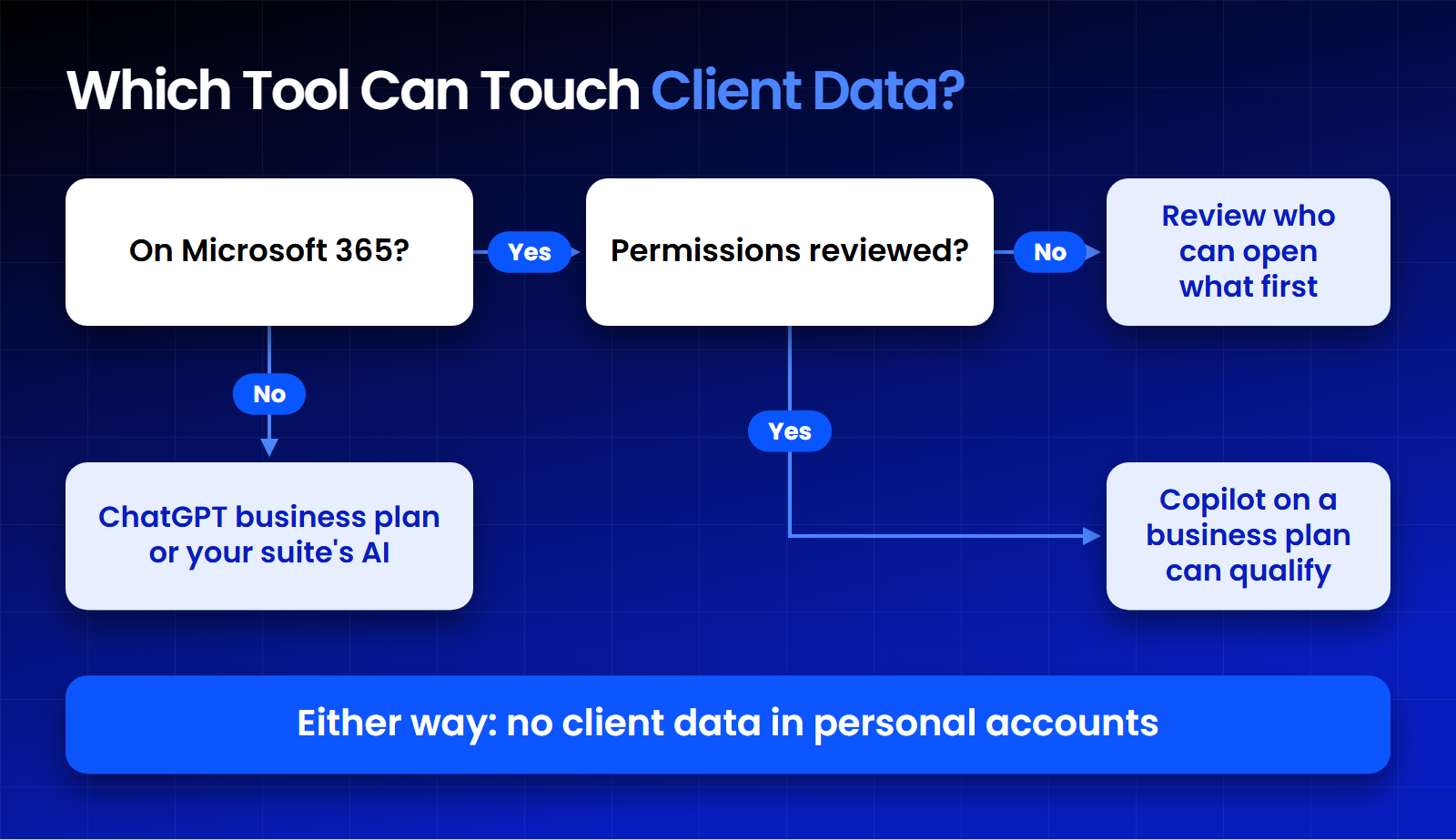
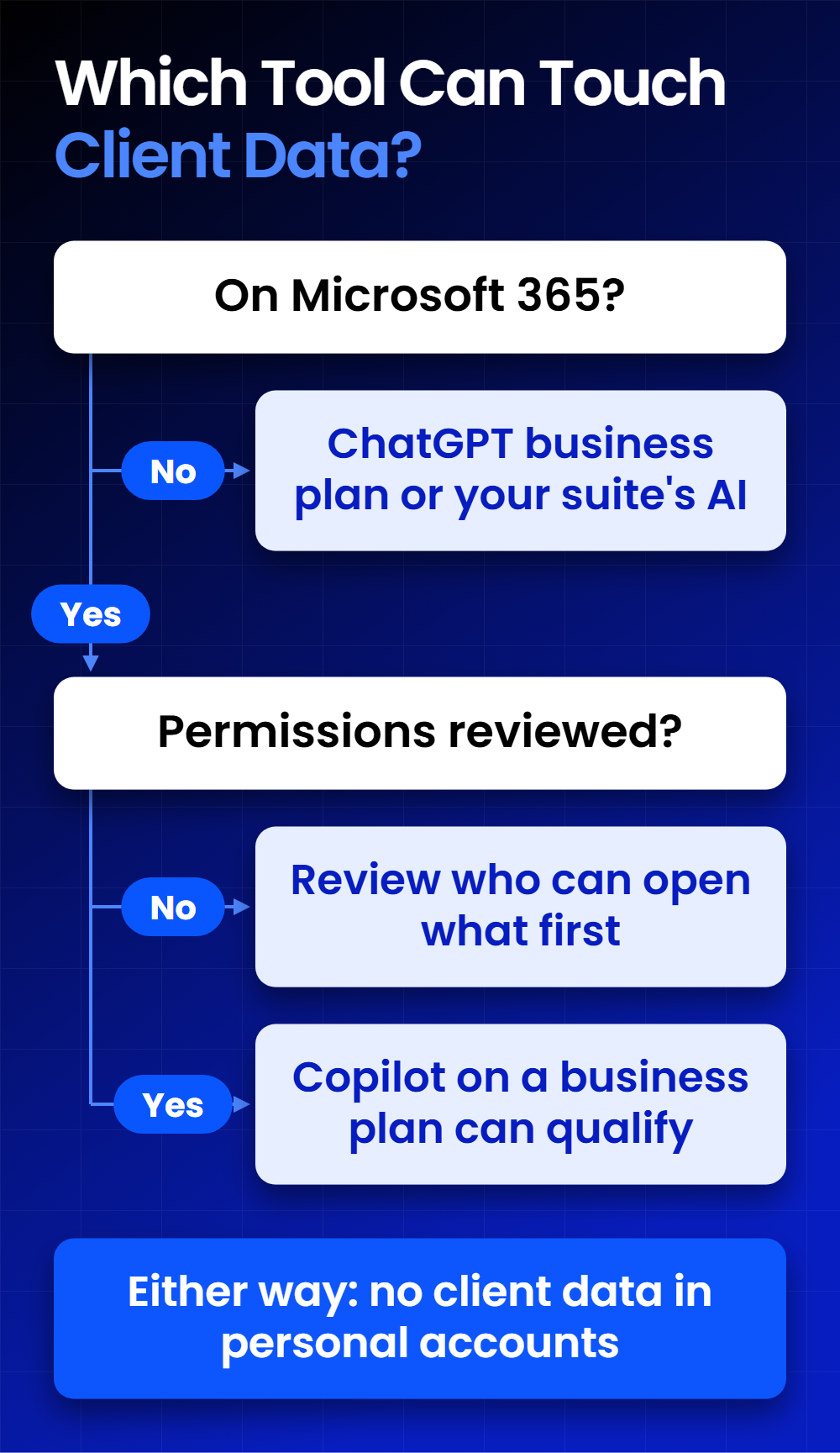
Your firm decides by reading the terms of the plan it would use and matching the tool to its own setup, starting with whether you’re on Microsoft 365 and whether anyone has reviewed who can open what.
ABA Formal Opinion 512 sets that reading as a baseline. Lawyers should read a tool’s terms “to learn who has access to the information that the lawyer inputs into the tool,” and they “may need to consult with IT professionals or cyber security experts” to understand them.
Tool choice is one part of what Opinion 512 asks your firm to vet, alongside client consent. On Microsoft 365, Copilot on a business plan only becomes an option once someone has reviewed who can open what, and whichever tool your firm picks, client data stays out of personal accounts.
If You’re on Microsoft 365 and Your Permissions Have Been Reviewed
Copilot on a business plan can qualify for client work once your firm has checked its terms, because it works inside the environment your firm already controls, under Microsoft’s Data Protection Addendum and Product Terms when your lawyers sign in with their firm accounts. Write down which plan is approved, and repeat the permission review as matters open and people change roles.
If Nobody Has Reviewed Your Permissions
Review who can open what before Copilot goes near client work. The same review applies before anyone connects SharePoint or Outlook to a ChatGPT business plan.
Start with your most sensitive matters and any folder, SharePoint site or shared mailbox the whole firm can open, and close access that shouldn’t be there. Until that’s done, keep Copilot to work with no client data in it.
If Lawyers Already Use Personal ChatGPT Accounts
If some of your lawyers already use personal ChatGPT accounts, take these steps:
Personal accounts are where the risk sits, because nobody at your firm has read or agreed to the terms they run under. Pair the rule with the approved plan, so your lawyers have a place for the work that used to go into personal accounts.
Watch · 8 min
Four AI Decisions to Make Before a Client Asks
How to find what's already in use, decide which tools may touch client data, name who checks the output, and put the rule on one page.

If Your Firm Wants Both Copilot and ChatGPT
Running both means:
Write down which tool handles which work, and keep client data in the one your firm has vetted for it.
What to Check Before Copilot or ChatGPT Touches a Matter
Before your next partner meeting on AI, find out which accounts your lawyers are already signed into. Ask each one whether they use Copilot or ChatGPT for work, and on which account: a firm Microsoft 365 login, a firm business plan or a personal one.
Then list who can open the folders for your most sensitive matters, and look for any that everyone in the firm can open. Those two lists put your firm in one of the four situations above, and they give your partners the facts to settle it.
WHAT’S NEXT
Frequently Asked Questions

Uptime Legal’s Technology Solutions
Cloud, software, IT, and document management built for today’s law firms.