Table of Contents
Getting or renewing cyber insurance for law firms starts with a questionnaire. Your answers shape the coverage and the rate, and someone at your firm signs it.
The questions look simple: is multi-factor authentication (MFA) enforced on every account, are backups tested, do you confirm changed wire instructions by phone? Each one gets a yes or a no, and each yes is a statement about how your firm’s IT is configured today.
Every business gets the same form, and your answers rest on controls your firm runs and evidence someone has to be able to produce. Those controls are the everyday work of law firm cybersecurity, and they protect client files whether or not an insurer is asking.
This guide walks through the application line by line: what each question is testing, which control answers it, and what evidence to keep. We help firms work through these questionnaires at renewal, and this is the walkthrough we’d give you.
Why Is the Cyber Insurance Questionnaire Getting Harder to Answer?
The cyber insurance questionnaire is harder to answer because it asks whether specific controls are in place across your firm, and a firm with IT support can still be unable to say yes with proof.
The ABA 2023 Cybersecurity TechReport tells firms they’ll have to complete a questionnaire, at a minimum, to obtain or renew coverage, and that some carriers may require a third-party security assessment.
Many firms went without the coverage. In the same ABA survey, 40% of respondents said their firms carried cyber liability insurance in 2023, down from 46% in 2022.
Questionnaires are also what push firms to fix their IT. Clients hand them out, insurers require them, and the person answering can’t leave a line blank or answer it wrong.
What “Proof” Means Now
Underwriters look past “we have IT support” and ask whether your firm can show that:
Each of those is a claim about coverage and records. If nobody can produce the record, treat the control as unproven.
What Does a Cyber Insurance Application Ask, Question by Question?
A cyber insurance application asks whether a set of specific security controls is in place across your firm, from MFA and endpoint protection to backups, patching and how you verify a payment request.
The wording varies by carrier, but many applications test the same controls. The table below phrases each question the way applications commonly do, then shows what the underwriter wants to know, the control that answers it and the evidence to keep.
Most of these questions ask whether a control is in place everywhere. MFA for most of the firm is a no to an MFA question, and so is EDR on the laptops but not the server.
Watch · 10 min
Watch the Cyber Insurance Requirements Explained
A walkthrough of the IT requirements insurers ask law firms about, to watch before you answer the rows above.

If you can’t answer yes to every row with the evidence in hand, those rows are where to start.
What Insurers Actually Check When Underwriting a Law Firm
Underwriters check whether each control covers every account, device and system it should, and whether someone keeps it that way between renewals.
Requirements vary by carrier and policy, but the same controls come up repeatedly. Here’s what a truthful yes requires for each one.
Multi-Factor Authentication (MFA) on Every Account
Multi-factor authentication (MFA) requires users to prove who they are with more than a password. The underwriter’s question is whether it’s enforced on every user, every admin account and every remote access path.
MFA should cover each of these, wherever the system supports it:
“Some users have MFA” is a no.
Endpoint Detection and Response (EDR) on Every Device
Endpoint detection and response (EDR) watches devices for attacker behavior that basic antivirus can miss, such as ransomware activity, stolen credentials in use or unusual scripts. It answers the endpoint question only when it runs on every laptop, desktop and server and someone reviews what it flags.
One compromised device can expose email, documents, billing and practice management software at once.
Backups That Pass a Restore Test
A backup counts when it’s encrypted, separated from the main environment, monitored and proven by a restore test. Like the rest of law firm data protection, it has to hold up when ransomware reaches the network. A stronger backup setup includes:
Until someone restores from a backup, nobody knows it works.
Patching Every System and Retiring End-of-Life Ones
Patching covers more than workstation updates. It also has to reach:
Coalition’s 2025 Cyber Threat Index reported that most ransomware claims in 2024 began with compromised perimeter security appliances, such as VPNs and firewalls.
A system past its vendor’s support date no longer gets regular security fixes. That’s why applications ask about end-of-life software as its own question.
Admin Rights Limited to the People Who Need Them
Underwriters want access control that limits admin rights to the people who need them, reviews them regularly and removes them the day someone leaves. That includes local admin rights on staff computers, because an everyday account with admin rights lets one phishing click install anything.
Email Filtering and Phishing Training for Every Mailbox
Email filtering blocks known phishing and spoofed senders before they reach an inbox, and training covers what gets through. The training question covers everyone with a mailbox, attorneys included.
Remote Access Behind MFA, with No Exposed RDP
Remote access answers the question when it sits behind MFA and nothing like Remote Desktop Protocol (RDP) is open directly to the internet. An exposed login screen gives attackers a place to try stolen or guessed passwords, so applications ask about it separately.
Around-the-Clock Monitoring and Logs
Monitoring means someone watches sign-in and device alerts around the clock, and logs record what happened if something goes wrong. The question underneath is whether anyone would notice an intruder overnight, and whether the firm could reconstruct what the intruder touched.
A Written Plan That Names Who Does What
An incident response plan counts when it’s written down, names who does what and is stored where the firm can reach it if its own systems are down. It should name who handles technical triage, who calls the insurer and outside counsel, and how systems get isolated and restored.

Where Do Law Firms Get Asked More? Wire Transfers, Email and Client Data
Cyber insurance applications are written for businesses in general, and the lines that weigh most for a law firm are the ones about email, payment instructions and client data.
The form can’t ask what your data is worth, and insurers struggle to price that part: medical records in personal injury files, or deal terms for a client that hasn’t announced a transaction.
Funds-transfer fraud is the line to take most seriously. Coalition’s 2026 Cyber Claims Report found that business email compromise (BEC) and funds transfer fraud accounted for 58% of all claims, and that 71% of funds transfer fraud claims came directly from social engineering.
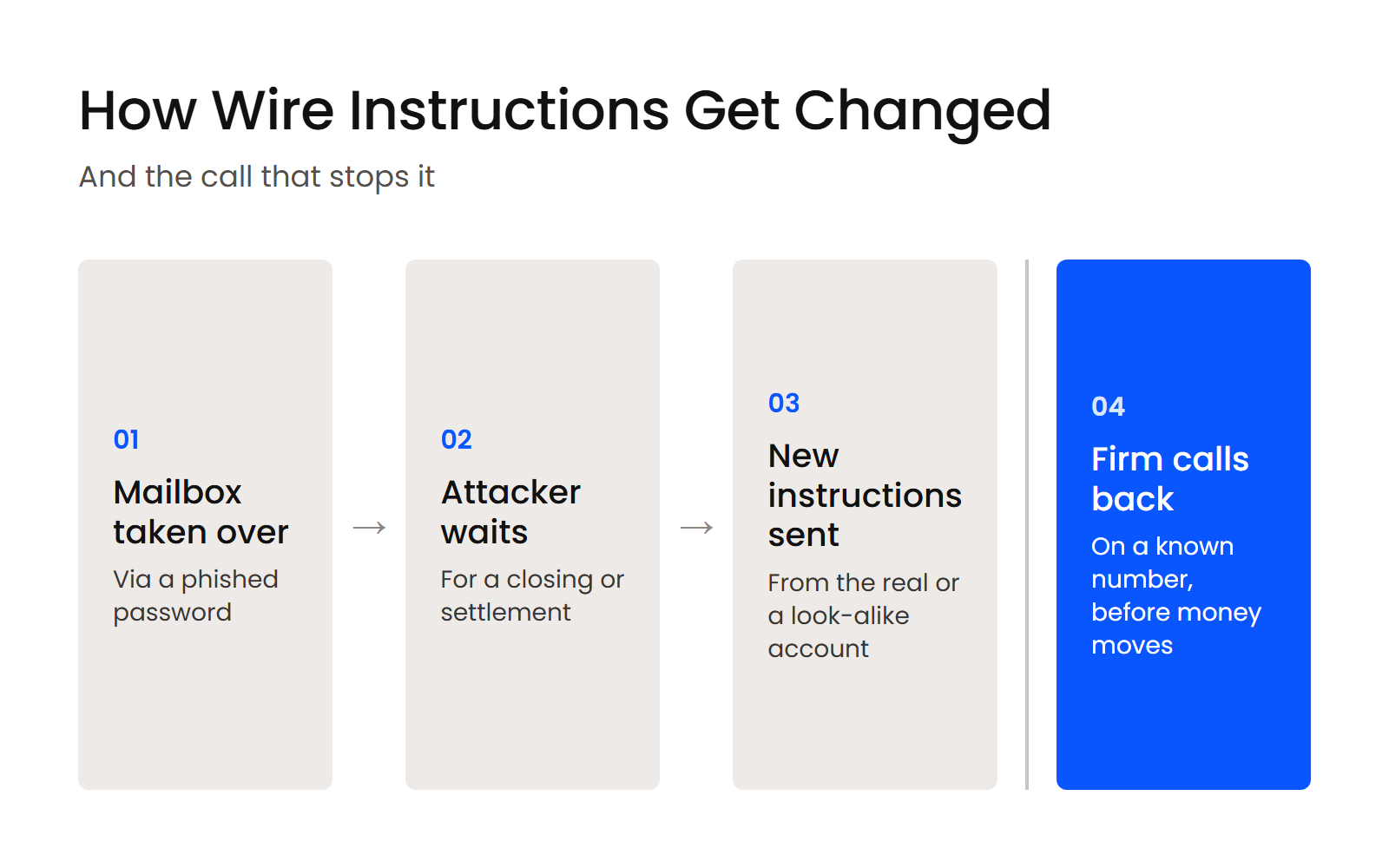
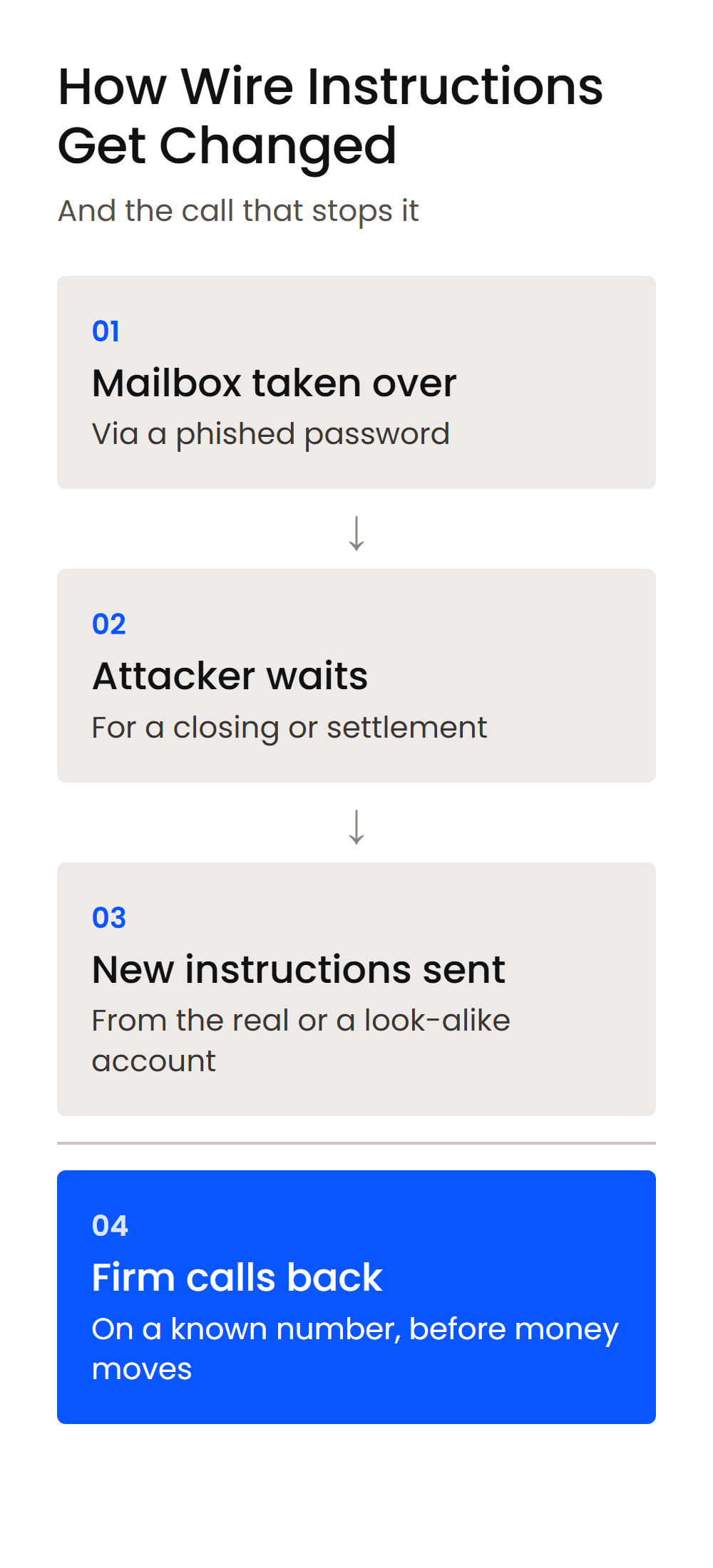
Firms move client money through trust accounts, which makes the pattern familiar. An attacker gets into a mailbox, waits for a closing or settlement, then sends changed wire instructions just before the money moves.
The control the application asks about is a callback on a number you already have, plus a second approver, for any new or changed payment instructions, and the warning signs are covered in our guide to business email compromise for law firms.
Client security questionnaires ask many of the same things. In the ABA’s 2023 survey, 22% of respondents said a client or potential client had asked their firm to complete one, so the evidence you gather for the insurer can answer the client too.
The duty underneath both is confidentiality. ABA Model Rule 1.6(c) requires lawyers to make reasonable efforts to prevent the inadvertent or unauthorized disclosure of, or unauthorized access to, information relating to the representation of a client.
Why Most Law Firm IT Environments Fail the Underwriting Checklist
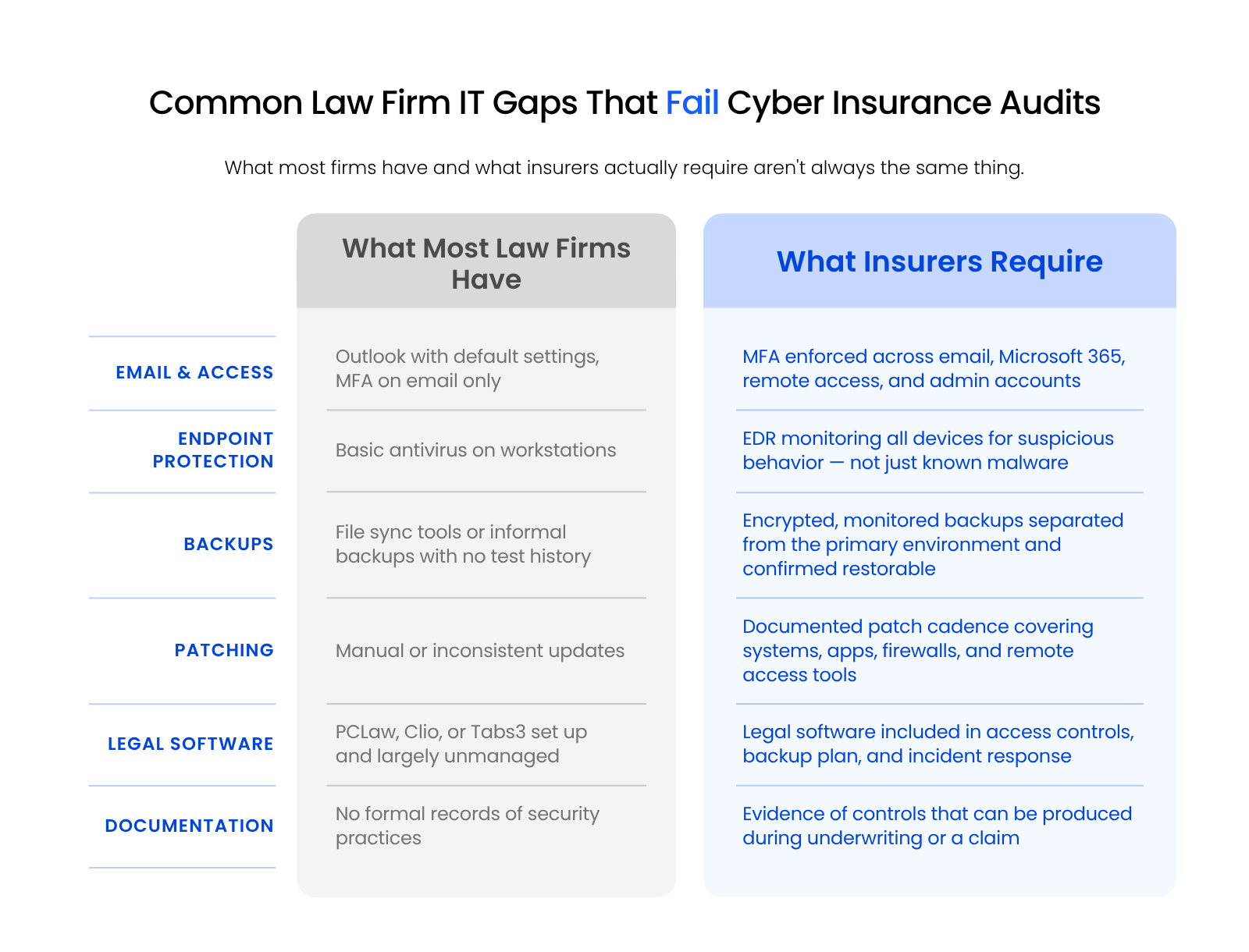
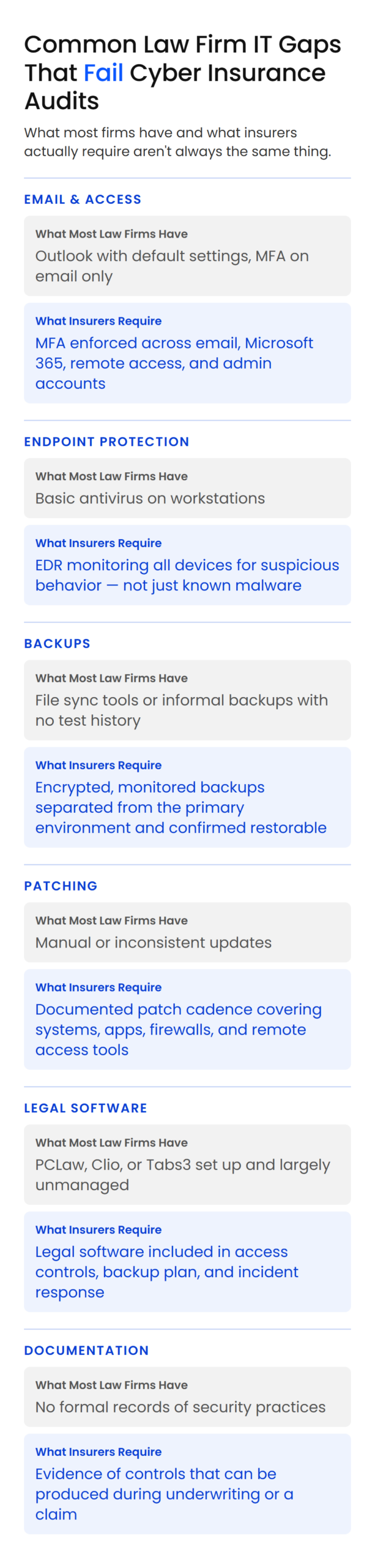
Most law firm IT environments fail the underwriting checklist because their controls are incomplete, inconsistently applied or impossible to document, even when the firm believes it’s covered.
A firm can have Microsoft 365, antivirus, backups, a firewall and an IT provider and still be unable to answer the questionnaire. The three most common reasons follow.
Fragmented Consumer-Grade Tools
The gap usually shows up where basic tools run without central management, monitoring or records. Common examples:
Usually some of the protection is in place, and what’s missing is full coverage and the proof of it.
Legal Software Left Out of the Security Plan
Your environment includes practice management, billing, accounting, document, scanning, email and remote access systems tied to client work. Systems like PCLaw, Clio, Tabs3, Time Matters, ProLaw, QuickBooks and Worldox touch sensitive client and matter data, so they belong in the security plan the application asks about. For each one, your firm needs to know:
A generalist IT provider handles workstations and email. Legal software touches matter data, billing and client communications in ways standard small-business security often doesn’t account for.
No Centralized Monitoring or Documentation
Readiness depends on controls and evidence. A firm may have protections in place, but if no one can produce the records, leadership still struggles at underwriting, at renewal, in a client review or during a claim investigation.
That weighs more for a firm, because security is tied to confidential client information and the lawyer’s duty under ABA Model Rule 1.6(c) to protect it. It’s why cybersecurity for law firms starts with documented, monitored controls.
How Managed IT Closes the Gaps Underwriters Find
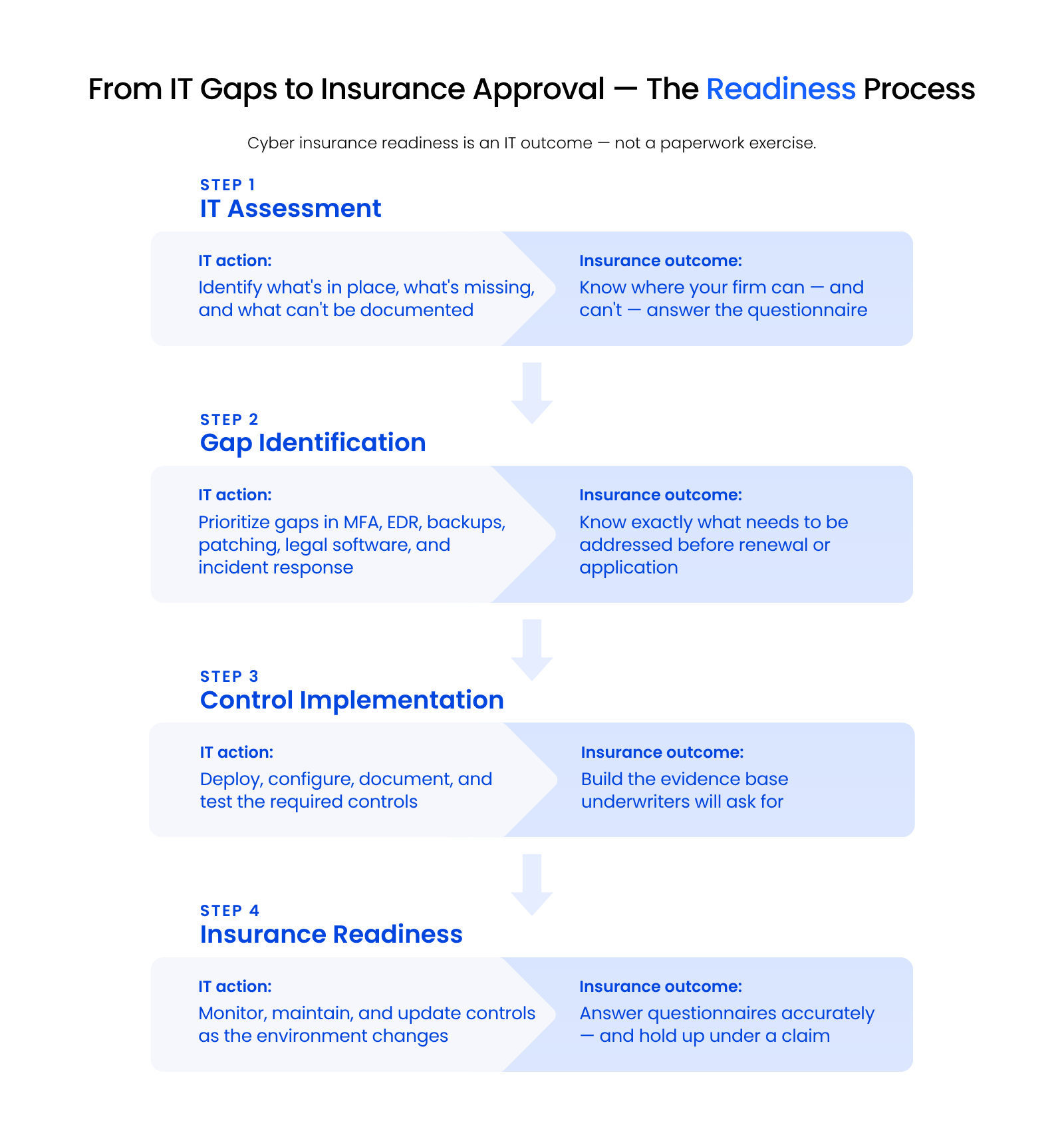
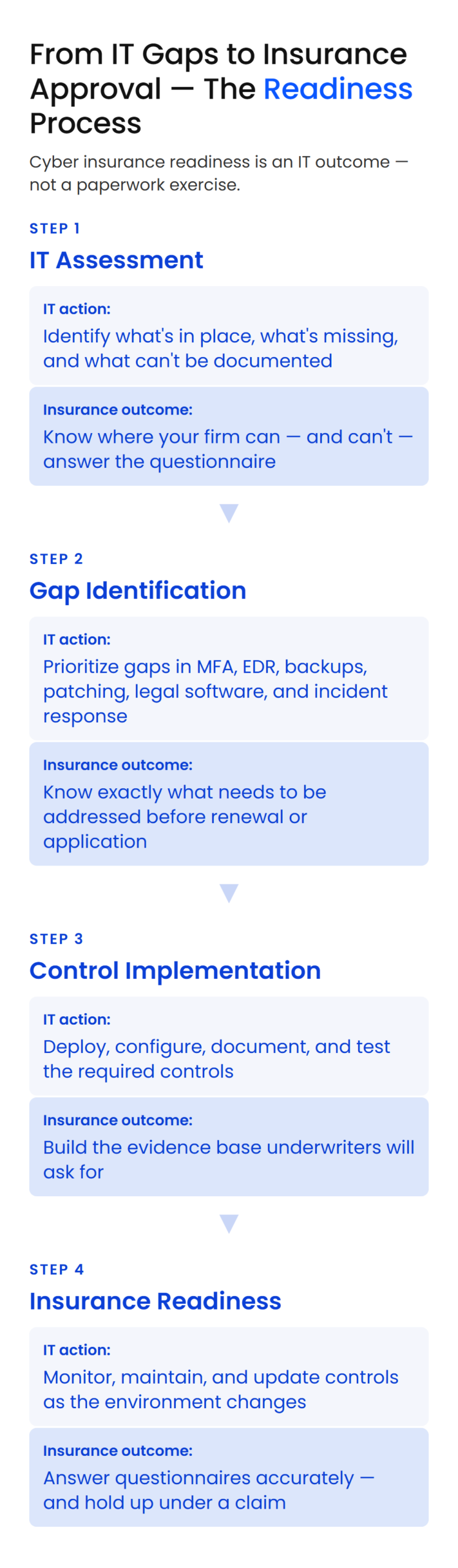
Managed IT closes the gap by keeping controls monitored, patched, tested and documented between renewals, so your firm answers the form from records it already has.
Beyond enabling MFA, adding EDR and writing a plan the month before renewal, the environment has to be monitored, patched, reviewed and documented for the rest of the year, which is the job of managed IT for law firms.
We handle urgent fixes first, and we won’t help answer a line as if a control exists before it’s in place.
Security Configured for How a Law Firm Works
Microsoft 365, remote access, legal software, document systems, email, billing and accounting all have to work together securely. Those choices shape how attorneys reach files, how staff work remotely, where client data is stored and how quickly the firm recovers.
Uptime Manage provides managed IT built for law firms, so the configuration, monitoring and documentation underwriters ask about stay current as part of day-to-day IT. No managed IT provider can guarantee approval, pricing, coverage terms or claim outcomes. Those decisions belong to the insurer.
Incident Response Planning Your IT Provider Keeps Current
Your IT provider keeps the incident response plan current as systems change, and the plan should also cover:
When your IT provider knows your systems and keeps the records, your answers on the application can match your environment.
What Happens If an Answer on the Application Is Wrong?
An inaccurate answer usually surfaces when the firm files a claim, because that’s when the insurer checks the application against the controls that were actually in place.
Someone with authority at the firm signs the application, and the answers describe the environment on that date. An optimistic yes can sit unnoticed for the whole policy term.
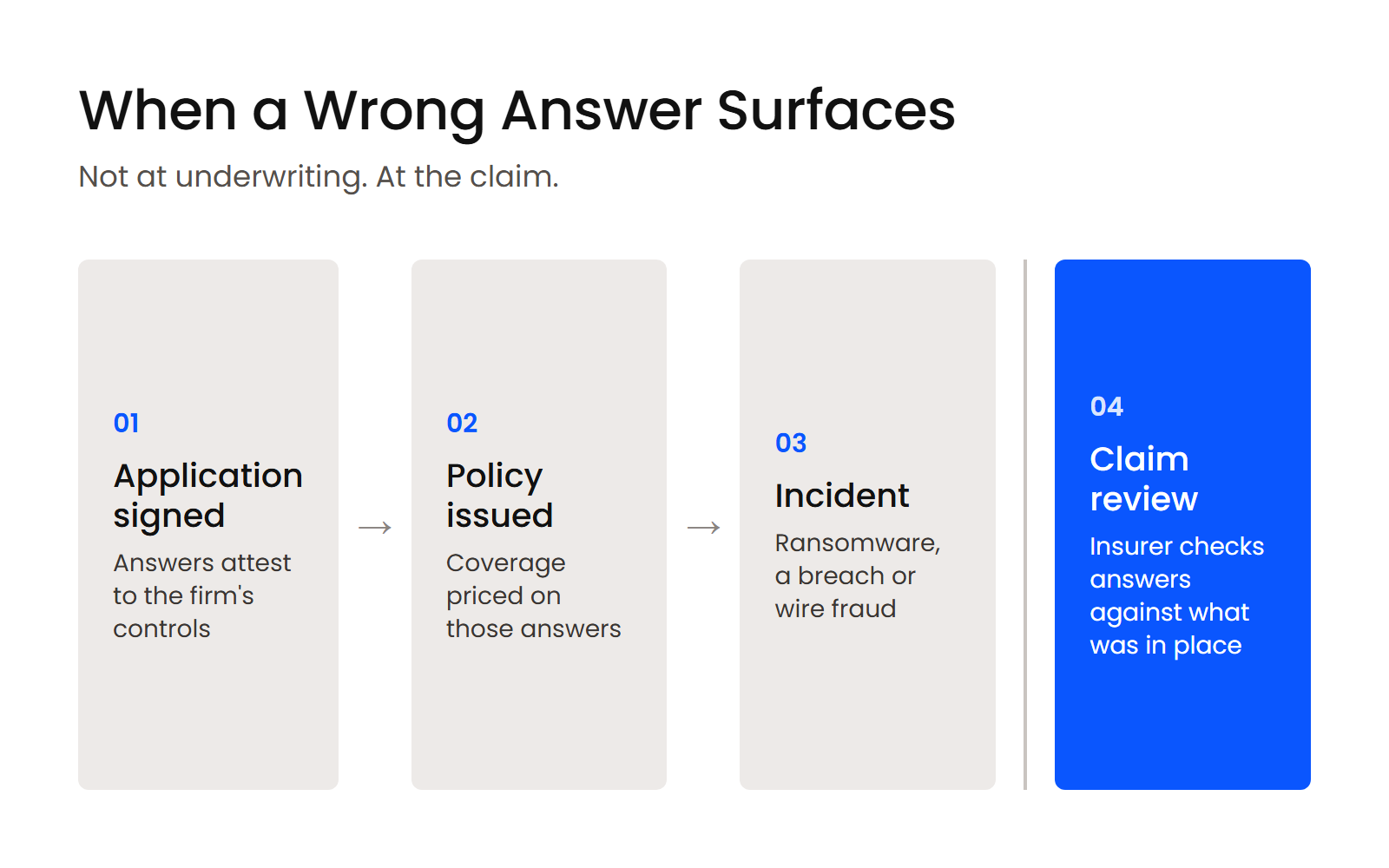
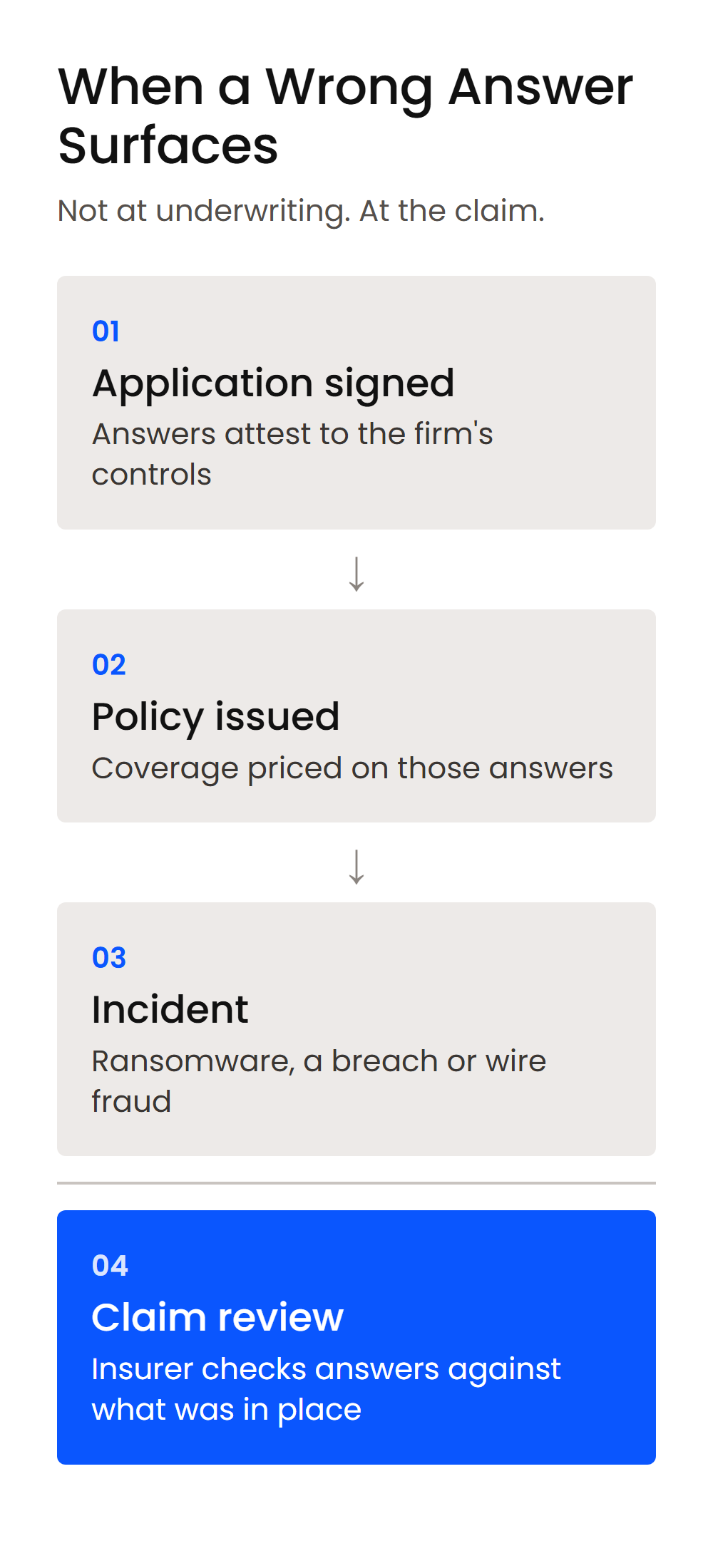
After an incident, the insurer’s investigation looks at how the attacker got in and what was in place at the time.
What an insurer can do with a misstatement depends on the policy and the jurisdiction, and it can put the claim itself at risk. The safer course is to have your IT provider review each answer, then answer accurately and tell your broker about any gap along with your plan to close it.
How Should a Firm Prepare Before Its Renewal?
A firm prepares for renewal by checking last year’s answers against today’s environment and gathering the evidence behind every yes before the new application arrives.
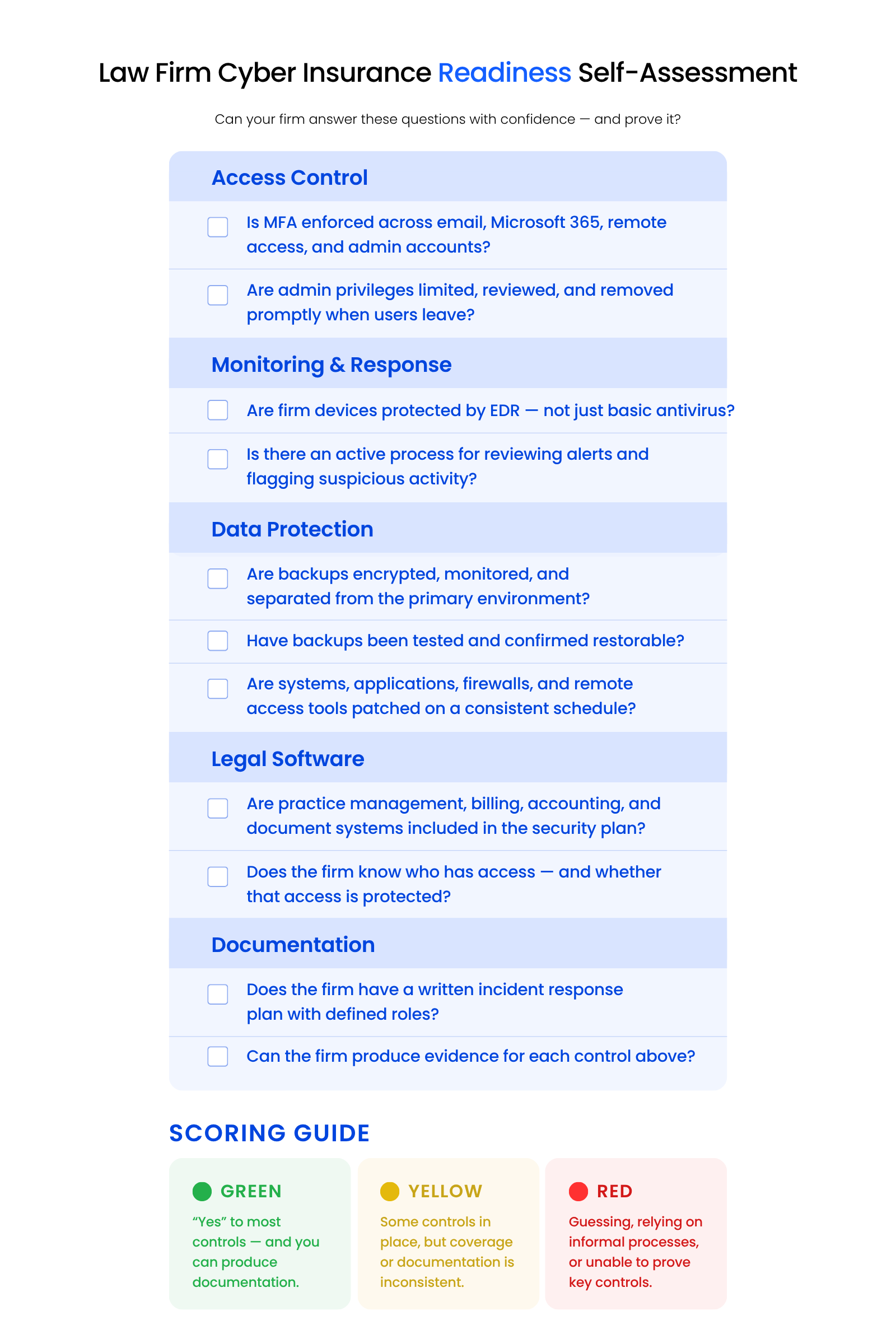
Start with the table above, then work through the evidence list and the scoring guide below.
The Evidence to Gather Before Renewal
For each yes, have the record ready:
If your firm can’t produce the record, don’t assume the control is in place.
Is Your Firm Green, Yellow or Red for Renewal?
Sort your firm honestly against the evidence:
Yellow and red answers are the work list before renewal.
When to Get a Professional IT Assessment
A professional IT assessment is worth it in three situations:
It’s especially useful with informal backups, inconsistent MFA, older legal software or no incident response plan.
Start Your Renewal with Last Year’s Application
Pull last year’s application before the new one arrives. Answer each line against the table above, and mark every question you can’t answer yes to with evidence in hand.
Those marks are your work list: a control to finish, a setting to change, a record to start keeping. Fixing them before the renewal date means every yes you sign is one you can prove.
WHAT’S NEXT
Frequently Asked Questions

Uptime Legal’s Technology Solutions
Cloud, software, IT, and document management built for today’s law firms.