Table of Contents
Pick the wrong practice management software and every part of your firm feels it. Billing gets messy, documents scatter across three different logins, and staff quietly build workarounds instead of using the system you paid for.
The right law practice management software depends on your firm’s size and workflow, but there’s a second decision that matters just as much as which vendor you pick: whether that software runs on your own server or in the cloud.
This guide breaks down 15 practice management platforms, from PCLaw to Clio, and where each one actually fits. It also covers a question most buying guides skip: how server-based and cloud-based deployment change what you get, and why that choice deserves its own line on your checklist.
What Is Law Practice Management Software?
Law practice management software is a system that centralizes case management, billing, and documents so your firm runs on one connected platform instead of scattered tools.
We work with hundreds of law firms across North America, and the question we hear most often is some version of “what’s the best law practice management software?” That’s a bit like asking what the best kind of car is. The answer depends on what your firm actually needs.
Some practice management platforms lean heavily on accounting. If your firm already has accounting software it’s committed to, that focus doesn’t help you. Other platforms lean into document and form creation, which matters for some firms and not others.
Start by identifying which features and functions matter most to your firm. That list becomes the framework you hold every option against, and it’s a faster path to a shortlist than reading every review on the internet.
What Does Law Practice Management Software Actually Do?
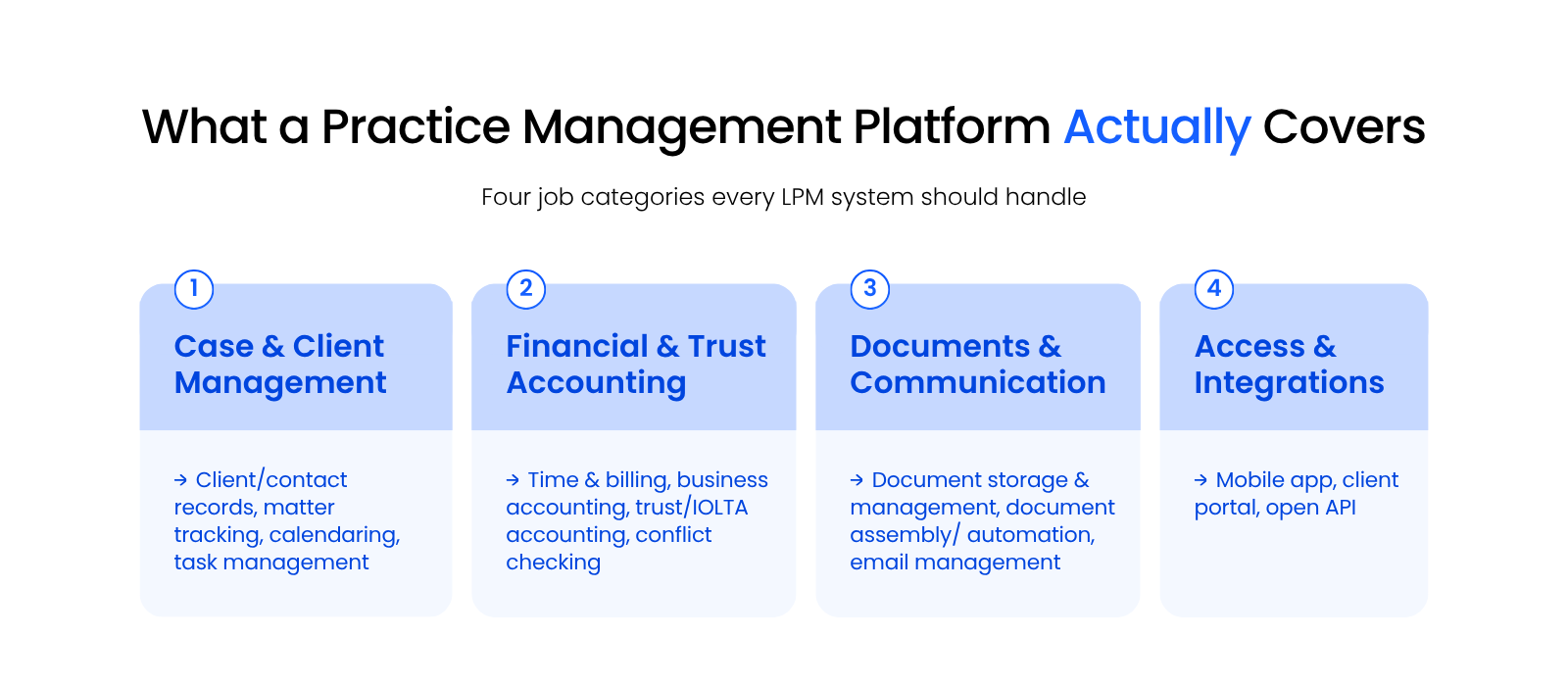
A law practice management platform needs to handle four jobs well, no matter which one you choose: case and client management, financial and trust accounting, documents and communication, and access and integrations.
The scope and depth of any given platform varies quite a bit from product to product. Here’s what to expect across the four core categories.
Case and Client Management
Case and client management keeps every matter’s contacts, deadlines, and tasks in one searchable record instead of scattered notes. This category covers your client and contact database, matter tracking, calendaring, task management, and conflict checking, which matters for a law firm specifically because you need a documented record every time you check for a conflict of interest.
Financial and Trust Accounting
Billing, business accounting, and trust or IOLTA accounting live together so your firm invoices accurately and stays compliant with trust-fund rules. Trust accounting in particular is not optional for a law firm the way it would be for most small businesses. Your platform needs to track client funds separately and produce the reporting your bar requires.
Documents and Communication
Document storage, assembly, and email management keep case files and client correspondence attached to the right matter automatically. Document assembly automates the preparation of court documents and forms, and email management saves messages to the right matter through Outlook integration instead of leaving them buried in someone’s inbox.
Access and Integrations
Mobile access, a client portal, and an open API let your team and your clients reach the system from anywhere without extra software. A client portal in particular gives clients a way to see updates and share documents without a phone call, which cuts down on routine status-check emails.
The Best Law Practice Management Software at a Glance
The fastest way to narrow 15 practice management platforms down to a shortlist is to compare them side by side on deployment, price, and firm size.
In our experience working with hundreds of law firms, here’s how the top law practice management platforms stack up. We’ve grouped them by deployment method first, because that choice shapes everything else about how the software runs.
The Best Law Practice Management Software at a Glance
| Software | Deployment | Starting Price | Best For |
|---|---|---|---|
| PCLaw | Server-based or private cloud | Contact vendor | Firms wanting billing and accounting unified in one system |
| Tabs3 and PracticeMaster | Server-based or private cloud | Contact vendor | Firms needing strong back-office billing plus matter management |
| ProLaw | Server-based or private cloud | Contact vendor | Firms wanting case management, document management, and accounting together |
| Time Matters | Server-based or private cloud | Contact vendor | Firms that want deep customization of workflows and reports |
| Clio | Cloud-based | $49/user/month | Solo and small firms wanting quick setup and broad integrations |
| Actionstep | Cloud-based | Contact vendor | Midsize firms wanting an end-to-end platform with full legal accounting |
| Smokeball | Cloud-based | Contact vendor | Firms wanting automatic time capture and heavy document automation |
| LEAP | Hybrid (cloud with desktop app) | Contact vendor | Form-heavy practices needing jurisdiction-specific document assembly |
| CosmoLex | Cloud-based | $109/user/month | Firms wanting built-in business and trust accounting without QuickBooks |
| Rocket Matter | Cloud-based | $49/user/month | Firms that want visual, project-style matter tracking |
| MyCase | Cloud-based | $39/user/month | Firms prioritizing a strong client portal and fast onboarding |
| Practice Panther | Cloud-based | $49/user/month | Solo and small firms wanting a lightweight built-in CRM |
| Bill4Time | Cloud-based | $27/user/month | Firms with complex billing needs like LEDES or split arrangements |
| Centerbase | Cloud-based | Contact vendor | Firms wanting a highly customizable all-in-one platform |
| LeanLaw | Cloud-based | $55/user/month | Firms that want deep QuickBooks integration for billing |
A private cloud hosts your law practice management software, documents, and data in the cloud so you get the reliability, security, and mobility of cloud computing without giving up the server-based software your firm already knows.
Server-Based and Private Cloud Law Practice Management Software
PCLaw, Tabs3, ProLaw, and Time Matters give firms deep, mature functionality that runs on your own server or a private cloud instead of a vendor’s servers.
These four platforms have been around for decades, and that maturity shows up as depth: more configuration options, tighter accounting integration, and features that newer cloud-native tools haven’t built yet.
PCLaw
PCLaw pairs lightweight case and client management with strong built-in billing and business accounting, and it’s one of the few platforms on this list that doesn’t require separate bookkeeping software.
Pricing: Subscription-based, per-user. Contact the vendor for details.
Tabs3 and PracticeMaster
Tabs3 and its counterpart, PracticeMaster, work together as one suite: Tabs3 handles the “back office” (time, billing, and accounting), and PracticeMaster covers the “front office” (client and matter management).
Pricing: Based on total users and timekeepers. See the vendor’s price calculator.
ProLaw
ProLaw is the only platform on this list built to run case management, document management, and accounting together in one system, which cuts down on the number of vendors your firm has to manage.
Pricing: Varies by firm. Starts at a 10-user package.
Time Matters
Time Matters pairs deep customization with strong document management, and firms often pair it with PCLaw or Juris for accounting.
Pricing: Subscription-based, per-user. Contact the vendor for details.
You don’t have to give up PCLaw, Tabs3, ProLaw, or Time Matters to get cloud benefits. A private cloud runs any of them on secure infrastructure your firm never has to maintain, so you keep the software and gain the mobility.
Cloud-Based and Web-Based Law Practice Management Software
Clio, MyCase, CosmoLex, and eight other cloud-native platforms run entirely in the browser, trading some of the deep customization above for fast setup and low maintenance.
Clio
Clio Manage is among the most widely adopted cloud-based practice management platforms, known for its clean interface and deep integrations with tools firms already use.
Stand-out features:
Pricing: EasyStart is $49/user/month, Essentials is $89/user/month, Advanced is $119/user/month, and Complete is $149/user/month (includes Clio Grow). Pricing is billed annually.
Actionstep
Actionstep is built for midsize firms that want intake, matter management, document management, billing, and full legal accounting on one configurable platform.
Pricing: Three tiers (Practice Pro, Practice Pro + Accounting, and Premier). Pricing isn’t published; contact the vendor directly.
Smokeball
Smokeball blends practice management with document automation and tight Microsoft and Outlook integration, and it markets itself well to firms of nearly any size.
Pricing: Four tiers (Bill, Boost, Grow, and Prosper+). Smokeball offers a 30-day free trial of its Boost plan; contact the vendor for current rates.
LEAP
LEAP is possibly the most capable of the cloud-connected platforms on this list, built around a comprehensive library of state and federal forms.
Pricing: Not published. Contact the vendor or a LEAP partner such as Uptime Legal.
CosmoLex
CosmoLex bundles practice management with full business and trust accounting, which means most firms don’t need a separate QuickBooks subscription.
Pricing: Standard is $109/user/month, Elite is $129/user/month, and the FirmsFirst Bundle is $223/user/month. Pricing is billed annually.
Rocket Matter
Rocket Matter takes a project-management approach to matter tracking, including kanban-style boards for visualizing case progress.
Pricing: Essentials is $49/user/month, Pro is $79/user/month, Premier is $99/user/month, and Elite is $129/user/month. Pricing is billed annually.
MyCase
MyCase built its reputation on ease of use and arguably has the strongest client portal of any platform on this list.
Pricing: Basic is $39/user/month, Pro is $89/user/month, and Advanced is $109/user/month. Pricing is billed annually.
Practice Panther
Practice Panther is a popular choice for solo and small firms that want an intuitive interface plus a lightweight CRM for intake.
Pricing: Solo is $49/user/month, Essential is $69/user/month, and Business is $89/user/month. Pricing is billed annually.
Bill4Time
Bill4Time started as a time and billing tool and has grown into a full practice management platform, with billing flexibility as its core strength.
Pricing: Time & Billing is $27/user/month, Time & Billing Enterprise is $67/user/month, Legal Pro is $45/user/month, and Legal Enterprise is $80/user/month. Pricing is billed annually.
Centerbase
Centerbase is a highly customizable cloud platform built around native general-ledger accounting alongside matter, time, and billing.
Pricing: Not published. Contact the vendor or a partner such as Uptime Legal.
LeanLaw
LeanLaw is a specialized billing platform built around QuickBooks for law firms, syncing tightly with QuickBooks Online rather than offering full case management.
Pricing: Core is $55/user/month and Pro is $75/user/month; Elite is custom-priced for larger firms.

Payment Processing for Law Firms
A closer look at the payment processing options built into or paired with your practice management software.
Cloud-Based vs. Server-Based Law Practice Management Software
Choosing cloud-based or server-based law practice management software changes who handles your updates and security, and that choice matters as much as which vendor you pick.
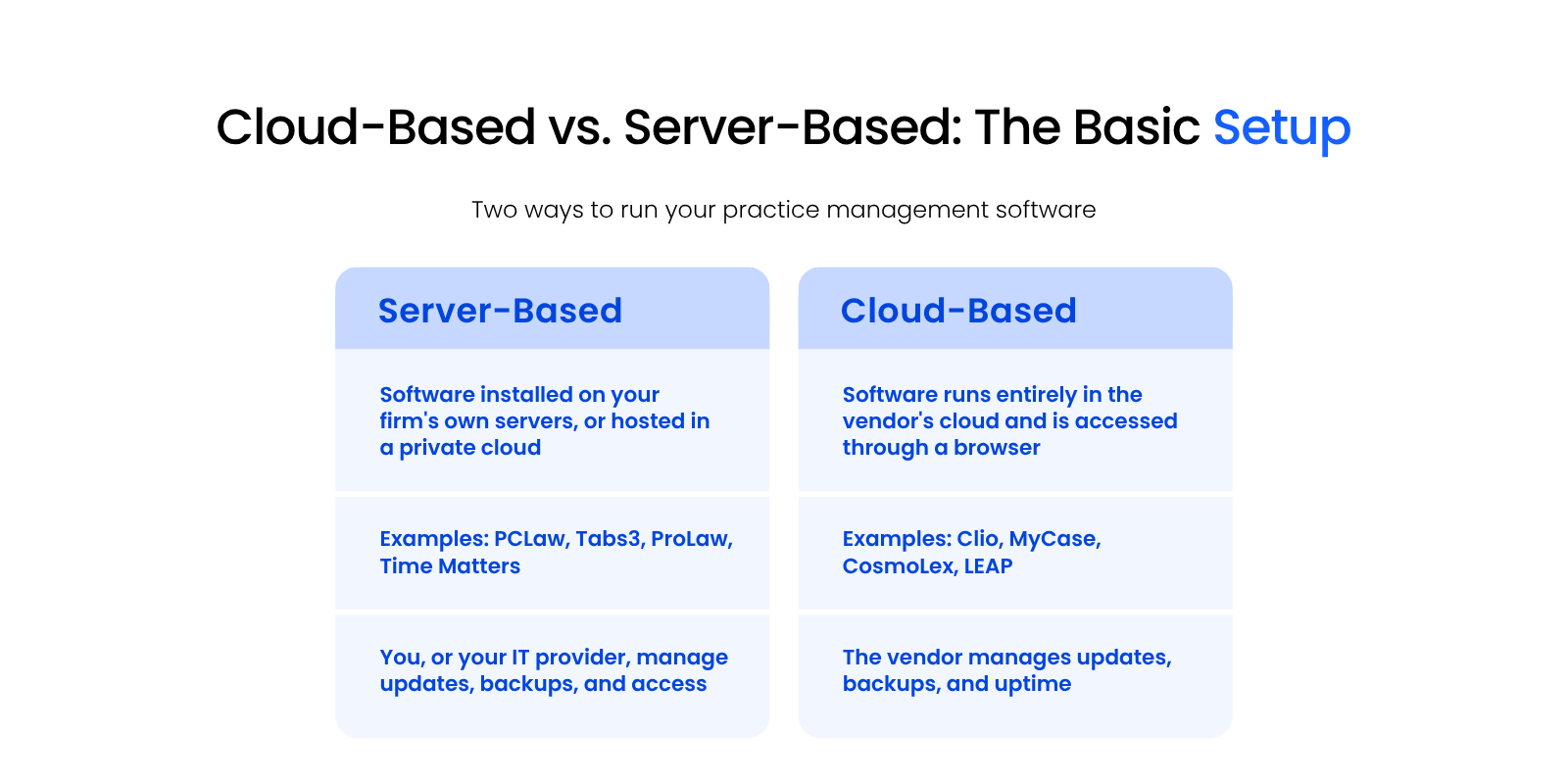
Every platform in this guide falls into one of these two deployment models, and the right one depends on how your firm wants to handle updates, security, and access, not just which features you need.
Why Firms Choose Cloud-Based Software
Cloud-based software gives firms mobility and automatic updates without the upfront cost of servers.
Your team can log in from anywhere with an internet connection, which matters for firms with remote staff or multiple offices. The vendor handles updates, security patches, and uptime, so your firm doesn’t need in-house IT expertise just to keep the software running.
That’s the opposite of what a lot of firms assume going in. Cloud infrastructure gets continuous security attention at a scale no single firm’s server room can match.
Why Firms Choose Server-Based Software
Server-based software gives firms more control and customization, which matters most for firms with complex or highly specific workflows.
Platforms like ProLaw and Time Matters have decades of legal-specific development behind them, and that depth shows up in configuration options cloud-native tools haven’t built yet. Firms that need tight control over their data, or workflows too specific for an off-the-shelf cloud tool, often find server-based software fits better.
Can You Get Both? The Case for a Private Cloud
A private cloud lets your firm run server-based software like PCLaw or ProLaw while still getting cloud-level accessibility through a virtual desktop.
Migrating to cloud-based software isn’t the only way to get cloud benefits. Server-based software typically packs in more mature features than a firm will use, and giving that up just to gain accessibility is often the wrong trade. A private cloud, hosted through Uptime Cloud’s managed hosting for law firms, hosts your existing software, documents, and email in a secure cloud workspace instead.
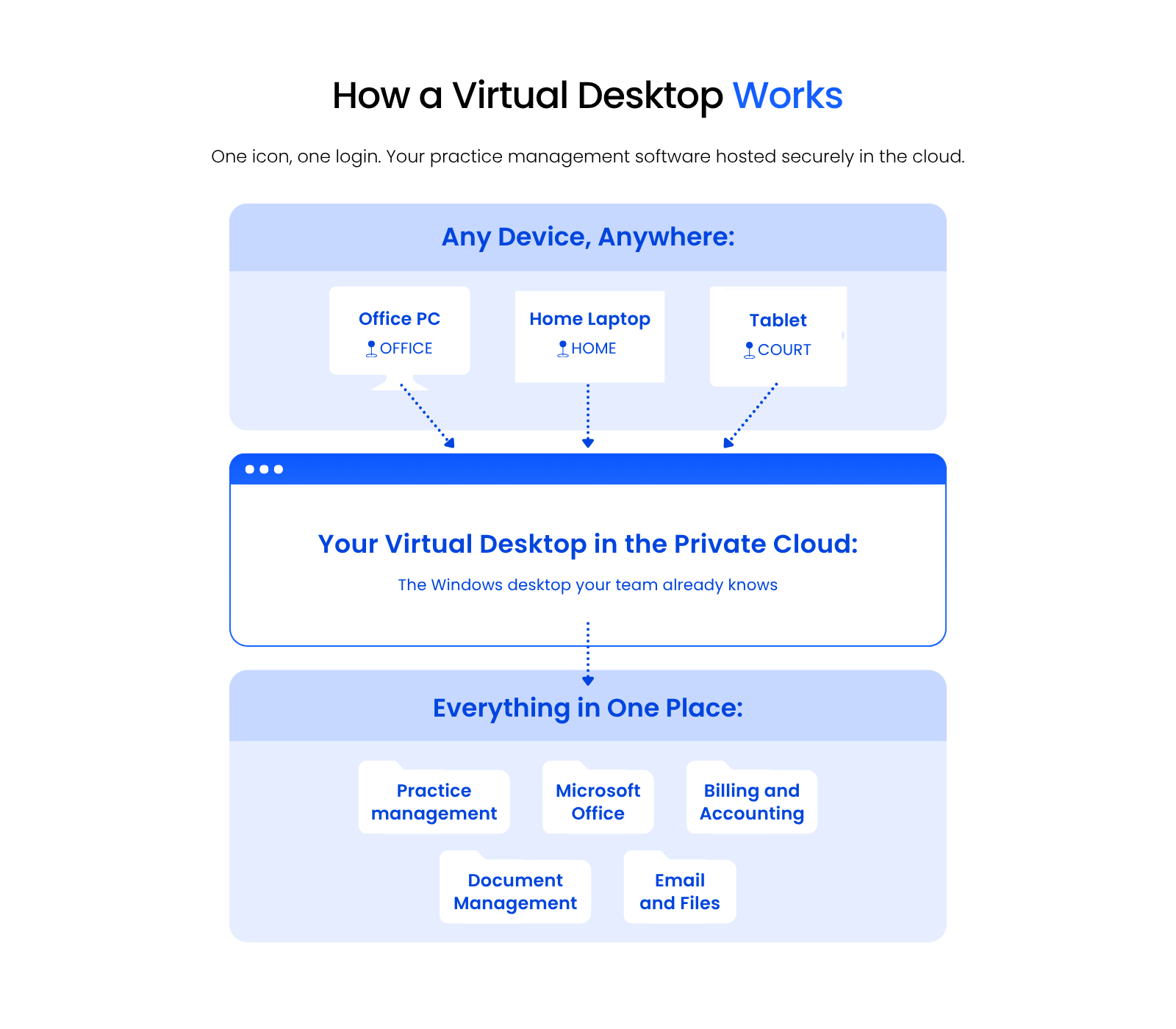
A virtual desktop is the access point: one icon on your local desktop that opens directly into your cloud-hosted software, with no separate login process to manage.
How to Decide Between Cloud and Server
Compare features, integrations, and cost against your firm’s actual workflow, not just the vendor’s marketing, before committing to a deployment method.
Whichever platform you choose, make sure it works with how your firm operates day to day, not just how it looks in a demo.
Conclusion
Your Practice Management Software Is a Two-Part Decision
Choosing law practice management software means deciding who runs your infrastructure, you or the vendor, as much as it means picking features.
The platforms in this guide handle case management, billing, and documents well in different ways. What separates a good fit from a bad one is matching that platform, and its deployment method, to how your firm actually works day to day.
Get both parts right, and the software disappears into the background of your firm’s work instead of fighting it.
WHAT’S NEXT
Frequently Asked Questions

Uptime Legal’s Technology Solutions
Cloud, software, IT, and document management built for today’s law firms.