Table of Contents
Juris Software, renowned for aiding small to midsize law firms in time, billing, and legal accounting, faces a shift. Using on-premise software is becoming outdated. With the cloud offering enhanced security, better uptime, and affordability, it’s clear why law firms are moving away from in-house servers.
This article discusses the transition of Juris Software to a cloud-based platform, providing easier access to essential billing and accounting tools.
Who This Guide Is For
This guide on making Juris Software cloud-based is for law firms who currently use Juris, or are considering it, and want to take advantage of the multitude of benefits that moving to the cloud offers.
This includes:
Our Ultimate Guide to Juris in the Cloud provides you with a roadmap, from education to execution, to harness the power of Juris when cloud-based.
Who Juris Is Good For
Juris is often a good fit for law firms of 5 or more attorneys. It’s especially useful for firms that need sophisticated legal accounting.
Juris is an especially good fit for firms that use Time Matters. Juris is generally not well-suited for solo and very small law practices, which are often better served by other legal practice management software built for smaller teams.
Introduction to Juris Legal Accounting
This section is for readers new to Juris or anyone who wants a quick primer on the company behind these billing and accounting tools. If you already know Juris and want to jump to cloud use, feel free to skip ahead.
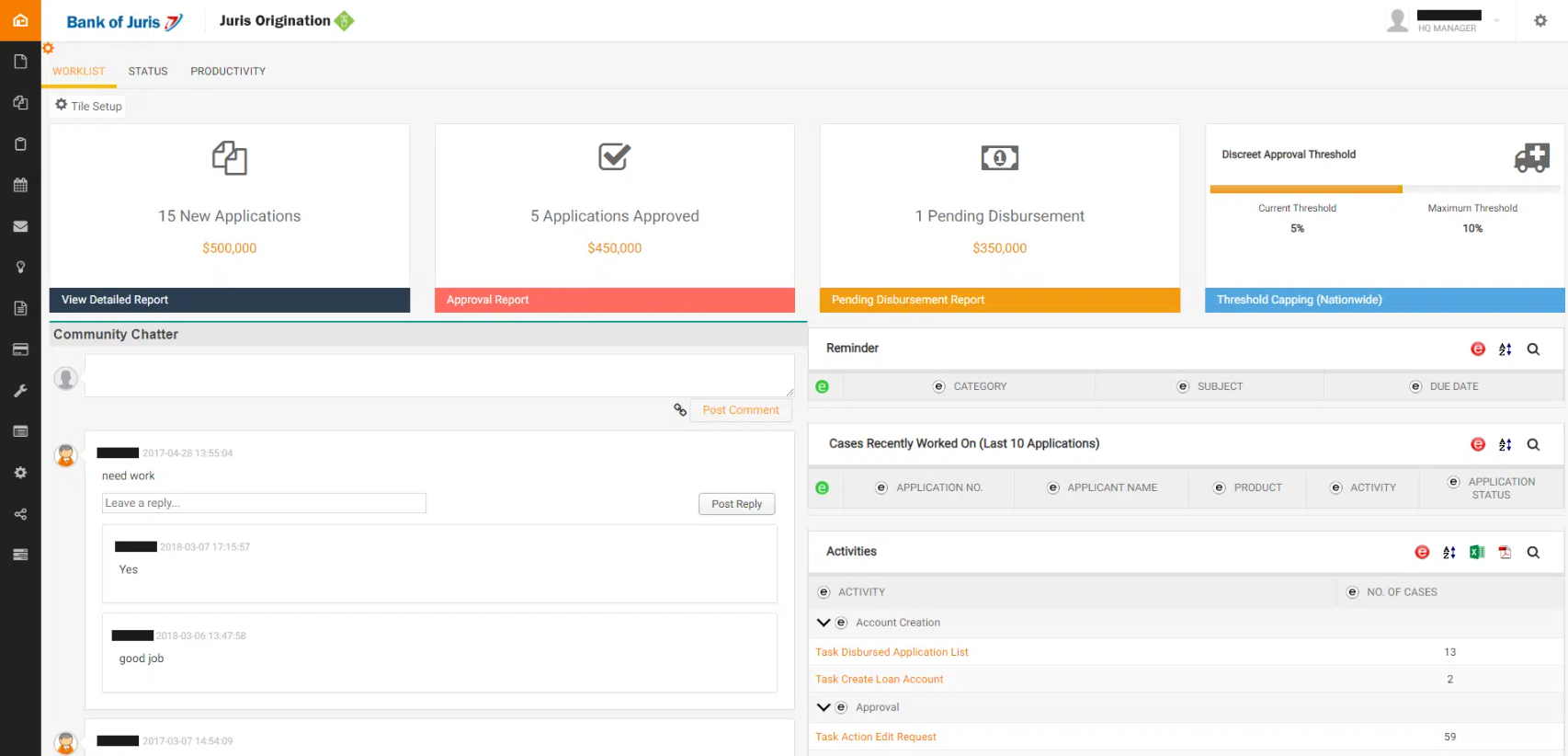
LexisNexis created Juris years ago to provide law firms with time, billing, and accounting software. Juris is typically used by firms with at least 5 to 10 timekeepers.
Juris is server-based. It’s designed to run on your firm’s on-premises server with the desktop client installed on each computer.
There’s also a Private Cloud option, which offers more flexibility on where you can use the software.
Juris software comes in three primary modules:
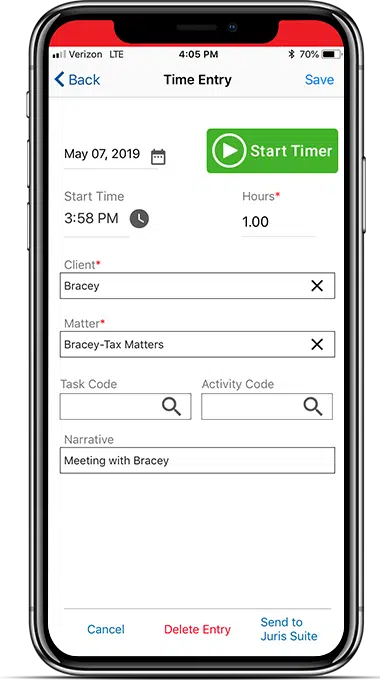
Juris Go is a comprehensive time-tracking app developed for mobile time entry. This simplifies the process, so lawyers can maximize profits through an easy-to-use timekeeping process. With hardly any effort, timekeepers can track time for the present moment and future reference. It works on a smartphone or tablet and can be integrated with Juris Suite for seamless matter lookups.
Juris as a whole offers strong software to ensure that you’re handling your accounting, billing, and financial management with software to track and execute necessary functions for your law firm.
Why Juris Is Better in the Cloud
Don’t Sacrifice the Right Software for the Cloud
The cloud brings reliability, security, and mobility, but many firms assume they must abandon their software. In practice, Juris and other server-based platforms often offer more capable features than cloud-native alternatives. You can avoid that detour. Keep the software you prefer and still gain cloud benefits by using a Juris cloud-hosting solution.
Discover how to “cloudify” Juris into a secure private cloud for 24/7 access, NIST-level security, and a server-free office in our Juris: Complete Review, Features, Pricing.
Juris provides great billing and accounting software to law firms. Their software is only enhanced when utilized through the cloud. In most cases, your favorite software works better in the cloud. You know Juris as server-based software, but let’s talk about why and how you can run Juris in the cloud. Before we talk precisely about how it works, let’s talk about why.
1. Combine the Best of Both
The cloud delivers mobility, anywhere access, and strong security. Juris is built for billing, accounting, and firm financials, and it integrates with Time Matters for case/matter and document management. Running Juris in the cloud preserves the reliability of the software your firm relies on while unlocking fast, anytime access to your data.
It’s a strategic way to keep proven workflows and gain the agility and efficiency of the cloud, the best of both worlds.
2. Managing Servers and IT Is a Hassle
For years, running quality legal billing software meant living with on-premise servers. Juris brings real value, but it requires a server, so firms bought one.
If you’ve been around, you’ve likely supported them longer than you’d like. If you’re newer, you may still avoid them altogether.
Owning servers is a hassle. For a long time it was the only way to run the software you wanted, and ironically, server-based tools are often more capable than cloud-native alternatives. Servers demand constant care: proactive (keep them healthy) and reactive (fix them when they break).
To run Juris on-premise, you’ll need to:
Contrary to these headaches, running Juris in the cloud lets you reap the benefits of a capable, server-based software without the inevitable drawbacks that come with server ownership.
3. Work from Anywhere
There was a time when using software in one location was fine. Today, that’s restrictive. Teams are expected to be operational anytime, anywhere. Whether for remote work or simple convenience, you’ll want access to Juris when you need it.
Making Juris cloud-based gives your firm secure, anywhere access. With the right solution, you can also reach all required applications, data, and email from any device or location.
Skip clunky VPNs and remote-to-office logins. Running Juris in a Private Cloud provides a secure, user-friendly virtual desktop experience.
4. Data Security and Compliance
Your firm has a moral duty to protect sensitive data, your own and your clients’. Cyberattacks are now commonplace, and regulators have tightened requirements for how data must be handled.
Contrary to outdated belief, a reputable cloud platform is often more secure than most in-house servers; protecting data is their core business.
What reputable cloud providers typically deliver:
Now compare that to the common on-prem reality: servers sitting in a closet or copy room, often under-managed because top-tier security is cost-prohibitive for most small and midsize firms. For cloud providers, investing in “bank-grade” controls makes economic sense, so you can use that scale.
As our client, you use a dedicated slice of enterprise-class infrastructure that’s actively managed and maintained for security and compliance.
5. Operate from Windows or Mac
More firms are adopting Macs, sometimes firm-wide (especially in smaller firms) and often in mixed Windows/Mac environments. Many people, including executives, also prefer Macs at home.
That matters because most desktop legal software is Windows-based, which limits efficiency for Mac users. In the past, the workaround was running Windows on a Mac via Parallels or similar tools, often slow and cumbersome.
Running Juris in the cloud, especially via a Virtual Desktop, solves this. Mac users get the same secure, full-featured access to Juris (and other firm software) as PC users. Virtual Desktops are platform-agnostic, enabling consistent access across operating systems.
6. More Reliability, Less Downtime
Reputable Private Cloud platforms, like our own Uptime Cloud, have extensively built-out infrastructures made to host your applications with fantastic uptime and reliability for your firm. They’re managed by professionals, around the clock, to ensure your company receives minimal downtime along with the most optimal productivity.
Private Cloud solutions typically offer professional-grade service in the form of:
All of these measures are considered and implemented for your firm, so you don’t have to.
7. Flexible and Scalable
The cloud is flexible and scalable, and running Juris in the cloud is no exception. Opting for a Private Cloud solution lets your law firm flexibly add or remove users, applications, storage, and other features as needed. Unlike the inflexibility and financial obligations of server ownership, the cloud lets your firm maintain agility and adaptability.
Firms weighing this shift often start by understanding virtual desktops for law firms, which we’ll cover in more detail shortly.
8. More Economical
We’ve worked with many law firms to conduct a side-by-side financial analysis of cloud vs. on-premise IT, and we consistently find that the Total Cost of Ownership is notably less in a Private Cloud.
Taking into account the initial expenses, ongoing monthly costs, and unforeseen IT expenditures related to server ownership and local IT support, this holds true in the majority of cases. We’ll provide the economics of Juris in the cloud in more detail below, along with some handy tools for you to conduct your own financial analysis.
9. Centralization
In the current shift toward Work From Home and hybrid work models, the growing threat of decentralization poses a significant risk. Law firms with multiple locations have long grappled with this issue. But considering all of the employees working remotely, either partially or entirely, the dispersion of data and applications across numerous locations becomes even more evident.
A Private Cloud platform is one of the cloud solutions for law firms that serves as the centralized hub for your firm to house Juris, along with all other applications and data. It provides a unified system to log into and creates a virtual workplace, regardless of your team’s geographical whereabouts.
Juris as a Cloud App
Juris is premise-based software. It was created to run on a server. From its conception until present day, Juris has required law firms to own, operate, and maintain their own servers to host this software.
Cloud-based software, by contrast, operates through the internet, so you’re able to access it through a browser without the need to retain servers.
One way to get around how Juris was set up is to run it as a cloud app. Let’s talk about how.
The simplest way is to “cloudify” Juris by running it through a simple cloud platform such as Uptime Cloud. Through a system like Uptime Cloud, you can run Juris in the cloud by operating it as a web application. This is one way to rid yourself of the burden of server ownership.
While this is a good solution, it’s not always the best. Here’s why.
If your law firm only requires Juris or another single software, then it would be no problem.
But if your firm needs to run something else — say Time Matters in the cloud — you’ll need another strategy for each other system or software.
Instead, you’re probably looking for a more complete approach. If so, consider using a Private Cloud or Virtual Desktop as a better solution for your firm.
Juris in a Private Cloud
Now that we’ve covered the benefits, here’s how Juris in the cloud works, and how it differs from web-based apps versus desktop/server software.
Cloud computing was first put into broad practice by Google and Amazon around 2006, grew steadily, and became mainstream closer to 2012.
Before then, most firm software (including Juris and other practice-management tools) was installed on in-house servers. Staff ran the desktop client on their PCs while the database and core application lived on the server.
In practical terms, using Juris meant you also needed a server. Owning and maintaining that server, and the in-house IT to support it, was seen as mandatory, a necessary but burdensome part of running law-firm software.
There wasn’t much choice. But not today.

Today, we use a technology called the Private Cloud. A private cloud is a hosted, managed IT platform that provides the same (or better) function that a server would. Namely, it hosts your firm’s legal applications, documents, email, and other data while providing greater mobility, reliability, and security.
With server-based software such as Juris, a server in some fashion is still required for it to run (with no change in sight). In the case of a private cloud, the private cloud is the server.
A typical private cloud setup for Juris in a law firm often includes:
The Private in Private Cloud
Private Clouds are so-called because every law firm (called a “tenant,” in cloud computing parlance) has its own segregated, dedicated working environment. In most cases, that means:
If you’re not familiar with these technologies, here’s the rundown. We separate your firm’s software, documents, and data from other law firms, giving you extra security and privacy protection.
Understand Private Cloud by reviewing how law firm software evolved from desktop-based to cloud-enabled systems in our Private Cloud 101 for Law Firms.
Juris in a Virtual Desktop
Now that we’ve covered why and how Juris runs in a Private Cloud, here’s what day-to-day use looks like.
If your firm has ever run Juris through a VDI (virtual desktop infrastructure) setup that felt expensive and hard to manage, you’re not alone. It’s a common complaint, especially for firms whose main reason for using one is simple: getting secure access while traveling or working outside the office. Paying a premium every month for something that’s supposed to make remote access easier, but instead adds cost and complexity, defeats the purpose.
The short answer to doing this well: a properly hosted Virtual Desktop.
It’s the same kind of Windows or macOS desktop you use at the office, only it’s hosted in the cloud. You sign in from any location, at any time, and everything is there, without the overhead of a clunky, standalone VDI setup bolted onto your existing infrastructure.
Your Virtual Desktop typically includes:
This setup lets every team member access firm software from anywhere, without being tied to a specific workstation. Virtual Desktop solutions are also known as Desktop-as-a-Service (DaaS), similar in concept to Software-as-a-Service (SaaS).
How Virtual Desktops Work
Traditionally, your computing environment at work operates by having the software you need installed on your literal, local computer, whatever you use in the office. Everything is local and installed individually.
A Virtual Desktop is different. In a Virtual Desktop environment, very few, if any, applications are actually installed on your local computer. Often, the only icon on your local desktop is a shortcut to log into your Virtual Desktop.
Once you or any member of your team logs into the Virtual Desktop, you’ll have full access to all of your law firm’s software, documents, and data. The Virtual Desktop serves as a centralized platform where you can work with all the essential tools and resources your firm’s operations require.
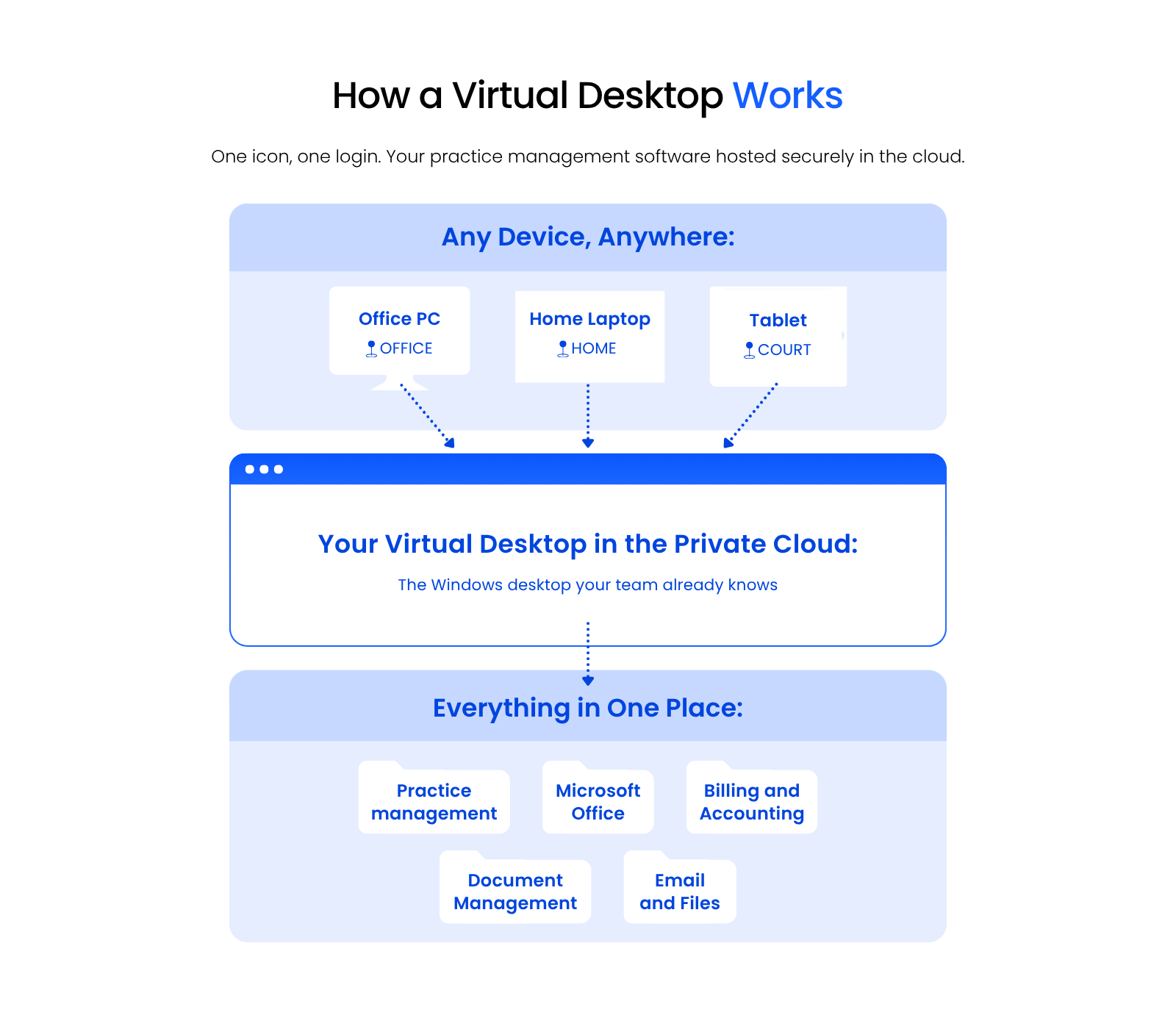
This includes:
This gives your entire firm access to Juris (and all your applications, documents, and data) from anywhere, on any device.
Another bonus: Virtual Desktops also mean you no longer have to manually install, update, and maintain each of your applications on each computer within your firm. Instead, your Cloud Service Provider simply keeps all software updated for you.
The cloud can be substantially more cost-effective than its alternatives, as covered in The Financial Case for Cloud for Law Firms.
Should My Law Firm Use Virtual Desktops?
Virtual Desktops offer numerous benefits to law firms, particularly in the following scenarios where they’re often the optimal technology solution:
We’ll cover selecting the right Virtual Desktop provider, and doing your due diligence, shortly.
Migration: How to Move Juris to the Cloud
Now that we understand how Juris in the Cloud works, the benefits, and the functions, we’ll walk through how to move Juris to the Cloud. This process is typically administered by your chosen Cloud Service Provider but could be done via a combination of IT consultants, software consultants, and cloud hosting providers. Here’s what to do.
Step 1: Onboarding Project Manager
Your Juris cloud migration is best begun the same way any well-managed project is: through a single point of contact. Your project manager (at Uptime Legal, we call this person the Onboarding Manager) should begin by clearly communicating the expectations and steps in the process, so you’re not left with uncertainty about the road ahead. This Onboarding Manager should define specific timelines, expectations, and what’s needed from you.
Step 2: Discovery
Although a reputable cloud service provider will have a clearly defined and documented onboarding process, this process is never one-size-fits-all, since every law firm is unique. An effective Juris cloud migration process should begin with a thorough discovery and assessment of your firm’s existing environment for a tailored strategy.
This includes:
Step 3: Build
Next, your Juris hosting provider will begin building the private cloud environment you’ll work in. A good provider will have a well-developed process and can build your private cloud quickly. The Onboarding Manager and engineering team will install your software, provision your email accounts, and generally build the “shell” of your complete IT platform.
This process includes:
Step 4: Go-Live
Next, your Juris software cloud provider will collect your data from your current environment to transfer over. Every element of your firm’s technology gets migrated over, piece by piece.
This cutover process includes:
The data transfer should be secure and designed for a smooth transition. After import, the Onboarding Manager’s team should thoroughly test every application, as well as workstations and peripherals, to confirm everything functions in the new cloud environment.
To minimize downtime, schedule the cutover during off-hours. Evenings and weekends usually work best to avoid disrupting operations and help prevent the migration from lasting longer than a day.
Step 5: Training & Ongoing Support
First impressions matter. To drive adoption, give employees an environment that’s easy to use and make sure your Juris cloud host has a clear, firm-wide training plan.
Your onboarding manager should stay engaged from planning through post-go-live, backed by dependable Juris support once you’re up and running.
Effective training should include:
Ongoing support to expect:
The Economics of Juris in the Cloud
Beyond the functionality, security, reliability, and mobility that Juris cloud hosting provides, there’s also the economic case for moving Juris to the cloud.
Running Juris in-house, with on-premise servers, is a deceptively expensive proposition. Consider what it actually requires:
And these costs are always higher in a given year than you think they’ll be.
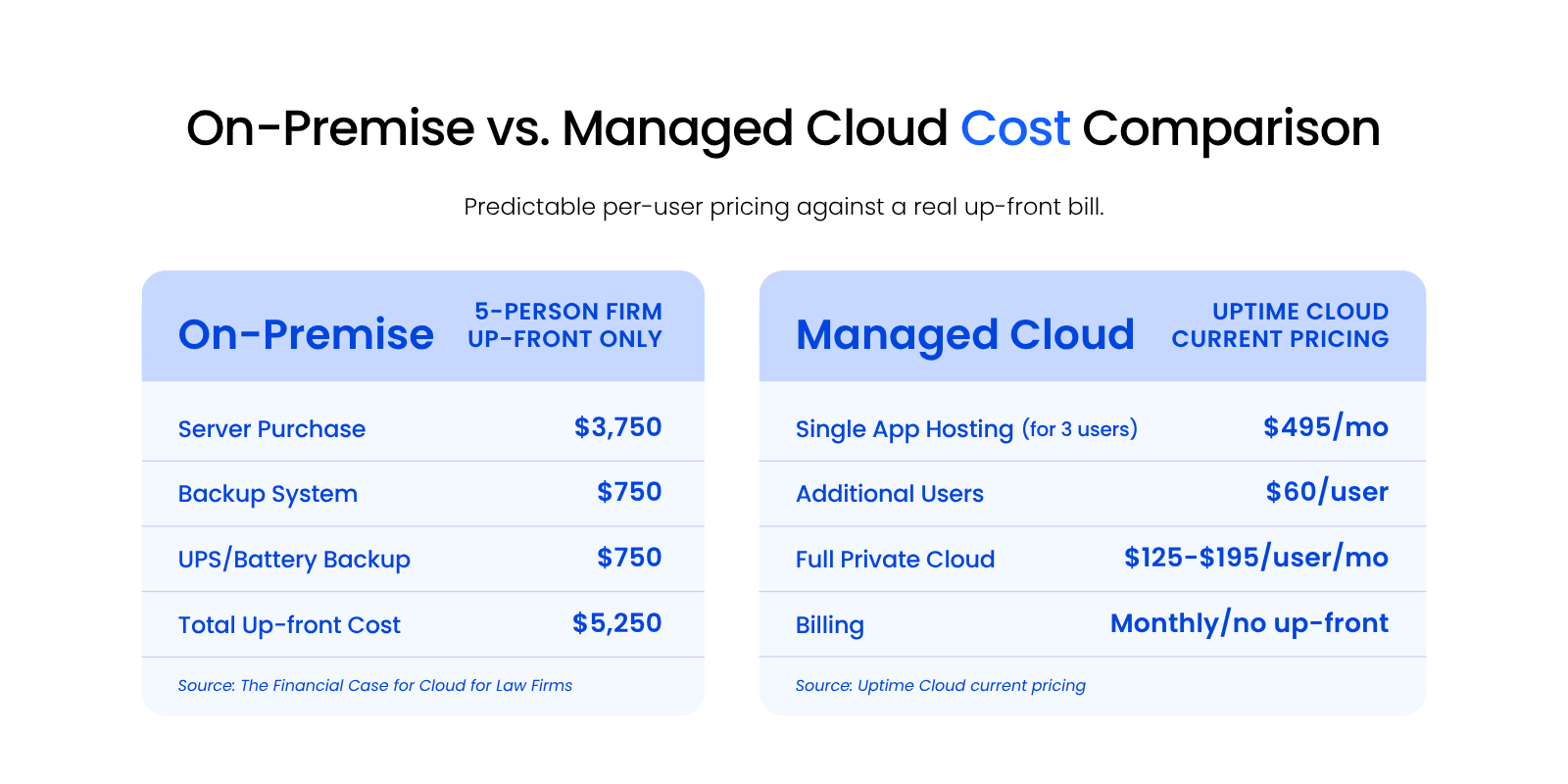
To understand the economics of moving Juris to the cloud, compare a Private Cloud solution to the costs of in-house, on-premise servers and IT.
On-Premise IT
Breaking on-premise IT costs down into up-front, ongoing, and unplanned categories gives you a full picture of what server ownership actually costs.
Up-Front Costs
To start, analyze all costs incurred each new server cycle (typically only 3 to 5 years). This entails the costs of buying and implementing server infrastructure, and usually includes:
To properly understand these costs, get pricing for each of these aspects, record it in a spreadsheet, and add them up. With this, you’ll have a sense of the total up-front cost of on-premise IT.
The costs associated with server setup and maintenance are heavily influenced by the software your firm uses.
Ultimately, these questions are determined by the software you use, particularly your Practice Management and Document Management software, and their respective server requirements.
Ongoing Costs
Unfortunately, the financial cost of servers needs to account for another aspect. Now that we’ve covered the upfront costs, we can analyze costs you’d incur on an ongoing basis. To do this, identify monthly recurring costs, as well as annual costs (renewals, maintenance), and determine your average monthly or annual recurring costs.
Common components of these costs for many law firms typically include:
Add up what you currently, or will, spend on an ongoing basis. This should include fixed monthly costs (such as a Managed IT Provider contract) as well as sporadic, less predictable costs (such as hourly IT support).
For the latter, if you’re unsure of a reasonable budget for this amount, find the average over the past two to three years. The total of all of these determines your average monthly IT spend.
On-Premise Costs: Unplanned
Finally, you need to identify and budget for the inevitable hiccups you may face with server ownership. You’re bound to encounter some level of unplanned IT expenses.
While proactive IT measures significantly decrease the likelihood and impact of unforeseen IT problems, over a sufficient period of time, such issues are still likely to occur, albeit less frequently.
Still, these unplanned costs may take the form of:
Some costs are fixed and predictable. Others are wildly unpredictable, but should be budgeted or accounted for in some way nevertheless.
With all things considered, total your up-front costs, monthly ongoing costs, and your budget for unplanned/unforeseen costs: this is your Total Cost of Ownership for on-premise IT.
Compare to Private Cloud
Now, compare this Total Cost of Server Ownership to that of a Private Cloud.
We’ve already demonstrated that a Private Cloud is objectively better than in-house IT in terms of reliability, security, and mobility. But simply comparing the costs of in-house vs. cloud-based IT shows that Private Cloud is also more economical than in-house IT.
Private Cloud costs typically include:
With the appropriate Private Cloud provider, these cost comparisons encompass all the technology that would otherwise need to be purchased and maintained. On-premise IT, as demonstrated earlier, often involves hidden and unpredictable costs.
Who wants that kind of surprise? A fully managed Private Cloud provides costs that are simple, clear, and predictable.
Doing Your Due Diligence and Mitigating Risk
Now that you know how Juris in the cloud works, and what it can do for your firm, it’s time for due diligence.
There are many ways to migrate Juris to the cloud. Whatever path you choose, do your homework.
A growing number of vendors, from solo local IT shops to large, generalist providers, claim they can host Juris. Claims aren’t competence.
Running and maintaining Juris in the cloud isn’t for amateurs. It requires specific configuration and deep product expertise.
What to verify with any prospective provider:
Once you’ve developed a short list of potential Juris hosting providers, do your homework on each company.
We recommend:
To see the Google reviews for a Private Cloud provider (or any business), if the company is reputable you can simply perform a Google search for that company, and the reviews will show up in the search results sidebar.
Is Running Juris in the Cloud Right for Your Firm?
Running Juris in the cloud comes down to a handful of connected decisions: which hosting model fits your firm, which provider actually knows Juris, and what the real cost looks like next to what you’re already spending on-premise.
Work through those deliberately, and the math usually points the same direction. A properly hosted Private Cloud or Virtual Desktop gets you the security and reliability a reputable provider builds in by default, without the maintenance burden or the unpredictable costs of owning your own servers.
The firms that get the most out of this move are the ones that treat due diligence as seriously as the migration itself. Pick a provider that actually knows Juris, confirm your numbers, and the transition becomes a lot less risky than it looks on paper.
WHAT’S NEXT
Frequently Asked Questions

Uptime Legal’s Technology Solutions
Cloud, software, IT, and document management built for today’s law firms.